antigravity-agy-dart
Health Pass
- License — License: MIT
- Description — Repository has a description
- Active repo — Last push 0 days ago
- Community trust — 109 GitHub stars
Code Fail
- spawnSync — Synchronous process spawning in bin/agy-dart.mjs
- exec() — Shell command execution in context/lib/code-outline.js
- os.homedir — User home directory access in context/lib/config.js
- process.env — Environment variable access in context/lib/config.js
- exec() — Shell command execution in context/lib/execution-receipts.js
- fs.rmSync — Destructive file system operation in context/lib/executor.js
- process.env — Environment variable access in context/lib/executor.js
- spawnSync — Synchronous process spawning in context/lib/handoff.js
- os.homedir — User home directory access in context/lib/handoff.js
- exec() — Shell command execution in context/lib/repo-skeleton.js
- spawnSync — Synchronous process spawning in context/lib/repo-skeleton.js
Permissions Pass
- Permissions — No dangerous permissions requested
No AI report is available for this listing yet.
Google Antigravity plugin that improves cache hits, keeps cache warm automatically, protects context quota, shows live context usage, rescues crashed sessions, and saves tokens.

agy-dart
Google Antigravity plugin — Save tokens · Improve KV-cache hits · Keep cache warm automatically · Protect context quota · Rescue crashed sessions
No extra dependencies · Works automatically in the background · Built-in Sidecar dashboard




简体中文 · English · How to Install · Changelog · Security · Third-Party Notices
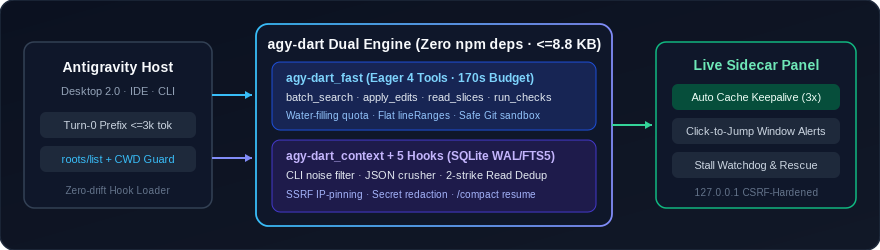
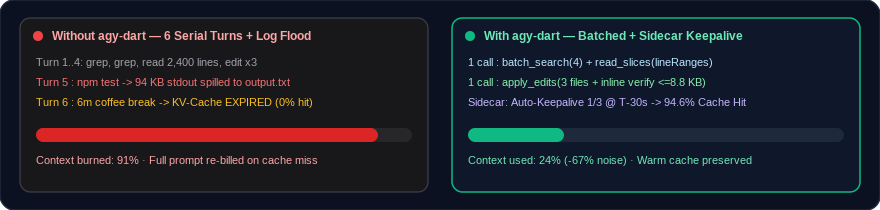
What does this Google Antigravity plugin do?
agy-dart is a performance, KV-cache, and context-window plugin for Google Antigravity (also supports Claude Code and Codex via --target). It reduces repeated reads and large tool results, shows prompt-cache usage, and helps you resume work in a new chat when a session fills up or stalls.
Once installed, it runs automatically in the background — no new commands to learn, just chat and code as usual:
1. Combine actions
When the AI needs to search several terms, it runs them in one batch; when it edits multiple files, it edits them together and runs tests in the same step instead of resending your full chat context across half a dozen turns.
2. Block noise
If a test run prints 3,000 lines of logs, the plugin passes only the lines that matter to the AI (e.g., line 42 failed, the other 199 passed) and stores the full log locally for lookup. On multi-thousand-line code files, it pulls the outline first and reads only the target lines.
3. Cache monitoring and optional keepalive
The plugin keeps prompt headers steady and avoids repeated reads of unchanged files. Automatic keepalive and desktop expiry alerts start off. If you enable keepalive, the initial limit is one ping per chat until your next message. You can change the limit in the panel.
4. Side panel & crash/hang rescue
The right-sidebar panel shows: remaining context space, minutes until cache expiry, and total noise blocked.
With multiple project windows open, if a background window is nearly out of context or stuck spinning with zero output, a desktop popup names that exact project and chat — click the popup to jump straight there. If a session crashes from blown-out context or hangs completely, click once in the panel to copy a progress summary and paste it into a new chat to continue.
Other built-in features
- Restore context clues after
/compact: Records modified files, latest test/build pass status, and saved reference IDs in the background so the AI can pick back up right after/compact. - Local search for long docs & web pages: Stores multi-thousand-word docs or web pages by section in a local database and fetches only matching sections by keyword.
- Local script filtering for giant logs & tables: On multi-MB logs, CSVs, or huge JSON dumps, the AI runs a short local script to compute counts or extract rows (e.g., top 5 failing endpoints) and returns only the result; large JSON outputs also surface error rows automatically.
- Workspace layout on new chats: Supplies a compact directory, script, and core-file summary at the start of a new conversation.
- Loop warnings: Shows a UI-only note (not injected into model context) when the AI repeats
edit → fail → revert → failcycles or calls the same tool with no progress. - Secret masking & sensitive-file blocking: Masks API keys and tokens in logs or fetched pages, blocks accidental reads of
.envfiles when configured, and sandboxes read-onlygitqueries against untrusted.git/confighooks. - Hard 8.8 KB response cap with dynamic quota: Antigravity spills tool outputs above ~10 KB into a temp file that costs an extra read turn; all plugin responses stay within 8.8 KB, dynamically giving short passing checks' unused space to failing stack traces.
- Detailed panel breakdown & offline simulation: Inspect context usage across file reads, terminal output, and subagents, check 15-turn cache hit trends and miss causes, optionally read only changed lines after edits (off by default), or replay past chat history via CLI to measure cache hit rates and keepalive cost.
Antigravity updates frequently — click Star at the top right to follow compatibility updates.
How to Install
Use Node.js 22.16.0 or later in the 22.x line, or Node.js 24 or later. The installer checks that the built-in SQLite supports FTS5 with the trigram tokenizer. The plugin uses only built-in modules.
Option 1: One-line terminal install (no clone needed)
Windows (PowerShell):
irm https://raw.githubusercontent.com/zou172866/antigravity-agy-dart/v1.7.0/install.ps1 | iex
macOS / Linux:
curl -fsSL https://raw.githubusercontent.com/zou172866/antigravity-agy-dart/v1.7.0/install.sh | sh
Option 2: Let Antigravity install it
Send this to Antigravity:
Clone tag v1.7.0 of https://github.com/zou172866/antigravity-agy-dart.git to a temp folder, run `node scripts/install.mjs install` (add `--install-rg` on Windows if `rg` is missing), and confirm `doctor` passes.
Option 3: Clone & install with custom flags
git clone --branch v1.7.0 --depth 1 https://github.com/zou172866/antigravity-agy-dart.git
cd antigravity-agy-dart

# Windows PowerShell (optional -InstallRg auto-installs ripgrep)
.\install.ps1 -InstallRg

# macOS / Linux
./install.sh
Other commands:
node scripts/install.mjs install                        # Global install (auto-syncs GEMINI_HOME & T3 ACP if present)
node scripts/install.mjs install --project /repo/path   # Single-project install
node scripts/install.mjs doctor                         # Check install health
node scripts/install.mjs uninstall                      # Uninstall
Restart or reload Antigravity after installing and open a new chat. User-created rules/*.local.md files inside the plugin directory are preserved across upgrades. If you previously installed standalone agy-fast or antigravity-plugin-context-mode, disable the old ones in your plugin list.
Indexed content and usage history are stored locally in ~/.agy-dart/context.db by default and survive uninstall. Before uninstalling, ctx_purge can clear the current chat's index. When the host omits a session ID, this covers anonymous data for the confirmed workspace. To clear indexed data and history across all projects, call ctx_purge with scope: "all".
Global uninstall also removes the Gemini/T3 copies recorded by the installer. If an older copy has no ownership record, the installer prints its location and a command for removing that copy explicitly.
Settings
Automatic cache keepalive is off by default. To opt in for one chat, turn on Auto-Keepalive in the agy-dart Context panel. Global Warm sets the default for chats without an override. Turning off warming for a chat silences its cache-expiry and keepalive-limit desktop alerts. Desktop alerts for stalled tasks default to off and can be enabled separately. Each keepalive requests an OK reply and consumes model input, including the full prompt on a cache miss. The panel also controls desktop alerts, protection, local cleanup, and file-size limits.
Preset modes & tool-loading modes via CLI:
node scripts/install.mjs mode host-45k              # Default: direct read up to 45 KB code / 128 KB patches, block >16 KB noisy logs
node scripts/install.mjs mode balanced-16k          # Outline first above 16 KB
node scripts/install.mjs mode fast-32k              # Raise normal file limit to 32 KB
node scripts/install.mjs mode strict-8k             # Block above 8 KB
node scripts/install.mjs mode no-read-hook          # Never block file reads, only trim noisy terminal output

node scripts/install.mjs tool-loading fast-eager    # Default: 4 fast tools eager, 8 context tools lazy
node scripts/install.mjs tool-loading lazy          # All 12 tools lazy-loaded
node scripts/install.mjs tool-loading eager         # All 12 tools eager-loaded
Changelog
v1.6.0
- 4 core fast tools preloaded directly, fixing occasional multi-file edit drops: Batch search, outlines, multi-file edits, and concurrent checks now preload directly instead of going through the wrapper tool that occasionally emptied multi-file edit arrays; the other 8 large-log tools stay on-demand to save initial context (switchable via
tool-loading). - Fixed automatic cache keepalive & skipped all subagents: Cleared legacy global-off state conflicts from old panel processes, added duplicate-send locks, and auto-restarts the background panel after plugin updates; subagents spawned by
/boost, browser tasks, or workflows — plus closed chats — no longer trigger keepalives or take over the top keepalive bar. - Direct file reads for subagents, plugin-folder write protection: Background subagents can read large or repeated files directly without red-text blocks; calls missing a project path that land inside the installed plugin folder are blocked so the plugin never searches or edits its own files.
- One-line install without cloning: Added single-line PowerShell and Shell install commands.
- Cross-platform hook launcher; unused quota from short checks shifts to long error traces; read-only Git sandboxing against external
.git/confighooks; clean Windows exit, preservedrules/*.local.mdon upgrade, plusSECURITY.mdand light/dark architecture diagrams.
v1.5.4
- Click alerts to jump to that chat: Clicking a desktop popup or cross-window panel alert brings the matching project window to the front and opens that conversation; added a multi-window session switcher bar in the panel.
- Optional cache keepalive sends a ping for primary chats shortly before expiry. The panel controls the per-chat limit. Your next message resets the count.
- Moved current context usage, cache countdown, and blocked noise volume into a larger top card in the panel.
v1.5.3
- Project & chat titles on multi-window alerts: Desktop popups and panel alerts show folder names (e.g.,
work/agy-dart) and short chat titles without exposing message text. - "Context Almost Full" desktop alert: Pops up once near the limit and resets after
/compact.
v1.5.2
- Faster file reads and chat startup; added code outlines for multi-thousand-line
.html/.astroand.dartfiles; fixed Windows Python / PowerShell encoding garbling and paused panel refreshes while hidden.
v1.5.1
- Filled in untranslated strings in Chinese UI mode; tuned post-edit file-limit suggestions.
v1.5.0
- Read actual model cache expiry time: Reads the active model's real cache lifetime (such as 5m or 15m) from recent usage and carries it into new chats.
- Added optional 1-minute cache-expiry desktop reminder and CLI keepalive cost simulation.
v1.4.0
- Hang detection & rescue summary: Flags chats stuck spinning with zero output (ignoring long builds and laptop sleep), points to the stalled step in the panel, and prepares a one-click progress summary (modified files, last command, current step) to continue in a new chat.
v1.3.1
- Allow immediate file re-reads right after
/compact; skip dedup prompts on slices under 4 KB; preserve mid-log error lines in long failure outputs.
v1.3.0
- Tiered file-read limits: Raised direct reads to 45 KB (800 lines) for normal code and 128 KB for
.patchfiles while keeping noisy logs at 16 KB; second-try reads pass through so patch reviews and subagents don't stall. - Added
.patchfile outlines and kept context lines when trimminggit diff.
v1.2.2
- Uninterrupted long tasks: Removed mid-task
/compactprompts and routed >60s builds, tests, and background servers straight to Antigravity's native background runner. - Blocked
.envreads and fixed 42 Windows shell, isolation, and orphan-process issues.
v1.2.1
- Automatic rollback on failed multi-file edits and 76 path/argument stability fixes.
v1.2.0
- Unified settings in
~/.agy-dart/config.json; added local panel request checks; automatic structure, sample, and error extraction for huge JSON files; addedgh,kubectl,terraform, andplaywrightoutput trimming plus handoff summaries.
v1.1.0
- Automatic terminal output trimming: Strips progress bars and repetitive noise from
git, test, build, and install commands while saving full logs locally. - Unchanged-file duplicate-read protection, edit-fail loop notes, internal-URL SSRF blocking, log secret masking, and one-click panel cleanup.
Local Checks
npm test                                    # Run full test suite
npm run verify:pkg                          # Verify installer file list
npm run prefix:budget                       # Estimate configured Antigravity startup and full-catalog token usage
node scripts/cache-audit.mjs --workspace . --no-live
npm run cache:simulate
Credits & License
MIT License. Incorporates and adapts MIT-licensed code from INK-Q/agy-fast and Domush/antigravity-plugin-context-mode; full third-party notices are in THIRD_PARTY_NOTICES.md.
v1.7 CLI
Install for Antigravity by default. Select Claude Code or Codex explicitly with --target claude|codex. Use outline <file> for a compact signature map and session <id> or compare <before> <after> for transcript usage.
For Claude Code and Codex, the installer keeps hashes and undo metadata in ~/.agy-dart/<host>-install.json to restore the plugin's configuration changes. Reinstalling replaces an older full-config record. Uninstalling removes that host's record.
git clone --branch v1.7.0 --depth 1 https://github.com/zou172866/antigravity-agy-dart.git
cd antigravity-agy-dart
node bin/agy-dart.mjs install
node bin/agy-dart.mjs doctor
Reviews (0)
Sign in to leave a review.
Leave a reviewNo results found