FocusShell
Health Warn
- License — License: GPL-3.0
- Description — Repository has a description
- Active repo — Last push 0 days ago
- Low visibility — Only 7 GitHub stars
Code Fail
- os.homedir — User home directory access in app/arrived.js
- os.homedir — User home directory access in app/background.js
- fs.rmSync — Destructive file system operation in app/build/name-electron.cjs
- fs module — File system access in app/build/name-electron.cjs
- fs module — File system access in app/build/pty-exec.cjs
- fs.rmSync — Destructive file system operation in app/build/seed.mjs
- fs.rmSync — Destructive file system operation in app/catchup.js
- os.homedir — User home directory access in app/catchup.js
- process.env — Environment variable access in app/catchup.js
- fs.rmSync — Destructive file system operation in app/code-ext/focusshell-open/extension.js
- process.env — Environment variable access in app/code-ext/focusshell-open/extension.js
- fs module — File system access in app/code-ext/focusshell-open/extension.js
Permissions Pass
- Permissions — No dangerous permissions requested
No AI report is available for this listing yet.
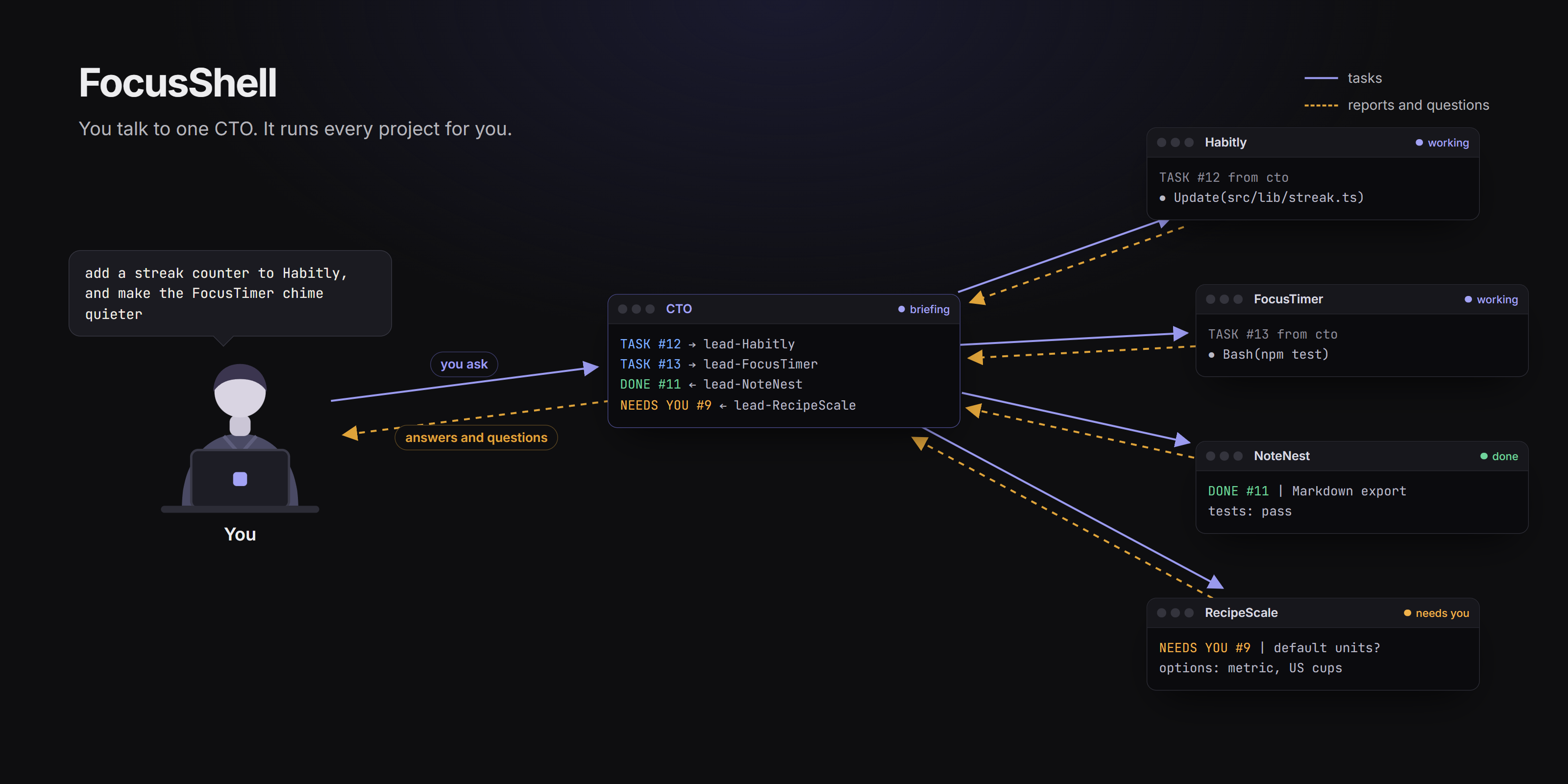
One window for all your Claude Code projects. Free and open source. Demo: youtu.be/t_WVO-hzF2w
FocusShell
TL;DR
- One window for all your Claude Code projects: you talk to one CTO session, and it hands the
work to a lead session in each project. - Free and open source (GPL-3.0), for Windows 10 and 11 and Apple silicon Macs (macOS 14 or newer).
- Download
FocusShell-Setup-2.0.0.exefrom Releases and run it. Windows may show a SmartScreen warning because the app is not code-signed yet: click More info, then Run anyway. - On a Mac, download
FocusShell-2.0.0-arm64.dmginstead; Mac below says how to open it.
More on how it works: zazag.dev/apps/focusshell
 Watch the demo
Install
- Download the installer from Releases.
- Run it. It is not code-signed: if SmartScreen stops it, click More info, then Run anyway.
- Open FocusShell and follow the short setup.
Mac (Apple silicon, macOS 14 or newer)
- Download
FocusShell-<version>-arm64.dmgfrom Releases, open it and drag FocusShell to Applications. - Open FocusShell. It is not signed by Apple, so macOS stops it the first time: open
System Settings > Privacy & Security, scroll down and click Open Anyway. (Or runxattr -dr com.apple.quarantine /Applications/FocusShell.appin Terminal.) - To check the download, compare
shasum -a 256 FocusShell-<version>-arm64.dmgwith the
SHA-256 in the release notes.
Because the Mac version is not signed:
- It cannot update itself. It tells you when a new version is out and opens its download page.
- macOS asks again, after each update, for the permissions it uses: Microphone and Screen &
System Audio Recording (the screen recorder), Input Monitoring (talk to the CTO from any app,
hold Ctrl to draw) and Accessibility (the microphone button on a card starts Dictation). Turn
them on in System Settings > Privacy & Security when it asks. - For the screen recorder, install
ffmpegandwhisper-cpp(brew install ffmpeg whisper-cpp)
and put a Whisper model file (such asggml-small.en.bin) in the Whisper folder named in
Settings.
Requirements
- Claude Code 2.1.234 or newer, signed in
- Node.js 18 or newer, and Git
- Optional: VS Code, for the Code pane
Network
FocusShell has no analytics. Everything that reaches Anthropic goes through your own Claude Code
sign-in and counts against your Claude plan: the sessions in your panes, and short headless
Claude Code turns FocusShell runs for you. One of those runs on its own, on Haiku: a plain
summary of each Waiting on you card (it sends the card's text). The AI helper, catch-up recaps and the screen recorder's cards (a recording's transcript and
screenshots) run only when you use them. Transcription itself runs on your PC.
FocusShell checks this repo's Releases for updates, the Code pane downloads VS Code's web build
from Microsoft once (it asks first), and a project page lists its open pull requests through yourgh sign-in. Remote Control (your sessions on claude.ai) and pushing the board backup to its
remote are off unless you turn them on.
Permissions
FocusShell adds no sandbox. Each pane is a normal Claude Code session in auto mode, started in
its project's folder, and Claude Code's permissions and your Claude Code settings decide what it
can reach. With Claude Code's defaults, a lead can still read files outside its folder, and
write there when its task asks for it, and every pane runs as your own user.
FocusShell and Claude Code permissions explains what is and is not kept apart,
what FocusShell sets, and the Claude Code settings that make it stricter.
Build from source
cd app, then npm ci and npm run dist (Windows), or npm run dist:mac on a Mac with
Xcode's command line tools.
Licence
Copyright (C) 2026 Zaza Gejadze. GPL-3.0-or-later: you may share and change FocusShell, and any
version you distribute must stay open under the same licence; see LICENSE. Bundled
parts keep their own licences, listed in THIRD_PARTY_NOTICES.md.
FocusShell is not affiliated with or endorsed by Anthropic.
Reviews (0)
Sign in to leave a review.
Leave a reviewNo results found