gridhand
Health Pass
- License — License: MIT
- Description — Repository has a description
- Active repo — Last push 0 days ago
- Community trust — 11 GitHub stars
Code Fail
- rm -rf — Recursive force deletion command in setup.sh
Permissions Pass
- Permissions — No dangerous permissions requested
This is a cross-platform Rust CLI tool designed to give AI agents the ability to control a desktop environment (taking screenshots, moving the mouse, typing, and managing windows) using JSON inputs and outputs.
Security Assessment
Overall Risk: Medium. Because this tool functions as a "Layer 3 Actuator," it is designed to take complete control of your mouse and keyboard. If connected to an AI agent, it inherently handles sensitive data and executes physical actions on your machine. While the permissions scan passed cleanly, an automated audit flagged a `rm -rf` recursive force deletion command in the setup script. This requires careful human review before running any installation, as malicious or flawed scripts could accidentally delete user data. No hardcoded secrets or external network requests were identified in the scan.
Quality Assessment
The codebase is written in Rust and targets zero dependencies, which naturally minimizes supply chain vulnerabilities and software bloat. The project is actively maintained, with its last code push occurring today. It is properly licensed under the permissive MIT license. However, it suffers from very low community visibility, currently boasting only 6 GitHub stars. Because of this, the code has not been widely vetted by the broader developer community.
Verdict
Use with caution: While the tool itself is well-structured and natively capable, the combination of low community trust, dangerous system-level desktop control, and a questionable `rm -rf` command in the setup script warrants a thorough manual code review before installation.
Zero-dependency Rust CLI for cross-platform GUI automation. Screenshots, window management, mouse, keyboard. JSON-in/JSON-out. Built for AI agents.
gridhand
Formerly published as gui-tool / agent-desktop-interface.
Let an AI agent click any desktop app by naming a grid cell — not guessing pixels.
A cross-platform Rust CLI for GUI automation: screenshots, window management, mouse and keyboard control, strict JSON in / JSON out. Zero dependencies — no crates, one small binary, direct OS APIs.





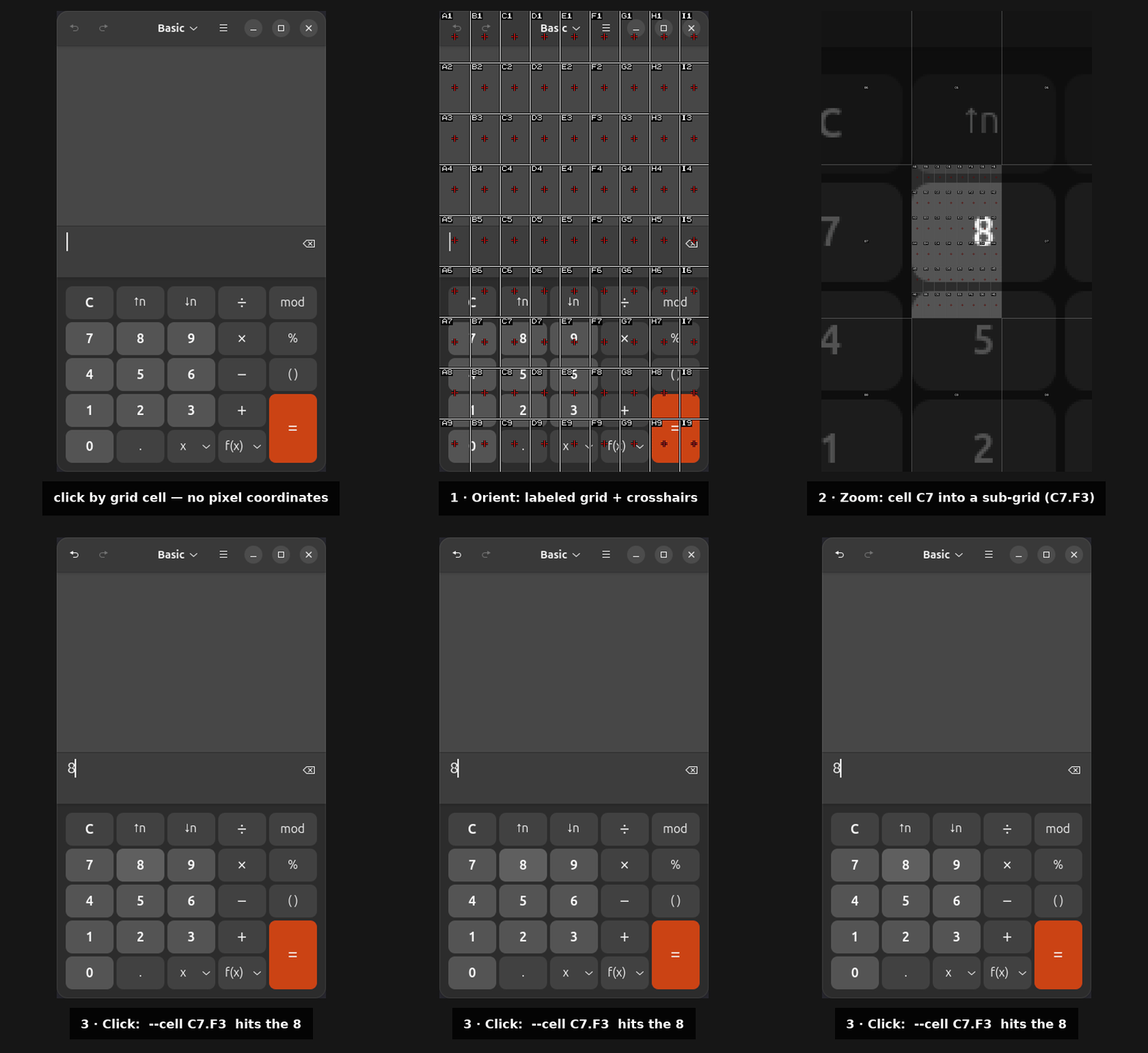
Real gridhand output — orient to a labeled grid → zoom into a cell → click the crosshair → verify.
Built for AI desktop agents (Claude Code, Codex, Gemini CLI, and friends), but it works fine as a general-purpose GUI automation tool.
Why it's different: agents are bad at guessing pixel coordinates from a screenshot, and every other automation tool makes them try. gridhand removes pixels entirely — it overlays a labeled grid with a crosshair at each cell's center, the agent names a cell, and the click lands exactly on that crosshair. Need more precision? Zoom into the cell for a sub-grid and name a sub-cell (C7.F3). It's the whole workflow in one line: orient → zoom → click → verify.
It sees pixels, not an accessibility tree. Most desktop-automation tools for agents find elements by reading the OS accessibility tree — which only helps when that tree exists, is complete, and is correct. gridhand never touches it. It works from the actual rendered screen, so it drives what tree-based tools can't see: games, <canvas> / WebGL apps, Flutter and other custom-drawn UIs, remote desktops and VNC, video, and any app with missing, mislabeled, or wrong accessibility data. If a human can see it, gridhand can click it.
Everything is hand-rolled against raw OS APIs — its own PNG encoder, D-Bus client, JSON output, and DEFLATE — so there are no crates to audit, no build surprises, and it runs natively on GNOME/Wayland where xdotool and pyautogui give up.
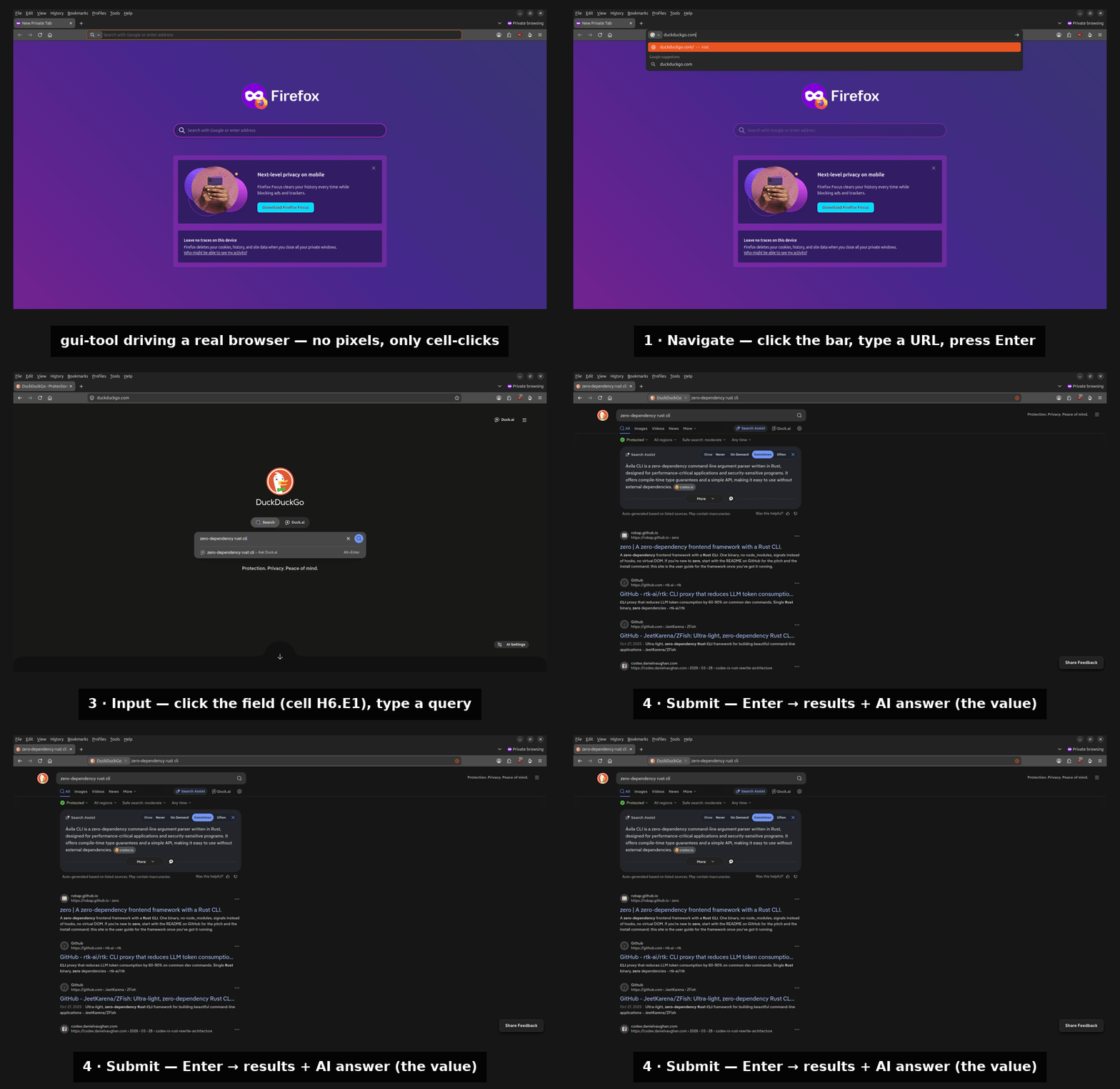
End-to-end in a real browser — navigate, click a field by cell, type, and submit, no pixel coordinates anywhere.
What it's for
Concrete things it's been used for:
- Automating apps with no CLI or API — drive GUI-only software (legacy tools, proprietary apps, installers, settings panels) the same way a person would, so an agent can script a workflow that otherwise has no headless path.
- Debugging GUI applications — let an agent open the app, reproduce a bug by clicking through it, screenshot each state, and read what's actually on screen — hands and eyes for the parts a log file doesn't capture.
- Reaching what the accessibility tree can't — pixel-precise grid zoom clicks targets in apps whose accessibility data is missing, incomplete, or wrong: games,
<canvas>/WebGL, Flutter and other custom-drawn UIs, remote desktops, and video.
Features
- Grid targeting: Overlay a labeled grid on screenshots with red crosshairs at each cell center. Click by cell label — no pixel coordinates. Supports recursive zoom (
B2.C1) and between-cell targeting (D3+E3). - No accessibility tree required: Targets purely from what's on screen — never AT-SPI, UI Automation, or the AX APIs. Works where the accessibility tree is missing, incomplete, or wrong: games,
<canvas>/WebGL, custom-drawn UIs (Flutter, etc.), and remote desktops. - Contextual zoom: Zoomed views show the target cell with a coarser sub-grid, surrounded by dimmed context from adjacent cells with parent-level labels for spatial orientation.
- No dependencies: Pure std Rust, direct FFI to OS APIs (CoreGraphics, user32.dll, D-Bus). Compiles to a single small binary.
- Wayland support: Works natively on GNOME/Wayland via XDG Desktop Portals and the
window-callsextension, where tools likexdotoolandpyautoguibreak. - JSON output: Every command returns structured JSON, so agents don't have to parse text output.
Grid Targeting
The full workflow — orient → zoom → zoom → ... → click → verify — in commands:
# Screenshot with labeled grid overlay (auto-scales: 16x9 for full screen)
gridhand screenshot --window-id 123 --grid --output /tmp/grid.png

# Zoom into a cell — shows sub-grid with dimmed context from neighbors
gridhand screenshot --window-id 123 --grid --cell B2 --output /tmp/zoom.png

# Recursive zoom for precision
gridhand screenshot --window-id 123 --grid --cell B2.C1 --output /tmp/zoom2.png

# Click at a cell center (moves + clicks in one step)
gridhand mouse click --cell B2.C1 --window-id 123

# Target straddles two cells? Zoom/click centered on the boundary
gridhand mouse click --cell D3+E3 --window-id 123
Commands
Screenshots
# Full screen
gridhand screenshot --output /tmp/screen.png

# Cropped to a specific window
gridhand screenshot --window "Firefox" --output /tmp/firefox.png

# Screenshot by window ID (cropped)
gridhand screenshot --window-id 2045481940 --output /tmp/app.png
Window Management
# List all windows (returns JSON array of IDs, titles, PIDs, and bounds)
gridhand windows list

# Bring a window to front by ID
gridhand windows raise 1234567890
Mouse
# Click at current position
gridhand mouse click
gridhand mouse click --button right

# Click at a grid cell center (moves + clicks in one step)
gridhand mouse click --cell B2 --window-id 2045481940

# Between-cell click (centered on boundary)
gridhand mouse click --cell D3+E3 --window-id 2045481940
All targeting uses --cell with grid references. There are no pixel coordinate commands — zoom the grid until a crosshair is on the target, then click.
Keyboard
# Type text into focused window
gridhand key type "hello world"

# Press key combinations
gridhand key press "ctrl+a"
gridhand key press "alt+f4"
gridhand key press "super"
gridhand key press "ctrl+shift+t"

# Type into a specific window
gridhand key type "hello" --window "Terminal"
gridhand key press "ctrl+a" --window-id 2045481940
Agent Integration
A skill definition following the Agent Skills standard is included in skills/gridhand/SKILL.md.
1. Add gridhand to your PATH (after building):
# Linux/macOS
sudo ln -s $(pwd)/target/release/gridhand /usr/local/bin/gridhand

# Or without sudo
ln -s $(pwd)/target/release/gridhand ~/.local/bin/gridhand
2. Install the skill:
# Claude Code
mkdir -p ~/.claude/skills/gridhand
cp skills/gridhand/SKILL.md ~/.claude/skills/gridhand/SKILL.md

# Codex
mkdir -p ~/.codex/skills/gridhand
cp skills/gridhand/SKILL.md ~/.codex/skills/gridhand/SKILL.md
Install
Pick the easiest that fits. On Linux and macOS there's a one-time platform-setup step after you get the binary (input permissions and the GNOME window-calls extension on Linux; Accessibility + Screen Recording permissions on macOS) — see Platform Requirements. Windows needs nothing.
Prebuilt binary (no Rust toolchain) — grab your platform's archive from the latest release, then:
tar xzf gridhand-*.tar.gz                      # or unzip on Windows
sudo install gridhand-*/gridhand /usr/local/bin/   # or: mv … ~/.local/bin/
From crates.io (needs the Rust toolchain):
cargo install gridhand
From source:
git clone https://github.com/ZachRouan/gridhand
cd gridhand
./setup.sh          # detects your OS, does platform setup, and builds
After a prebuilt or cargo install on Linux/macOS, run the platform setup without rebuilding — either follow the manual steps in Platform Requirements, or from a clone:
./setup.sh --skip-build
Platform Requirements
| Platform | Version | Setup |
|---|---|---|
| Linux | GNOME/Wayland | input group + udev rule + window-calls extension (handled by setup.sh) |
| macOS | 10.15+ | Grant Accessibility + Screen Recording permissions in System Settings |
| Windows | 8+ | None (cargo build --release in MSYS2, Git Bash, or PowerShell) |
The macOS Accessibility permission grants the right to synthesize mouse/keyboard input (post
CGEvents) — it is not used to read the accessibility tree.gridhandnever inspects the tree on any platform.
Architecture
~9,100 lines of Rust, no external crates. Each platform uses direct OS APIs:
- Linux:
/dev/uinputfor input via ioctl syscalls. Full D-Bus wire protocol implementation (SASL auth, message framing, type marshalling) for XDG Desktop Portal screenshots and GNOMEwindow-callswindow management. - macOS: CoreGraphics FFI (
CGEventCreateMouseEvent,CGEventCreateKeyboardEvent) for input.CGWindowListCreateImagefor screenshots. Objective-C runtime bindings for window activation. - Windows:
user32.dll(SendInput,EnumWindows,SetForegroundWindow,VkKeyScanW) andgdi32.dll(BitBlt,GetDIBits) for input, window management, and screenshots.
Known limitations
- macOS window raise activates the owning application, not necessarily the specific window — if an app has multiple windows, the one that ends up frontmost may not be the one you targeted.
- macOS screenshots use
CGWindowListCreateImage, a CoreGraphics API deprecated in macOS 14. It still works today; a ScreenCaptureKit-based backend is future work. - Linux desktop-size detection prefers GNOME Mutter's
DisplayConfigD-Bus interface and falls back to a DRM-sysfs heuristic on non-GNOME/non-Mutter sessions.
License
MIT
Reviews (0)
Sign in to leave a review.
Leave a reviewNo results found