vibebar
Health Pass
- License — License: MIT
- Description — Repository has a description
- Active repo — Last push 0 days ago
- Community trust — 15 GitHub stars
Code Pass
- Code scan — Scanned 12 files during light audit, no dangerous patterns found
Permissions Pass
- Permissions — No dangerous permissions requested
This is a lightweight macOS menu bar application that monitors live terminal session activity and tracks token usage for various AI coding tools like Claude Code, Codex, and OpenCode.
Security Assessment
Overall Risk: Low. The tool reads local log and database files (such as `usage.jsonl` and `opencode.db`) to track token usage, which involves accessing some potentially sensitive local data. It integrates with coding agents by acting as a PTY wrapper, which inherently involves managing shell and process executions. However, a light code audit of 12 files found no dangerous patterns, no hardcoded secrets, and no dangerous permissions requested. No malicious network activity was detected.
Quality Assessment
The project appears to be highly maintained, with its last push occurring just today. It is properly licensed under the standard MIT license, allowing for free use and modification. While community trust is currently modest at 15 GitHub stars, the project makes up for it by providing a highly professional setup, including comprehensive documentation, a multi-language README, and well-outlined integration guides for multiple AI platforms.
Verdict
Safe to use.
VibeBar is a lightweight macOS menu bar app that monitors live TUI session activity for Claude Code, Codex, and OpenCode.
VibeBar
VibeBar is a lightweight macOS menu bar app that monitors live TUI session activity for Claude Code, Codex, OpenCode, Aider, Gemini CLI, and GitHub Copilot.
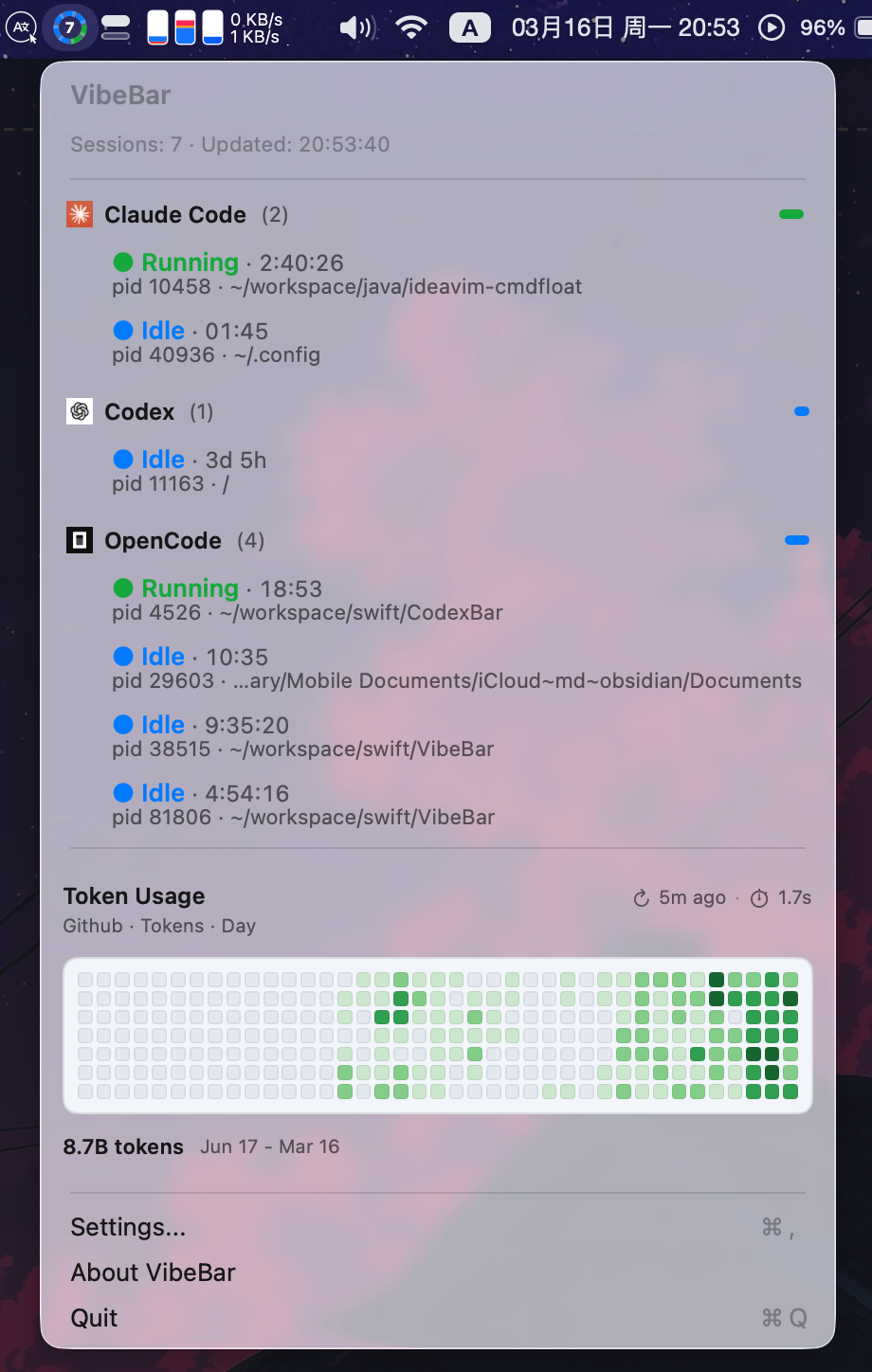
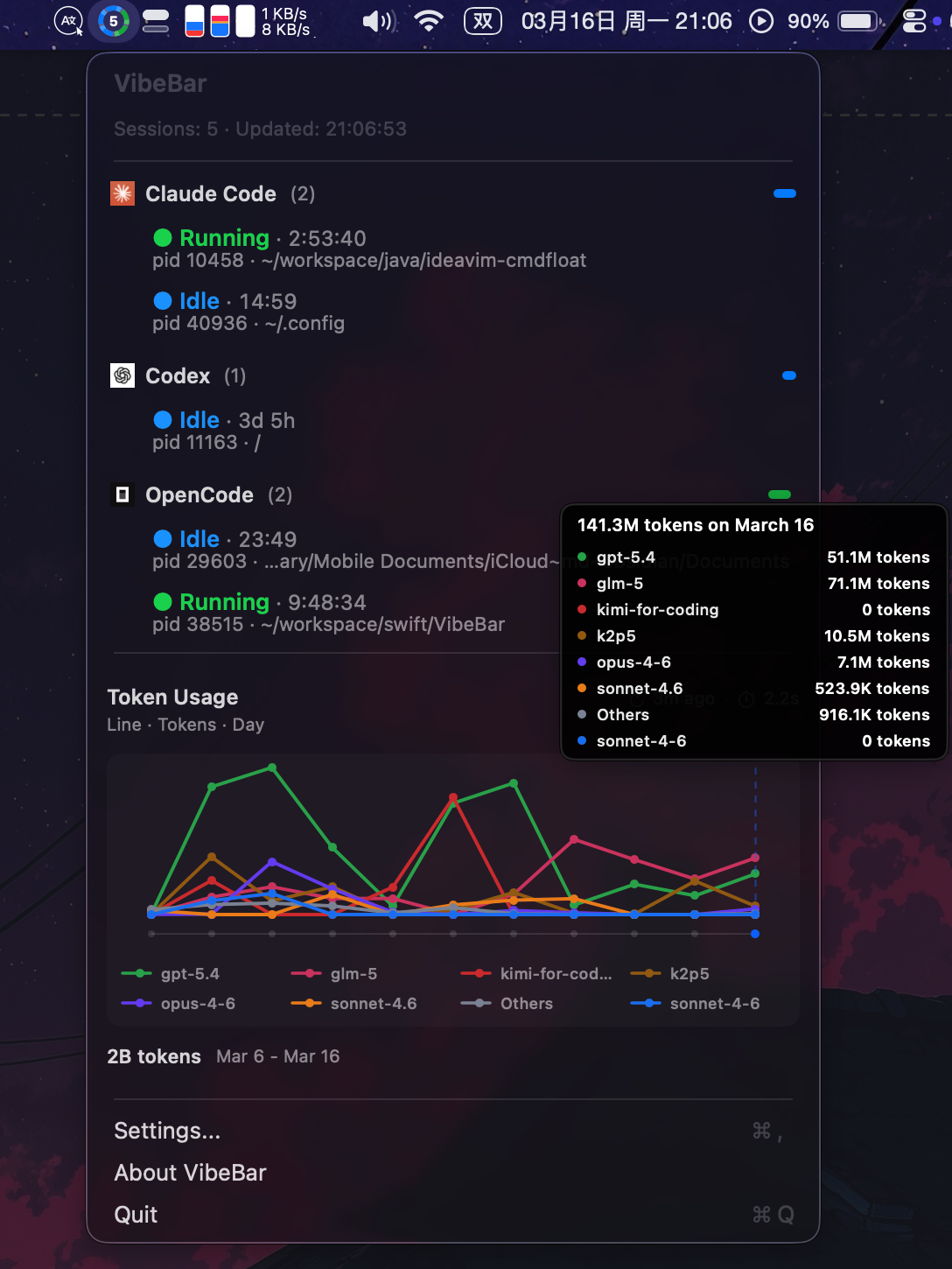
| Agent Sessions and Token Usage Trend | Agent Session and Token Usage Trend |
|---|---|
|
|
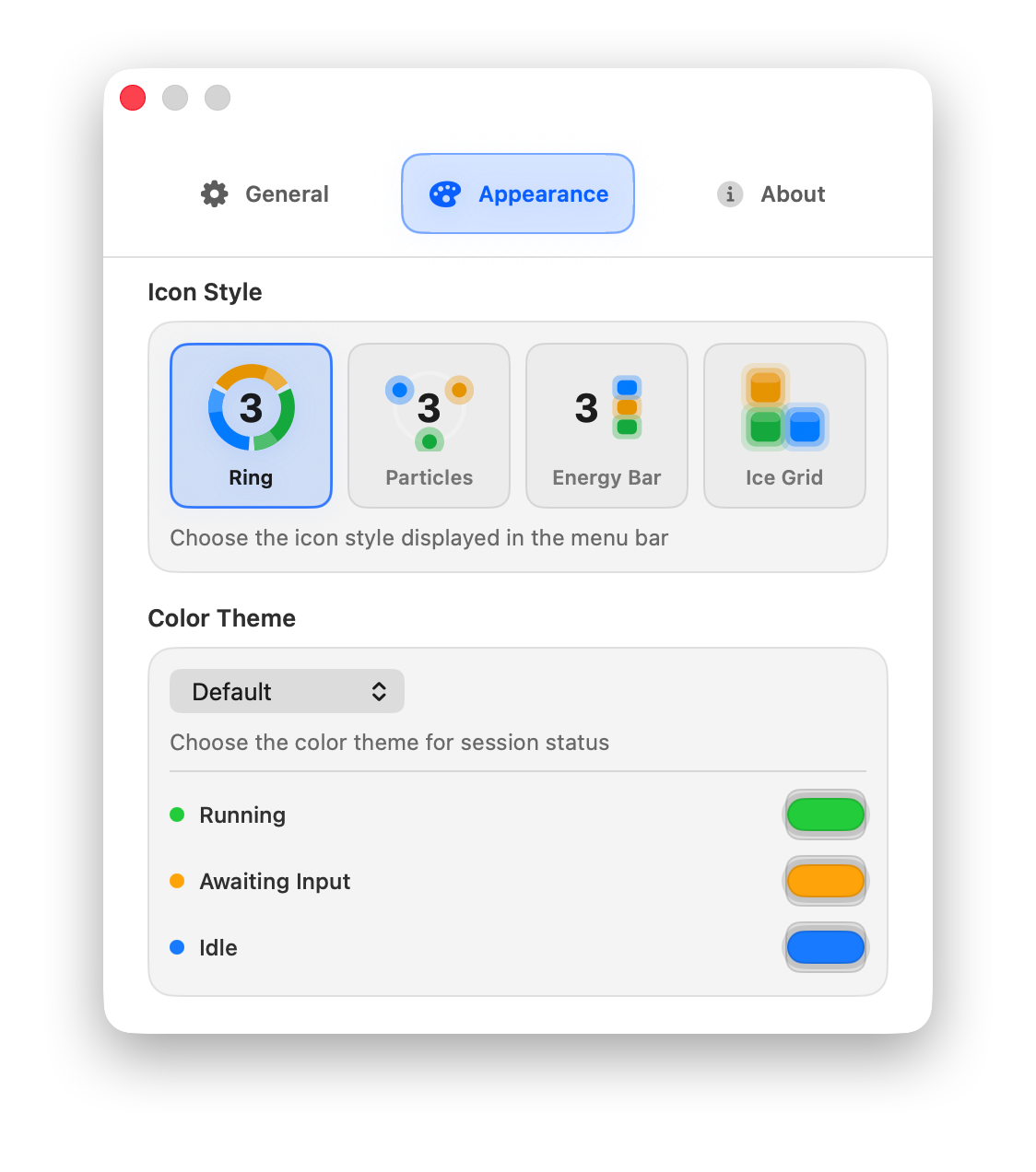
Multiple icon styles and color schemes are provided, which can be configured in the settings.
Recommended Integration (Important)
- Claude Code: use the VibeBar plugin (recommended).
- OpenCode: use the VibeBar plugin (recommended).
- Aider: use
vibebarwrapper (recommended), and optionallyvibebar notifyfor better awaiting-input signals. - Gemini CLI: use
vibebarwrapper (recommended). In headless/prompt mode, wrapper auto-enables--output-format stream-jsonunless already set. - GitHub Copilot: use the VibeBar hooks plugin (recommended). Install from Settings → Plugins → GitHub Copilot; VibeBar auto-deploys
.github/hooks/hooks.jsonto all running Copilot sessions' project directories. For projects opened after installation, click Install again or copy the hooks file manually. - Codex: use
vibebarwrapper (recommended), because Codex currently has no plugin system in this repo. vibebarwrapper supportsclaude/codex/opencode/aider/gemini/copilot, while plugin integration remains the preferred path where available.
Features
- Real-time menu bar status for multiple sessions and tools.
- Optional notch display mode on supported MacBook screens, extending a small black icon area from the right side of the notch and automatically falling back to the standard menu bar entry on unsupported primary displays.
- Session states:
running,awaiting_input,idle,stopped,unknown. - Three data channels for reliability:
- PTY wrapper (
vibebar) - Local plugin events via
vibebar-agent psprocess scanning fallback
- PTY wrapper (
- In-app plugin management (install/uninstall/update) for Claude Code, OpenCode, and GitHub Copilot.
- In-app wrapper command management for
vibebar. - Multiple icon styles, color themes, launch at login, and update checks.
- Multi-language UI (
English,中文,日本語,한국어).
Token Usage Tracking
VibeBar tracks token usage across supported AI tools with detailed analytics and visualization:
Supported Tools:
- Claude Code — reads from
~/.config/claude/projects/*/usage.jsonl - Codex — reads from
~/.codex/sessions/*/usage.jsonl - OpenCode — reads from
~/.local/share/opencode/opencode.db
Token Metrics:
- Input tokens, Output tokens
- Cache read tokens, Cache write tokens
- Total tokens and estimated cost in USD
Visualization Options:
- GitHub-style Heatmap — 39-week activity matrix with color-coded intensity
- Bar Chart — Stacked bars showing usage by time period
- Line Chart — Trend lines for usage over time
Configuration:
- Toggle between Tokens or Cost view
- Adjust granularity: Hour / Day / Week / Month
- Group by: Tool / Model / None
- Set refresh interval: 5min / 15min / 30min / 1hour
- Customize maximum series displayed
Access via the menu bar dropdown to view your AI usage patterns and costs at a glance.
Project Layout
VibeBarCore: models, storage, aggregation, scanners, plugin/wrapper detection.VibeBarApp: macOS menu bar app and settings UI.VibeBarCLI(vibebar): PTY wrapper around target CLIs.VibeBarAgent(vibebar-agent): local Unix socket server for plugin events.plugins/*: Claude Code, OpenCode, and GitHub Copilot hook plugin packages.
How Session Detection Works
VibeBar merges data from 3 channels:
vibebarPTY wrapper: high-fidelity interaction states.vibebar-agentsocket events: plugin lifecycle/status updates.psscan fallback: process-based discovery when stronger sources are missing.
State priority at tool level:
running > awaiting_input > idle > stopped > unknown
Runtime data paths:
- Session files:
~/Library/Application Support/VibeBar/sessions/*.json - Agent socket:
~/Library/Application Support/VibeBar/runtime/agent.sock
Installation
Option A: Download app (recommended)
- Download latest
VibeBar-*-universal.dmgfrom GitHub Releases. - Drag
VibeBar.apptoApplications. - First launch: right-click app and choose Open (Gatekeeper).
Option B: Homebrew
Add this repository as a tap and install:
brew tap yelog/vibebar https://github.com/yelog/vibebar.git
brew install --cask yelog/vibebar/vibebar
Upgrade:
brew upgrade --cask yelog/vibebar/vibebar
Option C: Build from source
Requirements: macOS 13+, Xcode Command Line Tools, Swift 6.2.
swift build
Quick Start (Source Build)
- Start app:
swift run VibeBarApp
- Start agent (recommended for plugin events):
swift run vibebar-agent --verbose
- Install local plugins for Claude/OpenCode:
bash scripts/install/setup-local-plugins.sh
- Install the GitHub Copilot hooks plugin (if using Copilot):
Open VibeBar Settings → Plugins → GitHub Copilot → Install. VibeBar will copy the hook script and auto-deploy hooks.json to all currently running Copilot sessions' project directories.
- Run Codex with wrapper (recommended path):
swift run vibebar codex -- --model gpt-5-codex
- Run Aider with wrapper (recommended path):
swift run vibebar aider -- --model sonnet
- Optional: forward Aider notifications into VibeBar state updates:
aider --notifications --notifications-command "vibebar notify aider awaiting_input"
- Run Gemini CLI with wrapper:
swift run vibebar gemini -p "explain this codebase"
For Gemini prompt/headless invocations (-p, --prompt, --stdin, or non-TTY stdin), vibebar automatically adds --output-format stream-json unless you already provide --output-format.
Gemini hooks integration example (.gemini/settings.json):
{
  "hooks": {
    "SessionStart": [{
      "matcher": "*",
      "hooks": [{ "type": "command", "command": "vibebar notify gemini session_start session_id=$GEMINI_SESSION_ID" }]
    }],
    "AfterAgent": [{
      "matcher": "*",
      "hooks": [{ "type": "command", "command": "vibebar notify gemini after_agent session_id=$GEMINI_SESSION_ID" }]
    }],
    "SessionEnd": [{
      "matcher": "*",
      "hooks": [{ "type": "command", "command": "vibebar notify gemini session_end session_id=$GEMINI_SESSION_ID" }]
    }]
  }
}
- Optional fallback: run Claude/OpenCode via wrapper when plugin is unavailable:
swift run vibebar claude
swift run vibebar opencode
Plugin docs:
plugins/README.mdplugins/claude-vibebar-plugin/README.mdplugins/opencode-vibebar-plugin/README.mdplugins/copilot-vibebar-hooks/README.md
Development Commands
# Build
swift build
swift build -c release

# Run
swift run VibeBarApp
swift run vibebar-agent --verbose
swift run vibebar codex

# Test (placeholder)
swift test
Package universal .dmg:
bash scripts/build/package-app.sh
Troubleshooting
- No menu bar icon: ensure local macOS GUI session (not headless/SSH).
- Stale sessions: use Purge Stale and verify session files path above.
- Missing plugin events: ensure
vibebar-agentis running and check socket path:
swift run vibebar-agent --print-socket-path
Limitations
- Without plugins, awaiting-input detection relies on heuristics.
- Codex has no plugin event channel in this repo yet.
- Aider has no native plugin event channel in this repo yet; use
vibebar notifyvia--notifications-commandfor better awaiting-input detection. - Gemini CLI transcript parsing is auxiliary only; it augments hook/process detection and should not be treated as a primary real-time source.
- GitHub Copilot hooks are per-repo: hooks.json must exist in each project's
.github/hooks/directory. VibeBar auto-deploys this file when you click Install, but projects opened after installation require a second Install click (or manual copy). - Automated tests are still minimal.
Acknowledgments
This project was inspired by ccusage. Thanks to @ryoppippi for the great idea and implementation.
Reviews (0)
Sign in to leave a review.
Leave a reviewNo results found