agent-powerups
Health Warn
- License — License: Apache-2.0
- Description — Repository has a description
- Active repo — Last push 0 days ago
- Low visibility — Only 5 GitHub stars
Code Fail
- rm -rf — Recursive force deletion command in catalog.json
Permissions Pass
- Permissions — No dangerous permissions requested
No AI report is available for this listing yet.
Curated power-ups for coding agents: skills, slash commands, MCP configs, hooks, AGENTS.md templates, and workflows for serious software engineering. Claude Code, Codex, Gemini CLI and more
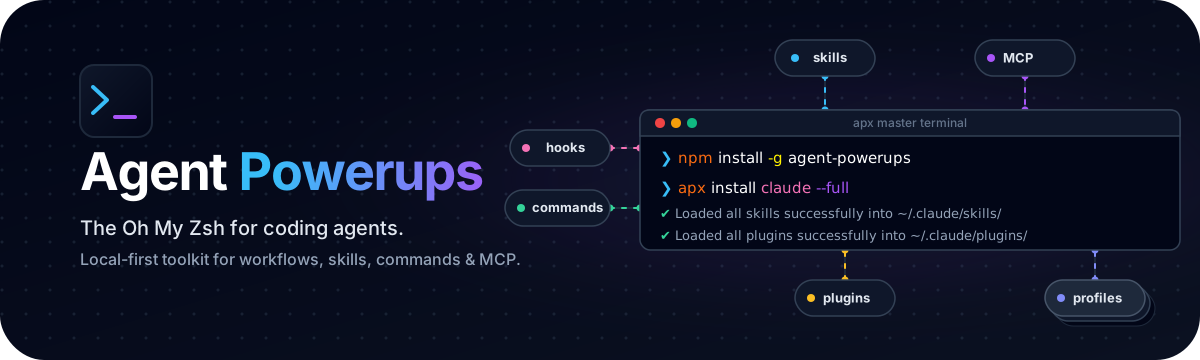
Agent Powerups
Oh My Zsh for coding agents.







Quickstart · Plugin Bundles · Installation · Security Model · Contributing
Agent Powerups is an Oh My Zsh-style collection of reusable skills, slash commands, MCP configs, hooks, AGENTS.md templates, and workflows for coding agents.
Today, this repo ships:
- reusable skills
- safe local CLI (
apx) with runnable local checks - persistent Gemini relay for always-active secondary-agent delegation
- validation and requirement-check scripts
- verified local GitHub MCP check, smoke, and install flow
- command, hook, workflow, examples, and AGENTS.md templates
- 17 plugin bundles (3 stable, 10 beta, 4 experimental) with native install, marketplace metadata, and
apx pluginsinspection - user-intent profiles with
apx profilesfor curated skill/plugin sets
Native install is direct for humans. Safety boundaries stay around external tools, secrets, shell profiles, and MCP enablement.
What Is Here
| Path | Status | Notes |
|---|---|---|
skills/ |
shipped | Reusable agent workflows such as systematic-debugging and writing-plans |
mcp/ |
shipped | Local-first GitHub MCP config with check, smoke, and explicit install commands |
agents-md/ |
shipped | Starter AGENTS.md templates |
commands/ |
shipped | Review-first command prompts plus safe runnable checks |
hooks/ |
shipped | Review-before-use hook recipes plus safe runnable checks |
workflows/ |
shipped | Scenario guides |
plugins/ |
shipped | 17 plugin bundles (3 stable, 10 beta, 4 experimental) with local-first discovery, validation, native install, and marketplace metadata |
scripts/ |
shipped | Validation and tool-check helpers for this repo |
examples/ |
shipped | Minimal safe setup examples |
Quickstart
Using npm (Recommended)
npm install -g agent-powerups
apx install claude --full
This installs the apx CLI globally and runs a full Claude Code setup — copies skills, plugins, and commands into ~/.claude/ and patches your CLAUDE.md. Use --dry-run to preview changes first.
Using Source Checkout (Development)
- Clone and install deps:
git clone https://github.com/yeaight7/agent-powerups.git
cd agent-powerups
npm install
- Build CLI and install globally:
npm run build
npm link
- Check repo health:
apx doctor
apx doctor --full
- Browse catalog:
apx list
apx info markitdown-file-intake
apx commands run ship-check
apx hooks run no-secrets-preflight --all
apx mcp check github-local --target generic
apx mcp smoke github-local --json
apx mcp install github-local --target codex --dry-run
- Manual native install:
apx install codex --dry-run
apx install codex
apx install claude
apx install gemini
apx install codex --full
apx install codex --verbose
Default native install copies all root skills and plugin bundles into the selected agent root. Human output shows counts by default; use --verbose for per-file paths. --full also stages support assets under agent-powerups/ and updates existing global instructions with a backup.
- Work with plugin bundles:
apx plugins list
apx plugins info dev-vitals
apx plugins validate --all
apx plugins install dev-vitals --target codex --dry-run
- Try a local advisor CLI and save an artifact:
apx ask-codex "Return OK only" --json
apx ask-claude "Return OK only" --json
apx ask-gemini "Return OK only" --json
- Start a persistent relay session (keeps context across turns):
apx relay init second-opinion
apx relay start second-opinion --provider gemini
apx relay ask second-opinion "Review this plan" --json
apx relay status second-opinion
apx relay stop second-opinion
- Browse profiles:
apx profiles list
apx profiles info safe-core
apx profiles plan safe-core --target codex
- Check deps without installing:
apx check markitdown-file-intake
apx check graphify
apx check ask-codex
apx check ask-claude
apx check ask-gemini
Preview supported dependency installers before asking for approval:
apx check defuddle --install-missing --dry-run
apx check markitdown-file-intake --install-missing --dry-run
apx check graphify --install-missing --dry-run
- Install a single asset explicitly:
apx install markitdown-file-intake --target codex --dry-run
apx install ask-claude --target codex --dry-run
- Agent-curated setup compatibility path:
apx setup codex --dry-run
apx setup codex --mode minimal --yes    # bootstrap only
apx setup codex --mode recommended --yes  # main agent setup (recommended)
apx setup codex --mode full --yes       # broad staging
Manual Setup (Primary)
apx install <codex|claude|claude-code|gemini> [--verbose]
apx install <codex|claude|claude-code|gemini> --full [--verbose]
Default manual install:
- root
skills/-><agent-root>/skills/ - Codex/Claude plugin bundles ->
<agent-root>/plugins/ - Gemini plugin bundles ->
<agent-root>/extensions/
Agent-Managed Setup
Give your agent access to this repo and ask it to run:
apx list
apx profiles list
apx setup <codex|claude-code|gemini> --mode recommended --yes
Agent will inspect available skills/plugins, propose a plan, and apply it.
Agent setup docs:
- Keep repo validation in loop:
python scripts/validate-skills.py
python scripts/validate-catalog.py
python scripts/check-requirements.py
Catalog Overview
Current shipped skills:
agent-config-security-auditagent-harness-designagent-runtime-patternsagent-session-forensicsai-slop-cleanerask-claudeask-codexask-geminiautonomous-delivery-pipelinebigquery-cost-auditbrainstormingbrowser-automation-safetybug-huntbuild-fix-minimal-diffchangelog-generatorcodebase-migration-batchescontext-compressioncontext-retrieval-loopdata-qualitydbt-incremental-strategy-auditdbt-preflightdbt-strategydefuddledeploy-pipeline-runbookdispatching-parallel-agentsenvironment-doctorfilesystem-mcp-guardrailsfinishing-a-development-branchgh-address-commentsgithub-ci-failure-triagegraphifyhard-won-skill-extractorjson-canvaslocal-rag-mcpmanaged-codebase-contextmarkitdown-file-intakemcp-server-buildermetric-impact-analyzermodel-routingno-fluffparallel-execution-enginepersistent-completion-looppr-review-ci-looppr-triageprompt-evaluation-runnerreceiving-code-reviewred-team-eval-authoringrelay-clauderelay-codexrelay-geminirelease-readiness-protocolrepo-maprequesting-code-reviewrequirements-clarifierreview-comment-style-miningsafe-refactorsearch-before-buildingskill-authoring-guideskill-evaluation-workbenchsql-business-logic-reviewstructured-code-search-mcpsubagent-team-orchestrationsystematic-debuggingtest-driven-developmentusing-git-worktreesusing-powerupsverification-before-completionwebapp-visual-testingworktree-session-managerwriting-planswriting-skills
Current shipped scripts:
scripts/validate-skills.pyscripts/validate-catalog.pyscripts/check-requirements.py
Current shipped MCP configs:
github-localgithub-remotecontext7sequential-thinkingplaywrightfilesystem-repo-scopedmemoryfetchtimegit-localpostgres-readonlysupabasevercelcloudflare-docsexa-searchatlassianbrowserbasee2b-sandbox
Current shipped AGENTS.md templates:
typescript-apppython-librarydbt-projectml-projectopen-source-maintainer
Current shipped command packs:
build-fixchangelogdebugdoctorimplementmcp-checkmcp-smokeplanreleasereviewship-checktriageusing-powerupsvisual-review
Current shipped hook examples:
Safety:
no-secrets-preflightdestructive-bash-guardenv-file-mutation-approvaldependency-review
Quality:
validation-requiredtest-gatelint-checkconsole-log-checkgenerated-file-warninglarge-diff-warningbuild-analysis-postdesign-quality-checkmigration-review-requiredtodo-fixme-blockerpre-commit-quality-checkquality-gate-after-edittypescript-post-edit-checkdoc-file-warning
Productivity:
handoff-summaryhandoff-completeness-checksession-context-restoresession-logsession-compaction-helpersession-lifecycle-stateauto-commit-messagedev-server-tmux-guard
Cloud:
cloud-cli-guard
MCP:
mcp-config-change-approvalmcp-write-guardmcp-elicitation-guard
Current shipped examples:
minimal-setup-examplecodex-setup-exampleclaude-code-setup-example
Current shipped workflows:
feature-iterationagent-relay
Current shipped plugin bundles (stable):
dev-vitalsdebugging-diagnosticsquality-gates
Current shipped plugin bundles (beta):
codebase-maintenancedata-engineeringdocumentation-systemsmachine-learning-opscodebase-intelligencespec-driven-developmentspec-quality-gatescontext-efficiencytool-integrationsmemory-optimization
Current shipped plugin bundles (experimental):
software-engineeringagentic-systemssecurity-guardrailsagent-evaluation-lab
Schema details: docs/catalog-schema.md
Compatibility Matrix
Compatibility claims in this repo are intentionally narrow:
| Asset class | Shipped today | Compatibility claim |
|---|---|---|
Root skills/ |
yes | Generic text-based skills; some also mention known agent surfaces |
mcp/ |
yes | 18 MCP configs for local and remote servers (GitHub, Supabase, Vercel, Cloudflare, Exa, Atlassian, Browserbase, E2B, and more); github-local has a full check/smoke/install flow |
agents-md/ |
yes | Plain text templates |
commands/ |
yes | Review-first markdown command prompts; Claude Code and Codex targets where provided |
hooks/ |
yes | Documentation recipes only; not installed automatically |
workflows/ |
yes | Plain text scenario guides |
plugins/ |
yes | 17 plugin bundles (3 stable, 10 beta, 4 experimental) with native install, marketplace metadata, and apx plugins inspection |
scripts/ |
yes | Generic Python scripts |
examples/ |
yes | Plain text setup examples only |
More detail: docs/compatibility.md
Tool Requirements
Most shipped skills are pure text and need no extra installation.
Current optional external tools used by shipped skills:
| Skill | Tool | Required | Install |
|---|---|---|---|
ask-codex |
Codex CLI (codex) |
yes for local advisor workflow | install/configure Codex CLI |
ask-claude |
Claude Code CLI (claude) |
yes for local advisor workflow | install/configure Claude Code CLI |
ask-gemini |
Gemini CLI (gemini) |
yes for local advisor workflow | install/configure Gemini CLI |
markitdown-file-intake |
Microsoft MarkItDown (markitdown) |
yes for conversion workflow | python -m pip install markitdown |
defuddle |
Defuddle CLI (defuddle) |
yes for Defuddle workflow | npm install -g defuddle |
graphify |
Upstream Graphify CLI + Python package (graphify, graphifyy) |
yes for graph workflow | uv tool install graphifyy or pipx install graphifyy or python -m pip install graphifyy |
pr-triage |
GitHub CLI (gh) |
optional | platform package manager |
Tool policy:
- Do not assume tools are installed.
- Do not auto-install without user approval.
- Show install command before running it.
- Prefer user-local or project-local installation where practical.
More detail: docs/tool-requirements.md and docs/installation.md
CLI Usage
npm install
npm run build
npm link
apx doctor
apx doctor --full --json
apx list
apx info markitdown-file-intake
apx check markitdown-file-intake
apx check graphify
apx ask-codex "Explain this code" --json
apx ask-claude "Review this patch" --json
apx ask-gemini "Brainstorm test cases" --json
apx relay start second-opinion --provider gemini --json
apx relay ask second-opinion "Review this plan" --json
apx relay stop second-opinion --json
apx ship-check --json
apx no-secrets-preflight --all --json
apx using-powerups
apx install codex --dry-run
apx install codex
apx install claude
apx install gemini
apx install codex --full
apx install markitdown-file-intake --target codex --dry-run
apx setup codex --dry-run
apx setup claude-code --dry-run
apx setup gemini --dry-run
apx setup codex --mode recommended --yes
apx setup claude-code --mode recommended --yes
apx setup gemini --mode recommended --yes
Migration note (v0.x)
apx install <agent> is now the primary manual install path and writes native skills/plugins by default. apx setup <agent> remains for compatibility and agent-curated setup; it is still dry-run by default unless --yes is passed.
Extra surfaces:
apx mcp list
apx mcp print github-local --target claude-code
apx mcp check github-local --target claude-code --json
apx mcp smoke github-local --json
apx mcp install github-local --target codex --dry-run
apx mcp install github-local --target claude-code --dry-run
apx mcp write github-local --target generic --dest .agent-powerups/github-local.json
apx agents-md list
apx agents-md print typescript-app
apx commands list
apx commands print ship-check --target generic
apx commands run ship-check --full
apx hooks list
apx hooks print no-secrets-preflight
apx hooks run no-secrets-preflight --path README.md
apx workflows list
apx workflows print feature-iteration
apx plugins list
apx plugins info dev-vitals
apx plugins validate --all
apx plugins install dev-vitals --target codex --dry-run
apx profiles list
apx profiles info safe-core
apx profiles plan safe-core --target codex
apx relay init second-opinion
apx relay start second-opinion --provider gemini --json
apx relay ask second-opinion "Review this plan" --json
apx relay status second-opinion --json
apx relay stop second-opinion --json
To explicitly copy a skill into a local Codex-visible folder, choose the destination yourself:
apx install ask-claude --target codex --dest .agent-powerups/installed/ask-claude
Plugin Bundles
Plugin bundles ship under plugins/. They are registered in both .claude-plugin/marketplace.json and .codex-plugin/marketplace.json. Gemini CLI uses local extensions; each plugin bundle includes gemini-extension.json and GEMINI.md.
- use
apx plugins listto discover bundles - use
apx plugins info <name>to inspect a single bundle - use
apx plugins validate --allto verify bundle structure - use
apx plugins install <name> --target <codex|claude-code|generic> --dry-runbefore any write - use
apx install <codex|claude|gemini>for full manual native install
Safety Warning
Review assets before loading them into a trusted agent environment.
- Skills can instruct an agent to read local files or run commands.
- Hooks can execute code when supported by the host agent.
- MCP configs can expand tool access.
- Install commands can modify the local environment.
- Secrets should never be pasted into agent context unless strictly necessary.
See SECURITY.md and docs/security-model.md.
Contributing
Contribution guide: CONTRIBUTING.md
Acknowledgements: ACKNOWLEDGEMENTS.md
MCP configs: docs/mcp-configs.md
Roadmap: docs/roadmap.md
Reviews (0)
Sign in to leave a review.
Leave a reviewNo results found