line-of-sight
Health Uyari
- License — License: MIT
- Description — Repository has a description
- Active repo — Last push 0 days ago
- Low visibility — Only 9 GitHub stars
Code Basarisiz
- fs.rmSync — Destructive file system operation in package.json
- exec() — Shell command execution in src/adapters/claudeCode.ts
- spawnSync — Synchronous process spawning in src/adapters/claudeCode.ts
- os.homedir — User home directory access in src/adapters/claudeCode.ts
- exec() — Shell command execution in src/adapters/codex.ts
- spawnSync — Synchronous process spawning in src/adapters/codex.ts
- os.homedir — User home directory access in src/adapters/codex.ts
- fs.rmSync — Destructive file system operation in src/cli/index.ts
- network request — Outbound network request in src/cli/index.ts
- fs.rmSync — Destructive file system operation in src/daemon/main.ts
Permissions Gecti
- Permissions — No dangerous permissions requested
Bu listing icin henuz AI raporu yok.
Stay oriented while coding agents work. A local, read-only session viewer and side chat for live and past Claude Code and Codex CLI sessions.
Line of Sight


Stay oriented while coding agents work.
Line of Sight is a local, read-only companion for Claude Code and Codex CLI.
It reads the JSONL conversation history both CLIs already keep on disk
(~/.claude/projects, ~/.codex/sessions) and shows every past and live
session in a browser, so you can review what the agent did, which commands
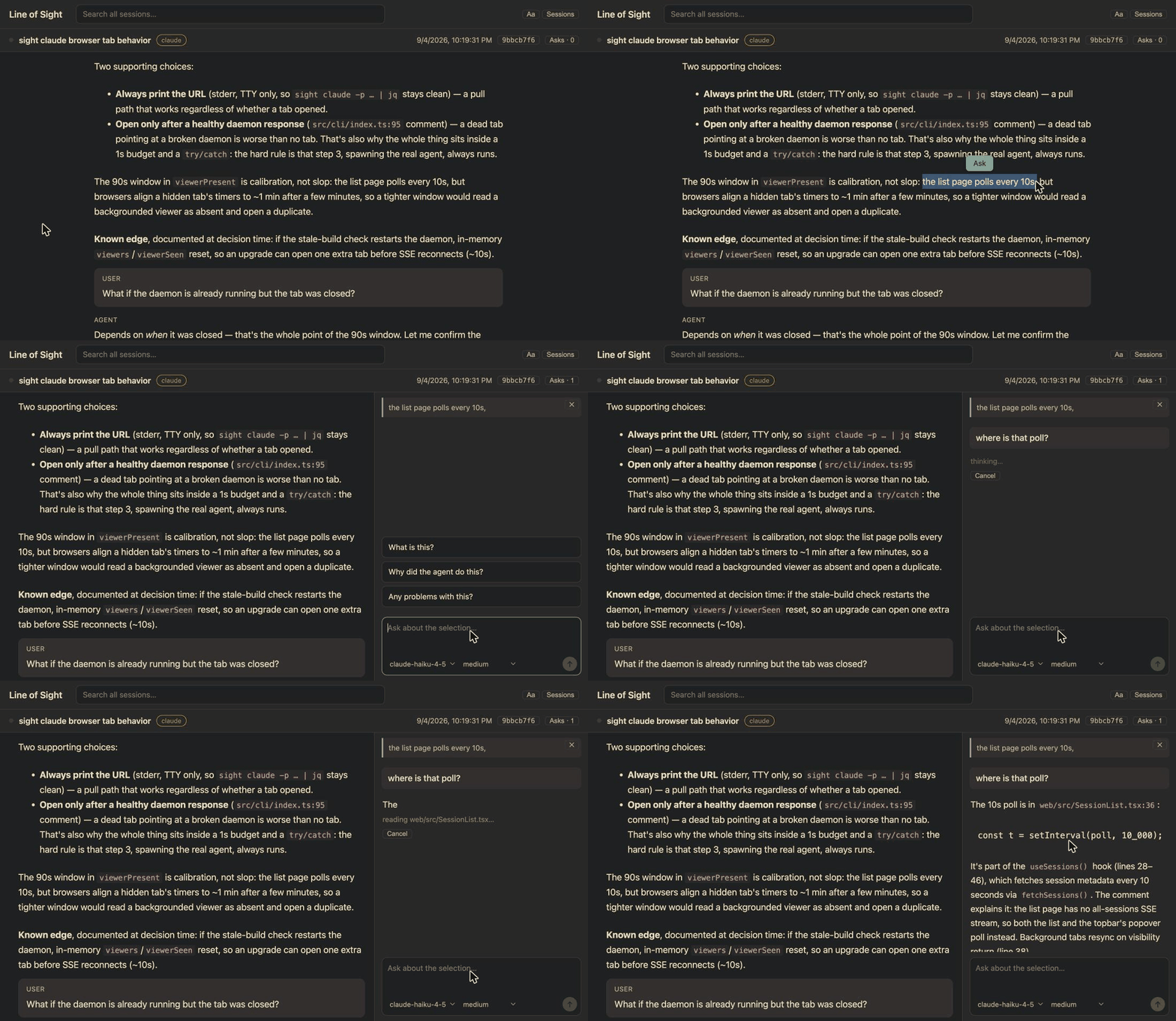
it ran, and what it changed. Select any text and ask what it means or why
the agent did it, without interrupting it. The same claude or codex you
already run answers in a side chat: it can read your project but not change
it, and the working session is never touched.
Quick start
Requires macOS, Node.js 20+, and claude (2.1.267+) or codex (0.153.4+) on your
PATH. Set up and authenticate the CLI you want to use first. Linux is untested.
npm i -g line-of-sight
sight open
Sight runs in the background and shows every Claude Code and Codex session,
past and live, at http://127.0.0.1:2020. Choose a session, select text, and
click Ask. Run sight open again after a restart.
To start Sight automatically with your agent, launch the agent through it:
sight claude # or: sight codex
Understand the work
- Follow. Read live sessions as they unfold, or return to past work
without digging through terminal output. - Inspect. See the conversation, tool calls, results, and subagent work
in one readable view. - Ask. Select any text and ask what happened, why the agent did it, or
whether something deserves a closer look. Answers live in a separate,
read-only side chat. - Search. Find decisions and explanations across Claude Code and Codex
sessions. - Copy. Copy messages as Markdown or code blocks as plain code.
Comprehension, not control
Line of Sight is not a control plane or mission-control dashboard for agents.
It does not orchestrate their work, send them commands, or reduce a session
to a completion status. It gives you a readable view of what happened and a
separate place to question it, while the working conversation stays untouched.
Privacy and behavior
- Read-only questions. Sight cannot edit your project or send replies to
the working agent. Claude Code uses restricted tools; Codex uses a
read-only sandbox. - Local storage. The viewer listens only on
127.0.0.1. Transcripts are
read from disk; indexed content, saved Q&A and, per question, a snapshot
of the conversation around it live in~/.sight. There is no telemetry. - Model access. Sight uses your CLI's authentication and model service.
Questions, transcript context, and project content read by the responder
are sent to that service, using your account's quota or billing. - Retention. Sight mirrors the transcripts on disk. If a transcript is
deleted, its session and saved side chats are removed from Sight too.
Claude Code deletes transcripts itself aftercleanupPeriodDays(30 by
default). To keep your questions, answers and their conversation
snapshot after that, setkeepSideChats— see the usage guide.
FAQ
How do I view my Claude Code conversation history in a browser?
Install Sight and run sight open. Every session under ~/.claude/projects
appears at http://127.0.0.1:2020, including ones that are still running.
How do I search across all my past Claude Code or Codex sessions?
Use the search box in Sight. It indexes user and assistant messages from both
CLIs, so one query covers every project and both agents.
How can I read Codex CLI session logs?
Sight parses the rollout files under ~/.codex/sessions and shows them the
same way as Claude Code sessions: conversation, tool calls, and results.
The agent's output is hard to follow. Can I get it explained?
Select the part you don't follow and click Ask. You get a plain
explanation of what that summary, error, or tool call means, with the
surrounding conversation as context.
Why did Claude Code do X? How do I find out without re-reading the session?
Select the relevant text in Sight and click Ask. The responder reads the
surrounding conversation and your project files, then explains what happened
and why. Ask follow-ups in the same side chat.
How do I review what an agent did in a long session?
Open the session in Sight and read it top to bottom: prompts, tool calls,
results, and subagent work in one view. Select anything that looks off and
ask whether it deserves a closer look.
Can I ask questions about what an agent did without interrupting it?
Yes. Select text in any session and click Ask. The same claude orcodex you already run answers in a separate side chat; it can read your
project but not change it. The working session is never touched.
Does it work with claude --resume?
Sight is a viewer, not a replacement for resume. Use it to find the session
you want, then resume it from the CLI as usual.
Does anything leave my machine?
Only the questions you ask, which go through your own CLI to its model
service. There is no telemetry and no other network access.
Uninstall
sight stop
npm uninstall -g line-of-sight
rm -rf ~/.sight
Deleting ~/.sight removes Sight's index, settings, and saved side chats.
Your Claude Code and Codex transcripts are not touched.
Help
See the usage guide for configuration and troubleshooting,
or run sight --help for all commands.
License
Yorumlar (0)
Yorum birakmak icin giris yap.
Yorum birakSonuc bulunamadi