reliquary-tc
Health Pass
- License — License: Apache-2.0
- Description — Repository has a description
- Active repo — Last push 0 days ago
- Community trust — 13 GitHub stars
Code Pass
- Code scan — Scanned 12 files during light audit, no dangerous patterns found
Permissions Pass
- Permissions — No dangerous permissions requested
No AI report is available for this listing yet.
Obsidian Turbocharged — governed, agent-ready Obsidian MCP server. Multi-vault native, pluggable embeddings, OAuth-ready HTTP. TypeScript + Rust. AGPL-3.0-only.
Reliquary-TC
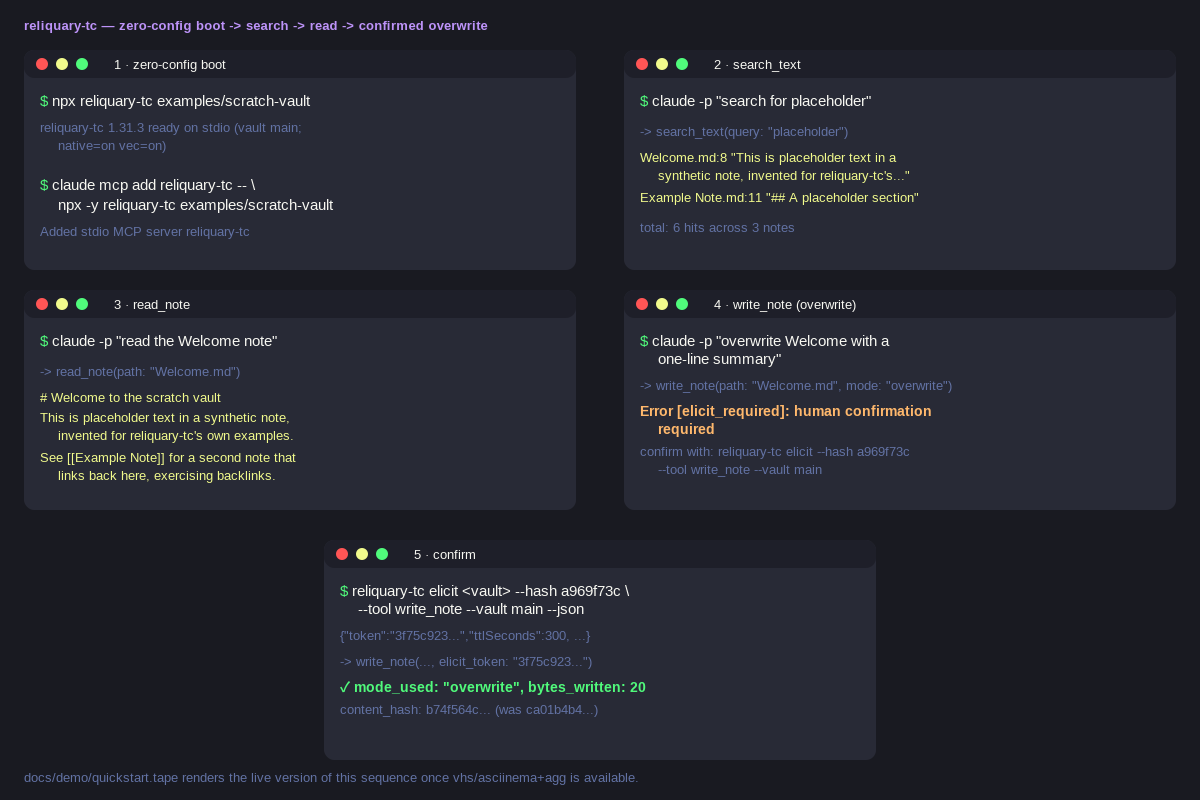
Governed, agent-ready Obsidian vault access over MCP.
Formerly obsidian-tc. Renamed in 2.0. The obsidian-tc command, OBSIDIAN_TC_* variables,obsidian-tc:// resource URIs, obsidian_tc_* metrics and an existing ~/.obsidian-tc folder all
keep working through 2.x; see Upgrading from obsidian-tc.




What it is
reliquary-tc is a governed, agent-ready Model Context Protocol
server for Obsidian vaults, for humans and agents alike. Instead of raw
filesystem access to years of notes, every tool call runs through one pipeline — auth, folder
ACLs, a read-only kill switch, HITL confirmation on destructive ops, and an audit log. It also
adds fused retrieval (full-text, vector, graph) and a memory tier — episodes, decay, forgetting —
living inside your vault under that same ACL.
A full tool surface across every domain (all visible by default; a smaller set with opt-inprofile: "core"), via a 3-tool discovery facade plus the standard search/fetch pair, listed in the
tool catalog. Pitch: docs/WHY.md.
60-second start
No install:
npx reliquary-tc /path/to/vault
Every note tool and lexical search work immediately. Semantic search defaults to a bundled
embedder — see When NOT to use for which install methods it
reaches.
For multi-vault, auth, or ACLs, use a config file:
npm install -g reliquary-tc
reliquary-tc ./reliquary-tc.config.json   # Node >= 24 or Bun >= 1.1
The default local embedder is an opt-in install, so npm install -g reliquary-tc leaves it out. To use it,
install the same version: npm install -g @the-40-thieves/reliquary-tc-embedder-local@<same version> (drop -g
for a project install), or let reliquary-tc setup offer to. Ollama and hosted embedding providers need no
local embedder; without any embedder, semantic search is off and everything else still works.
Also ships as a Docker image, .mcpb bundle, and standalone binaries. More:
docs/QUICKSTART.md.
When NOT to use reliquary-tc
Honest guidance — this is a heavier product than most:
- Smallest possible footprint, read-only access, or no MCP at all. A single trusted human
over one vault, a read-only wrapper, or the Obsidian URI/Local REST API plugin may be
all you need — see the full comparison. - Zero setup, source checkouts only. The vault is read off disk; semantic
search defaults to a bundled offline embedder; npm/Docker need an explicit provider until
published — see Embeddings. - Zero-config trades away auth/ACLs.
reliquary-tc /path/to/vaultboots with auth off, no
folder ACL — fine only because it's local-only; governance is opt-in. Detail: SECURITY.md. - Single-maintainer project.
- Everything inside Obsidian, or vault-independent memory. See the
comparison above.
Migrating from another MCP server: docs/CUTOVER.md.
How it compares
Most Obsidian MCP projects are vault-access servers, retrieval engines, or memory engines, rarely
more than one. reliquary-tc is the only one we know of that is all three, with memory living in
the vault under the same ACL as every other write. Full 9-project table and "where the others
win".
| Tools | Group | What it's for | |
|---|---|---|---|
| reliquary-tc | full surface (3-tool facade) | all three | governed access + retrieval + in-vault memory |
| obsidian-local-rest-api | 18 | access | Obsidian's own built-in MCP server; one bearer key, no ACL |
| basic-memory | ~35 | memory | entities/relations in a separate, portable markdown KB |
More
Table of contentsTC Bridge ·
Status ·
Architecture ·
The interface ·
Claude Code / Cursor / VS Code ·
Docs ·
Trademark ·
License ·
Contributing
TC Bridge: the companion Obsidian plugin
If you arrived here from Obsidian's plugin browser: the TC Bridge listing points here because
the plugin lives in this repo, but it's a small optional bridge, not the server described above. It
extends Local REST API with endpoints
for Obsidian-only features (Templater, Dataview, Tasks, Excalidraw, Git, Remotely Save). Every
filesystem-level feature works without it.
- Install Local REST API first; TC Bridge reuses its bearer-token auth, desktop-only. The
server is installed separately (60-second start); reaching the bridges needsrestApiUrl/restApiKeyin the vault config
(step 6). That key is a
vault root password — read the trust boundary first. - Formerly "Reliquary-TC." Settings migrate on first load — details in
packages/plugin/README.md.
Status
Shipped — v1.34.0, published to npm as provenance-signed packages, container image on GHCR.
Milestones: Roadmap; releases:
CHANGELOG.md.
Retrieval changes are measured, not asserted: a statistical ship rule gates every ranking change
against a private golden set. Headline figures once on this README were withdrawn 2026-08-07 as
unreproducible — full account and a public-corpus result since:
docs/EVALUATION.md.
Architecture
Polyglot monorepo:
| Package | Language | Purpose |
|---|---|---|
packages/server |
TypeScript (Bun) | MCP layer, auth, routing, tools, plugin bridges |
packages/plugin |
TypeScript | Companion Obsidian plugin extending Local REST API |
packages/shared |
TypeScript | Shared Zod schemas and types |
packages/native |
Rust (napi-rs) | Optional acceleration, pure-JS fallback |
Dispatch-pipeline and package-layout detail: ARCHITECTURE.md.
Every capability is a governed tool with declared access scopes. Read tools (read_note,search_vault, get_backlinks, ...) never mutate the vault. Write tools cover whole-note and
partial edits: write_note, append_note, patch_note (heading- and block-anchored edits),update_frontmatter, tag and link maintenance. Separate scope classes gate delete and move
(delete_note, move_note), bulk operations (bulk_set_property), execute (execute_command)
and admin (add_vault, reload_vault). The complete, always-current list, grouped by access
scope and generated from the tool registry, is the
tool catalog.
The interface: five tools, every governed capability
By default the server advertises just five tools instead of a wall of 164: three meta-tools,find_capability, describe_capability, call_capability (invoke by name, same pipeline as a
direct call), plus the standard search and fetch tools ChatGPT deep research needs. toolFacade.mode selects triad (default), domain or flat (a superseded auto also exists)
— boundary-only, no gate bypassed. Per-client advice: MCP clients.
Install in Claude Code, Cursor, VS Code
Claude Code plugin (launches npx -y reliquary-tc, asks for your config file path on enable):
claude plugin marketplace add The-40-Thieves/reliquary-tc
claude plugin install reliquary-tc@the-40-thieves
Grok Build and Muse Code (1.4.0+) read the same marketplace; details in
Installation.


Or by hand — Cursor (mcpServers) / VS Code (servers), same object:{"command": "npx", "args": ["-y", "reliquary-tc"], "env": {"RELIQUARY_TC_CONFIG": "/ABS/config.json"}}.
A .mcpb bundle (bun run bundle) also installs into Claude Desktop / other MCPB hosts.
For claude.ai and ChatGPT (remote HTTP), see distribution.
Docs
- docs/QUICKSTART.md — install to first governed write, ~5 min
- docs/WHY.md / SECURITY.md — threat model, governance
- docs/CUTOVER.md — migrating from another Obsidian MCP server
- docs/EVALUATION.md — how retrieval changes are measured
- ARCHITECTURE.md — dispatch pipeline, package layout
- Docs site: https://obsidian-tc.the40thieves.io (full comparison under Getting Started)
Trademark
reliquary-tc is independent and community-built, not affiliated with or endorsed by Obsidian
or its maker, Dynalist Inc. "Obsidian" is a Dynalist Inc. trademark, used only nominatively.
Official app: obsidian.md.
License
Apache-2.0. See LICENSE, NOTICE and the
licensing page. Releases up to 1.34.x stay
AGPL-3.0-only. Contributions under the DCO; sign-off in
CONTRIBUTING.md.
Contributing
See CONTRIBUTING.md / Code of Conduct.
Security: SECURITY.md.
Reviews (0)
Sign in to leave a review.
Leave a reviewNo results found