gmem
Health Pass
- License — License: MIT
- Description — Repository has a description
- Active repo — Last push 0 days ago
- Community trust — 13 GitHub stars
Code Pass
- Code scan — Scanned 12 files during light audit, no dangerous patterns found
Permissions Pass
- Permissions — No dangerous permissions requested
No AI report is available for this listing yet.
gmem keeps your coding agent's memory as plain Markdown files you own, so you can read every memory, decide what stays, and prune what no longer holds.
gmem
gmem keeps your coding agent's memory as plain Markdown files you own, so you can read
every memory, decide what stays, and prune what no longer holds.
Status: v1.0.0-alpha.2. I have used this memory system for a while, and the results
are good. Until now its two halves lived apart: memory and notes on one side, and
typmem's retros and learnings on the other. This repo brings them together so they
are easier to manage. The memory standard itself should not change much. Expect fixes
to details, mostly for bugs. If something breaks or reads wrong,
open an issue.
Most agent memory works like a recorder: it saves everything automatically and
finds things again with semantic search, usually a vector index. You don't see
what was kept, and you can't easily tell why one memory came back and another
didn't.
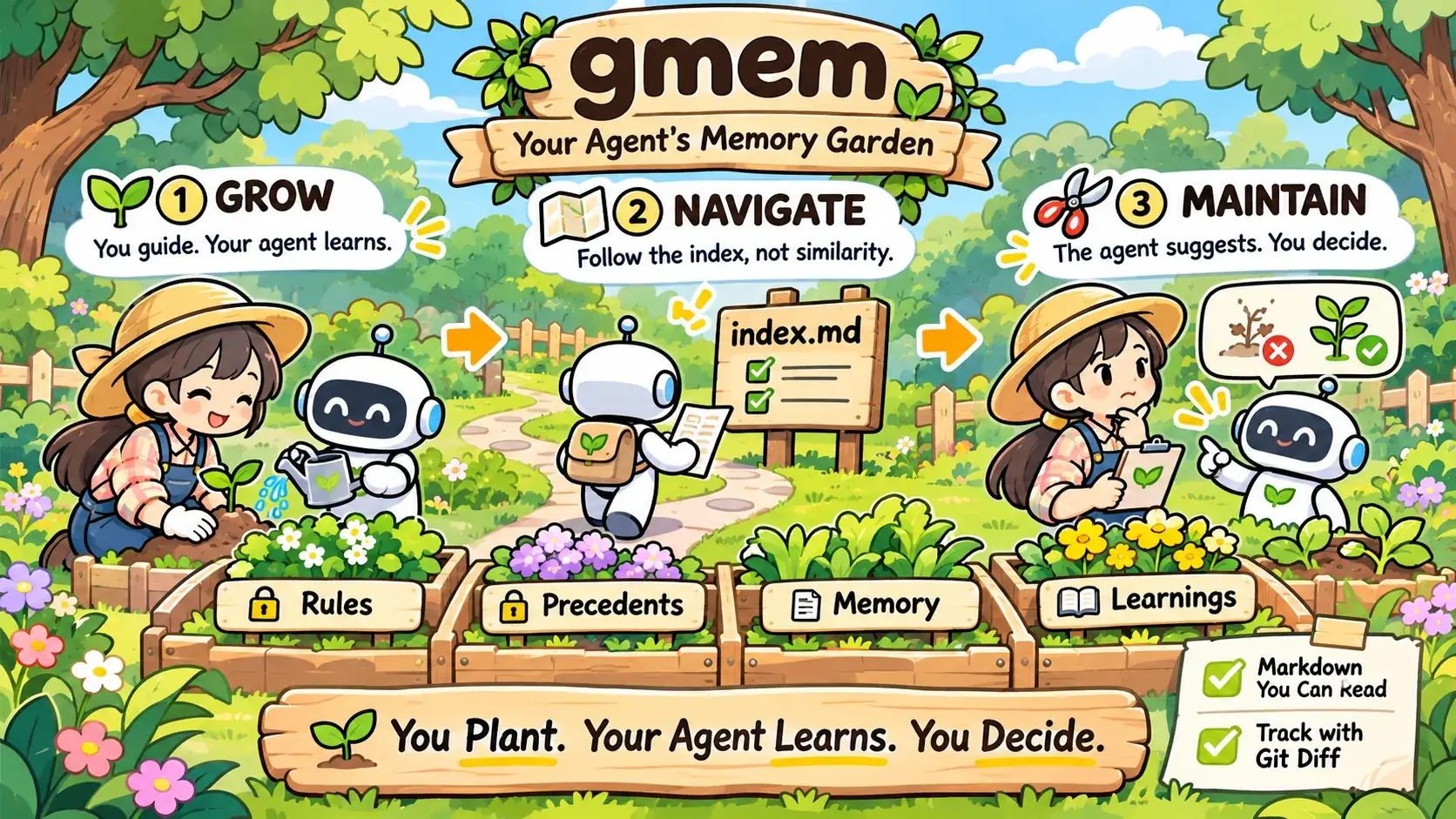
gmem is a garden. Memory is plain Markdown in a folder you own. The agent still
writes much of it, but each skill saves only what passes its own test, into a file
you can open. The agent walks through it at the start of every task and finds files
by their index rows, not by similarity. You decide what stays, and you prune it so
the paths stay clear.
- You plant, the agent learns. You tell the agent what to remember
(gmem-memory,gmem-note) and correct it when it is wrong (gmem-stop). The
agent keeps what it learns on its own withgmem-learn. Either way, it saves only
through a gmem skill, into a Markdown file you can read. - You lay the paths. Each layer has an
index.md, one row per file saying
when to read it. The agent follows those rows instead of guessing by similarity. - You prune.
gmem-judgeandgmem-tidyfind what's stale, duplicated or
wrong. You approve what gets cut or moved. - Some beds are fenced.
rules/andprecedents/change only when a human
decides. The agent can suggest, never rewrite.
A garden like this needs some work from you. In return, every memory can be read,
checked with git diff, and traced to whoever wrote it.
Install
Claude Code (plugin)
Add the marketplace, then install the plugin:
/plugin marketplace add thaitype/gmem
/plugin install gmem@gmem
gmem has the memory skills and the session-start hook.
We recommend that you turn off Claude Code's own auto memory. Otherwise Claude Code
also saves memories on its own, outside gmem, and you lose the single place where you
decide what is kept. Add this to ~/.claude/settings.json:
{
  "env": {
    "CLAUDE_CODE_DISABLE_AUTO_MEMORY": "1"
  }
}
If the file already has an env block, add the key to it. The setting takes effect in
the next session.
Other agents
npx skills@latest add thaitype/gmem
This installs the skills only, without the hook. See
Opening the map at session start.
Quick start
In this walkthrough, you set up gmem, save how something works and
where a piece of work stands, and see the agent pick up both in a fresh session. It
assumes you installed the Claude Code plugin.
Open Claude Code in your project and run the setup skill:
/gmem-setupThe agent asks one question at a time. First, whether you know gmem already (say no
and it runsgmem-askto explain the pattern). Then which install mode: choose
Central memory, the default. Last, where the config file lives: choose User
level. When it finishes, it prints the folders it resolved:memory -> /Users/you/.gmem/memory note -> /Users/you/.gmem/note rules -> /Users/you/.gmem/rules precedents -> /Users/you/.gmem/precedents learnings -> /Users/you/.gmem/learnings proposals -> /Users/you/.gmem/proposals retro -> /Users/you/.gmem/retro config -> /Users/you/.gmem/gmem-config.tomlWith Central memory, everything lives in one place in your home directory. See
Install modes for the other three.Then it asks whether to add typdoc, an optional helper for checking memory format.
gmem works without it, so keep the default, No. You can set it up later withgmem-typdoc.It also checks for
grilling,wayfinder, andresearch, three skills from
mattpocock/skills, and offers to install
any that are missing. You can skip them for now. Onlygmem-tidyuses them.Start a fresh session with
/clear.Claude Code shows Opening the gmem map while the hook runs, and the agent loads
gmem-map
before it answers you. The hook fires now because~/.gmem/gmem-config.tomlexists.Tell the agent how something in your project works:
Add to memory: the staging database resets every Sunday at 02:00 UTC, so test
data written there does not survive the weekend.
The agent runs
gmem-memory. It writes a topic file such as~/.gmem/memory/active/reference/staging-database.md, and adds a row for it to~/.gmem/memory/active/index.md:| reference/staging-database.md | Before writing test data to staging, or when staging data goes missing |The row says when to read the file. The agent uses it to decide whether the file
is relevant to a task.Tell the agent where a piece of work stands:
Leave a status note: we're moving the test fixtures into the seed script. The
users table is done. The orders table is next.
The agent runs
gmem-noteand writes a file such as~/.gmem/note/2026-11-19_1430_seed-script-fixtures.md:--- status: in-progress --- ## Current status - Users table fixtures are in the seed script. ## Next steps - Move the orders table fixtures.Run
/clearagain, then ask:Where did we leave off with the seed script? Anything I should know before I run it on staging?The agent runs
gmem-recall. It readsactive/index.mdand every note markedin-progressorblockedon every task. It answers from the note, opensreference/staging-database.mdbecause its row matches, and names both files as
sources.End the session the way you normally would, for example "done for now".
The agent runs
gmem-bye. It checks whether there is a note, a memory update, a
retro, or a learning worth writing, and writes only the ones that qualify. If the
orders table got done in this session, it updates the note.
You now have memory that the agent reads at the start of every session. Learnings come later. The agent writes them with gmem-learn when it learns
something on its own: from your guidance, from a mistake it made, or from something it
found out while it worked.
Everything is plain Markdown. With Central memory, all of it is under ~/.gmem/, so
none of it is in a project's git history. If you want memory to travel with a repo in git,
pick Home Repo Pattern memory or Dedicated agents memory in gmem-setup.
Examples
Quick start sets up gmem with the default mode. Two examples show larger layouts:
- Home repo: one home, many repos. One agent, one memory, used
across several code repositories. Based on
The Home Repo Pattern. - Dedicated agents: one agent, one home. Each agent keeps
its own memory and notes; rules, precedents and learnings are shared in~/.gmem.
Matches Dedicated agents memory (mode 3). The agents work outside their homes,
so run them under tight security controls.
See examples/ to compare them. They match two of the
install modes.
Ask gmem
Not sure how gmem works, or which skill fits? Run /gmem-ask. It explains why gmem
exists, every kind of memory, the lifecycle, which skill to use when, and the install
modes. It is read-only. gmem-setup calls it for you when you say you don't know gmem yet.
Memory lifecycle
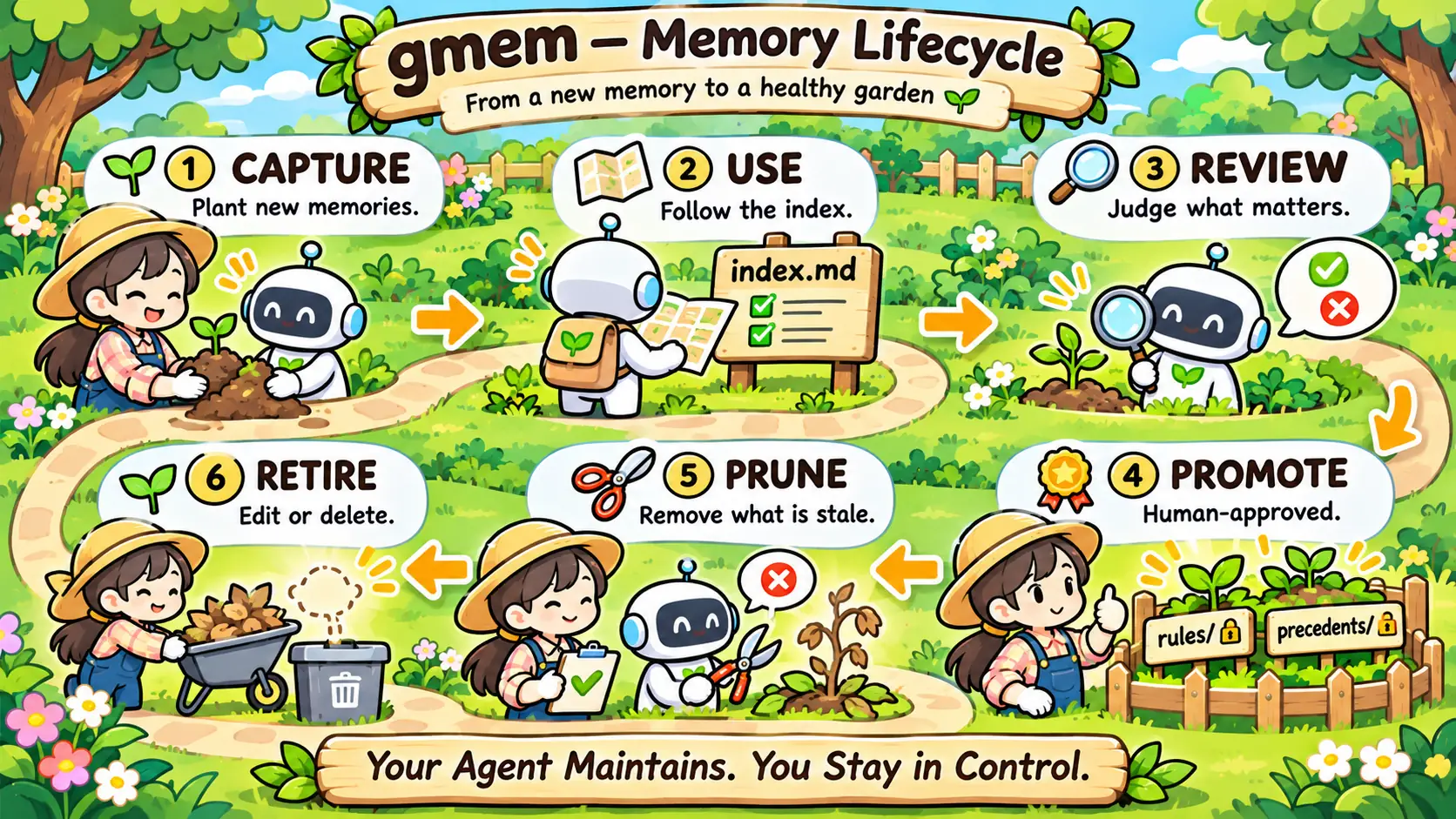
The agent writes most of the memory. You decide what stays, what gets promoted, and
what goes. This section describes each stage and what you do in it.
Capture: the agent writes, you point
Memory enters in five ways. Each kind has its own skill and its own folder. With the
default setup, all of them are under ~/.gmem/:
| You want to keep | Skill | Where it goes |
|---|---|---|
| Context you tell the agent to remember: how something works, the state of a system | gmem-memory |
memory/active/reference/<topic>.md |
| Something the agent learned on its own: from your guidance, a mistake, or a finding | gmem-learn |
learnings/<slug>.md |
| A mistake the agent made, and what to do instead | gmem-stop |
memory/active/correction/ |
| Where a piece of work stands, so the next session can pick it up | gmem-note |
note/YYYY-MM-DD_HHMM_<topic>.md |
| The story of a session: decisions, dead ends, open threads | gmem-retro |
retro/YYYY-MM-DD-<slug>.md |
The first two rows split on who knows the fact first. If you tell the agent something,
it is memory. If the agent works something out, it is a learning.
The agent reaches for gmem-learn on its own when it learns something worth keeping.gmem-bye runs at the end of a session and checks the other kinds. The one you call
yourself is gmem-stop (/gmem-stop). Run it the moment you correct the agent, because the agent
never runs it on its own. A one-line correction goes intoactive/correction/lessons.md, which gmem-recall reads on every task. A longer one
gets its own file in active/correction/ and a row in active/index.md.
Use: the agent reads in a fixed order
Before non-trivial work, gmem-recall reads rules/index.md, precedents/index.md,active/index.md, active/correction/lessons.md, and the notes markedin-progress or blocked. It opens only the
files whose index row matches the task. When two layers disagree, the higher one wins:
rules/ > precedents/ > active/ > learnings/
Notes and retros give context only. They never override a layer. gmem-recall opens
learnings, retros, and notes marked done only when a task needs them, for example
when you ask "have we hit this before?"
The order matters for what you maintain. An index row that says when to read a file
is how the agent finds it. A file without a row is easy to miss, so gmem-recall andgmem-tidy both report any file that has no row.
Review: the judge sorts, you decide
Run gmem-judge after a batch of learnings piles up. It reads every learning with an
empty reviewer field and does one of three things:
- It fixes small problems in place, such as a learning that holds two facts or tells a
story. - It writes a proposal in
proposals/when a learning should be promoted,
conflicts with a rule or precedent, or is unclear. - It leaves a clean learning alone.
It then sets reviewer, so the next run skips that file. Nothing waits on you here. A
learning stays usable whether or not anyone reads its proposal.
Promote: only you change rules and precedents
Read proposals/ when you have time (~/.gmem/proposals/ by default). For a proposal you agree with, add the
file to precedents/ or to rules/<topic>.md, and add its row to that folder'sindex.md in the same commit. The proposal already contains the row, so you can copy
it. The agent never writes to rules/ or precedents/. That limit is what makes the
top of the authority order something you can trust.
Promote rarely. A rule is for something that must never be broken. A precedent is for
a decision the agent should follow unless it states a reason not to. Most learnings
stay learnings, and that is fine.
Prune: tidy against the real code
Run gmem-check often, for example before you commit memory. It changes nothing. It
reports files in the wrong place, file names that break the pattern, index rows that
are missing or point at nothing, and frontmatter that is missing a required field. Each
finding names the skill that fixes it.
gmem-check checks format itself. If you want frontmatter checked against schemas,
install typdoc and the gmem-extensions plugin,
then run gmem-typdoc:
/plugin install gmem-extensions@gmem
/gmem-typdoc
gmem-check then uses typdoc validate for each .gmem/ folder.
Run gmem-tidy now and then, and always when the agent starts acting on facts that
are no longer true. It reads every file in the scope you choose and checks each one against
the code and scripts it describes, not only against other memory. A memory line that
contradicts the code does the most damage, because the agent trusts it.
gmem-tidy reports what it found and asks you to decide each fix, one question at a
time or through grilling or wayfinder if you installed them. After you confirm,
it moves files with git mv, writes one ledger entry that records what changed, and
rebuilds the index files.
Retire: edit or delete
When something in active/ stops being true, edit it or delete it. gmem has no
archive and no "inactive" flag. If you want a record of what used to be believed,
write a dated ledger entry in memory/ before you change the file. Set a finished
note's status to done, so gmem-recall stops reading it.
Where memory is stored
Each kind of memory has its own location in the gmem config: memory, note,rules, precedents, learnings, proposals, and retro. Run gmem-setup to choose
them. With no config, gmem uses Central memory: every kind lives in your home
directory.
~/.gmem/memory/             gmem-memory: ledger and active/
~/.gmem/note/               gmem-note
~/.gmem/rules/
~/.gmem/precedents/
~/.gmem/learnings/          gmem-learn
~/.gmem/proposals/          gmem-judge
~/.gmem/retro/              gmem-retro
In the config, ${PROJECT} stands for the project root and ${USER} for your home
directory. For example, learnings = "${PROJECT}" keeps learnings in<project>/.gmem/learnings/.
Install modes
gmem-setup offers four modes. Each is a preset of all seven locations. It also asks where
the config file lives: user level (~/.gmem/gmem-config.toml) or project level
(<project>/.gmem/gmem-config.toml).
| Mode | memory, note |
rules, precedents, learnings, proposals, retro |
Recommended config | Fits |
|---|---|---|---|---|
| Central memory (default) | ${USER} |
${USER} |
User level | Newcomers; everything in one place in your home directory |
| Home Repo Pattern memory | ${PROJECT} |
${PROJECT} |
Project level | Working across many repos from one home repo on your machine; memory and config travel with that repo |
| Dedicated agents memory | ${PROJECT} |
${USER} |
User level | Each agent or project home keeps its own context and status; what is learned and decided is shared at user level |
| Custom | ask per kind | ask per kind | none | A split the presets don't give |
Central memory shares one active/ and one note pool across every project, so context
from different projects can mix. Home Repo Pattern memory is based on
The Home Repo Pattern; see
examples/home-repo.
To share rules and precedents with your team, choose Custom in gmem-setup and
set rules and precedents to the project. They then live in the project's .gmem/
and go into git with it.
Migrating older memory
gmem used to be called typmem. The gmem-tools plugin has gmem-migrate, a
manual-only skill that moves memory from older versions (.typmem/ folders,~/.typmem/memory/, a single rules.md, precedents without an
index) or from a crew-style locker/ layout into the current one. It
shows a dry-run plan first, asks before every judgment call, and never deletes files.
To use it in Claude Code, install the plugin from the same marketplace, then run the
skill:
/plugin install gmem-tools@gmem
/gmem-migrate
The npx skills@latest add thaitype/gmem install already includes gmem-migrate.
Opening the map at session start
Installed as a Claude Code plugin, gmem has a SessionStart hook that tells the agent
to open gmem-map before its first task. It speaks up only where gmem is in use:
a gmem-config.toml or .gmem/ folder at the repository root, or a user-level~/.gmem/gmem-config.toml. With no config at all the hook stays silent, even if Central
memory already sits in ~/.gmem/, so run gmem-setup to turn it on.
If you installed the skills without the plugin (npx skills@latest add), there is no hook.
Place this in CLAUDE.md instead:
## Memory (gmem)

This project uses gmem. At the start of a session or before non-trivial work, open
`gmem-map` and follow it.
The map itself lives in the gmem-map skill, so updating the plugin updates every
project that points to it.
Reviews (0)
Sign in to leave a review.
Leave a reviewNo results found