Folio---Claude-Design-Skill-For-Poster-Brochure-Magazine
Health Warn
- License — License: Apache-2.0
- Description — Repository has a description
- Active repo — Last push 0 days ago
- Low visibility — Only 5 GitHub stars
Code Pass
- Code scan — Scanned 12 files during light audit, no dangerous patterns found
Permissions Pass
- Permissions — No dangerous permissions requested
No AI report is available for this listing yet.
Claude Code plugin and Claude skill for print design: magazines, brochures, company profiles and posters for church services, Bible verses, sports and events. Print-ready PDF/PNG plus a Canva-editable HTML of every page, humanized copy and a taste memory that learns what you approve.
Folio: Claude Design Skill for Posters, Brochures and Magazines





Design print-ready brochures, magazines, company profiles, catalogs, annual reports and posters (church services, Bible verses, sports, events and stream thumbnails) with Claude — and get a Canva-editable version of every page, automatically. folio is an open-source Claude Code plugin and Claude skill that makes Claude work like a print art director: real page layouts, a library of 11 signed-off magazine and brochure styles, AI-free copy through a built-in humanizer, automated print checks, and a taste memory that improves with every design you approve or reject.
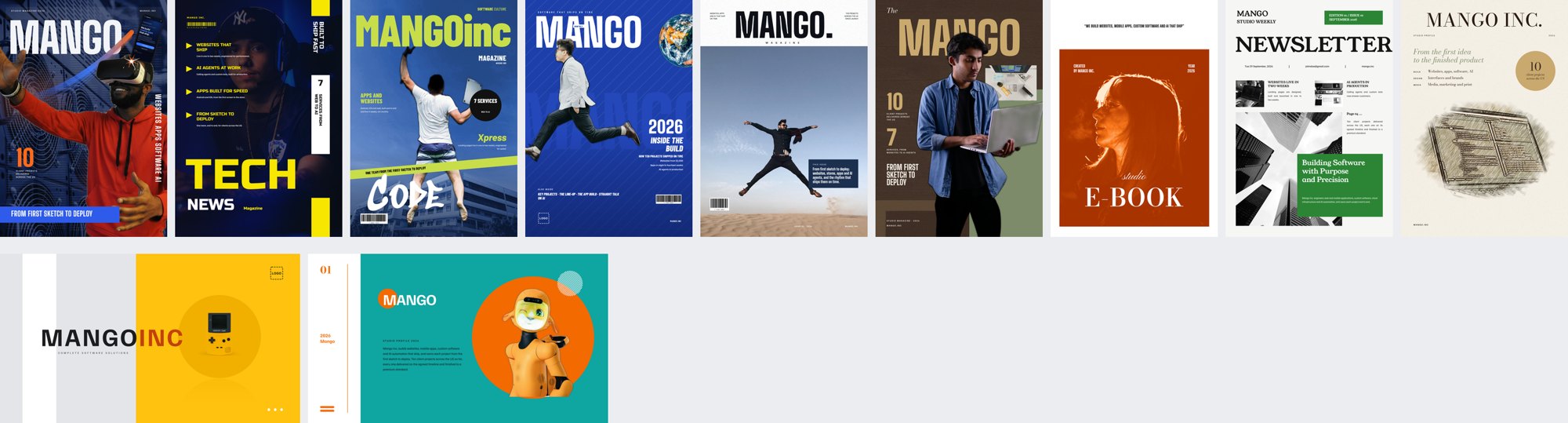
Every cover above was made by folio from one company's website facts (the sample client is Mango Inc., a made-up software studio: every company name, person, phone number, email and logo in the samples is a placeholder). No template was filled in by hand.
Keywords: Claude skill · Claude Code plugin · AI brochure design · AI magazine layout · AI poster generator · church poster design · Bible verse poster · sports poster · event flyer · YouTube thumbnail · Canva editable HTML · print-ready PDF · InDesign alternative · company profile design · annual report design · catalog design · editorial design · humanize AI text · agent skills
Contents
- What folio makes
- Why the designs don't look AI-generated
- The style catalogue: 11 ready magazine and brochure styles
- Posters: church, verse, sports and events
- How a job flows: guided, step by step
- How it works
- How it humanizes copy
- How it learns your taste and improves itself
- Canva-editable export: every image and text box stays editable
- Install · Where to use it · ChatGPT or Gemini · Quick start · Slash commands · Scripts
- FAQ · Credits · License
What folio makes
| Piece | Output |
|---|---|
| Magazines and magazine-style brochures (8–20+ pages) | Print PDF with bleed, page PNGs, spread contact sheet, Canva-editable HTML |
| Company profiles, studio books, annual reports, catalogs, quotation brochures | Same, plus client-copy verification |
| Posters, flyers and stream thumbnails for church services, Bible verses, sports and events, portrait or 16:9 (4 unique variants per request) | PNG at print or screen resolution + Canva-editable HTML |
| Old flat posters (a PNG or JPG) made editable | A clean background plate, the person as a cut-out, logos as layers, every word live text |
| Flyers, trifolds (imposed in fold order), trade-show panels, stage backdrops | Print PDF + editable HTML |
| Replicas of reference pages you like ("make it 1:1 like this") | The same grid, colour blocking and devices, filled with your content, then saved as a reusable style |
Everything is built as paged HTML/CSS in real print units (mm, pt, trim, 3 mm bleed, recto/verso margins, spreads, photos crossing the gutter) and rendered with Chromium to PDF.
Why the designs don't look AI-generated
Most AI-made PDFs are web pages printed out: the same heading-plus-cards structure on every page, rounded shadowed boxes, full-width 12 pt text, Inter, stock photos in frames, no page numbers. folio replaces each of those habits with an art director's:
- Flatplan first. Every page gets a layout pattern and a loud or quiet role before any HTML exists, so the rhythm of the book is planned.
- Locked art direction. One colour strategy, one type pair, one motif and one photo treatment, carried through every page.
- Real print rules. Folios and running heads, spreads, bleed, safe zones, gutter-aware placement, 250–300 ppi images.
- Imagery from the client's world. A software studio gets devices, its own website in phone and laptop mockups, code, servers and real technology logos, never coffee-cup lifestyle stock.
- Aesthetic type. Display faces from a curated roster (with free stand-ins for previews); common fonts are blocked in display roles.
- Measured QA.
preflight.pycatches clipped text, low-resolution images, fallback fonts, spine problems, contrast failures, decorative hairlines, too few colours, layout monotony, card shadows, lorem ipsum, and the writing tells of AI copy. - Look at every page. Claude renders, looks at the PNGs, compares them with the reference side by side, and fixes what it sees before delivering.
The style catalogue
folio ships 11 finished, user-approved styles ("kits"). Most clients bring content and a colour, not references, so folio starts from a kit, swaps in the client's colours, and fills every text and photo slot with their content. Leftover sample text or photos are a preflight error, so nothing from the sample reaches print.
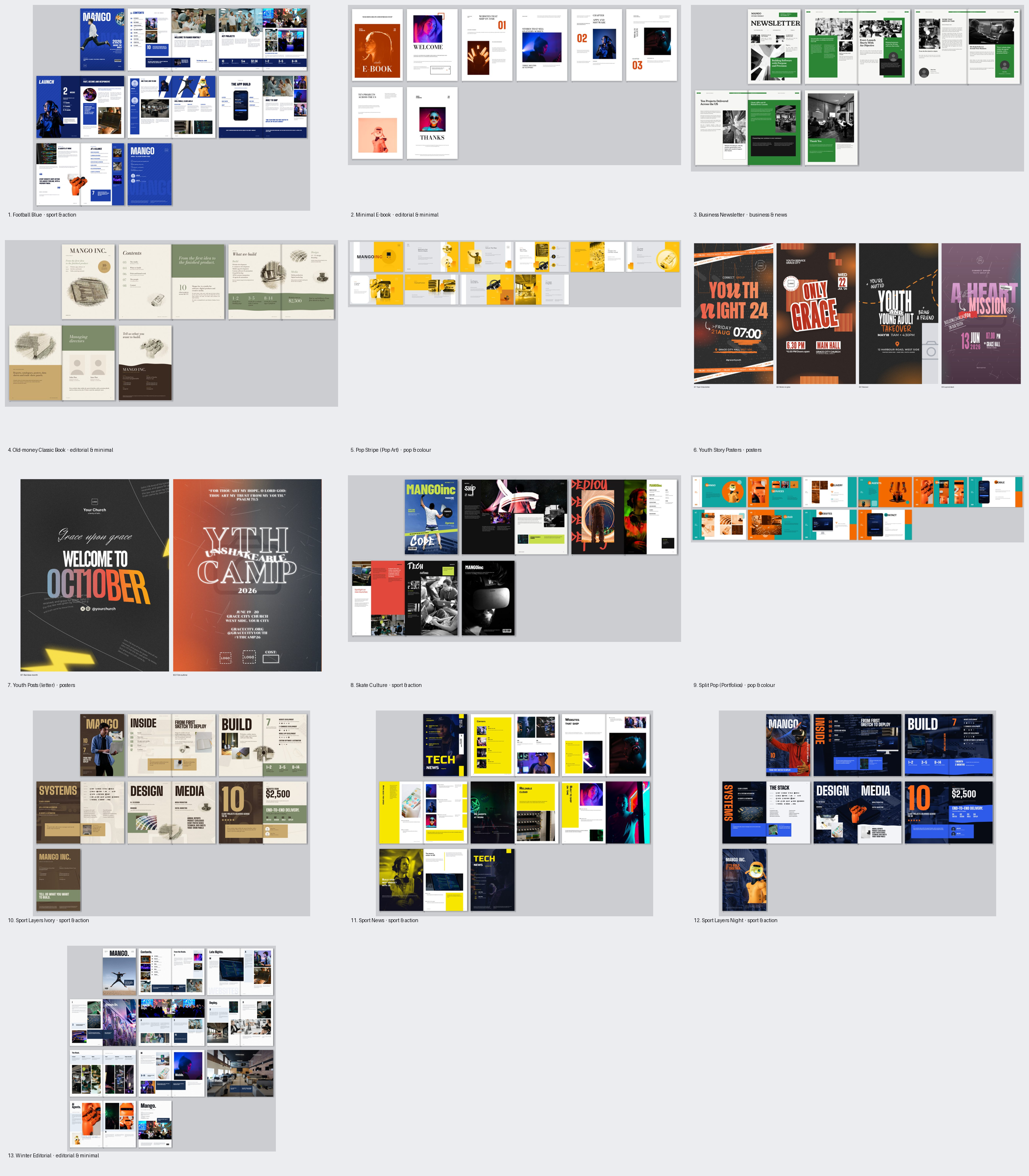
| Command | Style | Looks like |
|---|---|---|
/folio:ivory |
Sport Layers Ivory | Espresso cover with a cut-out person, ivory pages, champagne note boxes that run across the fold, sage bands |
/folio:night |
Sport Layers Night | Dark, high-contrast sports magazine: layered cover, bold vertical words, blue gutter boxes |
/folio:sports |
Sport News | Navy and acid yellow, heavy small caps, yellow panels, a vertical cover strip |
/folio:football |
Football Blue | Royal-blue monthly: huge masthead broken by a cut-out, stat rows, a striped line-up band, a full-page advert |
/folio:skate |
Skate Culture | Lime case-switch masthead, graffiti words, red and black spreads, light-trail photography |
/folio:winter |
Winter Editorial | Minimal white magazine: heavy condensed heads ending in a full stop, drop caps, panoramas across the spread |
/folio:ebook |
Minimal E-book | White pages, neon photography, Didone caps, huge numerals |
/folio:newsletter |
Business Newsletter | Newspaper masthead, green blocks over black-and-white team photos, quote boxes with portraits |
/folio:profile |
Old-money Classic Book | Ivory, espresso, champagne and sage, coloured-pencil sketches, flowing colour bands |
/folio:popart |
Pop Stripe (16:9) | Grey, white and saffron stripes, circle photos with reflections, gradient cards |
/folio:portfolio |
Split Pop (16:9) | Side rail, teal and orange splits, letter-disc titles, phone, tablet and desktop mockups |
/folio:styles shows the gallery and lets you pick. /folio:replicate copies any reference you give it 1:1; the result joins the catalogue, with its own command, only if it beats the closest existing style.
Posters: church, verse, sports and events
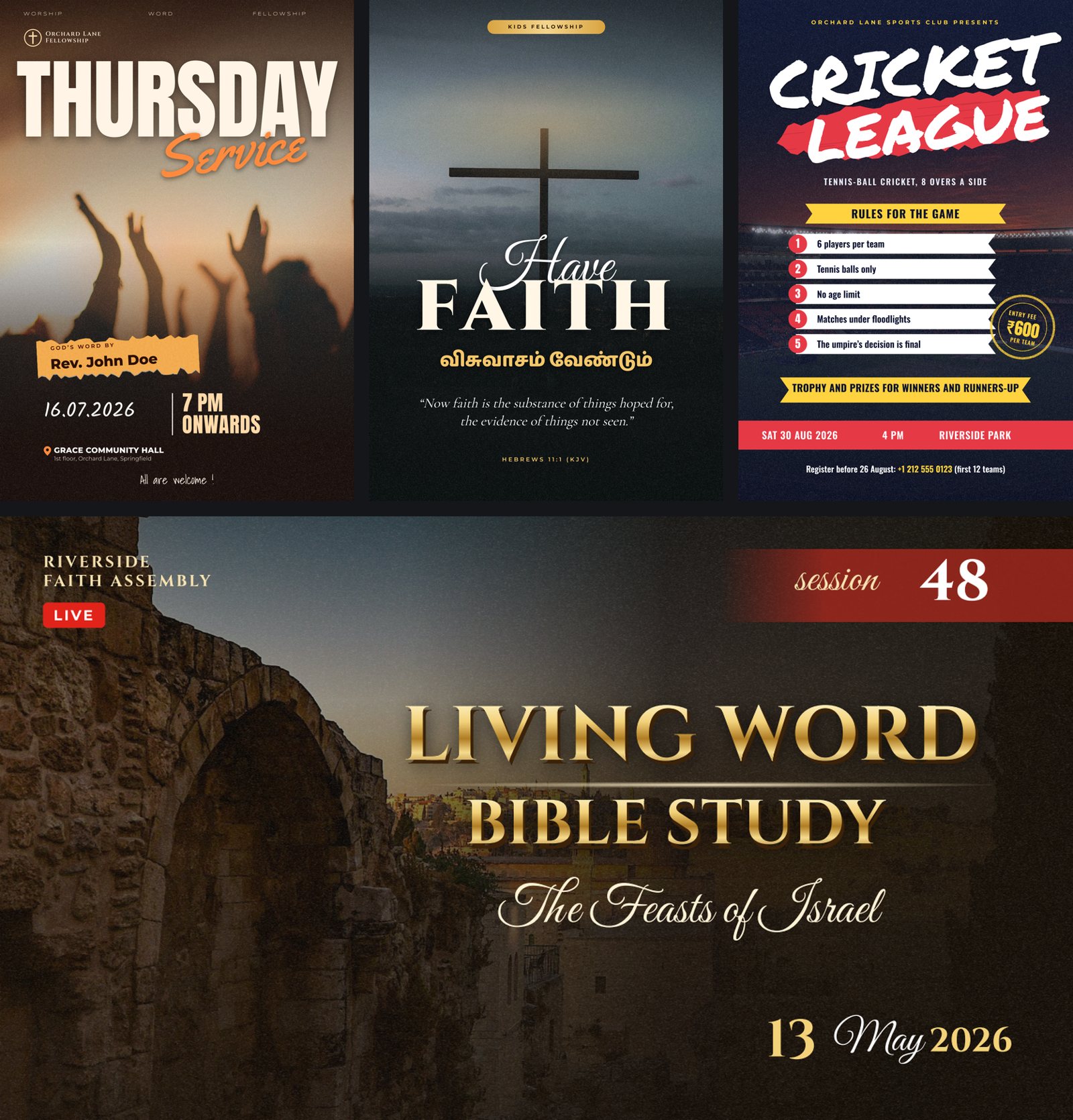
folio's poster language (skills/folio/reference/posters.md) was learned from a studio's 246 real posters (weekly church services, anointing days and worship nights, Bible-study stream thumbnails, bilingual Bible-verse posters, cricket and football leagues, national days), studied one by one and rebuilt 1:1 as editable posters. It covers the layer stack (textured ground → big symbol or venue → atmosphere → glow → speaker cut-out → headline → info modules → paper devices → series rails), ten headline treatments (script caps, nested condensed caps, gold 3D serif, outline stacks, ghost words, bilingual lockups…), info blocks, series identity and the rule that scripture is quoted exactly from a named translation, never paraphrased.
| Command | Makes |
|---|---|
/folio:poster |
Asks the topic, then the guided poster flow |
/folio:poster-church |
Service and event posters and 16:9 Bible-study thumbnails: speaker cut-out, headline behind the head, date-time block, series rails |
/folio:poster-verse |
Bible-verse and theme posters: emotive full-bleed photo, bilingual lockup, the verse quoted exactly |
/folio:poster-sports |
Leagues, matches and tournaments: marker titles, player cut-outs, rules ribbons, entry and prize badges |
/folio:poster-event |
National days, greetings, fellowships, launches and school events |
/folio:poster-youth |
Youth nights, connect groups, youth services and takeovers as 9:16 stories: caution tapes and blackletter letter swaps, die-cut sticker headlines on a glow, condensed stacks with marker notes |
Every request gives four unique variants (from different poster-kit templates where the topic has a kit) (portrait, landscape or both), as PNG plus a Canva-editable HTML where the photo, the cut-out and every word are separate layers. Hand it an old flat poster and /folio:replicate makes it editable: imagery.py fontmatch names the fonts, fit snaps live text onto the original, plate paints the old words out of a clean background and cuts the person out, compare shows the original, the rebuild and the difference side by side.
How a job flows
Say what you want and hand over whatever you have: a PDF, pasted text, your website, photos, a logo, reference images. In Claude Code you can also type /folio:new, /folio:magazine, /folio:brochure or /folio:poster. folio reads everything first and asks only what is missing, in three short rounds of one-tap questions. Every question has a recommended answer, and "you choose" is always allowed.
flowchart TD
  A["You: make a magazine from this PDF<br/>(or /folio:new)"] --> B["folio reads everything: text, photos,<br/>logo, contacts, reference images"]
  B --> C["Round 1: logo (if missing) · magazine, brochure or poster · how to write the copy"]
  C --> D["Round 2: colour palettes suggested from your logo · kind (sports, editorial, pop, business) · photos"]
  D --> E["Round 3: style, ranked for your content · contacts · pages"]
  E --> F["Page plan: layout, headline and photo for every page"]
  F -->|approve or change| G["First look: cover + first spread"]
  G --> H["Full build, every page checked"]
  H --> I["PDF + Canva file + a list of anything still to fill"]
  I --> J["Your verdict is remembered; your brand is saved for next time"]
- Colours from your logo. folio reads the logo's colours and suggests three print-safe palettes on a swatch sheet. Each comes with a reason ("gold fails as text on white, so headings use deep navy and gold stays on numbers") and the styles it suits.
- Styles ranked for your content. The top three styles in the kind you pick are ranked by your subject, your photos, the length of your text and your palette. The first one says why it fits. You can also mix two styles, taking the layout of one and the colours and type of the other.
- Photos placed where you want. The page plan shows which of your photos goes where ("team-02.jpg → cover, cut out") and fills gaps with free stock from your industry. Say "put photo 3 on page 5" and it moves.
- A first look before the full build, so a wrong direction costs one spread, not twenty pages.
- A still-to-fill list at the end. Every placeholder left (a LOGO box, an empty photo frame, a missing phone number) is listed with its page and how to finish it in Canva.
- Your brand, remembered. Logo, colours, contacts and fonts are saved per client, so the next job starts with "Use Mango Inc.'s saved brand?".
- Reference images. Copied 1:1 for your job. They join the style catalogue only if they clearly beat the closest existing style, so the catalogue stays small and good.
How it works
flowchart LR
  A[Your content, website,<br/>logo, photos or references] --> B[Guided questions<br/>logo, colours, style, photos, page plan]
  B --> C[Kit or flatplan<br/>+ locked art direction]
  C --> D[Premium copy from your facts<br/>run through the humanizer]
  D --> E[Imagery from your world<br/>grade, cut-outs, mockups, logos, sketches]
  E --> F[Paged HTML/CSS in mm/pt]
  F --> G[render.py: PDF, PNGs,<br/>contact sheet, Canva HTML]
  G --> H[Claude looks at every page<br/>+ preflight.py QA]
  H -->|fix| F
  H --> I[Deliver + ask for your verdict]
  I --> J[TASTE.md, LESSONS.md,<br/>kits: the next design starts smarter]
- Guided intake. folio reads what you already have (text, logo, photos, contacts, old brochures, your website) and asks the rest in three short rounds (see How a job flows), then shows a page plan to approve.
- Build. It starts from a kit (
kit.py new) or plans a flatplan, writes the copy from your facts, and makes the images: photo grading and duotones, background removal for magazine cut-outs, screenshots of your site framed in device mockups, single-colour technology logos, coloured-pencil sketches, flowing colour bands, hatched shapes. - Check.
render.pymakes the PDF, PNGs, a contact sheet and the Canva file; Claude looks at every page and runspreflight.pyuntil it reports 0 errors and 0 warnings. - Deliver and learn. You say what works and what doesn't; folio records it and starts from it next time.
How it humanizes copy
A layout can be studio-grade and still read as AI because of the words. folio builds in blader/humanizer and adapts it for print (skills/folio/reference/copy.md):
- Every headline, deck, caption and line folio writes goes through humanizer's patterns: no "not just X, but Y", no "Learn. Grow. Thrive." slogan rows, no "seamless", "unleash" or "where innovation meets excellence".
- Premium from thin input. When a client gives only a website or a card, folio still writes confident, specific lines built from real facts (services, timelines, prices, places, industries) instead of adjectives.
- Facts are never invented. Anything folio infers is marked
data-sampleand listed by preflight so you confirm it before printing.preflight.py --copy copy.mdchecks that every approved client sentence appears in the layout word for word. - Client copy that reads like a chatbot draft is flagged once, with an offer to humanize it without changing a fact.
How it learns and improves
folio gets better for you in four ways:
| Loop | What it does | Where |
|---|---|---|
| Taste memory | Every verdict ("love this", "no rotated headlines", "magazines should be darker") is logged with the concrete traits and turned into defaults the next design follows | skills/folio/library/TASTE.md, reference/taste.md |
| Memory across sessions | With the claude-mem plugin installed, verdicts and client facts are recalled automatically in later sessions | reference/memory.md |
| Self-repair | Any defect that would happen again on another document (a clipped word, a wrong export, a misleading rule) is patched into the skill itself as symptom → cause → fix | LESSONS.md, CHANGELOG.md |
| A growing library | References you share become layout pattern cards and direction cards; references that beat the closest style become kits with their own slash command; /folio:learn studies professional work in the lanes you like |
library/, kits/, commands/ |
Canva-editable export
Every render also writes out/<name>.editable.html: a flat, page-embedded file that imports into Canva with every text block, shape and image as its own editable element, so you can change words, swap photos and move things after Claude is done.
- One element per thing. Pages are fixed-size frames (A4 = 794 × 1123 px, tagged
data-document-role="page"); text keeps its font, size, weight, tracking, case, colour and columns; photos are cropped exactly as they appear (object-fit, focal point, masks, rounded and circle crops); rotated and tilted elements keep their rotation. - Fonts travel with the file. Only the Unicode subsets the text uses are embedded, plus a Google Fonts link.
- Under 8 MB, nothing dropped. A size budget (
--max-mb 8by default) steps only the image encoding down, from 384 ppi to 307, 250 and, as a last resort, 192 ppi, and palette-encodes the largest transparent cut-outs, until the file fits. No element or style is removed. - Checked against the PDF. Each page of the editable file is screenshotted and compared with the original; folio reports the per-page fidelity (target ≥ 97%) and writes a visual diff sheet for any page below it.
Install
Claude Code (CLI, desktop app or web): this repository is both the plugin and its marketplace. In a Claude Code session run:
/plugin marketplace add stanesjenson11-lgtm/Folio---Claude-Design-Skill-For-Poster-Brochure-Magazine
/plugin install folio@folio
or from a terminal:
claude plugin marketplace add stanesjenson11-lgtm/Folio---Claude-Design-Skill-For-Poster-Brochure-Magazine
claude plugin install folio@folio
Run /folio:setup once so plain /folio starts the guided flow (plugin commands are otherwise always prefixed, as in /folio:new). Restart the session if the /folio: commands don't appear straight away. folio has no fixed version number, so every new commit counts as an update: turn on auto-update once (/plugin → Marketplaces → folio → Enable auto-update, or "autoUpdate": true on its extraKnownMarketplaces entry) and new commits arrive within minutes of starting a session. To update by hand: claude plugin marketplace update folio then claude plugin update folio@folio.
Claude.ai / Claude desktop app (skill only): download folio.skill from the latest release and upload it under Settings → Capabilities → Skills. Then just ask ("make a magazine from this PDF"); there are no slash commands there.
From a clone:
git clone https://github.com/stanesjenson11-lgtm/Folio---Claude-Design-Skill-For-Poster-Brochure-Magazine.git
# then in Claude Code:
/plugin marketplace add ./Folio---Claude-Design-Skill-For-Poster-Brochure-Magazine
/plugin install folio@folio
Requirements (installed on demand): Python 3.10+, then
pip install playwright pypdfium2 pillow pdfplumber numpy "rembg[cpu]"
playwright install chromium
rembg is only needed for cut-outs (its model downloads once). npm fetches fonts from Fontsource, with Google Fonts as the fallback.
Where to use it
| Claude Code (terminal, VS Code / JetBrains, desktop app's Code tab) | claude.ai website | |
|---|---|---|
| Start | /folio:new (or plain /folio after running /folio:setup once), /folio:magazine, a style command, or plain words |
Plain words, or "/folio make a magazine from this PDF" |
| Questions and page plan | One-tap questions; the plan opens in plan mode for approval | One-tap questions; the plan is approved in chat |
| Fonts and stock photos | Work out of the box | Turn on code-execution network access for all domains (Settings → Capabilities), or upload your own photos |
| Styles you save, taste, client brands | Kept across chats and plugin updates | Nothing persists between chats: folio hands them back as downloads to re-upload or keep in a Project |
Recommended: Claude Code for the full experience; claude.ai works for the guided flow with the notes above.
Using folio in ChatGPT or Gemini
folio is written for Claude, but its design knowledge is plain Markdown and its pages are plain HTML/CSS, so other assistants can use it in a lighter form (no slash commands, plan mode or automatic rendering):
- Download
folio-for-chatgpt-gemini-v0.11.0.zipfrom the latest release and unzip it: 10 knowledge files and aHOW-TO.txt. - ChatGPT: Explore GPTs → Create → Configure. Instructions: "You are folio, a print art director. Follow SKILL.md and the reference files in your knowledge; ask my questions in short rounds; write every piece as paged HTML on folio.css." Upload the 10 files as Knowledge and turn on Code Interpreter.
Gemini: Gems manager → New Gem, the same instructions, and the same 10 files (Gemini's limit). - Ask in plain words ("make four church poster variants for our Thursday service"). Download the HTML it writes, keep
folio.cssbeside it, and open it in Chrome (Print → Save as PDF). For the PNGs and the Canva-editable file, run folio's scripts on your own computer:pip install playwright pypdfium2 pillow opencv-python && playwright install chromium, thenpython skills/folio/scripts/render.py poster.html --png-only.
Quick start
Just ask; the skill triggers on brochure, magazine, poster and report work:
Make a 12-page magazine for my bakery in the Sport Layers Night style. Facts are on example.com.
Here are two reference brochures I like. Copy them 1:1 with our company's content.
Redesign this old catalog PDF, same products and prices, and give me a Canva version.
Make four poster variants for our Thursday prayer service, Tamil and English.
Or start the guided flow with /folio:new make a magazine from brochure.pdf, or call a style directly: /folio:night our website is example.com.
How this repository is laid out
.claude-plugin/plugin.json        plugin manifest (name, version, keywords)
.claude-plugin/marketplace.json   makes this repo installable with /plugin marketplace add
commands/                         slash commands: /folio:new, /folio:magazine, /folio:ivory, /folio:night …
skills/folio/SKILL.md             the skill Claude loads for brochure, magazine and poster work
skills/folio/scripts/             render, preflight, Canva export, kits, imagery, palette, fonts
skills/folio/kits/                the 11 ready styles (pages, CSS, vector assets, previews)
skills/folio/library/             layout patterns, art directions, taste memory
skills/folio/reference/           the workflow: intake, copy/humanizer, typography, formats
docs/                             README images
Slash commands
| Command | Does |
|---|---|
/folio:setup |
One-time: makes plain /folio start the guided flow |
/folio:new (or /folio after setup) |
The guided flow for any new piece: logo, colours from your logo, style, photos and where they go, contacts, a page plan, a first look |
/folio:magazine /folio:brochure |
The guided flow with the type already chosen |
/folio:styles |
Show the style gallery and pick, then the guided flow |
/folio:ivory /folio:night /folio:sports /folio:football /folio:skate /folio:winter /folio:ebook /folio:newsletter /folio:profile /folio:popart /folio:portfolio |
Build a piece in that style from any content (the other questions still come) |
/folio:replicate |
Copy reference pages 1:1 with your content; saved as a new style only if it beats the closest one |
/folio:poster /folio:poster-church /folio:poster-verse /folio:poster-sports /folio:poster-event /folio:poster-youth |
The guided poster flow: topic, portrait or 16:9, four unique variants from the poster templates (PNG + Canva file) |
/folio:stock |
Find free, on-topic stock photos for a subject, with a contact sheet and credits |
/folio:taste |
Record what you liked or rejected |
/folio:learn |
Study professional references in the lanes you like and fold the best moves into the library |
Inside the skill there are also brief, direction, craft, copy, critique, polish, preflight, refs, extract, export, imagery and promo routes (see skills/folio/SKILL.md).
Scripts
python skills/folio/scripts/kit.py list | new <kit> <project> [--brand #hex --accent #hex] | save <project> <kit> [--builtin] | gallery | home
python skills/folio/scripts/render.py brochure.html [--bleed 3] [--single] [--png-only] [--max-mb 8]
python skills/folio/scripts/editable.py brochure.html [--max-mb 8]      # Canva-editable HTML on its own
python skills/folio/scripts/preflight.py brochure.html [--copy copy.md] [--source source.md]
python skills/folio/scripts/palette.py --brand "#8B1E3F" [--from-image logo.png] --out palette
python skills/folio/scripts/imagery.py grade | motif | cutout [--person] | sketch | screenshot | mockup | logos | hatch | divide | device | reflect | texture | mask | prompt
python skills/folio/scripts/imagery.py fontmatch crop.png "WORDS" | fit old.png poster.html --apply | plate old.png --html poster.html --person | compare old.png new.png
python skills/folio/scripts/fonts.py "Big Shoulders Display:800,900" "Familjen Grotesk:400,700" --out fonts
python skills/folio/scripts/promo.py out --format square|vertical|landscape      # mockups, social stills, page-flip reel
python skills/folio/scripts/harvest.py old.pdf --out harvest                     # mine an old PDF for photos, copy, colours
kit.py, render.py, editable.py, preflight.py and imagery.py carry doctest self-checks: python -m doctest skills/folio/scripts/<script>.py.
FAQ
Can Claude design a brochure or magazine?
Yes. With folio installed, Claude plans the pages, writes the copy, sources and treats the images, builds the layout in HTML/CSS with print units and renders a print-ready PDF, a PNG per page and a Canva-editable file.
How do I get an editable Canva design from Claude?
Import the out/<name>.editable.html folio writes on every render. Each text box, shape and image arrives as a separate element, and the file stays under 8 MB.
Is it a replacement for InDesign?
For brochures, magazines, company profiles, catalogs and posters, folio produces print-ready PDFs with bleed directly. If a printer insists on native InDesign files, pair it with an InDesign MCP server.
Does it use my client's photos and fonts?
Yes, first. It reads your logo colours, photos and old brochures before proposing anything, and uses stock only where you have none, always credited and never captioned as your team.
Can it copy a design I like?
Give it the reference images and ask for 1:1. It matches the grid, proportions, colour blocking, type behaviour and devices with your content, tells you every deviation (for example where contrast would fail in print), and saves the result as a reusable style.
Does it work without references?
Yes; that is what the style catalogue is for. Pick a style, give it your content, and it builds from a finished, approved design.
Credits
folio learned from nine open-source design skills (impeccable, huashu-design, hallmark, taste-skill, ui-ux-pro-max, claude-design-skill, print-studio, brag, html-magazine, html-anything) and builds in blader/humanizer for copy; see CREDITS.md. Sample photographs in the example pieces are from Unsplash (credited on each piece's back page); technology logos come from Simple Icons and remain trademarks of their owners. Private reference material and client work are not included in this repository.
License
Apache-2.0. Fonts fetched by the scripts are SIL OFL (via Fontsource or Google Fonts).
Reviews (0)
Sign in to leave a review.
Leave a reviewNo results found