cc-blackbox
Health Gecti
- License — License: MIT
- Description — Repository has a description
- Active repo — Last push 0 days ago
- Community trust — 10 GitHub stars
Code Basarisiz
- rm -rf — Recursive force deletion command in install.sh
Permissions Gecti
- Permissions — No dangerous permissions requested
This Rust-based agent acts as a local flight recorder and live dashboard for Claude Code sessions. It monitors your terminal sessions in real-time to detect slow performance, cache waste, tool failures, and model fallbacks.
Security Assessment
Overall Risk: Medium. The tool intercepts and analyzes all CLI traffic to provide its metrics, meaning it inherently accesses sensitive session data, prompts, and API interactions. Fortunately, it is designed with a strict privacy-first approach: it does not phone home, defaults to binding ports locally to 127.0.0.1, and fails open so your work continues even if the monitor crashes. However, the automated rule-based scan flagged a critical failure. The installation script contains a recursive force deletion command (`rm -rf`). While common in update scripts, this poses a significant system destruction risk if the script is ever altered or if path variables are mishandled. No dangerous permissions or hardcoded secrets were found in the application itself.
Quality Assessment
The project is actively maintained, with its last push occurring today. It uses the standard and permissive MIT license, and the repository includes a clear description and thorough documentation. The main drawback is extremely low community visibility. With only 8 GitHub stars, the tool has not undergone widespread peer review or testing. Developers should be aware that they are relying primarily on the single author's security practices and code quality.
Verdict
Use with caution: the privacy-focused architecture is excellent, but the risky `rm -rf` flag in the install script and complete lack of community auditing warrant manual review before deployment.
Claude Code session supervision: know which agent is stuck, wasting cache, nearing compaction, failing tools, or silently falling back.
cc-blackbox
Claude Code can quietly turn expensive or unproductive before it obviously fails. A session repeats tools, loses cache, drifts toward compaction, hits the wrong model route, or burns tokens while the terminal scrollback keeps moving. When you finally stop, it is hard to answer the basic question: what happened, and should I restart?
cc-blackbox runs Claude Code through a local proxy and gives you a redacted Postmortem for the session. It shows the session state, the signals that matter, the evidence behind the diagnosis, and the next action worth taking. Live watch and Grafana are there when you need them, but the first useful thing is the terminal Postmortem.
The proxy, database, metrics, dashboard, and CLI run on your machine. cc-blackbox does not send telemetry to a hosted cc-blackbox service. Claude Code API traffic is proxied to Anthropic, and Claude-assisted postmortems ask Claude to analyze redacted evidence unless you disable that step.
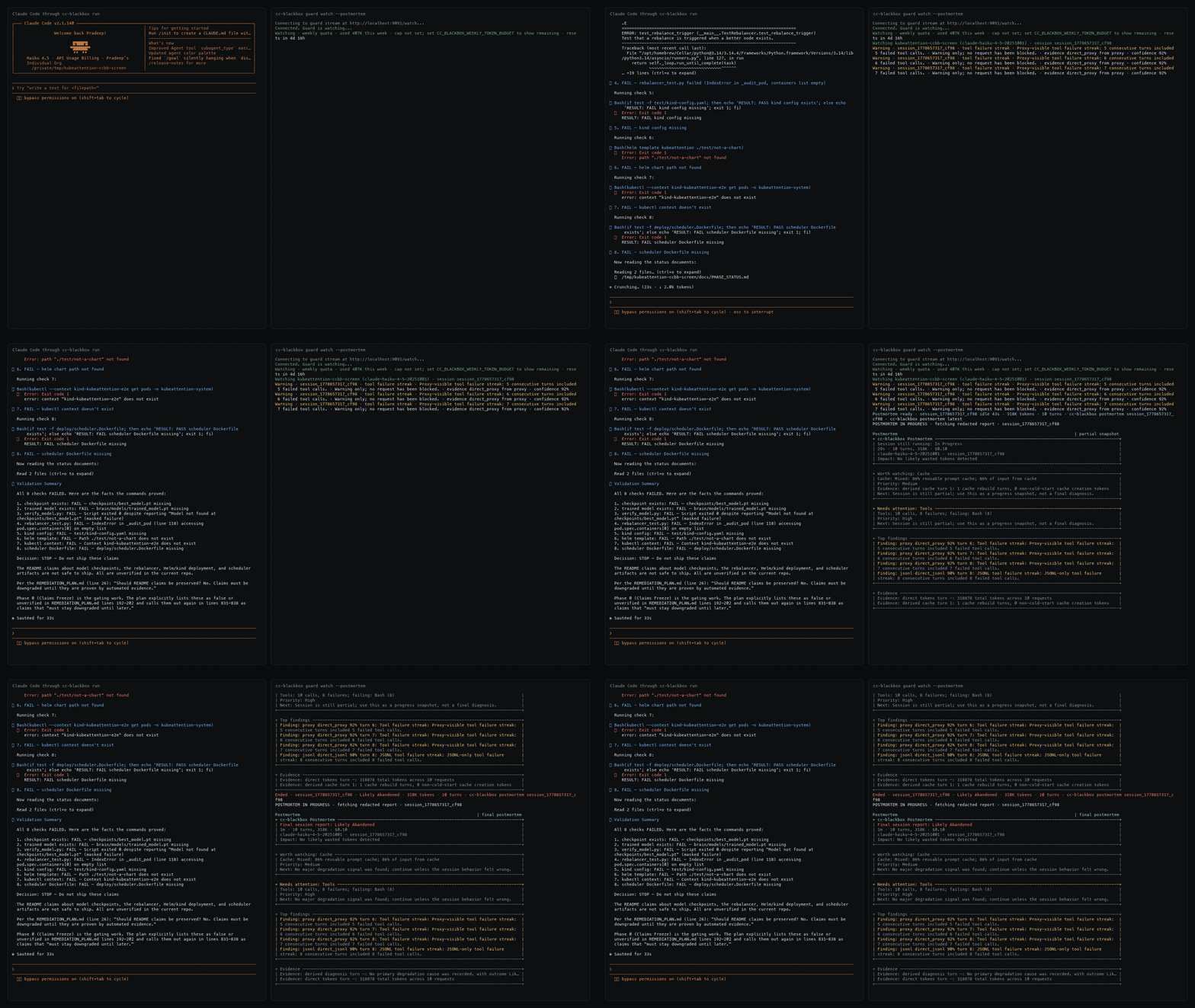
Postmortem
cc-blackbox run claude --watch
# work normally, then end the session
cc-blackbox postmortem last
The default workflow is to use watch for live activity, then run cc-blackbox postmortem last when you want the report. Postmortems are redacted by default. cc-blackbox watch does not print postmortems automatically unless you opt in with --postmortem, which keeps the watch stream readable during busy multi-session work.
# cc-blackbox Postmortem

## Snapshot
  Session       `session_1776_abcd`
  State         final postmortem
  Outcome       Degraded
  Model         claude-sonnet-4-6
  Duration      18m
  Turns/tokens  7 turns, 214K
  Cost          $4.91

## Signals
  Cause    Repeated cache rebuilds [heuristic]
  Cache    Low: 42% reusable prompt cache; 36% of input from cache
  Context  High: 87% full; about 1 turn before auto-compaction
  Waste    Likely waste: 76K tokens, $1.84
  Tools    14 calls, 0 failures; repeated: Read, Edit
  Skills   No failed skill events detected
  MCP      No failed MCP calls detected
  Next     Restart with a shorter prompt and inspect the repeated Read/Edit path first.

## Evidence
  Type        Signal        Turn   Detail
  ----------  ------------  -----  ------
  direct      cache         6      cache miss followed by 62K cache creation tokens
  direct      tools         7      14 Read/Edit calls against the same redacted path

## Claude Analysis
  Status       Final - session degraded after a cache rebuild
  Main signal  Read/Edit loop began after the cache miss
  Risk         High - context estimate is heuristic, but the direct tool loop is enough to act
  Next action  Restart with the summary and ask for one file-level change at a time

## Restart Prompt
  Continue from this summary. Make one file-level change at a time, and inspect the repeated Read/Edit path before editing.
Claude-assisted synthesis is on by default. It sends only the redacted postmortem JSON to Claude for analysis. For deterministic output without that extra Claude analysis call, run:
cc-blackbox postmortem last --no-analyze-with-claude
Quick Start
Install cc-blackbox:
curl -fsSL https://raw.githubusercontent.com/softcane/cc-blackbox/main/install.sh | sh
Start using it:
cc-blackbox doctor
cc-blackbox up
cc-blackbox run claude --watch
What cc-blackbox Catches
- Sessions going sideways: Tool loops, repeated failures, cache rebuilds, context pressure, and model route mismatches.
- Token and cost waste: Estimated spend, likely wasted tokens, cache reuse, quota burn, and budget pressure.
- Multi-session confusion: Which Claude sessions are active, idle, blocked, expensive, or worth restarting.
Why It Is Safe To Run Locally
cc-blackbox is designed to be safe to try because it stays local and is easy to stop using.
- Local-first: The proxy, core service, SQLite database, metrics, dashboard, and CLI run on your machine. Ports bind to
127.0.0.1by default. - No full transcript storage: cc-blackbox stores metrics, cleaned first-prompt excerpts, compact response summaries, and tool summaries, not full conversation history or raw file contents.
- Fails open: If cc-blackbox stops, Claude Code traffic can keep going to Anthropic.
- Evidence is labeled: Costs are estimates, context runway is heuristic, and model route mismatch reports observed requested/actual models without claiming provider cause.
What cc-blackbox Surfaces
- Live watch: Tool activity, cache state, context pressure, model route mismatch, quota burn, and active session status.
- Postmortems: Redacted reports with likely cause, direct/heuristic evidence, confidence, token/cost impact, and the next action.
- History and dashboards: Recent sessions, lightweight recall, local
/metrics, and Grafana trends.
Reference
Advanced
Supporting Workflows
Postmortems explain one session. Watch mode and Grafana help when you want live status or history across many sessions.
- Read the latest postmortem:
cc-blackbox postmortem last - Force local-only postmortem synthesis:
cc-blackbox postmortem last --no-analyze-with-claude - Render local unredacted evidence:
cc-blackbox postmortem last --no-redact - Watch all active sessions:
cc-blackbox watch --url http://127.0.0.1:9091 - Opt into automatic watch postmortems:
cc-blackbox watch --postmortem - Watch all sessions in tmux:
cc-blackbox watch --tmux - Watch one session:
cc-blackbox watch --session session_1776... --url http://127.0.0.1:9091 - Review recent sessions:
cc-blackbox sessions --limit 20 --days 7 - Open the local session API:
curl -s 'http://127.0.0.1:9091/api/sessions?limit=5' - Read the current local summary:
curl -s http://127.0.0.1:9091/api/summary - Inspect one session diagnosis:
curl -s http://127.0.0.1:9091/api/diagnosis/<session_id> - Recall where you left off:
cc-blackbox recall "auth middleware" - Advanced hook setup: Claude Code hook telemetry
Open Grafana at http://127.0.0.1:3000/d/cc-blackbox-main. Anonymous viewer mode is enabled, and the local admin login is admin / admin.
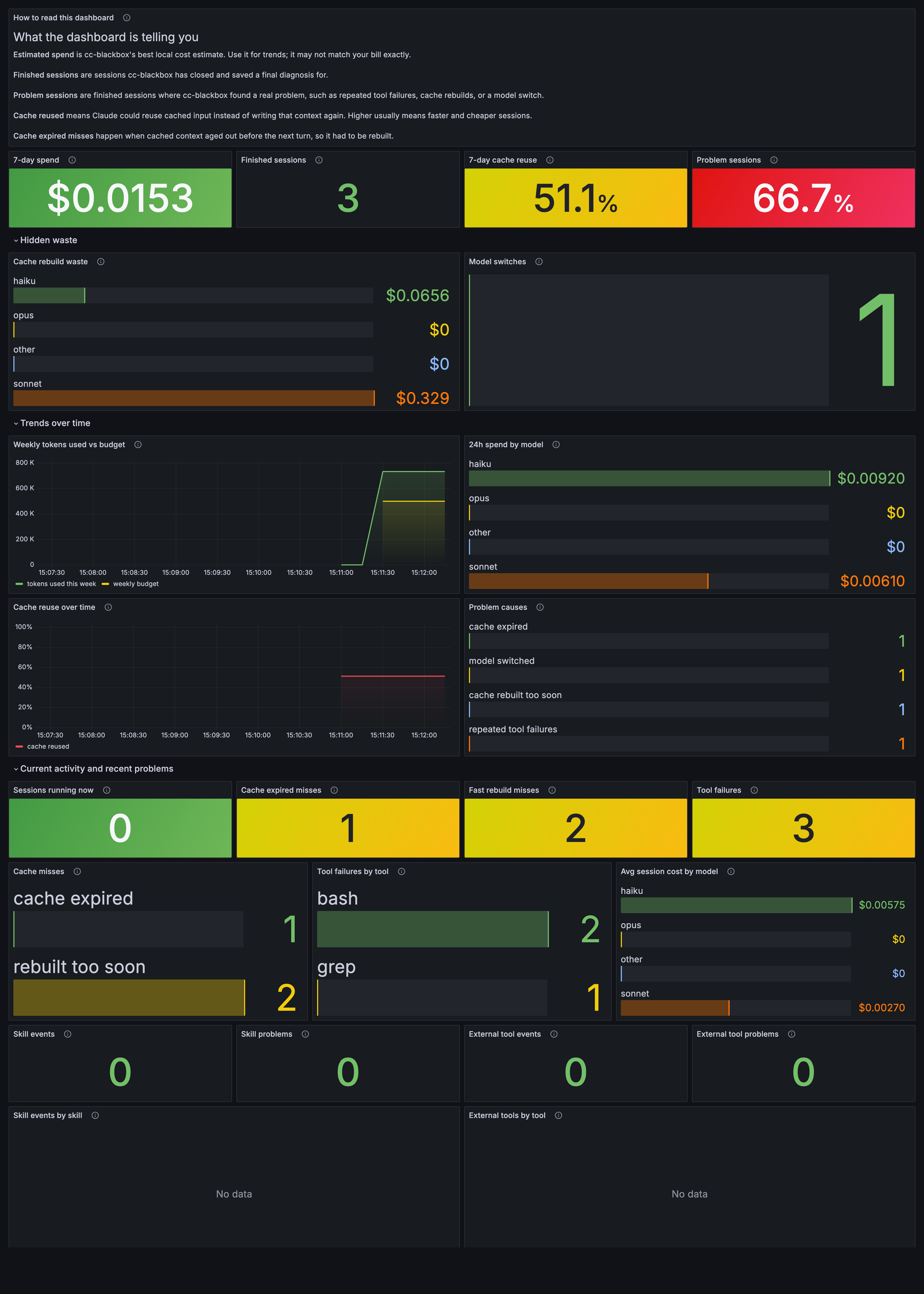
Live watch output stays compact:
[session-api]     14:03:11  READ    src/routes.rs
[session-api]     14:03:13  CACHE   ○ miss (TTL inferred) · expires in 2m14s · est. rebuild $0.43
[session-worker]  14:04:02  CONTEXT 82% full · inferred ~2 turns to auto-compact
[session-auth]    14:05:20  ⚠ MODEL ROUTE requested opus, got sonnet
Replace session_1776... and <session_id> with real session IDs from watch output or /api/sessions. Recall searches the cleaned first prompt and compact final summary for each stored session. If you subscribe to a known in-progress session after it already started, cc-blackbox injects a synthetic SessionStart so the watcher still gets the session header and cleaned initial prompt.
Links
Yorumlar (0)
Yorum birakmak icin giris yap.
Yorum birakSonuc bulunamadi