sqlctx
Health Gecti
- License — License: AGPL-3.0
- Description — Repository has a description
- Active repo — Last push 0 days ago
- Community trust — 143 GitHub stars
Code Gecti
- Code scan — Scanned 12 files during light audit, no dangerous patterns found
Permissions Gecti
- Permissions — No dangerous permissions requested
Bu listing icin henuz AI raporu yok.
The universal metrics layer. Compatible with 15+ formats: Cube, MetricFlow, LookML, Omni, BSL, LDM, Cortex, Malloy, OSI, SML, TML, Hex, Rill, Superset
sqlctx
sqlctx is an open-source semantic runtime. Define governed metrics once—or import the semantic models you already have—and query them consistently from SQL, the CLI, Python, HTTP, PostgreSQL clients, notebooks, BI tools, and AI agents.
- Bring existing models: Power BI TMDL/DAX, Cube, dbt MetricFlow, LookML, Hex, Rill, Superset, Omni, BSL, GoodData LDM, Snowflake Cortex, Malloy, Apache Ossie, AtScale SML, and ThoughtSpot TML
- Or author natively: concise YAML, semantic SQL DDL, or Python
- Run on your warehouse: DuckDB, MotherDuck, PostgreSQL, BigQuery, Snowflake, ClickHouse, Databricks, Spark SQL, and ADBC sources
- Consume metrics anywhere: semantic SQL, CLI, Python, HTTP/Arrow, PostgreSQL wire protocol, MCP, notebooks, TypeScript/WASM, and embedded analytics
Documentation | GitHub | Docker | Discord | Demo (50+ MB data download, runs in your browser with Pyodide + DuckDB)
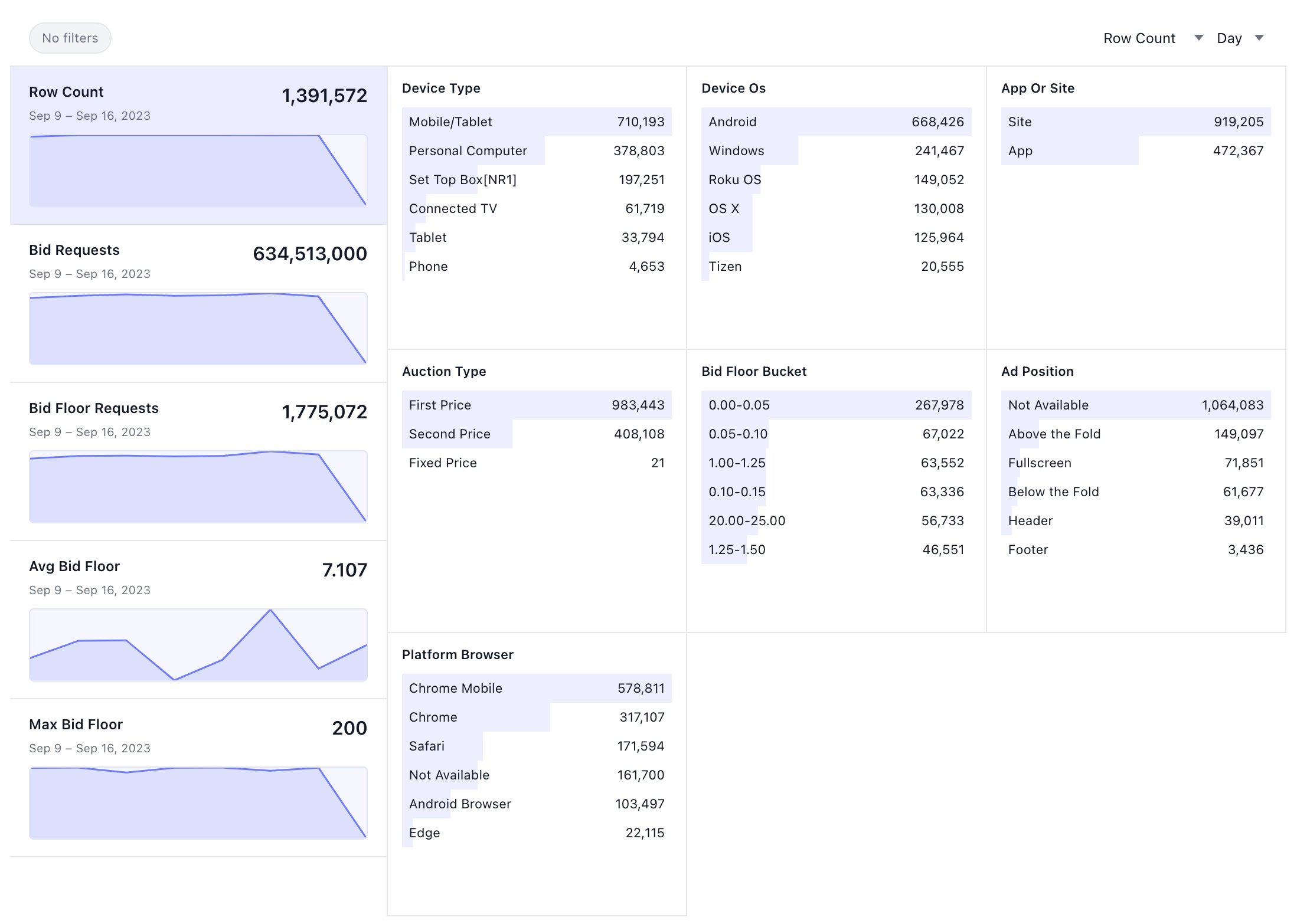
sqlctx ships Claude Code and Codex plugin metadata for two skills (modeler and webapp-builder). See Agent Plugin below to install.
Contributors working on browser surfaces should read the UI architecture and canonical ownership map.
60-second quickstart
Install from GitHub while PyPI serves the earlier sqlctx tool.
See it working before writing anything — one command creates a complete demo
project (models, sample DuckDB data, golden tests) and runs a first query:
uvx --from git+https://github.com/sidequery/sqlctx sqlctx demo
Start from your own data — sqlctx introspects it and generates models with
inferred dimensions, metrics, and relationships:
uvx --from git+https://github.com/sidequery/sqlctx sqlctx init analytics --from 'data/*.csv'   # also Parquet, JSON, DuckDB
cd analytics
uvx --from git+https://github.com/sidequery/sqlctx sqlctx query "SELECT orders.record_count FROM orders"
uvx --from git+https://github.com/sidequery/sqlctx sqlctx test              # golden-query assertions
uvx --from git+https://github.com/sidequery/sqlctx sqlctx validate --live   # models vs. actual database schema
uvx --from "sqlctx[api,mcp] @ git+https://github.com/sidequery/sqlctx" sqlctx serve   # web UI + HTTP API + MCP on one port
Or write a model by hand. Create models/orders.yml:
models:
  - name: orders
    sql: |
      select * from (values
        (1, 'paid',    120.00),
        (2, 'paid',     80.00),
        (3, 'pending',  50.00)
      ) as t(id, status, amount)
    primary_key: id
    dimensions:
      - name: status
        type: categorical
        sql: status
    metrics:
      - name: revenue
        agg: sum
        sql: amount
      - name: order_count
        agg: count
Query it directly—no database setup or package installation required:
uvx --from git+https://github.com/sidequery/sqlctx sqlctx query \
  "SELECT orders.status, orders.revenue, orders.order_count
   FROM orders
   ORDER BY orders.status" \
  --models ./models
status,revenue,order_count
paid,200.00,2
pending,50.00,1
From here, inspect generated warehouse SQL or open an interactive explorer:
# Compile without executing
uvx --from git+https://github.com/sidequery/sqlctx sqlctx query \
  "SELECT orders.status, orders.revenue FROM orders" \
  --models ./models --dry-run

# Explore in the terminal
uvx --from "sqlctx[workbench] @ git+https://github.com/sidequery/sqlctx" sqlctx workbench ./models
Choose your path
- Import existing semantic models: point sqlctx at a Cube, MetricFlow, LookML, Power BI, Malloy, Rill, or other supported project. Start with the adapter guide.
- Model tables or SQL: continue with models, dimensions, metrics, and relationships.
- Query governed metrics: use the CLI, semantic SQL, or Python API.
- Explore data: launch the terminal workbench, notebook widget, or browser UI.
- Serve other tools: expose models over the HTTP API, PostgreSQL wire protocol, or MCP server.
Install sqlctx in a project with uv add git+https://github.com/sidequery/sqlctx. Optional features are packaged as extras:
- Interfaces:
api(HTTP API andsqlctx serve),mcp(MCP server),apps(MCP apps with charts),serve(PostgreSQL wire protocol server),workbench(terminal UI),widget(Jupyter widget),charts(Altair charts for MCP chart tools), andlsp(language server) - Model formats:
lookml,metricflow,malloy,dax(Power BI TMDL/DAX), andossie(Apache Ossie schema validation) - Databases:
postgres,bigquery,snowflake,clickhouse,databricks,spark, andadbc, orall-databasesfor all of them - Engine:
rust(Rust engine) andfast(compiled SQLGlot) - Bundle:
full(every interface, format, and engine extra exceptserve,fast, and the databases)
Python is the default engine. To build the optional Rust engine from source and select it with --engine rust, follow Rust engine mode.
DAX And TMDL
DAX/TMDL support lives behind the dax extra because it includes a native Rust parser:
git clone https://github.com/sidequery/sqlctx.git
cd sqlctx
uv sync --extra dax
Native sqlctx YAML can preserve DAX expression source text next to the SQL definition sqlctx queries, for Power BI interoperability:
models:
  - name: sales
    table: sales
    primary_key: id
    dimensions:
      - name: doubled_amount
        type: numeric
        sql: amount * 2
        expression_language: dax
        dax: "'sales'[amount] * 2"
    metrics:
      - name: revenue
        agg: sum
        sql: amount
        expression_language: dax
        dax: "SUM('sales'[amount])"
Power BI TMDL projects can be loaded from a project root or definition/ folder. Embedded DAX measures, calculated columns, calculated tables, relationships, and TMDL passthrough metadata are parsed and preserved in model metadata:
from sqlctx import SemanticLayer, load_from_directory

layer = SemanticLayer(connection="duckdb://warehouse.duckdb")
load_from_directory(layer, "powerbi_project/")
print(layer.describe_models(["Sales"]))
TMDL can also round-trip back to disk:
from sqlctx.adapters.tmdl import TMDLAdapter

TMDLAdapter().export(layer.graph, "exported_tmdl/")
CLI
# Scaffold a project (optionally generating models from your data)
sqlctx init
sqlctx init --from data/orders.csv --from data/customers.parquet

# Self-contained demo project with sample data
sqlctx demo

# Query as a human-readable table (also supports csv, json, and jsonl)
sqlctx query "SELECT revenue FROM orders" --db data.duckdb --format table

# Query raw files directly (CSV, Parquet, JSON become tables named by file stem)
sqlctx query "SELECT orders.revenue FROM orders" --db data/orders.csv

# Golden-query tests: pin expected metric values so definitions cannot drift
sqlctx test

# Serve teammates and tools on one port: web UI, HTTP API, and MCP
uvx --from "sqlctx[api,mcp] @ git+https://github.com/sidequery/sqlctx" sqlctx serve models/ --db data.duckdb

# Interactive workbench (TUI with SQL editor + charts)
uvx --from "sqlctx[workbench] @ git+https://github.com/sidequery/sqlctx" sqlctx workbench models/ --db data.duckdb

# PostgreSQL server (connect Tableau, DBeaver, etc.)
uvx --from "sqlctx[serve] @ git+https://github.com/sidequery/sqlctx" sqlctx server postgres models/ --port 5433

# HTTP API server (JSON or Arrow)
uvx --from "sqlctx[api] @ git+https://github.com/sidequery/sqlctx" sqlctx server api models/ --port 4400 --auth-token-file .secrets/api-token

# Validate definitions (--live also checks tables/columns against the database)
sqlctx validate models/
sqlctx validate models/ --live --db data.duckdb

# Model info
sqlctx info models/

# Pre-aggregation recommendations from a log of compiled queries
# (or --connection for Snowflake, BigQuery, Databricks, or ClickHouse query history)
sqlctx preagg recommend --queries queries.sql

# Migrate SQL queries to semantic layer
sqlctx migrate generate legacy/ --output output/
See the CLI contract for output formats, --plain, quiet/verbose
diagnostics, option placement, terminal behavior, environment precedence,
stdin/stdout, exit codes, debugging, and secure credential input.
Demos
Workbench (TUI with SQL editor + charts):
uvx --from "sqlctx[workbench] @ git+https://github.com/sidequery/sqlctx" sqlctx workbench --demo
PostgreSQL server (connect Tableau, DBeaver, etc.):
uvx --from "sqlctx[serve] @ git+https://github.com/sidequery/sqlctx" sqlctx server postgres --demo --port 5433
HTTP API server (JSON or Arrow):
uvx --from "sqlctx[api] @ git+https://github.com/sidequery/sqlctx" sqlctx server api --demo --port 4400
Colab notebooks:
 SQL + DuckDB
LookML multi-entity
SQL syntax:
uv run https://raw.githubusercontent.com/sidequery/sqlctx/main/examples/sql/sql_syntax_example.py
Comprehensive demo:
uv run https://raw.githubusercontent.com/sidequery/sqlctx/main/examples/advanced/comprehensive_demo.py
Symmetric aggregates:
uv run https://raw.githubusercontent.com/sidequery/sqlctx/main/examples/features/symmetric_aggregates_example.py
Superset with DuckDB:
git clone https://github.com/sidequery/sqlctx.git && cd sqlctx
uv run examples/superset_demo/run_demo.py
Cube Playground:
git clone https://github.com/sidequery/sqlctx.git && cd sqlctx
uv run examples/cube_demo/run_demo.py
Rill Developer:
git clone https://github.com/sidequery/sqlctx.git && cd sqlctx
uv run examples/rill_demo/run_demo.py
Apache Ossie (complex adtech semantic model):
git clone https://github.com/sidequery/sqlctx.git && cd sqlctx
uv run examples/osi_demo/run_demo.py
Apache Ossie widget notebook (percent-cell Python notebook):
git clone https://github.com/sidequery/sqlctx.git && cd sqlctx
uv run examples/osi_demo/osi_widget_notebook.py
See examples/ for more.
Core Features
- SQL query interface with automatic rewriting
- Automatic joins across models
- Multi-format adapters (Cube, MetricFlow, LookML, Hex, Rill, Superset, Omni, BSL, GoodData LDM, Apache Ossie, AtScale SML, ThoughtSpot TML, Graphene GSQL)
- SQLGlot-based SQL generation and transpilation
- Pydantic validation and type safety
- Pre-aggregations with explicit routing
- Predicate pushdown for faster queries
- Segments and metric-level filters
- Jinja2 templating for dynamic SQL
- PostgreSQL wire protocol server for BI tools
- HTTP API with JSON and Arrow IPC responses
Multi-Format Support
Auto-detects: sqlctx (SQL/YAML), Power BI TMDL, Cube, MetricFlow (dbt), LookML, Hex, Rill, Superset, Omni, BSL, GoodData LDM, Apache Ossie, AtScale SML, ThoughtSpot TML, Graphene GSQL
sqlctx query "SELECT revenue FROM orders" --models ./my_models
from sqlctx import SemanticLayer, load_from_directory

layer = SemanticLayer(connection="duckdb://data.duckdb")  # duckdb:///abs/path.duckdb for absolute paths
load_from_directory(layer, "my_models/")  # Auto-detects formats
Apache Ossie is registered as format ossie; osi, apache-ossie, andopen-semantic-interchange remain accepted aliases. Use an explicit format when
selecting an Ossie scope or execution dialect:
sqlctx convert commerce.ossie.yaml \
  --from ossie --to sqlctx --output models.yml \
  --ossie-scope commerce --ossie-target-dialect bigquery

sqlctx convert models/orders.yml \
  --from sqlctx --to ossie --output commerce.ossie.yaml \
  --ossie-scope commerce --ossie-expression-dialect BIGQUERY
See the Apache Ossie compatibility guide for the
pinned schema profiles, validation policies, scope rules, and round-trip limits.
Databases
| Database | Status | Installation |
|---|---|---|
| DuckDB | ✅ | built-in |
| MotherDuck | ✅ | built-in |
| PostgreSQL | ✅ | uv add "sqlctx[postgres] @ git+https://github.com/sidequery/sqlctx" |
| BigQuery | ✅ | uv add "sqlctx[bigquery] @ git+https://github.com/sidequery/sqlctx" |
| Snowflake | ✅ | uv add "sqlctx[snowflake] @ git+https://github.com/sidequery/sqlctx" |
| ClickHouse | ✅ | uv add "sqlctx[clickhouse] @ git+https://github.com/sidequery/sqlctx" |
| Databricks | ✅ | uv add "sqlctx[databricks] @ git+https://github.com/sidequery/sqlctx" |
| Spark SQL | ✅ | uv add "sqlctx[spark] @ git+https://github.com/sidequery/sqlctx" |
Docker
Build the image from the repository root. Mount your models directory as a volume at /app/models:
docker build -t sidequery/sqlctx .
docker run -p 5433:5433 -v ./models:/app/models sidequery/sqlctx
Demo mode (built-in sample data, no volume needed):
docker run -p 5433:5433 sidequery/sqlctx --demo
See examples/docker/ for MCP mode, env vars, building from source, and integration test services.
For Cloudflare Worker + Container deployment, see examples/cloudflare_containers/.
HTTP API
These examples use the project created by uvx --from git+https://github.com/sidequery/sqlctx sqlctx demo. Create a
bearer token file, then start the API server:
cd sqlctx-demo
mkdir -p .secrets && openssl rand -hex 32 > .secrets/api-token
uvx --from "sqlctx[api] @ git+https://github.com/sidequery/sqlctx" sqlctx server api models/ --db data/demo.duckdb --port 4400 --auth-token-file .secrets/api-token
In another terminal in sqlctx-demo, compile a structured semantic query:
curl -s http://localhost:4400/compile \
  -H "Authorization: Bearer $(cat .secrets/api-token)" \
  -H "Content-Type: application/json" \
  -d '{"dimensions":["orders.status"],"metrics":["orders.revenue"]}'
Run a structured query as JSON:
curl -s http://localhost:4400/query \
  -H "Authorization: Bearer $(cat .secrets/api-token)" \
  -H "Content-Type: application/json" \
  -d '{"dimensions":["orders.status"],"metrics":["orders.revenue","orders.order_count"]}'
Run a structured query as Arrow IPC:
curl -s http://localhost:4400/query \
  -H "Authorization: Bearer $(cat .secrets/api-token)" \
  -H "Accept: application/vnd.apache.arrow.stream" \
  -H "Content-Type: application/json" \
  -d '{"metrics":["orders.order_count"]}' \
  > result.arrow
Execute rewritten SQL over HTTP:
curl -s http://localhost:4400/sql \
  -H "Authorization: Bearer $(cat .secrets/api-token)" \
  -H "Content-Type: application/json" \
  -d '{"query":"SELECT status, revenue FROM orders ORDER BY status"}'
Agent Plugin
sqlctx ships a plugin bundle with Claude Code and Codex metadata for two skills:
modeler— build, validate, and query semantic modelswebapp-builder— generate analytics webapps from your models
Install in Claude Code:
claude plugin marketplace add sidequery/sqlctx && claude plugin install sqlctx@sidequery
Install in Codex:
codex plugin marketplace add sidequery/sqlctx && codex plugin add sqlctx@sidequery
Use a local clone while developing:
claude --plugin-dir ./plugins/sqlctx
codex plugin marketplace add . && codex plugin add sqlctx@sidequery
The Claude Code plugin manifest lives at plugins/sqlctx/.claude-plugin/plugin.json, and its marketplace lives at .claude-plugin/marketplace.json.
The Codex plugin manifest lives at plugins/sqlctx/.codex-plugin/plugin.json, and its repo-local marketplace lives at .agents/plugins/marketplace.json.
The skills also work with other SKILL.md-compatible agents by pointing them at plugins/sqlctx/skills/.
How mature is sqlctx?
sqlctx is an ambitious but young semantic layer project. You could encounter rough patches, especially with the more exotic features like converting between semantic model formats or serving semantic layers via the included Postgres protocol server.
Testing
uv run pytest -v
This prints line coverage for sqlctx with missing lines in the terminal.
Yorumlar (0)
Yorum birakmak icin giris yap.
Yorum birakSonuc bulunamadi