agentic-workflows
Health Warn
- No license — Repository has no license file
- Description — Repository has a description
- Active repo — Last push 0 days ago
- Community trust — 59 GitHub stars
Code Fail
- rm -rf — Recursive force deletion command in core-workflows/claude-code/settings.local.json
- exec() — Shell command execution in showcase/expense-reimbursement-demo/lib/database.js
- fs module — File system access in showcase/expense-reimbursement-demo/lib/database.js
- rimraf — Recursive directory removal in showcase/expense-reimbursement-demo/package-lock.json
Permissions Pass
- Permissions — No dangerous permissions requested
No AI report is available for this listing yet.
collection of all agentic workflows to be used with AI tools which help develop
Agentic workflows - specgen: elegant context engineering solution for Claude Code!
Using well-stitched Claude Code features for rapid AI-assisted coding with guardrails
Stop juggling between 15 browser tabs, scattered notes, and endless context switching

Finally, AI workflows that actually work together. Instead of asking Claude the same questions over and over, create specialized agents that remember context, build on each other's work, and turn complex development tasks into simple conversations.
The problem
You know that feeling when you're deep in a complex feature or when the codebase gets large after adding a few features, and you have to:
- Explain your entire codebase to Claude... again
- Switch between architecture planning and implementation
- Keep track of decisions made 3 conversations ago
- Coordinate different types of analysis (security, performance, etc.)
What if your AI agents could talk to each other and build lasting knowledge about your project?
Table of contents
- What makes this different
- 🌟 Showcase
- 📊 Dashboard
- 🚀 Get started in 2 minutes
- 🔧 Solution overview
- 🎯 Use cases
- 🏗️ Architecture
- 📦 Components
- 🔗 Recommended MCPs
What makes this different
🧠 Agents that remember: Your project context persists across conversations
🔄 Workflows that connect: Architecture → Implementation → Review in one flow
📝 Specs that live: Documentation that updates as you build
🎯 Observability that helps: One stop dashboard to understand what each command, agent and feature is being worked on
🌟 Showcase
🎬 Live demo: Expense reimbursement system
Location: showcase/expense-reimbursement-demo
One-shot implementation: Complete three-stage approval workflow built with 3 prompts
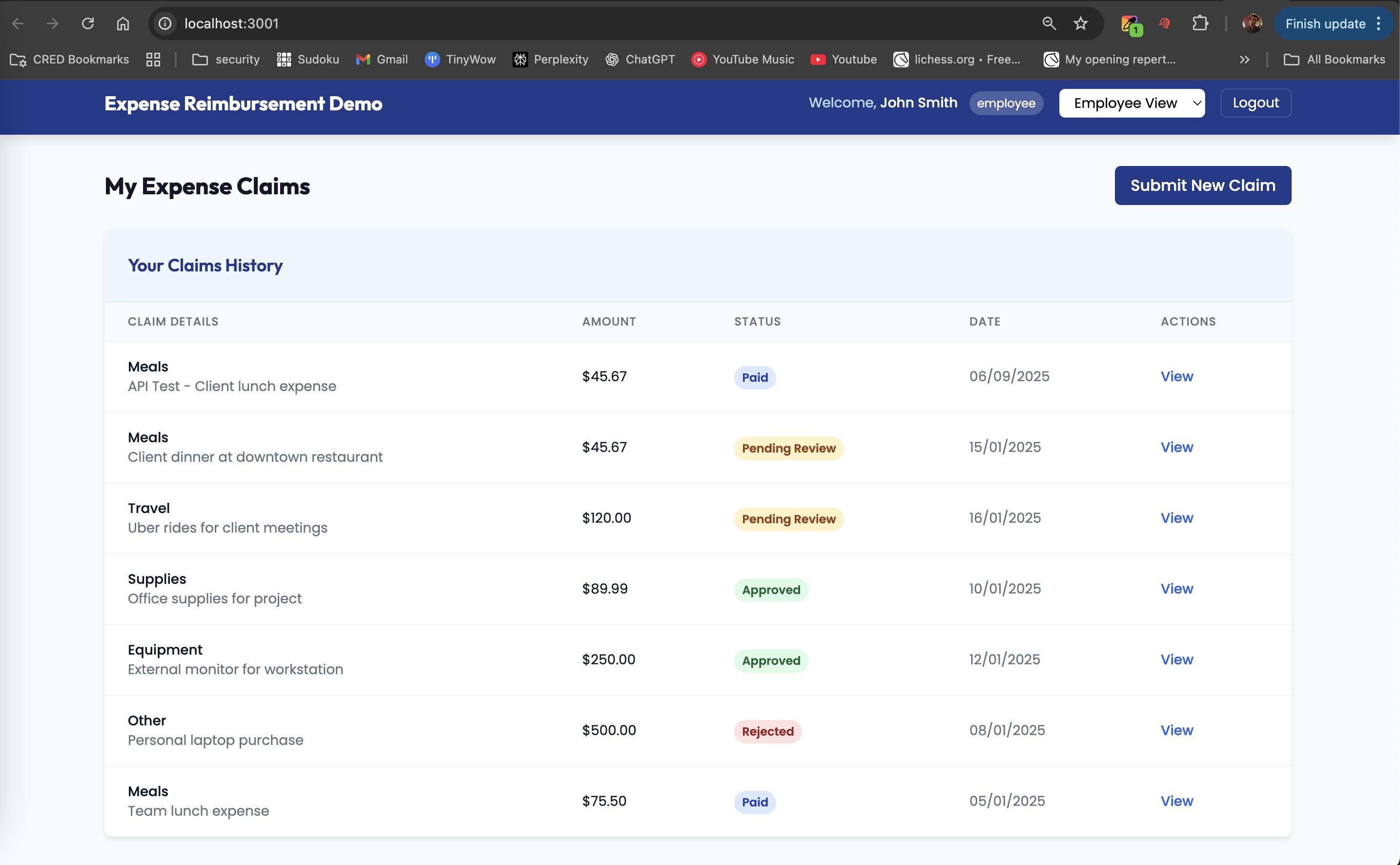
Employee expense submission interface
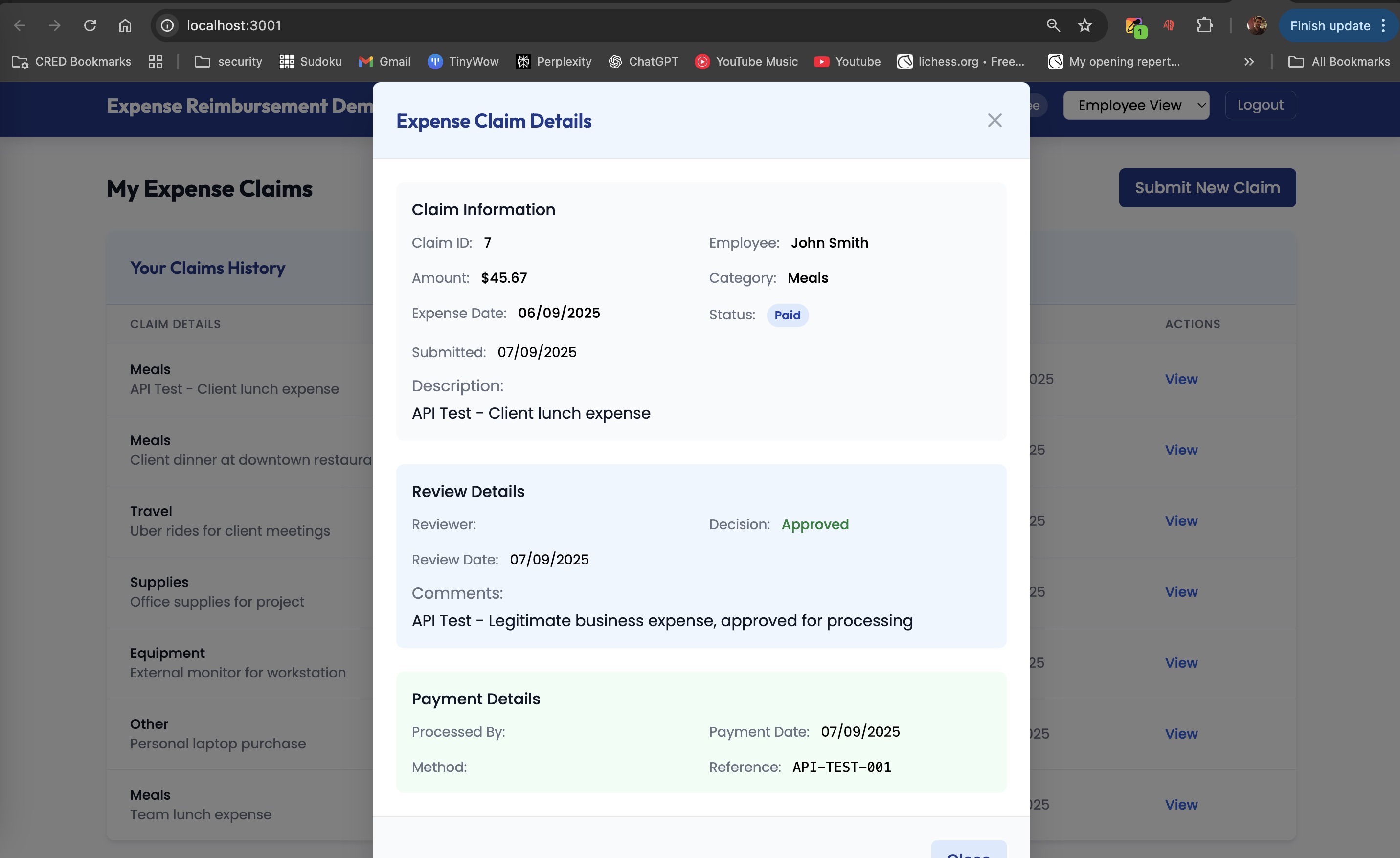
Manager review and approval process
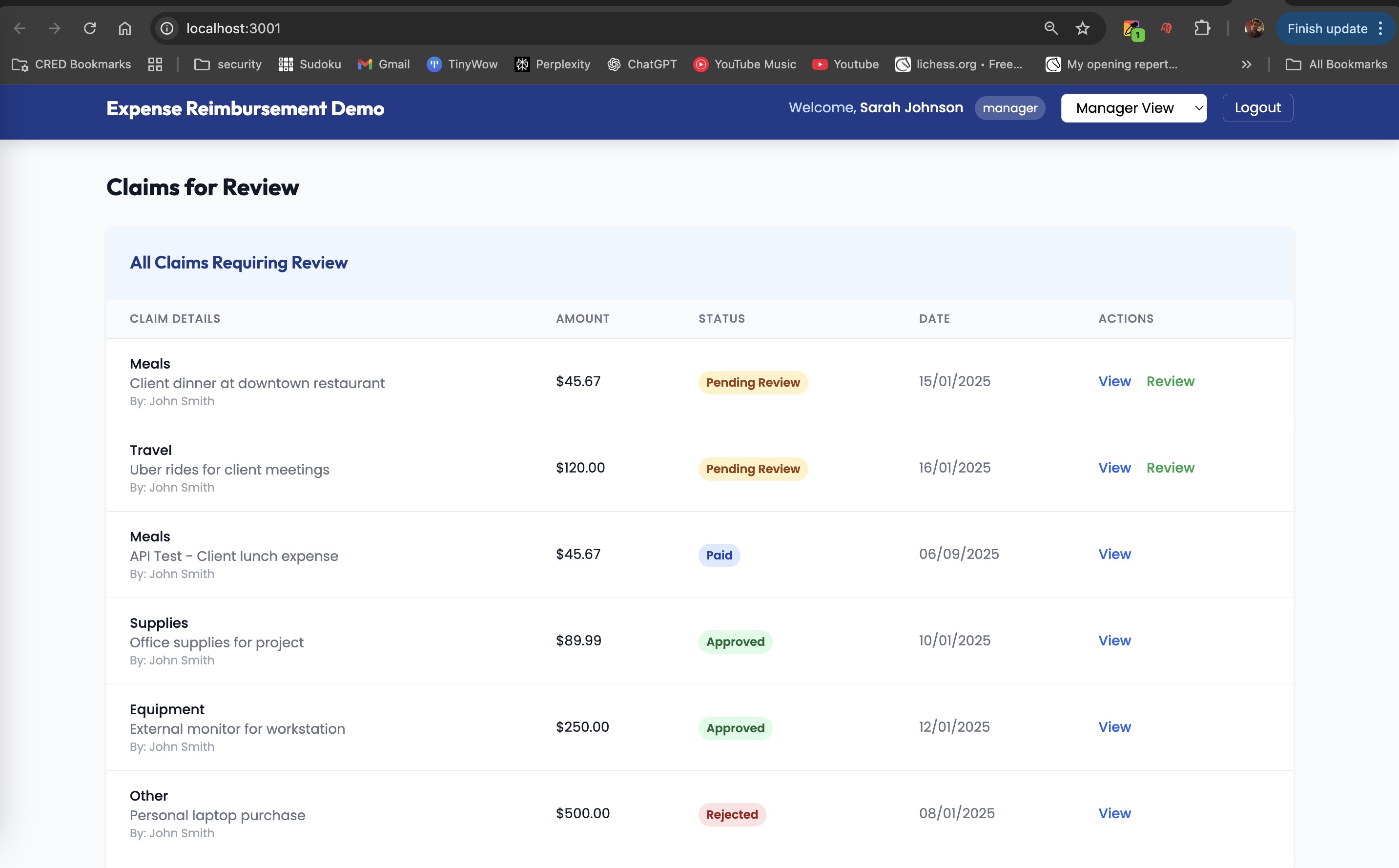
Finance team final processing
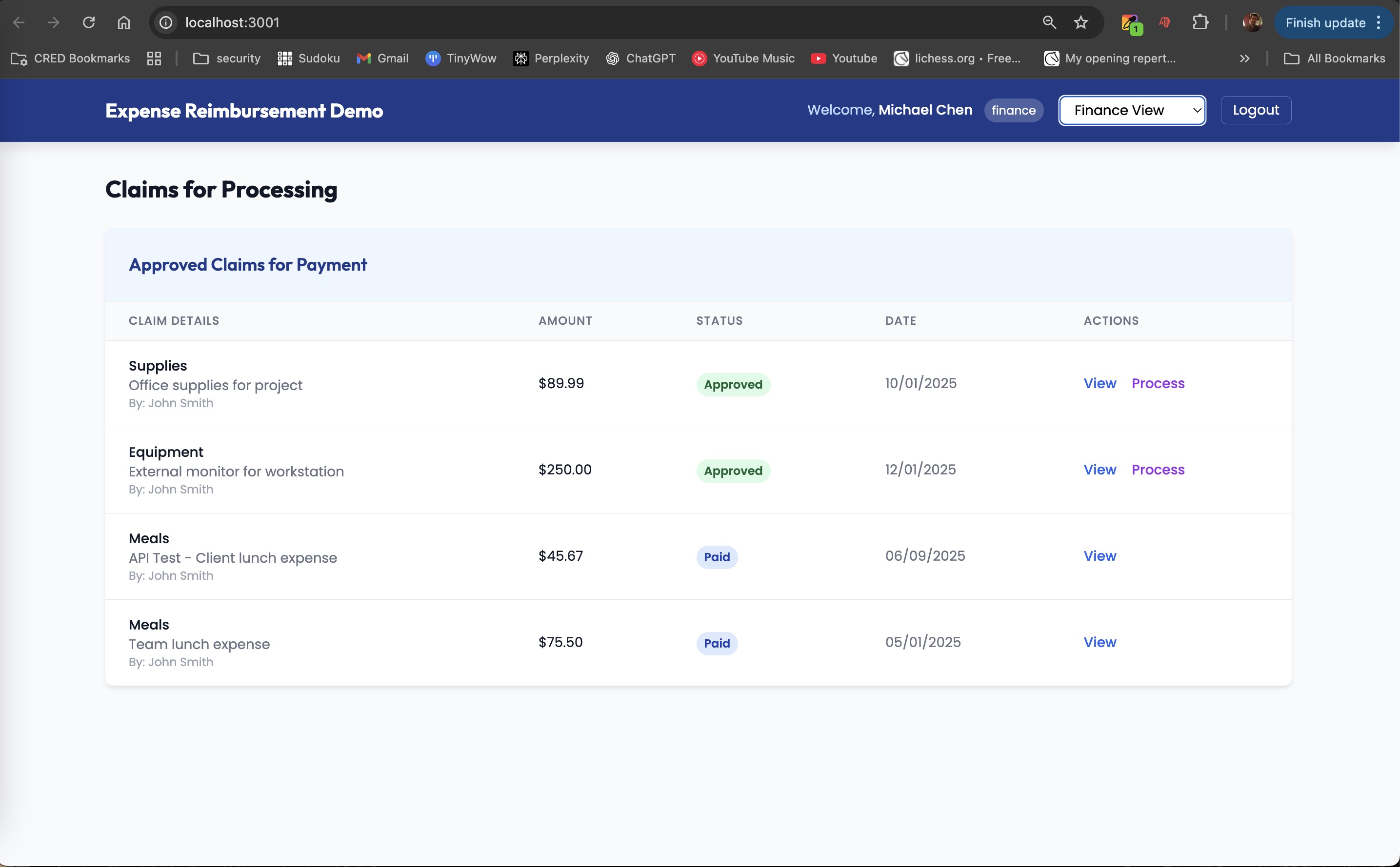
Real-time status tracking and notifications
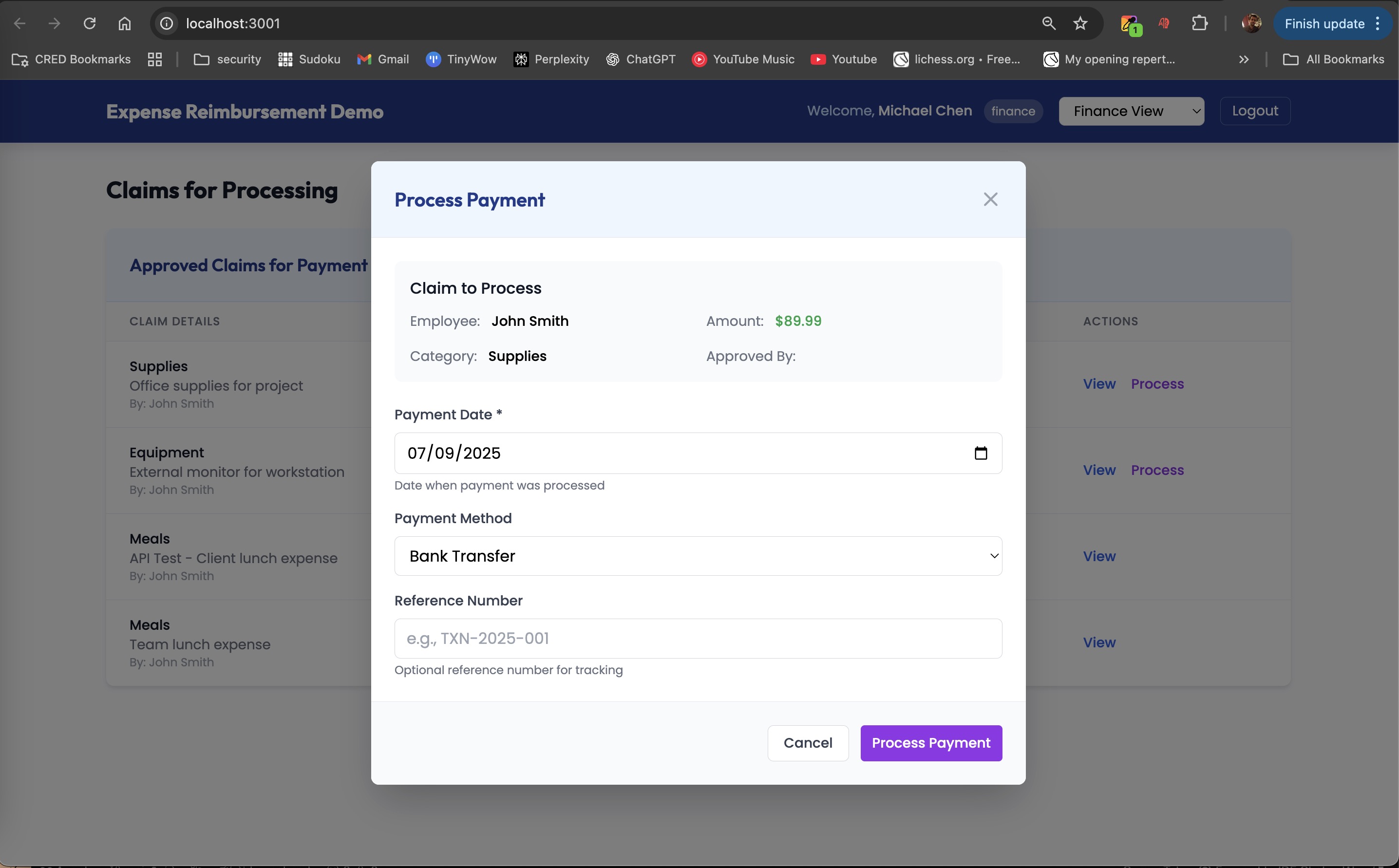
Complete audit trail and reporting
Technical stack: Express.js, SQLite, Session Management, File Upload, Multi-user Authentication
Implementation time: <30 minutes from concept to working application
Agent coordination: 5 specialized agents collaborated through shared specifications
📋 Implementation traces & logs
Find demo app, prompts & analysis: Complete implementation reasoning preserved in:
- app - /Users/pawanraviee/Documents/GitHub/agentic-workflows/showcase/expense-reimbursement-demo
docs/SPEC-20250105-expense-reimbursement.md- Full architectural analysis and decisions- '/Users/pawanraviee/Documents/GitHub/agentic-workflows/showcase/prompts' - input prompts and Claude code output traces
📊 Project statistics
Real implementation data (Expense Reimbursement Demo):
- Input prompt size: 89 lines of feature specification
- Input prompt messages: 3 total (1 architect + 1 engineer + 1 debug)
- Generated output: 3,480 lines (2,268 + 1,212) of comprehensive implementation logs
- Implementation time: <30 minutes from concept to working application
- Agent coordination: 5 specialized agents collaborated through shared specifications
- Code generation ratio: 39x output amplification (89 lines → 3,480 lines)
- Features implemented: 10 complete features(auth system, claim submission, 3-stage workflow, role-based access, file upload, validation, API endpoints, frontend dashboard, database schema, session management)
- Codebase size: 2,767 lines across 11+ source files (JS, HTML, CSS, SQL)
Have a cool project? Share it with us!
📊 Dashboard
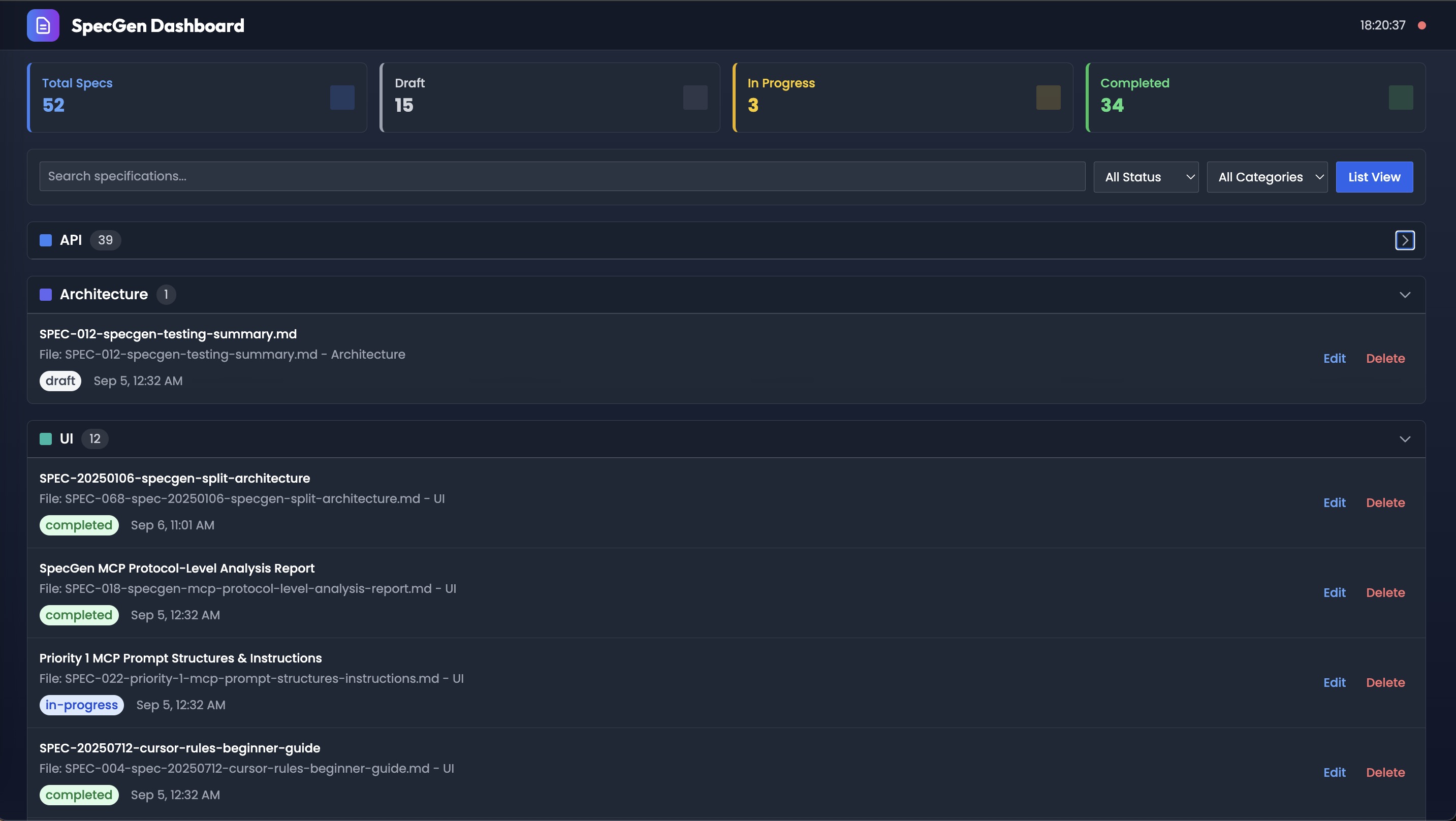
Visual overview of all specifications with status tracking and filtering
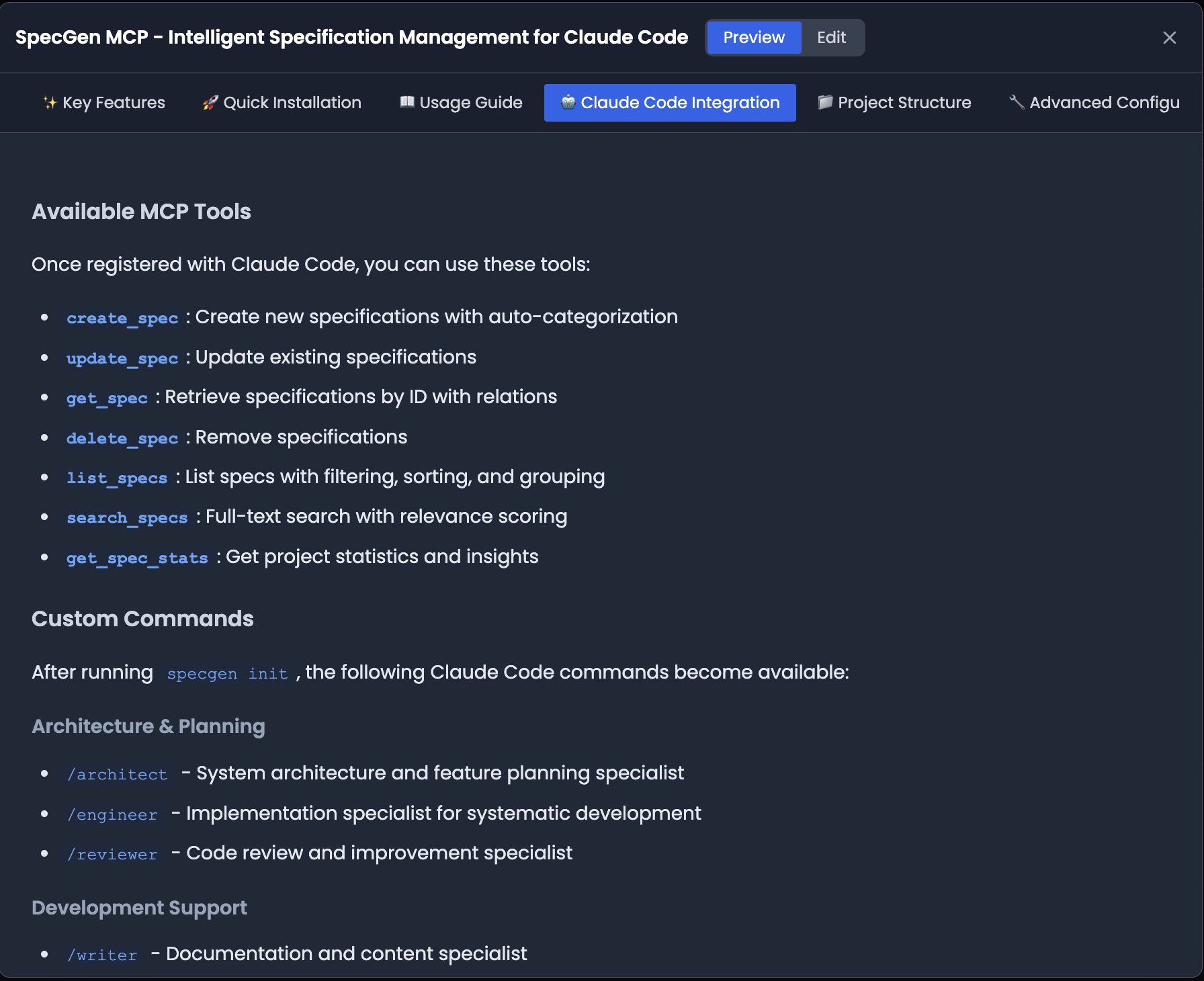
Detailed specification view with metadata and content
The integrated dashboard provides a visual interface for managing your specifications:
- Real-time sync with file changes
- Status tracking (Todo, In Progress, Completed)
- Category filtering and search
- Direct editing capabilities
- Export options for sharing
🚀 Get started in 2 minutes
The easiest way
Just ask Claude Code:
"Install specgen-mcp for me from https://github.com/pwnk77/agentic-workflows"
That's it. Claude will:
- Install SpecGen MCP
- Configure everything for you
- Set up all the agents and commands
- Get you ready to build better
See it working
Once installed, try your first workflow:
# Ask Claude to architect a new feature
/architect "Add user profile editing with image upload"

# Watch as multiple agents coordinate:
# → Research agent finds best practices
# → Backend explorer analyzes your API patterns
# → Frontend explorer checks your component structure
# → All findings get saved to a living specification

# Then implement it:
/engineer SPEC-20250105-user-profiles

# Finally review it:
/reviewer SPEC-20250105-user-profiles --security --performance
Manual installation
# Install SpecGen MCP
npm install -g specgen-mcp

# Configure Claude Code (if not auto-configured)
claude mcp add specgen -s project -- npx -y specgen-mcp@latest

# Initialize in your project
specgen-setup
See QUICKSTART.md for detailed setup instructions.
🔧 Solution overview
Specification-driven development methodology: Every feature begins with AI-generated comprehensive specifications before any code is written. This approach ensures architectural consistency and eliminates the traditional disconnect between planning and implementation.
Context persistence architecture: Project knowledge accumulates across conversations through MCP-managed specification files. Unlike traditional AI interactions that lose context, agents build cumulative understanding of your codebase patterns, architectural decisions, and implementation preferences.
Multi-agent coordination system: Eight specialized AI agents work collaboratively within shared context documents. Backend-explorer, frontend-explorer, database-explorer, and integration-explorer analyze different architectural layers while quality, performance, and security agents provide continuous review throughout development.
MCP protocol integration: Direct Claude Code integration through Model Context Protocol enables real-time specification management. Specifications serve as single source of truth, consolidating all agent insights and architectural analysis into living documents that persist and evolve.
Workflow architecture orchestration: Three-stage architect → engineer → reviewer workflow ensures comprehensive feature development. Each stage builds upon previous analysis, maintaining consistency and traceability from initial concept to production-ready code.
🎯 Use cases
- Feature Development: End-to-end feature planning, implementation, and review
- Architecture Analysis: Deep codebase exploration and architectural decision making
- Code Review: Multi-perspective code analysis with specialized review agents
- Documentation: Automated specification generation and maintenance
- Research: Best practice research and technology evaluation
- Project Planning: Specification-driven development planning
🏗️ Architecture
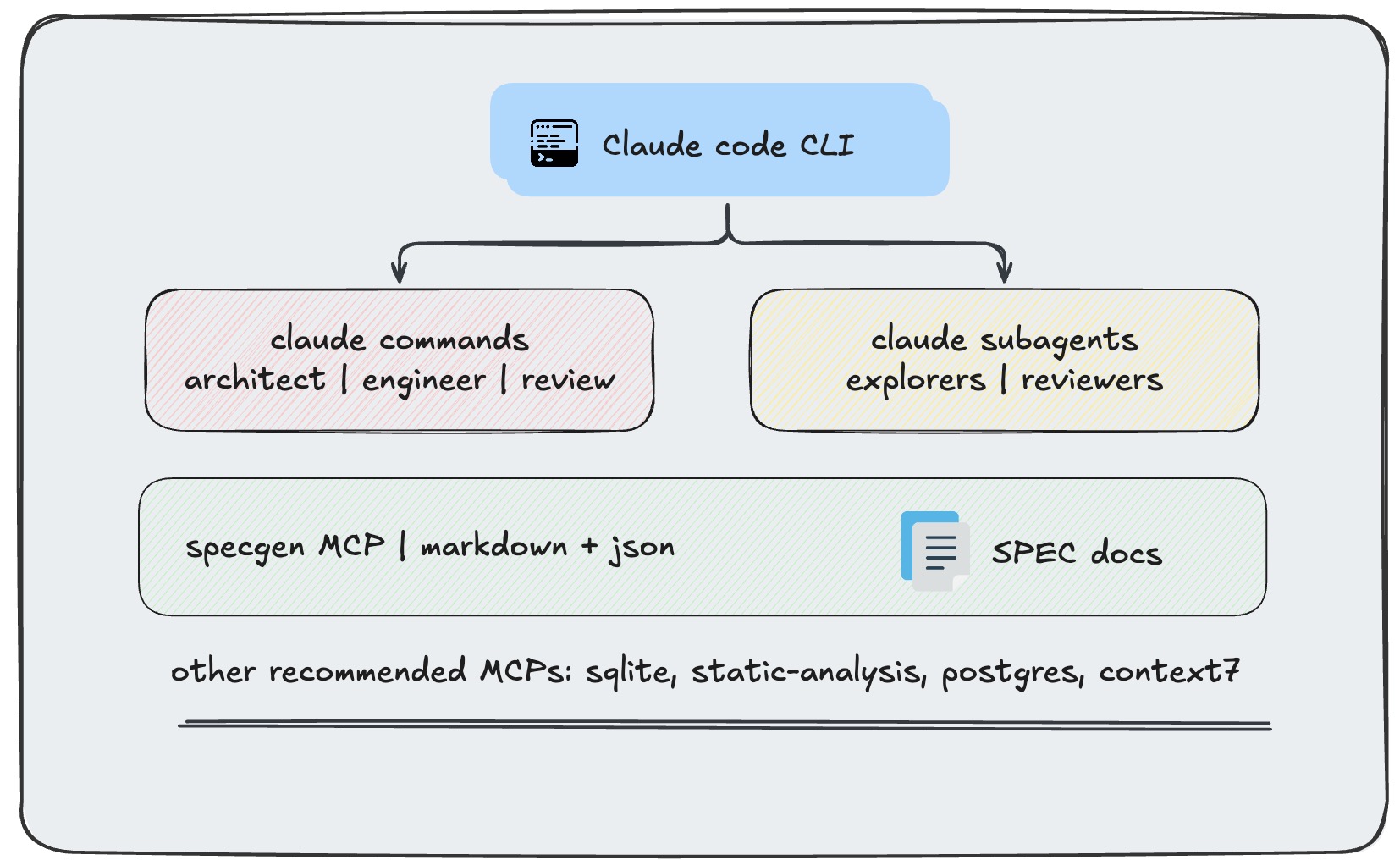
how claude code, commands, agents, and SpecGen MCP work together
📦 Components
Core workflows (/core-workflows)
Claude Code configuration system
- Agents directory: Specialized AI agents for different development phases
- Explorers:
backend-explorer,frontend-explorer,database-explorer,integration-explorer,researcher - Reviewers:
quality,performance,security
- Explorers:
- Commands directory: High-level workflow orchestrators
architect- Feature analysis and specification generationengineer- Implementation and developmentreviewer- Code quality and architecture review
- Hooks directory: System notifications and integrations
- Settings: Local configuration for Claude Code
SpecGen MCP (/specgen-mcp)
Project specification management with MCP integration
- File-based storage: Markdown specifications with automatic organization
- MCP protocol: Direct integration with Claude Code for real-time spec management
- Auto-categorization: Intelligent grouping by feature, priority, and status
- Dashboard interface: Web-based visualization and management
- Search & discovery: Full-text search across all specifications
- Agent integration: Seamless workflow between agents and specifications
Key features:
- 📝 Create, update, and manage project specifications
- 🔍 Search and discover existing specs across projects
- 📊 Visual dashboard for specification overview
- 🔗 Direct MCP integration with Claude Code agents
- 📂 Automatic file organization and categorization
- 🚀 Real-time updates during agent workflows
🔗 Recommended MCPs
Enhance your workflow with these compatible MCPs:
- Static Analysis MCP: TypeScript code analysis, symbol tracking, and compilation error detection
- Chrome MCP: Browser automation and web interaction capabilities
- Database MCPs: PostgreSQL, SQLite, and other database integrations
- Additional MCPs: Extend functionality based on your project needs
🔧 Development
Repository structure
agentic-workflows/
├── README.md                    # This file
├── QUICKSTART.md               # Installation guide
├── core-workflows/
│   └── claude-code/            # Claude Code configuration
│       ├── agents/             # Specialized AI agents
│       ├── commands/           # Workflow commands
│       ├── hooks/              # System hooks
│       └── settings.local.json # Configuration
├── specgen-mcp/                # SpecGen MCP implementation
│   ├── src/                    # TypeScript source
│   ├── dist/                   # Compiled JavaScript
│   ├── public/                 # Dashboard assets
│   └── README.md              # SpecGen documentation
└── static-analysis/            # Static analysis MCP (standalone)
Contributing
- Fork the repository
- Create a feature branch
- Make your changes
- Test with Claude Code integration
- Submit a pull request
📄 License
MIT License - see LICENSE for details.
Ready to stop explaining your project over and over?
Just ask Claude Code: "Install specgen-mcp for me from https://github.com/pwnk77/agentic-workflows"
Then try: /architect "your next feature idea"
Watch the magic happen. ✨
Built with ♥️ for developers who want AI workflows that actually work together
Powered by Claude Code and Model Context Protocol
Reviews (0)
Sign in to leave a review.
Leave a reviewNo results found