Intercept
Health Pass
- License — License: Apache-2.0
- Description — Repository has a description
- Active repo — Last push 0 days ago
- Community trust — 22 GitHub stars
Code Fail
- child_process — Shell command execution capability in npm/install.js
- execSync — Synchronous shell command execution in npm/install.js
- fs.rmSync — Destructive file system operation in npm/install.js
- fs module — File system access in npm/install.js
- network request — Outbound network request in npm/install.js
Permissions Pass
- Permissions — No dangerous permissions requested
No AI report is available for this listing yet.
The control layer for AI agents. Intercept enforces hard limits on every MCP tool call before execution. Rate limits, spend caps, access controls. Open source.




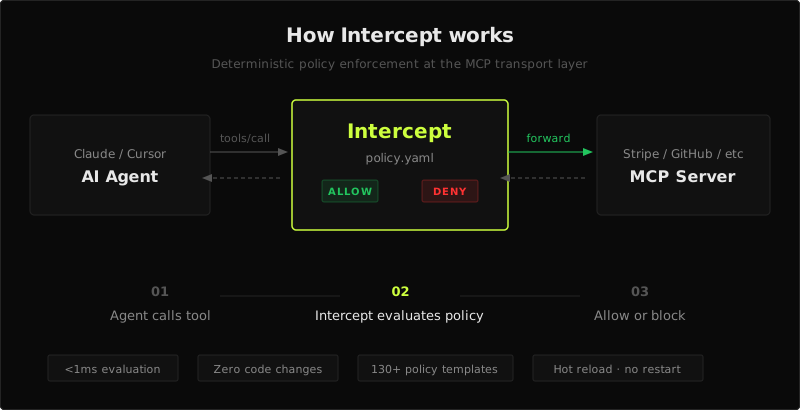
Intercept is the open-source control layer for AI agents in production. It sits between your agent and your MCP server, enforcing YAML-defined policies on every tool call. Rate limits, spend caps, access controls, argument validation. The call passes or it doesn't.
Try it in 30 seconds
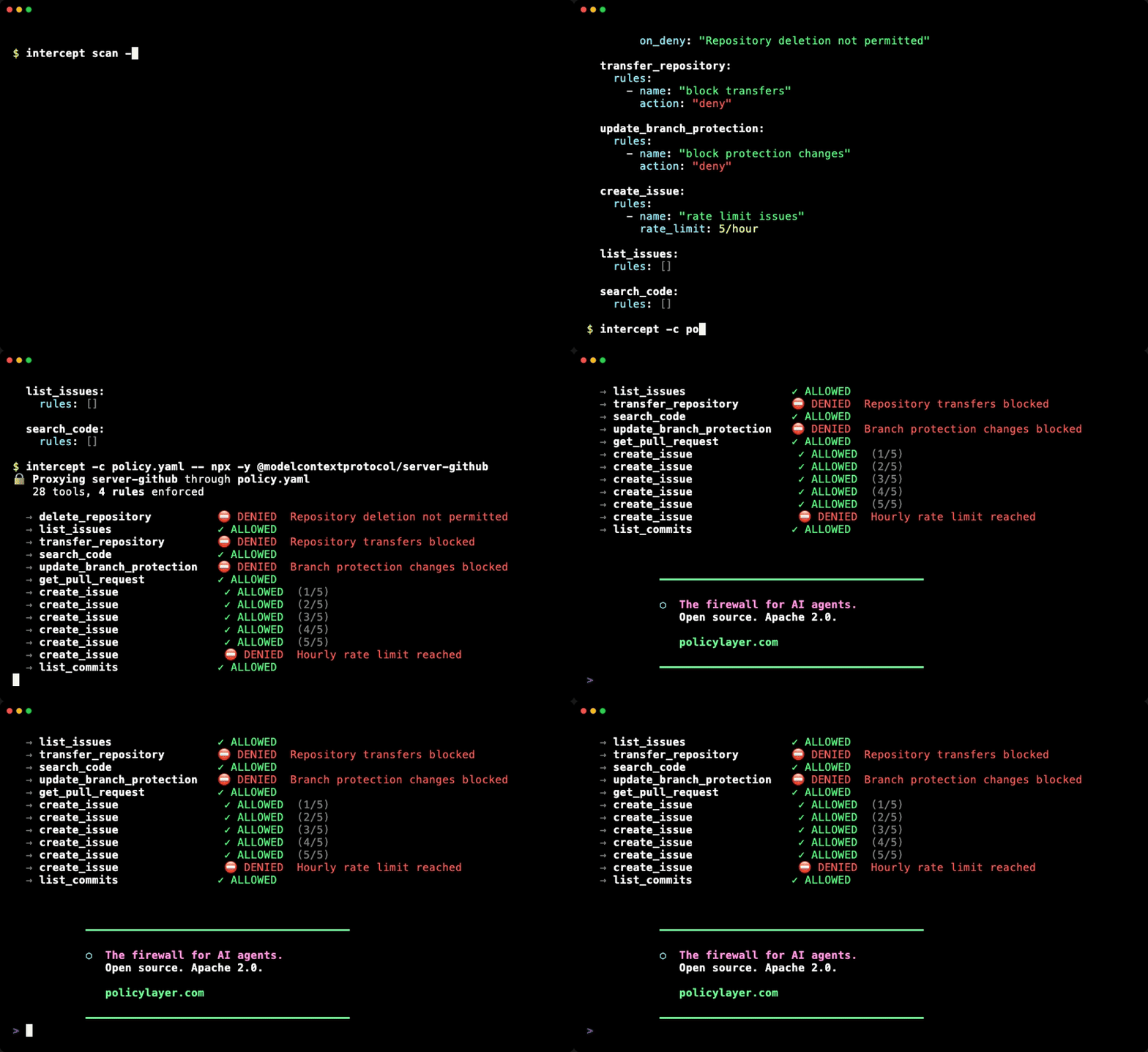
See every tool your AI agent has access to — before adding any rules:
npx -y @policylayer/intercept scan -- npx -y @modelcontextprotocol/server-github
This connects to the server, discovers all available tools, and shows you the full attack surface. Then add a policy to lock it down.
Why Intercept, not system prompts?
| System prompt | Intercept | |
|---|---|---|
| Enforcement | Probabilistic — model can ignore | Deterministic — blocked at transport layer |
| Bypassable | Yes — injection, reasoning, context overflow | No — agent never sees the rules |
| Stateful | No — no memory of previous calls | Yes — counters, spend tracking, sliding windows |
| Auditable | No — no structured log of decisions | Yes — every allow/deny logged with reason |
| Latency | N/A | <1ms per evaluation |
Prompts tell the agent what it should do. Intercept defines what it is allowed to do.
What it does
- Block tool calls — deny dangerous tools unconditionally (e.g.
delete_repository) - Validate arguments — enforce constraints on tool arguments (
amount <= 500,currency in [usd, eur]) - Rate limit — cap calls per minute, hour, or day with
rate_limit: 5/hourshorthand - Track spend — stateful counters with dynamic increments (e.g. sum
args.amountacross calls) - Hide tools — strip tools from
tools/listso the agent never sees them, saving context window tokens - Default deny — allowlist mode where only explicitly listed tools are permitted
- Hot reload — edit the policy file while running; changes apply immediately without restart
- Validate policies —
intercept validate -c policy.yamlcatches errors before deployment
Real-world examples
It drained a $230,000 treasury in six minutes
create_refund:
  rules:
    - name: "cap-refunds"
      rate_limit: "10/day"
      on_deny: "Daily refund limit reached"
It deleted a production config
delete_file:
  rules:
    - name: "block-delete"
      action: deny
      on_deny: "File deletion blocked by policy"
It provisioned infrastructure in a retry loop
create_resource:
  rules:
    - name: "limit-resource-creation"
      rate_limit: "10/hour"
      on_deny: "Resource creation rate limit reached"
It emailed 400,000 customers a test template
messages_send:
  rules:
    - name: "limit-sends"
      rate_limit: "5/hour"
      on_deny: "Email send rate limit reached"
Ready-made policies for all of these: 130+ policy templates
Install
npx:
npx -y @policylayer/intercept -c policy.yaml --upstream https://mcp.stripe.com --header "Authorization: Bearer sk_live_..."
npm:
npm install -g @policylayer/intercept
Go:
go install github.com/policylayer/intercept@latest
Pre-built binaries:
Download from GitHub Releases and place the binary on your PATH.
Quick start
1. Generate a policy scaffold from a running MCP server:
intercept scan -o policy.yaml -- npx -y @modelcontextprotocol/server-stripe
This connects to the server, discovers all available tools, and writes a commented YAML file listing each tool with its parameters.
2. Edit the policy to add rules:
version: "1"
description: "Stripe MCP server policies"

hide:
  - delete_customer
  - delete_product
  - delete_invoice

tools:
  create_charge:
    rules:
      - name: "max single charge"
        conditions:
          - path: "args.amount"
            op: "lte"
            value: 50000
        on_deny: "Single charge cannot exceed $500.00"

      - name: "daily spend cap"
        conditions:
          - path: "state.create_charge.daily_spend"
            op: "lte"
            value: 1000000
        on_deny: "Daily spending cap of $10,000.00 reached"
        state:
          counter: "daily_spend"
          window: "day"
          increment_from: "args.amount"

      - name: "allowed currencies"
        conditions:
          - path: "args.currency"
            op: "in"
            value: ["usd", "eur"]
        on_deny: "Only USD and EUR charges are permitted"

  create_refund:
    rules:
      - name: "refund limit"
        rate_limit: 10/day
        on_deny: "Daily refund limit (10) reached"
3. Run the proxy:
intercept -c policy.yaml --upstream https://mcp.stripe.com --header "Authorization: Bearer sk_live_..."
Intercept proxies all MCP traffic and enforces your policy on every tool call. Hidden tools are stripped from the agent's view entirely.
Example policies
The policies/ directory contains ready-made policy scaffolds for 130+ popular MCP servers including GitHub, Stripe, AWS, Notion, Slack, and more. Each file lists every tool with its description, grouped by category (Read, Write, Execute, Financial, Destructive).
Copy one as a starting point:
cp policies/stripe.yaml policy.yaml
# edit to add your rules, then:
intercept -c policy.yaml --upstream https://mcp.stripe.com
Browse all policies → policies/
MCP client integration
To use Intercept with Claude Code (or any MCP client that reads .mcp.json), point the server command at Intercept:
{
  "mcpServers": {
    "github": {
      "command": "intercept",
      "args": [
        "-c", "/path/to/policy.yaml",
        "--",
        "npx", "-y", "@modelcontextprotocol/server-github"
      ],
      "env": {
        "GITHUB_PERSONAL_ACCESS_TOKEN": "..."
      }
    }
  }
}
For remote HTTP servers, use --upstream instead of a command:
{
  "mcpServers": {
    "stripe": {
      "command": "intercept",
      "args": [
        "-c", "/path/to/policy.yaml",
        "--upstream", "https://mcp.stripe.com",
        "--header", "Authorization: Bearer tok"
      ]
    }
  }
}
State backends
Rate limits and counters persist across restarts. SQLite is the default (zero config). Redis is supported for multi-instance deployments:
intercept -c policy.yaml --state-dsn redis://localhost:6379 --upstream https://mcp.stripe.com
Documentation
- CLI reference: all commands, flags, transport modes, state backends, event logging
- Policy reference: YAML format, conditions, operators, stateful counters, examples
- Example policies: ready-made scaffolds for 130+ MCP servers
Contributing
Contributions welcome — open an issue to discuss what you'd like to change.
License
Reviews (0)
Sign in to leave a review.
Leave a reviewNo results found