Cerea
Health Uyari
- License — License: Apache-2.0
- Description — Repository has a description
- Active repo — Last push 0 days ago
- Low visibility — Only 5 GitHub stars
Code Gecti
- Code scan — Scanned 12 files during light audit, no dangerous patterns found
Permissions Gecti
- Permissions — No dangerous permissions requested
Bu listing icin henuz AI raporu yok.
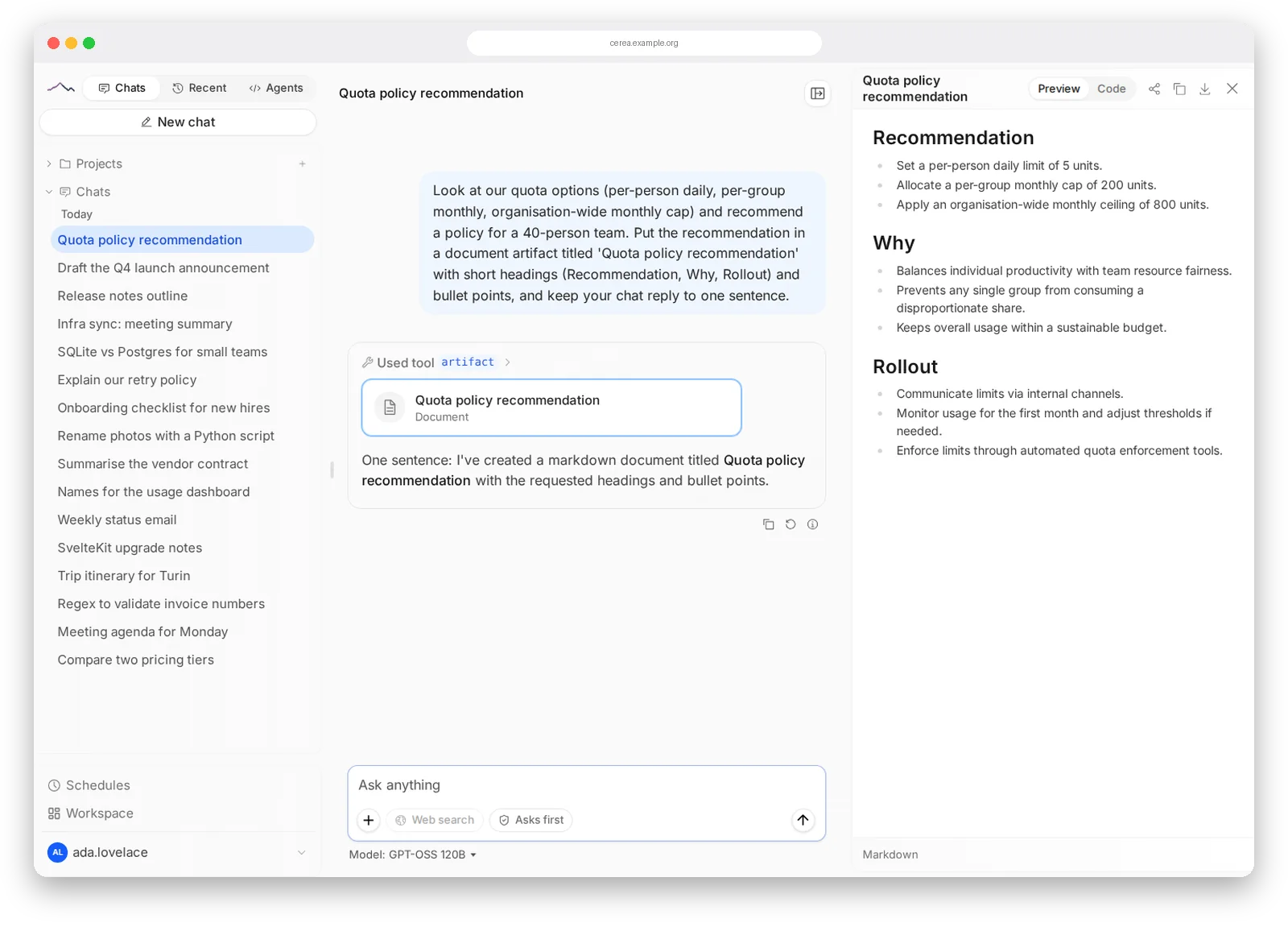
Self-hosted chat for the models your gateway exposes: knowledge bases, artifacts, Python in the browser, and coding agents on your own machines. A fork of Hugging Face chat-ui.

Cerea
A self-hosted chat for any OpenAI-compatible endpoint, with knowledge bases,
artifacts, Python (in the browser, or in a server sandbox), and coding agents
on your own machines.
The name. Cerea is a Turinese modo di dire: a historic, affectionate
greeting that means both buongiorno and arrivederci.
Cerea and Pystino
Cerea is one half of a pair. Each half solves a different problem, and each
runs on its own:
- Cerea (this repository) serves the people using models: the chat, its
knowledge, artifacts and tools, and galopin, which pairs coding agents
on a person's own machine. - Pystino serves the
organisation paying for them: an OpenAI-compatible gateway with per-user
and per-group accounting, quotas, PII redaction, model access and an admin
console.
Cerea alone runs against any OpenAI-compatible endpoint with one shared key.
Pystino alone serves any OpenAI or Anthropic client. Together they are the
intended setup: the chat calls Pystino's /v1 with each person's own sign-in
token, so spend, quotas and model access follow the person, and the gateway
adds web search, a local document reader and metered coding agents. Below, the
gateway means Pystino. The deploy kit in this repository (kit/) runs both
together, or the chat alone.
Features
Unmarked features work against any endpoint; those marked (Pystino) need
the gateway.
- Chat over any model your endpoint serves, signed in with OIDC. With
Pystino each call carries the person's own token, so quotas and billing are
theirs; without it, every call uses the one key you configure. The stack
currently signs the chat and the console in against one provider; to combine
several sources of users, federate them in your own IdP (Keycloak,
Authentik and the like). - Web search (Pystino), run by the deployment's search backends through
the gateway, with the backend chosen in Administration → Web search (the
gateway can also meter provider-side search where a model offers it). - File upload and extraction: PDFs, Office documents (old
.doctoo), images
and text, read once at upload. With Pystino, extraction goes through the
gateway and can stay inside your deployment; without it, PDFs and images
go to an OCR endpoint you name (CHAT_OCR_BASE_URL). Scanned PDFs reach a
model that sees images as page images. - Artifacts: HTML, React and Mermaid previews in sandboxed frames with no
network access, and generated files (see the next item). - Word, Excel, PowerPoint and PDF files: the assistant creates and edits
them through the bundled document service, saving each edit as a new version
and leaving the original alone. Styling by asking, or from a template you
upload; designed slides with backgrounds and shapes; native charts
(docs/office.md). - Skills and connectors: built-in skills for office files and data
analysis (docs/skills.md), and remote MCP servers as
connectors (docs/connectors.md). - Knowledge bases and projects, shareable with people or groups, with an
optional project memory (docs/knowledge.md). - Python the assistant runs: by default in your browser, in a WebAssembly
sandbox with the scientific and office libraries, so your files never leave
your device (docs/pyodide.md); or, when the operator
turns it on, in a gVisor sandbox on the server with native packages and more
memory (docs/sandboxes.md). - Share links: a link to one artifact, for signed-in users or anyone, with an expiry
and a band naming who shared it (docs/artifacts.md). - Browser use: the assistant does a task in a real browser on your own
computer, with approval before anything that commits; no cloud browser
(docs/browser-use.md). - Large content as files: a long paste or attachment is handed to the
model as a file it can read in parts, and a connector's file result is kept
as a file of the chat (docs/chat.md,
docs/connectors.md). - One connector list for the chat and your agents, with local connectors
on your own computers (docs/local-connectors.md). - Self-hosted model servers (vLLM, SGLang, llama.cpp) as gateway providers
(Pystino) (Pystino docs). - Your own models and look: a global system prompt and private custom
models (a base model plus a prompt) under Workspace → Customize models, a
searchable list of every chat at/chats, and accent and background palettes
(docs/chat.md). - The
/codeagents panel: coding agents on your own machines through
galopin, with a file explorer, scheduled actions (a prompt sent to a
session on a timetable) and, off by default, a browser terminal. The file
explorer uploads, downloads and zips files and folders; Claude Code runs
over ACP, andgalopin servicekeeps galopin running
(docs/agent-machines.md). With
Pystino the agents' model calls are metered like the chat's; without it
they use opencode's own providers.
Quick start
The deploy kit, the kit/ directory of this repository, runs the full
stack by default: the chat, Pystino and its console, a bundled identity
provider, a TLS proxy and the add-ons. It is one compose.yaml, a documented.env.example, and a ./configure script. Its installer fetches only that
directory:
curl -fsSL https://raw.githubusercontent.com/paoloviviani/Cerea/stable/kit/get-kit.sh | sh
cd cerea/kit
./configure
docker compose up -d
It also covers a chat-only install, against a central Pystino
(--preset satellite) or any OpenAI-compatible endpoint without Pystino
(--preset generic). What each shape gives and lacks is in
docs/deploy.md; the chat also runs without the kit.
Configuration
Cerea reads its settings from the environment. The ones that matter most:
| Variable | What |
|---|---|
OPENAI_BASE_URL |
the OpenAI-compatible API the chat calls (Pystino's /v1, or any endpoint) |
USE_USER_TOKEN |
true with Pystino: each call carries the signed-in person's own token |
OPENAI_API_KEY |
the one shared key, without Pystino |
OPENID_PROVIDER_URL, OPENID_CLIENT_ID, OPENID_CLIENT_SECRET |
the OIDC sign-in |
MONGODB_URL |
conversations, settings and pairing records |
CHAT_PG_URL |
PostgreSQL with pgvector, for knowledge-base passages |
ORIGIN, PUBLIC_ORIGIN |
the public URL of the chat, and of the whole site |
CHAT_KNOWLEDGE_ENABLED, CHAT_MEMORY_ENABLED, CHAT_USAGE_ENABLED, CHAT_CONSOLE_ENABLED |
feature switches (true or empty) |
FETCH_BACKEND |
direct (default) or playwright, the headless browser |
CODE_AGENTS_ENABLED, CODE_TERMINAL_ENABLED |
the /code panel, and its browser terminal |
The deployment's full, commented list is the kit's .env.example; .env
here lists every variable the app understands.
Agents
galopin runs next to the coding agent (opencode, or goose) on a person's machine, dials out to Cerea with
its own OIDC credential, and is confirmed by its owner in /code. What a
machine allows (the permission ceiling, workspace roots, files, the terminal) is fixed on
the machine at enroll time; the terminal also needs CODE_TERMINAL_ENABLED=true
on the deployment. See docs/code-panel.md (operators),
docs/agent-machines.md (users; the
reference has the depth) and
agent/PROTOCOL.md (the wire protocol).
Development
npm ci                    # also installs the git hooks (husky)
cp .env .env.local        # then set OPENAI_BASE_URL, OPENAI_API_KEY and friends
npm run dev               # http://localhost:5173
npm run check && npm run lint
Tests: npm run test (server and ssr Vitest projects; on a CPU without AVX point
them at a real MongoDB with TEST_MONGODB_URL and add --no-file-parallelism),npm run test:client (the component tests, in a real browser), npx playwright test
(end to end; E2E_SKIP_BUILD=1 reuses build/) and cd agent && go test ./...
(galopin, which needs Go 1.24+). Toolchains, git hooks, every test layer, CI,
releasing and the repository's conventions are in
CONTRIBUTING.md, which is also the
Development page of the
documentation.
The image fixes SvelteKit's base path at build time, and builds galopin
too: docker build --build-arg APP_BASE=/chat -t cerea .
Origin
Cerea began as a fork of huggingface/chat-ui,
with its history intact, and is now a hard fork: it does not merge upstream and
carries nothing for upstream's sake. The attribution stays in NOTICE.
Documentation
The documentation is a mkdocs site built from docs/:
chat · artifacts ·
pyodide · skills ·
knowledge · connectors ·
agent-machines ·
agent-machines-reference · browser ·
deploy · deploy-kit ·
configuration · chat-admin ·
code-panel · reference ·
development ·
PRIVACY. Build it withuv run --with-requirements docs/requirements.txt mkdocs build --strict
(there is no Python project in this repository; the pins are indocs/requirements.txt). Pystino's documentation lives in its own
repository. docs/source is upstream chat-ui's
documentation, kept as upstream wrote it, excluded from the site; parts of it
do not apply to Cerea.
Contributing, security, licence
See CONTRIBUTING.md and, for vulnerabilities,
SECURITY.md. Cerea is Copyright 2026 Paolo Viviani and
licensed under the Apache License 2.0; NOTICE records
that it is based on huggingface/chat-ui, © Hugging Face, and carries the
third-party notices. How this code was written is disclosed in
AI-DISCLOSURE.md.
Acknowledgments
This work is supported by LINKS Foundation.
Yorumlar (0)
Yorum birakmak icin giris yap.
Yorum birakSonuc bulunamadi