kra35-prismx-agentsumo
Health Pass
- License — License: MIT
- Description — Repository has a description
- Active repo — Last push 0 days ago
- Community trust — 11 GitHub stars
Code Pass
- Code scan — Scanned 12 files during light audit, no dangerous patterns found
Permissions Pass
- Permissions — No dangerous permissions requested
No AI report is available for this listing yet.
AgentSUMO: An Agentic Framework for Interactive Simulation Scenario Generation in SUMO via Large Language Models
AgentSUMO
An Agentic Framework for Interactive Simulation Scenario Generation in SUMO via Large Language Models






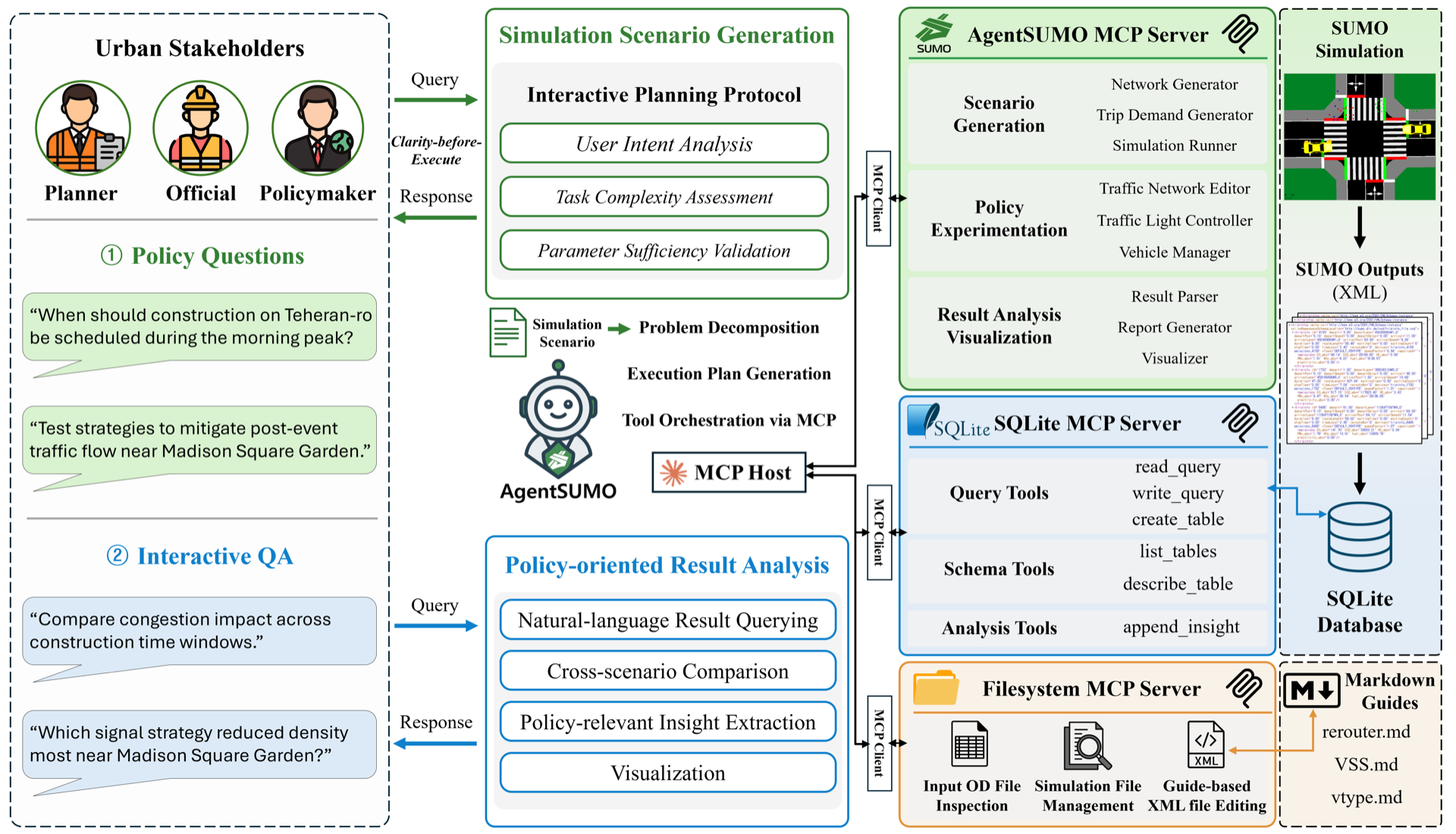
Overview
AgentSUMO lets non-expert stakeholders design, execute, and analyze SUMO traffic simulations through natural-language interaction. The Planner Agent translates abstract policy questions into executable simulation plans, drives them via the Model Context Protocol (MCP), and surfaces results through a web dashboard.
- Conversational scenario design — describe a policy question, get a runnable simulation
- Policy experiments — road closures, lane reductions, signal optimization, demand changes
- Cross-scenario analysis — SQL-based comparison across runs, with auto-generated HTML reports
- Web dashboard — geospatial visualization, time-series charts, and trip replay
Demo
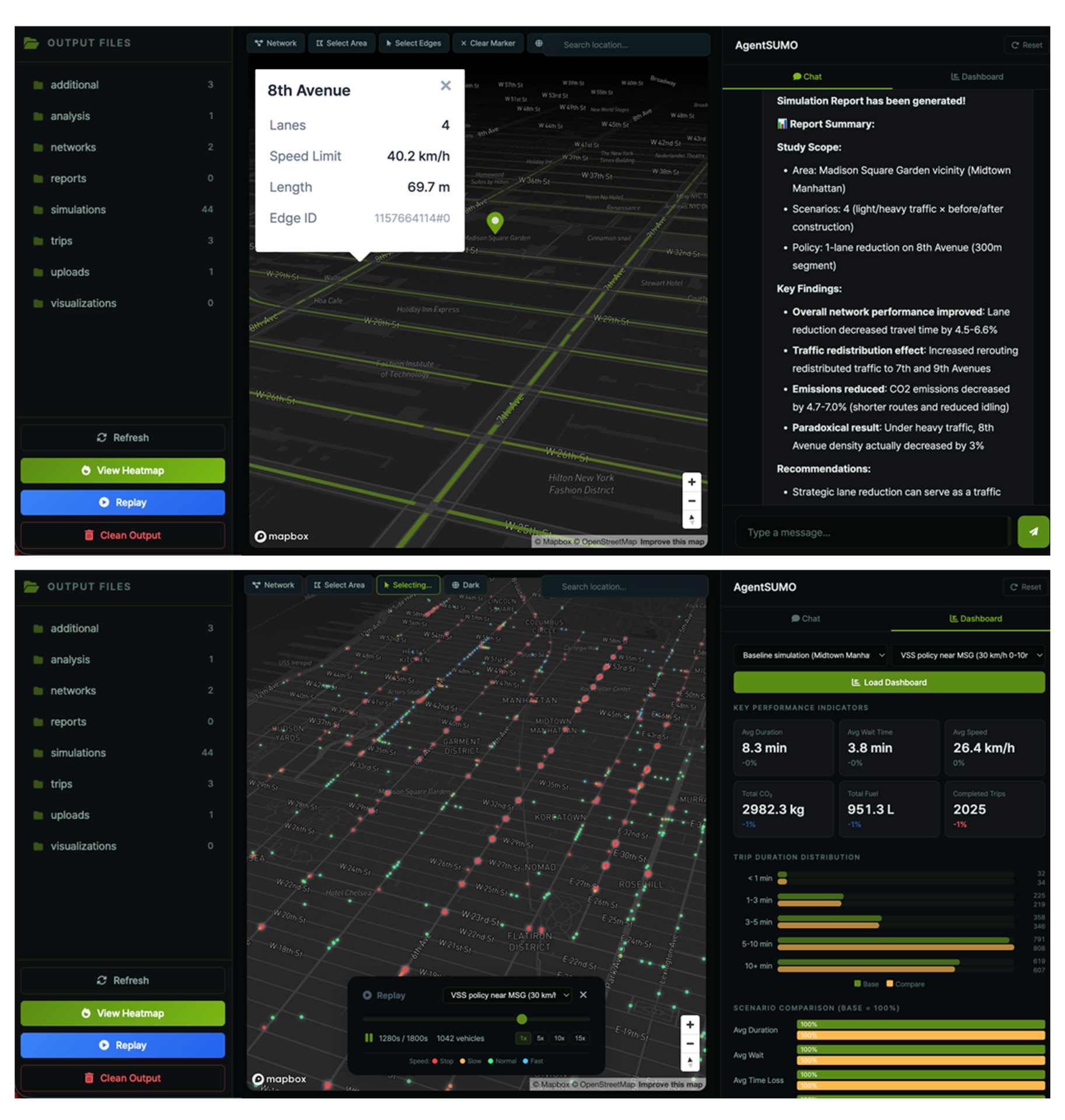
Web interface: conversational planning panel, scenario list, and live simulation status.
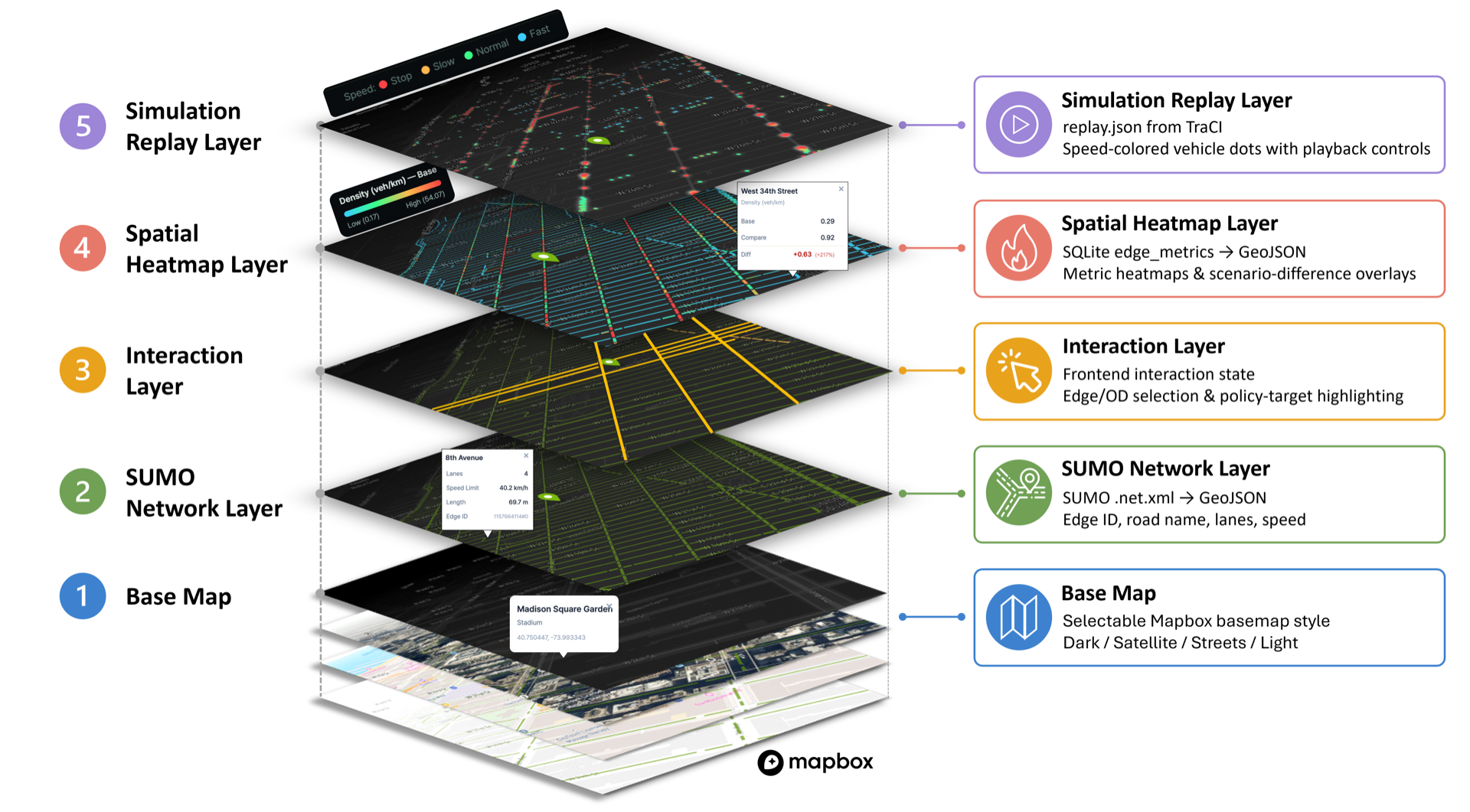
Geospatial visualization: per-edge metrics, congestion overlays, and trip replay on the 2.5D basemap.
Architecture
User (natural language)
    |
    v
Planner Agent (Claude LLM, Interactive Planning Protocol)
    |
    +--> AgentSUMO MCP Client --> AgentSUMO MCP Server (PyPI: agentsumo-mcp) --> SUMO
    |
    +--> SQLite MCP Client    --> SQLite MCP Server (Anthropic, open source)  --> simulations.db
    |
    +--> Filesystem MCP Client --> Filesystem MCP Server (Anthropic, open source) --> additional XML files
The reasoning layer (Planner Agent) lives in this repository. The execution layer (agentsumo-mcp) is published to PyPI and installed automatically as a dependency.
Tool Layer
The AgentSUMO MCP Server exposes 26 tools grouped into five capability categories that follow the simulation workflow. Full reference at agentsumo.readthedocs.io/.../tools.
| Category | Purpose | Representative tools |
|---|---|---|
| Scenario Generation | Build a baseline SUMO simulation: OSM → network → trips → routes → run | osm_extract, net_convert, trip_generate, route_generate, sumo_runner |
| Policy Experimentation | Apply infrastructure, demand, and signal-control interventions | edge_edit_tool, reduce_lanes_tool, vehicle_generation_tool, flow_generation_tool, tls_offset_tool, tls_adaptation_tool |
| Result Analysis | Convert SUMO XML output to SQLite and render HTML reports | xml_to_sqlite_tool, simulation_report_tool |
| Visualization | Render networks, highlighted edges, and per-edge metric heatmaps | visualize_net_tool, visualize_edge_tool, visualize_policy_target_tool, visualize_edgedata_tool |
| Utility Functions | Network statistics, routing, road-name ↔ edge-id resolution, OD-coordinate validation, web-search grounding | network_summary_tool, route_analysis_tool, validate_od_coordinates_tool, web_search_tool |
Installation
Requirements
- Python 3.12
- SUMO 1.24 or later (locally installed, with
SUMO_HOMEset) - Node.js 18 or later with
npxonPATH, for the Filesystem MCP Server (@modelcontextprotocol/server-filesystem, downloaded bynpxon first run). Without it the agent still starts, but cannot read the additional-file guides, write rerouter / VSS / vType files, or inspect Real OD CSVs - Anthropic Claude API key (bring-your-own-key)
- Mapbox access token (web interface only; the CLI does not need it)
- Internet access: OSM road data comes from the public Overpass API, place names are geocoded with Nominatim, and
web_search_tooluses DuckDuckGo - Optional:
osmium-tool(brew install osmium-tool/sudo apt-get install osmium-tool). Only used when Overpass fails: the server then cuts the area from a Geofabrik.osm.pbfextract
1. Install SUMO
macOS — Download the installer from the Eclipse SUMO downloads page, or use Homebrew. SUMO is not in Homebrew's core formulae; it comes from SUMO's own tap:
brew tap dlr-ts/sumo
brew install sumo
AgentSUMO runs SUMO headless, so the XQuartz setup the Homebrew formula mentions is only needed for sumo-gui.
Windows — Download the installer from the Eclipse SUMO downloads page.
Linux (Ubuntu/Debian)
sudo add-apt-repository ppa:sumo/stable
sudo apt-get update
sudo apt-get install sumo sumo-tools sumo-doc
2. Set up the Python environment
Install uv:
# macOS / Linux
curl -LsSf https://astral.sh/uv/install.sh | sh

# Windows (PowerShell)
powershell -c "irm https://astral.sh/uv/install.ps1 | iex"
Clone the repository, create a virtual environment, and install AgentSUMO:
git clone https://github.com/urban-ai-institute/kra35-prismx-agentsumo.git
cd kra35-prismx-agentsumo

# Create a Python 3.12 venv
uv venv --python 3.12

# Activate the venv
source .venv/bin/activate              # macOS / Linux
# .venv\Scripts\activate               # Windows

# Install AgentSUMO and all dependencies
# (this also pulls agentsumo-mcp from PyPI as a dependency)
uv pip install -e .
3. Configure environment variables
AgentSUMO reads API keys and the SUMO path from environment variables. The easiest way is a .env file at the project root:
cp .env.example .env
Open .env in your editor and fill in:
ANTHROPIC_API_KEY (required) — Claude API key that drives the Planner Agent. Get one at the Anthropic Console.
ANTHROPIC_API_KEY=sk-ant-api03-xxxxxxxxxxxxxxxxxxxxxxxxxxxxxxxx
MAPBOX_TOKEN (required for the web UI) — used to render the basemap. Get one at the Mapbox access tokens page.
MAPBOX_TOKEN=pk.eyJ1Ijoixxxxxxxxxxxxxxxxxx
SUMO_HOME (required) — absolute path to your local SUMO installation. The directory must contain bin/sumo (or bin/sumo.exe on Windows).
# macOS (Homebrew): $(brew --prefix sumo)/share/sumo
SUMO_HOME=/opt/homebrew/opt/sumo/share/sumo

# macOS (Eclipse SUMO installer)
SUMO_HOME=/Library/Frameworks/EclipseSUMO.framework/Versions/<version>/EclipseSUMO  # e.g. 1.24.0; use the directory name installed under Versions/

# Windows
SUMO_HOME=C:\Program Files (x86)\Eclipse\Sumo

# Linux
SUMO_HOME=/usr/share/sumo
AGENTSUMO_MCP_OUTPUT_BASE (optional) — override the base directory where the MCP server writes simulation outputs (networks, trips, results). Defaults to the current working directory, or ~/agentsumo-output when that directory is not writable (MCP hosts such as Claude Desktop often start servers in /).
AGENTSUMO_MCP_OUTPUT_BASE=/path/to/your/output/dir
4. Run
# Web interface (opens at http://localhost:8000; needs MAPBOX_TOKEN)
python web.py                 # python web.py --port 8001 to use another port

# CLI mode (type 'help' for commands, 'quit' to exit)
python chat.py

# Delete generated simulation outputs (keeps uploads/ and vehicle_types.add.xml)
python clean.py
On start the CLI prints Tools available: N: 26 AgentSUMO tools plus 14 Filesystem tools when Node.js is available. The six SQLite tools are added once a simulation database exists (after the first xml_to_sqlite_tool call).
Simulation outputs go to output/ under the directory you start from (or AGENTSUMO_MCP_OUTPUT_BASE). Start from the repository root so the MCP server runs the checkout's agentsumo_mcp rather than the PyPI copy.
Project Structure
AgentSUMO/
├── agentsumo/
│   ├── agent/        # Planner Agent (Claude orchestrator + prompts)
│   ├── client/       # MCP clients (AgentSUMO, SQLite, Filesystem)
│   └── core/         # Configuration
├── agentsumo_mcp/    # AgentSUMO MCP Server source (also published to PyPI)
│   └── defaults/     # Packaged fixtures (e.g., vehicle_types.add.xml)
├── packaging/mcp/    # PyPI build configuration for agentsumo-mcp
├── web/              # Web interface (FastAPI + Jinja2 templates)
├── docs/             # Sphinx documentation source
├── tests/            # Unit tests
├── assets/           # README images
├── output/           # Runtime artifacts (auto-populated; 8 categories tracked
│                     #   via .gitkeep — simulations/, networks/, trips/,
│                     #   analysis/, reports/, uploads/, visualizations/, additional/)
├── chat.py           # CLI entry point
├── clean.py          # Deletes generated outputs
├── web.py            # Web server entry point
└── .env.example      # Environment variable template
Use the MCP Server Standalone
The AgentSUMO MCP Server can be used independently from this framework with any MCP-compatible LLM client (Claude Desktop, OpenAI tool clients, Gemini, local LLMs):
pip install agentsumo-mcp
Or via uvx without installing:
uvx agentsumo-mcp
The standalone server provides the 26 AgentSUMO tools only; the Planner Agent, the SQLite MCP Server and the Filesystem MCP Server belong to this framework. It needs SUMO_HOME, and writes outputs under AGENTSUMO_MCP_OUTPUT_BASE (default: the working directory, or ~/agentsumo-output when that is not writable). Claude Desktop (claude_desktop_config.json):
{
  "mcpServers": {
    "agentsumo": {
      "command": "uvx",
      "args": ["agentsumo-mcp"],
      "env": {
        "SUMO_HOME": "/Library/Frameworks/EclipseSUMO.framework/Versions/Current/EclipseSUMO",
        "AGENTSUMO_MCP_OUTPUT_BASE": "/Users/you/agentsumo-output"
      }
    }
  }
}
The server is registered in the official MCP Registry under io.github.mw-jeong/agentsumo-mcp.
Troubleshooting
SUMO path error — Verify SUMO_HOME in your .env. The directory must contain bin/sumo (or bin/sumo.exe on Windows).
API key error — Verify ANTHROPIC_API_KEY in your .env is set to a valid Claude API key. The Planner Agent will refuse to start without it.
brew install sumo says "No available formula" — Add SUMO's tap first: brew tap dlr-ts/sumo.
"Filesystem MCP could not start" warning — Install Node.js 18+ and make sure npx is on PATH. The first start downloads @modelcontextprotocol/server-filesystem, which can take a minute. Without it the agent still runs, but road closures (rerouter), variable speed signs and vehicle-type edits are unavailable.
osm_extract is slow or fails — The public Overpass API can take minutes for larger areas or be temporarily overloaded. Use a smaller area (bbox, or city with a smaller radius), retry later, or install osmium-tool so the server can fall back to a Geofabrik extract.
Dependency error — Re-resolve dependencies:
uv pip install -e . --upgrade
Legacy token files (deprecated, scheduled for removal in 0.2.0) — AgentSUMO still falls back to claude_api.txt and mapbox_token.txt at the project root when the corresponding environment variables are missing, but those code paths now emit a DeprecationWarning at import time. Use the .env workflow for new installations.
Development
uv pip install pytest
pytest tests/
Tests that need SUMO (network editing, simulation runs) are skipped when SUMO_HOME does not point at a SUMO installation.
Documentation
Full documentation lives at agentsumo.readthedocs.io.
- Installation — SUMO, Python 3.12, environment setup
- Tools — reference for all MCP tools
- Schema —
simulations.dbER diagram and column reference - Tutorials — walkthroughs of the paper case studies
Citation
If you use AgentSUMO in academic work, please cite:
@article{jeong2025agentsumo,
  title         = {AgentSUMO: An Agentic Framework for Interactive Simulation Scenario Generation in SUMO via Large Language Models},
  author        = {Jeong, Minwoo and Chang, Jeeyun and Yoon, Yoonjin},
  journal       = {arXiv preprint arXiv:2511.06804},
  year          = {2025},
  url           = {https://arxiv.org/abs/2511.06804}
}
License
MIT. See LICENSE.
Developed at



Reviews (0)
Sign in to leave a review.
Leave a reviewNo results found