webmcp-react
Health Gecti
- License — License: MIT
- Description — Repository has a description
- Active repo — Last push 0 days ago
- Community trust — 36 GitHub stars
Code Gecti
- Code scan — Scanned 12 files during light audit, no dangerous patterns found
Permissions Gecti
- Permissions — No dangerous permissions requested
This package provides React hooks for exposing your application's internal functions as typed tools via the WebMCP browser standard (`navigator.modelContext`). It is designed to let AI agents securely interact with web apps directly in the browser.
Security Assessment
Overall risk: Low. The tool does not request dangerous system permissions, execute shell commands, or attempt to access sensitive local files. A code scan of 12 files found no hardcoded secrets and no malicious patterns. The library acts as a transport-agnostic wrapper for exposing application logic, meaning network requests and data access are strictly controlled by whatever the developer explicitly implements in their own handler functions.
Quality Assessment
This is an actively maintained, recently updated project (last push was today) released under the permissive and standard MIT license. It has a small but growing community footprint with 19 GitHub stars. The codebase includes continuous integration (CI), an interactive playground demo, and comprehensive documentation. The only notable caveat is that the underlying WebMCP browser specification is still experimental, so developers should expect potential API changes in the future.
Verdict
Safe to use, provided you are comfortable integrating an early-stage, evolving web standard into your application.
React hooks for exposing your app's functionality as WebMCP tools - transport-agnostic, SSR-safe, Strict Mode safe, W3C spec-aligned
webmcp-react
React hooks for exposing typed tools on document.modelContext, aligned with the current WebMCP spec.


Experimental. WebMCP is still evolving, so small API and behavior changes should be expected.
- Zod-first. Define inputs with Zod and get full type inference in handlers
- JSON Schema fallback. Pass raw JSON Schema when you don't want Zod
- Built-in polyfill. Uses a lightweight polyfill when native WebMCP is unavailable
- SSR-safe. Works with Next.js, Remix, and other server-rendering frameworks
- StrictMode safe. Avoids duplicate registrations and orphaned tools
Install
npm install webmcp-react zod
Playground
Try it live: WebMCP Wordle Demo
A fully playable Wordle clone that showcases webmcp-react hooks. Tools dynamically register and unregister as the game moves through phases (idle, playing, won/lost), and guesses can be made via keyboard or through a connected MCP agent. Includes a DevPanel for inspecting tool state and an easy-mode toggle that enables a hint tool. Install the Chrome extension to bridge tools to AI clients like Claude and Cursor.
Quick start
Wrap your app in <WebMCPProvider> and register tools with useMcpTool:
import { WebMCPProvider, useMcpTool } from "webmcp-react";
import { z } from "zod";

function SearchTool() {
  useMcpTool({
    name: "search",
    description: "Search the catalog",
    input: z.object({ query: z.string() }),
    handler: async ({ query }) => ({
      content: [{ type: "text", text: `Results for: ${query}` }],
    }),
  });
  return null;
}

export default function App() {
  return (
    <WebMCPProvider name="my-app" version="1.0">
      <SearchTool />
    </WebMCPProvider>
  );
}
That's it. The tool is registered on document.modelContext and can be called by WebMCP-compatible agents.
Using an AI agent?
This repo ships with agent skills that can set up webmcp-react and scaffold tools for you. Install them with the skills CLI:
npx skills add mcpcat/webmcp-react
Works with Cursor, Claude Code, GitHub Copilot, Cline, and 18+ other agents.
How it works
WebMCP is an emerging web standard that adds document.modelContext to the browser, an API that lets any page expose typed, callable tools to AI agents. Native browser support is still experimental and may evolve quickly. Chrome recently released it in Early Preview.
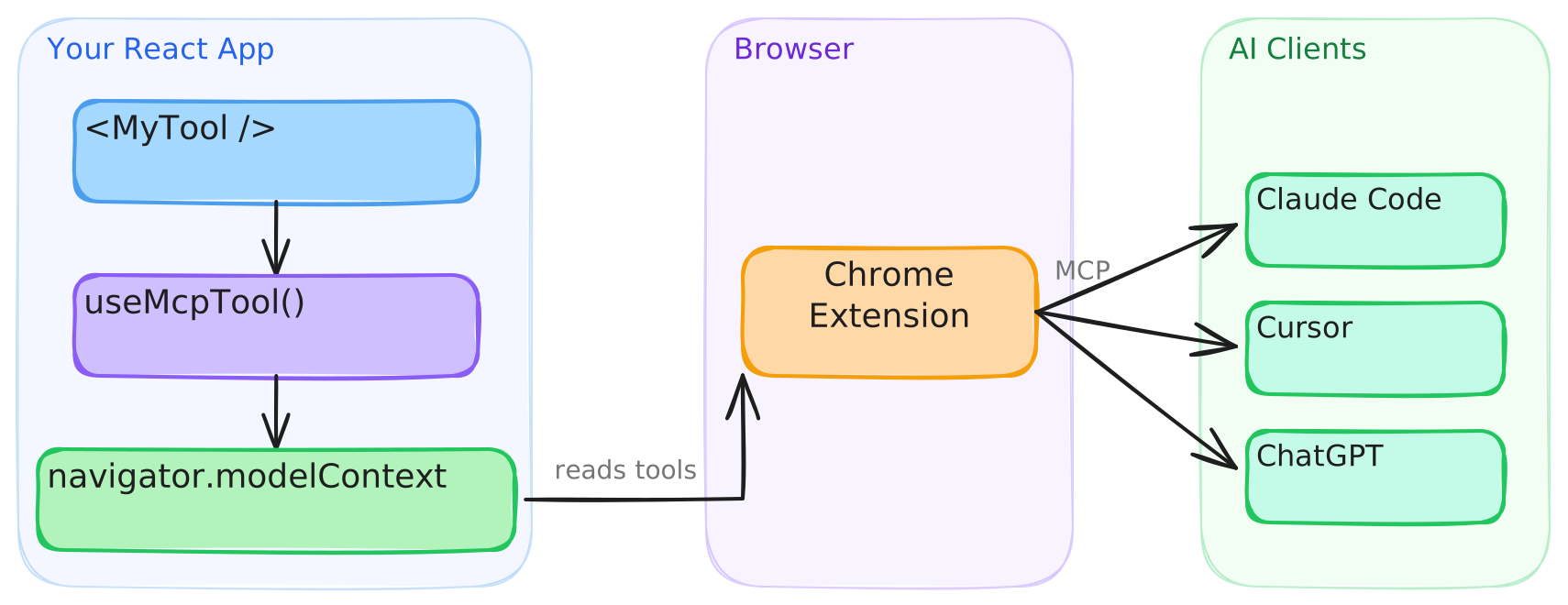
This library provides React bindings for that API. <WebMCPProvider> installs a polyfill (skipped when native support exists), and each useMcpTool call registers a tool that agents can discover and execute.
Connect to AI clients
Desktop MCP clients like Claude Code and Cursor can't access document.modelContext directly. The WebMCP Bridge extension connects your registered tools to any MCP client.
- Install the extension from the Chrome Web Store
- Configure your MCP client — see the extension setup guide for details
Once Chrome supports this bridging natively, I'll deprecate the extension.
Recipes
Execution state
useMcpTool returns reactive state you can use to build UI around tool execution:
function TranslateTool() {
  const { state, execute } = useMcpTool({
    name: "translate",
    description: "Translate text to Spanish",
    input: z.object({ text: z.string() }),
    handler: async ({ text }) => {
      const result = await translate(text, "es");
      return { content: [{ type: "text", text: result }] };
    },
  });

  return (
    <div>
      <button onClick={() => execute({ text: "Hello" })} disabled={state.isExecuting}>
        {state.isExecuting ? "Translating..." : "Translate"}
      </button>
      {state.lastResult && <p>{state.lastResult.content[0].text}</p>}
      {state.error && <p className="error">{state.error.message}</p>}
    </div>
  );
}
Title and annotations
Give a tool a human-friendly display title, and hint AI agents about its behavior with annotations. Per the current WebMCP spec, annotations are limited to readOnlyHint and untrustedContentHint:
useMcpTool({
  name: "search_users",
  title: "Search users",
  description: "Find users by name or email",
  input: z.object({ query: z.string() }),
  annotations: {
    readOnlyHint: true,
  },
  handler: async ({ query }) => { /* ... */ },
});
Dynamic tools
Tools register on mount and unregister on unmount. Conditionally render them like any React component:
function App({ user }) {
  return (
    <WebMCPProvider name="app" version="1.0">
      <PublicTools />
      {user.isAdmin && <AdminTools />}
    </WebMCPProvider>
  );
}
Callbacks
Run side effects on success or failure:
useMcpTool({
  name: "checkout",
  description: "Complete a purchase",
  input: z.object({ cartId: z.string() }),
  handler: async ({ cartId }) => { /* ... */ },
  onSuccess: (result) => analytics.track("checkout_complete"),
  onError: (error) => toast.error(error.message),
});
JSON Schema
Don't want Zod? Pass inputSchema directly:
useMcpTool({
  name: "calculate",
  description: "Basic arithmetic",
  inputSchema: {
    type: "object",
    properties: {
      a: { type: "number" },
      b: { type: "number" },
      op: { type: "string", enum: ["add", "subtract", "multiply", "divide"] },
    },
    required: ["a", "b", "op"],
  },
  handler: async (args) => {
    const { a, b, op } = args as { a: number; b: number; op: string };
    const result = { add: a + b, subtract: a - b, multiply: a * b, divide: a / b }[op];
    return { content: [{ type: "text", text: String(result) }] };
  },
});
SSR
Works with Next.js, Remix, and any server-rendering framework out of the box. The build includes a "use client" banner, so no extra configuration is needed.
Breaking changes in 0.2.0
0.2.0 realigns the library with the current WebMCP spec. If you're upgrading from 0.1.0:
- API moved to
document.modelContext. Tools register ondocument.modelContextinstead ofnavigator.modelContext. (The testing/consumer API stays onnavigator.modelContextTesting.) registerToolreturns aPromise. The polyfill'sregisterTool(tool, options?)returns aPromise<undefined>that rejects on invalid input (bad/duplicate/empty name, empty description, non-function execute, non-serializableinputSchema, untrustworthyexposedToorigin, or an already-aborted signal).- Unregistration is AbortSignal-only. There is no
unregisterTool— pass{ signal }and abort it.useMcpTooldoes this for you on unmount. - Handlers take a single argument.
handler(args)/execute(input)no longer receive a secondclientargument;ModelContextClientandrequestUserInteractionare removed. annotationsnarrowed to{ readOnlyHint, untrustedContentHint }. The classic hints (destructiveHint,idempotentHint,openWorldHint) andannotations.titleare removed. A new top-leveltitle?field replacesannotations.title.- New
exposedTo?: string[]controls cross-frame origin visibility (changing it re-registers the tool). - New
toolchangeevent.document.modelContextis anEventTargetthat fires a baretoolchangeevent on tool register/unregister; anontoolchangehandler is also supported.
outputSchema (Zod output / JSON-Schema outputSchema) and structuredContent on results are retained as documented library extensions.
API
See the full API reference.
License
Yorumlar (0)
Yorum birakmak icin giris yap.
Yorum birakSonuc bulunamadi