shufi
Health Uyari
- License — License: MIT
- Description — Repository has a description
- Active repo — Last push 0 days ago
- Low visibility — Only 5 GitHub stars
Code Basarisiz
- fs.rmSync — Destructive file system operation in hooks/correction-capture.mjs
- os.homedir — User home directory access in hooks/correction-capture.mjs
- process.env — Environment variable access in hooks/correction-capture.mjs
- exec() — Shell command execution in hooks/lib/correction-core.mjs
- os.homedir — User home directory access in hooks/lib/hub.mjs
- process.env — Environment variable access in hooks/lib/hub.mjs
Permissions Gecti
- Permissions — No dangerous permissions requested
Bu listing icin henuz AI raporu yok.
Shufi, the felt owl: a persistent memory hub and curated skills for Claude Code, Codex and Cursor, with a guided local setup.

Shufi
Claude Code forgets you between conversations. This fixes that.
A memory that follows you into any project, plus skills that keep it up to date on their own.





Renamed from Jarvis OS. If you installed
jarvis-os: runclaude plugin uninstall jarvis-os,
thenclaude plugin marketplace add ManceRayder42/shufiandclaude plugin install shufi./jarvis-setupis now/shufi-setup, and/jarvis-os:doneis now/shufi:done.
Your existing memory folder and config stay as they are; nothing to migrate.
Quick start
No account, no API key, nothing to pay for.
1. Install it. In Claude Code, run:
claude plugin marketplace add ManceRayder42/shufi
claude plugin install shufi
One step on Claude Code 2.1.275 or later: /plugin install shufi --marketplace ManceRayder42/shufi
2. Restart Claude Code and say "set me up". Claude creates your memory
folder, turns on the default skills and connects the free tools. It asks once
before installing any software, and leaves you only what needs a person: a key
or a sign-in.
Rather click through it? Type /shufi-setup for a local checklist page
that does the same thing.
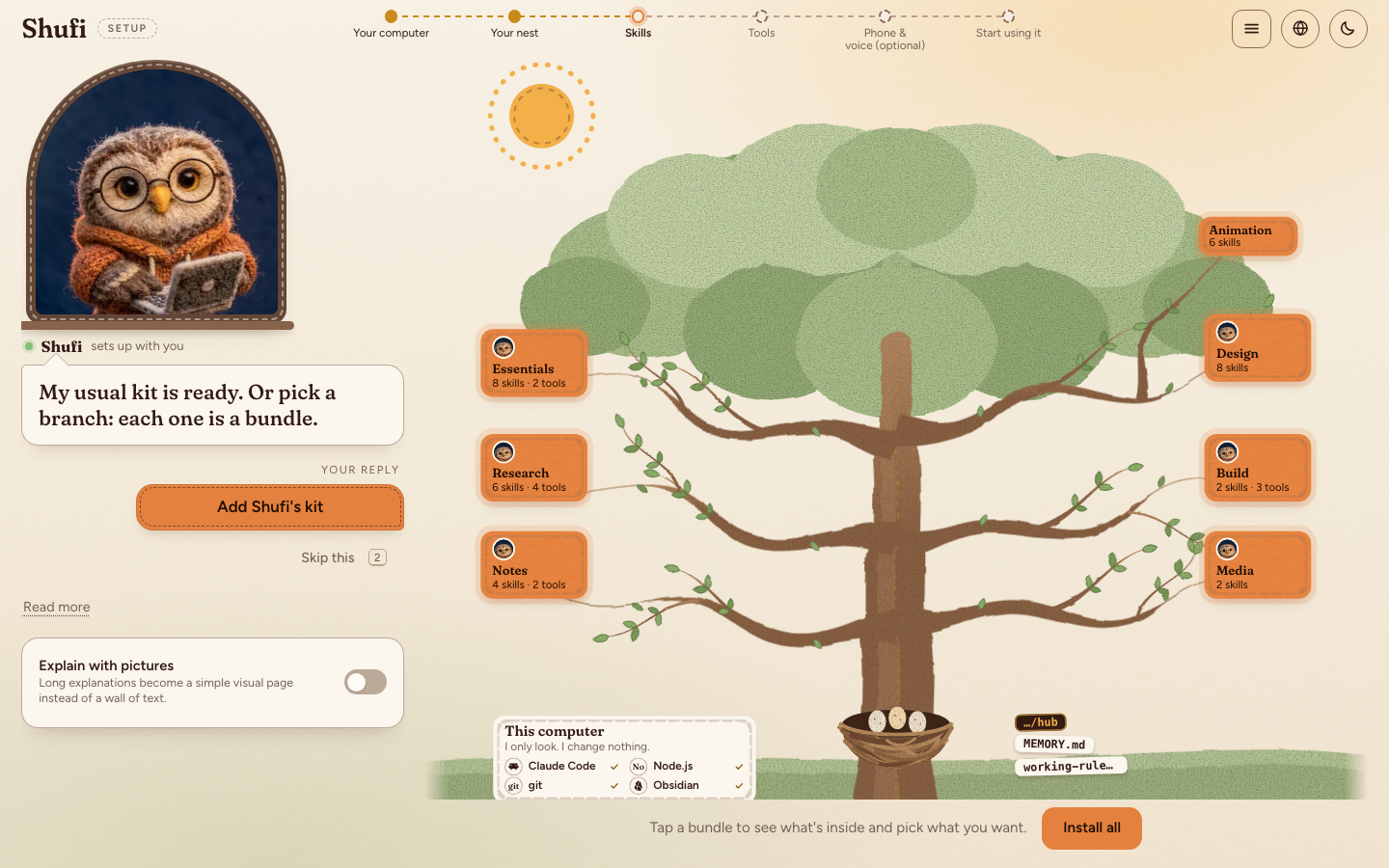
Works with Claude Code, Codex and Cursor
Same memory folder, same skills, same tools. Claude Code is the full experience;
Codex and Cursor get the same three things through their own config files, with
the gaps listed in details.
| Install | |
|---|---|
| Claude Code | the two lines above |
| Codex CLI | git clone https://github.com/ManceRayder42/shufi ~/.shufi && node ~/.shufi/setup/agent.mjs setup --host codex && node ~/.shufi/setup/agent.mjs install-host codex, then run /hooks once inside Codex and trust the hook |
| Cursor | the same with cursor, then node ~/.shufi/setup/agent.mjs install-host cursor --print-user-rule and paste the output into Customize > Rules (older builds: Cursor Settings > Rules > User Rules) |
It backs up any file it edits and never overwrites yours. Undo:node ~/.shufi/setup/agent.mjs uninstall-host codex (or cursor).
What you actually get
Claude Code normally starts every conversation from nothing — it doesn't
remember what you told it yesterday, or in a different project folder. This
plugin gives it a memory (technically a "hub": just one folder on your
computer, created for you during setup, that Claude reads at the start of
every conversation no matter which project you're in).
On top of that memory, it adds a set of skills — extra abilities Claude
picks up automatically when they're relevant. A few examples: closing out a
work session properly so nothing is forgotten, researching a topic with
citations, or turning a long explanation into a simple visual page instead of
a wall of text. The full list is in the details.
It keeps your memory honest
A fact in memory (a path, a version, "this is broken") is true the day you write it, not forever.
Twice you get help without doing anything:
- Stale facts are caught. About once a day, at the start of a session, a quick check looks for
paths that no longer exist, index lines that point nowhere and files the index forgot. If it finds
something you see one line, and a report is written toreports/in your memory folder. Nothing
is changed until you say "fix them". Clean memory means silence. - Corrections become rules. Tell Claude "no, I said..." or "לא, אמרתי..." and it saves the rule
to your memory right then and says so in one line. Say "undo" and it is gone. The same correction
twice raises a counter on the same rule instead of making a second one.
Both are on by default, finish well under 200 ms, and never block a session. Switches and details:
Memory hygiene.
One command builds the whole memory system
Say "set up memory" (or "תגדיר זיכרון") and Claude runs memory-setup. From an empty computer it
creates, and only what is missing: a short block in your ~/.claude/CLAUDE.md that points at your
notes, a knowledge/ folder (pack convention + index), a raw/ inbox and a wiki/ with an index,
the memory index with its rules, and it checks that the two hygiene hooks above are wired. It never
overwrites a file you wrote: in an existing CLAUDE.md it only touches its own marked block.
Run it again any time: it says "nothing to do". --dry-run shows the plan without writing.
Details: Memory setup.
The one thing you have to remember
Say "done" (or type /done) when you finish working.
That's the only habit this asks of you. Memory loading and skills happen
automatically. Saying "done" tells Claude to
write down what happened and fold it into your memory's history, so your
next conversation actually knows about it.
Skip it, and nothing breaks — but nothing new gets remembered either, and you
won't see an error telling you so. That invisible failure is exactly why it's
worth turning into a habit. If you take one thing from this page, take
this one.
What this is not
- Not a copy of one person's personal setup. Nothing here is tied to
someone else's projects or preferences — you fill in your own memory as you
use it. - Not a replacement for Claude Code's own project memory. That's a
different, narrower feature; the two work fine side by side. - Not going to tell you how to work. A couple of routing/workflow
defaults ship with a stated reason, never as "the one correct way."
More
How it works, the full skill list, optional skills, the phone assistant and licenses.
Contributing
Issues and PRs welcome — see CONTRIBUTING.md. Security
matters are in SECURITY.md.
License
MIT — see LICENSE.
Yorumlar (0)
Yorum birakmak icin giris yap.
Yorum birakSonuc bulunamadi