marm-memory
Health Pass
- License — License: Apache-2.0
- Description — Repository has a description
- Active repo — Last push 0 days ago
- Community trust — 305 GitHub stars
Code Pass
- Code scan — Scanned 12 files during light audit, no dangerous patterns found
Permissions Pass
- Permissions — No dangerous permissions requested
This server provides a persistent memory system and context-sharing layer for AI agents. It enables long-term recall, session continuity, and multi-agent coordination across various platforms using HTTP, STDIO, and WebSockets.
Security Assessment
Overall Risk: Low. The automated code scan of 12 files found no dangerous patterns, hardcoded secrets, or requests for dangerous system permissions. Because the core function involves sharing and storing context, the tool inherently handles conversational data, so you should still ensure your deployment environment is properly secured. Supporting WebSockets, HTTP, and STDIO means it will listen for and make network requests, but this is standard behavior for a multi-agent coordination server.
Quality Assessment
Overall Quality: Good, but anticipate a slower development cycle. The project is actively licensed under the permissive MIT license. It has solid community traction with 253 GitHub stars and saw repository updates as recently as today. However, the developer recently noted that active feature updates will be paused until Q1-Q2 2026 while they focus on broader system development.
Verdict
Safe to use, but be aware that major feature updates and direct maintenance are currently delayed until mid-2026.
Self-hosted, local-first MCP memory server for AI agents. Sub-20ms recall at 10k memories, hybrid semantic + exact-syntax search (RAG), code & concept knowledge graphs (158 languages). All local in SQLite: no cloud, no vector DB, no API keys. Works with Claude Code, Codex, Cursor, Gemini & any MCP client.
MARM: Local-First Persistent Multi-Agent Memory Layer for MCP Clients v2.18.0










Contributions welcome! Browse open issues to contribute, or join the MARM Discord to share workflows, get setup help, and connect with other builders.
Table of Contents
- Why MARM MCP
- Quick Start
- Code Graph
- Complete MCP Tool Suite
- MARM Dashboard
- Performance & Scaling Benchmarks
- Contributing
- Project Documentation
Why MARM MCP: The Problem & Solution
Your AI forgets everything. MARM MCP doesn't.
MARM MCP is a local memory infrastructure layer for AI agents. It gives Claude, Codex, Gemini, Qwen, IDE agents, and other MCP clients one persistent place to store decisions, retrieve context, reuse notebooks, and keep long-running work from drifting.
MARM is built around two focused surfaces: 7 core memory tools for daily agent context and 5 code-graph tools for repo intelligence (bundled over both HTTP and STDIO). The server handles the heavy work behind those tools: protocol delivery, hybrid recall, serialized writes, rate-limit presets, write-time consolidation, agent-assisted compaction, and lazy graph startup. Agents get a compact memory workflow plus codebase lookup when they need it, without rereading the whole project or flooding the model with duplicate context.
How It Works
| Layer | What it does | Why it matters |
|---|---|---|
| Memory model | Sessions, structured logs, notebooks, summaries, and semantic memories | Keeps project history searchable instead of trapped in one chat |
| Scale layer | SQLite WAL mode, connection pooling, serialized write queue, and HTTP rate-limit presets | Lets one server support solo use, multi-agent work, and swarm-style bursts |
| Intelligence layer | FTS filter, semantic re-rank, bounded semantic fallback, auto-classification, write-time consolidation, and compaction candidates | Keeps recall useful as memory grows instead of letting duplicates pile up |
| Code graph layer | Repo indexing, symbol lookup, call tracing, architecture overview, and change-impact analysis | Gives agents project structure without rereading the whole codebase |
| Token layer | Lightweight 7-tool core surface (12 over HTTP with bundled graph tools), semantic re-rank before retrieval, and write-time deduplication | Reduces tokens sent to the model on every recall and cost stays predictable as memory scales |
| Deployment layer | Pip, Docker, STDIO, HTTP, --swarm, --swarm-max, and --trusted |
Lets you run private local memory or shared multi-agent memory with the same MCP surface |
See Performance & Scaling Benchmarks for retrieval latency, concurrency, and write-cost numbers.
MARM Demo
https://github.com/user-attachments/assets/dabfe44f-689d-404f-a2c7-dcf8fa4ef0c1
MARM gives AI agents persistent local memory, shared context, write-queue safety, swarm presets, and hybrid recall so commands, config keys, and project meaning all stay reachable.
Start Now
Recommended: guided setup with marm-init
The easiest way to install MARM is to let your agent do the setup with you. marm-init turns the usual MCP setup mess into one guided conversation: Python or Docker, HTTP or STDIO, local or remote server, API keys, config paths, dashboard startup, and multi-agent linking for Claude, Codex, Gemini, Qwen, Cursor, VS Code, and other MCP clients. No hunting through install docs, no guessing which config file your client uses, and no rewriting the same connection by hand for every agent.
npx degit Lyellr88/MARM-Systems/skills
Then tell your agent: "Use the marm-init skill to set up MARM."
Manual pip install
pip install marm-mcp-server
| If you are... | Start the server | Connect your MCP client |
|---|---|---|
| Solo developer / researcher | python -m marm_mcp_server |
"agent" mcp add --transport http marm-memory http://localhost:8001/mcp |
| Private local STDIO user | marm-mcp-stdio |
"agent" mcp add --transport stdio marm-memory-stdio marm-mcp-stdio |
| Multiple agents sharing memory | python -m marm_mcp_server --swarm |
"agent" mcp add --transport http marm-memory http://localhost:8001/mcp |
| Private high-throughput swarm | python -m marm_mcp_server --swarm-max |
"agent" mcp add --transport http marm-memory http://localhost:8001/mcp |
| Trusted private lab/server | python -m marm_mcp_server --trusted |
"agent" mcp add --transport http marm-memory http://localhost:8001/mcp |
Code Graph: repo indexing and code lookup
marm-graph is bundled into the HTTP server. It indexes a repository once, then lets agents ask code-structure questions without repeatedly scanning files. The graph backend starts lazily on first graph-tool use, so normal memory, logging, notebook, and summary tools still start fast.
Use HTTP mode, then ask your agent to index the repo:
Use marm_graph_index to index this repository.
Then use marm_code_lookup when you need symbols, files, or source snippets.
Use marm_graph_trace for call paths, marm_graph_architecture for an overview, and marm_graph_impact for change-risk checks.
Graph tools are bundled on both HTTP and STDIO. STDIO stays a single local process with no port and no API key; the graph engine still starts lazily on first use.
🚀 Quick Start for MCP (HTTP & STDIO)
Use this quick rule of thumb to choose your setup
- Local HTTP/STDIO = fastest single-machine setup.
- Docker HTTP = shared/always-on server (key required).
- Docker STDIO = private containerized local use (no HTTP key).
Swarm / multi-agent note: The write queue is enabled by default to serialize memory writes through one worker. For shared HTTP deployments, use --swarm (200 RPM) or --swarm-max (600 RPM) when starting the server. --trusted disables rate limiting entirely for private deployments. STDIO is still best for private single-agent/local use. See MCP-HANDBOOK.md for more info.
"agent" refers to claude, gemini, grok, qwen, or any MCP client. Codex uses --url instead of --transport to add MCP tools.
pip install marm-mcp-server
python -m marm_mcp_server
# Stuck on client setup? Open a Q&A thread: https://github.com/Lyellr88/MARM-Systems/discussions
# most agents use this --transport command
"agent" mcp add --transport http marm-memory http://localhost:8001/mcp
codex mcp add marm-memory --url http://localhost:8001/mcp

</details>

<details>
<summary><strong>Local pip STDIO</strong></summary>

#### Local pip STDIO

```bash
pip install marm-mcp-server
python -m marm_mcp_server.server_stdio
# most agents use this --transport command
"agent" mcp add --transport stdio marm-memory-stdio marm-mcp-stdio
codex mcp add marm-memory-stdio -- marm-mcp-stdio
Use HTTP when multiple agents need to share one live MARM server. STDIO is still best for private single-agent use because each client owns its own local process.
# HTTP shared server, normal multi-agent use
python -m marm_mcp_server --swarm

# HTTP shared server, heavier private swarm
python -m marm_mcp_server --swarm-max

# HTTP trusted private lab/server, rate limiting disabled
python -m marm_mcp_server --trusted

# STDIO remains keyless/private and does not use swarm flags
marm-mcp-stdio
Docker HTTP (key required)
Docker HTTP requires an API key because it exposes MARM as a network server; STDIO stays local to the client process and does not need one.
# Step 1: generate key (do not add < > around the key)
docker run --rm lyellr88/marm-mcp-server:latest --generate-key

# Step 2: run server
docker pull lyellr88/marm-mcp-server:latest
docker run -d --name marm-mcp-server \
  -p 127.0.0.1:8001:8001 \
  -e SERVER_HOST=0.0.0.0 \
  -e MARM_API_KEY=your-generated-key \
  -v ~/.marm:/home/marm/.marm \
  lyellr88/marm-mcp-server:latest

# Step 3: connect client
"agent" mcp add --transport http marm-memory http://localhost:8001/mcp --header "Authorization: Bearer your-generated-key"

# PowerShell: set this before starting/restarting Codex
$env:MARM_API_KEY="your-generated-key"
codex mcp add marm-memory --url http://localhost:8001/mcp --bearer-token-env-var MARM_API_KEY

# Quick auth smoke test
curl -i -H "Authorization: Bearer $env:MARM_API_KEY" http://127.0.0.1:8001/mcp
--bearer-token-env-var takes the environment variable name, not the raw key. Start or restart Codex from the same shell after setting $env:MARM_API_KEY. For local Docker smoke tests, MARM_API_KEY=test is fine and avoids shell escaping problems; use a generated key for real deployments. A 406 Not Acceptable from the smoke-test GET /mcp means auth reached the MCP endpoint; 401 Unauthorized means the key is missing or mismatched.
# --swarm: write queue on, 200 RPM - recommended for multi-agent shared servers
docker run -d --name marm-mcp-server \
  -p 127.0.0.1:8001:8001 \
  -e SERVER_HOST=0.0.0.0 \
  -e MARM_API_KEY=your-generated-key \
  -v ~/.marm:/home/marm/.marm \
  lyellr88/marm-mcp-server:latest --swarm
Docker graph tools run inside the container, so they cannot see host paths unless you mount them at docker run.
$env:MARM_API_KEY="test"

docker run -d --name marm-mcp-server `
  -p 127.0.0.1:8001:8001 `
  -e SERVER_HOST=0.0.0.0 `
  -e MARM_API_KEY=$env:MARM_API_KEY `
  -v ~/.marm:/home/marm/.marm `
  -v C:\Users\lyell\Desktop\MARM-Systems:/workspace/MARM-Systems `
  lyellr88/marm-mcp-server:latest
Then index the container path, not the Windows host path:
marm_graph_index(repo_path="/workspace/MARM-Systems")
Graph tools must use the container path. Mounts cannot be added to an already-running container; stop and restart the container with the repo mount when you want Docker graph indexing.
Docker STDIO (no HTTP key)Docker STDIO includes the same built-in marm-graph tools; no extra image or install step is required.
docker run --rm -i \
  -v ~/.marm:/home/marm/.marm \
  --entrypoint python \
  lyellr88/marm-mcp-server:latest \
  -m marm_mcp_server.server_stdio
Support notes
- Docker HTTP requires a key; Docker STDIO does not.
- If you get
401, verify key match and client restart after env var changes. - For full key setup, rotation, and troubleshooting: INSTALL-DOCKER.md
Claude Code remains the recommended first setup path, but MARM also works with other MCP clients and IDE agents.
CLI clients - Claude Code · Codex · Gemini CLI · Qwen CLI · Linux variants · Docker/key
IDE agents - VS Code / Copilot Agent · Cursor · Docker/key IDE setup
Remote/API platforms - xAI / Grok Remote MCP · Platform integration
Using a client that isn't listed? Open an issue and let us know; client adapters are a first-class feature request.
MARM Dashboard
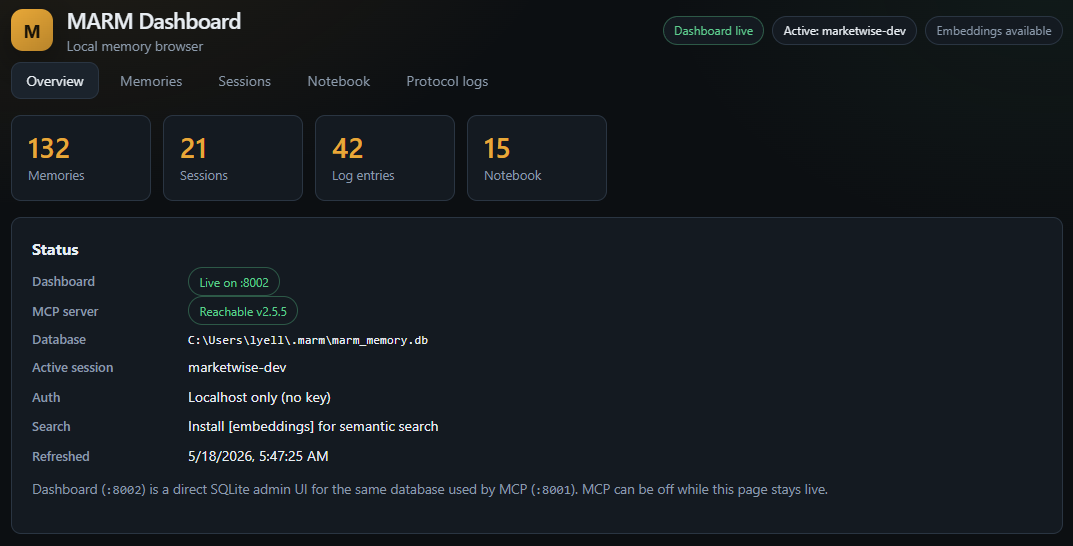
A local web UI for browsing and managing your MARM memory. It is bundled with marm-mcp-server and mounts at /dashboard when the HTTP server starts.
| What it gives you | How it works |
|---|---|
| Browse/search/edit all memories | Direct SQLite access to the same ~/.marm/marm_memory.db |
| Manage sessions and protocol logs | Open http://localhost:8001/dashboard beside the MCP endpoint on :8001 |
| Notebook CRUD with inline editor | Same MARM_API_KEY auth model as the MCP server |
| Delete-all with count confirmation | Included in the unified pip package and Docker image |
| View the write queue in real time | Pulls live data from the write queue |
Start MARM HTTP, then open the dashboard:
python -m marm_mcp_server
# browser: http://localhost:8001/dashboard
Docker uses the same unified image and key:
docker run -d --name marm-mcp-server \
  -p 127.0.0.1:8001:8001 \
  -e MARM_API_KEY=your-key \
  -v ~/.marm:/home/marm/.marm \
  lyellr88/marm-mcp-server:latest
# browser: http://localhost:8001/dashboard
Complete MCP Tool Suite (12 Tools)
💡 Pro Tip: You don't need to manually call these tools! Just tell your AI agent what you want in natural language:
- "Claude, log this session as 'Project Alpha' and add this conversation as 'database design discussion'"
- "Remember this code snippet in your notebook for later"
- "Search for what we discussed about authentication yesterday"
The AI agent will automatically use the appropriate tools. Manual tool access is available for power users who want direct control.
| Category | Tool | Description |
|---|---|---|
| Memory Intelligence | marm_smart_recall |
Hybrid recall with automatic exact-query detection for config keys, commands, API names, and file paths; semantic reranking; bounded fallback search; and chunk-aware scoring for long memories. Supports search_all=True, project/platform filters, exact_mode="auto"|"exact"|"semantic", and detail=1/2/3 depth controls |
| Logging System | marm_log_entry |
Add structured session log entries. Session/topic routing, summary-cache invalidation, and context summary preparation are handled by the server |
marm_log_show |
Display all entries and sessions (filterable) | |
marm_delete |
Delete a log session, log entry, or notebook entry (type="log"|"notebook") |
|
| Reasoning & Workflow | marm_summary |
Generate cached session summaries with intelligent truncation for LLM conversations |
| Notebook Management | marm_notebook |
Unified notebook tool: add, use, show, status, or clear entries with action="add"|"use"|"show"|"status"|"clear" |
| Memory Maintenance | marm_compaction |
Unified compaction workflow with action="status"|"candidates"|"review"|"stage"|"apply"|"discard" for agent-assisted memory cleanup |
| Code Graph (bundled, HTTP + STDIO) | marm_graph_index |
Index a repo into the code-structure graph, or check status / list indexed projects |
marm_code_lookup |
Find symbols, text patterns, or a symbol's source — use instead of grep/glob | |
marm_graph_trace |
Trace call paths / data flow through the graph from a function | |
marm_graph_architecture |
High-level architecture overview: node/edge breakdown, modules, and schema | |
marm_graph_impact |
Blast radius of code changes: git diff → affected symbols + risk |
A Deeper Look
MARM keeps the core MCP surface lean with 7 tools by grouping domain operations behind explicit parameters like marm_notebook(action=...), marm_delete(type=...), and marm_compaction(action=...). Behind those tools, the server handles lifecycle setup, protocol refresh, docs indexing, date context, summary-cache maintenance, write queue handling, project/platform attribution, and health checks. marm-graph's 5 code-structure tools are bundled by default on both HTTP and STDIO, bringing the discoverable surface to 12; the code-graph engine starts lazily on first use and never blocks the 7 core tools if it fails to start (GRAPH_ENABLED=false disables it outright).
Under the hood, MARM uses SQLite WAL mode, connection pooling, serialized writes, HTTP swarm presets, safe local defaults, exact-query routing for syntax-heavy lookups, FTS→semantic reranking, bounded fallback search, chunk-aware long-memory recall, and summary/context/full recall depths to keep memory fast, stable, and token-efficient as projects grow.
For a deeper look into the MCP behavior, tool parameters, automation, and workflows, see MCP-HANDBOOK.md and FAQ.md.
Performance & Scaling Benchmarks
MARM is tuned for fast recall first, even as memory grows and long memories are chunked behind the scenes.
1. Retrieval Latency Scaling
| Session Size ($N$) | Min Latency | Median Latency | p95 Latency |
|---|---|---|---|
| N = 100 | 12.3 ms | 13.8 ms | 15.0 ms |
| N = 500 | 13.3 ms | 14.1 ms | 16.4 ms |
| N = 1,000 | 14.5 ms | 16.2 ms | 17.1 ms |
| N = 2,000 | 15.9 ms | 18.4 ms | 20.8 ms |
| N = 4,000 | 17.6 ms | 20.8 ms | 22.5 ms |
2. Encoder + Concurrency
- Cold model load:
972ms - Warm encode: median
10.3ms, p9511.2ms - Concurrent recall: 10 gathered recalls completed in
394.7msvs436.6msserial. The current path is intentionally serialized around shared encoder/SQLite work, so this is stable under load rather than true parallel speedup.
3. Write-Time Ingestion Cost
- Consolidation off: median
10.3ms, p9511.6ms - Consolidation on: median
42.0ms, p9546.3ms - Tradeoff: write-time dedupe/clustering adds
4.1xmedian cost so recall stays fast and cleaner over time.
4. Hybrid Search Scaling
| Session Size ($N$) | Pure Semantic | Production Hybrid | FTS Filter -> Rerank | Speedup vs Pure |
|---|---|---|---|---|
| N = 100 | 2.4 ms | 15.1 ms | 2.2 ms | 1.1x |
| N = 1,000 | 23.6 ms | 16.2 ms | 2.7 ms | 8.8x |
| N = 4,000 | 93.8 ms | 18.3 ms | 4.9 ms | 19.0x |
| N = 10,000 | 242.7 ms | 19.7 ms | 5.4 ms | 45.1x |
Benchmarks used a throwaway real SQLite database and the live fastembed-backed all-MiniLM-L6-v2 encoder on local hardware. Reproduce them: marm-mcp-server/scripts/bench_hotpath.py
⭐ Star the Project
If MARM helps with your AI memory needs, please star the repository to support development!
Contributing
MARM welcomes contributors at every level. Code helps, but so do docs, setup notes, client testing, bug reports, benchmarks, and real workflow feedback from people using AI tools every day.
Good places to help:
- Test MARM with more MCP clients, IDE agents, and operating systems
- Improve docs, screenshots, examples, and platform-specific setup notes
- Report bugs or confusing install steps with clear reproduction details
- Share memory workflows, agent habits, and tool ideas from real use
- Check out open issues
💡 Want to get your name on this list? Check out our CONTRIBUTING.md guide to get started!
Join the MARM Community
Help build the future of AI memory - no coding required!
Connect: MARM Discord | GitHub Discussions
License & Usage Notice
MARM is released under the Apache 2.0 License, and forks, experiments, and integrations are welcome. MARM also wraps third-party open-source components such as codebase-memory-mcp under MIT; see THIRD_PARTY_NOTICES.md for attribution. If you build on it, please make unofficial versions easy to distinguish from releases published by the official MARM repository so users know what they are installing.
Project Documentation
Usage Guides
- MCP-HANDBOOK.md - Complete MCP server usage guide with commands, workflows, and examples
- PROTOCOL.md - MCP operating protocol
- FAQ.md - Answers to common questions about using MARM
MCP Server Installation
- INSTALL-DOCKER.md - Docker deployment (recommended)
- INSTALL-WINDOWS.md - Windows installation guide
- INSTALL-LINUX.md - Linux installation guide
- INSTALL-PLATFORMS.md - Platform installation guide
Project Information
- README.md - This file - ecosystem overview and MCP server guide
- CONTRIBUTING.md - How to contribute to MARM
- CHANGELOG.md - Version history and updates
- ACKNOWLEDGMENTS.md - Contributors and acknowledgments
- ROADMAP.md - Planned features and development roadmap
- LICENSE - Apache 2.0 license terms
Reviews (0)
Sign in to leave a review.
Leave a reviewNo results found