herdr-agent-usage
Health Gecti
- License — License: MIT
- Description — Repository has a description
- Active repo — Last push 0 days ago
- Community trust — 130 GitHub stars
Code Gecti
- Code scan — Scanned 12 files during light audit, no dangerous patterns found
Permissions Gecti
- Permissions — No dangerous permissions requested
Bu listing icin henuz AI raporu yok.
Credential-scoped AI quota, context, and cache in Herdr for Claude, Codex, Grok, Agy, OpenCode, Pi, omp, Devin, Muse, and Cursor.
herdr-agent-quota
Model, context, and subscription quota in Herdr's Agent sidebar — grouped by
Space, with brand icons that carry agent status.


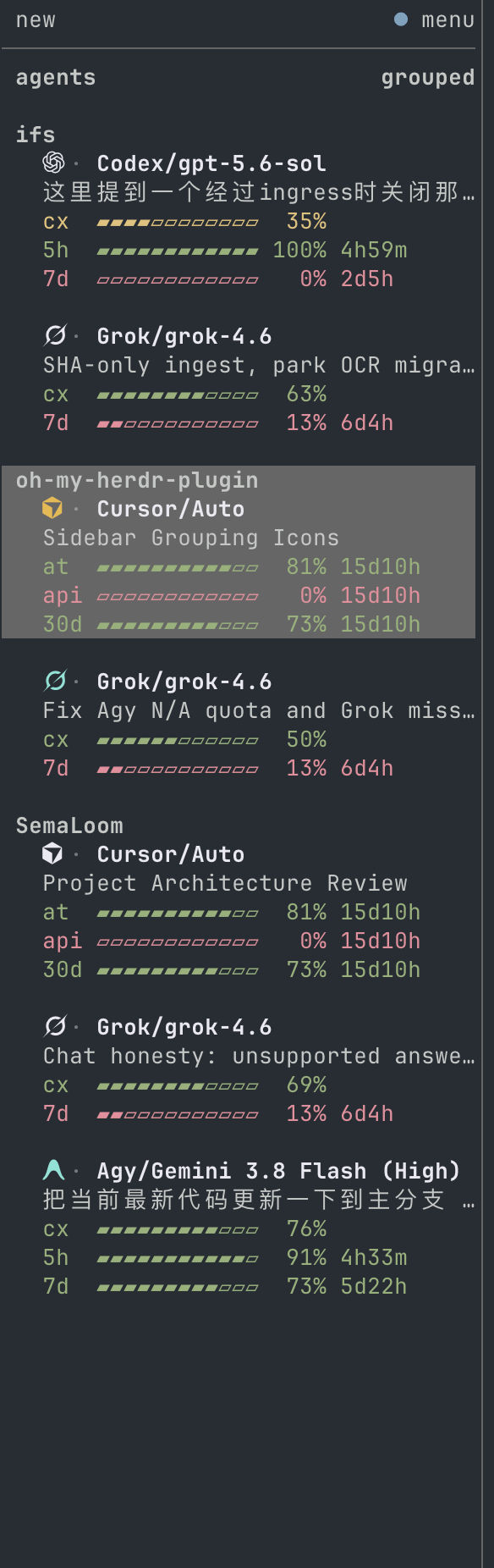
Agents are grouped under their Space. Each row leads with this plugin's brand
icon — not Herdr's status ring. The icon colour tracks the agent: yellow while
working, teal while done (until you focus it or move focus away from it), ink-white when idle.
Provider and model stay ink-white; severity colours on the meters still mean
remaining headroom.
The default layout is gauges: a meter beside each quota number. Bars fill to
the printed number, and cx, 5h, 7d, and 30d all follow quota-percent.
Labels are three characters so those periods align; a provider-named window too
long for that column keeps a plain row instead of a truncated bar. Meters size
to the connected Herdr endpoint's sidebar — indent and scrollbar included.
Empty fields collapse; percentages can show remaining or used quota. Cache and
TTL are off by default (turn them on in settings if you want them). Login-scoped
vendors (Grok, Codex, Devin, OpenCode, Cursor) keep every tab visible in the
Agent panel; duplicate 5h/7d/30d rows collapse to one pane per Space. On a
wide sidebar, the vendor icon and name sit above that pane's quota, and extra
tabs list model, topic, and context with no icon. A settings row gap of 1 still
separates different agents; nested extra tabs of the same vendor stay flush.
Claude and Agy stay per-pane.
Agent order defaults to Space grouping with least quota left first inside each space.
Low-quota notifications stay off until you set a threshold. Switch layout,
fields, and percentages from the settings pane (prefix+shift+q).
Install and upgrade
Requires Herdr 0.9.0+, the Rust toolchain pinned in rust-toolchain.toml,
macOS or Linux, and a supported agent CLI.
git clone https://github.com/levi-qiao/herdr-agent-quota.git
cd herdr-agent-quota
./install.sh
To enable a subset, use ./install.sh --agent claude,codex,omp.
Existing sessions need restarting only when newly installed hooks or Herdr
integrations must be loaded.
The script builds, links, and runs configure. It does not finish icons in
every terminal, Herdr integrations, or macOS Keychain approval. To have a
coding agent on this machine complete that, paste the prompt in Ask an agent
to finish setup.
Upgrade from the repository directory:
git pull --ff-only
./install.sh
Upgrades retain saved preferences, repair managed configuration, refresh quota,
and restore background updates automatically. No cache deletion or watcher
management is required. Changes to the Herdr server connection are adopted by
the watcher automatically.
Ask an agent to finish setup
./install.sh is not the whole job: brand icons need a font map in this
terminal, most agents need a Herdr integration, and Cursor/Muse on macOS need
a one-time Keychain Always Allow. Paste the following into Claude, Cursor,
Grok, Codex, or any coding agent on the machine that runs Herdr. The same
steps, with commands, are in docs/agent-setup.md
(中文).
Install and fully configure herdr-agent-quota on this computer until Herdr's
Agent sidebar shows brand icons and quota for the agent CLIs I actually have.
Stopping after ./install.sh is not done. Icons as boxes or "?" are unfinished.

Repo: https://github.com/levi-qiao/herdr-agent-quota
If this working tree is already that repo, use it; otherwise clone it, cd in,
and follow docs/agent-setup.md (English) or docs/agent-setup.zh-CN.md (中文).
If you cannot read those files, do all of the following anyway.

Rules:
- Do not herdr pane read (especially --source recent). That repaints agent TUIs.
- Do not call a bare `agent` binary (that is Grok when both are installed).
  Cursor's CLI is `cursor` or `cursor-agent`.
- Do not install a Cursor statusLine; it replaces the native footer.
- Plugin actions ignore extra env vars. Pass choices as ./install.sh flags.
- Use rustup for rust-toolchain.toml. Do not brew-install rust.

1. PATH: add ~/.local/bin, ~/.cargo/bin, /opt/homebrew/bin, /usr/local/bin.
   Need herdr 0.9.0+ and rustup/cargo. If herdr is missing, stop. If cargo is
   missing, install rustup (https://rustup.rs), not a distro Rust package.

2. Detect agents as the union of binaries, config dirs, and `herdr agent list`.
   --agent names: claude (claude, ~/.claude), codex (codex, ~/.codex),
   grok (grok, ~/.grok), agy (agy, ~/.gemini/antigravity-cli),
   opencode (opencode, ~/.config/opencode), pi (pi, ~/.pi/agent),
   omp (omp, ~/.omp), devin (devin, ~/.local/share/devin),
   muse (muse or muse-code, ~/.config/muse),
   cursor (cursor or cursor-agent, ~/.cursor).
   Print the list. If none, install all and say so.

3. From the repo: git pull --ff-only if this is main and clean; then
   ./install.sh --agent <detected,comma,separated>
   Read the full output. font: notes and missing integrations are remaining work.

4. After the script:
   - herdr plugin list must show herdr-agent-quota enabled.
   - Wait for configure/refresh logs to succeed (invoke returns while running).
   - herdr integration status; for each detected agent that is "not installed",
     herdr integration install <id> (claude, codex, grok, opencode, pi, omp,
     devin, cursor — not agy or muse). Skip CLIs the user does not have.
   - Font: configure copies Herdr Agent Icons Max to ~/Library/Fonts (macOS) or
     ~/.local/share/fonts (Linux) and maps Ghostty/kitty only if those configs
     already exist. Linux: fc-cache that fonts dir. Detect THIS terminal
     (TERM_PROGRAM / KITTY_WINDOW_ID / WEZTERM_EXECUTABLE). PUA U+E1A0–U+E1B6
     needs an explicit map or the cell is a box or "?". Ghostty:
     font-codepoint-map = U+E1A0-U+E1B6="Herdr Agent Icons Max" (and U+E1C0–U+E1C5),
     wrapped in "# BEGIN/END herdr-agent-quota font". kitty: symbol_map those
     ranges to Herdr Agent Icons Max. WezTerm: add the family to font_with_fallback.
     VS Code/Cursor: append it to terminal.integrated.fontFamily. Then reload
     the terminal (Ghostty cmd+shift+,, kitty ctrl+shift+f5). Muse's mark is ◈
     on purpose. Nested extra tabs of the same vendor have no icon by design.
     Yellow "?" on 1.6.1+ is almost always an unmapped terminal; older builds
     used ZWNJ — upgrade.
   - macOS Cursor: if ~/.cursor/cli-config.json has authInfo and
     ~/.cursor/.herdr-keychain-approved is missing, warn the user, then
     ./target/release/herdr-agent-quota refresh --provider cursor --keychain-approve --force
     and tell them to click Always Allow (not Allow).
   - macOS Muse keychain login: same with --provider muse.
   - herdr plugin action invoke refresh --plugin herdr-agent-quota and wait.
   - Tell me which already-running panes to restart (new hooks/integrations).
     Claude/Agy need one turn for StatusLine. Cursor cache needs a turn after
     hooks.json is reloaded.

5. Report: detected vs enabled agents, integrations, font path and which
   terminal you mapped, Keychain, restarts still needed, anything still broken.
   Do not claim icons are correct without a human look or a verified font map.
Settings
Press prefix+shift+q, or run the following if that key is already assigned:
herdr plugin pane open --plugin herdr-agent-quota --entrypoint settings --focus
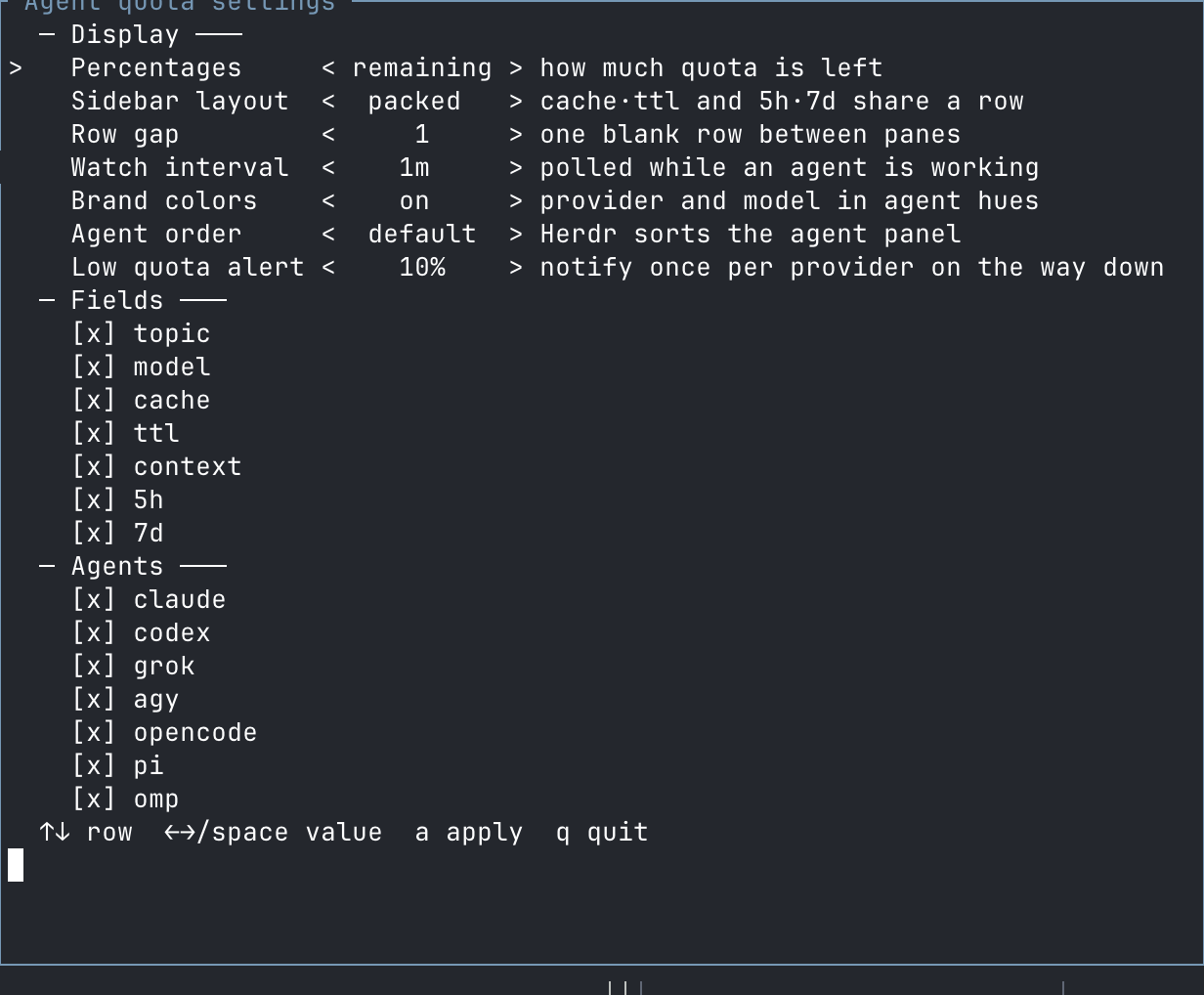
| Setting | Options |
|---|---|
| Percentages | Remaining or used; colors always indicate remaining headroom |
| Layout | gauges (default) adds a meter beside each quota number; packed groups related fields; stacked gives each field a row |
| Row gap | Zero or one blank line between agents |
| Watch interval | 30 seconds–1 hour; default 60 seconds |
| Fields | Provider, topic, model, context, short/long/monthly quota on by default; cache and TTL optional |
| Agent order | Group by Space, least quota left first (default); or Herdr's own policy |
| Low quota alert | Off or a threshold from 1% to 100% |
| Agents | Claude, Codex, Grok, Agy, OpenCode, Pi, OMP, Devin, Muse, Cursor |
Use arrows or Space to edit, a to apply, and q to close.
Installer options are also available through ./install.sh --help.
Data sources and limits
| Agent | Quota source | Attribution |
|---|---|---|
| Codex | Codex app-server; 5h and/or 7d | Current login in the plugin's CODEX_HOME |
| Grok | CLI billing endpoint; 7d or 30d | Current CLI credentials |
| Devin | CLI usage endpoint; 1d and 7d | Current CLI credentials |
| Muse Code | CLI subscription endpoint; 5h and 7d | Current CLI account login; session via Muse's session lock (Linux) |
| Cursor | CLI DashboardService usage; at, api, and 30d | Current CLI auth.json, else the macOS Keychain login from cursor-agent login, else $CURSOR_STATE_DB (state.vscdb access token) when the CLI has no login; model from local session files; topic from the generated session title; cx from store.db token_details (the CLI footer percent); cache from CLI hooks |
| Claude Code | StatusLine; 5h and 7d | Exact session observation |
| Agy / Antigravity | StatusLine; 5h, 7d, and api (third-party pool on Gemini) | Exact session and identifiable model pool |
| OpenCode | OpenCode Go usage endpoint | Go credential; confirmed PAYG routes have no subscription quota |
| Pi | Canonical Codex quota | Only when the recorded account matches |
| OMP | omp usage --json --provider <id> |
Reported account matching the session's credential pin |
The Claude Code status line keeps the user's own statusLine output and appends
a spending pace for the binding window, for example ⏱ 5h ↓12%: quota used
minus the share of the window's clock already run, in points. ↓ means slow
down, ↑ means there is headroom, = is within five points. The window with
the least remaining quota is paced and named; if that window cannot be paced,
nothing is appended rather than pacing the looser one: no reset time, expired,
reset further away than the window is long, or in the first 5% of the window.
Quota windows retain their provider's meaning. Model, context, and cache data
come from the identified session when available. ttl≈ marks an estimated
prompt-cache lifetime, not a guaranteed expiry. Topic extraction uses the
named pane's visible screen for most agents and preserves the last topic when
it scrolls away. Cursor and Grok use the generated session title from local
session metadata instead; Muse uses the last prompt in its transcript.
All supported working agents participate in one background watcher. Requests
are debounced for 60 seconds, including a final refresh after a turn settles.
OMP additionally retains its own five-minute usage cache. Idle panes sharing a
verified quota source receive the same reading.
Native Codex, Grok, Devin, Muse, and Cursor collectors follow the plugin's current login,
not separate accounts for each pane. Claude/Agy do not report a reliable serving
account ID, so their observations are not shared across sessions. Unknown
identity or model-pool attribution does not produce a guessed quota. Failed
requests preserve the last verified reading for that same account; they do not
turn failures into zero usage.
Troubleshooting
| Symptom | Check |
|---|---|
Brand icons are boxes or ? |
The icon font is missing or this terminal has no U+E1A0–U+E1B6 map — see Ask an agent to finish setup. Reload the terminal after configure. A yellow ? on a build older than 1.6.1 was the working-state ZWNJ bug; upgrade. Muse uses the text mark ◈ on purpose. Nested extra tabs of the same vendor have no icon by design. |
| Session data is missing | Run herdr integration status; load missing integrations before restarting the affected agent |
| Claude/Agy quota is missing | Send a turn so the session's StatusLine produces an observation |
| OMP quota is missing | Check omp usage --json --redact --provider <id> |
| Devin quota is missing | Check the CLI login and DEVIN_CREDENTIALS_FILE if customized |
| Muse quota is missing | Run muse login (API-key logins have no subscription quota); check MUSE_AUTH_PATH if customized. On macOS, a storage: "keychain" login also needs a one-time Keychain approval: run herdr-agent-quota refresh --provider muse --keychain-approve and click Always Allow |
| Cursor quota is missing or stuck on a previous account | Run cursor login. On macOS, cursor-agent login stores the token in Keychain: run herdr-agent-quota refresh --provider cursor --keychain-approve and click Always Allow. The desktop app token is only used when the CLI has no login of its own and $CURSOR_STATE_DB is set |
| Ghostty asks to "access data from other apps" while using Cursor | macOS SystemPolicyAppData: a Ghostty child touched Cursor-owned files (~/.cursor or Application Support). This plugin does not open those trees on macOS unless $CURSOR_HOME / $CURSOR_AUTH_FILE / $CURSOR_STATE_DB is set. Cursor CLI itself may still prompt (it writes under ~/Library/Caches). Click Allow, or grant Ghostty Files & Folders / Full Disk Access. Don't Allow makes later reads fail closed. Reload the plugin after upgrading so the watcher is the new binary. |
| Cursor cache/context is missing | cx comes from that session's store.db; cache still needs the pane to have reloaded hooks.json and sent a turn (headless --print does not fire those hooks) |
| Rows are missing | Run the configure action below to repair managed configuration |
The gauges meter disappears on a narrow sidebar |
Expected below ~24 columns; widen the sidebar and refresh |
gauges still uses the old width after a resize |
Refresh with prefix+shift+r; there is no live resize publish path |
Cache details stay on two lines under gauges |
Widen the sidebar until the combined row fits |
herdr plugin action invoke refresh --plugin herdr-agent-quota
herdr plugin action invoke configure --plugin herdr-agent-quota
Uninstall everything with ./uninstall.sh, or remove a subset with./uninstall.sh --agent grok. Configuration changes are reversible; user-owned
settings and other agents remain intact.
Contributing
See CONTRIBUTING.md for development and validation,
SECURITY.md for data handling and vulnerability reports, and
CHANGELOG.md for release notes. Dated investigations are indexed
in docs/README.md.
License
MIT. Not affiliated with Herdr or the supported AI providers.
Yorumlar (0)
Yorum birakmak icin giris yap.
Yorum birakSonuc bulunamadi