lerim
Health Pass
- License — License: NOASSERTION
- Description — Repository has a description
- Active repo — Last push 0 days ago
- Community trust — 97 GitHub stars
Code Pass
- Code scan — Scanned 12 files during light audit, no dangerous patterns found
Permissions Pass
- Permissions — No dangerous permissions requested
This tool acts as a background memory agent for coding workflows. It watches your coding-agent sessions (like Claude Code or Cursor) to automatically extract, consolidate, and store reusable project context and decisions locally.
Security Assessment
Overall Risk: Low. The application operates entirely locally and does not request dangerous permissions. It naturally accesses sensitive data—such as your source code and coding session histories—to perform its job. However, a light code scan of 12 files found no dangerous patterns, hardcoded secrets, or suspicious network requests. The extracted memories are safely stored as plain markdown files within your local project directory.
Quality Assessment
The project is actively maintained and recently updated. It has garnered 66 GitHub stars, indicating a fair level of community trust and early adoption. While the automated audit check notes the license as "NOASSERTION," the repository's documentation clearly states it uses the BSL-1.1 (Business Source License). Developers should be aware that BSL-1.1 is a source-available license that applies specific usage restrictions, meaning it is not a traditional open-source license like MIT.
Verdict
Safe to use, but review the BSL-1.1 license terms to ensure compliance with your project's needs.
Compiles AI agent traces and truns them into reusable context.
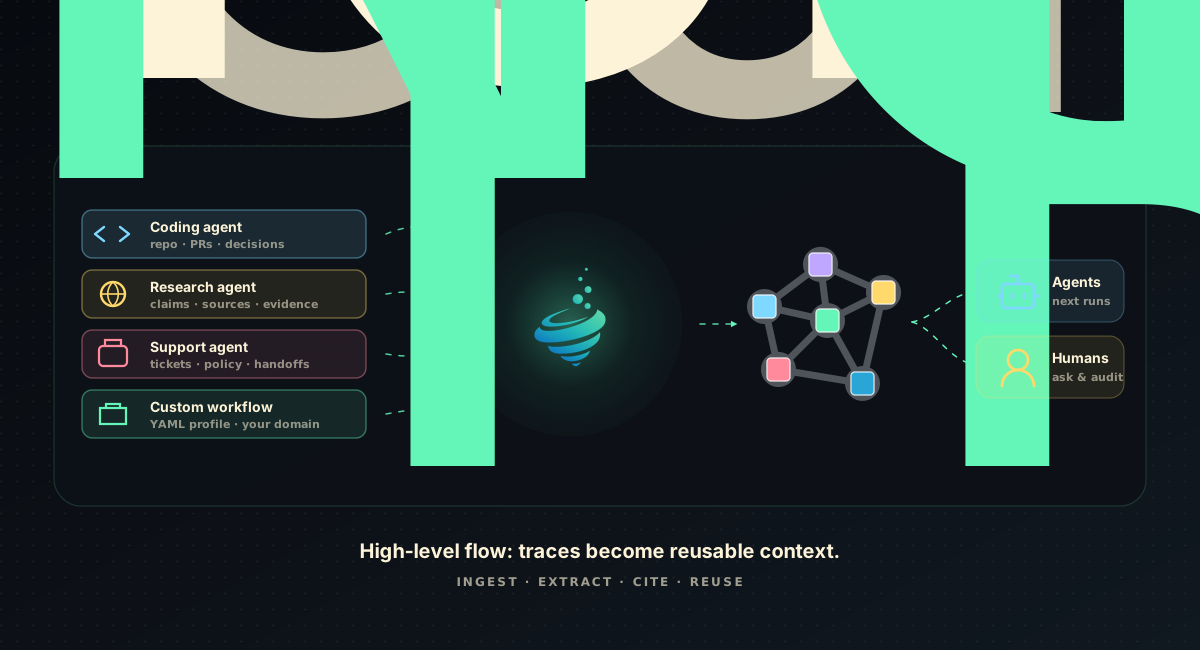
Lerim compiles completed agent traces into cited, reusable context.
Lerim sits above agent traces, compiles useful signal into cited context and eval assets, and gives future agents the operating memory they need before work begins.





Docs · Benchmarks · Examples · PyPI · License
Lerim
Lerim is a context compiler for repeated AI agent workflows.
Agents leave traces everywhere: terminals, tools, tickets, code reviews,
support cases, research runs. Most of that history is too noisy to reuse
directly. Lerim filters those traces into evidence-backed context records and
eval-ready signal: the decisions, constraints, facts, preferences, corrections,
and handoffs future agents should not have to rediscover, each linked back to
the source session.
What The Demo Shows
| Moment | Lerim does | Future agents get |
|---|---|---|
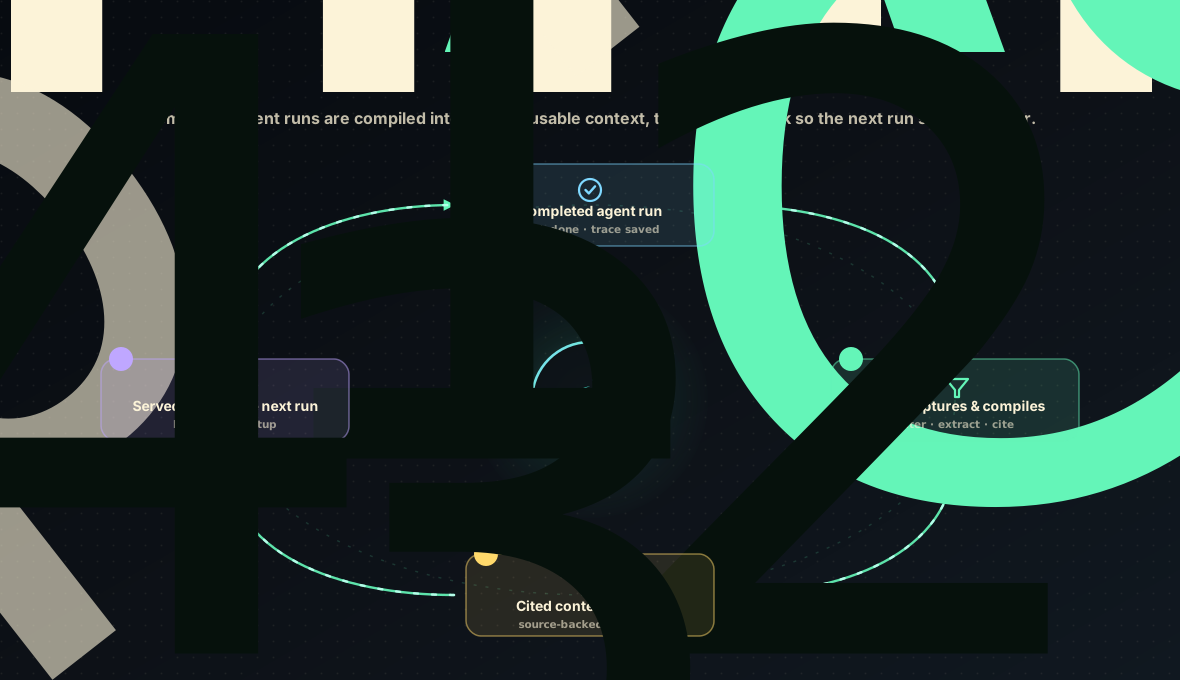
| A completed agent run lands | Imports a source session through the trajectory normalizer, MCP submit, or clean custom JSONL | A stable source boundary instead of a transcript paste |
| The trace is noisy | Compacts the run and filters for reusable decisions, constraints, facts, preferences, corrections, and handoffs | Durable context and eval-ready signal, not another log index |
| Someone asks later | Retrieves relevant records and answers with citations back to stored evidence | A shorter start with less re-explaining |
Most routine traces produce no durable record. Lerim's value is compact, cited
context, not more logs.
Quick Install
Requires Python 3.11+ and Node.js 20+. Lerim parses agent transcripts
with Letta's trajectory normalizer, an
npm package, so node is a hard runtime requirement — there is no fallback
parser. lerim init verifies node and installs the pinned normalizer for you.
pip install lerim
lerim init
lerim connect auto --mode auto
lerim project add .
lerim up
If node is missing, install it first (macOS: brew install node, Linux:
https://nodejs.org/en/download) and re-run lerim init. The Docker image ships
node and the pinned normalizer already.
Native trace sources ingest completed local sessions where a stable trace store
exists; MCP setup writes tool entries for compatible agents. See
Agent Support for what is verified per agent.
Then ask Lerim what a future agent should know:
lerim answer "What context should I know before working in this project?"
Why Lerim
AI agents now triage tickets, investigate incidents, research markets, prepare
handoffs, review policies, analyze customers, and change software. Every run
leaves a trace, and most traces are too long, too noisy, and too
platform-specific for the next agent to reuse.
Without a durable context layer, decisions get re-debated, constraints get
rediscovered, preferences get ignored, corrections never become reusable
context or eval signal, and every new session starts too close to zero.
Lerim fits best where one repeated workflow has trace access, a workflow owner,
privacy constraints, and a measurable quality failure to fix. Coding is the
proof-rich workflow today because native trace parsing is mature there; support,
incident, research, and compliance run the same compiler through custom traces.
Key Capabilities
- Trace-to-context extraction.
ingestreads supported sources and custom clean-trace folders, extracts reusable signal, and can archive routine runs without creating noisy durable records. - Shared context across agents. What one agent learns can become useful context for a different agent or workflow later.
- Context curation. Lerim consolidates overlap, archives weak records, and keeps the context layer compact.
- Derived context graph. Lerim links related decisions, constraints, evidence, facts, and handoffs for curation and future/hosted visualization.
- Query and startup context. Agents can ask questions against accumulated context or start from a compact context brief.
- Evidence-backed memory. Useful decisions, constraints, preferences, facts, and handoffs stay linked to the work that produced them.
- Skill updates. Register a skill or instruction file, let Lerim propose evidence-backed edits from learned context, then review the diff in the dashboard before applying it.
- Custom source profiles. Coding, support, and incident workflows share one compiler, and teams can register YAML profiles for their own verticals with focus, noise, evidence, and scope rules.
What Lerim Is Not
- Not a raw transcript replay tool.
- Not a broad
memory_savebucket for agents to write arbitrary memories. - Not a replacement for observability. Observability keeps the trace; Lerim compiles reusable context from completed source sessions.
- Not a claim that every listed agent has native completed-session ingestion. MCP recall is useful, but it is different from native trace ingestion.
Agent Support
Lerim has two integration layers:
- Native trace parsing reads completed local sessions through the
trajectory normalizer and feeds Lerim's compiler. - MCP support lets compatible agents query Lerim context and explicitly submit completed sessions through
lerim_trace_submit; it is not automatic local-history capture.
| Support level | Agents and sources |
|---|---|
| Native trace parsing plus MCP config writer | Claude Code, Codex CLI, OpenClaw |
| Native trace parsing, no MCP claim | Letta Code |
| MCP config writer; live recall/submit only where verified | Gemini CLI, Cline, Claude Desktop, Hermes, Goose, Roo Code, Kilo Code, Windsurf |
| Experimental or user-owned path | OpenHuman, custom trajectory-v1 JSONL, generic MCP trace submit |
| Not supported in 0.4.0 | Cursor, OpenCode, pi (no upstream trajectory adapter); Hermes, OpenHands, DeepAgents (upstream adapter exists but the session store is not a transcript file) — use a custom trace folder |
See the integration matrix for the exact support
boundary and evidence level per agent.
MCP Quickstart
Install Lerim into an MCP client (dry-run first, then write):
lerim connect gemini-cli --mode mcp --dry-run
lerim connect gemini-cli --mode mcp
MCP tools: lerim_context_brief, lerim_context_answer, lerim_context_search,lerim_records_list, lerim_context_feedback, lerim_trace_submit,lerim_ingest_status.
See MCP Quickstart for the generic client
config, the absolute-path rationale, and verification.
Benchmarks
Benchmark numbers live in docs, not in a marketing scoreboard. Start with
Benchmark Overview for the map and reporting rules:
- Benchmark Suite: what each benchmark
surface measures and its boundary. - Lerim Results: first-party raw artifacts,
commands, and boundaries, including retrieval-only and aggregate-only scope. - Market Comparison: source-backed rows
with provenance for each external number.
| Surface | Evidence |
|---|---|
| LongMemEval-S retrieval | Full 500-question hybrid + lexical retrieval-only artifact |
| Context budget | Full 500-question context-selection artifact, recall vs. token reduction |
| Extraction quality | Aggregate-only 47-case diagnostic report |
Skill Updates
Lerim can also update the instructions future agents use. Register a skill
directory, SKILL.md, AGENTS.md, CLAUDE.md, or another instruction file;
Lerim scans scoped context records from past traces and proposes small,
evidence-backed edits. Review each unified diff in the dashboard before applying.
Targets default to review mode; auto-apply is opt-in and bounded by policy.
lerim skill target add ~/.agents/skills/clean-code \
  --description "Keep simplification guidance current"
lerim skill refresh clean-code
lerim dashboard
See Skill Updates for the dashboard workflow and
CLI: lerim skill for command details.
Custom & Non-Coding Agents
Lerim is not only for coding agents. Support, incident and security operations,
research, compliance, revenue, and other custom business agents feed the same
compiler through clean JSONL traces and a signal profile that matches the
workflow.
Bundled signal profiles cover the common verticals out of the box:
| Profile | Workflow |
|---|---|
coding |
Repository and coding-agent work (default). |
support |
Customer support and customer operations. |
ops |
Incident response, operations, and reliability. |
research |
Research, market intelligence, and analysis. |
compliance |
Compliance, legal, regulatory, and policy review. |
generic |
General-purpose fallback. |
List them with lerim profile list / lerim profile show research, or write
your own in a few minutes. Start at
Custom & Non-Coding Agents for the full path,
or jump to a worked demo:
support ·
incident ·
research ·
compliance.
Custom Agent Traces
Built-in connect sources cover Claude Code, Codex CLI, Letta Code, and
OpenClaw. For any other agent or business workflow, register already-clean
trajectory-v1 JSONL — one .jsonl file per completed session. Custom mode has no
normalizer step, so you own export, cleaning, redaction, and retention before
files enter the folder.
See Custom Trace Folders for the
trajectory-v1 schema and a paste-in prompt that generates a cleaner for your
source, and Submit a Custom Agent Trace
for the lerim trace import profile/scope flags.
Common Commands
lerim status              # pipeline and queue state
lerim ingest               # compile completed sessions into context
lerim curate               # consolidate and prune records
lerim answer "What decisions exist about caching?"
lerim connect auto         # (re)write agent integrations
lerim context-brief show   # compact startup context
Full command reference: CLI Overview.
Development
uv venv && source .venv/bin/activate
uv pip install -e '.[test]'
tests/run_tests.sh unit
Node.js 20+ must be on PATH; the trace-parsing tests shell out to the pinned@letta-ai/trajectory normalizer.
See the Contributing Guide
for full dev setup, the live test suites, and the release checklist.
To read the codebase, start with
src/lerim/README.md and
docs/concepts/how-it-works.md.
License
Lerim core is Apache-2.0. The local CLI, runtime, self-hosted sync server,
native trace parsing, context DB schema, benchmark scripts, and integration docs
stay usable without any paid account. Any hosted or commercial offering sits
outside the open-source core. See COMMERCIAL.md for the open-source scope.
Contributing
Contributions are welcome.
Good starting points include:
- new harness adapters, contributed upstream to trajectory so every consumer gets them
- custom trace-folder examples
- extraction quality
- context curation quality
- context graph link quality
- docs and demo examples
Helpful links:
- Contributing Guide
- Open issues
- Trace-source plumbing:
src/lerim/adapters/ - Upstream adapter guide: letta-ai/trajectory
Reviews (0)
Sign in to leave a review.
Leave a reviewNo results found