lacy
Health Warn
- License — License: MIT
- Description — Repository has a description
- Active repo — Last push 0 days ago
- Low visibility — Only 5 GitHub stars
Code Fail
- rm -rf — Recursive force deletion command in install.sh
Permissions Pass
- Permissions — No dangerous permissions requested
No AI report is available for this listing yet.
AI Terminal. Speak to your shell.
Lacy
Talk to your shell. Commands run. Questions go to AI. No prefixes. No context switching. You just type.




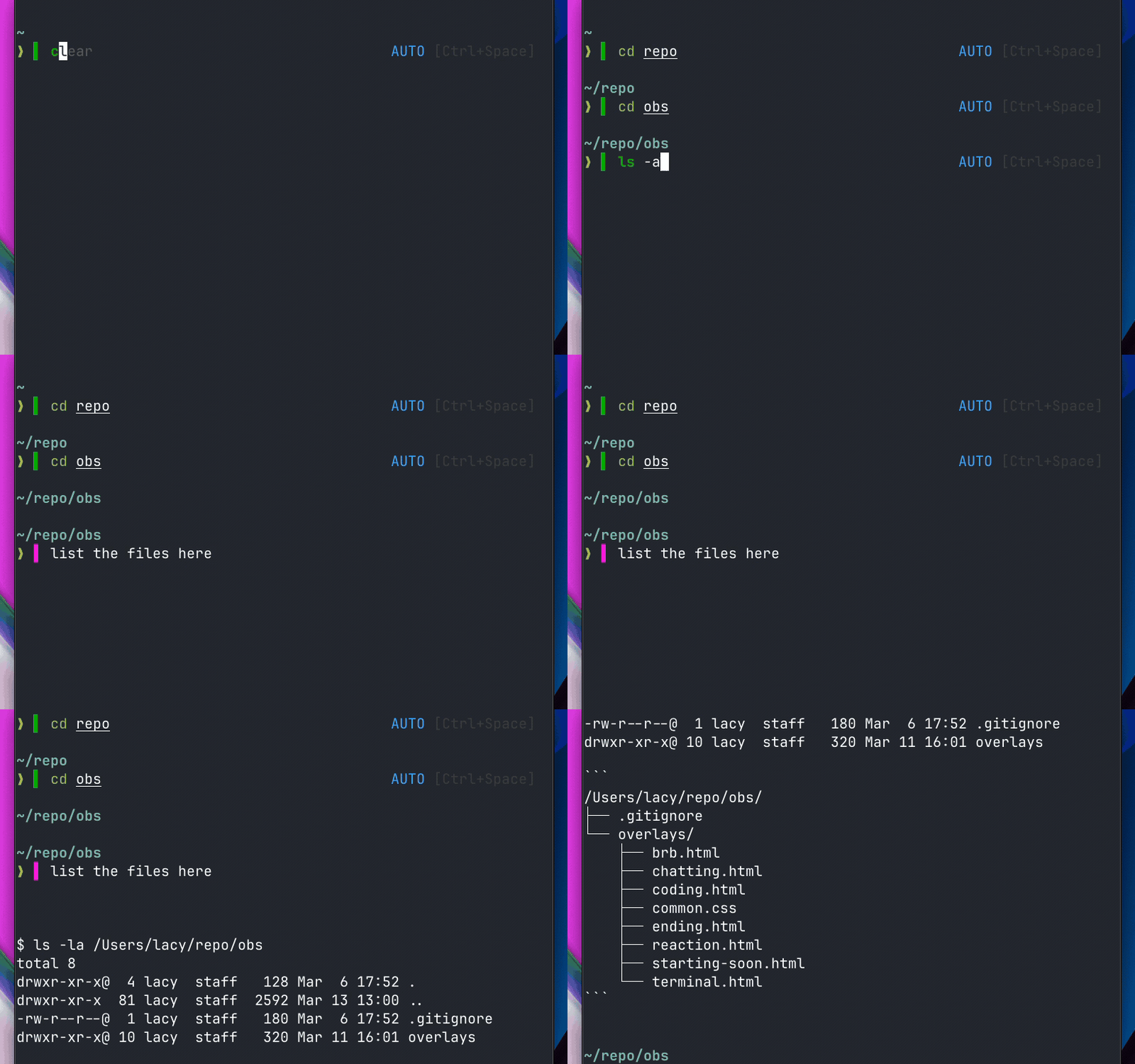
Why Lacy?
- No new tools to learn — Lacy works with your existing AI CLI (Claude Code, Gemini, OpenCode, Codex, Lash). It's a complement, not a replacement.
- Zero friction — No slash commands, no hotkeys, no separate terminal. Type naturally and Lacy routes it. A real-time color indicator shows you what will happen before you press enter.
- Smart detection — Lacy classifies input using word analysis, not AI. It's instant. Commands like
ls -lastay green (shell). Questions likewhat files are hereturn magenta (AI). If a command fails with natural language patterns, it silently reroutes to AI.
Works with ZSH and Bash 4+ on macOS, Linux, and WSL.
Install
curl -fsSL https://lacy.sh/install | bash
# Homebrew
brew tap lacymorrow/tap
brew install lacy

# npx (interactive)
npx lacy

# Manual
git clone https://github.com/lacymorrow/lacy.git ~/.lacy
echo 'source ~/.lacy/lacy.plugin.zsh' >> ~/.zshrc
How It Works
Real-time visual feedback shows what will happen before you hit enter:
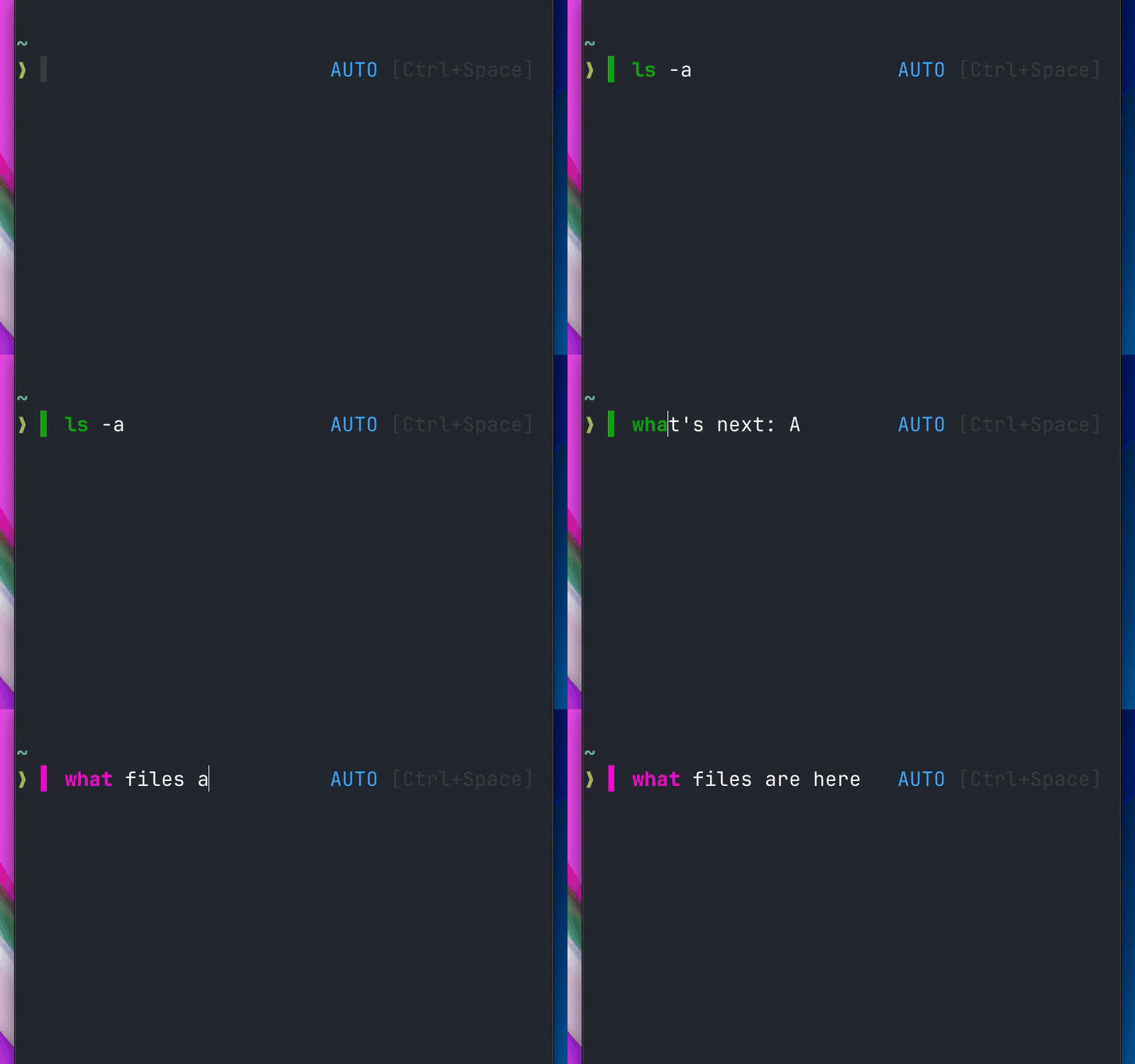
Commands execute in your shell. Natural language goes to your AI agent. No prefixes, no context switching — you just type.
| Input | Routes to | Why |
|---|---|---|
ls -la |
Shell | Valid command |
what files are here |
AI | Natural language |
git status |
Shell | Valid command |
do we have a way to install? |
AI | Reserved word — never a real command |
fix the bug |
AI | Multi-word, not a command |
kill the process on 3000 |
Shell → AI | Valid command, but fails — rerouted |
go ahead and fix it |
Shell → AI | "go" is valid, but "ahead" triggers reroute |
!rm -rf * |
Shell | ! prefix forces shell |
The first word of your input is also syntax-highlighted in real-time: green for shell commands, magenta for AI queries.
Smart rerouting (auto mode): When a valid command contains natural language patterns (3+ bare words with articles, pronouns, etc.) and fails, lacy shows a hint and automatically re-sends it to the AI agent. Shell reserved words like do, then, in, else are routed directly to the agent — they pass command -v but are never standalone commands.
Modes

| Mode | Behavior | Activate |
|---|---|---|
| Auto | Smart routing (default) | mode auto |
| Shell | Everything to shell | mode shell or Ctrl+Space |
| Agent | Everything to AI | mode agent or Ctrl+Space |
Supported Tools
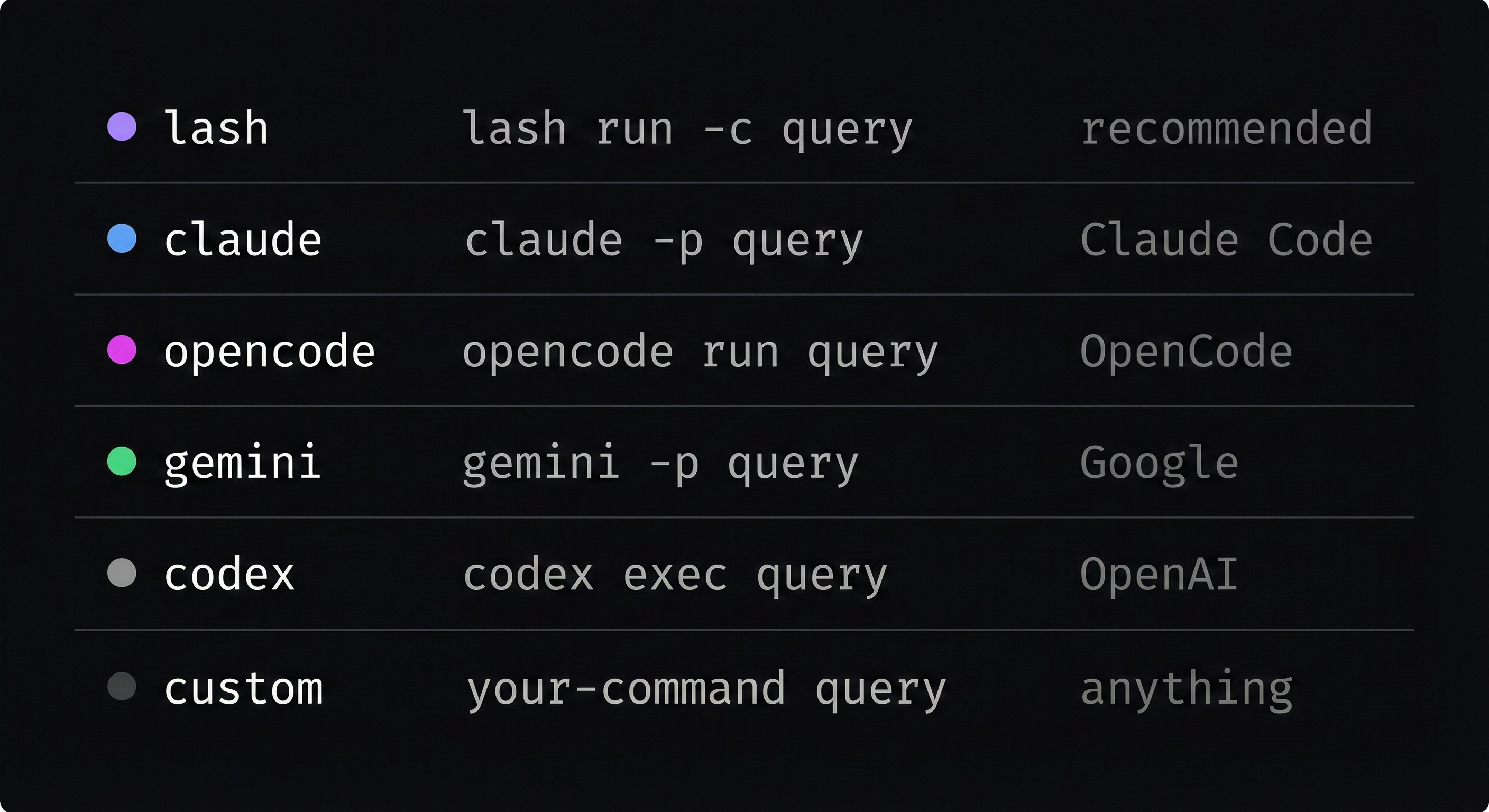
Lacy auto-detects your installed AI CLI. All tools handle their own auth — no API keys needed.
tool set claude    # Use Claude Code
tool set lash      # Use Lash
tool set auto      # Auto-detect (first available)
Or edit ~/.lacy/config.yaml:
agent_tools:
  active: claude # lash, claude, opencode, gemini, codex, custom, or empty for auto
Commands
| Command | Description |
|---|---|
mode |
Show current mode |
mode [shell|agent|auto] |
Switch mode |
tool |
Show active AI tool |
tool set <name> |
Set AI tool |
ask "query" |
Direct query to AI |
Ctrl+Space |
Toggle between modes |
CLI
After installation, the lacy command is available (no Node required):
lacy setup        # Interactive settings (tool, mode, config)
lacy status       # Show installation status
lacy doctor       # Diagnose common issues
lacy update       # Pull latest changes
lacy config edit  # Open config in $EDITOR
lacy uninstall    # Remove Lacy Shell
lacy help         # Show all commands
Uninstall
lacy uninstall
# or
npx lacy --uninstall
# or
curl -fsSL https://lacy.sh/install | bash -s -- --uninstall
Configuration
Config file: ~/.lacy/config.yaml
agent_tools:
  active: claude # lash, claude, opencode, gemini, codex, or empty for auto

modes:
  default: auto # shell, agent, auto

api_keys:
  openai: "sk-..." # Only needed if no CLI tool installed
  anthropic: "sk-ant-..."
Troubleshooting
No AI response — Check tool to see if a tool is detected. Install one: npm i -g lashcode or brew install claude.
Colors not showing — Ensure your terminal supports 256 colors (green=34, magenta=200, blue=75).
Command rerouted unexpectedly — In auto mode, commands with natural language patterns that fail are re-sent to the AI. Switch to mode shell to disable this, or prefix with !.
Emergency bypass — Prefix any command with ! to force shell execution: !rm -rf node_modules
Releasing
Requires Bun, gh, and npm login.
bun run release          # interactive — prompts for patch/minor/major
bun run release patch    # patch bump  (1.5.3 → 1.5.4)
bun run release minor    # minor bump  (1.5.3 → 1.6.0)
bun run release major    # major bump  (1.5.3 → 2.0.0)
bun run release 2.0.0    # explicit version
The script handles the full release flow:
- Bumps version in both
package.jsonfiles - Commits with
release: v<version>and tags - Pushes to GitHub and creates a GitHub release
- Publishes the npm package (prompts for OTP if required)
Support This Project
Lacy Shell is free and open source. If it saves you time, consider sponsoring the project:

Your support keeps development active and helps cover infrastructure costs.
Contributing
Contributions welcome! Check out the issues for good first issues, or open a new one.
License
MIT — see LICENSE.
Reviews (0)
Sign in to leave a review.
Leave a reviewNo results found