rel-ai-chatgpt-web-harness
Health Pass
- License — License: Apache-2.0
- Description — Repository has a description
- Active repo — Last push 0 days ago
- Community trust — 19 GitHub stars
Code Fail
- rm -rf — Recursive force deletion command in .github/workflows/pages.yml
- process.env — Environment variable access in .github/workflows/release.yml
Permissions Pass
- Permissions — No dangerous permissions requested
No AI report is available for this listing yet.
Local agency/runtime harness for ChatGPT Web: repositories, tasks, commands, validation, Git, skills/memory, observability, and opt-in computer control.

Rel.AI — ChatGPT Web Harness
Turn normal ChatGPT Web into a local development agent without replacing ChatGPT.
Rel.AI is the local agency/runtime harness around ChatGPT: it supplies repository tools, task state, validation, Git, skills and memory, observability, and opt-in computer control while ChatGPT remains the model, conversation, and reasoning host.
Download Rel.AI · Set up · Connect ChatGPT · How it works · FAQ





Created and maintained by Kyne.
[!WARNING]
Use Rel.AI MCP only on repositories, systems, and services you own or are authorized to access. Rel.AI can read and modify files, execute project commands, and perform Git actions when requested. You are responsible for complying with applicable third-party terms, policies, and laws. The project authors and maintainers are not responsible for consequences resulting from misuse. Use at your own risk.
[!IMPORTANT]
Official release binaries are built and published by this repository's GitHub Actions release workflow from the source commit used for the release. The release workflow also produces SHA-256 checksums and GitHub build-provenance and SBOM attestations for supported artifacts, so releases can be checked against the public source and CI/CD pipeline. You can also use DeepWiki to explore and ask questions about the codebase: Ask DeepWiki

Rel.AI is a local agency/runtime harness for ChatGPT Web. You keep the normal ChatGPT conversation and model behavior, while Rel.AI supplies the durable local environment that turns that conversation into controlled repository and computer work.
Instead of copying files into chat or moving every repository task into a separate coding product, you can ask ChatGPT to inspect a project, make focused edits, run the relevant checks, review the result, and use Git without giving it open-ended access to your machine.
Your repositories stay on your computer. You choose which projects ChatGPT can use. Publishing happens only when you ask.
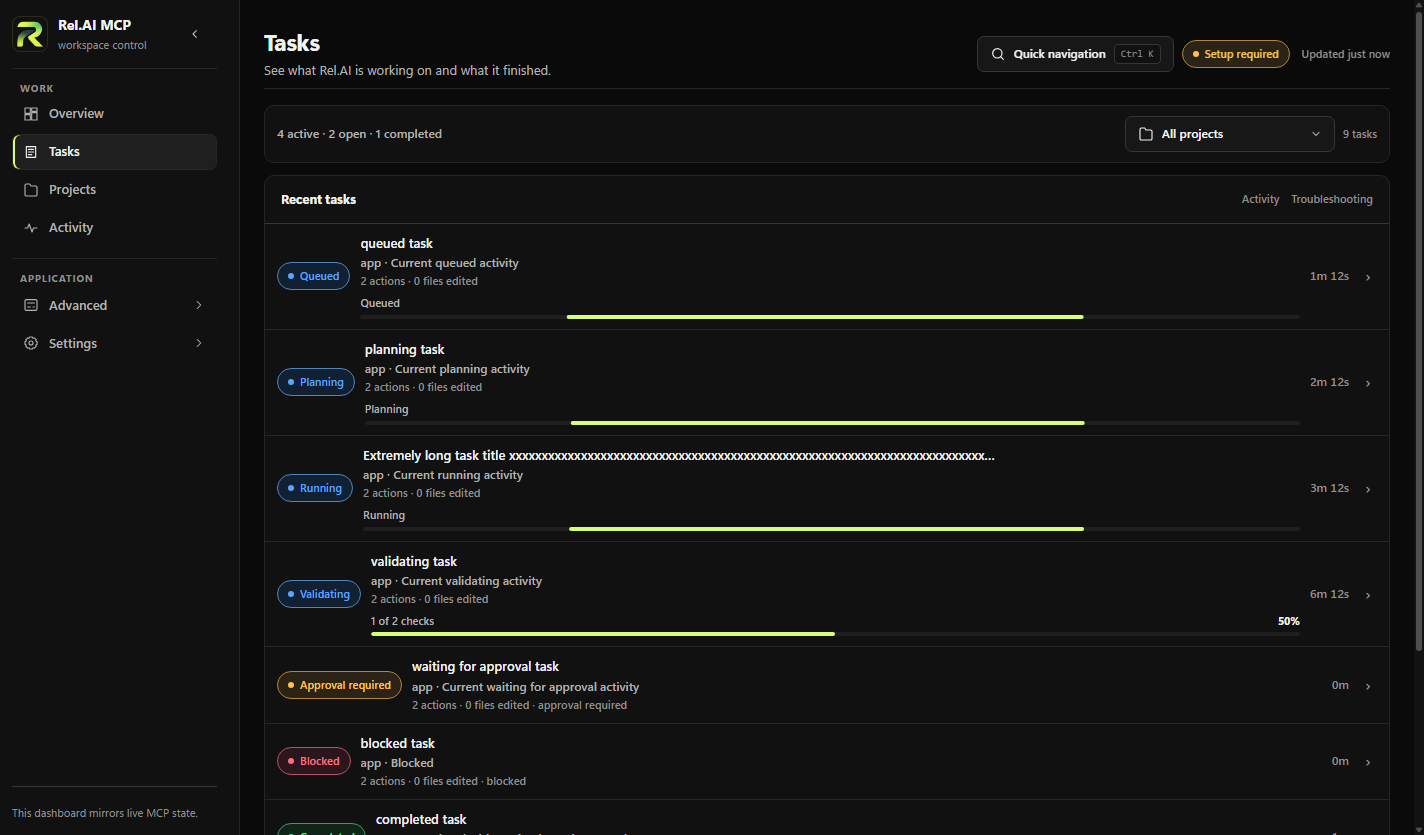
Projects
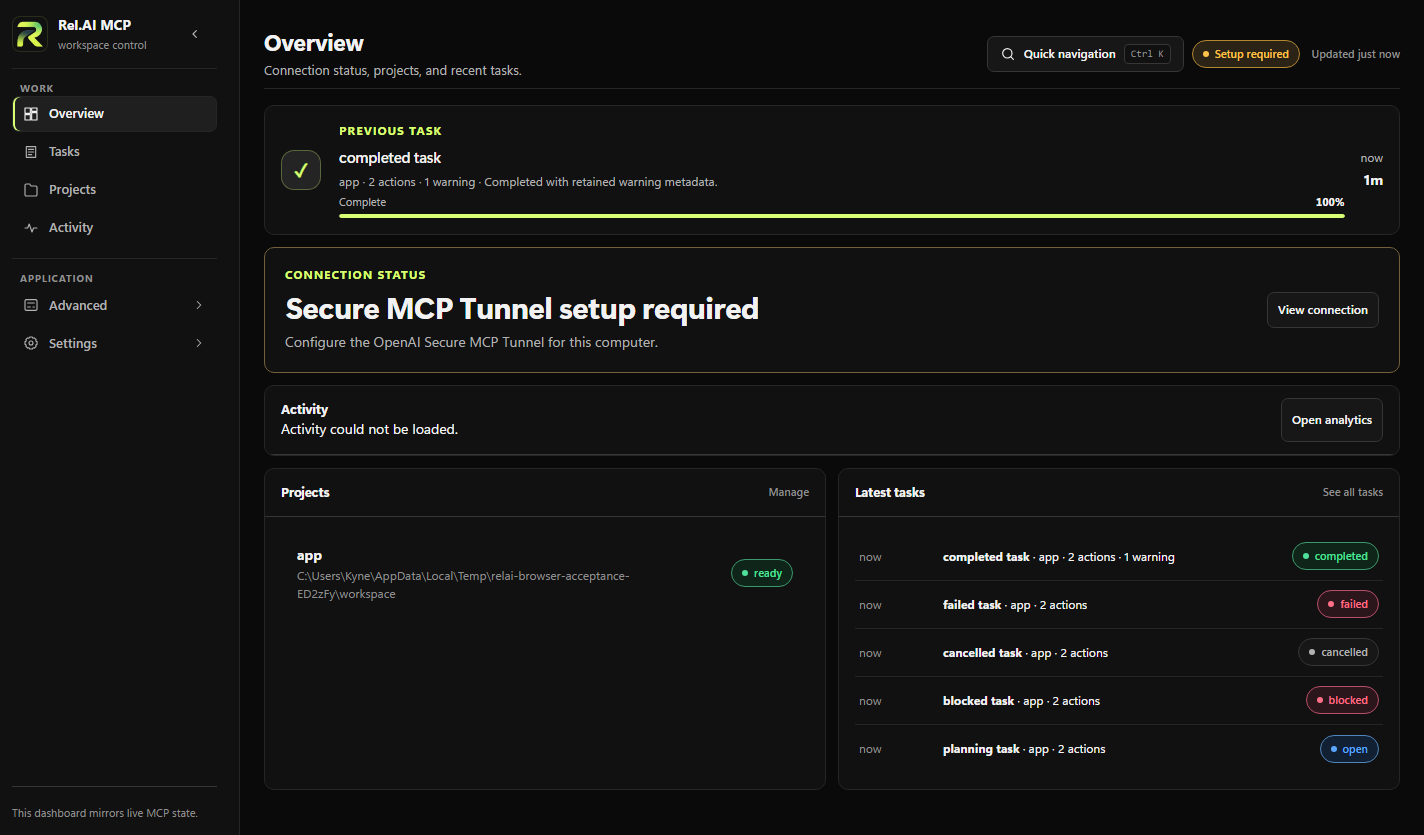
Activity
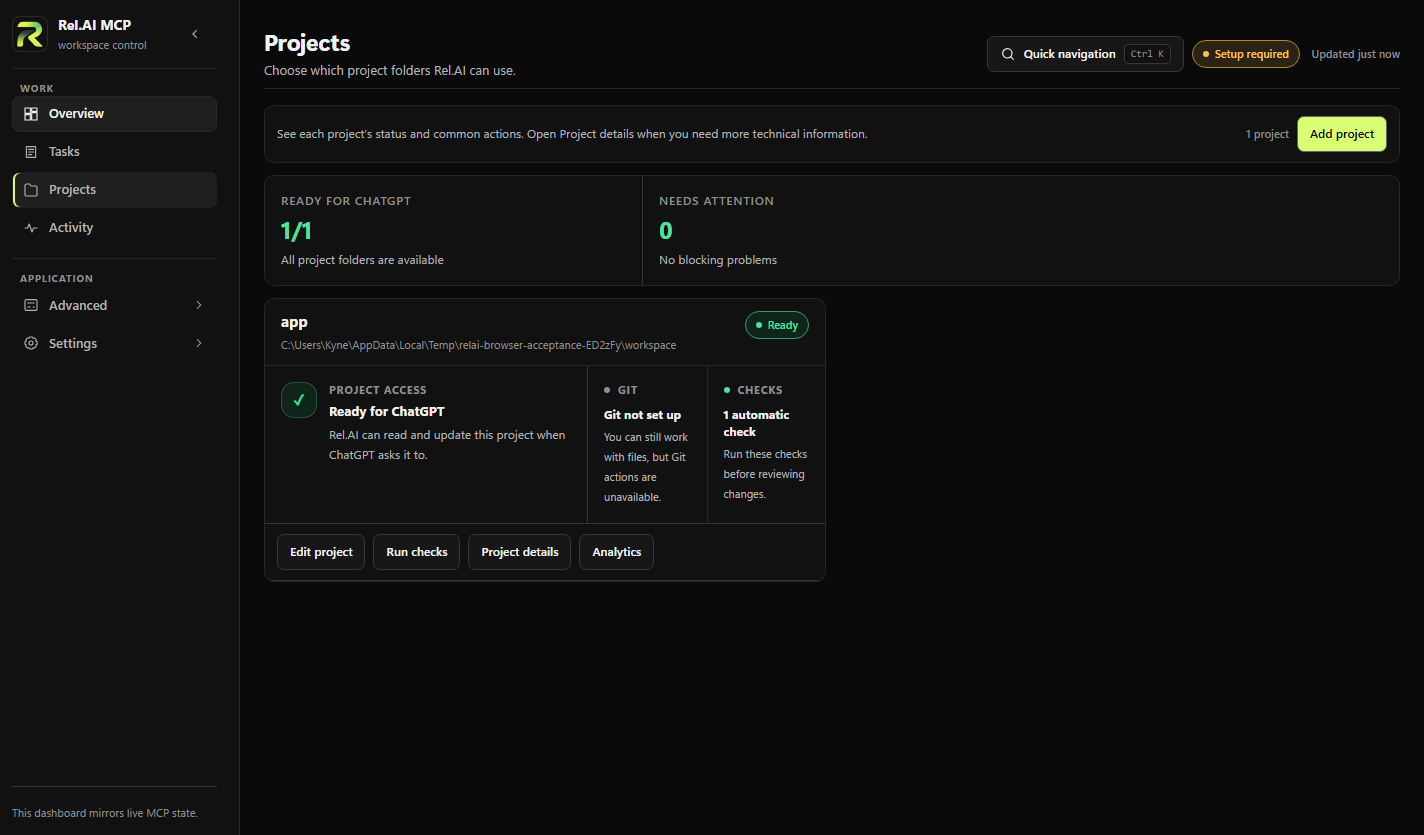
What is Rel.AI?
Rel.AI is a ChatGPT Web harness. ChatGPT provides the model, conversation, hidden reasoning, and product-side context. Rel.AI provides the local agency layer around it: repository access, task/session state, validation, Git, managed processes, skills and memory, observability, desktop lifecycle, and opt-in computer control.
Model Context Protocol (MCP) is the primary tool transport between ChatGPT and Rel.AI. It is an important protocol boundary, but it is not the full product architecture.
With a configured workspace, ChatGPT can use Rel.AI to:
- find and read relevant files without dumping an entire repository into the conversation;
- search text, symbols, references, imports, related files, and project structure;
- edit existing files or create focused multi-file changes;
- run commands, tests, linters, builds, development servers, and other project tools;
- inspect changes and verify that the current code actually satisfies the task;
- manage long-running local processes such as dev servers and watchers;
- review task-scoped diffs and Git state;
- commit or push changes only when explicitly requested;
- preserve task continuity, validation evidence, local learned skills, and saved project context across tool calls; and
- use explicit opt-in host computer control when a task genuinely requires desktop interaction.
Rel.AI is not a hosted development machine, a new AI model, or a replacement ChatGPT runtime. It is the local harness around ChatGPT for the projects and capabilities you explicitly enable.
Why use Rel.AI?
Rel.AI is for developers who want to use the normal ChatGPT Web experience as a practical coding workflow for local projects.
Keep coding inside ChatGPT Web
You can stay in the same ChatGPT conversation you already use for planning, debugging, explaining code, and making decisions. Rel.AI adds the repository actions needed to turn that conversation into real local work.
Keep project access narrow
ChatGPT can work only inside folders you add as Rel.AI workspaces. Repository access is resolved locally from a workspace alias instead of exposing arbitrary filesystem paths.
Keep changes tied to one task
Each objective gets a work session. Reads, edits, commands, checks, review, recovery, and completion stay associated with that task instead of becoming an unstructured stream of unrelated tool calls.
Verify the result, not just the command
A successful command is not automatically treated as proof that the task is done. Rel.AI tracks what changed and uses task-appropriate checks so completion can be based on the current code rather than a stale success message.
Keep Git publishing separate
Editing code does not automatically commit, push, reset, clean, or rewrite repository history. Git publishing stays a separate action and happens only when requested.
Quick start
Rel.AI currently uses one supported ChatGPT connection: OpenAI Secure MCP Tunnel.
- Download Rel.AI MCP from the GitHub Releases page. Desktop packages are built for Windows, macOS, and Linux.
- Create an OpenAI Secure MCP Tunnel for the computer running Rel.AI and create the runtime API key required by the tunnel.
- Open Rel.AI and finish first-run setup. Enter the tunnel ID and runtime API key. Rel.AI stores the runtime key with Electron
safeStorageand manages the bundled tunnel client. - Add a workspace. Choose a repository folder and assign a short alias such as
myapp. - Connect ChatGPT. Add or reconnect Rel.AI MCP using ChatGPT's Tunnel connection option, choose the same Secure MCP Tunnel, and use No authentication for the ChatGPT-side connection.
- Ask ChatGPT to use the workspace alias. Rel.AI resolves the real path locally.
For the complete walkthrough, see One-click setup and Connecting to ChatGPT.
A safe first request is read-only:
Use Rel.AI MCP with workspace "myapp". Start one work session, inspect the project, and explain the relevant parts before changing anything.
Then move into an implementation request:
Use Rel.AI MCP with workspace "myapp". Implement this change, run the relevant checks, review what changed, and do not commit or push unless I ask.
How Rel.AI works
You describe the goal in ChatGPT
              │
              ▼
           Understand
   find the relevant project context
              │
              ▼
             Edit
      make focused local changes
              │
              ▼
              Run
 commands, tests, builds, or local apps
              │
              ▼
             Check
 verify the latest code and task result
              │
              ▼
            Review
 inspect task-owned changes and evidence
              │
              ▼
           Publish
      commit or push only when asked
Rel.AI keeps track of what existed before the task and what the current task changed. A repository does not have to begin perfectly clean for Rel.AI to reason about task-owned work.
Connection path
ChatGPT Web
    │
    ▼
OpenAI Secure MCP Tunnel
    │
    ▼
bundled tunnel-client
    │  Authorization: Bearer <local secret>
    ▼
127.0.0.1:<port>/mcp
    │
    ▼
Rel.AI MCP
    │
    ▼
configured workspace → files / Git / commands / checks
The tunnel runtime API key is used by the bundled tunnel client to operate the configured OpenAI tunnel. The separate Rel.AI bearer token protects the loopback tunnel-client-to-MCP hop and is not the credential you enter in ChatGPT.
A reconnect restores transport. It does not rewrite repository history or pretend an interrupted mutation completed successfully.
Local repository tools
Repository search and code intelligence
Rel.AI helps ChatGPT narrow down a project before reading large amounts of source code.
- Repository snapshots surface structure, manifests, detected checks, and project hints.
- Bounded reads target specific files and line ranges.
- Text search covers tracked and untracked workspace files.
- Code intelligence follows symbols, references, calls, imports, related files, affected tests, and available diagnostics.
- Hybrid semantic search combines lexical, path, symbol, and local vector signals without sending source text to a hosted embedding service.
The goal is to spend ChatGPT context on the files that matter instead of returning large, low-signal repository dumps.
Focused code editing
Rel.AI provides one primary editing surface for exact replacements, multi-replacement edits, full-file writes, patch-shaped updates, and large staged changes.
Editing is constrained by workspace containment, symlink protection, and optional stale-write checks. Large legitimate changes can stay one logical task instead of being artificially fragmented because one write is too large.
Commands, tests, and local development processes
Rel.AI can run one-shot commands and manage long-running processes such as development servers and watchers.
One-shot execution returns bounded output, exit state, timing, and detected file changes. Managed processes use stable IDs, bounded persistent logs, workspace attribution, controlled shutdown, and interactive input where appropriate.
Validation and review
Rel.AI chooses checks based on what the task changed and can reuse recent evidence when it still proves the current code. If a command changes files and then fails, the mutation is still recorded. If a command exits successfully but does not prove the requested result, that success alone is not treated as completion.
Task review is scoped to the current objective so ChatGPT can distinguish new work from changes that were already present in the repository.
Git when you ask for it
Rel.AI can inspect Git status, review changes, create scoped commits, push to an existing remote, and prepare pull-request draft text. Push targets must already exist in the repository, and sensitive staged paths receive stricter authorization.
Rel.AI vs. Codex
Rel.AI and Codex overlap in some everyday coding workflows, but they are not the same product.
| Rel.AI MCP | Codex | |
|---|---|---|
| Conversation surface | Normal ChatGPT Web conversation | Codex coding experience |
| Where the repository runs | Your local computer | Depends on Codex workflow |
| Local tools | Rel.AI exposes repository, command, process, validation, review, and Git tools through MCP | Managed by Codex |
| Product goal | Make normal ChatGPT useful for local repository work | Dedicated coding agent workflows |
| Same internals? | No | No |
For many routine repository tasks—reading code, making edits, running checks, reviewing changes, and using Git—Rel.AI can provide a similar end-to-end workflow while keeping the normal ChatGPT conversation.
Rel.AI does not emulate Codex internals and does not claim to be a drop-in implementation of Codex.
OpenAI currently documents that ChatGPT Apps use the normal ChatGPT rate limits for your plan, while Codex usage is accounted for through its own agentic usage model. Rel.AI uses the ChatGPT app/tool path; your normal ChatGPT plan limits still apply.
Desktop visibility
The Rel.AI desktop app shows the local side of the harness so you can see what ChatGPT is allowed to access, which tasks and processes exist, and what local actions are occurring.
- Home — current connection, recent work, and a quick usage overview.
- Workspaces — repositories ChatGPT is allowed to use and their local status.
- Sessions — active and historical objectives with task progress and completion state.
- Activity — individual Rel.AI tool events and recorded results.
- Processes — long-running development processes and bounded output.
- Connection — Secure MCP Tunnel state, local MCP health, reconnect guidance, and setup information.
- Usage — locally observed requests, tools, outcomes, duration, and workspace aggregates.
- Settings and diagnostics — application health, updates, notifications, recovery, and advanced controls.
Rel.AI records observable tool activity and results. It does not claim access to ChatGPT's private reasoning.
Security and privacy
Rel.AI is a trusted local ChatGPT harness, not a sandbox. Add only repositories and capabilities you trust ChatGPT and Rel.AI to inspect, execute, and modify.
Important boundaries include:
- Workspace containment — traversal, absolute-path injection, and symlink escape are blocked.
- Sensitive-path handling — credential-bearing and secret-like content receives stricter operation-aware handling.
- Bounded data movement — reads, snapshots, diffs, process output, and request bodies have limits.
- Stale-write protection — supported edits can fail closed when the target changed underneath the task.
- Task ownership — repository objectives are bound to work sessions rather than inferred from transport state.
- Git boundaries — pushes are limited to configured remotes and sensitive staged paths require narrower authorization.
- Tunnel credential storage — Electron protects the OpenAI tunnel runtime API key with
safeStorage; the local MCP bearer token remains private to the computer. - Renderer isolation — privileged desktop actions cross constrained Electron IPC boundaries.
- Updater integrity — release verification, checksums, packaging policy, and Electron fuses are part of the desktop security boundary.
Repository-defined tests, builds, linters, analyzers, package scripts, and development commands are executable code and inherit the trust level of the repository itself.
Read Security for the full authentication, workspace, Electron, updater, and remaining trust boundaries.
Recovery is separate from connectivity
Rel.AI distinguishes connection recovery from work recovery.
A Secure MCP Tunnel reconnect can restore connectivity, but it does not automatically restart unrelated development processes or convert uncertain repository work into a successful result. If the outcome of a mutation is uncertain, Rel.AI can preserve read access while blocking new mutations or completion until the task state is reconciled.
Recovery avoids automatically replaying destructive Git actions such as resets, cleans, restores, or pushes.
Being connected is not the same thing as being correct.
See Workflow reliability and Task observability for the detailed state model.
One supported ChatGPT connection
Rel.AI intentionally has one supported ChatGPT transport: OpenAI Secure MCP Tunnel. There is no second provider or legacy tunnel path to configure and keep in sync.
The desktop owns the local MCP service, bundled tunnel client, connection state, encrypted runtime key, and loopback bearer credential. ChatGPT owns the remote tunnel association. Keeping those responsibilities separate makes reconnects predictable without letting a connection change decide what happens to repository work.
Rel.AI is currently built specifically for ChatGPT Web. It does not currently support Claude, Cursor, Gemini, or other AI clients. Supporting another client would require its own connection and compatibility contract rather than a provider-name switch.
MCP tool surface
MCP is Rel.AI's ChatGPT-facing tool transport, not the full harness. Rel.AI targets MCP protocol 2026-07-28 and keeps its public tool surface intentionally small. The public tools cover broader workflows instead of exposing a separate tool for every internal operation.
That design keeps schemas, authorization, task behavior, output validation, and desktop metadata aligned while still supporting repository inspection, search, edits, command execution, managed processes, validation, review, Git operations, recovery, and work-session lifecycle.
See MCP protocol policy and Architecture for the current protocol and ownership model.
Bundled workflow skills
Rel.AI ships first-party workflow skills for common development patterns such as task orchestration, planning, investigation, debugging, verification, and persistent development processes.
These skills provide reusable guidance to ChatGPT without adding a separate skill-management system to the Rel.AI desktop application or expanding the public MCP surface just to manage instructions.
Frequently asked questions
Can ChatGPT Web edit local files with Rel.AI MCP?
Yes. After you add a repository as a Rel.AI workspace and connect ChatGPT through the supported Secure MCP Tunnel, ChatGPT can use Rel.AI tools to inspect and edit files inside that workspace.
Rel.AI does not grant ChatGPT unrestricted filesystem access. The configured workspace is the local boundary.
Can ChatGPT run local commands and tests?
Yes. Rel.AI can run project commands, tests, linters, builds, and other configured development commands. It can also manage long-running local processes such as development servers and watchers.
Commands execute on the computer running Rel.AI, so only add repositories and run project scripts you trust.
Can Rel.AI use Git?
Yes. Rel.AI can inspect Git state, review task changes, create commits, and push to existing configured remotes when requested. Editing a file does not automatically publish it.
Does Rel.AI upload my whole repository?
No hosted repository copy is required by Rel.AI. Repository files, Git operations, commands, tests, builds, managed processes, and workspace configuration stay on the selected computer. ChatGPT receives the bounded tool results needed for the conversation and task.
Does Rel.AI send my source code to a hosted embedding service?
No. Rel.AI's semantic repository search uses local signals and does not require sending source text to a hosted embedding service.
Is Rel.AI a sandbox?
No. Rel.AI is a trusted local ChatGPT harness. Commands, repository-defined scripts, and enabled computer-control actions run with the permissions of the local Rel.AI process and should be treated as real local execution.
Does Rel.AI work without ChatGPT?
Rel.AI provides local MCP and desktop infrastructure, but the supported product workflow is built for ChatGPT Web. ChatGPT supplies the model and reasoning; Rel.AI supplies the local repository capabilities.
Does Rel.AI support Claude, Cursor, Gemini, or other MCP clients?
Not currently. Rel.AI intentionally focuses on one ChatGPT connection so its desktop behavior, permissions, recovery model, work sessions, and compatibility rules can be tested as one complete workflow.
Can Rel.AI replace Codex?
For many everyday repository tasks, it can cover the same kind of work: reading code, editing files, running commands and tests, reviewing changes, and using Git. The products are still different and do not share the same internals.
Does Rel.AI give me unlimited ChatGPT usage?
No. Rel.AI does not bypass ChatGPT plan limits. It uses the ChatGPT app/tool path, so your normal ChatGPT plan and product limits still apply.
Which operating systems are supported?
The desktop release pipeline targets Windows, macOS, and Linux. Check the latest GitHub release for currently published installers and packages.
What happens if the tunnel disconnects during a task?
Rel.AI treats reconnection and repository-work recovery separately. Restoring the connection does not automatically claim that an interrupted edit, command, or Git operation succeeded. The task can require reconciliation before further mutation or completion.
Usage and privacy
The Usage view measures locally observed Rel.AI activity, not ChatGPT model tokens or ChatGPT billing. It can report request counts, tool calls, outcomes, execution duration, active days, tools, and workspace aggregates from local Rel.AI records.
Keep tunnel runtime API keys, local bearer credentials, repository credentials, private keys, and other secrets out of public issues and unreviewed diagnostic exports.
Build Rel.AI from source
Rel.AI currently uses Node.js 24 and npm 12. The root runtime and Electron desktop maintain separate lockfiles.
npm ci --ignore-scripts
npm ci --prefix electron
npm run electron:dev
For normal desktop iteration, avoid packaging and keep a source-mode watcher running instead:
npm run electron:dev:watch
It rebuilds dashboard CSS continuously and restarts source Electron when relevant electron/, src/, public/, or bin/ files change. The default command reuses the normal Rel.AI profile, so fully close the installed app first. Use npm run electron:dev:watch:isolated when you want a separate persistent Electron/ChatGPT development profile. Neither command writes a packaged app to dist.
For validation, use the smallest checks that prove the current change and broaden only when the risk warrants it:
npm run check
npm run lint
npm run typecheck
npm test
The Electron desktop is the normal application composition root. Direct HTTP entry points exist for development, protocol testing, and packaged-runtime verification rather than as the normal installed-user setup path.
See Development for source architecture, generated assets, validation, packaging, and release workflows.
Documentation
| Goal | Documentation |
|---|---|
| Install and configure Rel.AI | One-click setup |
| Connect ChatGPT with Secure MCP Tunnel | Connecting to ChatGPT |
| Understand the runtime architecture | Architecture |
| Understand the desktop interaction model | Desktop UX architecture |
| Review security and local trust boundaries | Security |
| Understand MCP lifecycle and compatibility | MCP protocol policy |
| Understand recovery and completion authority | Workflow reliability |
| Understand sessions, activity, and observable evidence | Task observability |
| Build, test, package, or release Rel.AI | Development |
| See changes between releases | Changelog |
Contributing
Focused fixes, product improvements, documentation updates, and regression coverage are welcome.
Keep changes scoped. Preserve the repository's security and compatibility boundaries. Prefer direct code and the smallest useful abstraction. Treat tests as risk controls rather than a reason to duplicate coverage. If a change affects runtime ownership, protocol behavior, security boundaries, or packaging, review the relevant architecture documentation before adding another layer.
Support
For connection or repository-work problems:
- Check Diagnostics in the Rel.AI desktop app.
- Review One-click setup and Connecting to ChatGPT.
- If the problem is reproducible, open a GitHub issue with the smallest safe reproduction and sanitized diagnostics.
Never include tunnel runtime API keys, local bearer credentials, repository secrets, private keys, or other sensitive credentials in a public issue.
License and attribution
Rel.AI MCP is created and maintained by Kyne.
Copyright © 2026 Kyne. The current source tree is released under the Apache License 2.0. Rel.AI also ships a NOTICE identifying Kyne (Kyne0328) as the original creator and linking to the original Rel.AI MCP project. Under Apache-2.0, applicable attribution notices from that NOTICE must be preserved in qualifying derivative distributions.
Previously published Rel.AI releases remain governed by the license terms included with those releases.
Reviews (0)
Sign in to leave a review.
Leave a reviewNo results found