xylocopa
Health Pass
- License — License: Apache-2.0
- Description — Repository has a description
- Active repo — Last push 0 days ago
- Community trust — 16 GitHub stars
Code Warn
- fs module — File system access in ecosystem.config.cjs
- network request — Outbound network request in frontend/public/push-handler.js
Permissions Pass
- Permissions — No dangerous permissions requested
Xylocopa is a web-based orchestration layer for Claude Code. It allows users to manage, dispatch, and monitor multiple parallel AI agents across different projects from a single dashboard, primarily transforming synchronous terminal interactions into an asynchronous workflow.
Security Assessment
Overall risk: Low. The tool requires no explicitly dangerous permissions. Automated scans flagged file system access in `ecosystem.config.cjs`, which is expected standard behavior for process managers rather than a vulnerability. An outbound network request was found in `frontend/public/push-handler.js`, likely required for standard push notifications. No hardcoded secrets were detected in the codebase. Because this is an orchestration platform, it inherently handles and routes user prompts to AI models, so users should ensure they deploy it within a trusted network.
Quality Assessment
The project is actively maintained, with its most recent code push occurring today. It uses recognized, modern frameworks (Python/FastAPI backend with a React frontend) and operates under the permissive Apache 2.0 license. Community trust is currently minimal but present, sitting at 16 GitHub stars, indicating a smaller, early-stage user base.
Verdict
Safe to use, assuming you audit the expected network calls and run the server in a secure environment.
Manage your AI worker bees easily — all in one, all at once. Could possibly be your handy workspace for the AI agent era 🐝
Xylocopa



Getting Started · The Loop · Features · Known Issues · Roadmap · Contributing · Host Setup · Client Setup
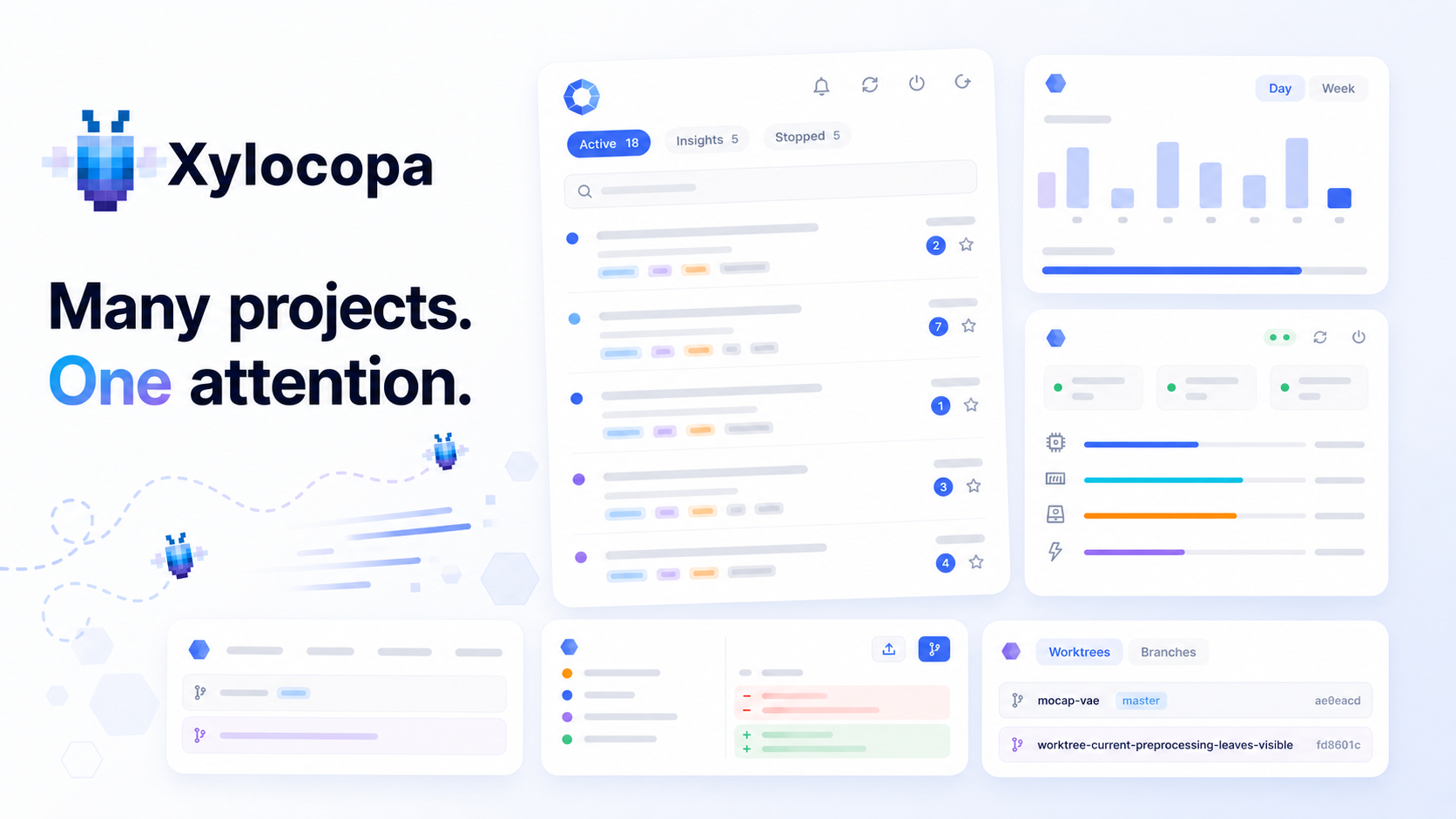
All your AI worker bees in one hive. 🐝
Note: Xylocopa was previously named AgentHive. The repo URL still reads
agenthiveand theagenthiveCLI alias keeps working — see the migration notes below.
Xylocopa is a web-based control layer for Claude Code that turns it from a synchronous terminal tool into an asynchronous, agentic workflow. Capture ideas from your phone or by voice, dispatch to parallel agents on isolated worktrees, monitor progress in real time, and iterate with auto-summarized context when agents miss the mark. Your existing CLAUDE.md files, project setup, and CLI sessions all carry over, and project knowledge grows with every session.
If you find Xylocopa useful, a star helps others discover it :)
The Loop
Traditional task management tracks what you need to do. Xylocopa tracks what your agents are doing.
1. Capture
Get ideas out of your head and into the system — fast, from anywhere.
- Inbox — a persistent queue for tasks across all your projects. Tasks wait here until you're ready to dispatch them.
- Voice input — dictate tasks using speech-to-text. Great for quick ideas on your phone while walking the dog.
- Lightning input — rapid task creation with minimal friction. Title, project, go.
- Draft persistence — edits are cached locally as you type. Close the app, lose connection, or switch tasks — your unsaved work is still there when you come back.
2. Dispatch
Assign tasks to AI agents and let them work.
- Task → Agent — turn any task into an autonomous agent with one click. Pick a model (Opus/Sonnet/Haiku), set permissions, and let the agent do the work while you move on.
- Parallel execution — run 5, 10, or more agents in parallel across different projects. Each agent gets its own isolated git worktree so they never step on each other's code.
- AI batch processing — got a pile of tasks in your inbox? One click to let AI triage and dispatch them in bulk, instead of handling each one manually.
- RAG-powered context — when dispatching a task, Xylocopa automatically retrieves relevant history from past agent sessions. Your new agent starts with the lessons learned, not from scratch.
- Cross-session reference — tell an agent "check xy session
<session_id>" and it can read another agent's full conversation via a built-in MCP server.
3. Monitor
Watch everything happen in real time — from your desk or your phone.
Mobile-first web UI — a full PWA you can add to your Home Screen. Works on any device, any screen size.
Split screen — monitor 2, 3, or 4 agents side by side (2-column, 3-column, 2x2 grid on desktop; stacked on mobile). Each pane navigates independently.
Rich chat interface — markdown rendering, inline image and media preview, interactive cards for tool approvals and plan review. Approve, deny, or respond to agents directly in the conversation.
Dual-directional CLI sync — CLI sessions appear in the web app, web app sessions are resumable from the CLI. Attach to any agent's terminal with
tmux attach -t xy-<agent-id prefix>(legacyah-sessions still attach for back-compat) and keep working from your keyboard. One conversation history, two interfaces.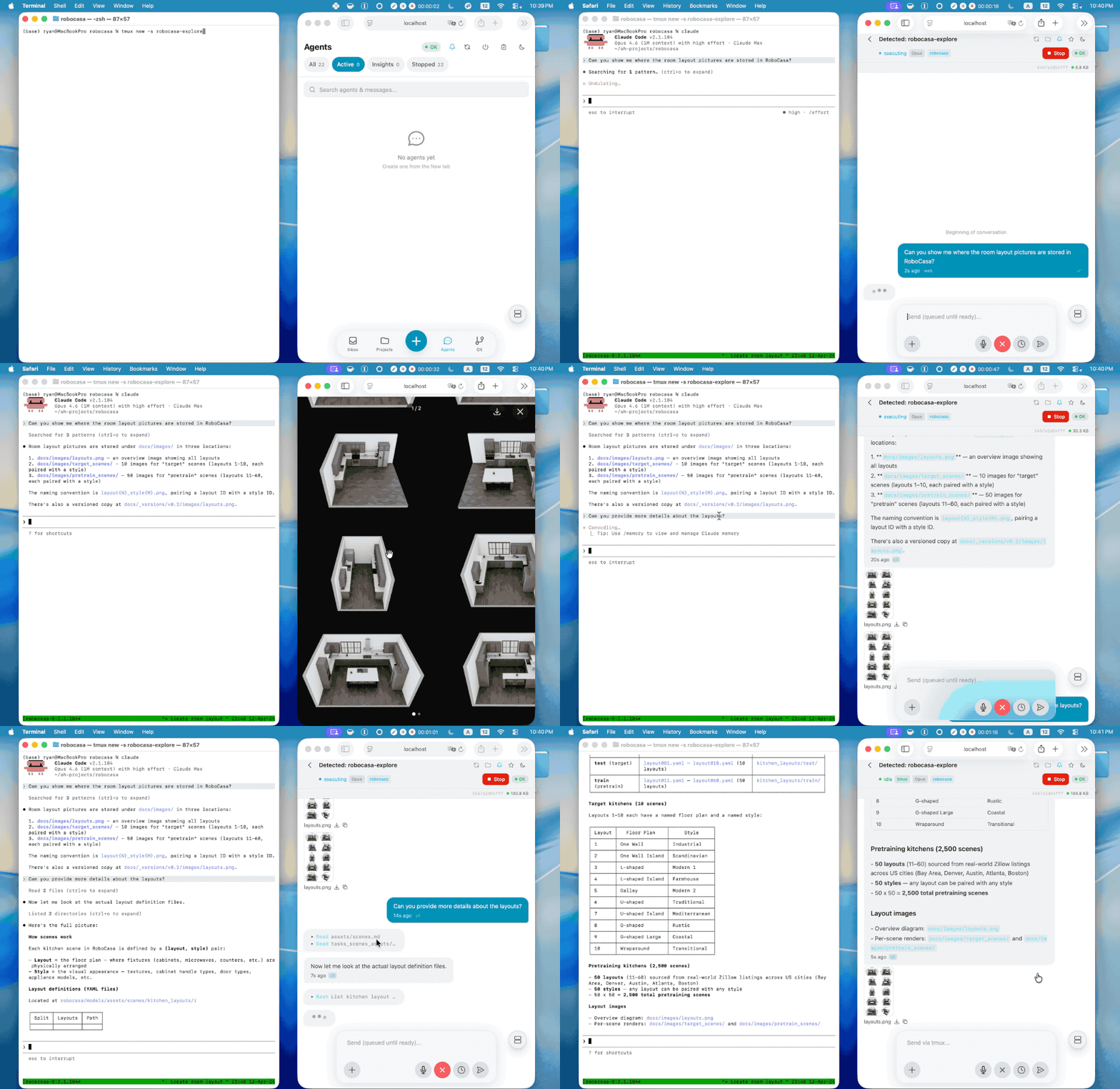
Smart notifications — Web Push and Telegram with dual-channel in-use detection: if you're viewing an agent in the browser (WebSocket presence) or attached to its tmux pane, notifications are suppressed. Permission requests always cut through.
System & usage monitoring — disk, memory, GPU status, and token usage at a glance.
4. Review
Check results, give feedback, and keep the knowledge growing.
- Mark done — review agent output, approve the work, mark the task complete.
- Try → Summarize → Retry — agent didn't nail it? Stop the agent, add your feedback, and Xylocopa auto-generates a summary of what was tried. Re-dispatch with full context — the next agent picks up where the last one left off. Iterate until it's right.
- Git operations — view diffs, commit history, and branch status per project. One-click cleanup and push when you're satisfied.
- Growing intelligence — each project carries a PROGRESS.md where lessons accumulate across sessions. You control which agent conversations generate summaries, review and cherry-pick which insights to keep, and relevant lessons are automatically retrieved (top-k) when dispatching new agents — more control over project memory than Claude Code's native auto-memory.
5. Maintain
Your conversations with agents are valuable. Don't lose them.
- Automatic backups — database, session history, and project configs are backed up on a configurable schedule. Crash recovery salvages partial output.
- Session archive — every agent conversation is persisted and searchable. Star important sessions for quick access. Browse history across projects.
- Resume anytime — pick up any agent conversation right where it left off, whether it finished yesterday or last month.
- Full-text search — find any task, message, or agent session across your entire history.
- Progress tracking — weekly completion stats show how much your agents are getting done. See the trend, not just the backlog.
- Project memory — per-project PROGRESS.md managed through the UI. Choose which sessions to summarize, accept or reject individual insights, and edit the file directly. Survives across agents, sessions, and time.
Why Xylocopa?
Zero Migration Cost
Already using Claude Code? Xylocopa plugs right in. It wraps the same claude CLI you already know — launched inside tmux sessions on your machine, managed through a web UI. Your existing CLAUDE.md files, project setup, and workflow all carry over. The only new dependencies are tmux and optionally Tailscale for remote access. No new APIs, no vendor lock-in, no relearning.
Built for Reliability
Xylocopa hooks into Claude Code's native event system — not polling, not heuristics. Notifications, message delivery, and session sync are all event-driven. Messages reach agents through stop-hook dispatch with guaranteed ordering. Session lifecycle is tracked via SessionStart/SessionEnd hooks. Each agent runs in its own tmux session with a dedicated git worktree, with configurable timeouts and automatic crash recovery.
Features
| Category | What you get |
|---|---|
| Smart Notifications | Hook-based notification system with dual-channel in-use detection — automatically notifies when you're away and stays quiet when you're present. Web Push (VAPID) and Telegram. Per-agent mute, global toggles. |
| Task Management | Inbox with drag-to-reorder. Voice input. Lightning capture. Draft persistence. Per-project organization. Retry with auto-summarization. |
| Agent Control | Start, stop, resume agents. Per-agent model selection (Opus/Sonnet/Haiku). Configurable timeouts and permission modes. AI batch dispatch. RAG-powered context from past sessions. Cross-session reference via MCP — agents can read each other's conversations on demand. |
| Chat Interface | Rich markdown rendering (code blocks, tables, images). Inline media preview. Plan mode with approve/reject. Interactive tool confirmation cards. |
| Monitoring | Split screen (up to 4 panes). Real-time WebSocket streaming. System monitor (disk, memory, GPU, tokens). Weekly progress stats. |
| Mobile PWA | Add to Home Screen on iOS/Android. Full functionality — voice input, push notifications, task management. |
| CLI Session Sync | Dual-directional: CLI sessions in the web app, web app sessions resumable from CLI. |
| Git Integration | Commit history, diffs, branch status per project. Agents work in isolated worktrees. One-click cleanup and push. |
| Session History | Every conversation persisted and searchable. Star sessions. Resume any agent anytime. Full-text search. |
| Security | Password auth with exponential-backoff rate limiting. Inactivity lock. HTTPS encryption. |
| Backups | Automatic database backups. Session JSONL caching. Crash recovery with partial output salvage. |
Getting Started
Host Setup
Prerequisites
- Linux or macOS host (Ubuntu 22.04+ / macOS 13+ recommended)
- Node.js 18+ and npm
- Python 3.11+
- tmux (usually pre-installed;
sudo apt install tmuxif not) - Claude Code CLI —
npm install -g @anthropic-ai/claude-code - Claude subscription — Claude Max or Pro (uses your existing subscription, no separate API billing)
- OpenAI API key (optional, for voice input)
Installation
# 1. Clone
git clone https://github.com/jyao97/AgentHive.git xylocopa && cd xylocopa

# 2. Run automated setup (installs deps, creates venv, generates SSL certs)
chmod +x setup.sh && ./setup.sh

# 3. Configure
nano .env   # Set HOST_PROJECTS_DIR (required), optionally OPENAI_API_KEY

# 4. Start
./run.sh start
Verify by opening https://<machine-ip>:3000 on the host.
Tip: You can also run
claudein the project directory and tell it to set up Xylocopa for you :)
Tip: Symlink the Xylocopa repo into
~/xylocopa-projects/to personalize your experience — let agents improve the tool while you use it.
Auto-Start on Reboot (PM2)
Xylocopa uses PM2 to manage its processes. By default, PM2 does not auto-start after a system reboot. To enable it:
# 1. Make sure Xylocopa is running
./run.sh start

# 2. Save the current process list
pm2 save

# 3. Install the systemd startup hook (one-time, requires sudo)
pm2 startup systemd
# PM2 will print a command starting with `sudo env PATH=...` — copy and run it exactly as shown.
After this, Xylocopa will automatically start when the machine boots.
To disable auto-start later:
pm2 unstartup systemd
Set Up Your Projects
Add projects in the app: long-press the + button → New Project — paste any GitHub URL or point to an empty folder. You can also manually create or symlink folders in the projects directory (~/xylocopa-projects/ by default, configured via HOST_PROJECTS_DIR in .env).
Client Setup
After setting up the host, visit https://<machine-ip>:3000 from any device with network access — that's it. Set a password on first visit.
Remote Access
For access outside your LAN, Xylocopa works with any tunneling or VPN solution — Tailscale, ZeroTier, WireGuard, frp, Cloudflare Tunnel, etc. The author uses Tailscale:
- Install Tailscale on your server and phone
tailscale upon both devices- Access Xylocopa at
https://<tailscale-ip>:3000
No port forwarding, no public exposure — traffic stays in an encrypted tunnel between your devices.
iPhone PWA
If you want the full app experience on iPhone (home screen icon, fullscreen, push notifications):
- Open
https://<machine-ip>:3000in Safari (bypass the certificate warning via Advanced → Visit Website, then refresh). - Follow the on-screen guide on the login page to install the CA certificate and the Xylocopa app.
Important: Install the CA certificate before installing the App. The App opens in fullscreen without a browser address bar — if the certificate isn't trusted first, you'll be stuck on a warning page with no way to navigate.
Installing the CA Certificate
Xylocopa uses a self-signed SSL certificate. The host trusts it after setup, but other client devices will show a browser warning until you install the cert. iPhone/iPad users can skip this — the iPhone PWA guide above already covers it.
For Android, macOS, Windows, and Linux — see detailed instructions.
Gestures & Shortcuts
- Short-press the + button to quickly add a task. Long-press it to choose between adding a project, agent, or task.
- Double-tap an agent's session ID to quickly copy it to the clipboard.
- Double-tap a message in the chat view to quickly copy its content.
Troubleshooting
- Conversation appears stuck or not updating? — Try clicking the refresh button at the top of the chat view. This manually re-syncs the agent's session data from the CLI and often resolves display issues without restarting the agent.
- Agent shows IDLE after server restart but is still running? — When the backend restarts while agents are executing, their status may temporarily show as IDLE even though the underlying Claude CLI process is still active. This is normal — the status will automatically restore to EXECUTING the next time the agent makes a tool call (which triggers a heartbeat via the
agent-tool-activityhook). If the agent is in a long thinking phase with no tool calls, you can wait or send it a message to trigger activity. - Don't name tmux sessions with the
xy-orah-prefix — Xylocopa usesxy-{id}as its internal naming convention for managed agent sessions (legacyah-{id}is also still recognized for back-compat). User-created tmux sessions starting with either prefix will not be detected or synced by the orchestrator.
Known Issues
- iPad & mobile browser layout — layout needs further optimization for iPad and non-PWA mobile browsers. There are minor visual quirks on iPad standalone mode. Tested and working correctly on iPhone (Add to Home Screen) and desktop browsers.
Roadmap
- macOS support — basic compatibility merged (cross-platform process detection, path normalization, iOS cert/Web Clip setup). Some edge cases may remain — please report issues.
- Backup & restore — automatic backups run on schedule, but the restore flow has not been fully validated. Use with caution.
- UI & icon refresh — improve visuals, iconography, and layout polish across the web interface.
- Better HTTPS certificates — replace the self-signed certificate with a more seamless solution (e.g. Let's Encrypt, Tailscale HTTPS, or mDNS) to eliminate manual cert installation on client devices.
Contributing
We welcome contributions! See CONTRIBUTING.md for guidelines on:
- Reporting bugs and suggesting features
- Setting up a development environment
- Running tests and submitting pull requests
Migration from AgentHive
Xylocopa was previously named AgentHive. Existing installs continue to work without manual migration — the upgrade path is backward compatible:
- CLI — the
agenthivecommand remains as a symlink to the newxylocopacommand. Both work identically. - Install dir —
XYLOCOPA_DIRis the new env var;AGENTHIVE_DIRis still honored as a fallback. Existing~/agenthive-maincheckouts keep working. - Process names —
pm2processes are nowxylocopa-backend/xylocopa-frontend. The upgrade script removes the legacyagenthive-*processes automatically. - MCP server — the entry in
.mcp.jsonis renamed fromagenthivetoxylocopaon first agent start. Cross-session references (check ah session <id>style) keep working. - tmux sessions — new agents use the
xy-{id}prefix; legacyah-{id}sessions are still recognized so in-flight agents survive the upgrade. - User data dir —
~/.agenthive/uploadsis renamed to~/.xylocopa/uploadsautomatically on first backend start (only if the new dir doesn't already exist). - Env vars —
XYLOCOPA_MANAGEDis the new flag;AGENTHIVE_MANAGEDis still set in parallel for any external scripts that read it. - Browser storage — theme/notification preferences in
localStorageare auto-migrated to the newxylocopa-*keys on first page load. - Certificates — newly issued certs use
xylocopa-ca.crt/xylocopa.crtfilenames. Already-installed certs continue to work — no reinstall needed. - Apple Web Clip — the bundle ID changes from
com.agenthive.*tocom.xylocopa.*. Re-download theXylocopa.mobileconfigprofile from the login page if you want the renamed Home Screen entry.
If you'd like to rename your install dir to match: mv ~/agenthive-main ~/xylocopa-main && cd ~/xylocopa-main && ./run.sh restart.
License
Apache 2.0 — see LICENSE for details.
Reviews (0)
Sign in to leave a review.
Leave a reviewNo results found