graphite
Health Uyari
- License — License: MIT
- Description — Repository has a description
- Active repo — Last push 0 days ago
- Low visibility — Only 6 GitHub stars
Code Uyari
- network request — Outbound network request in docs/site.js
- network request — Outbound network request in electron/ai/assistant.cjs
- fs module — File system access in electron/ai/hub.cjs
Permissions Gecti
- Permissions — No dangerous permissions requested
Bu listing icin henuz AI raporu yok.
One fast desktop app for 24 databases — PostgreSQL, MySQL, SQL Server, Oracle, MongoDB, Redis, DynamoDB, ClickHouse and more — with an AI assistant and an MCP server that ask before they write.

Graphite
A fast, keyboard-friendly desktop client for 24 databases: SQL, NoSQL and cloud warehouses
with an AI assistant and an MCP server for your own agents.



Website · Download · Português
Features
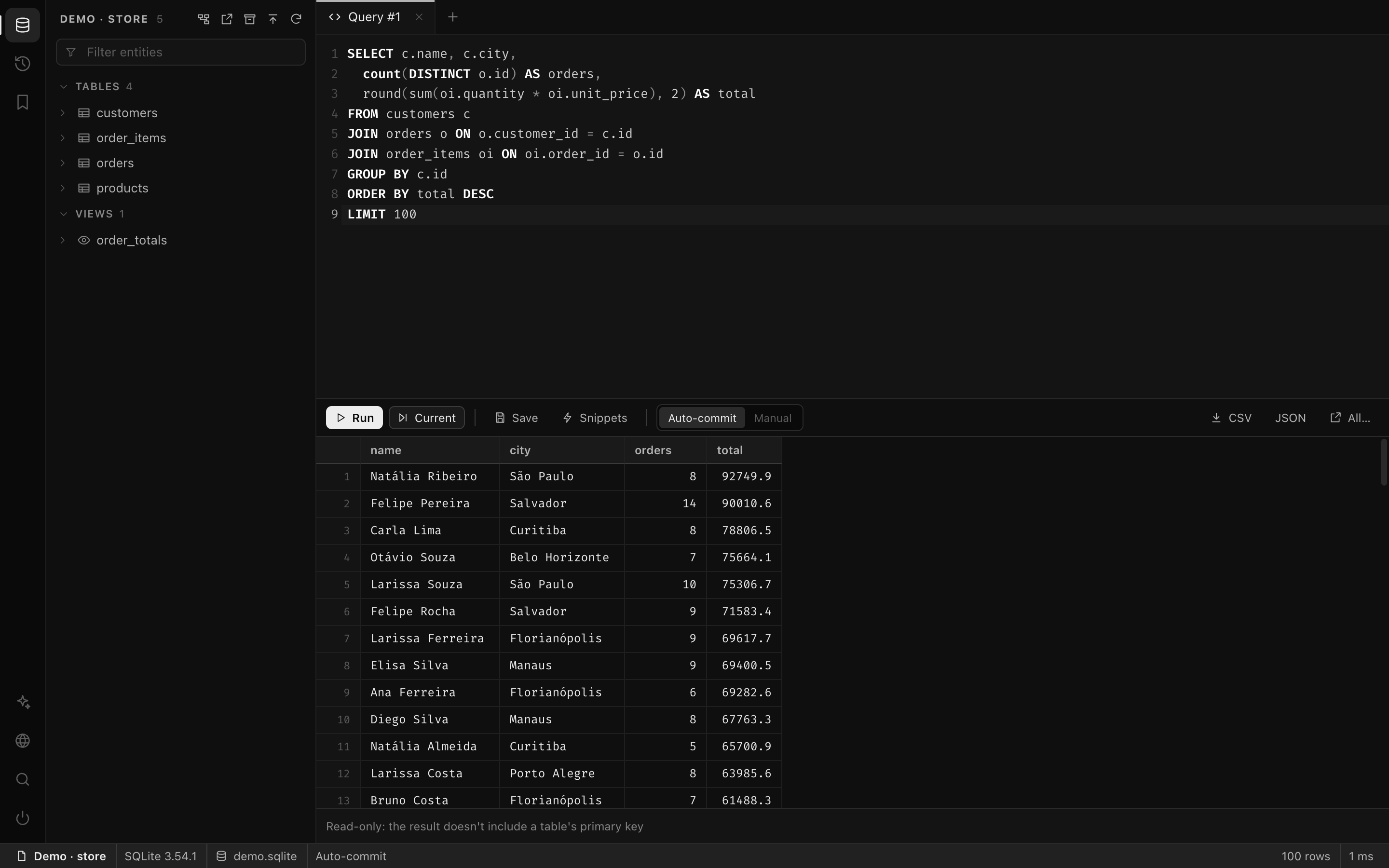
- SQLite, PostgreSQL, MySQL, MariaDB, TiDB, CockroachDB, GreengageDB and LibSQL/Turso (full list) with saved connections (passwords encrypted by the OS keychain), a
Test button, Import from URL (pastepostgres://…,mysql://…,mongodb+srv://…, JDBC,DATABASE_URL=…,
libpq or ADO.NET strings and the form fills itself in) and a ready-to-use demo database. - SQL editor (CodeMirror 6): table/column autocomplete, current-statement highlight, several results per run,
inline errors.⌘/Ctrl+Enterruns everything or the selection,⌘/Ctrl+Shift+Enterruns the statement under the cursor. - SQL snippets: type a shortcut (
sel,ij,ups,ct…) and pick it from autocomplete; templates adapt to each database. - Table browser: pagination, sorting,
WHEREfilter, structure tab (columns, indexes, DDL). - Inline editing of tables and query results (when the primary key is in the result), applied in a single
transaction. Right-click actions on cells, headers and rows: copy as value / JSON /INSERT, setNULL, filter by value… - Generate SQL from any table:
SELECT,SELECTwithJOINs following the foreign keys,INSERT,UPDATE,DELETE. - Auto-commit or manual transactions per connection, with commit/rollback (PostgreSQL uses savepoints so one error
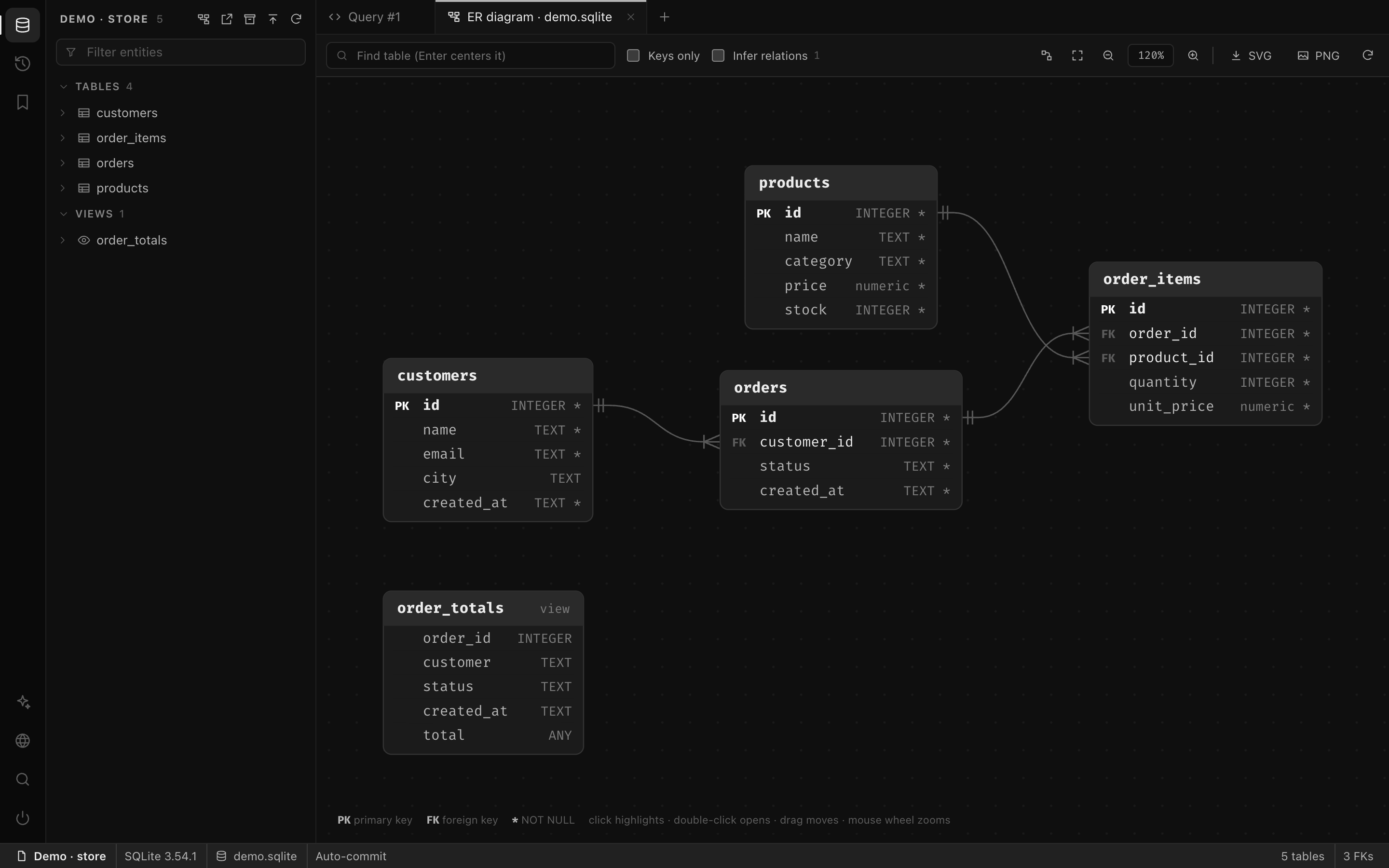
doesn't abort the transaction). - ER diagram with automatic layout, inferred relations, search, keys-only mode and SVG/PNG export.
- Backup and restore in
.sql/.sql.gzwithoutpg_dumpormysqldump, streamed, with progress and cancel. - Export tables or full query results to CSV, JSON, JSON Lines or SQL
INSERTs, with no row limit. - History per connection, saved queries, quick search (
⌘/Ctrl+P), tabs. - English, Português (Brasil) and Español: follows the system language, switch any time from the globe icon.
| Query | Joins | Change data | Schema | Diagnostics |
|---|---|---|---|---|
sel seld cnt grp pag busca entre cte case exists in rank dup |
ij lj rj fj cj antij j3 |
ins insm inss insr ups upd updj del delj tx |
ct addcol dropcol rencol idx uidx fk view drop |
exp cols tam proc |
Tab / Shift+Tab move between fields and Esc leaves. The Snippets toolbar button lists them all with search.
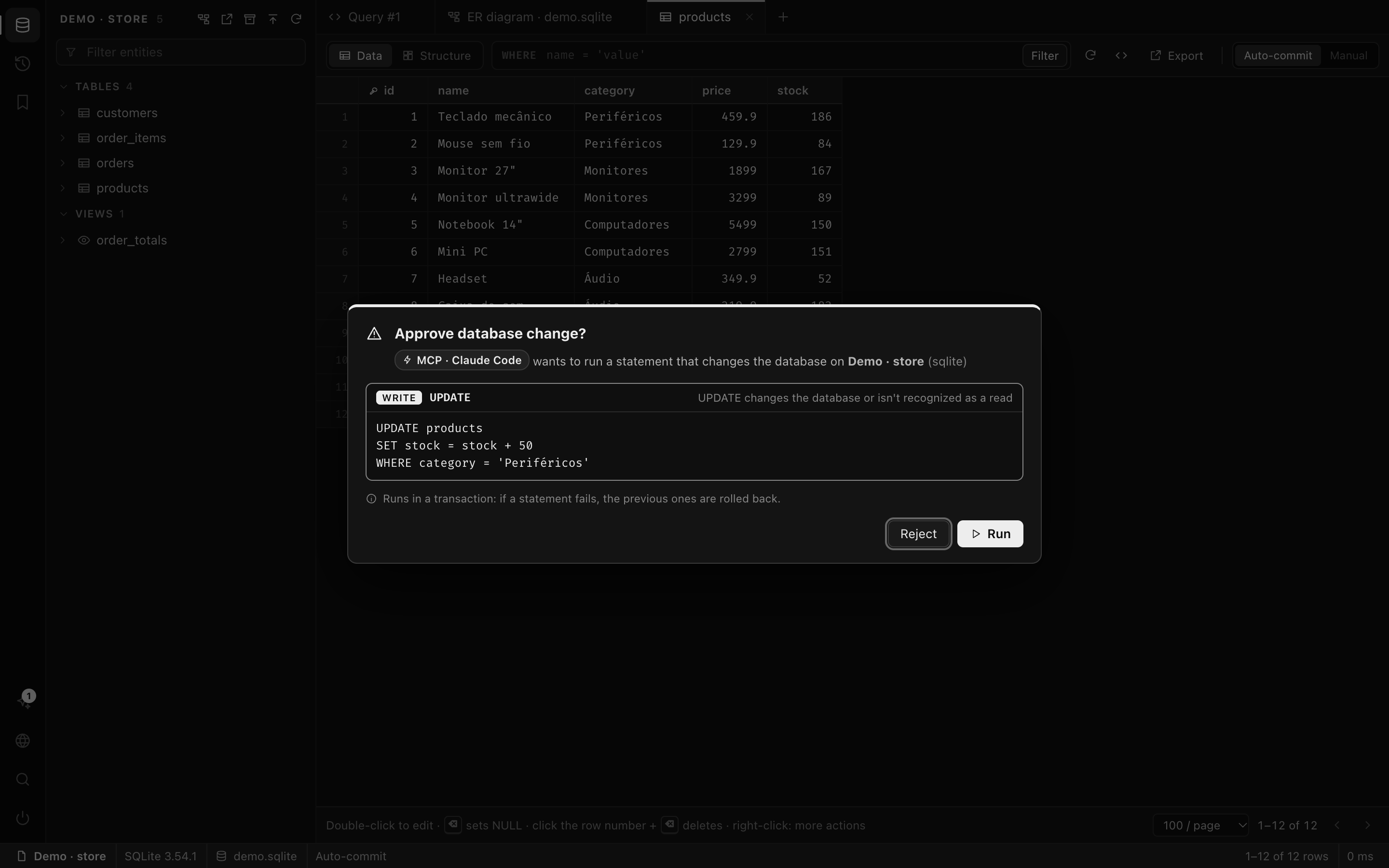
| ER diagram | Approving an agent's change |
|---|---|
 |
 |
Supported databases
| Database | Status | Notes |
|---|---|---|
| SQLite | ✅ | Local files |
| PostgreSQL | ✅ | |
| MySQL | ✅ | |
| MariaDB | ✅ | |
| TiDB | ✅ | AI asks for approval on every query (TiDB doesn't enforce read-only transactions) |
| CockroachDB | ✅ | No Graphite backup (use CockroachDB's own BACKUP) |
| GreengageDB | ✅ | |
| LibSQL / Turso | ✅ | Remote URL + token; no manual transaction mode |
| SQL Server / Azure SQL | ✅ | Wide decimals in free-form queries lose precision (driver limitation); CAST them |
| Oracle Database | ✅ | Thin mode (no Instant Client); "database" = service name |
| ClickHouse | ✅ | HTTP; no transactions (read-only grid); AI reads with readonly=1 |
| Trino / Starburst | ✅ | "Database" = catalog or catalog.schema; read-only grid |
| Firebird 3+ | ✅ | "Database" = path or alias on the server |
| DuckDB | ✅ | Local .duckdb file; AI asks for approval on every query |
| Snowflake | 🧪 beta | Programmatic Access Token; read-only grid; not yet tested against a real account |
| BigQuery | 🧪 beta | Service account key (JSON); read-only grid; tested with the open-source emulator |
| MongoDB | ✅ | mongosh-style commands (db.orders.find({…})); JSON filter; grid editing keeps BSON types |
| Redis / Valkey | ✅ | redis-cli commands, one per line; keys browsed and edited by type (atomic MULTI/EXEC) |
| Apache Cassandra / ScyllaDB | ✅ | CQL; keyspaces in the picker; pages without a total; grid edits as one logged batch |
| Amazon DynamoDB | ✅ | PartiQL; access key + secret (or DynamoDB Local); grid edits in one transaction, attribute types kept |
| SurrealDB | ✅ | SurrealQL over HTTP; namespace + database; grid edits in one transaction, field types kept |
| Amazon Redshift | 🧪 beta | Not yet tested against a real cluster |
| StarRocks | ✅ | No transactions (read-only grid); AI asks for approval on every query |
On the non-relational databases the AI asks for approval on every command, since none of them offers a read-only mode
the app could rely on. They all support grid editing; key columns (_id, primary/partition/sort keys, id) stay
read-only, since they identify the row.
AI: bring your own model or agent
Two ways to use your own AI, sharing the same tools (list connections, schemas and tables, describe a table,
schema summary with foreign keys, run SQL):
- Built-in assistant (✦ in the sidebar): a chat next to the editor using the Anthropic API (Claude) or any
OpenAI-compatible provider, including local models (Ollama, LM Studio). It reads the schema, runs reads on its
own, gives you SQL with Insert / New tab buttons, and failing queries get a Fix with AI button. The model
list is loaded live from the provider. Your API key is encrypted on your machine, stored per provider, and never sent
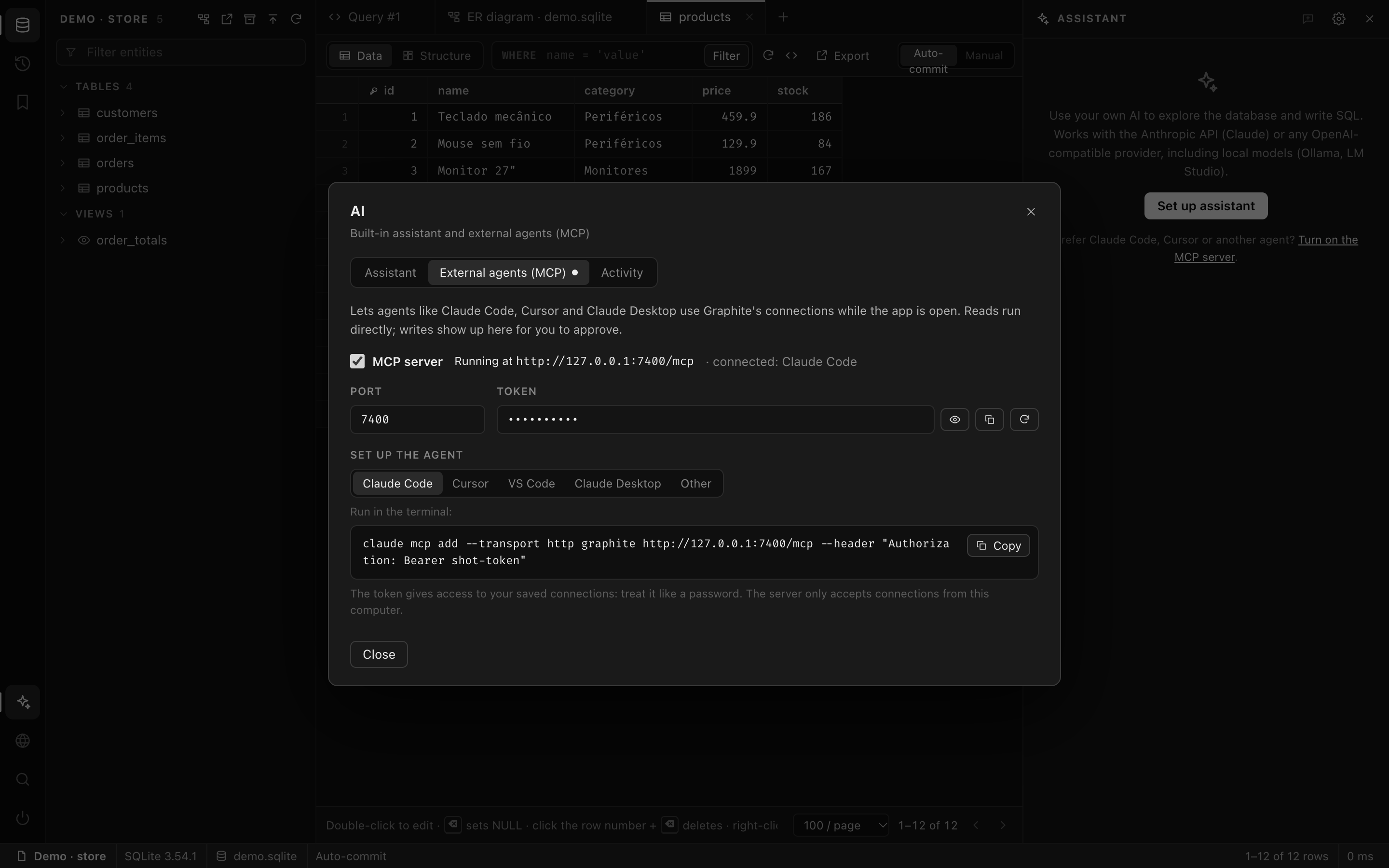
back to the window or to another provider. - MCP server for external agents (Claude Code, Cursor, VS Code, Claude Desktop via
mcp-remote): turn it on in
AI and agents → External agents, which shows ready-to-paste configs. It only listens on127.0.0.1, requires a
token, and rejects browser requests (Origin) or otherHostheaders.
How your data stays safe (electron/lib/aiquery.cjs):
- Reads (
SELECT,WITH,EXPLAIN,SHOW…) run in a read-only mode enforced by the database itself
(BEGIN READ ONLY,SET SESSION TRANSACTION READ ONLY,PRAGMA query_only), with a 30 s timeout and only the first
rows fetched. A write disguised as a read (WITH … DELETE,EXPLAIN ANALYZE DELETE,nextval()) fails instead of running. - Anything else opens an approval dialog in Graphite showing who asked, the connection and every statement.
Approved scripts run in a transaction; rejected ones don't run and the agent is told so. Read-only connections never allow writes. - Agents use their own sessions, never your open transaction. Every call is listed in AI → Activity.
[!IMPORTANT]
Whoever has the MCP token can read every saved connection without asking. Treat it like a password and
regenerate it if it leaks.
Install
Download the latest build from Releases.
macOS (Apple Silicon and Intel)
Open Graphite-<version>-arm64.dmg (Apple Silicon) or -x64.dmg (Intel) and drag Graphite to Applications.
The app is ad-hoc signed but not notarized (no paid Apple Developer ID), so Gatekeeper blocks the first launch.
Either go to System Settings → Privacy & Security → Open Anyway, or run:
xattr -dr com.apple.quarantine /Applications/Graphite.app
On the Mac, shortcuts use ⌘ instead of Ctrl (the interface already shows ⌘), and ⌫ in the grid works as Del.
Linux (x64)
sudo apt install ./graphite_<version>_amd64.deb   # Debian/Ubuntu: installs to /opt/Graphite, adds the `graphite` command
sudo apt remove graphite                          # uninstall
Or use the portable Graphite-<version>.AppImage (chmod +x and run). The .deb adds an AppArmor profile so
Electron's sandbox works on Ubuntu 23.10+.
TLS / SSL
With Use SSL, pick how the server certificate is checked: encrypt only, verify the CA, or verify the CA and
host name (the default for new connections). Point to a CA certificate (else the system's trusted CAs are used)
and, for mutual TLS, a client certificate and key (PEM files; Graphite stores only their paths). Firebird encrypts
its own protocol instead; MongoDB takes its TLS options in the connection URL (tls=true&tlsCAFile=…).
Updates
Graphite checks this repository's releases when it opens and every 6 hours, shows Update available in the
sidebar, and downloads and installs the new version for you: the file is checked against the SHA-256 that GitHub
publishes for it, then Graphite restarts on the new version (macOS .app, AppImage, or .deb via pkexec). Turn the
automatic check off in the same dialog; the check is a plain request to the GitHub API with nothing about you or your
databases.
Where your data lives
Saved connections, history and settings stay on your machine: ~/Library/Application Support/Graphite (macOS) or~/.config/Graphite (Linux). Graphite has no telemetry; it only talks to your databases, to your AI provider if you set one up, and to GitHub to
check for updates (can be turned off).
Build from source
Requires Node.js 22+.
git clone https://github.com/julioczn/graphite.git
cd graphite
npm install
npm run dev        # Vite with hot reload + Electron
npm start          # production renderer build + Electron
npm run dist:mac   # release/Graphite-<version>-{arm64,x64}.dmg and .zip (on a Mac)
npm run dist       # release/Graphite-<version>.AppImage and graphite_<version>_amd64.deb
npm run i18n:check # translation coverage
GRAPHITE_PROFILE_DIR=/some/folder npm start runs with a separate profile (settings, connections, demo), handy for testing.
Project structure
electron/
  main.cjs        windows, native dialogs, safeStorage, utility process + MessagePorts
  preload.cjs     window.graphite: RPC over a MessagePort + whitelisted IPC
  utility.cjs     database process: handlers for conn/*, query/*, table/*, app/*
  ai/             hub (tools, agent sessions, approvals), mcp (server), assistant (chat)
  drivers/        sqlite, postgres (pg), mysql (mysql2), libsql, mssql (tedious), oracle (oracledb),
                  clickhouse, trino, firebird (node-firebird), duckdb (@duckdb/node-api),
                  snowflake, bigquery, mongodb, redis (ioredis), cassandra (cassandra-driver), dynamodb, surrealdb
  lib/            app database, demo, backup/restore/export, read-only guard for AI queries
shared/
  engines.mjs     database engines: family, defaults and capabilities
  sql.mjs         statement splitter (utility and renderer)
  i18n.mjs        translations for every process + locales/en.mjs, locales/es.mjs
src/              Vue 3 renderer (components/, lib/)
docs/             website (GitHub Pages) and screenshots
All database work happens in a separate utility process that talks to the window over a MessagePort; the window
itself is sandboxed with context isolation and no Node.js access.
Translations
The Portuguese text is the translation key: t('Nova conexão'), t('Tabela {name}', { name }), plurals witht('{n} linha|{n} linhas', { n }). English and Spanish live in shared/locales. To add a language,
copy en.mjs, translate the values and register it in shared/i18n.mjs;npm run i18n:check lists anything missing. Corrections from native speakers are very welcome.
Contributing
Issues and pull requests are welcome. See CONTRIBUTING.md. For security issues, please follow
SECURITY.md instead of opening a public issue.
License
MIT © Julio Zimmermann
Yorumlar (0)
Yorum birakmak icin giris yap.
Yorum birakSonuc bulunamadi