selfguard
Health Warn
- License — License: MIT
- Description — Repository has a description
- Active repo — Last push 0 days ago
- Low visibility — Only 5 GitHub stars
Code Pass
- Code scan — Scanned 12 files during light audit, no dangerous patterns found
Permissions Pass
- Permissions — No dangerous permissions requested
No AI report is available for this listing yet.
Local-first guard that watches every JavaScript, Python, Rust and Go repo on your machine and alerts you about vulnerable or malicious dependencies. Mac menu bar app and CLI, OSV.dev, MCP-ready, zero dependencies.
selfguard




A local-first guard for every repo on your machine, and for the machine itself.
- 📦 Every repo's dependencies. New vulnerabilities and malicious packages in npm, pnpm,
yarn, bun, uv, Poetry, Cargo and Go projects, even in repos you haven't opened in months. - 🤖 CI and AI agents. Compromised or unpinned GitHub Actions, MCP servers and repo settings
that make Claude, Cursor or Codex run code. - 💻 This machine. What supply-chain attacks leave behind: planted git hooks, malicious editor
and browser extensions, fake launch agents, exposed dev services, tokens in plain text. - 🔔 It tells you on its own. In the background, with one upgrade target per package, and
quiet about what isn't worth your time.
npm install -g selfguard && selfguard setup
Or get the Mac app: menu bar,
dashboard and notifications, everything bundled. Local-first: only package names and versions
ever leave your machine.
How it looks
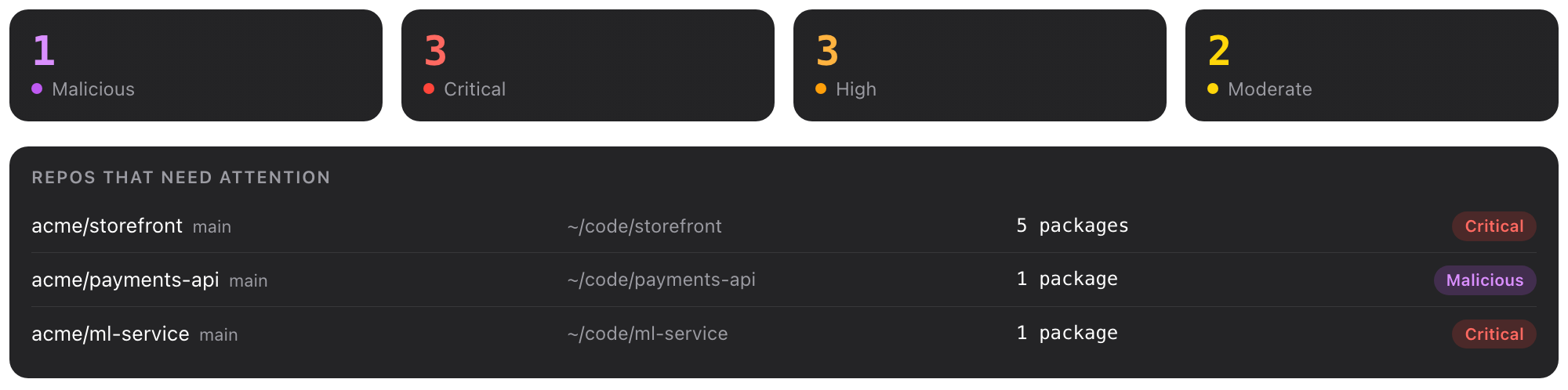
What needs attention across all your repos, at a glance:
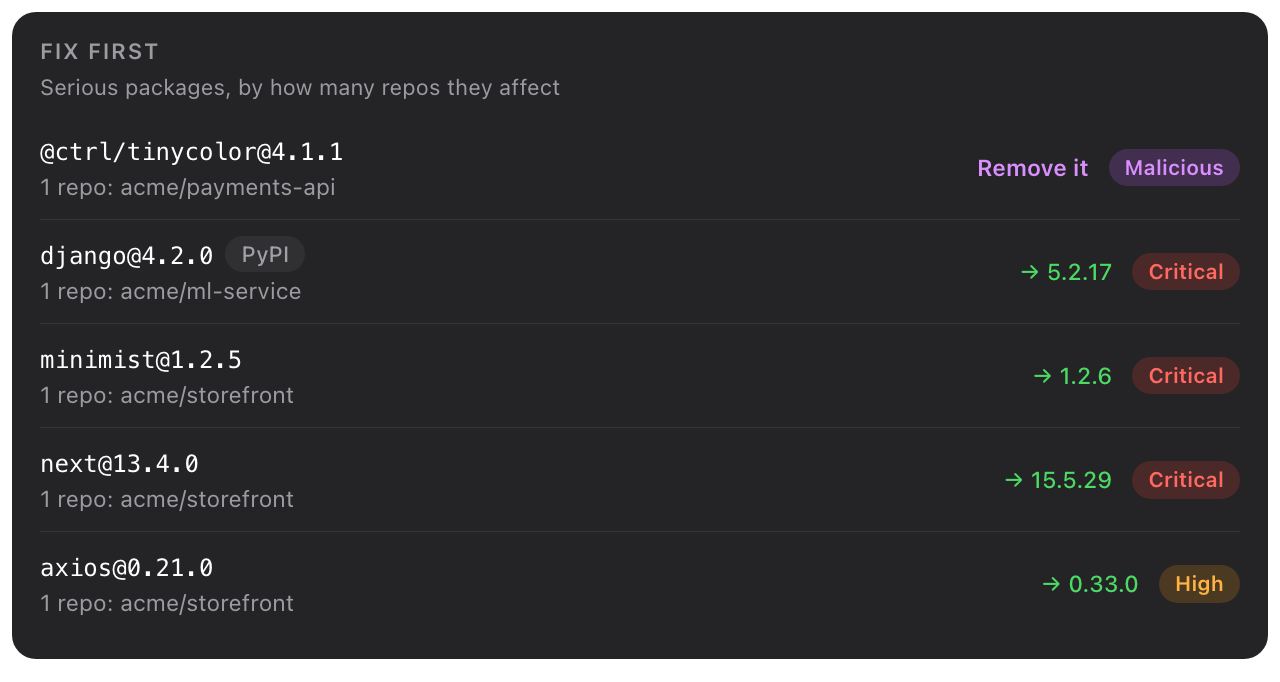
What to fix first: one upgrade target per package, not a wall of advisories, ranked by how
serious it is and how many repos it affects:
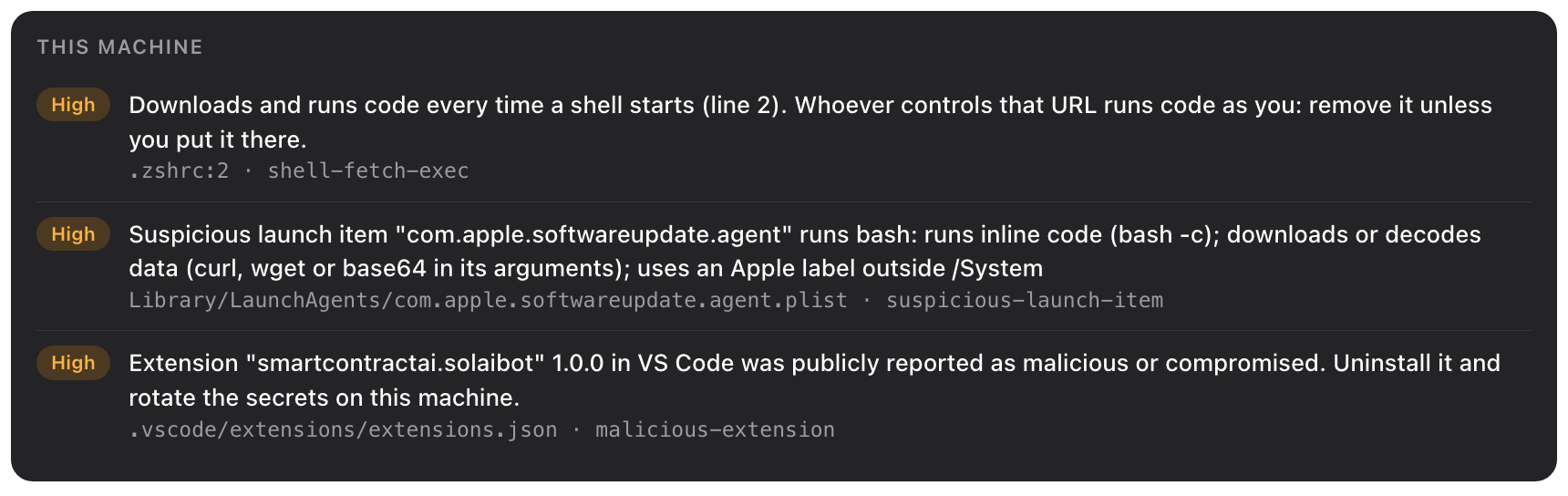
Signs of an attack on this machine alert you right away, even on a fresh clone. Practices worth a
look (a token in plain text, an unpinned MCP server) wait quietly in the dashboard:
Meet Bastion

A 16-bit castle guard acts out what changed: he patrols when all is clear, sounds the horn for
a critical vulnerability, fights off a malicious package and celebrates your fixes. With the app
open, each alert arrives once, from him.
Features
- Always up to date. A watcher re-checks a repo seconds after its lockfile changes, a
scheduled sync catches new advisories, and a daily reminder lists what is still serious. You
get a "✓ fixed" notification too. - Signal over noise. Only checkouts with recent git activity alert you. Old clones stay
listed but quiet (except for malicious packages), and the first scan is a silent baseline. - Hands-off.
cdinto a project and it is registered and scanned. New clones in your code
folders are picked up, and "Find my projects" searches your whole home folder. - Your other machines too. Other Macs over Tailscale, servers over SSH with a small
read-only reader. Worktrees and clones of a repo are grouped with their branches. - Incident response.
selfguard where <package>answers "do I use this anywhere?". - AI-ready. A built-in MCP server,
--jsonon every command, and a guide for agents. - Safe by design. It never runs code from your projects, has zero runtime dependencies, and
only sends package names and versions over the network. Releases are signed and come with an
SBOM you can verify.
Quick start
Requires Node.js 20.10+. Works on macOS and Linux. Native notifications and
scheduling are macOS-only for now.
npm install -g selfguard
selfguard setup
setup is a small terminal UI. Pick the folders where you keep your code, and selfguard scans
them. It then offers to install the shell hook and background watching with notifications.
You don't need the command line on a Mac: the selfguard app bundles everything, asks
whether to watch in the background, and can add a selfguard terminal command that runs its
engine (dashboard → Settings → This Mac → Terminal command).
The dashboard is only in the selfguard Mac app (from the
latest release): open it from its menu
bar icon → Open Dashboard. In the terminal, selfguard status and selfguard report show the
same results.
Where do you keep your code?
selfguard only looks inside the folders you pick, nothing else on your disk.

  [x] ~/code                          42 projects    depth 5
› [ ] ~/work                          17 projects    depth 5
  + add another folder…

↑/↓ move · space select · ←/→ depth · a add folder · enter continue · q quit
Then, from any terminal:
$ selfguard status
 MALICIOUS  acme/payments-api  1 vulnerable pkg(s)  ~/code/payments-api
CRITICAL acme/storefront  6 vulnerable pkg(s) on main · 7 on feat/checkout  2 checkouts
   ├ main  6 vulnerable  ~/code/storefront
   └ feat/checkout worktree  7 vulnerable  ~/code/storefront-feat-checkout
CRITICAL acme/ml-service  2 vulnerable pkg(s)  ~/code/ml-service
✓        acme/docs-site  clean  ~/code/docs-site
Or scan a single project without setting anything up:
$ selfguard scan
~/code/payments-api  412 packages
  3 vulnerable package(s), 9 advisories: 1 critical, 4 high, 4 moderate

  CRITICAL [email protected] (transitive)
    → upgrade to 1.2.6 or later
    • GHSA-xvch-5gv4-984h critical Prototype Pollution in minimist

  HIGH [email protected] (direct)
    → upgrade to 0.33.0 or later
    • GHSA-cph5-m8f7-6c5x high axios Inefficient Regular Expression Complexity vulnerability
    …
Documentation
| Getting started | Install, setup, dashboard, alerts, uninstall |
| CLI reference | Every command and flag, exit codes, environment variables |
| Supported ecosystems | JavaScript, Python, Rust and Go: files read, what is checked, limitations |
| CI workflows and agent tools | GitHub Actions in workflows and MCP servers of AI agents: what is read, checks, privacy |
| This machine | Launch items, shell startup files, git and package manager config, plaintext credentials, Python startup hooks, editor and browser extensions, exposed local services: rules and privacy |
| How it works | Discovery, lockfile parsing, repo grouping, OSV, caching, alerts |
| AI and automation | MCP server setup, tools, JSON output, scripting and CI |
| Security model | What selfguard trusts, what it sends, how it is released |
| Verify your download | Check the provenance of the npm package, the DMG and the SBOM yourself |
| Troubleshooting | Notifications, hook, scheduling, unsupported lockfiles |
How it compares
| selfguard | npm audit |
osv-scanner | Dependabot | |
|---|---|---|---|---|
| Watches every project on your machine | ✅ | ❌ one project, on demand | ❌ on demand | ❌ hosted repos only |
| Alerts when a new advisory hits an old project | ✅ | ❌ | ❌ | ✅ |
| Local-only (no repo hosting required) | ✅ | ✅ | ✅ | ❌ |
| npm, pnpm, yarn, bun | ✅ | npm only | ✅ | ✅ |
| uv, Poetry, Cargo, Go modules | ✅ | ❌ | ✅ | ✅ |
| Malicious package feed | ✅ via OSV | ❌ | ✅ via OSV | partial |
| Opens PRs with fixes | ❌ | ❌ (npm audit fix locally) |
guided remediation | ✅ |
| Ecosystems | JavaScript, Python, Rust, Go | JavaScript | many | many |
selfguard complements these tools rather than replacing them. Keep Dependabot or Renovate for
automated fix PRs, and use selfguard to know what is vulnerable on your machine right now.
Privacy
selfguard sends only the ecosystem, name and version of your locked dependencies to the OSV.dev API.
No file paths, repo names or source code ever leave your machine. All state lives in~/.selfguard, readable only by your user. See the security model.
Contributing
Bug reports, ideas and pull requests are welcome. See CONTRIBUTING.md.
Please report security issues privately as described in SECURITY.md.
License
Reviews (0)
Sign in to leave a review.
Leave a reviewNo results found