jc
Health Pass
- License — License: MIT
- Description — Repository has a description
- Active repo — Last push 0 days ago
- Community trust — 35 GitHub stars
Code Fail
- rm -rf — Recursive force deletion command in scripts/bundle.sh
- rm -rf — Recursive force deletion command in scripts/update-gpui-component.sh
Permissions Pass
- Permissions — No dangerous permissions requested
No AI report is available for this listing yet.
Claude Code orchestrator in one window

jc
Orchestrate multiple Claude Code sessions across projects.
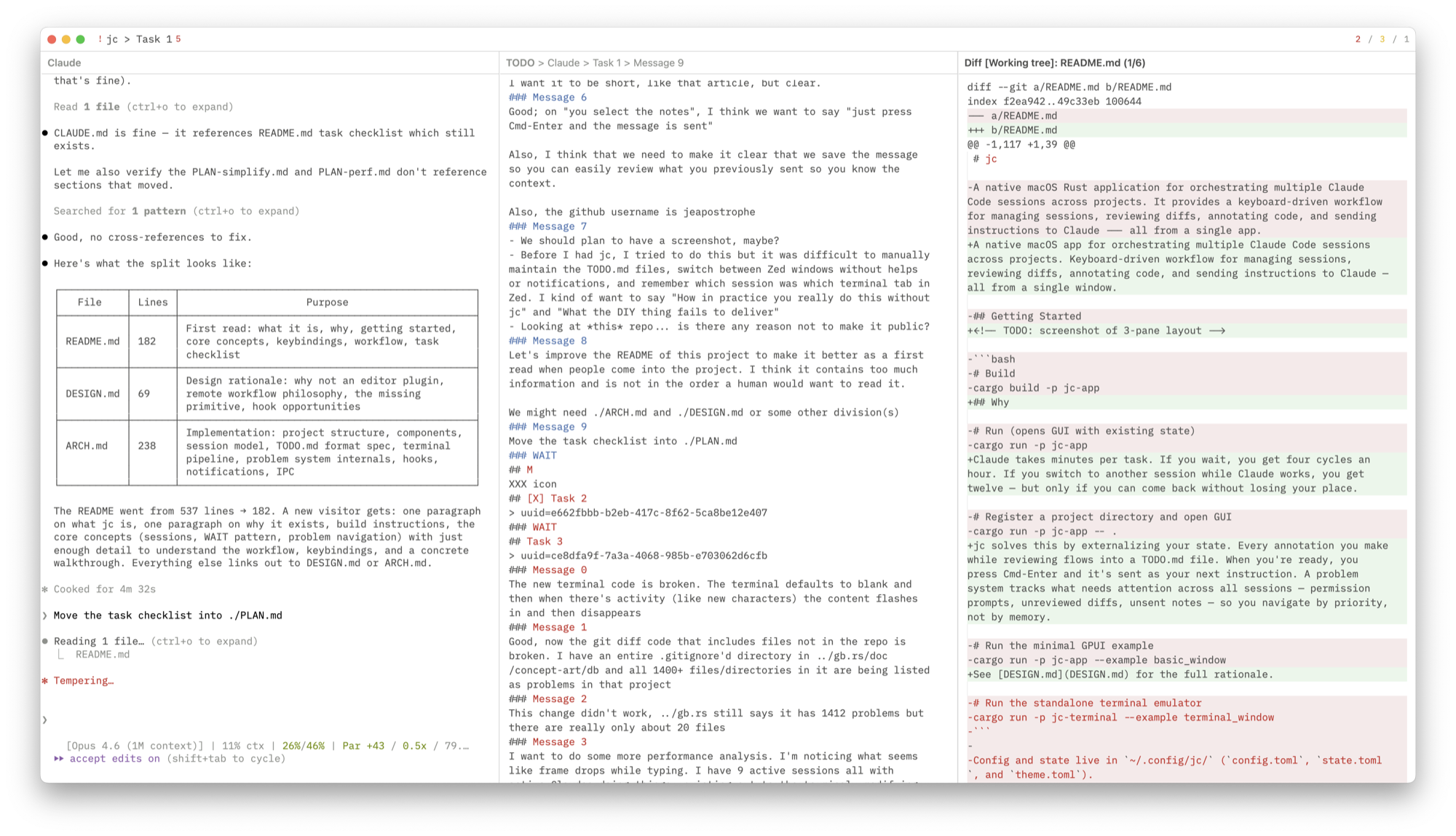
Review diffs, annotate code, send instructions — all from one window.




Why · Getting Started · Keybindings · Design · Architecture
Why
Claude takes minutes per task. If you wait, you get four cycles an hour. If you switch to another session while Claude works, you get twelve — but only if you can come back without losing your place.
jc solves this by externalizing your state. Every annotation you make while reviewing flows into a TODO.md file. When you're ready, you press Cmd-Enter and it's sent as your next instruction. A problem system tracks what needs attention across all sessions — permission prompts, unreviewed diffs, unsent notes — so you navigate by priority, not by memory.
See DESIGN.md for the full rationale.
Getting Started
# Build and run as macOS .app bundle
./make.sh

# Or run directly via cargo
cargo run -p jc-app

# Register a project directory
cargo run -p jc-app -- .
Config and state live in ~/.config/jc/ (config.toml, state.toml, theme.toml).
Core Concepts
Projects and Sessions
A project is a code repository registered with jc. Each project has one or more sessions — ongoing Claude Code conversations. Sessions are defined in the project's TODO.md:
# Claude
## Refactor auth module
> uuid=abc123-def456-...
### Message 0
first instruction sent to claude
### Message 1
second instruction
### WAIT
Notes for next message go here.
The ### WAIT marker separates what you've sent from what you're drafting. Annotations from any view (diff, terminal, code) accumulate below WAIT. When you send (Cmd-Enter), the notes become a numbered message and WAIT moves below it — so you always have a full history of what you asked.
Sessions are resumed automatically on startup via claude --resume <uuid>. New sessions get their UUID from Claude Code's hook system. /clear is handled transparently.
Problem Navigation
The app tracks problems — things that need your attention:
| Priority | Examples | Meaning |
|---|---|---|
| L0 (urgent) | Permission prompt, API error | Claude is blocked |
| L1 (review) | Unreviewed diffs, terminal bell, script errors | Work to review |
| L2 (send) | Unsent notes below WAIT | Ready to send next instruction |
| L3 (idle) | Session finished, nothing queued | Start new work |
Cmd-; cycles through problems in priority order across all sessions. You don't pick a session — you pick the next problem. Permission prompts in other projects surface immediately.
See ARCH.md for the full problem system internals.
Views
The window has 1, 2, or 3 panes (Cmd-1/2/3). Any view can go in any pane via Cmd-O.
| View | Description |
|---|---|
| Claude Terminal | Claude Code CLI in an embedded terminal. Notifications on stop/permission. |
| General Terminal | Separate shell per session for running tests, inspecting output. |
| TODO Editor | Markdown editor for session notes. Drafting area below WAIT, message history above. |
| Git Diff | Working tree diff with file-by-file review (Cmd-R to mark reviewed). |
| Code Viewer | Syntax-highlighted source with tree-sitter outline navigation. |
| Global TODO | Read-only view of ~/.claude/TODO.md. |
Per-session pane layouts are saved and restored on session switch.
Keybindings
Press Cmd-? for the in-app overlay.
Global
| Key | Action |
|---|---|
| Cmd-1 / 2 / 3 | Set pane layout |
| Cmd-[ / ] | Focus previous / next pane |
| Cmd-O | Open picker (pane views + files) |
| Cmd-Shift-O | Drill-down picker (symbols / modified files / headings) |
| Cmd-P | Session picker (all projects) |
| Cmd-Shift-P | Project actions |
| Cmd-F | Search lines in current editor |
| Cmd-K | Comment — annotate selection, appended below WAIT |
| Cmd-Shift-K | Snippet picker (~/.claude/jc.md) |
| Cmd-S | Save file |
| Cmd-Enter | Send notes to Claude terminal |
| Cmd-Shift-C | Copy Claude's reply (/copy → clipboard → .jc/replies/) |
| Cmd-; | Next problem |
| Cmd-. | Jump to WAIT |
| Cmd-` | Rotate to next project |
| Cmd-D | Toggle Code ↔ Diff for current file |
| Cmd-Shift-E | Open in external editor (Zed) |
| Cmd-Alt-↑/↓ | Scroll other pane |
| Cmd-? | Keybinding help |
View-Specific
| Key | Action | View |
|---|---|---|
| Cmd-R | Reload from disk | Code |
| Cmd-R | Mark file reviewed | Diff |
| Cmd-C / Cmd-V | Copy / Paste | Terminal |
| Cmd-= / - / 0 | Font size +/-/reset | Terminal |
Picker
| Key | Action |
|---|---|
| Enter | Confirm |
| Escape | Cancel |
| ↓ / Ctrl-N | Next |
| ↑ / Ctrl-P | Previous |
| Cmd-Shift-Backspace | Disable session |
Workflow
Review → Annotate → Send
- Claude finishes. Desktop notification fires.
- Cmd-; jumps to the most urgent problem.
- Review the diff (Cmd-D). Highlight a region, Cmd-K, type a note → it appears below WAIT.
- Check the terminal output. Cmd-K on selected text → appended below WAIT.
- Cmd-R to mark files reviewed.
- Open the TODO editor. Review accumulated notes. Cmd-Enter to send.
- Switch to another session (Cmd-P) or wait.
Navigate Code
- Cmd-O → fuzzy file search.
- Cmd-Shift-O → tree-sitter symbol outline.
- Cmd-K to annotate. Cmd-Shift-E to open in Zed.
Manage Sessions
jc .from a repo to register a project.- Cmd-P to switch sessions across all projects. Problem counts shown inline.
- New sessions get UUIDs automatically via hooks.
/clearupdates the UUID transparently.
Contributing
PRs welcome. Preferably have your Claude open one against mine — I don't accept human-authored code.
Further Reading
Don't Wait for Claude — Article explaining the workflow philosophy behind jc
PLAN.md — Task checklist
DESIGN.md — Design principles, why not an editor plugin, remote workflow philosophy
ARCH.md — Implementation details: session lifecycle, terminal pipeline, problem system, hooks, TODO.md format
Star History
Reviews (0)
Sign in to leave a review.
Leave a reviewNo results found