flanner
Health Uyari
- License — License: MIT
- Description — Repository has a description
- Active repo — Last push 0 days ago
- Low visibility — Only 5 GitHub stars
Code Gecti
- Code scan — Scanned 12 files during light audit, no dangerous patterns found
Permissions Gecti
- Permissions — No dangerous permissions requested
Bu listing icin henuz AI raporu yok.
Local-first agent context — versioned on your machine, synced peer-to-peer between your team's devices, signed end to end.
Flanner




A plan-file manager for AI coding agents, wired into Claude Code and other assistants over MCP (Model Context Protocol).
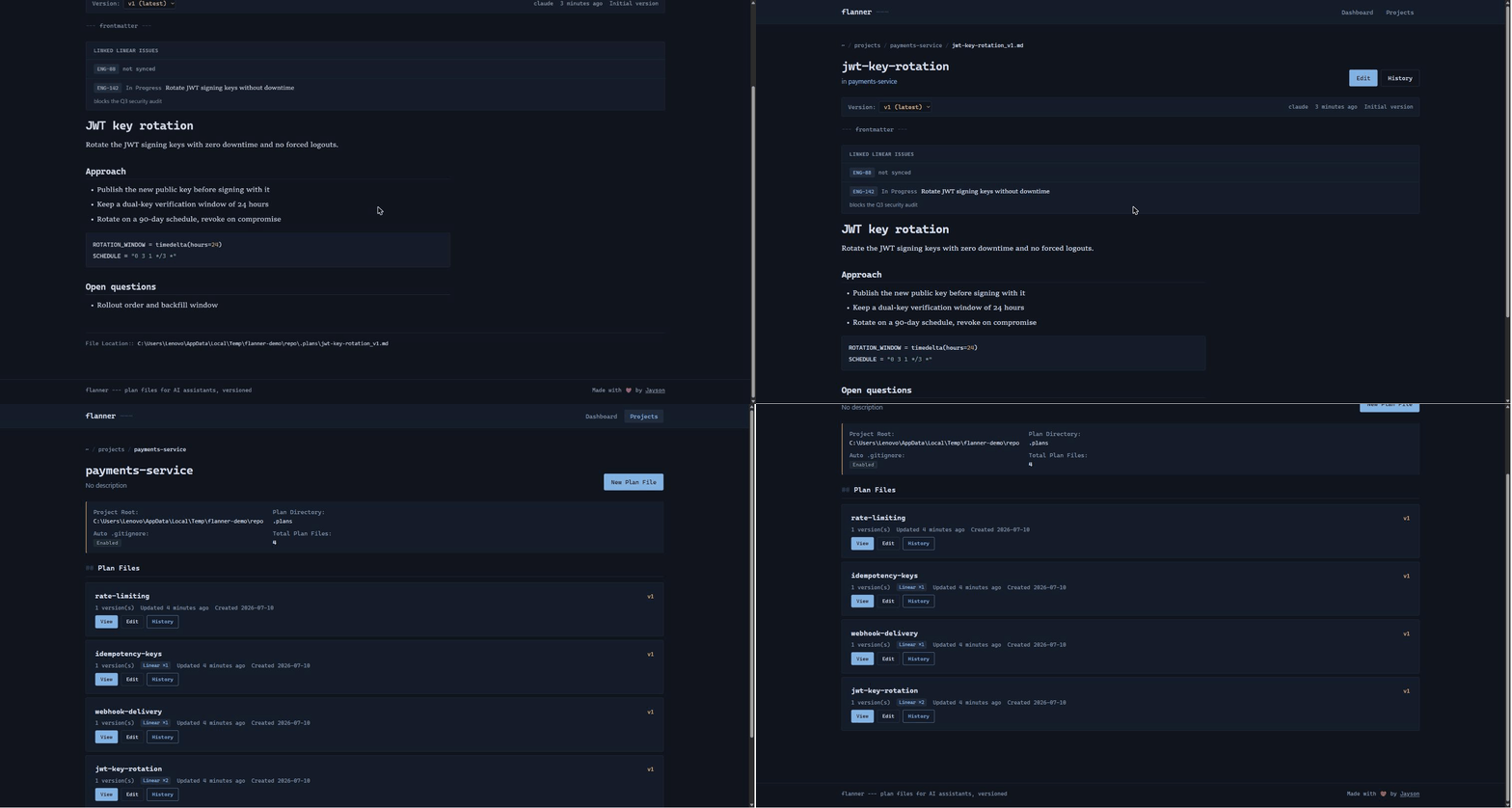
Why
AI agents write markdown constantly: design docs, migration plans, architecture notes. It piles up fast, scattered across your repo, quietly going stale, and easy to commit by accident. Flanner gives those files one home, versions them automatically as the agent revises, and keeps them out of git until you decide otherwise, with a browsable reading view and an audit trail on top.
No, I'm not convinced. But why?
Those plan files pile up in two directions at once: scattered across your projects locally, and scattered across open issues in your project-management tool. Flanner is the choke point for both, keeping you organized on disk and linked to the issue each plan belongs to.
Flanner is local-first, and stays that way when a team uses it. Plans sync directly between your machines over an encrypted connection — there is no server holding them, and no upload step. The hosted side (Flanner Mesh) issues identities and decides who may read what; it never sees plan contents and could not read them if it wanted to. Next after that: clean links out to the tools teams already work in, from product trackers and chat to second brains like Notion.
Features
- MCP integration: exposes plan-file tools to Claude Code and Codex.
- Automatic headers and versioning: every plan gets YAML frontmatter, and each revision is a new version with a full history.
- Git protection: plans live in
.plans/and are kept out of commits automatically. - Agent integration:
flanner initwires CLAUDE.md, AGENTS.md, and a guard hook so agents save plans through flanner instead of scattering raw markdown. - Memory: the durable context around a plan — a constraint, a rejected library, a fact about the environment — kept as Markdown files a later session can search. Explicit by default, refuses anything that looks like a credential, and shared with a teammate only when somebody asks for it.
- Skills: what your agents actually load. Skill packages arrive from a project, your home directory and every installed plugin at once, and when two share a name one wins silently.
flanner skills scanreads them all andflanner skills doctorsays which copy is in effect and what is wrong with the rest. A read: nothing in a package is executed. - Issue tracker links: tie a plan to its Linear (or JIRA) issue; with a
LINEAR_API_KEY, flanner verifies the issue and shows its live state, in the CLI and the dashboard. - Reading view: a browser dashboard to read, edit, and walk the history of plans (light and dark, fully offline).
- Per-project config: customize the plan directory per repository.
Quick start
uv tool install flanner   # or: pipx install flanner, or: pip install flanner

cd your-project      # a git repo where plans should live
flanner init         # sets up the database, MCP registration, and a project
uv tool install gives flanner an environment of its own and puts bothflanner and flanner-mcp on your PATH. Both matter: your agent spawnsflanner-mcp by name, so a project virtualenv can hide it from an agent
started outside that environment. pip install flanner works, with that
caveat.
Then ask your agent to work with plans:
"Create an architecture plan for the auth service"
"Show me the history of the architecture plan"
And open the dashboard to browse them:
flanner web --open-browser # http://localhost:8080
flanner init is safe to re-run. It detects your git root, creates .plans/, updates .gitignore, and installs the agent integration.
Three agents, three different files, and init handles all of it — there is no second command to remember. It writes a project-scoped .mcp.json that Claude Code reads, registers the server at user scope and in Claude Desktop's config, and adds managed blocks to CLAUDE.md and AGENTS.md. Codex reads AGENTS.md but registers MCP servers in ~/.codex/config.toml, which flanner does not edit — init prints the two lines to paste. flanner status shows a row per agent, each checked where that agent actually looks, and flanner setup re-runs the registration on its own if one of them needs repairing later.
--setup picks which of them you want, and repeats: flanner init --setup codex registers Codex and nothing else. --skip-claude opts out of all of it.
Adopting a repository somebody else set up? flanner init --sync also imports the plan files already committed in it, so flanner list shows them straight away.
CLI commands
flanner init [--project-root PATH] [--plan-dir DIR]     # set up a project
flanner status                                          # projects, plan files, db path
flanner list [--project NAME] [--output json]           # list projects or a project's plans
flanner sync [--project NAME] [--dry-run]               # import existing .plans/ files
flanner config NAME [--plan-dir DIR] [...]              # change project settings
flanner web [--port 8080] [--host 127.0.0.1] [--open-browser]
flanner start [--port 8765] / flanner stop              # MCP server in the background, over http
flanner peer start / flanner peer stop                  # serve plans to teammates in the background
flanner mem remember "..." / flanner mem recall "..."   # durable context for later sessions
flanner mem list / show ID / supersede ID "..."         # browse, read, and correct
flanner mem mode [off|explicit|suggest|auto-safe]       # how much this project captures
flanner mem share ID / flanner mem withdraw ID          # give one to the team, or ask them to stop
flanner skills scan / flanner skills doctor             # what your agents load, and what is wrong
flanner skills list [--all] / inspect NAME              # browse them, or read every copy of one
flanner skills observe enable / flanner skills report   # record which get used, off until you ask
flanner skills adopt NAME / install HASH / rollback ID  # keep a copy, install it, put it back
flanner skills share HASH / transfers / import ID       # send one to the team; receiving is not installing
flanner register [--force] / flanner unregister         # MCP registration with Claude Desktop
flanner claude-info                                     # integration status
Most MCP clients spawn their own copy of the server over stdio and need
neither start nor stop. They are for a client that only speaks http, two
editors sharing one server, or working with flanner on its own. The server
binds 127.0.0.1 and no option widens that: every tool acts with the full
authority of whoever started it, and nothing authenticates a caller.
Every managed plan carries YAML frontmatter, generated by the tools and never hand-written:
---
mcp_plan_file: true
project_id: 3d816ecd-489a-4fa0-abe2-15ec93f60d5a
plan_file_id: 59c34f9c-8471-47fc-97f2-8dcfefa15434
plan_name: architecture
version: 2
created_by: claude
---

# Architecture Plan

Your plan content here...
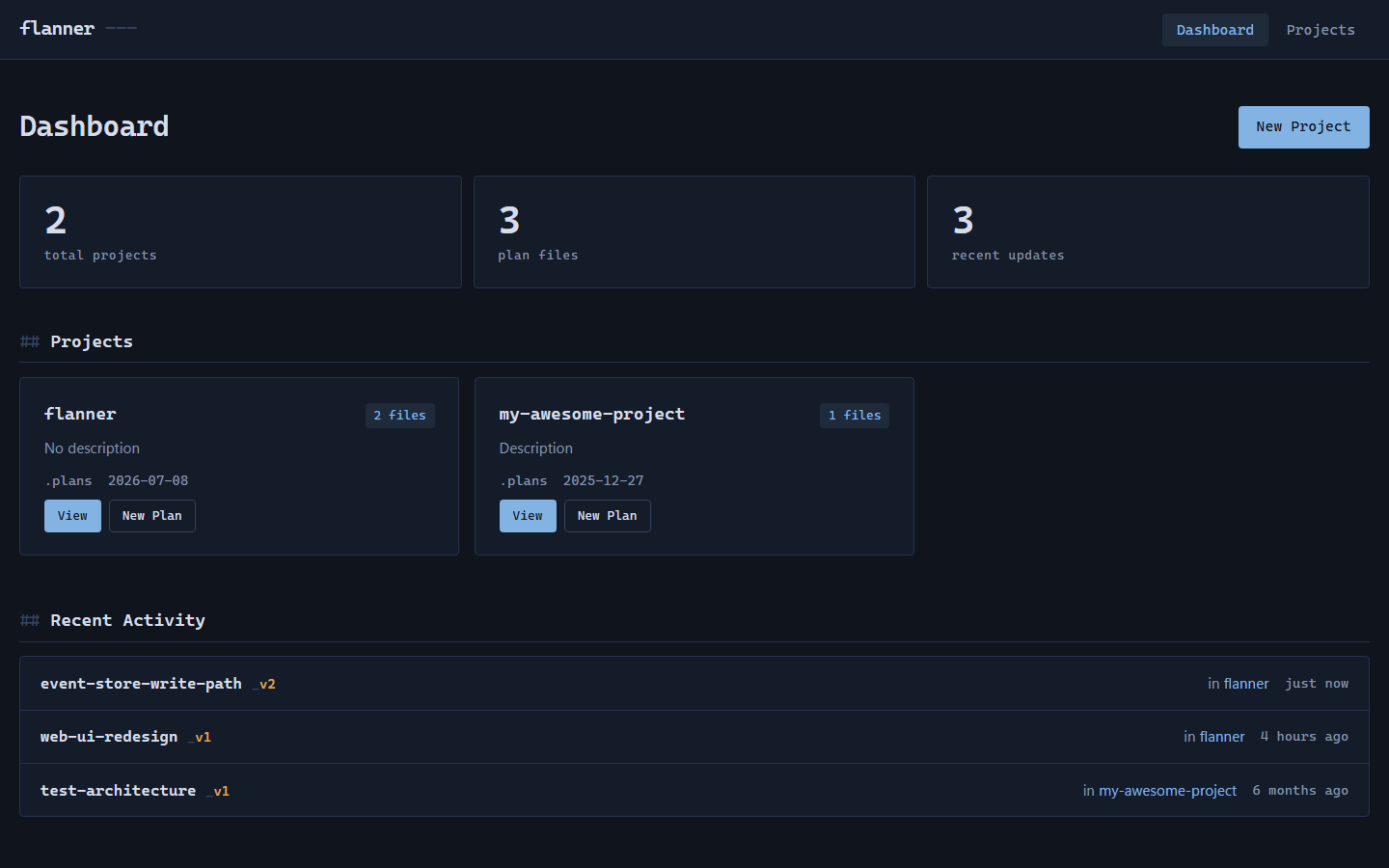
A server-rendered dashboard, no build step, works offline:
- Dashboard (
/): projects, stats, and recent activity - Project detail (
/projects/{id}): a project's plans, paginated - Plan viewer (
/plans/{id}): rendered markdown, version selector, frontmatter - Editor (
/plans/{id}/edit) and version history (/plans/{id}/history)
The web UI binds 127.0.0.1 with no authentication. Do not expose it beyond localhost.
- Catalog (SQLite):
~/.flanner/data.db, override withFLANNER_HOMEorFLANNER_DB_PATH - Plan files:
.plans/in your repo, git-ignored, namedname_v1.md,name_v2.md, and so on
Link plan files to issues so a plan and its ticket travel together.
flanner linear auth                                     # verify LINEAR_API_KEY, print MCP snippet
flanner linear config PROJECT --workspace acme          # linear.app/acme
flanner linear link PLAN --issue ENG-123 [--notes ...]  # link a plan to an issue
flanner linear links [--project PROJECT]                # list all links
flanner linear show PLAN [--project PROJECT]            # links for one plan
flanner linear unlink PLAN [--issue ENG-123 | --all]
flanner linear refresh PLAN                             # re-pull title/state (needs API key)
With LINEAR_API_KEY set, link verifies the issue exists and caches its title
and state, --attach-url attaches a URL to the Linear issue, and refresh
re-pulls live status. Without a key it stays link-only (stores the id, builds
the URL). The key is read from the environment only, never stored on disk. See
docs/LINEAR_INTEGRATION.md. A parallel flanner jira
group links to JIRA issue keys (link-only).
flanner peer serve                                      # answer authorised peers
flanner peer pull <device-id> [--project NAME]          # pull what a peer holds
flanner peer status [<device-id>]                       # how this device is reached
A workspace is a team, and a team has more than one repository, so a pulled
plan needs somewhere to land. A plan you already hold goes where it lives;
otherwise --project, or the project you ran the command from, decides. Two
local projects in one workspace with nothing to choose between them is
reported rather than guessed at, and the next pull that names one writes what
the first could not.
peer serve opens no listening port. It dials out and answers on that
connection, so it needs no port forwarding, no VPN and no administrator
rights. Devices find each other by public key rather than by address.
Being reachable grants nothing. A caller needs a signed request and an
entitlement naming both its device and the workspace, and every artifact
received is checked against its author's key, not the peer that handed it
over. So a peer you sync with is not a peer you trust.
peer status answers the question a slow sync raises: direct or relayed?
Both work. A relay is slower, and usually means a firewall that refuses to
be punched through.
Connections go direct where possible and relay only where they must. Pass
an http address instead of a device id to reach a peer already on your
network, which needs flanner peer serve --http on the other side.
Platforms. Reaching a peer that has no address needs the iroh
transport, which publishes builds for macOS on Apple Silicon, Linux on
x86-64 and arm64, and Windows on x86-64. It is declared only for those, so
installing flanner works everywhere; elsewhere it is simply absent andflanner peer status says so. Everything else in flanner is unaffected,
and peers on a shared network still sync over an address.
Alpine and other musl distributions are the exception: the Linux build does
not match there, so the install fails rather than skipping it. Use a
glibc-based image, or install with --no-deps and add the remaining
dependencies yourself.
Layering is enforced by tests/test_architecture.py:
- foundation (
exceptions,utils,frontmatter,git_integration,jira_utils,linear_utils) imports nothing else from the package; thelinear_apiGraphQL client adds onlyexceptions - data (
database,storage) sits on the foundation only - composition roots (
serverfor MCP,web,cli) wire everything together and do not import each other (exceptcli, which launches both)
Decisions are recorded in docs/adr/, with more guides in docs/.
Performance
Measured on Windows AMD64, Python 3.13.1, SQLite on a local SSD. Reproduce
with python benchmarks/bench.py.
| Operation | Median | p95 | Scale |
|---|---|---|---|
create_project |
35.9 ms | — | one project |
create_plan_file |
62.7 ms | 203.0 ms | n=100, ~2.4 KB body each |
list_plan_files |
2.6 ms | 7.0 ms | 100 plans, n=20 |
Cold start, measured the same way:
| Command | Median (n=7) | Before |
|---|---|---|
flanner --version |
397 ms | 1470 ms |
flanner --help |
342 ms | 1470 ms |
SQLAlchemy was being imported by every command, including the ones that
never open a store, and cost 630 ms of a 1.1 s import. It is now reached
through thin wrappers that import it on first use, so a command that does
not touch the database does not pay for it. flanner list does open the
store, so its cost is real work rather than overhead.
Both are now under the 500 ms bar. These are from an editable install, which
adds roughly 80 ms of import-finder overhead a normal pip install does not.
flanner list is no longer in this table. It opens the store, so its cost is
real work rather than startup, and quoting it beside two commands that open
nothing invited the comparison it does not deserve.
The numbers come from python benchmarks/bench.py, which measures the
installed console script rather than python -m flanner.cli — they are not
the same, and the one a person types is the one worth reporting. CI compares
every run against benchmarks/baseline.json and fails past 3x, which
catches an order-of-magnitude regression and nothing subtler; a shared
runner's timings vary by a factor of two on identical code.
When something goes wrong
flanner --verbose doctor        # where the time went, per step
flanner doctor --report         # a scrubbed summary to paste into an issue
--verbose prints a timing breakdown after the command, so "why was that
slow" has an answer without a profiler.
doctor --report prints versions, platform, store size, catalog counts and
whether the mesh transport installed. No paths, plan names, or plan
contents — a local log holding a project name is fine, and something you
paste into a public issue is not. It works when the store will not open,
which is when you most need it.
The MCP server keeps ~/.flanner/mcp.log: one line per tool call, with the
outcome and any error. That surface has no human watching it, so an agent
that hits an error and quietly works around it would otherwise leave no
trace at all. Plan bodies are never written there; flanner peer serve
records the requests it answers to the same file.
Your plans, memories and skills never leave your machine. flanner sends
nothing else unless you turn it on. See What flanner sends.
What flanner sends
Nothing, by default. Two things can be turned on, each with its own question
at flanner init and its own command:
| Where it goes | What it carries | Turn it off | |
|---|---|---|---|
| Version check | pypi.org, once a day | A request for flanner's public version list. Nothing about you or your work. | flanner updates off |
| Crash reports | flanner's developers, through Sentry (EU) | The error type; where in flanner it happened (module, function, line, paths relative to the package); the flanner version, OS, Python version and how flanner was installed; which surface crashed and the command name. | flanner crash-reports off |
A crash report never contains the error message, local variables, source
lines, command arguments, full file paths, your user or machine name, or
anything that identifies or counts people. flanner crash-reports show
prints exactly what is waiting to be sent, or what was sent last. Reports
are sent by a separate background process, never by the command that
crashed. DO_NOT_TRACK=1 or FLANNER_CRASH_REPORTS=0 turns crash reports
off whatever you answered.
Plan, memory and skill contents only ever travel through Flanner Mesh,
directly to your own team's devices.
Exit codes
Scripts need to tell "fix your command" from "this machine is broken", so
the two are different codes:
| Code | Means | Retrying helps? |
|---|---|---|
0 |
It worked | — |
1 |
You asked for something that cannot be done: no such project, no access, a workspace id that is not yours | Only after you change the command |
2 |
The machine underneath failed: disk, permissions, a store that will not open | No |
How it works
An agent calls get_plan_config to learn where plans go, then create_plan_file_tool or update_plan_file_tool to write them. Flanner places the file in the project's plan directory, adds the header, and bumps the version. Files stay in .plans/ (git-ignored), so they never land in a commit by accident.
Nothing is pruned, and nothing is erased. Every version, comment and review decision is kept. The store is append-only, there is no cleanup command, and the Settings page shows what that costs in bytes so the choice is visible rather than assumed. Deletion follows from the same design: flanner retire <plan> asks every peer to stop showing and serving a plan, and --restore undoes it, but it is a claim other devices honour rather than an erasure. A teammate who was offline when you ran it keeps the content until they next sync, and anyone already holding the bytes keeps them. That is the strongest promise an append-only store spread across machines you do not control can honestly make, so it is the one made here.
Keeping the agent on the rails. The MCP tools are the how; flanner init also installs two layers that make the agent actually use them. It writes a managed block into CLAUDE.md and AGENTS.md (guidance Claude Code and Codex read every session) plus a flanner-plan skill, so the agent knows to route plan docs through flanner. On top of that, a guard-write PreToolUse hook denies any raw write into the plan directory and points the agent back to create_plan_file_tool, so even if it ignores the guidance a plan cannot land as unmanaged markdown. The hook fails open and never blocks writes elsewhere.
Roadmap
Shipped in 0.9.0: peer-to-peer sync, shared workspaces, and review between
teammates. Plans move directly between machines; nothing is uploaded. See
Flanner Mesh for how that works and what it costs.
Shipped since: live updates in the web UI over server-sent events, a relay
fallback for peers that cannot reach each other directly, and — in 0.12.0 —
Flanner Memory and Flanner Skills.
Planned next:
- Full-text search across plan bodies. The command palette indexes names
today; the text inside a plan is not searchable yet. - Links out to product trackers, chat, and second brains like Notion
- Running skill comparisons, not only storing them.
flanner skills eval
records results that a harness or a person produced; it does not yet run a
suite against a model and a harness itself. - Observation for agents other than Claude Code, once there is an interface
worth trusting. Skills reports usage as unknown rather than zero until
then.
There is no plan to host plan contents. The catalog stays on your machine.
That is a design decision, not a milestone waiting to be funded.
Contributing
Setup, the CI gates, how to run the unit and browser tests, benchmarks, and the release process are in CONTRIBUTING.md.
License
MIT
Yorumlar (0)
Yorum birakmak icin giris yap.
Yorum birakSonuc bulunamadi