todo-flow
Health Warn
- License — License: MIT
- Description — Repository has a description
- Active repo — Last push 0 days ago
- Low visibility — Only 8 GitHub stars
Code Pass
- Code scan — Scanned 12 files during light audit, no dangerous patterns found
Permissions Pass
- Permissions — No dangerous permissions requested
No AI report is available for this listing yet.
Pick TODOs. Let replaceable agents carry them through parallel work, review and verified delivery.
TODO Flow
Pick the work. Let agents carry it forward.
Turn selected TODOs into parallel work, independent reviews and verified delivery—with files that survive the session and a dashboard that shows who is doing what.
English · 한국어
Get started · See it in action · For agents · Operations



TODO Flow in 32 seconds
https://github.com/user-attachments/assets/6c62d429-2fbc-40b5-a31e-b530e5d1ada3
Animated workflow overview: track selection, parallel agents, session handoffs, verification, review and landing.
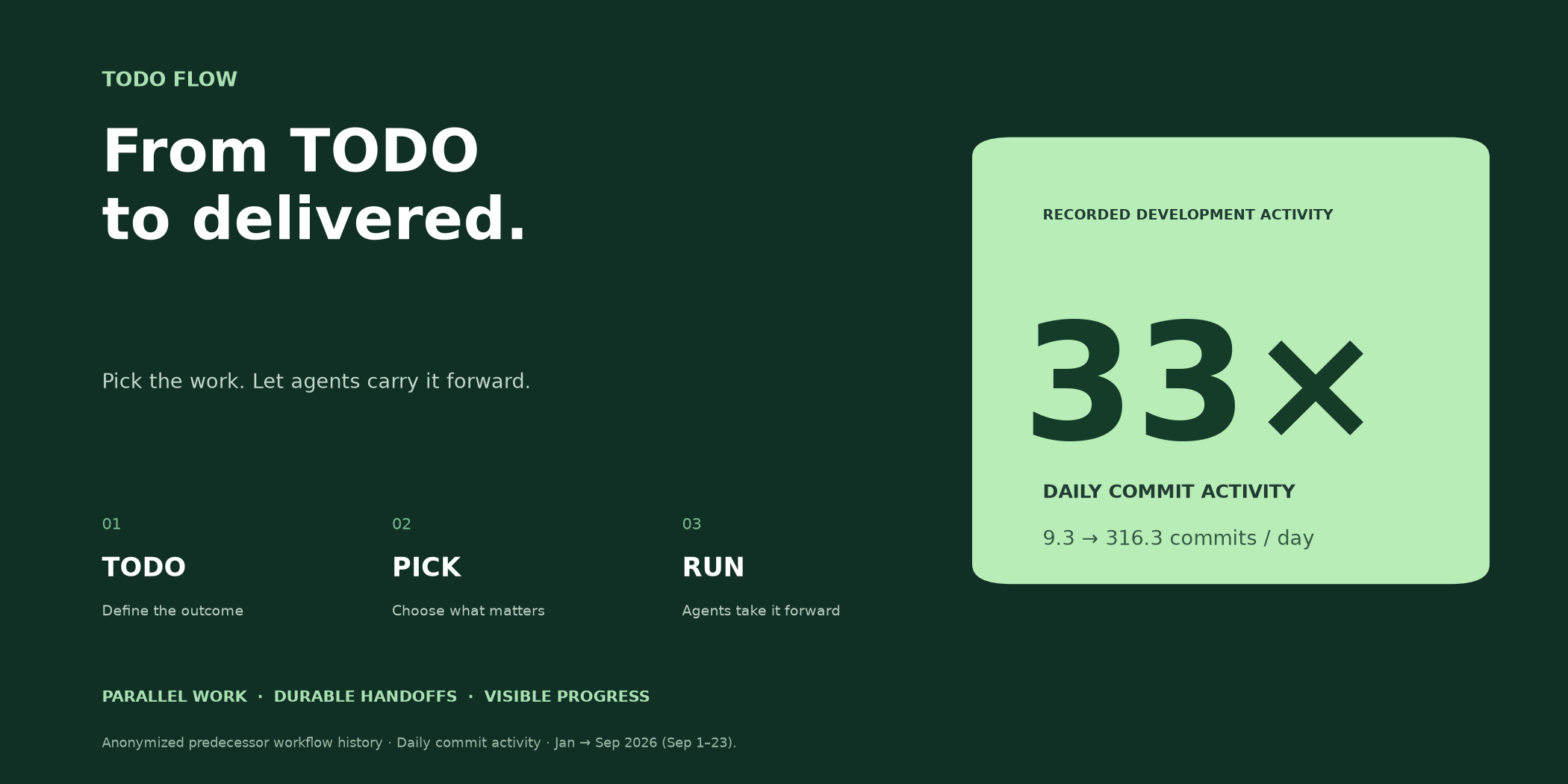
Development activity, up to 33×.
Register. Pick. Run. You set the direction; replaceable agents carry out investigation, implementation, verification and review, then landing and triage when authorized.
Anonymous predecessor workflow: daily commits increased from 9.3 in January to 316.3 in September 2026 (September 1–23). Commit activity, not a measured multiplier of labor productivity or a benchmark of this package.
January–September growth and measurement notes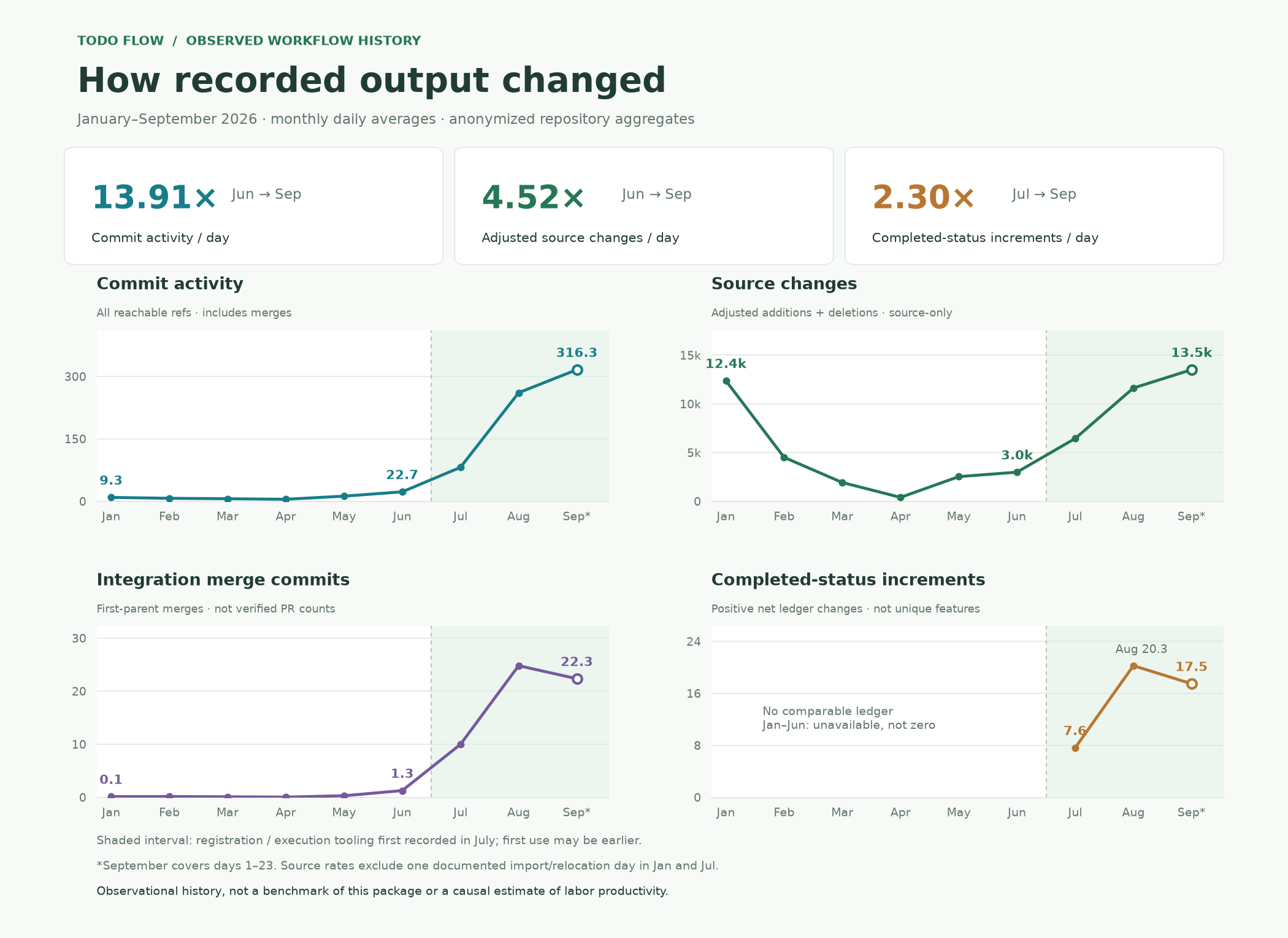
Adjusted source changes per day increased 4.52× from June to September; recorded completion transitions per day increased 2.30× from July to September. Different metrics describe different outcomes: January–September source changes rose 1.09×, and September completion transitions were lower than August.
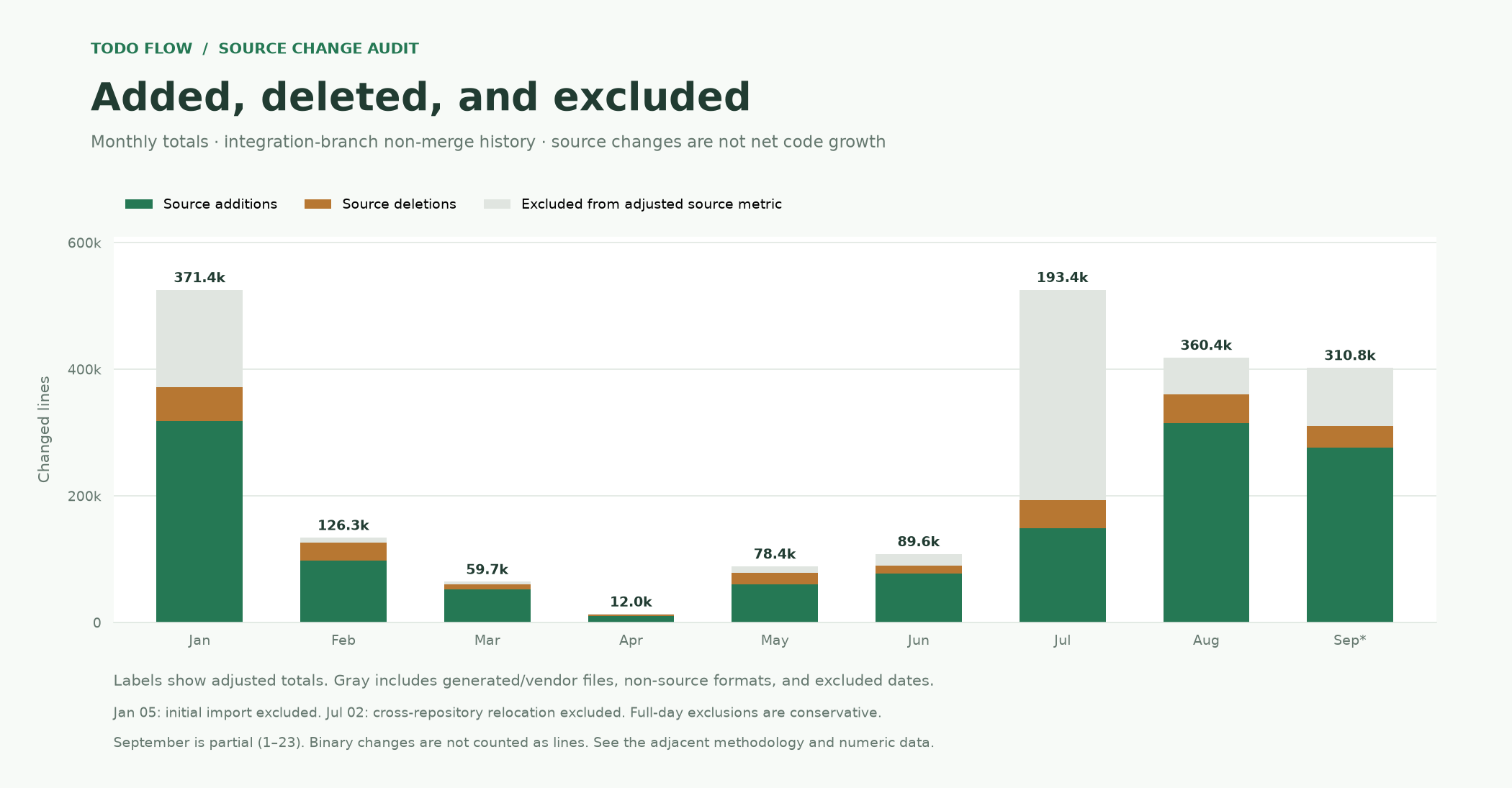
Method and monthly figures · Aggregate JSON · CSV. These are observations from predecessor operations, not a controlled causal experiment. Identifying source material is not published.
The workflow cycle
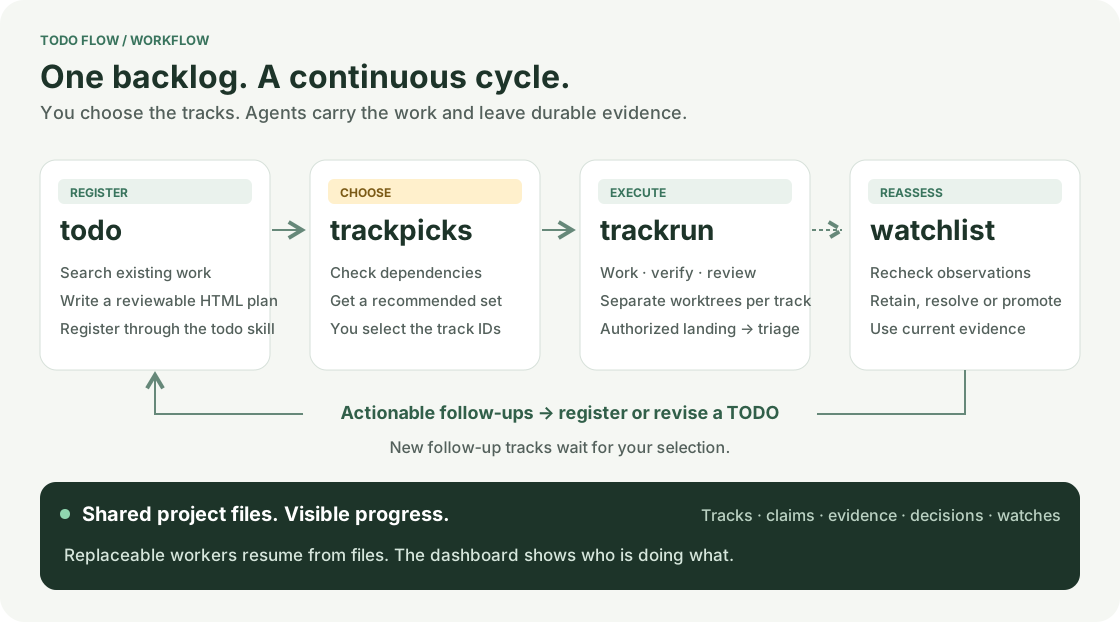
todo → trackpicks → trackrun → watchlist → todo. Register a reviewable plan, choose the work, execute selected tracks, and reassess what needs attention. You can also select tracks directly in the dashboard. trackpicks recommends work; it does not start workers.
trackrun stops at review by default. With landing authorized, it continues through landing and triage, including reassessment of that track's open watches. Use watchlist for explicit reassessment; actionable findings return to an existing or new TODO. New follow-up tracks await your selection. These are entry points into shared project state, not mandatory phases for every track.
See it in action
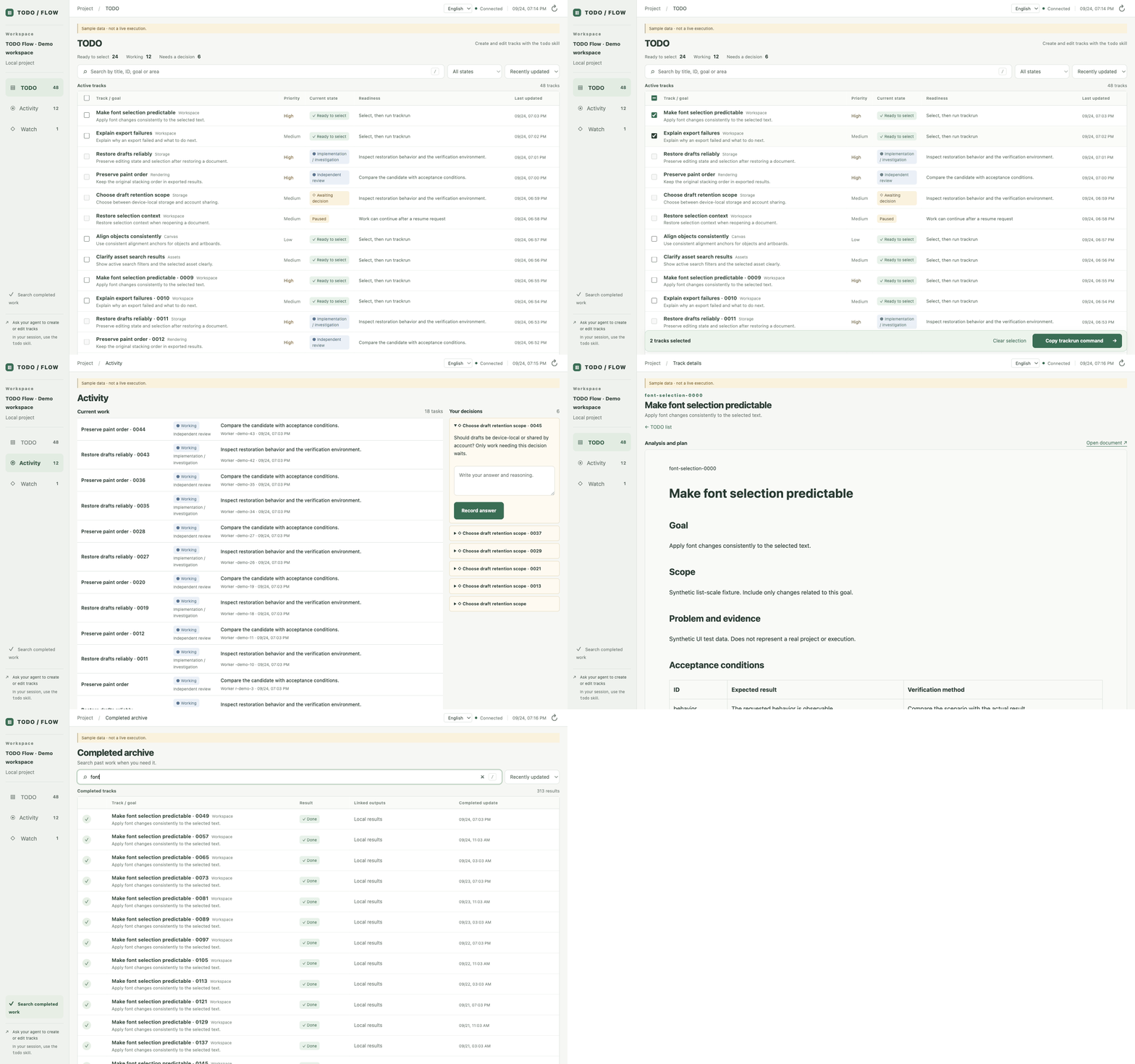
Captured from the real dashboard with explicitly labeled synthetic data. This UI tour does not represent a live model run.
Dashboard screenshot · 한국어 dashboard · Reproduce the demo · Plan preview · Example HTML · Real issue → merged PR
The tour shows a dense, continuous TODO list, selection for trackrun, current workers and decision waits, a rich track document, and a separate completed archive. For the full execution path, follow the two-track walkthrough or run the documented live acceptance test in a disposable project.
Built for work that outlives a chat
| What you need | What TODO Flow provides |
|---|---|
| Move several tasks forward | Selected tracks run in separate Git worktrees; workers take bounded pieces of work. |
| Recover after a session ends | Documents, claims, results, questions and follow-up intent stay in searchable files. |
| Review the plan before execution | HTML documents preserve diagrams, images, scripts and simulations. Markdown also renders to HTML. |
| Know who is doing what | A compact dashboard shows current work, owners, waits and evidence. Completed work has its own archive. |
| Deliver with evidence | Exact-candidate verification, independent agent review, authorized landing and post-landing triage. |
Useful for a backlog of independent changes, work that spans sessions, and reviewing several candidate changes before integration. On the development branch, workers receive workspace and evidence paths, then search and read relevant files themselves. See current scope for release availability and remaining boundaries.
Quick start
Choose English (en) or Korean (ko) during project setup. This sets the project's default dashboard language and the language requested from agents for reports and new track documents. Skill instructions remain English. The dashboard also has an English / 한국어 switch for your personal display preference.
Let your agent set it up
Paste this into your coding-agent session, filling in the project and first task:
Install TODO Flow in /absolute/my-project following
https://github.com/JakeB-5/todo-flow/blob/main/AGENT_INSTALL.md. Ask me to choose English or Korean if I have not specified it.
My first task is: [the change and expected result].
Register a reviewable HTML TODO and show me its link. Select and run the
track that covers this request, then report the actual result and next steps.
For agents explains the installation contract. Setup-only requests stop after setup; the prompt above also requests the first run.
Install manually
Prerequisites: Python 3.11+, uv, Git, and an authenticated Claude or Codex CLI. GitHub issues and PRs additionally need authenticated gh. Install the published release:
uv tool install https://github.com/JakeB-5/todo-flow/releases/download/v0.0.4/todo_flow-0.0.4-py3-none-any.whl
todo-flow --version
Release assets and checksums. This installs the CLI and bundled dashboard/skills; no checkout is needed. For source development, clone this repository and use uv sync --frozen and uv tool install ..
In the target project, use its real verification command, base branch and relevant file patterns. This example assumes an existing Python project with a test suite, an initial Git commit and an origin remote:
cd /absolute/my-project
todo-flow init --repo . --base main --worker codex \
  --language en \
  --verify '["python3","-m","unittest","discover","-v"]' \
  --write 'src/*.py' --write 'tests/*.py' \
  --context 'src/*.py' --context 'tests/*.py' --context README.md

todo-flow install-skills --target .agents/skills
todo-flow serve --port 8765
Use --language ko for Korean. Omitting it prompts in an interactive terminal and defaults to English without a terminal. For Claude sessions, install to .claude/skills. Skills inherit the configured language. Add --github OWNER/REPOSITORY to init for GitHub issues and PRs.
Open http://127.0.0.1:8765. Ask your agent to use the installed todo skill, review the generated document, then select and run its actual ID. Setup is complete when the dashboard opens, the registered document renders and the requested first run reaches its configured endpoint. Detailed setup and recovery.
From the first TODO to a result
In your agent session:
todo Add bounded retries for temporary network failures, with tests.
todo Show a useful error when a request cannot be retried.
trackpicks
The agent searches existing files for overlap and registers HTML plans. Review them in the dashboard. Pick tracks there and copy the command, or use the recommendations from trackpicks:
trackrun retry-backoff request-error-message
These are example IDs; use the IDs returned by your own registration. todo and trackpicks are agent skill requests; trackrun is also an installed terminal command.
| Step | What you can inspect |
|---|---|
| Register and review | The HTML plan, scope, evidence and acceptance conditions. Example |
| Select and execute | Selected IDs, separate worktrees, current workers and questions. |
| Verify and review | Verification output and independent review tied to the exact candidate. |
| Land and triage | With an authorized landing endpoint: integrated SHA, finding dispositions, issue closure and completion. |
The default endpoint is review, which preserves a reviewed candidate. To authorize automatic landing during initialization, add --endpoint land --allow-land. After landing, triage handles original-scope repairs, separate follow-ups and conditional watches. New follow-up TODOs await your selection.
For agents
Read AGENT_INSTALL.md and perform the requested installation and first-run scope. Reuse existing configuration and authorization. Ask for the primary language if it was not specified; persist it with init --language en|ko and use it for new documents and reports. Do not infer language solely from the English README.
Agent setup covers project discovery, authentication, language selection, skill installation, document review, execution and evidence-based handoff. Skills contain the task-specific instructions.
How it fits together
Your selection ── trackrun ── bounded, replaceable workers
                                ↕
                   Project files: goals, work, evidence
                                ↓
                  verify → review → authorized landing
                                ↓
                         triage → completion

Dashboard reads the same project state throughout.
One installed engine serves multiple projects. Each project has its own configuration, files, worktrees, installed skills and running dashboard/driver processes. Workers propose useful next work; the host validates ownership, evidence and external effects. There is no fixed global phase sequence or resident supervisor agent.
| Component | Support |
|---|---|
| Worker adapters | Claude CLI and Codex CLI; trusted command adapter for integrations/tests |
| Remote delivery | Git remote, optionally GitHub issues / PRs through gh |
| Project state | HTML / Markdown / JSON files; SQLite is only a rebuildable query cache |
| Language | English / Korean project preference and dashboard UI |
| Environment | Local macOS validation; Linux checks configured in CI. Windows is not supported by the current POSIX process/locking implementation. |
Updates
todo-flow --version
todo-flow --state /absolute/project/todo compatibility --target /absolute/project/.agents/skills
For an installed uv tool, todo-flow upgrade --wheel /absolute/new-release.whl --dry-run plans an engine update; omit --dry-run to apply it while all drivers and dashboards are stopped. The updater checks known project formats, backs up the environment and restores it if installation or validation fails. Supply a trusted newer release wheel; automatic release discovery is not yet provided.
Then use todo-flow --state STATE update-skills --target PATH --dry-run for each project and apply without --dry-run. Local edits and language/state bindings are preserved; conflicting changes stop before any file is replaced. Engine and skill updates return separate rollback IDs.
Update, rollback and recovery guide includes interrupted-update recovery, legacy skill adoption, tested boundaries and the future release checklist.
FAQ
Does this replace my coding agent? It coordinates selected work using your authenticated Claude or Codex CLI. You keep your model and project configuration.
Where is the data? Is there a shared database? Each project owns its todo/ directory, or an explicit --state directory. Use rg to inspect it. No shared server or database service is required.
What happens when a session or driver stops? Restart todo-flow --state STATE run against the same files. The runtime reconciles claims and recorded effects. A stopped process is not reported as completion.
Will it merge automatically? The default is review-only. An initialized land endpoint with allow_land permits landing, followed by triage and completion checks. Existing branch protection still applies.
How many tracks can I select? Pass multiple IDs to trackrun. --jobs limits concurrent tasks for that driver (default: 2); it is not the number of selected tracks or a guarantee of a dedicated worker per track.
What does it cost? TODO Flow is MIT licensed. Model usage and any external services follow your existing provider accounts and billing. Parallel work can increase model usage.
Can I change language without changing the project? Yes. The dashboard switch remembers a display preference for this project in this browser. It does not translate existing authored documents or change the agents' configured primary language.
Do I need Jev? No. The todo and watchlist skills recommend Jev for optional investigation/overlap/changed-source screening. They proceed without it; TODO Flow does not bundle or automatically install a Jev integration.
Current scope
New in 0.0.4: proposal commits preserve unrelated staged changes, verification and review check a clean checkout at the exact candidate commit, and timed-out verification stops its process group before more work proceeds. See execution boundaries.
New in 0.0.3: integration repairs merge the current base into the candidate checkout, expose conflict evidence by path and require new verification and independent review before landing. Interrupted repairs and decision answers retain the recorded merge. See repair behavior.
New in 0.0.2: workers read project files on demand, and trackrun prefers visible terminal logs through Orca, a configured terminal launcher or tmux. No available terminal means headless execution; --launcher headless explicitly selects it. The published 0.0.1 wheel still uses the earlier snapshot/headless implementation. See worker execution.
Completed tracks automatically clean disposable checkouts and unchanged worker terminals while retaining documents, logs, results and Git branches. Resources with user changes or unconfirmed ownership are kept with a reason. Use --no-auto-cleanup to retain resources for inspection; see cleanup and retry.
Latest release: 0.0.4. Small-project full cycles, recovery and two–three independent concurrent tracks have been exercised; large lists have separate synthetic UI coverage.
- One repository per project state. Forgejo, submodules and coordinated multi-repository landing are not implemented.
- Development workers explore the checkout with read-only tools and return JSON proposals. The runtime applies changes, verifies and publishes. Browser workflows are not implemented.
- Source contents and full evidence are not injected into the prompt; there is no aggregate 150,000-byte source limit on
main. Provider context limits still apply to what a worker chooses to read. File deletion and binary edits are not supported. - Default worker timeout: 600 seconds. Default driver task-assignment limit: 100; remaining requests survive for the next run.
- No shared slot budget across drivers, separate heavy-verification queue or validated distributed-filesystem operation.
Documentation and contributing
Updates and rollback · Operations and recovery · Demo and acceptance test · Contributing · Changelog · Agent repository rules · CI configuration
Report bugs or propose improvements through repository Issues; include a minimal public-safe reproduction. Contribution and local validation commands are in CONTRIBUTING.md. Local design notes in docs/ are ignored and are not required to use or build the project.
MIT License · Copyright © 2026 TODO Flow contributors.
Reviews (0)
Sign in to leave a review.
Leave a reviewNo results found