ai-agency
Health Pass
- License — License: MIT
- Description — Repository has a description
- Active repo — Last push 0 days ago
- Community trust — 10 GitHub stars
Code Pass
- Code scan — Scanned 6 files during light audit, no dangerous patterns found
Permissions Pass
- Permissions — No dangerous permissions requested
This tool provides a single command to initialize and manage AI-powered development agents within a project. It automatically generates project context and configuration files for AI assistants like Claude Code, Cursor, and Copilot.
Security Assessment
The tool's primary function is project analysis and agent execution. Because it relies on a Shell script that you pipe directly from the internet via `curl | bash`, it inherently executes shell commands on your machine. A light audit of 6 files found no dangerous patterns, hardcoded secrets, or requests for excessive permissions. However, it does consume significant API tokens during the initial setup as it reads your entire project to build context. Overall risk is rated as Medium due to the external script execution requirement and full project read access.
Quality Assessment
The repository is actively maintained, with the most recent push happening today. It is properly licensed under the standard MIT license, allowing for broad usage and modification. While community trust is currently low with only 10 GitHub stars, the provided documentation is exceptionally thorough and clearly explains various installation methods and project structures.
Verdict
Use with caution — while the source code currently appears safe, standard security best practices dictate reviewing the shell script yourself before piping it to bash.
One command to give any AI agent instant project understanding. Auto-generates AGENTS.md + context for Claude Code, Codex, Cursor, Copilot, and more.
ai-agency
The single entry point for all AI-powered development.
Setup context → launch agents → run sessions — all from one command.
ai-agency init prepares your project, ai-agency runs your agents.


Quick Start
Global install (recommended)
Install once, use from anywhere:
# macOS / Linux
brew install itdar/tap/ai-agency

# Or without Homebrew (macOS / Linux / Windows WSL)
curl -fsSL https://raw.githubusercontent.com/itdar/ai-agency/main/install.sh | bash -s -- --global
ai-agency init ~/my-project   # setup context
ai-agency                      # launch agent session (from anywhere)
Local install (per-project)
Downloads scripts into the current project directory. No global command — use ./ai-agency.sh instead.
cd /path/to/your-project
curl -fsSL https://raw.githubusercontent.com/itdar/ai-agency/main/install.sh | bash
./ai-agency.sh                 # launch agent session (from project directory)
Both methods provide the full interactive CUI (arrow-key navigation, hide/show agents, tmux multi-session). Global install additionally supports
ai-agency init,register,scan, and running from any directory.
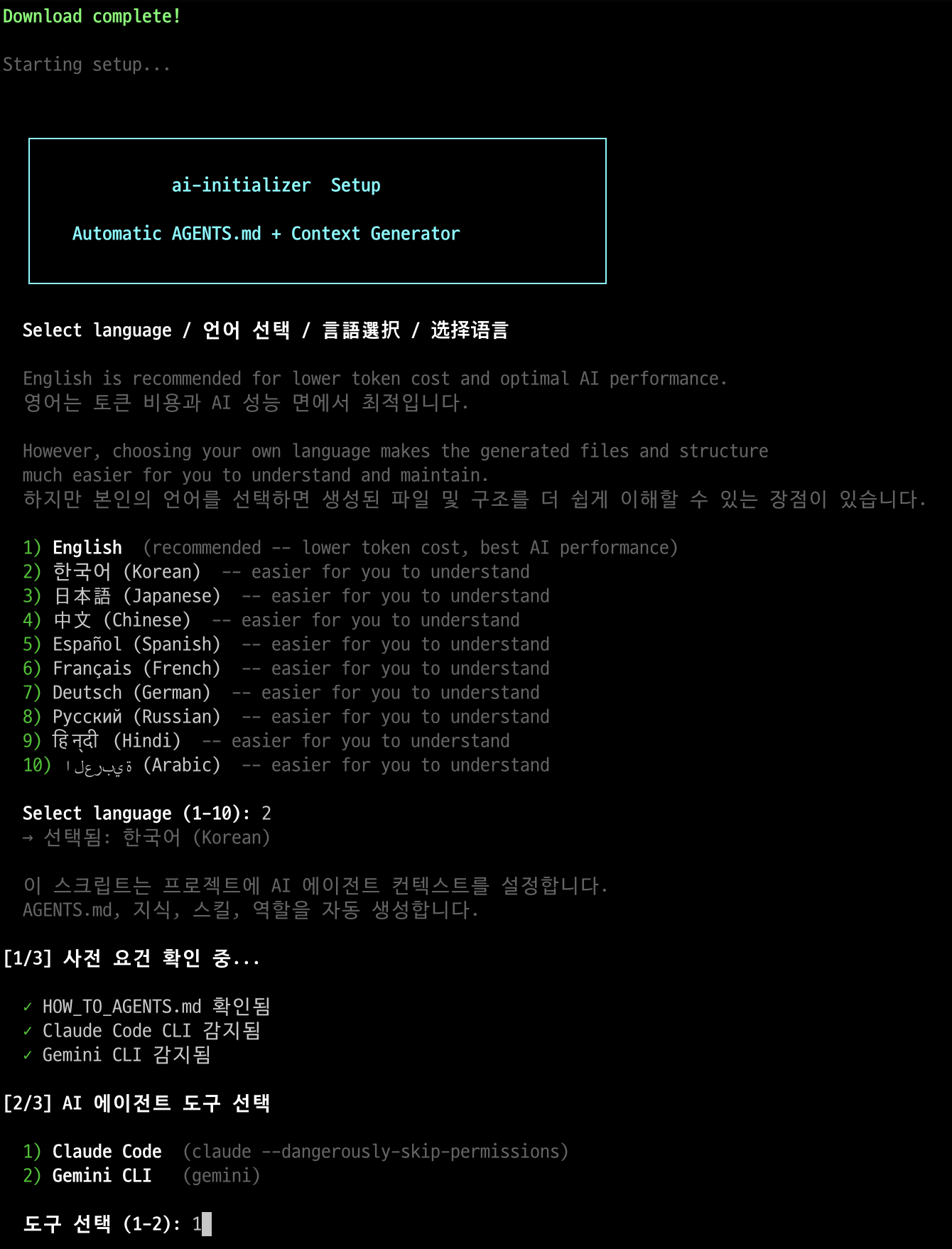
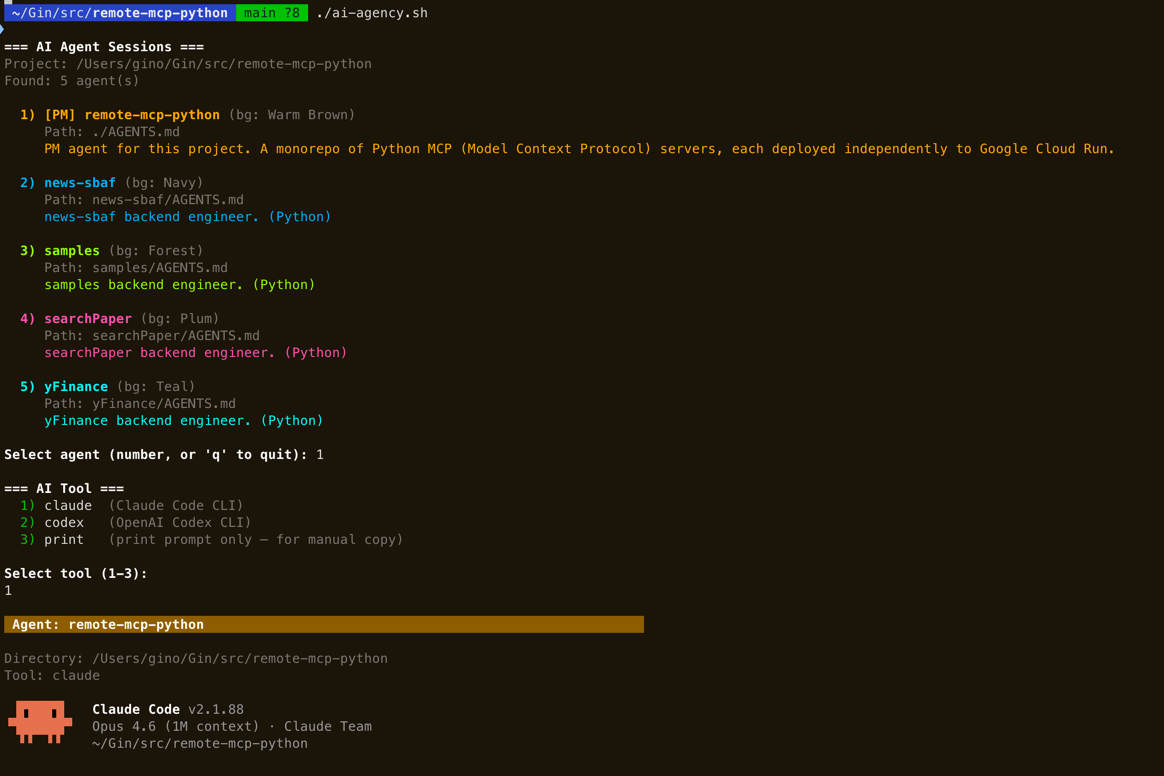
Token notice: Initial setup analyzes the full project and may consume tens of thousands of tokens. This is a one-time cost — subsequent sessions load pre-built context instantly.
Usage Examples by Project Structure
The directory where you run ai-agency init becomes the Root PM. The hierarchy depth is determined automatically by your project structure.
Single Product
my-product/  <-- run ai-agency init here
├── apps/
│   ├── api/          --> Backend agent
│   ├── web/          --> Frontend agent
│   └── worker/       --> Backend agent
└── infra/            --> Infra agent

Result: 2 layers (PM --> workers)
apps/ = simple passthrough, no own context
Single Product + Business/Planning
my-product/  <-- run ai-agency init here
├── apps/
│   ├── api/          --> Backend agent
│   └── web/          --> Frontend agent
├── business/         --> Business Analyst agent
├── planning/         --> Planner agent
└── infra/            --> Infra agent

Result: 2 layers (PM --> workers)
Dev and business agents are peers under the same PM.
Multi-Domain Platform
platform/  <-- run ai-agency init here
├── commerce/         --> Domain Coordinator (auto-detected)
│   ├── order-api/    --> Backend agent
│   ├── catalog-api/  --> Backend agent
│   └── storefront/   --> Frontend agent
├── social/           --> Domain Coordinator (auto-detected)
│   ├── feed-api/     --> Backend agent
│   └── chat-api/     --> Backend agent
└── infra/            --> Infra agent

Result: 3 layers (PM --> Domain Coordinators --> workers)
commerce/, social/ get their own .ai-agents/context/
Child services reference domain context (no duplication).
Auto-detection rule: A directory with only subdirectories, where 2+ subdirectories have their own build files (
package.json,go.mod, etc.), is classified as a domain boundary with its own context and coordination role.
Why Do You Need This?
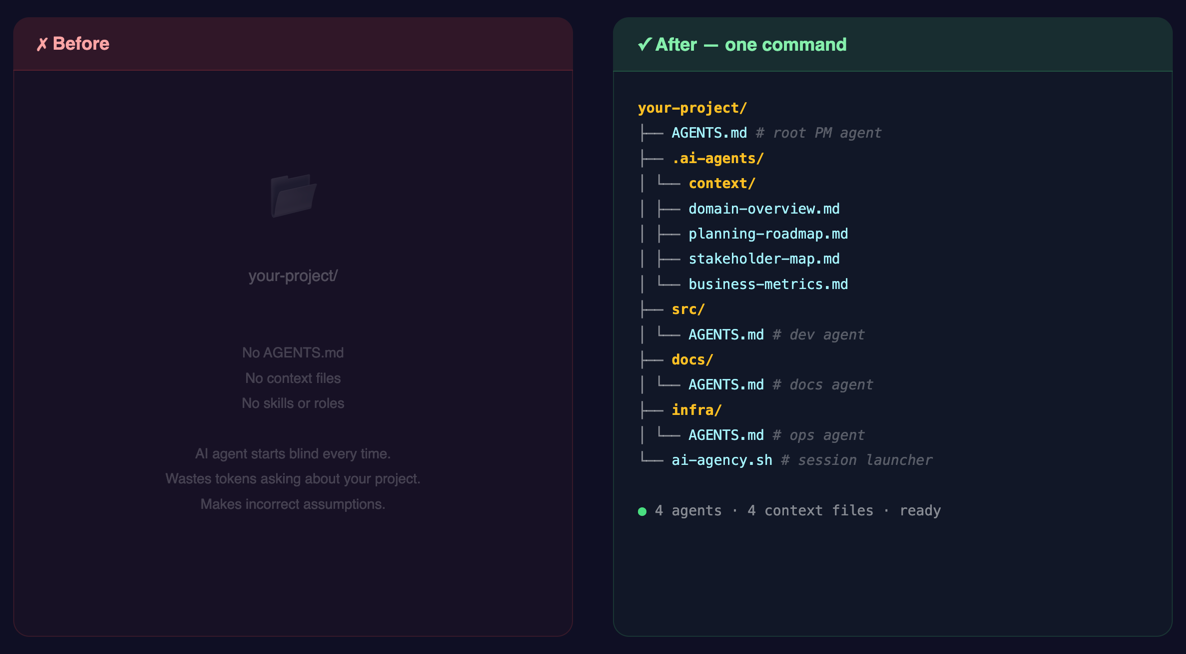
The Problem: AI Loses Its Memory Every Session
AI agents forget everything when a session ends. Every time, they spend time understanding the project structure, analyzing APIs, and learning conventions.
| Problem | Consequence |
|---|---|
| Doesn't know team conventions | Code style inconsistencies |
| Doesn't know the full API map | Explores entire codebase each time (cost +20%) |
| Doesn't know prohibited actions | Risky operations like direct production DB access |
| Doesn't know service dependencies | Missed side effects |
| Doesn't know business rules/KPIs | Proposals misaligned with business goals |
| Doesn't know approval flows | Skips required stakeholder sign-offs |
| Doesn't know operational procedures | Incorrect incident response or deployment steps |
The Solution: Pre-build a "Brain" for the AI
 Session Start
┌──────────────────────────────────────────────────┐
│                                                  │
│  Reads AGENTS.md (automatic)                     │
│       │                                          │
│       ▼                                          │
│  "I am the backend expert for this service"      │
│  — or —                                          │
│  "I am the business analyst for this product"    │
│  "Conventions, rules, prohibited actions loaded" │
│       │                                          │
│       ▼                                          │
│  Loads .ai-agents/context/ files (5 seconds)     │
│  "APIs, entities, KPIs, stakeholders understood" │
│       │                                          │
│       ▼                                          │
│  Starts working immediately!                     │
│                                                  │
└──────────────────────────────────────────────────┘
ai-agency solves this — generate once, and any AI tool understands your project instantly.
Core Principle: 3-Layer Architecture
                    Your Project
                         │
            ┌────────────┼────────────┐
            ▼            ▼            ▼

     ┌──────────┐  ┌──────────┐  ┌──────────┐
     │ AGENTS.md│  │.ai-agents│  │.ai-agents│
     │          │  │ /context/│  │ /skills/ │
     │ Identity │  │ Knowledge│  │ Behavior │
     │ "Who     │  │ "What    │  │ "How     │
     │  am I?"  │  │  do I    │  │  do I    │
     │          │  │  know?"  │  │  work?"  │
     │ + Rules  │  │          │  │          │
     │ + Perms  │  │ + Domain │  │ + Deploy │
     │ + Paths  │  │ + Models │  │ + Review │
     └──────────┘  └──────────┘  └──────────┘
      Entry Point   Memory Store  Workflow Standards
1. AGENTS.md — "Who Am I?"
The identity file for the agent deployed in each directory.
project/
├── AGENTS.md                  ← PM: The leader who coordinates everything
├── apps/
│   └── api/
│       └── AGENTS.md          ← API Expert: Responsible for this service only
├── infra/
│   ├── AGENTS.md              ← SRE: Manages all infrastructure
│   └── monitoring/
│       └── AGENTS.md          ← Monitoring specialist
├── business/
│   └── AGENTS.md              ← Business Analyst: KPIs, requirements, specs
├── planning/
│   └── AGENTS.md              ← Planner: Roadmaps, milestones, specs
└── cs/
    └── AGENTS.md              ← CS Specialist: Runbooks, escalation, FAQ
It works just like a team org chart — not just for developers:
- The PM oversees everything and distributes tasks
- Developers, business analysts, planners, and CS specialists each have their own agent
- Each agent deeply understands only their area
- They don't directly handle other teams' work — they request it
2. .ai-agents/context/ — "What Do I Know?"
A folder where essential knowledge is pre-organized so the AI doesn't have to read the code every time.
.ai-agents/context/
├── domain-overview.md         ← "This service handles order management..."
├── data-model.md              ← "There are Order, Payment, Delivery entities..."
├── api-spec.json              ← "POST /orders, GET /orders/{id}, ..."
├── event-spec.json            ← "Publishes the order-created event..."
├── business-metrics.md        ← "GMV target: $10M/quarter, conversion rate: 3.5%..."
├── stakeholder-map.md         ← "Feature approval: Product Lead → CTO..."
├── ops-runbook.md             ← "P1 incident: page on-call → escalate in 15min..."
└── planning-roadmap.md        ← "v2.1: domain-grouping (done), v2.2: dashboards..."
Analogy: Onboarding documentation for a new employee — developers, planners, and business analysts alike. Document it once, and no one has to explain it again.
3. .ai-agents/skills/ — "How Do I Work?"
Standardized workflow manuals for repetitive tasks.
.ai-agents/skills/
├── develop/SKILL.md       ← "Feature dev: Analyze → Design → Implement → Test → PR"
├── deploy/SKILL.md        ← "Deploy: Tag → Request → Verify"
└── review/SKILL.md        ← "Review: Security, Performance, Test checklist"
Analogy: The team's operations manual — makes the AI follow rules like "check this checklist before submitting a PR."
What to Write and What Not to Write
ETH Zurich (2026.03): Including inferable content reduces success rates and increases cost by +20%
         Write This                        Don't Write This
  ┌─────────────────────────┐     ┌─────────────────────────┐
  │                         │     │                         │
  │  "Use feat: format for  │     │  "Source code is in     │
  │   commits"              │     │   the src/ folder"      │
  │  AI cannot infer this   │     │  AI can see this with ls│
  │                         │     │                         │
  │  "No direct push to     │     │  "React is component-   │
  │   main"                 │     │   based"                │
  │  Team rule, not in code │     │  Already in official    │
  │                         │     │   docs                  │
  │  "QA team approval      │     │  "This file is 100      │
  │   required before       │     │   lines long"           │
  │   deploy"               │     │  AI can read it         │
  │  Process, not inferable │     │   directly              │
  │                         │     │                         │
  └─────────────────────────┘     └─────────────────────────┘
       Write in AGENTS.md              Do NOT write!
Exception: "Things that can be inferred but are too expensive to do every time"
  e.g.: Full API list (need to read 20 files to figure out)
  e.g.: Data model relationships (scattered across 10 files)
  e.g.: Inter-service call relationships (need to check both code + infra)

  → Pre-organize these in .ai-agents/context/!
  → In AGENTS.md, only write the path: "go here to find it"
Include (non-inferable)        .ai-agents/context/ (costly inference)    Exclude (cheap inference)
───────────────────────        ────────────────────────────────────      ────────────────────────
Team conventions               Full API map                              Directory structure
Prohibited actions             Data model relationships                  Single file contents
PR/commit formats              Event pub/sub specs                       Official framework docs
Hidden dependencies            Infrastructure topology                   Import relationships
                               KPI targets & business metrics
                               Stakeholder map & approval flows
                               Ops runbooks & escalation paths
                               Roadmap & milestone tracking
How It Works
Step 1: Project Scan & Classification
Explores directories up to depth 3 and auto-classifies by file patterns.
deployment.yaml + service.yaml  →  k8s-workload
values.yaml (Helm)              →  infra-component
package.json + *.tsx            →  frontend
go.mod                          →  backend-go
Dockerfile + CI config          →  cicd
...19 types auto-detected
Step 2: Context Generation
Generates .ai-agents/context/ knowledge files by actually analyzing the code based on detected types.
Backend service detected
  → Scan routes/controllers → Generate api-spec.json
  → Scan entities/schemas   → Generate data-model.md
  → Scan Kafka config       → Generate event-spec.json
Step 3: AGENTS.md Generation
Generates AGENTS.md for each directory using appropriate templates.
Root AGENTS.md (Global Conventions)
  → Commits: Conventional Commits
  → PR: Template required, 1+ approvals
  → Branches: feature/{ticket}-{desc}
       │
       ▼ Auto-inherited (not repeated in children)
  apps/api/AGENTS.md
    → Overrides only: "This service uses Python"
Global rules use an inheritance pattern — write in one place, and it automatically applies downstream.
Root AGENTS.md ──────────────────────────────────────────
│ Global Conventions:
│  - Commits: Conventional Commits (feat:, fix:, chore:)
│  - PR: Template required, at least 1 reviewer
│  - Branch: feature/{ticket}-{desc}
│
│     Auto-inherited                Auto-inherited
│     ┌──────────────────┐       ┌──────────────────┐
│     ▼                  │       ▼                  │
│  apps/api/AGENTS.md    │    infra/AGENTS.md       │
│  (Only additional      │    (Only additional      │
│   rules specified)     │     rules specified)     │
│  "This service uses    │    "When changing Helm   │
│   Python"              │     values, Ask First"   │
└────────────────────────┴───────────────────────────
Benefits:
- Want to change commit rules? → Modify only the root
- Adding a new service? → Global rules apply automatically
- Need different rules for a specific service? → Override in that service's AGENTS.md
Step 4: Vendor-Specific Bootstrap
Adds bridges to vendor-specific configs so all AI tools read the generated AGENTS.md.
┌──────────────┐     ┌─────────────┐     ┌─────────────┐
│ Claude Code  │     │   Cursor    │     │   Codex     │
│  CLAUDE.md   │     │  .mdc rules │     │  AGENTS.md  │
│      ↓       │     │      ↓      │     │  (native)   │
│ "read        │     │ "read       │     │      ✓      │
│  AGENTS.md"  │     │  AGENTS.md" │     │             │
└──────┬───────┘     └──────┬──────┘     └─────────────┘
       └──────────┬─────────┘
                  ▼
           AGENTS.md (single source of truth)
                  │
        ┌─────────┼─────────┐
        ▼         ▼         ▼
  .ai-agents/  .ai-agents/  .ai-agents/
   context/     skills/      roles/
Principle: Bootstrap files are only generated for vendors already in use. Config files for unused tools are never created.
Vendor Compatibility
| Tool | Auto-reads AGENTS.md | Bootstrap |
|---|---|---|
| OpenAI Codex | Yes (native) | Not needed |
| Claude Code | Partial (fallback) | Adds directive to CLAUDE.md |
| Cursor | No | Adds .mdc to .cursor/rules/ |
| GitHub Copilot | No | Generates .github/copilot-instructions.md |
| Windsurf | No | Adds directive to .windsurfrules |
| Aider | Yes | Adds read to .aider.conf.yml |
Auto-generate bootstraps:
bash scripts/sync-ai-rules.sh
Generated Structure
project-root/
├── AGENTS.md                          # PM Agent (overall orchestration)
├── .ai-agents/
│   ├── context/                       # Knowledge files (loaded at session start)
│   │   ├── domain-overview.md         #   Business domain, policies, constraints
│   │   ├── data-model.md             #   Entity definitions, relationships, state transitions
│   │   ├── api-spec.json              #   API map (JSON DSL, 3x token savings)
│   │   ├── event-spec.json            #   Kafka/MQ event specs
│   │   ├── infra-spec.md              #   Helm charts, networking, deployment order
│   │   ├── external-integration.md    #   External APIs, auth, rate limits
│   │   ├── business-metrics.md        #   KPIs, OKRs, revenue model, success criteria
│   │   ├── stakeholder-map.md         #   Decision makers, approval flows, RACI
│   │   ├── ops-runbook.md             #   Operational procedures, escalation, SLA
│   │   └── planning-roadmap.md        #   Milestones, dependencies, timeline
│   ├── skills/                        # Behavioral workflows (loaded on demand)
│   │   ├── develop/SKILL.md           #   Dev: analyze → design → implement → test → PR
│   │   ├── deploy/SKILL.md            #   Deploy: tag → deploy request → verify
│   │   ├── review/SKILL.md            #   Review: checklist-based
│   │   ├── hotfix/SKILL.md            #   Emergency fix workflow
│   │   └── context-update/SKILL.md    #   Context file update procedure
│   └── roles/                         # Role definitions (role-specific context depth)
│       ├── pm.md                      #   Project Manager
│       ├── domain-coordinator.md      #   Domain Coordinator (multi-domain projects)
│       ├── backend.md                 #   Backend Developer
│       ├── frontend.md                #   Frontend Developer
│       ├── sre.md                     #   SRE / Infrastructure
│       └── reviewer.md               #   Code Reviewer
│
├── apps/
│   ├── api/AGENTS.md                  # Per-service agents
│   └── web/AGENTS.md
└── infra/
    └── helm/AGENTS.md
CLI Reference
ai-agency                          # Interactive: pick project → pick agent → launch
ai-agency init [path]              # Initialize a project (generate AGENTS.md + context)
ai-agency register [path]          # Register an existing project
ai-agency scan [dir]               # Auto-discover projects with AGENTS.md
ai-agency list                     # List registered projects
ai-agency unregister [path]        # Remove a project from registry
Options:
ai-agency --tool claude            # Specify AI tool
ai-agency --agent api              # Select agent by keyword
ai-agency --multi                  # Parallel agents in tmux
ai-agency --list                   # Print agent list only
Interactive CUI
The agent and tool selection uses an interactive terminal UI:
- Arrow keys (
Up/Down) to navigate the agent list - Enter to select the highlighted agent
hto hide an agent you don't use oftensto view hidden agents /uto unhideLeft/Rightarrows to switch between visible and hidden listsqto quit- Number keys still work for quick selection
Hidden agents are remembered per-project. The AI prompt is also context-aware: only active (non-hidden) sub-agents are included in the session context, so the AI won't try to delegate to hidden agents.
See the Sample Output in Quick Start for a full walkthrough.
Token Optimization
| Format | Token Count | Notes |
|---|---|---|
| Natural language API description | ~200 tokens | |
| JSON DSL | ~70 tokens | 3x savings |
api-spec.json example:
{
  "service": "order-api",
  "apis": [{
    "method": "POST",
    "path": "/api/v1/orders",
    "domains": ["Order", "Payment"],
    "sideEffects": ["kafka:order-created", "db:orders.insert"]
  }]
}
AGENTS.md target: Under 300 tokens after substitution
Session Restore Protocol
Session start:
  1. Read AGENTS.md (most AI tools do this automatically)
  2. Follow context file paths to load .ai-agents/context/
  3. Check .ai-agents/context/current-work.md (in-progress work)
  4. git log --oneline -10 (understand recent changes)

Session end:
  1. In-progress work → Record in current-work.md
  2. Newly learned domain knowledge → Update context files
  3. Incomplete TODOs → Record explicitly
Context Maintenance
When the project changes, .ai-agents/context/ files must be updated accordingly.
Who updates?
- During AI sessions: Each AGENTS.md includes maintenance triggers — the AI agent updates context files automatically as part of its normal workflow (e.g., after adding an API, it updates
api-spec.json). - After major changes: Run
ai-agency initand select Incremental update mode. This re-scans the project and generates context for new directories without overwriting existing files. - Manual override: You can always instruct the AI directly: "Update
.ai-agents/context/domain-overview.mdwith the new business rules."
API added/changed/removed      →  Update api-spec.json
DB schema changed              →  Update data-model.md
Event spec changed             →  Update event-spec.json
Business policy changed        →  Update domain-overview.md
External integration changed   →  Update external-integration.md
Infrastructure config changed  →  Update infra-spec.md
KPI/OKR targets changed       →  Update business-metrics.md
Team structure changed         →  Update stakeholder-map.md
Operational procedure changed  →  Update ops-runbook.md
Milestone/roadmap changed      →  Update planning-roadmap.md
Failing to update means the next session will work with stale context.
Analogy: Traditional Team vs AI Agent Team
              Traditional Dev Team       AI Agent Team
              ────────────────────       ──────────────────
 Leader       PM (human)                 Root AGENTS.md (PM agent)
 Members      N developers              AGENTS.md in each directory
 Onboarding   Confluence/Notion         .ai-agents/context/
 Manuals      Team wiki                 .ai-agents/skills/
 Role Defs    Job titles/R&R docs       .ai-agents/roles/
 Team Rules   Team convention docs      Global Conventions (inherited)
 Clock In     Arrive at office          Session starts → AGENTS.md loaded
 Clock Out    Leave (memory retained)   Session ends (memory lost!)
 Next Day     Memory intact             .ai-agents/context/ loaded (memory restored)
Key difference: Humans retain their memory after leaving work, but AI forgets everything each time.
That's why .ai-agents/context/ exists — it serves as the AI's long-term memory.
Adoption Checklist
Phase 1 (Basics)               Phase 2 (Context)                Phase 3 (Operations)
────────────────               ─────────────────                ────────────────────
☐ Generate AGENTS.md           ☐ Create .ai-agents/context/     ☐ Define .ai-agents/roles/
☐ Record build/test commands   ☐ domain-overview.md             ☐ Run multi-agent sessions
☐ Record conventions & rules   ☐ api-spec.json (DSL)            ☐ .ai-agents/skills/ workflows
☐ Global Conventions           ☐ data-model.md                  ☐ Iterative feedback loop
☐ Vendor bootstraps            ☐ Set up maintenance rules
Deliverables
| File | Audience | Purpose |
|---|---|---|
bin/ai-agency |
Human | The CLI — init, discover, and launch agent sessions |
install.sh |
Human | One-line installer (supports --global for system-wide install) |
setup.sh |
Internal | Interactive setup engine (called by ai-agency init) |
HOW_TO_AGENTS.md |
AI | Meta-instruction manual that agents read and execute |
AGENTS.md (each directory) |
AI | Per-directory agent identity + rules |
.ai-agents/context/*.md/json |
AI | Pre-organized domain knowledge |
.ai-agents/skills/*/SKILL.md |
AI | Standardized work workflows |
.ai-agents/roles/*.md |
AI/Human | Per-role context loading strategies |
References
- Kurly OMS Team AI Workflow — Inspiration for the context design of this system
- AGENTS.md Standard — Vendor-neutral agent instruction standard
- ETH Zurich Research — "Only document what cannot be inferred"
License
MIT
Reduce the time it takes for AI agents to understand your project to zero.
Reviews (0)
Sign in to leave a review.
Leave a reviewNo results found