claude-cli-telegram
Health Gecti
- License — License: MIT
- Description — Repository has a description
- Active repo — Last push 0 days ago
- Community trust — 13 GitHub stars
Code Basarisiz
- execSync — Synchronous shell command execution in approval-hook.mjs
- rm -rf — Recursive force deletion command in approval-hook.mjs
- process.env — Environment variable access in approval-hook.mjs
- network request — Outbound network request in approval-hook.mjs
- process.env — Environment variable access in notify-hook.mjs
- network request — Outbound network request in notify-hook.mjs
- process.env — Environment variable access in stop-hook.mjs
- network request — Outbound network request in stop-hook.mjs
- execSync — Synchronous shell command execution in worker/executor.mjs
- process.env — Environment variable access in worker/executor.mjs
- execSync — Synchronous shell command execution in worker/index.mjs
- network request — Outbound network request in worker/index.mjs
- network request — Outbound network request in worker/mcp-telegram.mjs
Permissions Gecti
- Permissions — No dangerous permissions requested
This tool is a Telegram bot that turns your Mac or Linux machine into a remote terminal for Claude Code. It allows you to send commands, voice inputs, and files from your phone to execute real CLI operations on your computer.
Security Assessment
The overall risk is High. By design, this application is built to execute synchronous shell commands directly on your host machine. The code analysis flags the presence of recursive force deletion commands (`rm -rf`), which pose a significant local destruction risk if abused. Because it acts as a remote control wrapper, the tool inherently requires extensive access to environment variables and makes continuous outbound network requests to function. While no hardcoded secrets were detected, the repository requires users to manually supply sensitive API keys and Telegram bot tokens in a configuration file. Users must be incredibly careful to secure their Telegram chat access, as anyone who can message the bot gains full tool and bash execution privileges on the linked host machine.
Quality Assessment
The project has a clean bill of health regarding maintenance and legal clarity. It was updated very recently, is covered under the permissive MIT license, and includes a highly detailed README with clear setup instructions. However, community trust is currently very low, sitting at only 13 GitHub stars, which means the codebase has not been broadly vetted by the open-source community.
Verdict
Use with extreme caution — while actively maintained and licensed, the tool exposes full, remote shell execution to an external messaging platform, presenting severe inherent security risks if not strictly locked down.
Turn your Mac/Linux into a remote Claude Code terminal via Telegram. Spawns real CLI — sessions, streaming, approvals, voice, git panel, 30+ commands.
Claude CLI ↔ Telegram






Turn your Mac or Linux machine into a remote Claude Code terminal — controlled from your phone via Telegram.
Send a message from Telegram → bot spawns real Claude Code CLI → streams progress → sends response back. Not an API wrapper — runs the actual CLI with full tool access (Bash, Read, Write, Edit, Grep, Glob, etc).
You (Telegram) → Bot (Node.js) → Claude Code CLI → tools → response → You
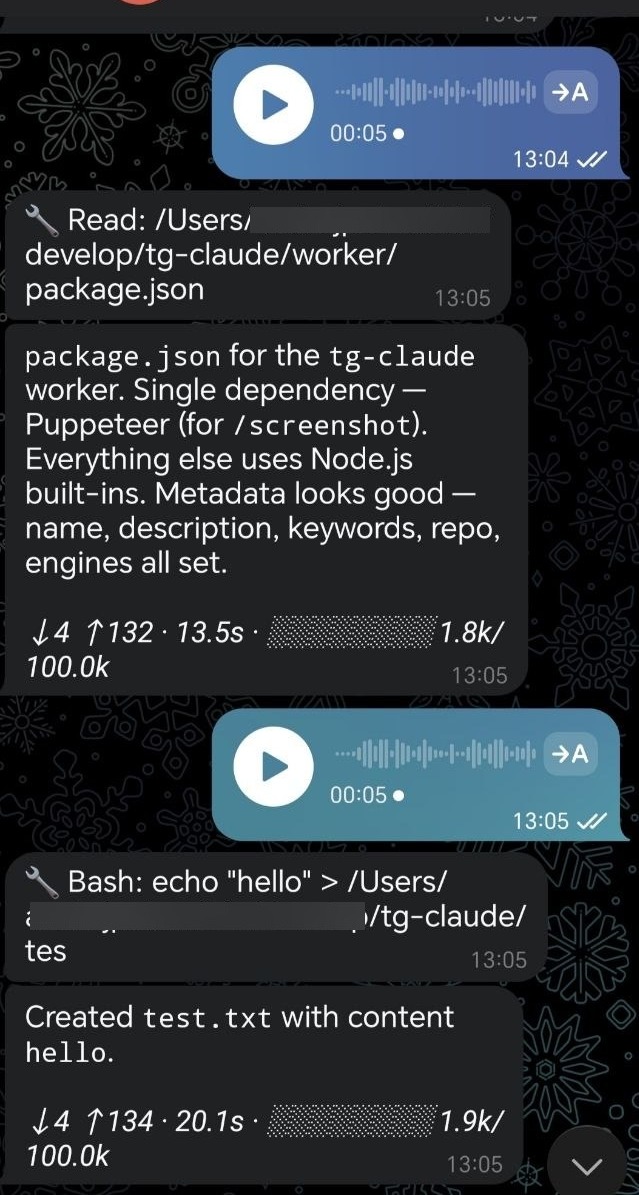
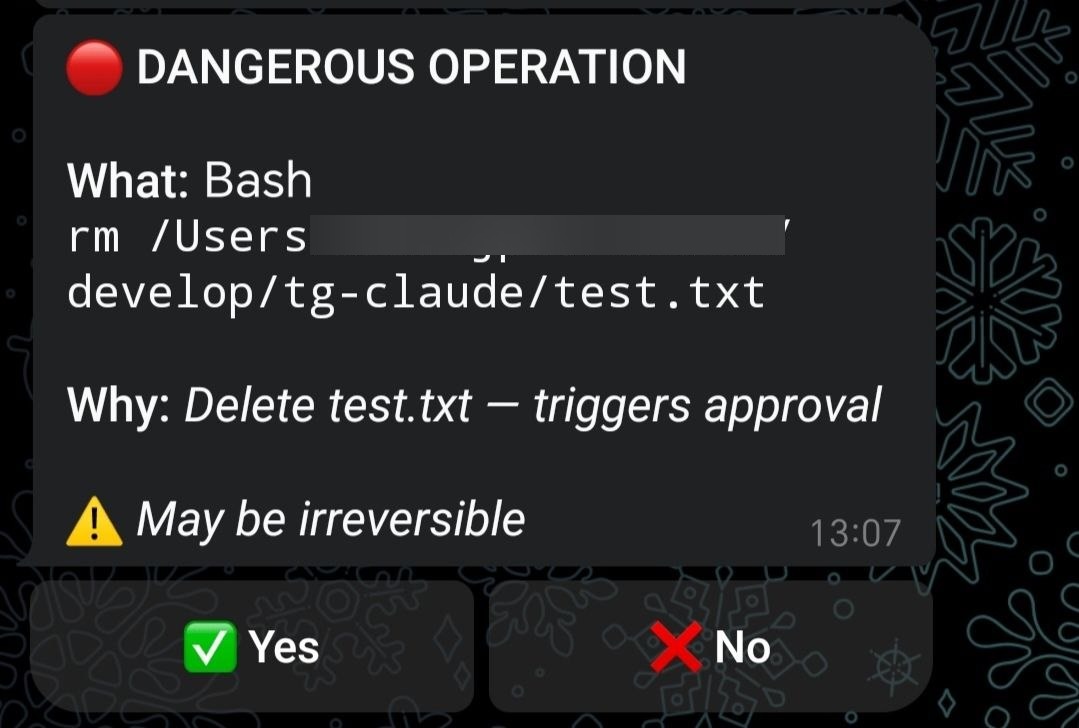
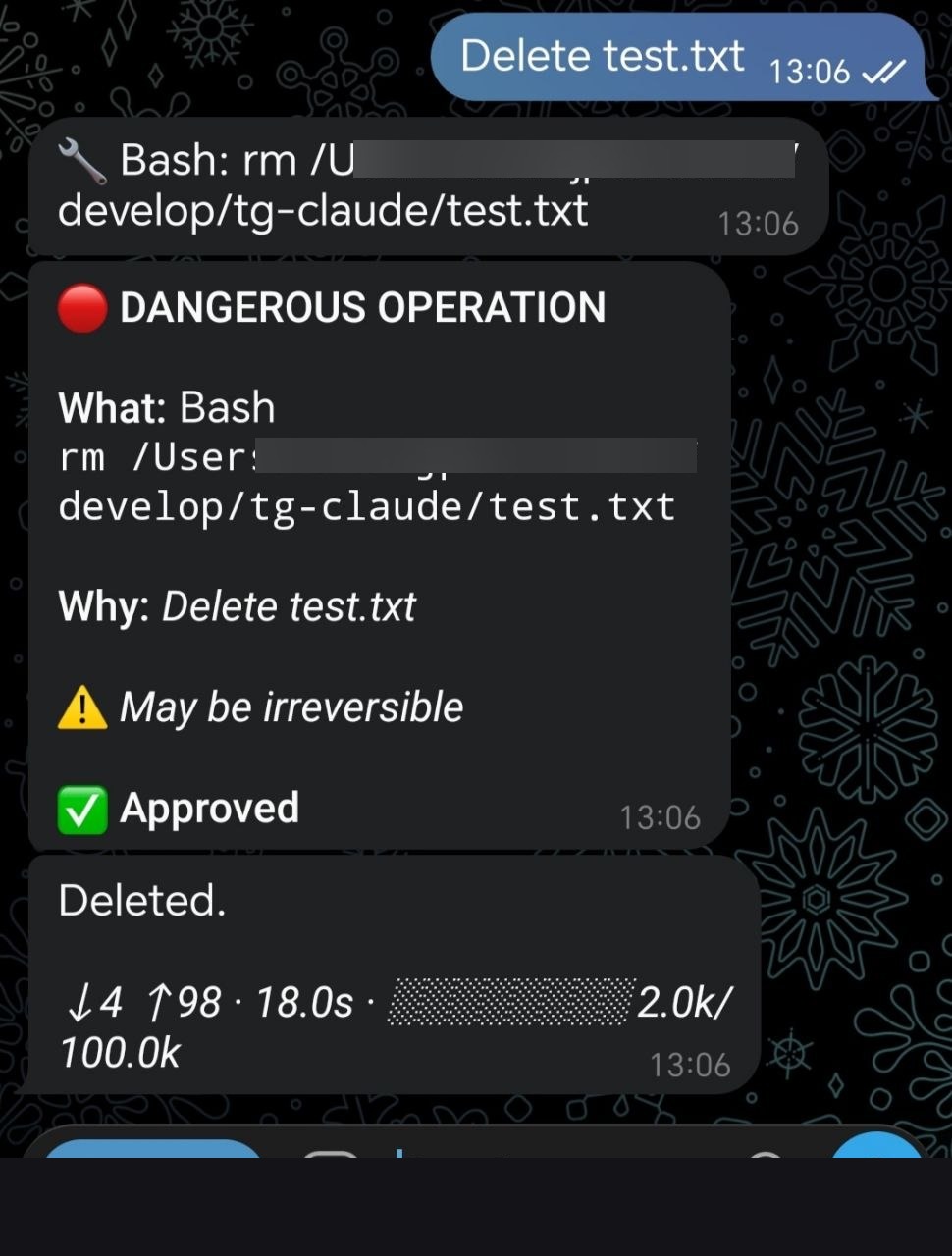
| Voice input + streaming | Approval buttons | Full approval flow |
|---|---|---|
 |
 |
 |
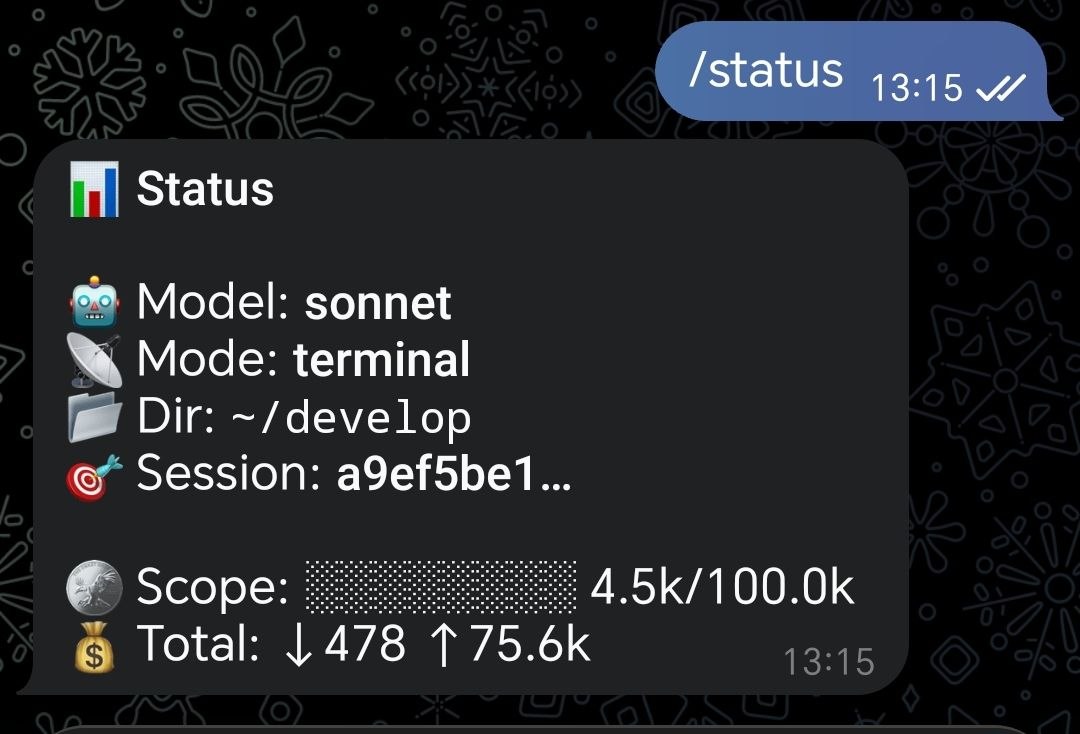
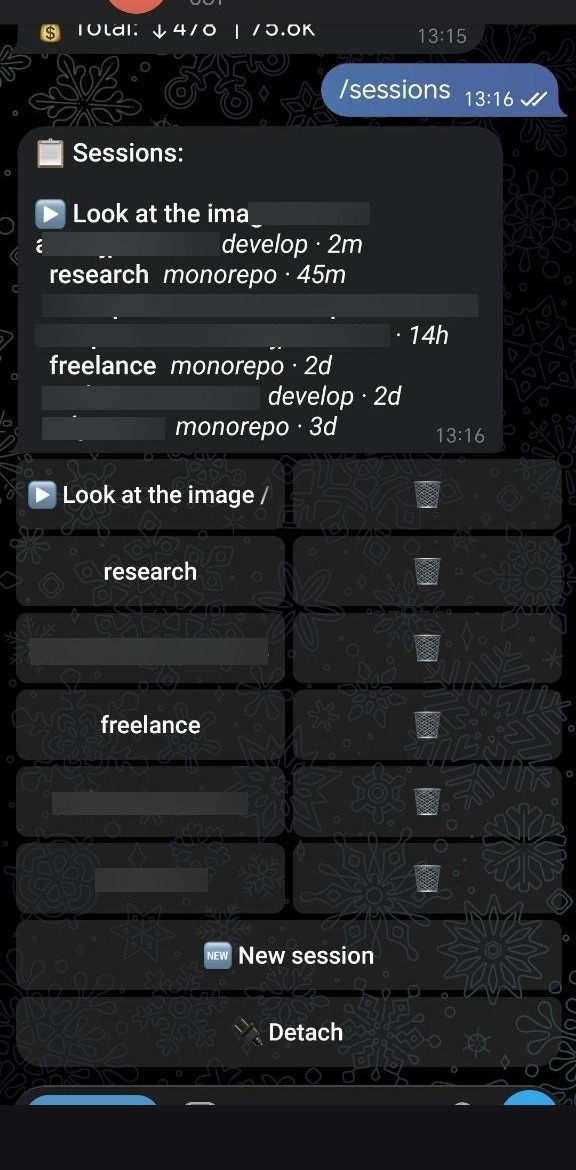
| /status | /sessions |
|---|---|
 |
 |
Why This Exists
Anthropic's official Telegram plugin is a minimal MCP bridge — 3 tools, no history, no session management.
Claude CLI ↔ Telegram is a full remote terminal: sessions, streaming progress, approval system for dangerous ops, git panel, voice input, file/photo handling, Mac remote control, and 30+ commands - all from your phone.
| Official Plugin | Claude CLI ↔ Telegram | |
|---|---|---|
| Architecture | MCP bridge | Full bot wrapper around CLI |
| Session management | None | Auto-resume, rotate, switch, rename |
| Streaming progress | None | Live tool activity display |
| Dangerous op approval | None | Inline buttons (approve/deny) |
| Voice input | None | Groq Whisper STT |
| Git integration | None | Full panel (status/diff/log/push/pull) |
| Quick commands | None | Shell, system info, clipboard, files |
| i18n | None | EN + RU (auto-detected) |
Quick Start
git clone https://github.com/Imolatte/claude-cli-telegram.git
cd tg-claude && cp config.example.json config.json
# Edit config.json — add bot token, chat ID, Groq API key
cd worker && npm install && node index.mjs
On first /start, a setup wizard walks you through OS, output mode, and token rotation settings.
Features
Input Types
- Text → Claude Code with full tool access
- Voice → Groq Whisper STT → Claude
- Photos → downloaded, passed to Claude for vision analysis
- Files → downloaded with original extension, passed to Claude
- Forwards → analyzed by Claude (text before forward auto-combined)
Live Streaming Progress
While Claude works, see exactly what's happening:
🔧 Read: /src/auth.ts
🔧 Edit: /src/auth.ts
🔧 Bash: npm run build
📝 Writing response...
With /codediff enabled, edits show inline diffs:
🔧 Edit: /src/auth.ts
- import { getRegion } from './geo'
+ import { getRegion, USDT_PRICE } from './geo'
Token usage shown after each response: ↓3.2k ↑17k · 4.5s
Session Management
- Auto-resume sessions across messages (
--resume) /sessions— inline keyboard to switch/delete/new [name]— start fresh;/name <title>— rename/detach— disconnect;/cd <path>— change working directory- Token usage tracking per session
Approval System
Dangerous operations require your approval:
git push/reset/clean,rm -rf, Docker commands- DB migrations (
prisma migrate,DROP TABLE) - Deploys (
vercel --prod,npm publish) - Sensitive file edits (
.env,docker-compose, CI configs)
Dual-channel approval (terminal sessions):
- Terminal shows its normal permission prompt
- If unanswered for 5 minutes, Telegram sends inline buttons
- Tap Approve/Deny on your phone - terminal prompt resolves automatically via TTY injection
Telegram sessions: inline buttons sent immediately as before.
Output Modes
| Mode | Responses | Approvals | Use case |
|---|---|---|---|
terminal |
Terminal | Terminal (+ TG after 5 min) | At desk |
hybrid |
Terminal | Telegram | Away, approvals on phone |
telegram |
Telegram | Telegram | Fully remote |
Switch with /mode in Telegram or node mode.mjs <mode> in terminal.
Commands
Main
| Command | Description |
|---|---|
/help |
Full command reference |
/status |
Mode, model, session, cwd, token progress bar |
/setup |
Re-run first-time setup wizard |
/stop |
Kill running Claude process |
/plan |
Toggle Plan / Build mode |
Sessions
| Command | Description |
|---|---|
/sessions |
Session list with connect/delete buttons |
/new [name] |
Start a new session |
/name <title> |
Rename current session |
/detach |
Disconnect from session |
/cd <path> |
Set working directory (- to reset) |
Display & Output
| Command | Description |
|---|---|
/codediff |
Toggle inline code diff in tool updates |
/mode |
Output mode: terminal / hybrid / telegram |
/model |
Switch model: sonnet / opus / haiku |
/botlang |
Bot UI language: en / ru |
/lang |
Voice recognition language: ru / en / auto |
Git
| Command | Description |
|---|---|
/git |
Git panel — Status, Diff, Log, Stage, Commit (AI message), Push, Pull |
/git <args> |
Direct git command, e.g. /git log --oneline -5 |
/undo |
Rollback last commit (soft/hard, with confirmation) |
/diff [ref] |
Show git diff with pagination |
Quick Commands (instant, no Claude)
| Command | Description |
|---|---|
/sh <cmd> |
Run shell command |
/sys |
CPU, RAM, disk, battery, Wi-Fi, IP, uptime |
/clip |
Get/set clipboard |
/dl <path> |
Download file to Telegram |
/recent |
Recently edited files with one-tap download |
/screenshot <url> |
Screenshot via Puppeteer |
/cron <Xh/Xm> <text> |
Set a reminder |
Mac Remote Control
| Command | Description |
|---|---|
/sleep |
Put Mac to sleep |
/lock |
Lock screen |
/shutdown |
Shut down (with confirmation) |
/reboot |
Restart (with confirmation) |
/battery |
Battery status with low-battery alerts |
MCP: Claude → Telegram
Claude can proactively message you:
send_telegram(text)— send text messagesend_file_telegram(file_path, caption?)— send file
Group Chat Support
Add the bot to any Telegram group:
- Only the owner + users on the allowed list can interact
- Bot responds when @mentioned or when replying to its messages
- Dangerous operations from non-owners are automatically denied (owner gets a DM notification)
Setup
Prerequisites
- Node.js 20+
- Claude Code CLI installed and in PATH
- Telegram Bot — create via @BotFather
- Groq API key (free): groq.com → API Keys
- Optional: FFmpeg (
brew install ffmpeg) for voice fallback
Install
git clone https://github.com/Imolatte/claude-cli-telegram.git
cd tg-claude/worker && npm install
cp ../config.example.json ../config.json
Configure
Edit config.json:
{
  "botToken": "YOUR_BOT_TOKEN",
  "chatId": "YOUR_TELEGRAM_CHAT_ID",
  "groqApiKey": "YOUR_GROQ_API_KEY",
  "timeoutMs": 300000,
  "claudeTimeoutMs": 1800000,
}
| Field | Description | Default |
|---|---|---|
botToken |
Telegram bot token from @BotFather | required |
chatId |
Your Telegram user ID (owner) | required |
groqApiKey |
Groq API key for voice STT | required |
timeoutMs |
Approval request timeout (ms) | 300000 (5 min) |
claudeTimeoutMs |
Max time for a single Claude task (ms) | 1800000 (30 min) |
Get your chatId: send any message to your bot, then open https://api.telegram.org/bot<TOKEN>/getUpdates — find chat.id.
Claude Code Hooks
Add to ~/.claude/settings.json for approval forwarding and completion notifications:
{
  "hooks": {
    "PreToolUse": [{
      "matcher": "",
      "hooks": [{ "type": "command", "command": "node /full/path/to/tg-claude/approval-hook.mjs", "timeout": 310 }]
    }],
    "Stop": [{
      "hooks": [{ "type": "command", "command": "node /full/path/to/tg-claude/stop-hook.mjs", "timeout": 10 }]
    }]
  }
}
Start
cd worker && node index.mjs
Autostart (macOS)
Create ~/Library/LaunchAgents/com.tg-claude.worker.plist pointing to node index.mjs in the worker directory. See launcher.sh for reference.
Logs: /tmp/tg-claude.log
Architecture
worker/
  index.mjs           Bot core: polling, commands, streaming, task queue
  executor.mjs         Spawns Claude Code CLI, parses stream-json events
  sessions.mjs         Session state management
  locale.mjs           i18n: EN + RU strings
  voice.mjs            Groq STT with local Whisper fallback
  mcp-telegram.mjs     MCP server: send_telegram + send_file_telegram

approval-hook.mjs      PreToolUse hook → dual-channel approval (terminal + TG)
stop-hook.mjs          Stop hook → Telegram completion notification
CLAUDE.md              Project context for Claude Code sessions
mode.mjs               CLI: switch output mode (terminal/hybrid/telegram)
bot-system-prompt.md   System prompt appended to Claude Code
config.json            Credentials (gitignored)
Design principles:
- Minimal runtime dependencies (Puppeteer optional for screenshots)
- No frameworks — vanilla Node.js, ESM modules
- Single-process architecture — one
node index.mjsruns everything - File-based IPC between hooks and bot (via
/tmp/files) - Works on macOS and Linux
i18n
Bot UI supports English and Russian. Language is auto-detected from your Telegram profile on first /start. Switch anytime with /botlang.
Adding a new language: copy the en object in worker/locale.mjs, translate all values, submit a PR.
Security
- Owner-only — single
chatId, all other users silently ignored - Group access control — explicit allowlist per user ID
- No credentials in repo —
config.jsonis gitignored - Duplicate protection — kills previous instances on startup
- Stale session recovery — auto-retries without
--resumeon failure
Contributing
See CONTRIBUTING.md for guidelines.
License
MIT — Andrey Petrushikhin
Yorumlar (0)
Yorum birakmak icin giris yap.
Yorum birakSonuc bulunamadi