ternarycode
Health Pass
- License — License: MIT
- Description — Repository has a description
- Active repo — Last push 0 days ago
- Community trust — 14 GitHub stars
Code Pass
- Code scan — Scanned 12 files during light audit, no dangerous patterns found
Permissions Pass
- Permissions — No dangerous permissions requested
No AI report is available for this listing yet.
Know which AI coding agent needs you. A native, terminal-first workspace for Claude Code, Codex, OpenCode and Antigravity CLI across all your projects, with a browser your agents drive. macOS, Windows and Linux. Rust, no Electron.

TernaryCode
One native Agent Development Environment (ADE) for all your projects and AI coding agents.
Wide code editor, project-nested sessions, multi-account failover with 5-hour & weekly limits, live usage monitor, and mobile companion — written in Rust for macOS, Windows, and Linux.




Website · Install · Features · Shortcuts · Troubleshooting · Build · Bahasa Indonesia
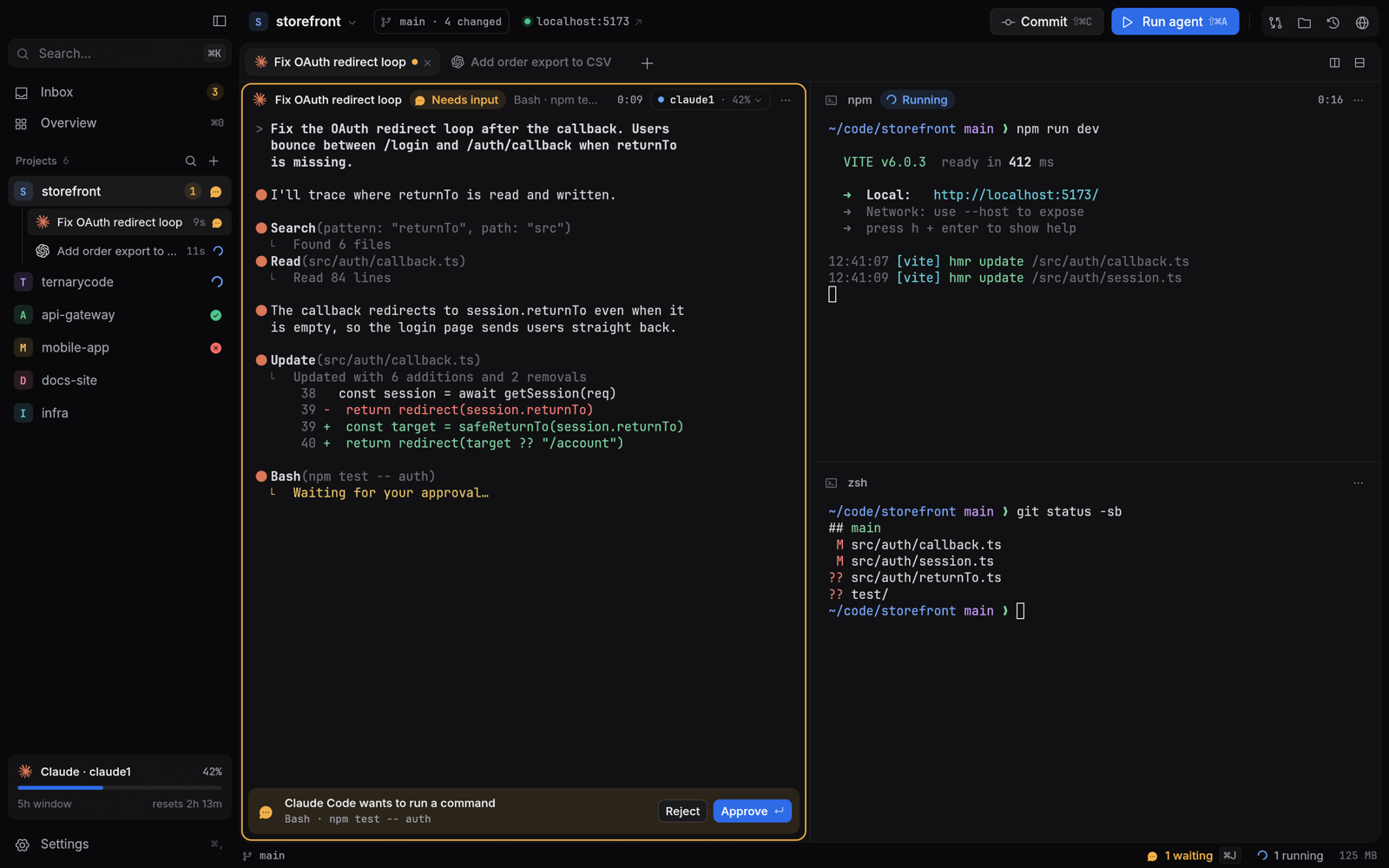
Running Claude Code, ChatGPT / Codex, Gemini CLI, Antigravity CLI, or OpenCode across multiple projects usually means scattered terminal windows, manual logout/re-login dances when an account hits its usage limit, and guessing which agent is waiting for you. TernaryCode brings every project, session, account, and editor into one fast native Rust workspace.
No Electron, no cloud middleman: it launches in ~0.2 s, idles at 0% CPU, and keeps all credentials strictly local on your machine.
Highlights
- Wide Code Editor & Collapsible Terminal Panel: the Code Editor & Diff Viewer commands the primary viewport (≥60% by default), while Terminals, Agent Logs, and LSP Problems live in a dockable bottom or right panel (
⇧⌘L). - Project-Nested Agent Sessions: expand any project in the sidebar to see live and past sessions for Claude Code, Codex, Gemini CLI, and Antigravity CLI with brand logos, live status pills, and 1-click resume.
- Multi-Account Profiles & 5-Hour / Weekly Usage Limits: pre-register multiple accounts (
chatgpt1,chatgpt2,chatgpt3,claude1,claude2,gemini1) with isolated file-backed auth folders. Switch accounts in one click without logging out, or let Auto/Manual Failover resume your session automatically when an account hits its limit. - Unified All-Agent Usage & Status Monitor: live top-bar telemetry pill, quick-switch popover, and full monitor tracking 5-hour & weekly quotas, reset countdowns, active sessions, and failover events.
- Phone Pairing & Mobile Companion: pair your smartphone via QR code over local Wi-Fi or a secure tunnel to stream live agent output, approve pending tools, send follow-ups, and trigger profile failovers remotely.
- Know Which Agent Needs You: hook-backed Needs input, Running, Done, and Failed states,
⌘Jjump queue, and a live Grid (⌘0) of every project. - Agent Browser, Review, Worktrees & Documents: built-in web view agents can drive, side-by-side diffs with 1-button commit/push/PR, isolated git worktrees, and in-place viewers for PDF, Word, PowerPoint, Excel, CSV, and images.
Install
Download from the latest release:
| System | File |
|---|---|
| macOS 12+ (Apple Silicon and Intel) | the installer below, or TernaryCode-<version>.dmg |
| Windows 10 (1809)+, x64 | …-windows-x64-setup.exe, or the portable …-windows-x64.zip |
| Debian, Ubuntu, Mint | …-linux-amd64.deb (-arm64.deb on ARM) |
| Fedora, RHEL, openSUSE | …-linux-x86_64.rpm (-aarch64.rpm) |
| Any Linux | …-linux-x86_64.AppImage or .tar.gz (-aarch64 on ARM) |
macOS, in Terminal:
curl -fsSL https://raw.githubusercontent.com/ilhamnadhif/ternarycode/main/scripts/install.sh | bash
It checks the download's SHA-256 and signature and installs into /Applications.
[!IMPORTANT]
The builds are not notarized or code-signed yet. On macOS, a.dmgdownloaded with a browser is
blocked: use the installer above, or System Settings → Privacy & Security → Open Anyway. On
Windows, SmartScreen asks once: More info → Run anyway.
On Linux, TernaryCode needs OpenGL (a software renderer is fine) and glibc 2.28+; the Browser panel needs WebKitGTK 4.1 (libwebkit2gtk-4.1-0).
TernaryCode updates itself (the .deb, .rpm, and portable .zip through a new package).
Quick start
- Add a project: click + in the sidebar, drop a folder on the window, or run
ternarycode .in any terminal. - Pre-register your accounts (optional): open Profiles (bottom-left 👤), click + ChatGPT / + Claude / + Gemini, and click Auth Login once per account. Each account stays signed in inside its own private
0o700folder. - Run Agent (
⇧⌘A): launch Claude Code, Codex, Gemini CLI, Antigravity CLI, or OpenCode. Expand the project in the sidebar anytime to resume past sessions in one click. - Switch accounts or jump to waiting agents: click
⇄ <next_account>right in the pane header to switch accounts mid-session without logout, or press⌘Jto jump to any waiting agent.
Features
Wide Code Editor & Project-Nested Sessions
- Code-first workspace: the Code Editor (
⌘E) opens wide by default with smooth resizable splits, language servers (rust-analyzer, gopls, TypeScript, pyright, clangd…), and git gutter change markers. - Collapsible Terminal Panel (
⇧⌘L): dock Terminals, Agent Logs, and LSP Problems at the bottom or right, maximize to full height, or hide when reading code. - Project-nested session tree: expand any project row in the left sidebar (
›) to view live sessions (● live) and past history for Claude Code, Codex, Gemini CLI, and Antigravity CLI (agy --conversation <id>) — click any session to focus or resume directly.
Multi-Account Profiles, 5-Hour & Weekly Limits, & 1-Click Switch

- Zero logout/re-login dance: register multiple accounts (
chatgpt1,chatgpt2,chatgpt3,claude1,claude2,gemini1) upfront. Each isolated profile gets its ownCLAUDE_CONFIG_DIR, file-backedCODEX_HOME(auth.json), orGEMINI_CLI_HOME, plus automatic env cleanup across switches. - Dual Usage Limit Meters: tracks both 5-Hour rolling limits and Weekly (7-day) limits — reading real server-reported percentages & reset timestamps directly from Codex session telemetry (
rate_limits.primary/secondary,plan_type), and rolling 5h/7d log windows + optional token caps for Claude and Gemini. - 1-Click Live Account Switch & Rate-Limit Failover: click the
⇄quick-switch button in any running agent pane header — or let Auto-Resume / Manual Resume kick in when a limit hits. Same-provider switches atomically copy the session file across isolated roots and natively--resumeyour exact conversation; cross-provider switches write a secret-redacted handoff note so work continues seamlessly.

Unified All-Agent Usage & Status Monitor

- Click the top-bar telemetry pill to inspect every account's live state (
Running,Idle,Rate-Limited,Cooldown,Error), 5h & Weekly usage bars, reset countdowns, and trigger a 1-click Switch without leaving your code. - Open Full View for aggregate 5-Hour Tokens, Weekly Tokens, healthy account counts, active session jump links, and the live failover & agent event log.
Phone Pairing & Mobile Companion

- Enable the built-in Mobile Companion Server (local Wi-Fi or optional Cloudflare / Tailscale / ngrok tunnel) and scan the QR code with your phone camera.
- Every paired device gets its own revocable bearer token (with brute-force rate limiting and secret-redacted output streaming). Monitor live terminal output over SSE, approve or reject pending tool requests, send follow-up prompts, and switch accounts remotely from your smartphone.
Review, Worktrees, Grid, Browser & Documents

- Review & 1-button Commit/Push/PR (
⇧⌘R,⇧⌘C): inspect unified or split diffs since an agent started or since the last commit, start agents in isolated git worktrees, and commit, push, or open a GitHub PR in one step. - The Grid (
⌘0): monitor every project side by side in live terminals, with changed-file badges and 1-click Review. - Agent Browser (
⇧⌘B): native system web view (WebKit, WebView2, WebKitGTK) that agents can navigate, click, and inspect while you watch or Take Over anytime. - In-Place Documents: open PDF, Word, PowerPoint, Excel, CSV (as an interactive table), and images directly beside your agent.


Keyboard shortcuts
On Windows and Linux, ⌘ is Ctrl+Shift (⌥ stays Alt), so Ctrl+C still reaches the terminal. The command palette (⌘K) lists everything.
| macOS | Windows, Linux | |
|---|---|---|
⌘J · ⇧⌘J |
Ctrl+Shift+J · Ctrl+Alt+J |
next waiting agent · back |
⌘K · ⌘P |
Ctrl+Shift+K · Ctrl+Shift+P |
command palette · switch project |
⇧⌘A |
Ctrl+Shift+A |
run an agent |
⌘0 |
Ctrl+Shift+0 |
Grid |
⌘E · ⇧⌘L |
Ctrl+Shift+Y · Ctrl+Shift+L |
Code Editor · Terminal Panel |
⌘O · ⌘S |
Ctrl+Shift+O · Ctrl+Shift+S |
open file · save |
⌘T · ⌘W |
Ctrl+Shift+T · Ctrl+Shift+W |
new tab · close pane |
⌘D · ⇧⌘D |
Ctrl+Shift+D · Ctrl+Shift+E |
split right · down |
⇧⌘R · ⇧⌘C |
Ctrl+Shift+R · Ctrl+Shift+Alt+C |
review changes · commit, push & PR |
⇧⌘B |
Ctrl+Shift+Alt+B |
Browser panel |
⌘F · ⇧⌘F |
Ctrl+Shift+F · Ctrl+Shift+G |
find · in all panes |
⌘B · ⌥⌘B |
Ctrl+Shift+B · Ctrl+Alt+B |
sidebar · narrow sidebar |
⌘1–⌘9 |
Ctrl+Shift+1–9 |
project 1–9 |
Troubleshooting
- An agent shows only Active. It was started by hand without hooks: use Run Agent, or install hooks in Settings → Agents.
- Windows: "running scripts is disabled". Run
Set-ExecutionPolicy -Scope CurrentUser RemoteSignedonce, or install PowerShell 7 (winget install Microsoft.PowerShell). - Linux: the window stays blank. Check OpenGL;
LIBGL_ALWAYS_SOFTWARE=1 ternarycodeuses Mesa's software renderer. - Anything else: open an issue with your version, system, and steps.
Privacy
No cloud account, no telemetry. TernaryCode only checks GitHub for app updates (optional); pull requests go through your own GitHub CLI; Mobile Companion stays on your LAN (or your own tunnel) with revocable per-device tokens and automatic secret redaction. Settings and isolated profiles live in ~/Library/Application Support/ternarycode (macOS), %APPDATA%\ternarycode (Windows), or ~/.local/share/ternarycode (Linux).
Build from source
cargo build --release       # ternarycode and ternarycode-hook, side by side
./target/release/ternarycode
Before a pull request, run: cargo clippy --locked --workspace --all-targets -- -D warnings and cargo test --locked --workspace (plus scripts/e2e.sh on macOS). The code is formatted by hand: please don't run cargo fmt over whole files.
Built with egui, alacritty_terminal, and wry. Fonts: Inter and JetBrains Mono (SIL OFL 1.1), Phosphor icons (MIT).
TernaryCode is part of the Ternary family alongside TernaryGrid (SQL), TernaryWire (API), and TernaryShell (SSH).
License
MIT.
Reviews (0)
Sign in to leave a review.
Leave a reviewNo results found