claude-sessions
Health Uyari
- License — License: MIT
- Description — Repository has a description
- Active repo — Last push 0 days ago
- Low visibility — Only 8 GitHub stars
Code Gecti
- Code scan — Scanned 12 files during light audit, no dangerous patterns found
Permissions Gecti
- Permissions — No dangerous permissions requested
Bu listing icin henuz AI raporu yok.
Session manager for Claude Code with automatic documentation and artifact tracking
cs - Claude Code Session Manager
A session manager for Claude Code that creates isolated workspaces with automatic documentation and artifact tracking.
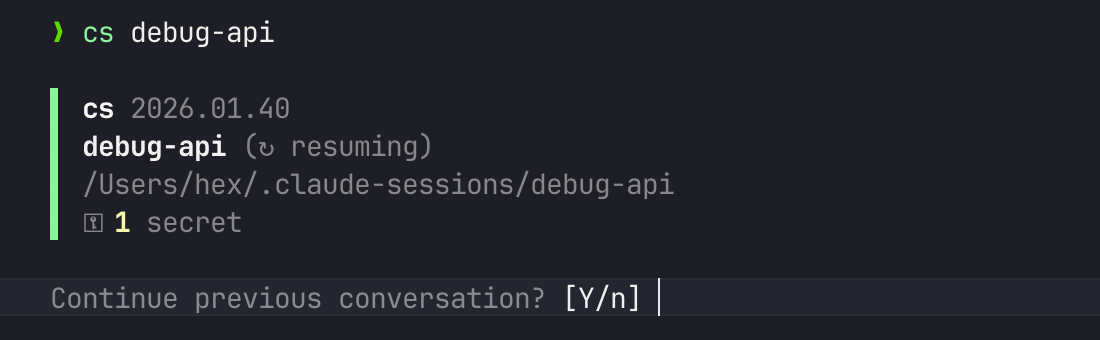
Why cs?
Claude Code doesn't require a project. You can spin up an instance to debug an API, troubleshoot home automation, research a hardware problem, or explore any idea that comes to mind.
But conversations get lost. You discover key insights, create useful scripts, figure out a tricky configuration - then the session ends and it's gone.
cs gives every task a home:
cs debug-api          # Investigate that flaky endpoint
cs homeassistant      # Fix your smart home setup
cs router-config      # Document your network settings
cs research-llms      # Explore a topic, keep your notes
Each session is a persistent workspace - documentation, artifacts, and secrets that survive across conversations and sync across machines.
No git repo required. No project structure needed. Just a name for what you're working on.
Features
- Isolated session workspaces - Each session has its own directory with structured documentation
- Automatic artifact tracking - Scripts and configs are auto-saved to
artifacts/ - Secure secrets handling - Sensitive data auto-detected and stored in OS keychain; sync across machines with age public-key encryption
- Documentation templates - Pre-configured markdown files for discoveries and changes
- Discoveries archival - Automatic rotation of large discovery files before context compaction, with LLM-powered condensation via
/compact-discoveries - Automatic git version control - Every session gets local git history; discovery edits are autosaved to a shadow ref for crash safety, session end creates one clean commit; optionally sync to remote
- Session locking - PID-based lock prevents the same session from being opened in two terminals simultaneously; use
--forceto override - Remote sessions - Run sessions on remote machines via
etorssh+tmux;cshandles connection, stubbing, and session tracking - Update notifications - Checks for updates and notifies when new versions are available
- Verified updates - Updates are downloaded from GitHub Releases and verified with SHA-256 checksums; additionally verified with minisign signatures when available
Installation
Bash (macOS/Linux)
bash -c "$(curl -fsSL https://raw.githubusercontent.com/hex/claude-sessions/main/install.sh)"
Or clone and run ./install.sh.
PowerShell 7 (Windows/macOS/Linux)
irm https://raw.githubusercontent.com/hex/claude-sessions/main/install.ps1 | iex
Or clone and run ./install.ps1.
:warning: Always review scripts (bash, PowerShell) before running them from the internet.
The installer:
- Adds
cs,cs-secrets, andcs-tuito~/.local/bin/ - Installs eleven hooks to
~/.claude/hooks/for session tracking - Adds
/summaryand/compact-discoveriescommands, andstore-secretskill to~/.claude/ - Installs shell completions for bash and zsh
- Configures hook entries in
~/.claude/settings.json
Usage
cs                          # Interactive session manager (TUI)
cs <session-name>           # Create or resume a session
cs <session-name> --force   # Override active session lock
cs -adopt <name>            # Adopt current directory as a session
cs -remote <cmd>            # Manage remote hosts
cs -list, -ls               # List all sessions
cs -remove, -rm <name>      # Remove a session
cs -update                  # Update to latest version
cs -uninstall               # Uninstall cs
cs -help, -h                # Show help message
cs -version, -v             # Show version
Interactive Session Manager
Running cs with no arguments launches an interactive TUI for browsing and managing sessions:
- Navigate with
j/kor arrow keys;g/Gfor first/last; mouse scroll and click supported - Sort by column with
1-6(toggles ascending/descending) - Fuzzy search with
/— matches characters in order with highlighting; Enter commits the filter - Time-based sections — sessions grouped under Today, Yesterday, This Week, This Month, Older when sorted by date
- Action bar with
Enter— inline bar shows available actions with shortcut keys - Preview pane — appears automatically on wide terminals (>120 cols); toggle with
p - Expand row with
Tab— shows session objective, discoveries, and artifact count inline - Create session with
n— opens inline dialog to create a new session - Delete with
d(confirmation required) - Batch operations — mark sessions with
Space, thenDto batch delete - Rename with
r - Move to remote with
m(local sessions only) - Manage secrets with
s(view values withv, auto-redacts after 5 seconds) - Async sync with
P(push),L(pull),S(status) — runs in background with spinner;Escto cancel - Quit with
qorEsc
The TUI requires cs-tui (an ~817 KB Rust binary). Build from source: cd tui && cargo build --release.
Session Commands
cs <session> -sync, -s <cmd>  # Sync with git remote
cs <session> -secrets <cmd>   # Manage secrets
cs <session> --on <host>      # Run on remote host
cs <session> --move-to <host> # Move session to remote host
cs <session> --force          # Override active session lock
Examples
cs debug-api                # Create/resume 'debug-api' session
cs fix-auth -sync remote <url> # Initialize sync for session
cs my-project -secrets list # List secrets for session
Adopting Existing Projects
Already working in a project directory with Claude Code? Use -adopt to add cs session management without moving anything:
cd ~/my-project
cs -adopt my-project
This converts the current directory into a cs session in place:
- Creates the
.cs/metadata structure in the current directory - Symlinks
~/.claude-sessions/<name>to the current directory - Merges session protocol into existing
CLAUDE.mdif one exists - Initializes a git repo if one doesn't exist (preserves existing repos)
- Since the working directory doesn't change,
claude --continuepicks up previous conversations
Remote Sessions
Run sessions on a remote machine (e.g., a Mac Mini build server) while keeping cs SESSION_NAME as your single entry point. The remote machine needs cs and Claude Code installed independently.
Register a remote host (one-time):
cs -remote add mini [email protected]
cs -remote list
cs -remote remove mini
Create or connect to a remote session:
cs my-session --on mini                # using registered name
cs my-session --on [email protected] # inline, no registration needed
cs [email protected]:my-session      # host:session syntax (auto-remembered)
After the first connection, cs my-session automatically reconnects to the remote host.
Move an existing local session to remote:
cs my-session --move-to mini
This rsyncs the session to the remote host and creates a local stub so future cs my-session calls connect remotely.
Transport: Prefers Eternal Terminal (et) when available, falls back to ssh. Sessions are wrapped in tmux on the remote side.
Listing: cs -ls shows a LOCATION column when remote sessions exist.
Note: -sync and -secrets commands are not available on remote sessions. Connect to the remote session first, then run them from within.
Session Structure
~/.claude-sessions/<session-name>/
├── .cs/                    # Session metadata
│   ├── README.md           # Objective, environment, outcome
│   ├── discoveries.md      # Recent findings and observations
│   ├── discoveries.archive.md  # Archived historical entries
│   ├── discoveries.compact.md  # LLM-condensed archive summary
│   ├── changes.md          # Auto-logged file modifications
│   ├── sync.conf           # Sync configuration
│   ├── remote.conf         # Remote host (if remote session)
│   ├── memory/             # Claude Code auto memory (synced)
│   ├── artifacts/          # Auto-tracked scripts and configs
│   └── logs/session.log    # Session command log
├── .claude/
│   └── settings.local.json # Redirects auto memory into .cs/memory
├── CLAUDE.md               # Session instructions for Claude
└── [your project files]    # Clean workspace
Claude Code's auto memory is redirected into .cs/memory/ via CLAUDE_CODE_AUTO_MEMORY_PATH env var (set at launch) and .claude/settings.local.json (for future compatibility). This means auto memory is synced across machines with cs -sync and cleaned up with cs -rm.
Configuration
Add to ~/.bashrc or ~/.zshrc:
# Sessions directory (default: ~/.claude-sessions)
export CS_SESSIONS_ROOT="/path/to/sessions"

# Git sync prefix for shorter commands
export CS_SYNC_PREFIX="[email protected]:youruser/"

# Legacy password for secrets sync (age encryption preferred - see docs/secrets.md)
export CS_SECRETS_PASSWORD="your-secure-password"

# Override secrets backend (keychain, credential, or encrypted)
export CS_SECRETS_BACKEND="keychain"

# Override Claude Code binary (default: claude)
export CLAUDE_CODE_BIN="claude"

# Use Nerd Font icons (requires a Nerd Font in your terminal)
export CS_NERD_FONTS="1"

# Disable colors (see https://no-color.org)
export NO_COLOR="1"
The following environment variables are set automatically when you start a session:
CLAUDE_SESSION_NAME- The session name (e.g.,myproject)CLAUDE_SESSION_DIR- Full path to the session directory (workspace root)CLAUDE_SESSION_META_DIR- Path to the.cs/metadata directoryCLAUDE_ARTIFACT_DIR- Path to the artifacts subdirectory (.cs/artifacts)CLAUDE_CODE_TASK_LIST_ID- Set to the session name for task list persistence
Shell Completion
Tab completion for session names and commands is installed automatically. To enable it:
Bash - Add to ~/.bashrc:
[[ -f ~/.bash_completion.d/cs.bash ]] && source ~/.bash_completion.d/cs.bash
Zsh - Add to ~/.zshrc (before compinit):
fpath=(~/.zsh/completions $fpath)
autoload -Uz compinit && compinit
PowerShell - Add to your $PROFILE:
. "$HOME/.config/powershell/completions/cs.ps1"
Then restart your shell or run source ~/.bashrc / source ~/.zshrc / . $PROFILE.
Completions support:
- Session names:
cs home<TAB>→cs homeassistant - Global flags:
cs -<TAB>→-list,-sync,-secrets, etc. - Sync commands:
cs session -sync <TAB>→remote,push,pull, etc. - Secrets commands:
cs session -secrets <TAB>→set,get,list, etc.
Documentation
- Hooks - How the Claude Code hooks work
- Secrets - Secure secrets handling and storage backends
- Sync - Git-based session sync across machines
Requirements
- Claude Code
- Bash 4.0+ or PowerShell 7+
jqfor hook configuration (bash installer only; PowerShell uses native JSON)gitfor session sync
Uninstalling
cs -uninstall
See also
- iTerm2-dimmer -- dims noisy hook output (TASKMASTER, discoveries) in iTerm2 so it doesn't clutter the screen
License
MIT
Contributing
Contributions welcome! Please open an issue or PR.
Yorumlar (0)
Yorum birakmak icin giris yap.
Yorum birakSonuc bulunamadi