Clawd-Code
Health Gecti
- License — License: MIT
- Description — Repository has a description
- Active repo — Last push 0 days ago
- Community trust — 122 GitHub stars
Code Gecti
- Code scan — Scanned 12 files during light audit, no dangerous patterns found
Permissions Gecti
- Permissions — No dangerous permissions requested
This project is an unofficial Python rewrite of the Claude Code CLI tool, originally written in TypeScript. It serves as an interactive command-line agent for coding, debugging, and executing shell commands.
Security Assessment
Risk Rating: Medium. As an AI agent framework, the tool is inherently designed to execute bash commands and perform local file read/write operations. The automated code scan did not find any dangerous backdoor patterns, hardcoded secrets, or malicious network callbacks, and the tool does not request outright dangerous permissions. However, any LLM-driven CLI that dynamically executes shell commands carries an inherent risk of prompt injection or unintended local system changes. Users should practice basic caution when running the agent.
Quality Assessment
The project appears active and well-documented, with the last code push occurring today. It uses the permissive MIT license, which is standard for open-source development. It has garnered 122 GitHub stars, indicating a decent level of community interest and basic peer trust. However, the disclaimer in the documentation notes that it is based on "leaked TypeScript source code." Developers should be aware of the potential intellectual property and ethical gray areas surrounding the project's origins before adopting it in a professional setting.
Verdict
Use with caution: the code itself is clean and open, but it handles live shell execution and stems from potentially unauthorized original source code.
Claude-Code-Python: Reconstructing Claude Code in Python - 基于Claude Code源码的Python重构实现
English | 中文 | Français | Русский | हिन्दी | العربية | Português
🚀 Claude Code Python
A Complete Python Reimplementation Based on Real Claude Code Source
From TypeScript Source → Rebuilt in Python with ❤️




🔥 Active Development • New Features Weekly 🔥
🎯 What is This?
Clawd Code is a complete Python rewrite of Claude Code, based on the real TypeScript source code.
⚠️ Important: This is NOT Just Source Code
Unlike the leaked TypeScript source, Clawd Codex is a fully functional, runnable CLI tool:
| Core Features Showcase |
|---|
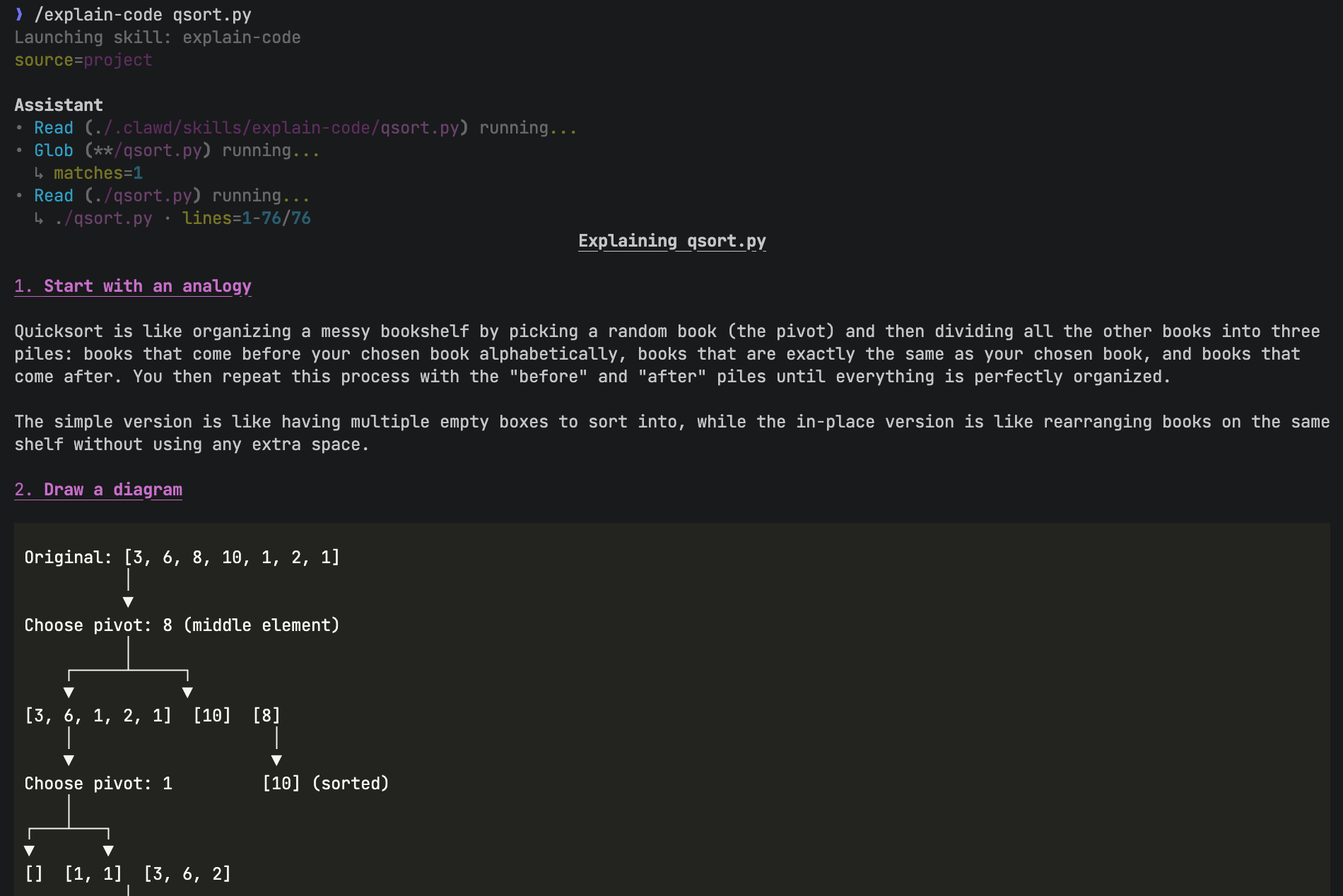 |
| Flexible Skill Systems |
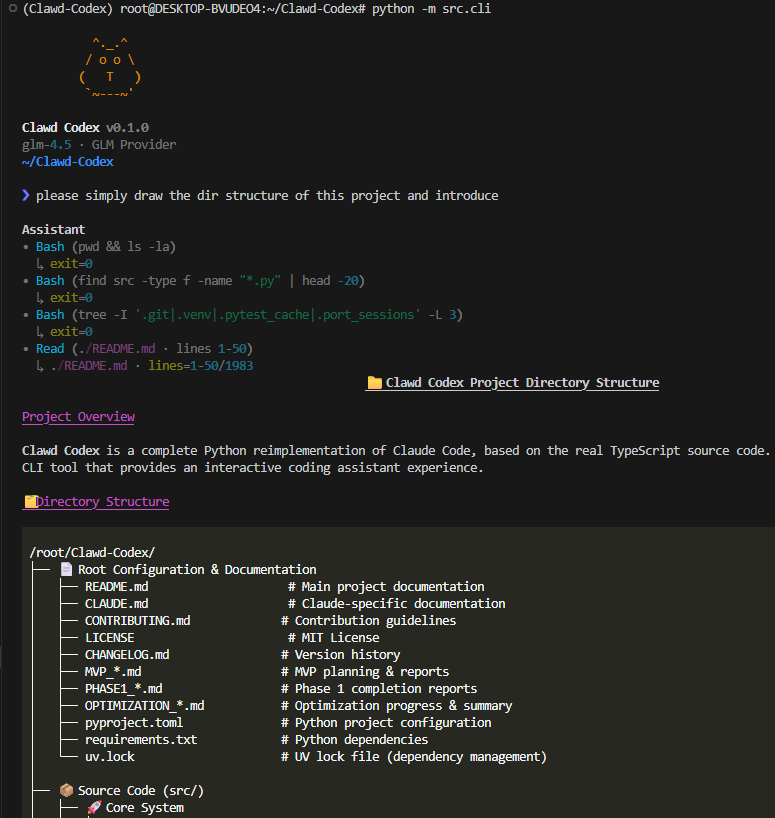 |
| Real-time Tool Execution |
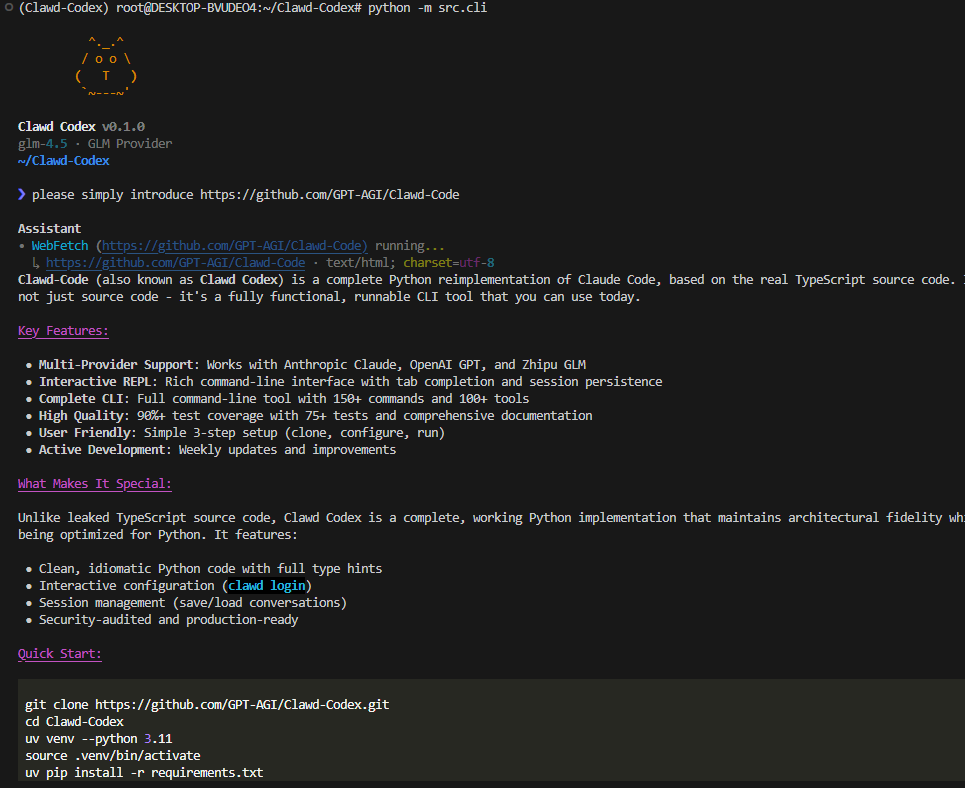 |
| Instant Web Content Extraction |
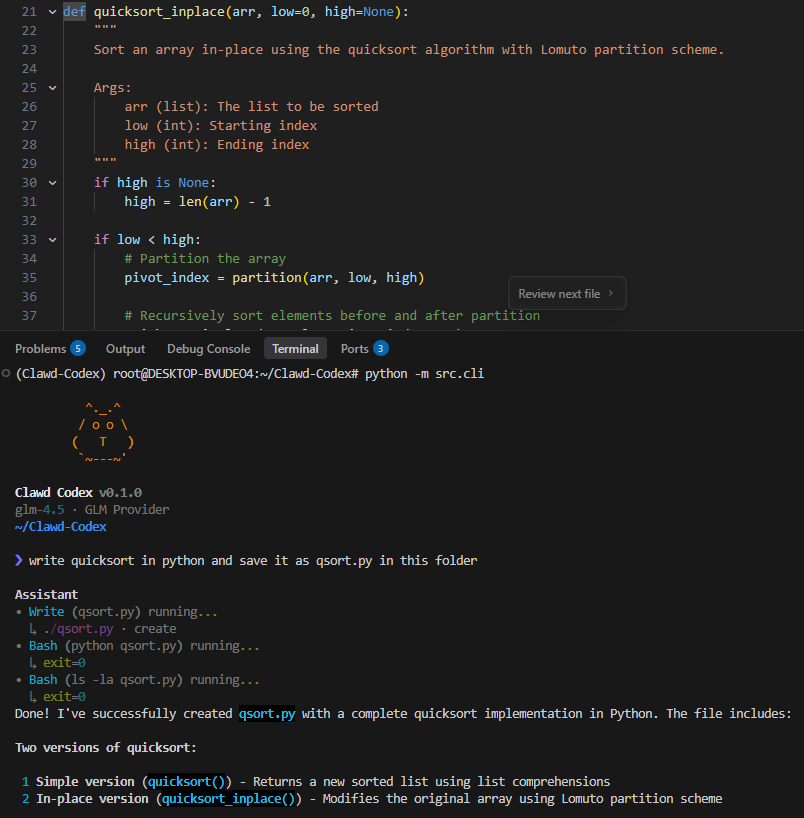 |
| Seamless Coding & Debugging |
Real CLI • Real Usage • Real Community
- ✅ Working CLI — Not just code, but a fully functional command-line tool you can use today
- ✅ Based on Real Source — Ported from actual Claude Code TypeScript implementation
- ✅ Maximum Fidelity — Preserves original architecture while optimizing
- ✅ Python Native — Clean, idiomatic Python with full type hints
- ✅ User Friendly — Easy setup, interactive REPL, comprehensive docs
- ✅ Continuously Improved — Enhanced error handling, testing, documentation
🚀 Try it now! Fork it, modify it, make it yours! Pull requests welcome!
⭐ Star History
✨ Features
Flexible Skill Systems
---
description: Explain code with diagrams and analogies
allowed-tools:
  - Read
  - Grep
  - Glob
arguments: [path]
---

Explain the code in $path. Start with an analogy, then draw a diagram.
- Markdown-based
SKILL.mdslash commands - Supports project skills, user skills, named arguments, and tool limits
Multi-Provider Support
providers = ["Anthropic Claude", "OpenAI GPT", "Zhipu GLM"] # + easy to extend
Interactive REPL
>>> Hello!
Assistant: Hi! I'm Clawd Codex, a Python reimplementation...

>>> /help         # Show commands
>>> /             # Show all commands & skills
>>> /save         # Save session
>>> /multiline    # Multi-paragraph input
>>> Tab           # Auto-complete
>>> /explain-code qsort.py   # Run a skill
Complete CLI
clawd              # Start REPL
clawd login        # Configure API
clawd --version    # Check version
clawd config       # View settings
📊 Status
| Component | Status | Count |
|---|---|---|
| REPL Commands | ✅ Complete | 6+ built-ins |
| Tool System | ✅ Complete | 30+ tools |
| Automated Tests | ✅ Present | Core suites for skills, providers, REPL, tools, context |
| Documentation | ✅ Complete | 10+ docs |
Core Systems
| System | Status | Description |
|---|---|---|
| CLI Entry | ✅ | clawd, login, config, --version |
| Interactive REPL | ✅ | Rich interactive output, history, tab completion, multiline |
| Multi-Provider | ✅ | Anthropic, OpenAI, GLM support |
| Session Persistence | ✅ | Save/load sessions locally |
| Agent Loop | ✅ | Tool calling loop implementation |
| Skill System | ✅ | SKILL.md-based slash-command skills with args + tool limits |
| Context Building | 🟡 | Initial prompt injection for workspace, git, and CLAUDE.md; deeper project understanding still needed |
| Permission System | 🟡 | Framework exists, needs integration |
Tool System (30+ Tools Implemented)
| Category | Tools | Status |
|---|---|---|
| File Operations | Read, Write, Edit, Glob, Grep | ✅ Complete |
| System | Bash execution | ✅ Complete |
| Web | WebFetch, WebSearch | ✅ Complete |
| Interaction | AskUserQuestion, SendMessage | ✅ Complete |
| Task Management | TodoWrite, TaskManager, TaskStop | ✅ Complete |
| Agent Tools | Agent, Brief, Team | ✅ Complete |
| Configuration | Config, PlanMode, Cron | ✅ Complete |
| MCP | MCP tools and resources | ✅ Complete |
| Others | LSP, Worktree, Skill, ToolSearch | ✅ Complete |
Roadmap Progress
- ✅ Phase 0: Installable, runnable CLI
- ✅ Phase 1: Core Claude Code MVP experience
- ✅ Phase 2: Real tool calling loop
- 🟡 Phase 3: Context, permissions, recovery (in progress)
- ⏳ Phase 4: MCP, plugins, extensibility
- ⏳ Phase 5: Python-native differentiators
See FEATURE_LIST.md for detailed feature status and PR guidelines.
🚀 Quick Start
Install
git clone https://github.com/GPT-AGI/Clawd-Code.git
cd Clawd-Code

# Create venv (uv recommended)
uv venv --python 3.11
source .venv/bin/activate

# Install
uv pip install -r requirements.txt
Configure
Option 1: Interactive (Recommended)
python -m src.cli login
This flow will:
- ask you to choose a provider: anthropic / openai / glm
- ask for that provider's API key
- optionally save a custom base URL
- optionally save a default model
- set the selected provider as default
The configuration file is saved in in ~/.clawd/config.json. Example structure:
{
  "default_provider": "glm",
  "providers": {
    "anthropic": {
      "api_key": "base64-encoded-key",
      "base_url": "https://api.anthropic.com",
      "default_model": "claude-sonnet-4-20250514"
    },
    "openai": {
      "api_key": "base64-encoded-key",
      "base_url": "https://api.openai.com/v1",
      "default_model": "gpt-4"
    },
    "glm": {
      "api_key": "base64-encoded-key",
      "base_url": "https://open.bigmodel.cn/api/paas/v4",
      "default_model": "glm-4.5"
    }
  }
}
Run
python -m src.cli          # Start REPL
python -m src.cli --help   # Show help
That's it! Start chatting with AI in 3 steps.
💡 Usage
REPL Commands
| Command | Description |
|---|---|
/ |
Show commands & skills |
/help |
Show all commands |
/save |
Save session |
/load <id> |
Load session |
/multiline |
Toggle multiline mode |
/clear |
Clear history |
/exit |
Exit REPL |
Skills (Slash Commands)
Skills are markdown-based slash commands stored under .clawd/skills. Each skill lives in its own directory and must be named SKILL.md.
1) Create a project skill
Create:
<project-root>/.clawd/skills/<skill-name>/SKILL.md
Example:
---
description: Explains code with diagrams and analogies
when_to_use: Use when explaining how code works
allowed-tools:
  - Read
  - Grep
  - Glob
arguments: [path]
---

Explain the code in $path. Start with an analogy, then draw a diagram.
2) Use it in the REPL
❯ /
❯ /<skill-name> <args>
Example:
❯ /explain-code qsort.py
Notes
- User-level skills:
~/.clawd/skills/<skill-name>/SKILL.md - Tool limits:
allowed-toolscontrols which tools the skill can use. - Arguments: use
$ARGUMENTS,$0,$1, or named args like$path(fromarguments). - Placeholder syntax: use
$path, not${path}.
🎓 Why Clawd Codex?
Based on Real Source Code
- Not a clone — Ported from actual TypeScript implementation
- Architectural fidelity — Maintains proven design patterns
- Improvements — Better error handling, more tests, cleaner code
Python Native
- Type hints — Full type annotations
- Modern Python — Uses 3.10+ features
- Idiomatic — Clean, Pythonic code
User Focused
- 3-step setup — Clone, configure, run
- Interactive config —
clawd loginguides you - Rich REPL — Tab completion, syntax highlighting
- Session persistence — Never lose your work
📦 Project Structure
Clawd-Code/
├── src/
│   ├── cli.py           # CLI entry
│   ├── providers/       # LLM providers
│   ├── repl/            # Interactive REPL
│   ├── skills/          # SKILL.md loading and creation
│   └── tool_system/     # Tool registry, loop, validation
├── tests/               # Core test suite
├── .clawd/
│   └── skills/          # Project-local custom skills
└── FEATURE_LIST.md      # Current feature status
🤝 Contributing
We welcome contributions!
# Quick dev setup
pip install -e .[dev]
python -m pytest tests/ -v
See CONTRIBUTING.md for guidelines.
📖 Documentation
- SETUP_GUIDE.md — Detailed installation
- CONTRIBUTING.md — Development guide
- TESTING.md — Testing guide
- CHANGELOG.md — Version history
⚡ Performance
- Startup: < 1 second
- Memory: < 50MB
- Response: Turn-based assistant output with Rich markdown rendering
🔒 Security
✅ Basic Local Safety Practices
- No sensitive data in Git
- API keys obfuscated in config
.envfiles ignored- Safe for local development workflows
📄 License
MIT License — See LICENSE
🙏 Acknowledgments
- Based on Claude Code TypeScript source
- Independent educational project
- Not affiliated with Anthropic
🌟 Show Your Support
If you find this useful, please star ⭐ the repo!
Made with ❤️ by Clawd Code Team
中文版
English | 中文 | Français | Русский | हिन्दी | العربية | Português
🚀 Claude Code Python
基于真实 Claude Code 源码的完整 Python 重实现
从 TypeScript 源码 → 用 Python 重建 ❤️
🔥 活跃开发中 • 每周更新新功能 🔥
FLEXIBLE SKILL SYSTEMS
基于 Markdown 的斜杠技能系统,支持参数替换、工具限制,以及项目级 / 用户级技能加载。
🎯 这是什么?
Clawd Codex 是 Claude Code 的完整 Python 重写版,基于真实的 TypeScript 源码。
⚠️ 重要:这不仅仅是源码
不同于泄露的 TypeScript 源码,Clawd Codex 是一个完全可用的命令行工具:
| 核心功能演示 |
|---|
|
| Flexible Skill Systems |
|
| 实时的 Bash 命令执行 |
|
| 即时的网页内容提取 |
|
| 无缝的文件读取与写入 |
真实的 CLI • 真实的使用 • 真实的社区
- ✅ 可工作的 CLI — 不仅仅是代码,而是你今天就能使用的完整命令行工具
- ✅ 基于真实源码 — 从真实的 Claude Code TypeScript 实现移植而来
- ✅ 最大程度还原 — 在优化的同时保留原始架构
- ✅ 原生 Python — 干净、符合 Python 习惯的代码,完整类型提示
- ✅ 用户友好 — 简单设置、交互式 REPL、完善的文档
- ✅ 持续改进 — 增强的错误处理、测试、文档
🚀 立即试用!Fork 它、修改它、让它成为你的!欢迎提交 Pull Request!
⭐ Star 历史
✨ 特性
Flexible Skill Systems
---
description: 用类比 + 图示解释代码
allowed-tools:
  - Read
  - Grep
  - Glob
arguments: [path]
---

请解释 $path 的实现:先给一个类比,再画一个结构示意图。
- 基于
SKILL.md的 Markdown 斜杠命令 - 支持项目级技能、用户级技能、命名参数替换与工具限制
多提供商支持
providers = ["Anthropic Claude", "OpenAI GPT", "Zhipu GLM"] # + 易于扩展
交互式 REPL
>>> 你好!
Assistant: 嗨!我是 Clawd Codex,一个 Python 重实现...

>>> /help         # 显示命令
>>> /             # 显示命令与技能
>>> /save         # 保存会话
>>> /multiline    # 多行输入模式
>>> Tab           # 自动补全
>>> /explain-code qsort.py   # 运行一个技能
完整的 CLI
clawd              # 启动 REPL
clawd login        # 配置 API
clawd --version    # 检查版本
clawd config       # 查看设置
📊 状态
| 组件 | 状态 | 数量 |
|---|---|---|
| REPL 命令 | ✅ 完成 | 6+ 内置命令 |
| 工具系统 | ✅ 完成 | 30+ 工具 |
| 自动化测试 | ✅ 已覆盖 | Skills、providers、REPL、tools、context |
| 文档 | ✅ 完成 | 10+ 文档 |
核心系统
| 系统 | 状态 | 描述 |
|---|---|---|
| CLI 入口 | ✅ | clawd、login、config、--version |
| 交互式 REPL | ✅ | 丰富的交互输出、历史记录、Tab 补全、多行输入 |
| 多提供商支持 | ✅ | 支持 Anthropic、OpenAI、GLM |
| 会话持久化 | ✅ | 本地保存/加载会话 |
| Agent Loop | ✅ | 工具调用循环实现 |
| Skill 系统 | ✅ | 基于 SKILL.md 的 /skill 技能:参数替换 + 工具限制 |
| 上下文构建 | 🟡 | 已接入 workspace、git、CLAUDE.md 的基础上下文注入,仍需补强项目级理解 |
| 权限系统 | 🟡 | 框架已存在,需要集成 |
工具系统(已实现 30+ 工具)
| 类别 | 工具 | 状态 |
|---|---|---|
| 文件操作 | Read, Write, Edit, Glob, Grep | ✅ 完成 |
| 系统 | Bash 执行 | ✅ 完成 |
| 网络 | WebFetch, WebSearch | ✅ 完成 |
| 交互 | AskUserQuestion, SendMessage | ✅ 完成 |
| 任务管理 | TodoWrite, TaskManager, TaskStop | ✅ 完成 |
| Agent 工具 | Agent, Brief, Team | ✅ 完成 |
| 配置 | Config, PlanMode, Cron | ✅ 完成 |
| MCP | MCP 工具和资源 | ✅ 完成 |
| 其他 | LSP, Worktree, Skill(SKILL.md), ToolSearch | ✅ 完成 |
路线图进度
- ✅ 阶段 0:可安装、可运行的 CLI
- ✅ 阶段 1:Claude Code 核心 MVP 体验
- ✅ 阶段 2:真实工具调用闭环
- 🟡 阶段 3:上下文、权限、恢复能力(进行中)
- ⏳ 阶段 4:MCP、插件、扩展性
- ⏳ 阶段 5:Python 原生差异化特性
详细功能状态和 PR 指南请查看 FEATURE_LIST.md。
🚀 快速开始
安装
git clone https://github.com/GPT-AGI/Clawd-Code.git
cd Clawd-Code

# 创建虚拟环境(推荐使用 uv)
uv venv --python 3.11
source .venv/bin/activate

# 安装
uv pip install -r requirements.txt
配置
方式 1:交互式(推荐)
python -m src.cli login
这个流程会:
- 让你选择 provider:anthropic / openai / glm
- 让你输入该 provider 的 API key
- 可选:保存自定义 base URL
- 可选:保存默认 model
- 将该 provider 设为默认
配置文件会保存在 ~/.clawd/config.json。示例结构:
{
  "default_provider": "glm",
  "providers": {
    "anthropic": {
      "api_key": "base64-encoded-key",
      "base_url": "https://api.anthropic.com",
      "default_model": "claude-sonnet-4-20250514"
    },
    "openai": {
      "api_key": "base64-encoded-key",
      "base_url": "https://api.openai.com/v1",
      "default_model": "gpt-4"
    },
    "glm": {
      "api_key": "base64-encoded-key",
      "base_url": "https://open.bigmodel.cn/api/paas/v4",
      "default_model": "glm-4.5"
    }
  }
}
运行
python -m src.cli          # 启动 REPL
python -m src.cli --help   # 显示帮助
就这样! 3 步开始与 AI 对话。
💡 使用
REPL 命令
| 命令 | 描述 |
|---|---|
/ |
显示命令与技能 |
/help |
显示所有命令 |
/save |
保存会话 |
/load <id> |
加载会话 |
/multiline |
切换多行模式 |
/clear |
清空历史 |
/exit |
退出 REPL |
Skills(技能 / 斜杠命令)教程
技能是存放在 .clawd/skills 下的 Markdown 斜杠命令。每个技能对应一个目录,并且文件名固定为 SKILL.md。
1)创建项目技能
创建:
<project-root>/.clawd/skills/<skill-name>/SKILL.md
示例:
---
description: 用类比 + 图示解释代码
when_to_use: 当用户问“这段代码怎么工作?”时使用
allowed-tools:
  - Read
  - Grep
  - Glob
arguments: [path]
---

请解释 $path 的实现:先给一个类比,再画一个结构示意图。
2)在 REPL 中使用
❯ /
❯ /<skill-name> <args>
示例:
❯ /explain-code qsort.py
补充说明
- 用户级技能:
~/.clawd/skills/<skill-name>/SKILL.md - 工具限制:
allowed-tools用于限制技能允许调用的工具集合 - 参数替换:支持
$ARGUMENTS、$0、$1、以及命名参数(例如$path,来自arguments) - 占位符写法:请使用
$path,不要写成${path}
🎓 为什么选择 Clawd Codex?
基于真实源码
- 不是克隆 — 从真实的 TypeScript 实现移植而来
- 架构保真 — 保持经过验证的设计模式
- 持续改进 — 更好的错误处理、更多测试、更清晰的代码
原生 Python
- 类型提示 — 完整的类型注解
- 现代 Python — 使用 3.10+ 特性
- 符合习惯 — 干净的 Python 风格代码
以用户为中心
- 3 步设置 — 克隆、配置、运行
- 交互式配置 —
clawd login引导你完成设置 - 丰富的 REPL — Tab 补全、语法高亮
- 会话持久化 — 永不丢失你的工作
📦 项目结构
Clawd-Code/
├── src/
│   ├── cli.py           # CLI 入口
│   ├── providers/       # LLM 提供商
│   ├── repl/            # 交互式 REPL
│   ├── skills/          # SKILL.md 加载与创建
│   └── tool_system/     # 工具注册、循环与校验
├── tests/               # 核心测试套件
├── .clawd/
│   └── skills/          # 项目级自定义技能
└── FEATURE_LIST.md      # 当前功能状态
🤝 贡献
我们欢迎贡献!
# 快速开发设置
pip install -e .[dev]
python -m pytest tests/ -v
查看 CONTRIBUTING.md 了解指南。
📖 文档
- SETUP_GUIDE.md — 详细安装说明
- CONTRIBUTING.md — 开发指南
- TESTING.md — 测试指南
- CHANGELOG.md — 版本历史
⚡ 性能
- 启动时间:< 1 秒
- 内存占用:< 50MB
- 响应:回合式输出,支持 Rich Markdown 渲染
🔒 安全
✅ 基础本地安全实践
- Git 中无敏感数据
- API 密钥在配置中做了基础混淆
.env文件被忽略- 适合本地开发工作流
📄 许可证
MIT 许可证 — 查看 LICENSE
🙏 致谢
- 基于 Claude Code TypeScript 源码
- 独立的教育项目
- 未隶属于 Anthropic
Yorumlar (0)
Yorum birakmak icin giris yap.
Yorum birakSonuc bulunamadi