chipping-orchestrator
Health Gecti
- License — License: Apache-2.0
- Description — Repository has a description
- Active repo — Last push 0 days ago
- Community trust — 12 GitHub stars
Code Gecti
- Code scan — Scanned 12 files during light audit, no dangerous patterns found
Permissions Gecti
- Permissions — No dangerous permissions requested
Bu listing icin henuz AI raporu yok.
Autonomous AI coding agent orchestrator. Watches GitHub issues, spawns Claude Code, Codex CLI, or Antigravity CLI in isolated git worktrees, opens PRs, and runs an independent reviewer pass. Self-hosted, Python, multi-repo.
chipping-orchestrator

chipping-orchestrator turns local coding-agent CLIs (codex, claude, agy) into a hands-off implementer + reviewer
loop. File an issue, and the orchestrator decomposes it if needed, spawns the dev agent in an isolated git worktree,
opens a PR, runs a fresh reviewer pass, and pings the HITL handles when the PR is ready for a human to merge.
State lives entirely in the issue itself — one workflow label plus one pinned JSON comment — so progress is
visible on GitHub and the orchestrator can be restarted without losing context. It is meant for solo or small-team
setups that already have a codex, claude, or agy login and want autonomy without standing up a separate planner,
queue, or database.
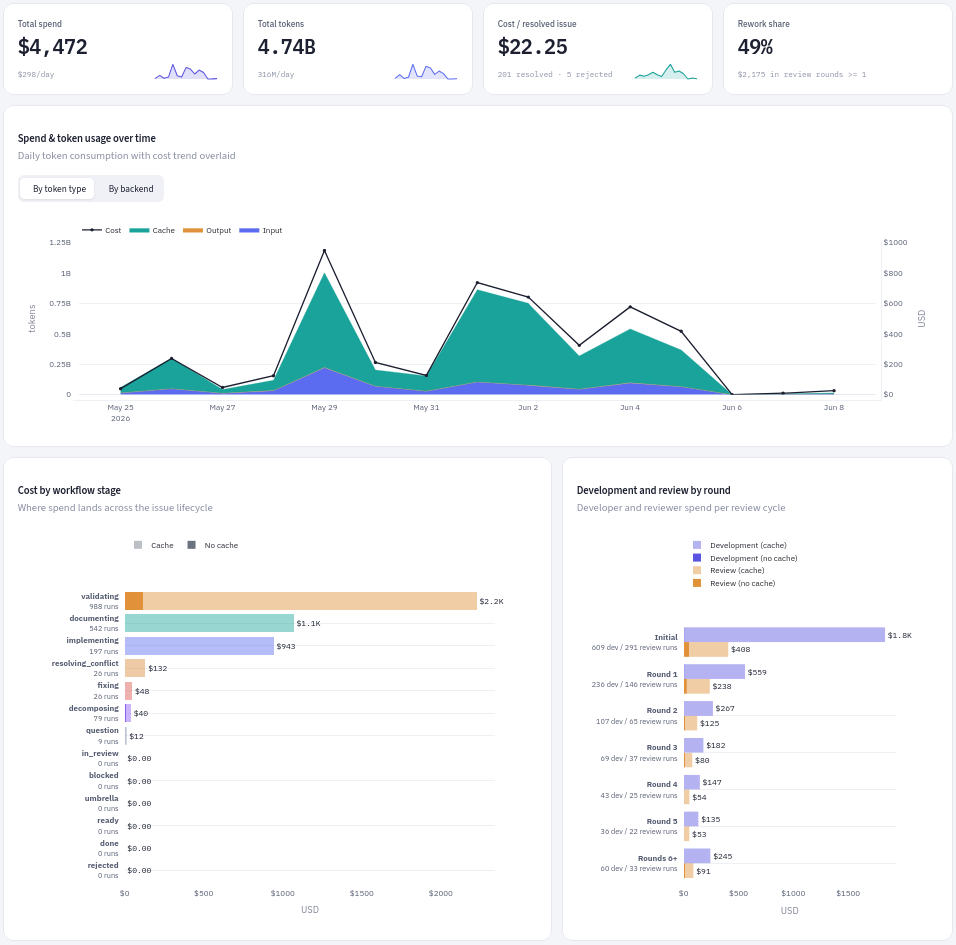
The analytics dashboard shows every tick, agent run, verification, and PR outcome, so you can see what the
orchestrator is doing and why. Built-in usage and cost reporting show which repos, issues, models, and workflow stages
drive spend.
How it works
Each issue carries at most one workflow label, plus optional control labels. A typical unsplit implementation follows
this path:
workflow:decomposing→workflow:ready— the decomposer sizes the issue up and hands a single task to the
implementer; split work creates child issues, usesworkflow:blockedfor dependency waits, and can leave a
no-implementation parent onworkflow:umbrella. WithDECOMPOSE=off, pickup starts atworkflow:implementinginstead.workflow:implementing— the dev agent produces commits in an isolated git worktree; the orchestrator measures
what they add againstMAX_ADDED_LINESand then pushes the branch and opens the PR. A candidate past that ceiling
is held unpublished and sent back toworkflow:decomposingto be adjudicated. Split there, it becomes children
that reuse the work already committed, each owning its own implementation, tests and documentation and each sized
to land under the ceiling — a child issue states the all-path budget its slice was proposed at, and that number
binds nothing: a child is measured exactly as its parent was, over the whole of its own base-to-candidate diff
across every path and however many commits it took, and one that lands past the ceiling is split again;
adjudicated as one change — a verdict that has to say why no safe split of the work was available — nothing is
published and the issue waits for you, because publishing an oversized change unsplit is
a decision the orchestrator does not make for itself. The commit, its worktree and any pull request it stands under
are left exactly as they are, no further decomposer is spawned against them, and replying with what to change
resumes the dev agent and re-measures what comes back — or/orchestrator authorize-oversized <commit>publishes it as it stands. WithDECOMPOSE=offa new candidate skips that measurement and publishes as it always did — but one already recorded
goes on being measured and adjudicated, so flipping the switch never publishes work nobody looked at.workflow:validating— a fresh reviewer checks the diff. Requested changes enterworkflow:fixingand return
here after the dev agent addresses them. Every fix is measured before it is pushed too, and for what the pull
request would come to rather than for what the fix changed, so a PR cannot be grown pastMAX_ADDED_LINESone
small fix at a time; one that would goes back toworkflow:decomposingwith nothing pushed. Adjudicated as a
split there, the open pull request is closed over a notice naming the children it was handed to and the
immutable ref the committed work is preserved on, and the issue becomes an umbrella; adjudicated as one change,
it waits for you there with the pull request left open and nothing pushed, and authorizing it puts the commit on
that pull request and hands the issue back to the stage it came from.workflow:documenting— the dev agent makes the final documentation pass after reviewer approval.in_review— the orchestrator pings you once for each PR head that becomes ready; you merge by hand.done/rejected— the terminal result after the PR is merged or closed without merging.
A PR branch that cannot be rebased cleanly onto the base branch detours through workflow:resolving_conflict and
returns to validation. Every commit that detour publishes is measured the same way a fix is — for what the pull
request would come to — so a branch cannot be grown past MAX_ADDED_LINES one conflict round at a time either; a
resolution that would goes back to workflow:decomposing with nothing pushed and no round spent againstMAX_CONFLICT_ROUNDS. The operator-applied question and discussion flows are described below; the complete graph
is in docs/state-machine/lifecycle.md.
Requirements
- Linux host, Git, Python 3.12+, and
uv(orpython3-venv+pip). CI runs the
suite on 3.12, 3.13, and 3.14, so a newer interpreter installs but is untested. - The CLI agents you actually route to must be authenticated on the host. Defaults:
claudefor decomposition + implementation,codexfor review. Any role can also use
Antigravity (agy)
viaDEV_AGENT/REVIEW_AGENT/DECOMPOSE_AGENT
(seedocs/workflow/command-specs.md). They are spawned with--dangerously-bypass-approvals-and-sandbox/--dangerously-skip-permissions, so the host is the sandbox
boundary. - A GitHub repository to manage plus a fine-grained personal access token scoped to that repository (read/write on
Contents, Issues, Pull requests; Metadata read-only). Full rationale and the generation URL are indocs/configuration.md. - Runtime dependencies are
PyGithubandpsycopg[binary](the latter for the optional analytics Postgres surface),
declared inpyproject.toml. Dev tools (pytest,pytest-cov,ruff, andwemake-python-styleguide) live in adevdependency group; the optional analytics dashboard'sstreamlitandplotlylive in a separatedashboardgroup, souv sync --lockedkeeps the default install minimal. Exact
versions are pinned inuv.lock; CI installs from it.
Quick start
Clone and enter the repo
git clone https://github.com/chippingway/orchestrator.git chipping-orchestrator
cd chipping-orchestrator
Install from the lockfile
uv sync --lockedIf
uvis not installed yet, use the official
installation guide.This creates
.venv/and installs the exact runtime and dev versions recorded inuv.lock. For a runtime-only
install (nopytest,pytest-cov,ruff, or WPS/Flake8), add--no-dev.Configure environment
cp .env.example .envTo include the optional advanced settings in the same file, append the advanced template:
cat .env.example.advanced >> .envEdit
.envand review these basics:HITL_HANDLE— comma-separated GitHub logins (the users the orchestrator @-mentions on questions)REPO— leave default unless pointing at a different repoTARGET_REPO_ROOT— uncomment and set whenREPOpoints at a different repo (path to its local clone)ALLOWED_ISSUE_AUTHORS— uncomment and set on any public repo to restrict automatic issue pickup to the listed
GitHub users. Empty (the default) trusts everyone. When set, untrusted third-party comments are excluded from
workflow input and agent prompts, while non-bot PRs from unlisted authors receiveworkflow:community_contributionand one HITL ping. See
the comment trust boundary.
Then store the personal access token outside the repo so the implementer agent (which runs
in a sibling worktree with sandbox bypass enabled) cannot read it via a relative
path. The default token path is derived fromREPO(~/.config/<owner>/<repo>/token):OWNER=chippingway REPO=orchestrator install -d -m 700 "$HOME/.config/$OWNER/$REPO" printf %s "$YOUR_PERSONAL_ACCESS_TOKEN" > "$HOME/.config/$OWNER/$REPO/token" chmod 600 "$HOME/.config/$OWNER/$REPO/token"Alternatively, export
GITHUB_TOKENin the orchestrator's launch environment. A token written into.envis
ignored with a warning at startup — the orchestrator reads only the two locations above.Basic settings live in
.env.example; common advanced overrides and opt-in examples are in.env.example.advanced. The full reference starts atdocs/configuration.md— every setting, every default, required vars, target-repo
config, agent role specs, cadence and budgets, parallel processing, and in-review behavior — with the
observability sinks and dashboards split out intodocs/configuration/observability.mdand CI, run modes, systemd, and
applying an edited.envintodocs/configuration/operations.md.Verify the agents are authenticated
codex --version
claude --version
agy --version  # if a role uses Antigravity
If a backend is not logged in, run its login flow. Only the backends you actually route to (the first token of
DEV_AGENT/REVIEW_AGENT/DECOMPOSE_AGENT) need to be authenticated.To check configuration of agents see
docs/configuration.md#agent-roles.
Examples of advanced configuration of models and efforts to use could be found indocs/workflow/command-specs.md#examples.Run
./run.shOn first start, the orchestrator creates its workflow and control labels on the repo and begins polling open issues
every 60 seconds. Labels owned only by the orchestrator are namespacedworkflow:<name>; labels a human applies or
reads directly —in_review,question,discussion,done,rejected,backlog, andpaused— keep their bare
spelling. At startup, it migrates legacy labels when possible and recognizes any that remain. See
the migration notes. The configuration docs cover
other run modes and systemd deployment.File a first issue and watch it go end-to-end. Start from something small enough to land in one round, for
instance:Title: Add an
.editorconfig
Body: Add a root.editorconfig(root = true) recording how the repo is already formatted: per file type,
the indent style and size, line endings, final newline, and trailing-whitespace handling that the existing files
actually use. Read them rather than guessing, and don't touch any other file.Within about one minute, the orchestrator should comment "picking this up" and label the issue
workflow:decomposing, then walk it throughworkflow:implementing→workflow:validating→workflow:documenting→in_review, opening a PR along the way. The
orchestrator is manual-merge-only: a mergeable PR whose current head has completed the reviewer-approved final-docs
handoff earns a one-shot HITL ping so you know it is ready. You can then click Merge by hand, or leave review
comments for the orchestrator to address automatically. For the full state-machine narrative — including conflict
resolution and the split-decomposition path — seedocs/state-machine.md.
Asking the orchestrator a question
Apply the question label to any open issue to get a read-only answer instead of an implementation. The orchestrator
spawns the configured DECOMPOSE_AGENT in the issue's worktree with a read-only prompt and posts the answer as an
issue comment that pings HITL_HANDLE; subsequent human replies resume the same locked session, and closing the issue
is the terminal signal. See docs/workflow/conversations.md#question-stage for the prompt and
session contract, and docs/state-machine.md#_handle_question-label-question for the
read-only-violation park reasons.
Discussing an issue's architecture
Apply the discussion label when an issue needs design agreement before implementation. The orchestrator asks the
configured DECOMPOSE_AGENT to study the repository, present architecture choices, and end with numbered questions
and recommendations. Reply by number; the same session incorporates your answers and continues the discussion.
Nothing is written while the design is still open.
Once you confirm the design is settled, the agent writes and commits only plans/issue-<number>.md. The orchestrator
validates that plan-only change and opens a pull request. Merge the PR to accept the design and finish the issue asdone, or close it unmerged to finish as rejected. Closing the issue itself does not decide an open plan PR.
To send the plan straight to implementation, relabel the issue to workflow:implementing before deciding the plan
PR. Do not simply remove the discussion label: an unlabeled issue the orchestrator has already met is left exactly
where you put it rather than greeted a second time, so nothing runs again until a workflow label goes back on. See the
discussion-stage contract for the full prompt and what each round may write, and the
discussion handler for the safety checks and recovery steps.
Holding and unsticking an issue
backlog— apply it (typically at creation) to keep the orchestrator from picking the issue up; remove it to
release the issue for processing.paused— freeze an in-flight issue without discarding its state. If it lands during an agent run, the orchestrator
withholds post-run side effects; committed dev work or a confirmed discussion plan stays on the branch for recovery.
Removing the label is the entire resume action./orchestrator continue— post this as the entire comment to retry a dev session that stopped for a reason no
human has to answer: it went silent, timed out, hit a session/usage limit, or was refused by the model provider (anAPI Error: 529 Overloadedor one of its 5xx siblings). The park comment says which, and names this command when
it is the answer. It is not an un-pause command and does not clear other park reasons — a park waiting on a real
answer refuses it and says so.
The same command answers one more park, on two other stages: an issue stopped underworkflow:decomposingorworkflow:implementingbecause
its per-issue daily spawn budget (MAX_RETRIES_PER_DAY) is spent. Nothing else moves that one — not an edited issue
body, not a widened or disabled cap, not an ordinary reply — and it keeps everything it carries while it waits: the
manifest, the children and the decomposer session on one, the developer's session, its commits and its pull request
on the other, and the frozen candidate with the pull request it stands under where the spent run was the size
adjudication of an oversized change. One trusted/orchestrator continuebuys a single further agent
run on a fresh conversation, and it counts even when your comment carries guidance beside it. It buys that one run
and no more: once the attempt is spent, the next fresh agent this issue needs is refused again, and buying it
is another command./orchestrator authorize-oversized <commit>— post this as the entire comment on an issue parked underworkflow:decomposingbecause the late decomposer read its committed candidate as one change it could not split.
That park is the orchestrator refusing to publish pastMAX_ADDED_LINESon an agent's say-so; this command is you
deciding it may, and it is the only reply that does. It also ends thelate_unauthorized_exemptionpark, which an
issue takes wherever it publishes from when its committed candidate carries an exemption an older build recorded
without an operator's decision behind it — or one whose authorization a hand edit or a half-written crash left
unreadable. The record is left exactly as found either way — nothing is deleted or rewritten to take that park —
and a change measuring at or below the ceiling publishes without the command at all. Whether prose does anything
there depends on where the issue is: before it has a pull request a reply resumes the developer, and once one
carries the work the command is the only reply that stage reads — the park comment says which of the two you are
looking at.<commit>is the candidate's full git object id — an
abbreviation is refused, since nothing here ever writes one. The park comment names the commit, and spells the whole
command out ready to copy. Nothing else authorizes a publication:/orchestrator continueis refused, prose is guidance (which resumes the dev agent against it and re-measures what
comes back, so a comment carrying the command and words is guidance too), a comment posted before the park
comment is not an answer to it, and an account outsideALLOWED_ISSUE_AUTHORSis not read at all.The tick that reads a valid one recomputes what the frozen commit contributes over its frozen base, records that
digest with the candidate, the base, the added-line count, the ceiling it was counted against and the id of your
comment, and then publishes: the commit is exempted from the ceiling, the branch is pushed (onto the existing pull
request where the candidate already had one), and the issue goes back to the stage it came from. Only that commit
is exempt — anything committed on top of it is measured again, and it is that issue's decision as much as that
commit's: a child a split creates later is a separate issue with a pinned record of its own, so it carries neither
the exemption nor your authorization and its first candidate is measured from scratch. A command naming any other
commit gets one reply saying so and changes nothing, and an edit to the issue title, body or earlier comments
outranks the command entirely: the issue parks on the edit first, and the decision has to be made again against the
requirements as they now read.The one way the exemption moves is the orchestrator's own rewrite of that exact commit — the squash on approval,
the base refresh's clean rebase, or the clean rebaseworkflow:resolving_conflictruns. Where the rewritten commit
contributes exactly the change you authorized, the exemption and your authorization carry over to it rather than
asking you again; a rewrite that changed anything, and any commit the orchestrator did not rewrite itself, is
measured like any other candidate
(how that is proved).Publishing it needs the issue's checkout, and where that is not ready the orchestrator holds rather than asking you
twice. The worktree has to be on this host, its tree carrying nothing a push would leave behind, and its head still
on the commit you named; where any of the three is not true, nothing is published, nothing is said, and your
command, the park and the record all stand exactly as they were — so the poll after you put the checkout back
publishes on the command you already wrote. A push that fails after your authorization is recorded is answered the
same way: the park comes back over the terms you agreed to instead of your decision being spent, and the retry
publishes that same commit. A reply that is not the command is guidance as always, and reaches the dev agent.What you authorize is one adjudication of one commit, not the issue. Anything that sends the candidate back to be
adjudicated spends it — an edit you then certify with/orchestrator continue, guidance that resumes the dev agent
(even where the agent answers that the committed work already covers it), or a record the orchestrator can no
longer read the verdict off. Each of those sends the candidate back through adjudication, and the issue then stops
for whatever that answers; there is no standing permission for a commit, so an authorization can never be spent
on a verdict you did not see./orchestrator add-review-rounds N— post this on its own line with a positiveNon an issue parked atMAX_REVIEW_ROUNDS. It grants up toNmore reviewer rounds, capped at the configured maximum./orchestrator add-agent-runs N— post this on its own line with a positiveNon an issue that has spent its
whole lifetime agent-run allowance (MAX_AGENT_RUNS_PER_ISSUE); the park comment says so and quotes the numbers.
It is the only reply that park acts on — no window reopens a lifetime, and an ordinary comment, an edited body, or
a widened setting moves nothing.Nhas to be a whole number from 1 to 50, and what it buys is a new ceiling of
exactly runs already spent + N, recorded on the issue: it widens what this issue may still spend rather than
giving back a run, so the issue stops on the same park again once it reaches the new ceiling. A request outside
that range gets one reply saying so and changes nothing. The tick that reads a valid one goes straight on to the
work, so the run you paid for is the next thing that happens.
Some parks unstick themselves and say so. A push that failed on a network blip, a dev or reviewer agent that timed
out or crashed, or a review the provider refused to serve, is retried quietly on the next tick; when the retry works
the orchestrator posts a short Recovered automatically … No action needed. comment so the @-mention that pinged
you is not the thread's last word. A park that is still stuck stays silent, so a mention with no such follow-up
under it is one that still wants you.
See the backlog / paused reference and the
stage-handler lifecycle for the full semantics.
Observability
The workflow state lives on GitHub, but local logs explain what happened between label transitions.logs/orchestrator.log records process and per-issue handler activity, while logs/analytics.jsonl records stage
transitions, handler timing, agent exits, token use, cost estimates, and a per-tick snapshot of each target repo's
skill catalog by default. The daily pass that reclaims a finished issue's worktrees and branches adds one boundedterminal_artifact_cleanup result there per
candidate it considers — what it did, why, and never a path, a command, or git's own output. Set EVENT_LOG_PATH when
you also want an operator-owned audit JSONL file outside the repo.
For dashboard views,
prepare and start the local Postgres service, setANALYTICS_DB_URL in .env, then sync the JSONL sink into it and launch Streamlit:
uv run python -m orchestrator.observability.analytics.sync.cli
uv sync --group dashboard
uv run streamlit run orchestrator/apps/analytics_dashboard.py
With no database configured, the sync is a no-op and the dashboard displays its unconfigured state. The step-by-step
version is indocs/configuration.md#analytics-dashboard-quickstart.
To browse per-run agent reasoning trajectories together with their token usage and cost (including a claude per-turn
breakdown), enable the opt-in trajectory sink (TRAJECTORY_LOG_PATH) and launch its dedicated viewer — a separate
Streamlit page that reads the JSONL file directly, so it needs no Postgres or sync:
uv sync --group dashboard
uv run streamlit run orchestrator/apps/trajectory_dashboard.py
See docs/observability.md for the map over every observability surface,docs/observability/event-streams.md for the audit and analytics event schemas
and their retention behavior,docs/observability/trajectories.md for the trajectory sink, its operator
workflow, and this viewer,docs/observability/analytics-database.md for the database setup and the
sync CLI, docs/observability/analytics-dashboard.md for the read model
and dashboard details, and docs/observability/usage.md for the usage parser.
Managing multiple repositories
Set REPOS to drive several target repositories from one orchestrator process. Worktrees and PR branches are both
namespaced by the sanitized repo slug (WORKTREES_DIR/<owner>__<name>/issue-N andorchestrator/<owner>__<name>/issue-N). This allows one local repository to manage multiple remotes, such as public
and private repositories that share the same codebase. Identical issue numbers cannot collide on disk or on the branch
ref, even when those repositories share a target_root.
For the entry syntax (including the optional fifth parallel_limit field) and the available per-entry fields, seedocs/configuration.md#multi-repo-repos-syntax. For how multi-repo
ticks fan out and the per-repo / global concurrency caps, seedocs/configuration.md#parallel-processing.
Reference documentation
docs/README.md is the documentation landing page: it maps every page in the set, names the focused
page under each area, and says which addresses stay stable as an area grows. The six areas it opens onto:
| Topic | Link | Covers |
|---|---|---|
| Architecture | docs/architecture.md |
Process model, agent model, push model, module map |
| State machine | docs/state-machine.md |
Labels, states, stage handlers, lifecycle |
| Workflow | docs/workflow.md |
Agent roles, conversation contracts, command specs |
| Configuration | docs/configuration.md |
Env vars, defaults, operator runbooks |
| Observability | docs/observability.md |
Map of the sinks, database, dashboard, parser |
| Security | docs/security.md |
Checklist, GitHub and org settings |
Reporting a suspected vulnerability is SECURITY.md at the root rather than any page in that table: it
names the private channel — GitHub's Security tab, never a public issue, which on this repository is also an
agent-workflow input — the versions that are supported, and what a report earns in return.docs/security.md stays the operator-side hardening checklist behind it.
License
Licensed under the Apache License, Version 2.0. See LICENSE for the full text.
Yorumlar (0)
Yorum birakmak icin giris yap.
Yorum birakSonuc bulunamadi