ccem
Health Uyari
- No license — Repository has no license file
- Description — Repository has a description
- Active repo — Last push 0 days ago
- Community trust — 22 GitHub stars
Code Basarisiz
- rm -rf — Recursive force deletion command in .claude/settings.json
- fs module — File system access in .github/workflows/ci.yml
- fs module — File system access in .github/workflows/release-desktop.yml
- rm -rf — Recursive force deletion command in apps/cli/scripts/generate-logo.sh
- os.homedir — User home directory access in apps/cli/scripts/migrate.js
- fs.rmSync — Destructive file system operation in apps/cli/src/__tests__/cron.test.ts
- fs.rmSync — Destructive file system operation in apps/cli/src/__tests__/desktop-control.test.ts
- process.env — Environment variable access in apps/cli/src/__tests__/desktop-control.test.ts
Permissions Gecti
- Permissions — No dangerous permissions requested
This tool is an environment and session manager for Claude Code and Codex. It enables multi-model parallel sessions, permission management, usage analytics, scheduled cron tasks, and remote control via Telegram or WeChat.
Security Assessment
Overall risk: Medium. The codebase contains several areas of concern regarding local system access. Recursive force deletion commands (`rm -rf`) were found in configuration and shell scripts. Additionally, the code accesses the user's home directory and uses destructive file system operations (`fs.rmSync`), which could lead to accidental data loss if misconfigured. It naturally requires extensive local environment access to manage CLI configurations and run automated tasks. The Telegram and WeChat remote control features imply network requests are made to external servers. No hardcoded secrets were detected, and the tool does not request explicitly dangerous elevated permissions.
Quality Assessment
The project is actively maintained, with its most recent push happening today. It has a small but growing community with 15 GitHub stars. However, a major quality red flag is the complete absence of a license file. Without an explicit open-source license, the software is technically proprietary by default, meaning you do not have clear legal permission to use, modify, or distribute the code, despite the README badge claiming otherwise.
Verdict
Use with caution — the active maintenance and useful features are overshadowed by destructive file operations and a missing software license.
All Kind of MODEL IN ONE APP. Workspace for Claude Code & Codex — multi-model parallel sessions, Telegram remote control, scheduled cron tasks with push notifications, usage analytics, permission modes. CLI + native macOS desktop app.

CCEM
The Control Center for Your AI Coding Assistants







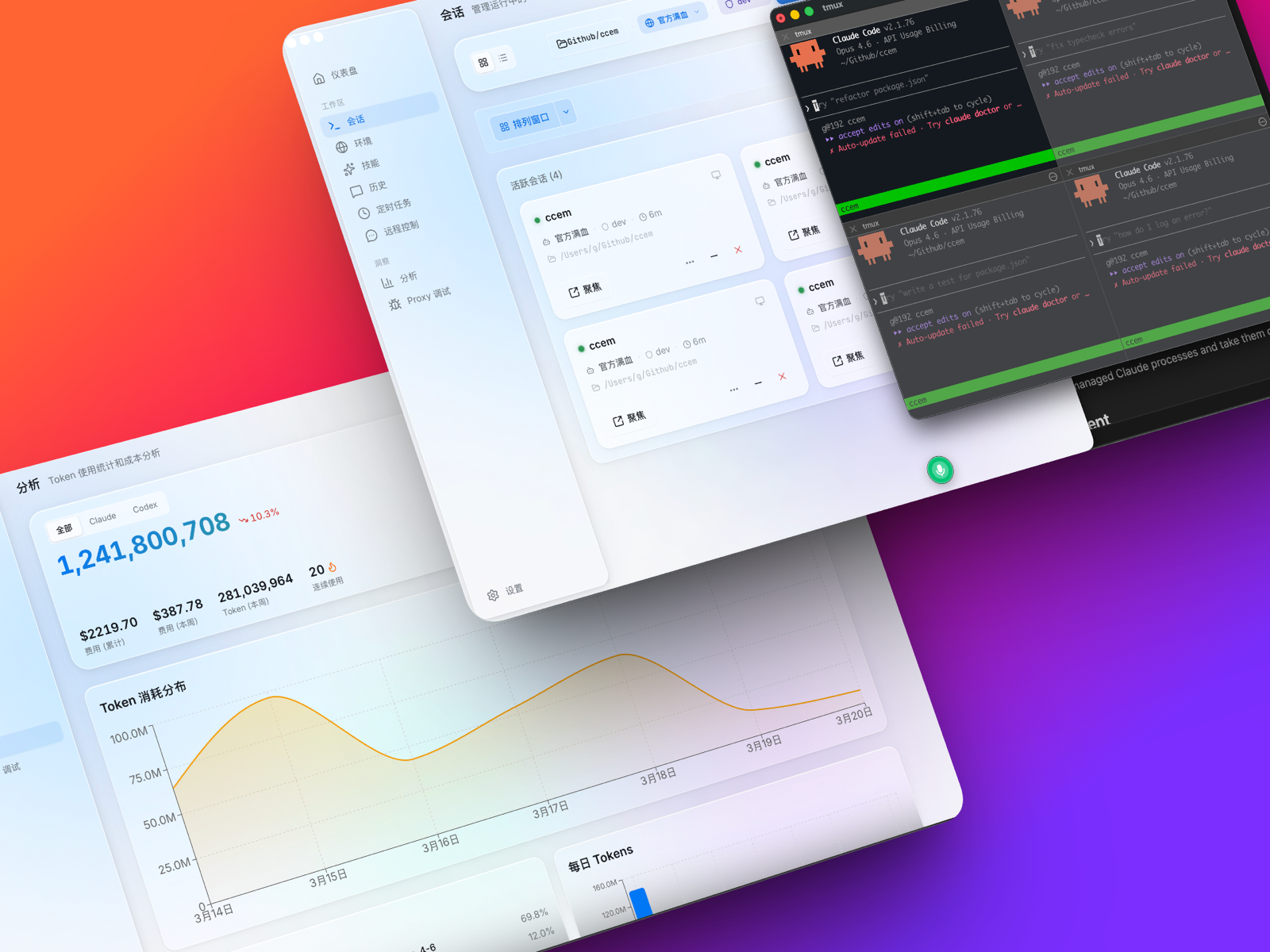
Table of Contents
- Why ccem
- What ccem Does
- Competitive Landscape
- Quick Start
- CLI
- Desktop App
- Coming Soon
- Data Storage
- Tech Stack
- Contributing
- License
Why ccem
After using Claude Code for a while, some things just get annoying.
You want KIMI for frontend, Opus for architecture, DeepSeek for scripts — but every time you switch models you're manually export-ing env vars. Eight terminal tabs later, no idea which is connected to what.
Permissions too. Approving every command gets old. But --dangerously-skip-permissions feels reckless — what if it deletes your .env?
Then there's the money question. How much have you spent this month? Claude Code won't tell you. Codex won't either. The combined bill across both? Nobody knows.
And the real kicker — you're out getting coffee, need Claude to fix something, but your computer's at home. You're stuck.
Or maybe you want Claude to run tests every night, review PRs, push results to your phone. Not a crazy ask, right?
So I built ccem. Environment switching, permission modes, multi-model sessions, usage analytics, cron automation, remote control from your phone — one tool, all covered.
What ccem Does
Two flavors. Pick whichever fits.
| Feature | CLI | Desktop |
|---|---|---|
| Multi-model environment switching | ✅ | ✅ |
| Permission mode presets (6 modes) | ✅ | ✅ |
| Usage analytics & cost tracking | ✅ | ✅ |
| Skill management (discover + install) | ✅ | ✅ Streaming search |
| Remote config sharing (team) | ✅ | ✅ |
| Claude Code + Codex dual engine | — | ✅ |
| Workspace dashboard | — | ✅ |
| Multi-session management | — | ✅ |
| Telegram remote control | — | ✅ |
| WeChat remote control | — | ✅ |
| WeCom (企业微信) bot bridge | — | ✅ |
| Cron scheduled tasks | — | ✅ |
| System tray mini-dashboard | — | ✅ |
| Conversation history browser | — | ✅ |
| API proxy debugging | — | ✅ |
| Session review (todos, artifacts, subagents) | — | ✅ |
| Checkpoint rewind | — | ✅ |
| Global search across history | — | ✅ |
| ccem:// deeplinks & JSON-RPC API | — | ✅ |
| Auto-update | — | ✅ |
| Share poster (AI coding weekly report) | — | ✅ |
Both share the same config file (~/.ccem/config.json). Change an environment in Desktop, CLI picks it up instantly — and vice versa.
Competitive Landscape
| ccem | ccswitch | OpenClaw | Vanilla Claude Code | |
|---|---|---|---|---|
| Multi-model switching | CLI + GUI | CLI only | — | Manual export |
| Permission presets | 6 modes | — | — | 3 built-in |
| Dual engine (Claude + Codex) | Yes | — | — | — |
| Desktop app | Tauri native | — | — | — |
| Remote control | Telegram / WeChat / WeCom | — | Self-hosted | — |
| Cron automation | Templates + AI gen | — | — | — |
| Usage analytics | Claude + Codex unified | — | — | — |
| Tray dashboard | Yes | — | — | — |
| Conversation history | Unified browser | — | Web UI | — |
| API proxy debug | Built-in | — | — | — |
| External API | JSON-RPC + deeplinks | — | — | — |
| Session review | Todos, artifacts, subagents | — | — | — |
| Team config sharing | Encrypted remote load | — | — | — |
| Price | Free & open source | Free & open source | Free & open source | Free |
Quick Start
CLI (Terminal)
npx ccem # Interactive menu — no install needed
Or install globally:
npm install -g ccem
ccem add kimi         # Add an environment (auto-fills URL and models)
ccem use kimi         # Switch to it
ccem dev              # Launch Claude Code in dev permission mode
Desktop
Download from GitHub Releases:
- macOS:
.dmg(Apple Silicon / Intel) - Windows:
.exeinstaller (x64)
Launch, add an environment, pick Claude or Codex, hit go.
CLI
Environment switching, permissions, usage stats, and skill installation — all from your terminal.
Install
npm install -g ccem
# or: pnpm add -g ccem
# or just: npx ccem
Environment Management
ccem              # Interactive menu
ccem add kimi     # Add with preset (auto-fills URL + models)
ccem use kimi     # Switch environment
ccem ls           # List all environments
ccem current      # Show active environment
ccem env          # Output export commands (pipe-friendly)
ccem env --json   # JSON format
ccem run <cmd>    # Run command with env vars injected
ccem del <name>   # Delete environment
ccem rename <a> <b>
ccem cp <src> <dst>
Built-in Presets
| Preset | Base URL | Main Model | Fast Model |
|---|---|---|---|
| GLM (Zhipu) | https://open.bigmodel.cn/api/anthropic |
glm-5.2[1m] | glm-4.7 |
| KIMI (Moonshot) | https://api.moonshot.cn/anthropic |
kimi-k3[1m] | kimi-k3[1m] |
| Kimi Code Plan | https://api.kimi.com/coding/ |
kimi-for-coding | kimi-for-coding |
| MiniMax | https://api.minimaxi.com/anthropic |
MiniMax-M3[1m] | MiniMax-M3[1m] |
| DeepSeek | https://api.deepseek.com/anthropic |
deepseek-v4-pro[1m] | deepseek-v4-flash |
| Bailian (Aliyun) | https://dashscope.aliyuncs.com/apps/anthropic |
qwen3.7-max | qwen3.6-flash |
| Bailian Code Plan | https://coding.dashscope.aliyuncs.com/apps/anthropic |
qwen3.7-plus | qwen3.7-plus |
| OpenRouter | https://openrouter.ai/api |
anthropic/claude-opus-5 | anthropic/claude-haiku-4.5 |
| Ollama | http://localhost:11434 |
gemma4:31b | gemma4:e4b |
| MiMo (Xiaomi) | https://api.xiaomimimo.com/anthropic |
mimo-v2.5-pro | mimo-v2.5 |
| MiMo Token Plan | https://token-plan-cn.xiaomimimo.com/anthropic |
mimo-v2.5-pro | mimo-v2.5-pro |
Official environment defaults to
claude-sonnet-4-5-20250929+claude-haiku-4-5-20251001.
Shell Integration
After ccem use, env vars won't update in your current shell. Add this to ~/.zshrc:
ccem() {
  command ccem "$@"
  local exit_code=$?
  if [[ $exit_code -eq 0 ]]; then
    if [[ "$1" == "use" || -z "$1" ]]; then
      eval "$(command ccem env)"
    fi
  fi
  return $exit_code
}
Then source ~/.zshrc.
Permission Modes
Six presets between "approve everything" and "approve nothing."
| Mode | Description | When to use |
|---|---|---|
| yolo | Allow everything | Your own project, full trust |
| dev | Dev permissions, block sensitive files | Daily development |
| readonly | Read-only | Code review, learning |
| safe | Restrict network + writes | Unfamiliar codebases |
| ci | CI/CD suitable | Automation pipelines |
| audit | Read + search only | Security audits |
ccem yolo / dev / readonly / safe / ci / audit   # Temporary (reverts on exit)
ccem setup perms --dev                            # Permanent
ccem setup default-mode --dev                     # Set default
ccem --mode                                       # Show current
Usage Analytics
ccem usage          # Interactive with calendar heatmap
ccem usage --json   # Machine-readable
Parses JSONL logs from ~/.claude/projects/ to calculate token usage and costs. Price data fetched from LiteLLM and cached locally.
Skill Management
ccem skill add              # Interactive picker (Tab to switch groups)
ccem skill add <name>       # Install preset
ccem skill add <github-url> # Install from GitHub
ccem skill ls               # List installed
ccem skill rm <name>        # Remove
Official presets: frontend-design, skill-creator, web-artifacts-builder, canvas-design, algorithmic-art, theme-factory, mcp-builder, webapp-testing, pdf/docx/pptx/xlsx, brand-guidelines, doc-coauthoring
Curated: superpowers, ui-ux-pro-max, Humanizer-zh
Remote Config
Share API configurations across your team with encrypted transport.
ccem load https://your-server.com/api/env --key YOUR_KEY --secret YOUR_SECRET
Server code lives in server/. AES-256-GCM encryption with authenticated envelope (v2), rate limiting, and hot-reload. See server/ in the repo for full deployment instructions.
CLI Command Reference
Full list| Command | Description |
|---|---|
ccem |
Interactive menu |
ccem ls |
List environments |
ccem use <name> |
Switch |
ccem add <name> |
Add |
ccem del <name> |
Delete |
ccem rename <a> <b> |
Rename |
ccem cp <src> <dst> |
Copy |
ccem current |
Current environment |
ccem env [--json] |
Output env vars |
ccem run <cmd> |
Run with env |
ccem load <url> |
Load remote config |
ccem yolo/dev/readonly/safe/ci/audit |
Temporary permission mode |
ccem --mode |
Current mode |
ccem --list-modes |
All modes |
ccem setup perms --<mode> |
Permanent permissions |
ccem setup default-mode --<mode> |
Default mode |
ccem setup init |
Initialize (skip onboarding, disable telemetry) |
ccem usage [--json] |
Usage stats |
ccem skill add/ls/rm |
Skill management |
Desktop App
A native desktop app built with Tauri 2.0 — real Rust + React, not an Electron wrapper. Runs on macOS and Windows.
On top of everything the CLI offers, Desktop brings an integrated workspace, dual-engine support, remote control, cron automation, and a tray mini-dashboard.
Install
Download from GitHub Releases:
- Windows x64:
CCEM Desktop_*_x64-setup.exe - macOS (Apple Silicon / Intel):
.dmg— macOS 10.15+
Workspace — Your Command Center
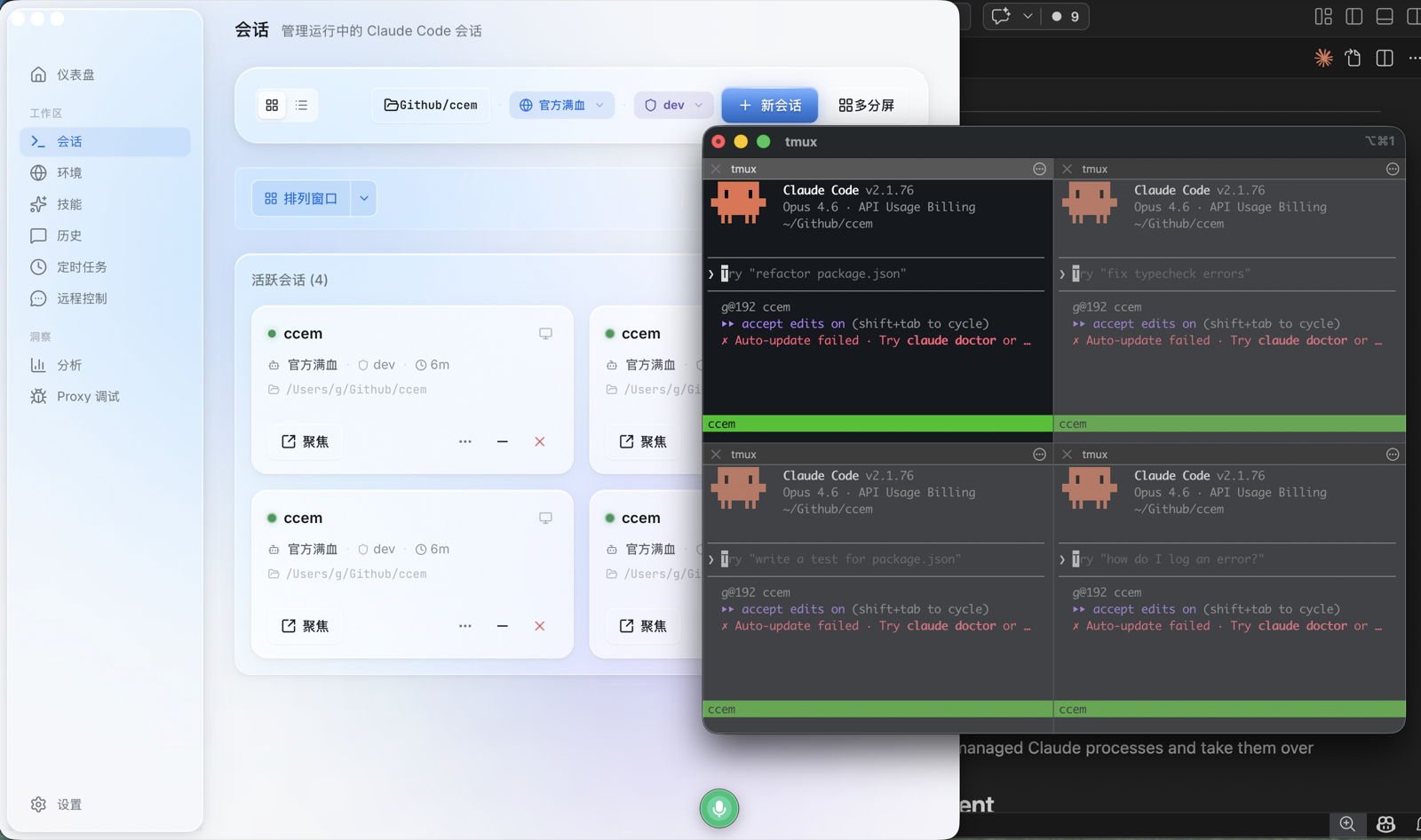
The Workspace is where sessions live. It's not just a launcher — it's a full control surface.
Prompt Composer — Launch sessions with a rich input: $skill tokens, /commands, @file references, image attachments, model/provider/effort selectors. Everything you need before hitting enter.
Slash Commands — ccem scans your installed Claude Code commands and .claude/commands/ directories, parsing YAML frontmatter. Available directly in the composer.
Global Search (Cmd+K) — Search across all past conversations and projects in real time. Find that thing Claude said three days ago.
Multi-Session Management — Run Claude Code in one window, Codex in another, DeepSeek in a third — simultaneously, each with its own environment and permission mode.
- Grid / list view toggle
- Per-session: project dir, environment, permission mode, PID, source (Desktop / CLI / Telegram / WeChat / WeCom / Cron)
- Per-session actions: focus, minimize, stop, close
- Orphan recovery: detect and take over unmanaged Claude processes
Session Review Drawer — Open any session to see a structured review: final assistant reply, changed files (git + SDK), extracted todos, tool evidence, generated artifacts (HTML/images/reports), subagent tracking.
Checkpoints & Rewind — Claude's file checkpoint system exposed in the UI. Create checkpoints, rewind to them, track rewind failures.
Subagent Tracking — ccem tracks subagent lifecycle with named scientific personas (Turing, Curie, Feynman, Hopper, etc.), each with unique symbols and accent colors.
Claude Code + Codex Dual Engine
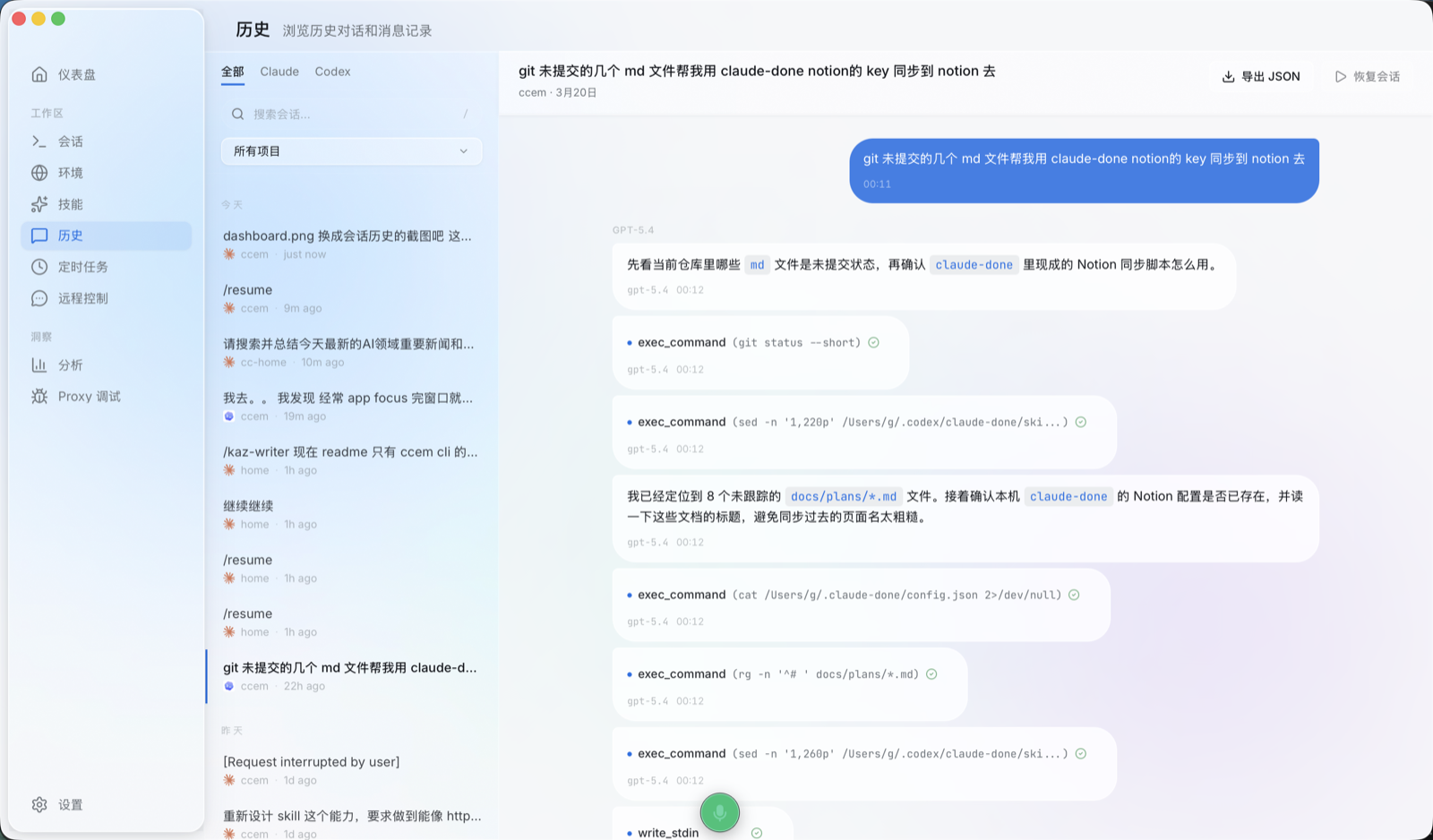
Desktop supports both Claude Code and OpenAI Codex CLI as runtimes. The Dashboard launch panel has a dropdown — pick Claude or Codex, hit launch.
When Claude is selected, environment switching and permission modes work as usual. When Codex is selected, those controls hide — Codex manages its own config.
Both session types appear in a unified view, with proper icons and status indicators. Proxy Debug captures traffic from both engines.
ccem Desktop isn't just a Claude Code manager — it's a control center for your local AI coding assistants.
Remote Control — Telegram, WeChat & WeCom
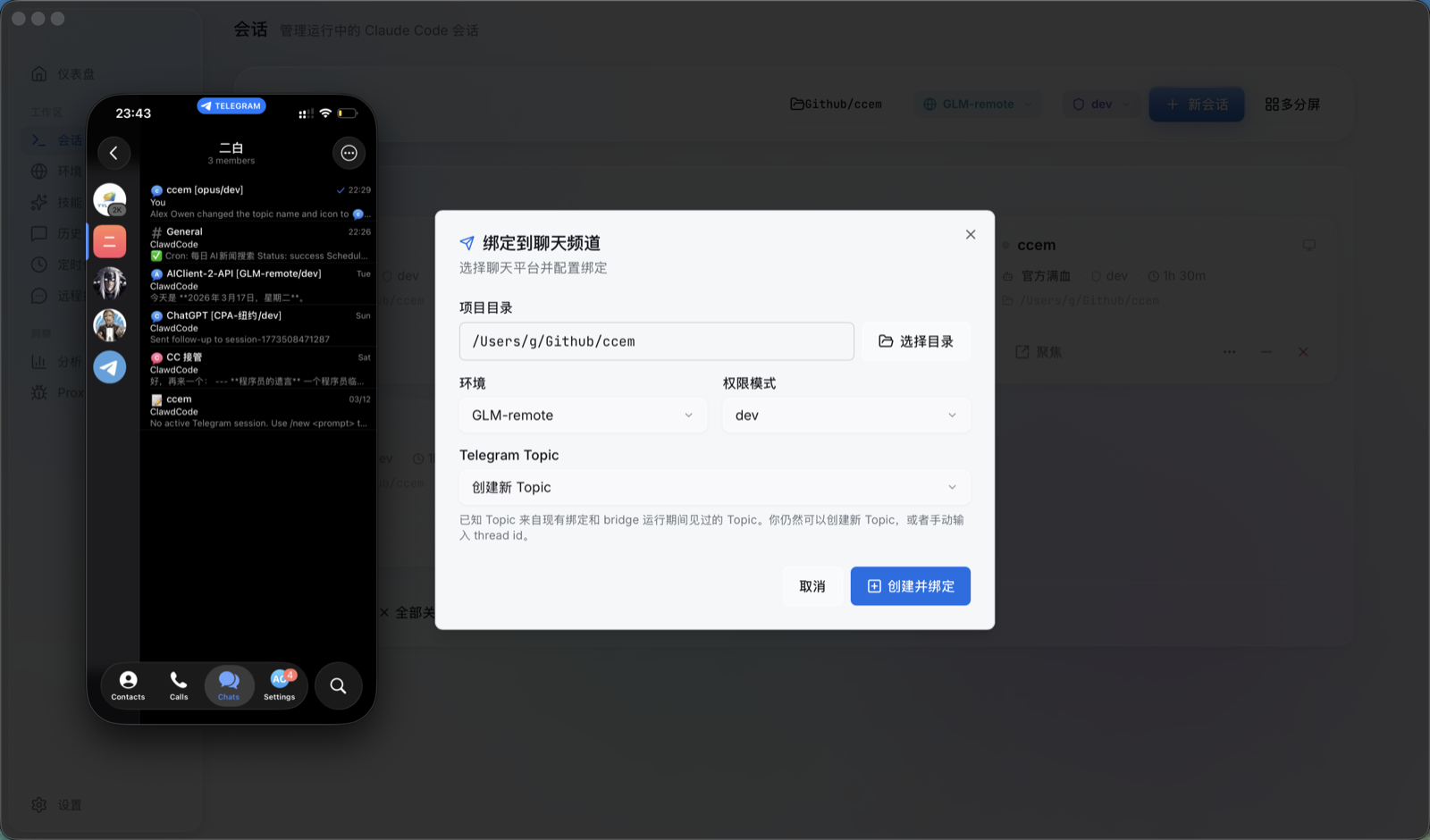
Control Claude Code sessions on your computer from your phone. Unlike the official Claude mobile app (Anthropic subscription required), ccem works with any API key you've configured.
Telegram
Uses Forum Topics — each Topic maps to a project directory on your machine. One Topic, one project, one persistent session. Clean separation, no cross-talk.
- Configure your Bot Token + allowed users in ChatApp
- Bind each Forum Topic to a project directory, environment, and permission mode
- Send messages from your phone — ccem spawns/reuses a local Claude session
- Results stream back in real time, with optional tool call visibility
WeChat (微信)
Direct private chat mode — send a message, ccem spawns a headless Claude session, results stream back. QR code login, user allowlist, permission approval via /approve / /deny in chat.
WeCom (企业微信)
Full enterprise WeChat bot bridge with multi-bot management, WebSocket connectivity, admin/user permission separation, group chat support, @mention triggering, and cron-to-WeCom push notifications.
Feishu (Lark) integration — coming soon.
Cron Tasks — Scheduled Automation
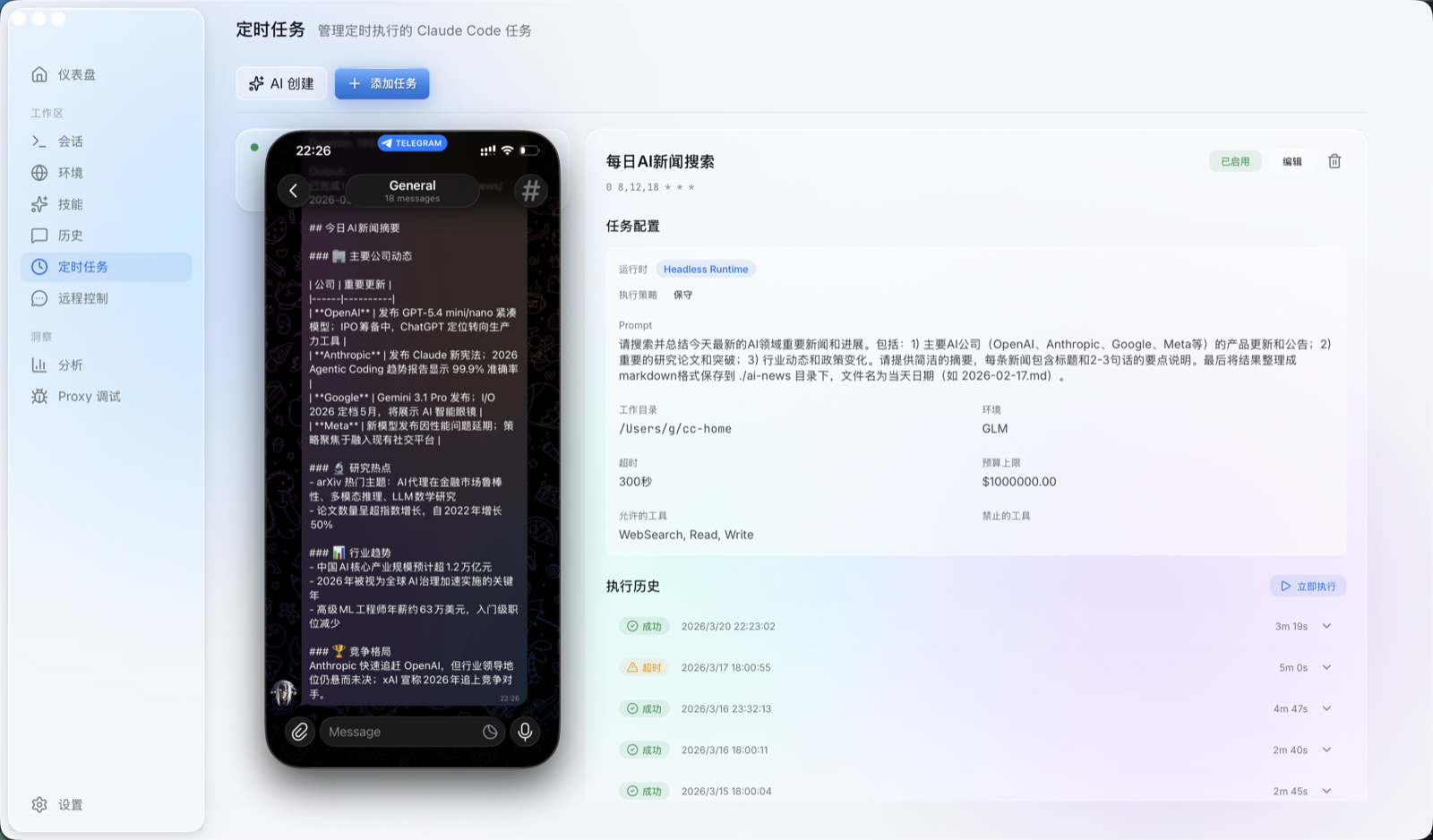
Write a cron expression and a prompt — ccem runs Claude Code on schedule and pushes results to Telegram, WeChat, or WeCom.
- Templates: PR Review, Test Runner, Doc Generation, Security Audit, Changelog
- AI generation: Describe what you want in natural language, get a cron expression + prompt generated
- Auto-push: Results land in your bound chat app when done (or on failure)
- Run history: Status, duration, logs for every execution
- Next run preview: See when upcoming runs will fire
- Retry on failure: One-click re-run
Analytics — Claude + Codex, One View
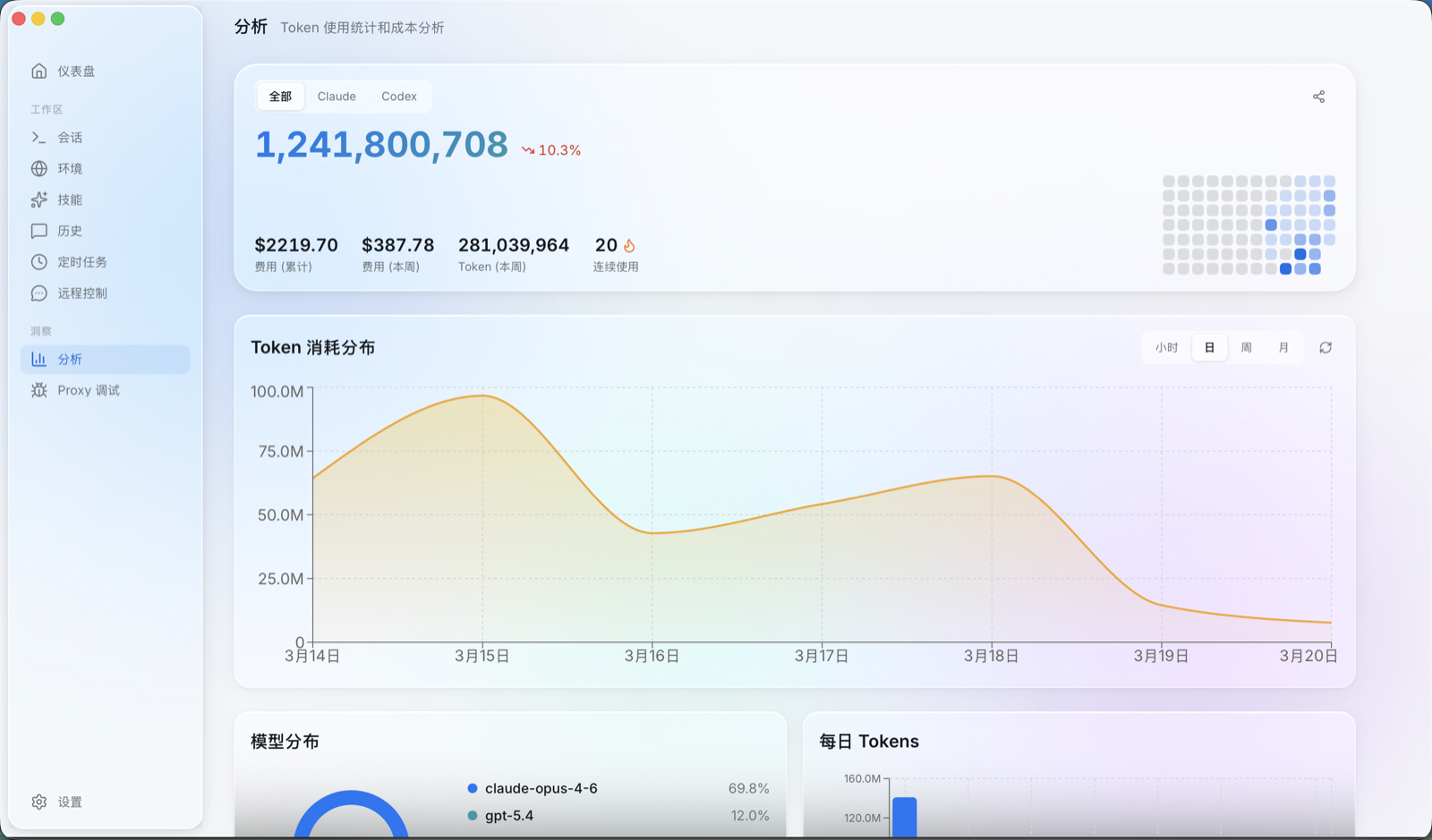
GitHub-style usage statistics for both Claude Code and Codex, unified.
- Daily activity heatmap + token/cost trends by model
- Switch between Claude, Codex, or combined with one click
- Consecutive active days streak + trend arrows (up/down vs. last week)
- Share poster: generate your AI Coding weekly report
Tray Cockpit — System Tray Mini-Dashboard
A persistent mini-dashboard in your system tray, independent of the main window:
- Current environment and permission mode at a glance
- Today's token usage and cost
- 12-hour activity chart with interactive cursor tracking
- Provider breakdown: Claude / Codex / OpenCode
- Active sessions with status dots
- Upcoming cron tasks with expressions
- Quick-launch dock: Workspace, Sessions, Proxy Debug
Conversation History
Browse all past Claude Code and Codex conversations in one place. Filter by source (All / Claude / Codex), grouped by project directory. /compact segmentation boundaries supported.
Proxy Debug
Built-in API request debugging:
- Live traffic list: timestamp, method, URL, status code, size
- Request/response detail viewer with JSON formatting + SSE stream detection
- Separate upstream URL configuration for Claude and Codex
Environments & Skills
Same functionality as CLI, visual interface:
- Environments: Card-based list, one-click preset filling, remote config sync
- Skills: Streaming search as you type, one-click install/uninstall
App Auto-Update
Built-in Tauri updater — check, download, install updates from within the app. Progress tracking with status indicator.
External Control API
A local JSON-RPC server for programmatic control:
ccem://URI scheme deeplinks to sessions, events, and history- Token-authenticated localhost endpoint
create_session,list_sessions,send_input,open_sessionmethods- Enables bot-to-session binding and external tool integration
Settings
- Theme: light / dark / system
- Language: Chinese / English
- Default permission mode / working directory
- Terminal preference (iTerm2 / Terminal.app)
- AI-enhanced mode: use a selected environment for AI features
- Dependency check: auto-detect CLI / claude / codex / tmux
Keyboard Shortcuts
| Shortcut | Action |
|---|---|
| Cmd+1~9 | Switch pages |
| Cmd+Enter / Cmd+N | Launch session |
| Cmd+K | Global search |
| Cmd+, | Settings |
| Cmd+Q | Quit |
Coming Soon
- Feishu (Lark) — bot bridge integration
- Pet/Companion — pixel-art desktop companion that reacts to your session activity
Data Storage
| Path | Contents |
|---|---|
~/.ccem/config.json |
Environment config (API keys encrypted) |
~/.ccem/usage-cache.json |
Usage cache |
~/.ccem/model-prices.json |
Price cache |
.claude/settings.json |
Project permission config |
.claude/skills/ |
Installed skills |
Tech Stack
apps/cli/          CLI — Commander.js + Inquirer.js + Ink (React for CLI)
apps/desktop/      Desktop — Tauri 2.0 + React 18 + Rust
packages/core/     Shared logic — presets, types, encryption
server/            Remote config server
pnpm workspaces monorepo. Frontend: Vite, Tailwind CSS, Zustand, shadcn/ui, Recharts, GSAP. Backend: Rust + Tauri 2.0, window-vibrancy (macOS glassmorphism). i18n: Chinese / English.
Contributing
Issues and PRs welcome!
License
MIT
Yorumlar (0)
Yorum birakmak icin giris yap.
Yorum birakSonuc bulunamadi