ai-gateway
Health Gecti
- License — License: Apache-2.0
- Description — Repository has a description
- Active repo — Last push 0 days ago
- Community trust — 49 GitHub stars
Code Gecti
- Code scan — Scanned 12 files during light audit, no dangerous patterns found
Permissions Gecti
- Permissions — No dangerous permissions requested
Bu listing icin henuz AI raporu yok.
One API for 25+ LLMs, OpenAI, Anthropic, Bedrock, Azure. Caching, guardrails & cost controls. Go-native LiteLLM & Kong AI Gateway alternative.
 Ferro Labs AI Gateway
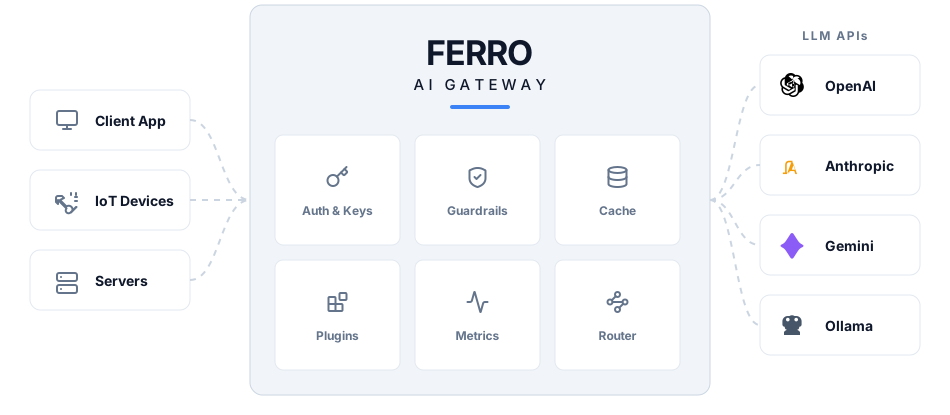
High-performance AI gateway in Go. Route LLM requests across 29 providers via a single OpenAI-compatible API.






🔀 29 providers, 2,500+ models — one API
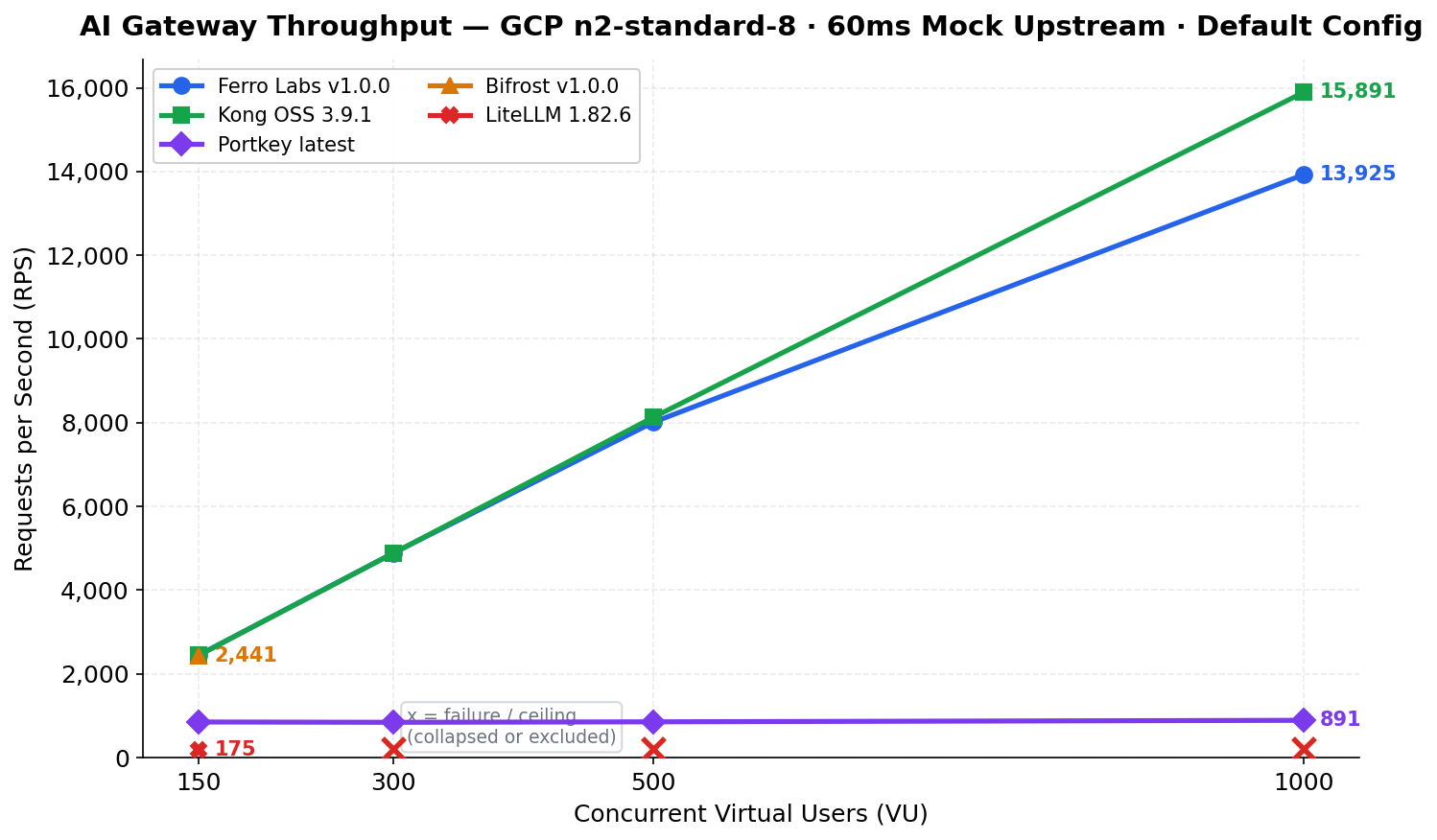
⚡ 13,925 RPS at 1,000 concurrent users
📦 Single binary, zero dependencies, 32 MB base memory
Quick Start
Get from zero to first request in under 2 minutes.
Option A — Binary (fastest)
curl -fsSL https://github.com/ferro-labs/ai-gateway/releases/download/v1.0.0/ferrogw_linux_amd64 -o ferrogw
chmod +x ferrogw
./ferrogw init          # generates config.yaml + MASTER_KEY
./ferrogw               # starts the server
Option B — Docker
docker pull ghcr.io/ferro-labs/ai-gateway:v1.0.0
docker run -p 8080:8080 \
  -e OPENAI_API_KEY=sk-your-key \
  -e MASTER_KEY=fgw_your-master-key \
  ghcr.io/ferro-labs/ai-gateway:v1.0.0
Option C — Go
go install github.com/ferro-labs/ai-gateway/cmd/[email protected]
ferrogw init            # first-run setup
ferrogw                 # start the server
First-time setup
ferrogw init generates a master key and writes a minimal config.yaml:
$ ferrogw init

  Master key (set as MASTER_KEY env var):
  fgw_a3f2e1d4c5b6a7f8e9d0c1b2a3f4e5d6

  Config written to: ./config.yaml

  Next steps:
    export MASTER_KEY=fgw_a3f2e1d4c5b6a7f8e9d0c1b2a3f4e5d6
    export OPENAI_API_KEY=sk-...
    ferrogw
The master key is shown once — store it in your .env file or secret manager. It is never written to disk.
Minimal config
Create config.yaml (or use ferrogw init):
strategy:
  mode: fallback

targets:
  - virtual_key: openai
    retry:
      attempts: 3
      on_status_codes: [429, 502, 503]
  - virtual_key: anthropic

aliases:
  fast: gpt-4o-mini
  smart: claude-3-5-sonnet-20241022
First request
export OPENAI_API_KEY=sk-your-key

curl http://localhost:8080/v1/chat/completions \
  -H "Content-Type: application/json" \
  -d '{
    "model": "gpt-4o-mini",
    "messages": [{"role": "user", "content": "Hello from Ferro Labs AI Gateway"}]
  }' | jq
Why Ferro Labs
Most AI gateways are Python proxies that crack under load or JavaScript services that eat memory. Ferro Labs AI Gateway is written in Go from the ground up for real-world throughput — a single binary that routes LLM requests with predictable latency and minimal resource usage.
| Feature | Ferro Labs | LiteLLM | Bifrost | Kong AI |
|---|---|---|---|---|
| Language | Go | Python | Go | Go/Lua |
| Single binary | ✅ | ❌ | ✅ | ❌ |
| Providers | 29 | 100+ | 20+ | 10+ |
| MCP support | ✅ | ❌ | ✅ | ❌ |
| Response cache | ✅ | ✅ | ✅ | ❌ (paid) |
| Guardrails | ✅ | ✅ | ❌ | ❌ (paid) |
| OSS license | Apache 2.0 | MIT | Apache 2.0 | Apache 2.0 |
| Managed cloud | Coming Soon | ✅ | ✅ | ✅ |
Performance
Benchmarked against Kong OSS, Bifrost, LiteLLM, and Portkey on
GCP n2-standard-8 (8 vCPU, 32 GB RAM) using a 60ms fixed-latency
mock upstream — results reflect gateway overhead only.
Ferro Labs Latency Profile
| VU | RPS | p50 | p99 | Memory |
|---|---|---|---|---|
| 50 | 813 | 61.3ms | 64.1ms | 36 MB |
| 150 | 2,447 | 61.2ms | 63.4ms | 47 MB |
| 300 | 4,890 | 61.2ms | 64.4ms | 72 MB |
| 500 | 8,014 | 61.5ms | 72.9ms | 89 MB |
| 1,000 | 13,925 | 68.1ms | 111.9ms | 135 MB |
At 1,000 VU: 13,925 RPS, p50 overhead 8.1ms, memory 135 MB.
No connection pool failures. No throughput ceiling.
Live Upstream Overhead (OpenAI API)
Measured against live OpenAI API (gpt-4o-mini) using two independent methods:
the gateway's X-Gateway-Overhead-Ms response header (precise internal timing)
and paired direct-vs-gateway requests (external black-box validation).
| Configuration | Overhead p50 | Overhead p99 |
|---|---|---|
| No plugins (bare proxy) | 0.002ms (2 microseconds) | 0.03ms |
| With plugins (word-filter, max-token, logger, rate-limit) | 0.025ms (25 microseconds) | 0.074ms |
The gateway adds 25 microseconds of processing overhead per request in a typical
production configuration. LLM API calls take 500ms-2s — the gateway is 20,000x faster
than the provider it proxies.
How to Reproduce
git clone https://github.com/ferro-labs/ai-gateway-performance-benchmarks
cd ai-gateway-performance-benchmarks
make setup && make bench
Full methodology, raw results, and flamegraph analysis:
ferro-labs/ai-gateway-performance-benchmarks
Features
🔀 Routing
- 8 routing strategies: single, fallback, load balance, least latency, cost-optimized, content-based, A/B test, conditional
- Provider failover with configurable retry policies and status code filters
- Per-request model aliases (
fast → gpt-4o-mini,smart → claude-3-5-sonnet)
🔌 Providers (29)
| OpenAI & Compatible | Anthropic & Google | Cloud & Enterprise | Open Source & Inference |
|---|---|---|---|
| OpenAI | Anthropic | AWS Bedrock | Ollama |
| Azure OpenAI | Google Gemini | Azure Foundry | Hugging Face |
| OpenRouter | Vertex AI | Databricks | Replicate |
| DeepSeek | Cloudflare Workers AI | Together AI | |
| Perplexity | Fireworks | ||
| xAI (Grok) | DeepInfra | ||
| Mistral | NVIDIA NIM | ||
| Groq | SambaNova | ||
| Cohere | Novita AI | ||
| AI21 | Cerebras | ||
| Moonshot / Kimi | Qwen / DashScope |
🛡️ Guardrails & Plugins
- Word/phrase filtering — block sensitive terms before they reach providers
- Token and message limits — enforce max_tokens and max_messages per request
- Response caching — in-memory cache with configurable TTL and entry limits
- Rate limiting — global RPS plus per-API-key and per-user RPM limits
- Budget controls — per-API-key USD spend tracking with configurable token pricing
- Request logging — structured logs with optional SQLite/PostgreSQL persistence
⚡ Performance
- Per-provider HTTP connection pools with optimized settings
sync.Poolfor JSON marshaling buffers and streaming I/O- Zero-allocation stream detection, async hook dispatch batching
- Single binary, ~32 MB base memory, linear scaling to 1,000+ VUs
🤖 MCP (Model Context Protocol)
- Agentic tool-call loop — the gateway drives
tool_callsautomatically - Streamable HTTP transport (MCP 2025-11-25 spec)
- Tool filtering with
allowed_toolsand boundedmax_call_depth - Multiple MCP servers with cross-server tool deduplication
📊 Observability
- Prometheus metrics at
/metrics - Deep health checks at
/healthwith per-provider status - Structured JSON request logging with SQLite/PostgreSQL persistence
- Admin API with usage stats, request logs, and config history/rollback
- Built-in dashboard UI at
/dashboard - HTTP-level connection tracing with DNS, TLS, and first-byte latency
Examples
Integration examples for common use cases are in ferro-labs/ai-gateway-examples:
| Example | Description |
|---|---|
| basic | Single chat completion to the first configured provider |
| fallback | Fallback strategy — try providers in order with retries |
| loadbalance | Weighted load balancing across targets (70/30 split) |
| with-guardrails | Built-in word-filter and max-token guardrail plugins |
| with-mcp | Local MCP server with tool-calling integration |
| embedded | Embed the gateway as an HTTP handler inside an existing server |
Configuration
Full annotated example — copy to config.yaml and customize:
# Routing strategy
strategy:
  mode: fallback  # single | fallback | loadbalance | conditional
                  # least-latency | cost-optimized | content-based | ab-test

# Provider targets (tried in order for fallback mode)
targets:
  - virtual_key: openai
    retry:
      attempts: 3
      on_status_codes: [429, 502, 503]
      initial_backoff_ms: 100
  - virtual_key: anthropic
    retry:
      attempts: 2
  - virtual_key: gemini

# Model aliases — resolved before routing
aliases:
  fast: gpt-4o-mini
  smart: claude-3-5-sonnet-20241022
  cheap: gemini-1.5-flash

# Plugins — executed in order at the configured stage
plugins:
  - name: word-filter
    type: guardrail
    stage: before_request
    enabled: true
    config:
      blocked_words: ["password", "secret"]
      case_sensitive: false

  - name: max-token
    type: guardrail
    stage: before_request
    enabled: true
    config:
      max_tokens: 4096
      max_messages: 50

  - name: rate-limit
    type: guardrail
    stage: before_request
    enabled: true
    config:
      requests_per_second: 100
      key_rpm: 60

  - name: request-logger
    type: logging
    stage: before_request
    enabled: true
    config:
      level: info
      persist: true
      backend: sqlite
      dsn: ferrogw-requests.db

# MCP tool servers (optional)
mcp_servers:
  - name: my-tools
    url: https://mcp.example.com/mcp
    headers:
      Authorization: Bearer ${MY_TOOLS_TOKEN}
    allowed_tools: [search, get_weather]
    max_call_depth: 5
    timeout_seconds: 30
See config.example.yaml and config.example.json for the full template with all options.
CLI
ferrogw is a single binary — no separate CLI tool required.
| Command | Description |
|---|---|
ferrogw |
Start the gateway server (default) |
ferrogw init |
First-run setup — generate master key and config |
ferrogw validate |
Validate a config file without starting |
ferrogw doctor |
Check environment (API keys, config, connectivity) |
ferrogw status |
Show gateway health and provider status |
ferrogw version |
Print version, commit, and build info |
ferrogw admin keys list |
List API keys |
ferrogw admin keys create <name> |
Create an API key |
ferrogw admin stats |
Show usage statistics |
ferrogw plugins |
List registered plugins |
Global flags available on all subcommands: --gateway-url, --api-key, --format (text/json/yaml), --no-color.
Deployment
Local development
export OPENAI_API_KEY=sk-your-key
export MASTER_KEY=fgw_your-master-key
export GATEWAY_CONFIG=./config.yaml
make build && ./bin/ferrogw
Option D — Docker Compose (dev & prod)
The repo ships three Compose files that follow the standard override pattern:
| File | Purpose |
|---|---|
docker-compose.yml |
Base — shared image, port mapping, all provider env var stubs |
docker-compose.dev.yml |
Dev — builds from source, debug logging, live config mount, Ollama host access |
docker-compose.prod.yml |
Prod — pinned image tag, restart policy, health check, resource limits, log rotation |
Dev (builds from source):
docker compose -f docker-compose.yml -f docker-compose.dev.yml up
Prod (pin to a release tag — never use latest in production):
IMAGE_TAG=v1.0.1 CORS_ORIGINS=https://your-domain.com \
  docker compose -f docker-compose.yml -f docker-compose.prod.yml up -d
Provider API keys are commented out in docker-compose.yml. Uncomment and set the ones you need, or supply them via a .env file in the same directory.
Docker Compose (with PostgreSQL)
services:
  ferrogw:
    image: ghcr.io/ferro-labs/ai-gateway:v1.0.0
    ports:
      - "8080:8080"
    environment:
      - OPENAI_API_KEY=${OPENAI_API_KEY}
      - GATEWAY_CONFIG=/etc/ferrogw/config.yaml
      - CONFIG_STORE_BACKEND=postgres
      - CONFIG_STORE_DSN=postgresql://ferrogw:ferrogw@db:5432/ferrogw?sslmode=disable
      - API_KEY_STORE_BACKEND=postgres
      - API_KEY_STORE_DSN=postgresql://ferrogw:ferrogw@db:5432/ferrogw?sslmode=disable
      - REQUEST_LOG_STORE_BACKEND=postgres
      - REQUEST_LOG_STORE_DSN=postgresql://ferrogw:ferrogw@db:5432/ferrogw?sslmode=disable
    volumes:
      - ./config.yaml:/etc/ferrogw/config.yaml:ro
    depends_on:
      - db

  db:
    image: postgres:16-alpine
    environment:
      POSTGRES_USER: ferrogw
      POSTGRES_PASSWORD: ferrogw
      POSTGRES_DB: ferrogw
    volumes:
      - pgdata:/var/lib/postgresql/data

volumes:
  pgdata:
Kubernetes via Helm
helm repo add ferro-labs https://ferro-labs.github.io/helm-charts
helm repo update
helm install ferro-gw ferro-labs/ai-gateway \
  --set env.OPENAI_API_KEY=sk-your-key
Helm charts: github.com/ferro-labs/helm-charts
Migrate to Ferro Labs AI Gateway
From LiteLLM
LiteLLM users can migrate in one step. Ferro Labs AI Gateway is OpenAI-compatible — change one line in your code:
Python (before — LiteLLM):
from litellm import completion

response = completion(
    model="gpt-4o",
    messages=[{"role": "user", "content": "Hello"}]
)
Python (after — Ferro Labs AI Gateway):
from openai import OpenAI

client = OpenAI(
    base_url="http://localhost:8080/v1",
    api_key="your-ferro-api-key",
)

response = client.chat.completions.create(
    model="gpt-4o",
    messages=[{"role": "user", "content": "Hello"}],
)
Node.js (after — Ferro Labs AI Gateway):
import OpenAI from "openai";

const client = new OpenAI({
  baseURL: "http://localhost:8080/v1",
  apiKey: "your-ferro-api-key",
});

const response = await client.chat.completions.create({
  model: "gpt-4o",
  messages: [{ role: "user", content: "Hello" }],
});
Why migrate from LiteLLM:
- 14x higher throughput at 150 concurrent users (2,447 vs 175 RPS)
- 23x less memory at peak load (47 MB vs 1,124 MB under streaming)
- Single binary — no Python environment, no pip, no virtualenv
- Predictable latency — p99 stays under 65 ms at 150 VU vs LiteLLM's timeouts at the same concurrency
Config migration:
# LiteLLM config.yaml               # Ferro Labs config.yaml
model_list:                          strategy:
  - model_name: gpt-4o                mode: fallback
    litellm_params:
      model: gpt-4o                  targets:
      api_key: sk-...                  - virtual_key: openai
  - model_name: claude-3-5-sonnet     - virtual_key: anthropic
    litellm_params:
      model: claude-3-5-sonnet       aliases:
      api_key: sk-ant-...              fast: gpt-4o
                                       smart: claude-3-5-sonnet-20241022
Provider API keys are set via environment variables (OPENAI_API_KEY, ANTHROPIC_API_KEY, etc.) — not in the config file.
From Portkey
Portkey users: Ferro Labs AI Gateway uses the standard OpenAI SDK — no custom headers required in self-hosted mode.
Before (Portkey hosted):
from portkey_ai import Portkey

client = Portkey(api_key="portkey-key")
response = client.chat.completions.create(
    model="gpt-4o",
    messages=[{"role": "user", "content": "Hello"}],
)
After (Ferro Labs AI Gateway self-hosted):
from openai import OpenAI

client = OpenAI(
    base_url="http://localhost:8080/v1",
    api_key="your-ferro-api-key",
)

response = client.chat.completions.create(
    model="gpt-4o",
    messages=[{"role": "user", "content": "Hello"}],
)
Why migrate from Portkey:
- Fully open source — no per-request pricing, no log limits
- Self-hosted — your data never leaves your infrastructure
- No vendor lock-in — Apache 2.0 license
- MCP support — Portkey self-hosted lacks native MCP
- FerroCloud (coming soon) for teams that want a managed service
From OpenAI SDK directly
No gateway yet? Add Ferro Labs AI Gateway in front of your existing code with a single base_url change. No other code changes required.
# Before — calling OpenAI directly
client = OpenAI(api_key="sk-...")

# After — routing through Ferro Labs AI Gateway
# Gains: failover, caching, rate limiting, cost tracking
client = OpenAI(
    base_url="http://localhost:8080/v1",
    api_key="your-ferro-api-key",
)
Ferro Labs AI Gateway handles provider failover automatically — if OpenAI is down, your requests fall through to Anthropic or Gemini with zero application code changes.
FerroCloud
FerroCloud — the managed version of Ferro Labs AI Gateway with multi-tenancy, analytics, and cost governance — is coming soon.
👉 Join the waitlist at ferrolabs.ai
OpenAI SDK Migration
Point existing OpenAI SDK clients to Ferro Labs AI Gateway by changing only the base URL.
Python:
from openai import OpenAI

client = OpenAI(
    api_key="sk-ferro-...",
    base_url="http://localhost:8080/v1",
)
TypeScript:
import OpenAI from "openai";

const client = new OpenAI({
  apiKey: "sk-ferro-...",
  baseURL: "http://localhost:8080/v1",
});
Contributing
We welcome contributions. New providers go in this OSS repo only — never in FerroCloud. See CONTRIBUTING.md for branch strategy, commit conventions, and PR guidelines.
Community
- GitHub Discussions
- Discord
- Built with Ferro Labs AI Gateway? Open a PR to add to our showcase.
License
Apache 2.0 — see LICENSE.
Yorumlar (0)
Yorum birakmak icin giris yap.
Yorum birakSonuc bulunamadi