gitviber
Health Uyari
- License — License: GPL-3.0
- Description — Repository has a description
- Active repo — Last push 0 days ago
- Low visibility — Only 5 GitHub stars
Code Basarisiz
- rm -rf — Recursive force deletion command in scripts/install-mac.sh
- process.env — Environment variable access in scripts/tauri.mjs
Permissions Gecti
- Permissions — No dangerous permissions requested
Bu listing icin henuz AI raporu yok.
Vibe code from one app: run agents in parallel worktrees, watch their diffs live, browse, test and commit. A 14 MB git client with a file explorer and terminal built in.

GitViber
Vibe code from one app.
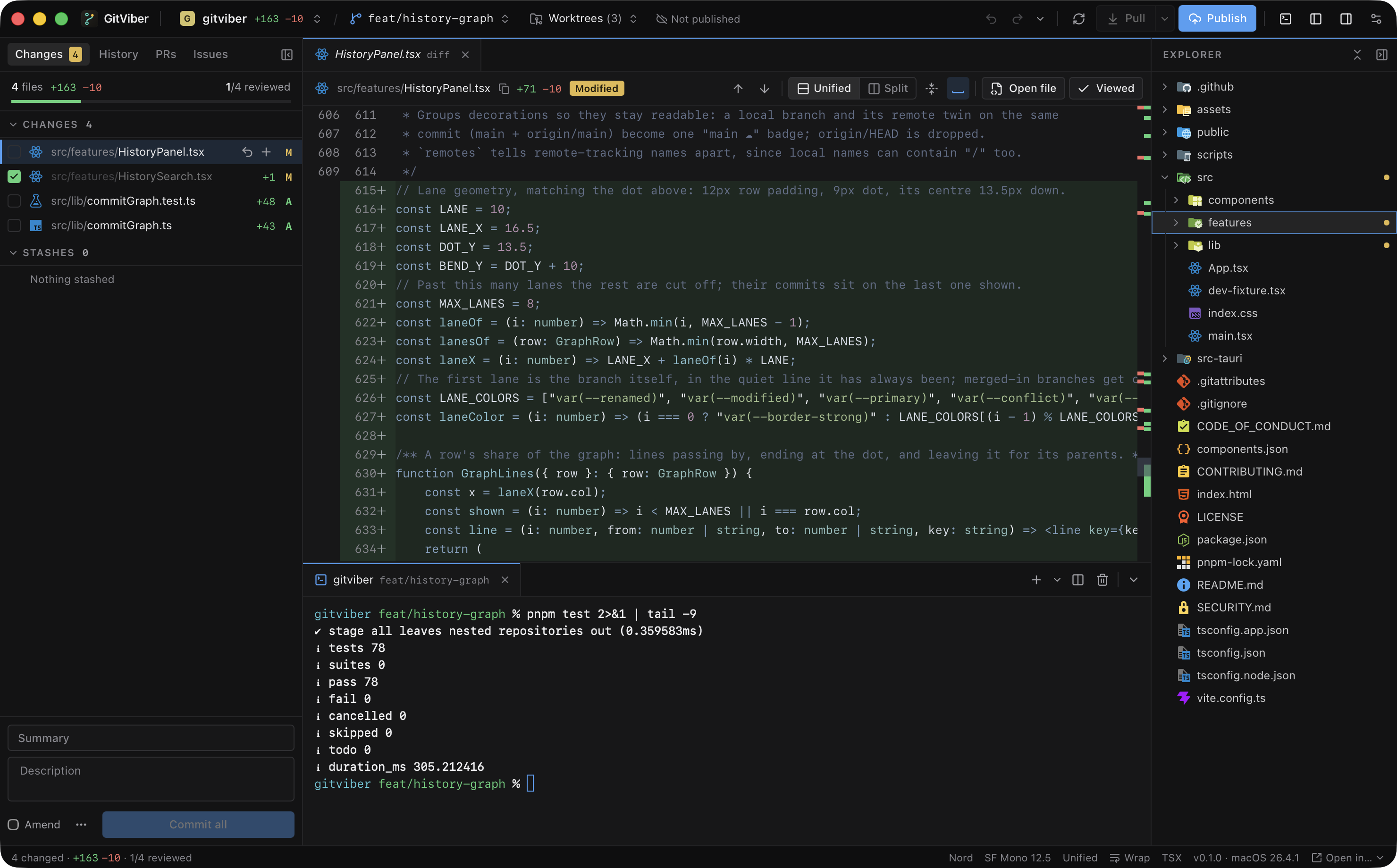
Run your agents in parallel worktrees, watch their diffs land live, browse the code, test it in
the terminal and commit, without GitHub Desktop, an editor and three terminal windows open.



Why GitViber
Coding with agents turned the day into reading code. You start Claude Code or Codex in a few
worktrees, then juggle an editor to look at the files, GitHub Desktop to see the diffs, a pile of
terminals to run things and a browser for the pull requests. Editors like Cursor easily eat
gigabytes of RAM just to let you read.
GitViber is one window for all of it, and it's small:
- 14 MB app. GitHub Desktop is 681 MB. No bundled Chromium, a Rust core and the system webview.
- Idles at 0% CPU. It wakes up when files change, not on a timer.
- Memory it gives back. Activity Monitor also counts memory the app is done with but WebKit
hasn't collected yet, so the number climbs while you click around and drops again after a few
idle minutes. Closing a terminal frees its GPU memory at once. - Fast on big diffs. Diffs are computed in Rust and highlighted off the main thread.
- Plain git underneath. Your config, hooks, credentials and signing. Nothing of its own goes into the repo.
Everything in one window
Many agents, one screen
Give every agent its own worktree and switch between them from the top bar, each with its change
count. Start one from any branch or commit, in the folder you choose, or check a pull request out
into its own worktree without touching yours. Rename one along with its folder, lock it, and
remove or prune it when the work is merged. Every worktree keeps its own terminals, so nothing
gets lost when you hop between them.
Watch the work land
Diffs refresh the moment an agent saves, without losing your scroll position. Whole files, unified
or split, word-level highlights. J / K walk the changed files and V marks one viewed; when
the agent touches it again, the mark clears so you know to look again.
Test it right there
A real terminal sits under the diff (⌘J), with tabs and splits. Run the tests, start the dev
server or talk to the agent without leaving the change you're reading.
Browse the code, not just the diff
A full file explorer with change bars in the gutter, quick open (⌘P) and rename, create and
delete from the right-click menu. For most days that's the editor you no longer need open.
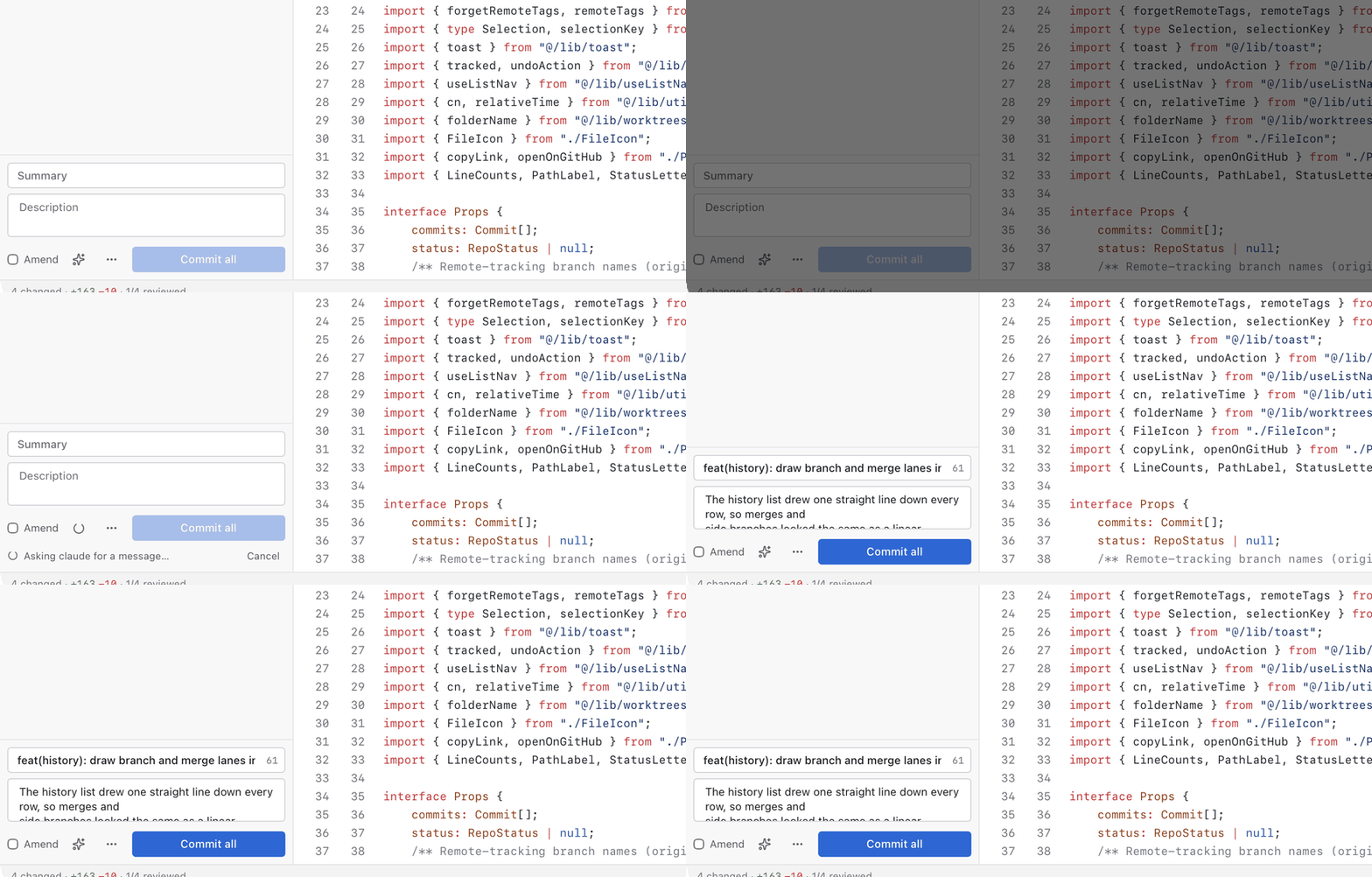
Commit messages from your agent
Turn it on in Settings, hit the sparkle next to the commit box, and your own claude -p orcodex exec writes the message from the diff. No API key, no extra account: it uses the CLI
you're already signed in to.
Good-looking, and yours
Light and dark themes, eight syntax themes, your own code font and interface scale. Every action
has a shortcut, every shortcut can be rebound, and holding ⌘ shows them all.
 |
 |
And the rest of git
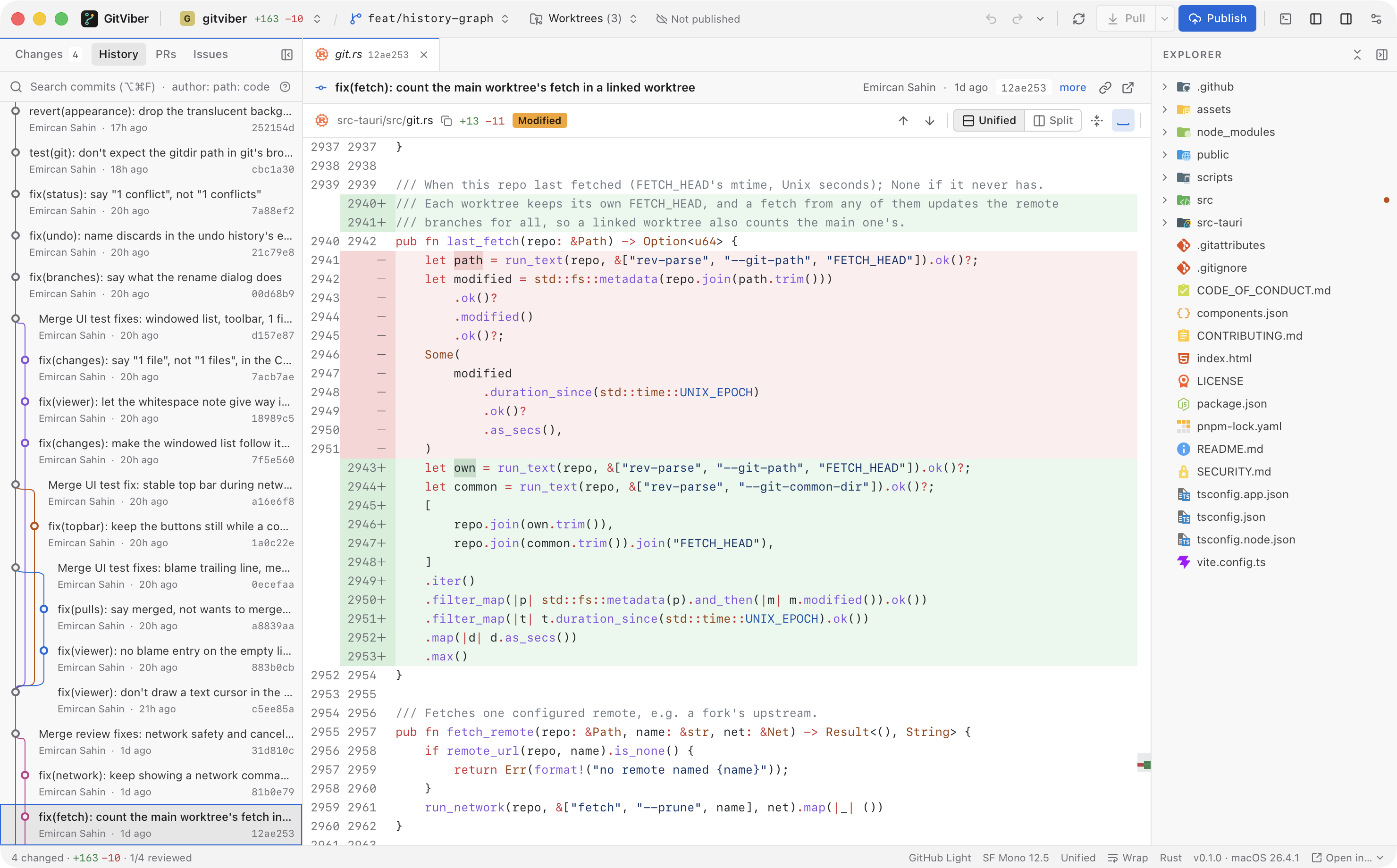
| History | Branches and merges as a colored lane graph. Undo, revert, reset, check out or tag from the right-click menu; anything that rewrites pushed commits asks first |
| Branches | Merge, rebase, and pull with fast-forward, merge or rebase |
| Conflicts | Resolve block by block (current, incoming, both, or by hand), then continue, skip or abort |
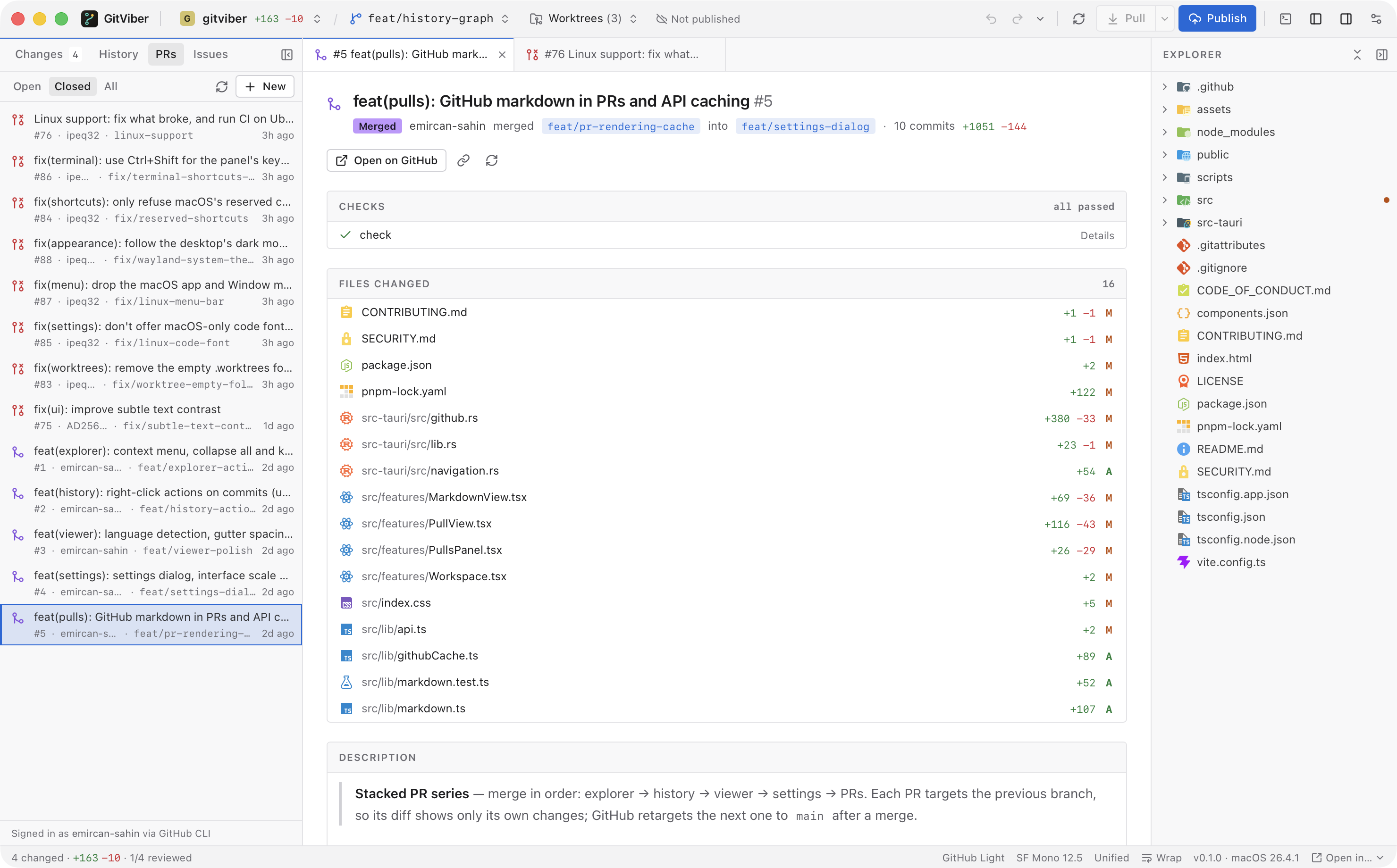
| Pull requests | List, read, review in the same diff viewer, create, merge and check out (GitHub) |
| Issues | List, read, open, edit, comment, close and reopen (GitHub) |
Install
There are no signed release builds yet, so for now you build it. You need Rust (stable), Node 22+,
pnpm and git.
git clone https://github.com/emircan-sahin/gitviber && cd gitviber
pnpm install
pnpm install:mac    # macOS: builds a release and copies it into /Applications
pnpm tauri build    # Linux: makes a .deb, an .rpm and an AppImage
On Linux, Tauri's webview also needs WebKitGTK 4.1 and a C toolchain:
sudo apt install libwebkit2gtk-4.1-dev build-essential        # Debian, Ubuntu
sudo dnf install webkit2gtk4.1-devel gcc                       # Fedora
sudo pacman -S --needed webkit2gtk-4.1 base-devel              # Arch
If the AppImage step fails in linuxdeploy (its bundled strip is too old for current
toolchains, e.g. on Arch), run it with NO_STRIP=true.
GitViber is used daily on macOS. CI builds and tests it on Linux too, but the app itself is only
starting to get used there (#35). Windows
is untested.
Privacy
No telemetry, no API keys. The app talks to your git remotes and, for pull requests and issues,
GitHub. For those it borrows a login you already have, the GitHub CLI (gh auth token) first,
then git's stored github.com credential, and keeps the token in memory. Errors go to a local file
(~/Library/Logs/app.gitviber.desktop/errors.log on macOS) and nowhere else. Markdown from GitHub
is cut down to GitHub's own HTML allowlist, and an image hosted outside GitHub loads only when you
click it. Commit message suggestions go wherever the command you picked sends them.
Shortcuts
Every shortcut, and how they map on LinuxEvery shortcut below except moving around a list or view (arrows, ↵, ⎋, ⇧F10) can be rebound in Settings (⌘,).
While you type, only shortcuts with ⌘, ⌃ or an F-key apply, except ⌘← ⌘→ and ⌃ with a letter, which edit the text.
On Linux and Windows ⌘ is Ctrl, the views are on Alt+1–4, Ctrl+Tab / Ctrl+Shift+Tab switch tabs, and the terminal's⌘T ⌘D ⌘K ⌘W are Ctrl+Shift+T, D, K and W, since Ctrl+letter stays the shell's.
| Keys | |
|---|---|
⌘, |
Settings |
Hold ⌘, or ⌘/ |
Show every shortcut, the ones that don't work where you are dimmed (the hold can be turned off in Settings) |
⇧⌘P ⌘P |
Command palette, quick open |
⌃1 ⌃2 ⌃3 ⌃4 |
Changes, History, PRs, Issues |
⌘1 … ⌘8, ⌘9 |
Go to tab 1 to 8, the last tab |
⇧⌘] ⇧⌘[, ⌘→ ⌘←, ⌃⇥ ⌃⇧⇥ |
Next / previous tab |
J K |
Next / previous changed file |
↓ ↑ ↵ |
Move through the focused list (Changes, History, PRs, Issues), ↵ keeps the tab open; Home End PgUp PgDn too |
⇧F10 |
The focused row's right-click menu |
V |
Mark file viewed |
S ⌘⌫ |
Stage or unstage, discard the open file |
F7 ⇧F7, ⌥↓ ⌥↑ |
Next / previous change |
⌥S ⌥C ⌥Z |
Split view, collapse unchanged, word wrap |
⌘B ⌥⌘B |
Toggle the git panel, the file explorer |
⇧⌘G ⌘E ⇧⌘E |
Focus the git panel, the code view, the file explorer |
F6 ⇧F6 |
Focus the next / previous panel (not from the terminal, which keeps F-keys for its programs) |
→ ⎋ |
From a file in a list to its code, and back |
↑ ↓ PgUp PgDn Space Home End |
Scroll the focused code view, ← → sideways |
⌘J or ⌃ ` |
Toggle the terminal |
⌘T |
New terminal |
⌘D ⌘K, ⌥⌘← ⌥⌘→ |
Split, clear, previous / next pane (in the terminal) |
⌘= ⌘− ⌘0 |
Zoom the interface |
⌥⌘= ⌥⌘− ⌥⌘0 |
Code font size |
⌘W |
Close tab, or the terminal pane in focus |
⌘↵ |
Commit (in the commit message) |
⌘R |
Refresh |
⌘O |
Open repository |
Hacking on it
Tauri 2 and Rust on the backend, React 19 with Radix and Tailwind v4 on the front. Diffs are
computed in Rust with similar, highlighting is Shiki in a web worker, and the UI runs in the
system webview, so there's no bundled Chromium.
pnpm tauri dev      # run the app (takes the next free port if 1420 is in use)
pnpm check          # what CI runs: build, tests, rustfmt, clippy
Bug reports and small, focused PRs are welcome. CONTRIBUTING.md covers setup
and the few rules the app depends on. Report security issues privately, see SECURITY.md.
License
GPL-3.0. Use it, change it, share it; a fork you ship has to stay open under the same
license.
Yorumlar (0)
Yorum birakmak icin giris yap.
Yorum birakSonuc bulunamadi