folio
Health Warn
- License — License: MIT
- Description — Repository has a description
- Active repo — Last push 0 days ago
- Low visibility — Only 6 GitHub stars
Code Warn
- fs module — File system access in desktop/package.json
- process.env — Environment variable access in desktop/scripts/demo-bundle.mjs
Permissions Pass
- Permissions — No dangerous permissions requested
No AI report is available for this listing yet.
Read, search and review folders of Markdown: specs, ADRs and notes. Highlight, annotate, and copy review notes for coding agents. macOS, Windows, Linux.

Folio
Read, search and review folders of Markdown — specs, ADRs, notes and Obsidian vaults.
For macOS, Windows and Linux.



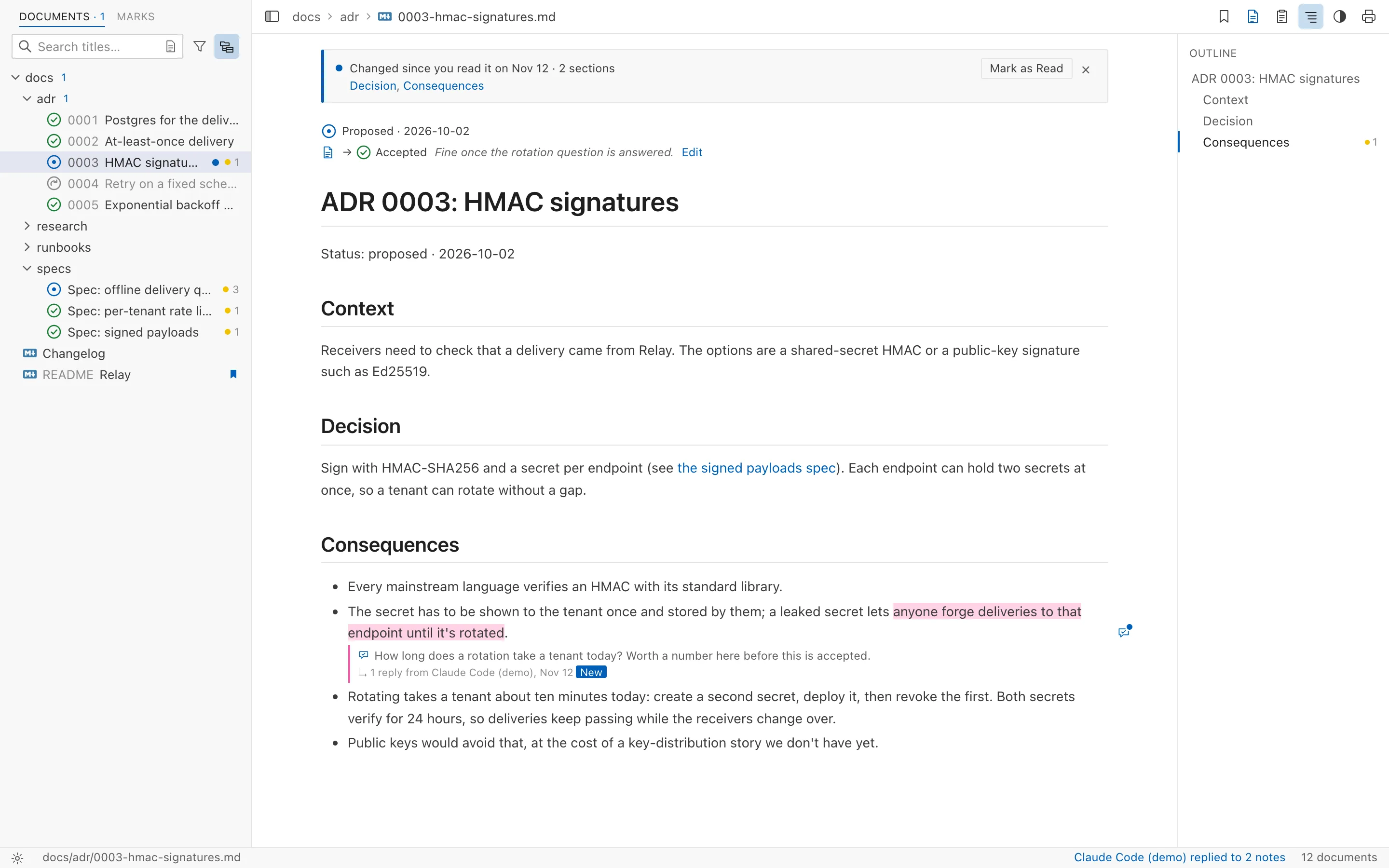
Folio is a desktop app for reading and reviewing folders of Markdown: the
specs, architecture decision records and design notes that pile up in every
project, more and more of them written by coding agents. Open a project's
docs folder, see where each document stands, mark what needs another pass,
and send your notes back to the agent.
Think of a newspaper: coding agents are the reporters, filing drafts faster
than anyone can read them, and you're the editor, who reads each one, marks
it up, sends it back and decides what runs. Folio is the editor's desk:
 agent writes / revises ──► Folio: what changed? read, mark up
          ▲                                   │
          └────── notes, replies ◄────────────┘
The agent edits the files. Folio only reads them: your highlights, notes and
read history are kept in its own folder, ~/.folio.
Try it in your browser: the live demo
opens a sample repository of specs and ADRs, with nothing to install.
Download
Get the latest version from the download page
or from GitHub Releases:
| Platform | File |
|---|---|
| macOS (Apple Silicon) | Folio-<version>-arm64.dmg — signed and notarized |
| macOS (Intel) | Folio-<version>.dmg — signed and notarized |
| Windows | Folio-Setup-<version>.exe — not code-signed yet, so SmartScreen shows a warning: choose More info → Run anyway |
| Linux | Folio-<version>.AppImage — chmod +x it, then run it |
The app checks for updates at launch (Folio → Check for Updates…).
Features
- See where every document stands. Statuses and tags from front matter
or aStatus:line, as icons in a folder tree, with filters. - Mark it up. Highlights, notes, bookmarks, and a verdict on a whole
document ("accept once retries are capped"). Every mark in one list. - Send your review to a coding agent. Copy your notes as Markdown with
file paths and lines, or let the agent fetch them through Folio's MCP
server and reply to each one in Folio. - See what changed since you read it. New and changed documents are
marked, and a changed document names the sections that changed. - Git-aware. What changed on your branch, compared with the base branch,
and the last commit of each document, with worktrees. - Search titles, headings and full text, or focus on one folder.
- Reads what you write: GitHub Flavored Markdown, Obsidian links and
embeds, math, and Mermaid diagrams in light and dark themes, in three
document styles, to print or PDF.
The user guide covers every
feature, the settings
and the keyboard shortcuts.
What's new in each version is in the changelog.
Use it with Claude Code
Install the plugin in Claude Code:
/plugin marketplace add crazzybot/folio
/plugin install folio@folio
Then /folio:review has the agent get your review notes, revise the
documents and answer each note in Folio.
To skip asking after each round, run /folio:review-loop instead: the agent
waits for your notes. Send in the Send review notes dialog hands
them straight to it. It addresses them, answers each one, and waits for the
next round. A Live pill in Folio shows where it's waiting; End Review
Loop stops it. See Review in a loop.
Other agents (Cursor, Codex…) use the MCP server directly, waiting withfolio_wait_for_review: see packages/mcp.
Settings → Coding agents in the app has both setups.
Privacy and security
Folio never writes to your documents, has no account, and sends no
analytics. It goes online only to check for updates and to load web images
in a document. Markdown is treated as untrusted: HTML is sanitized, and only
safe file types are served. See SECURITY.md for the details
and how to report a vulnerability.
Building from source
You need Node.js 20.19 or later and npm 10.
git clone https://github.com/crazzybot/folio.git
cd folio/desktop
npm install
npm start
npm start builds the frontend and the main process and launches the app.
Pick the repository's workspace/ folder when it asks for one.
docs/development.md covers live reload, the live
demo, the project structure and the checks; docs/releasing.md
how releases are made.
Contributing
Bug reports, ideas and pull requests are welcome: see
CONTRIBUTING.md for setup, checks and conventions. This
project follows a Code of Conduct.
License
MIT © 2026 Alexei Pogrebtsov
Folio includes open-source software under its own licenses. Their notices
are in Help → Third-Party Licenses in the app, and Settings →
Third-party licenses in the live demo.
Reviews (0)
Sign in to leave a review.
Leave a reviewNo results found