traxagent-claude-plugin
Health Gecti
- License — License: MIT
- Description — Repository has a description
- Active repo — Last push 0 days ago
- Community trust — 174 GitHub stars
Code Gecti
- Code scan — Scanned 9 files during light audit, no dangerous patterns found
Permissions Gecti
- Permissions — No dangerous permissions requested
Bu listing icin henuz AI raporu yok.
Ask Claude, ChatGPT, Claude Code, Cursor or VS Code who spent your AI budget and what to fix. TraxAgent's read-only MCP server and Claude Code plugin.
TraxAgent: ask your AI tools about your AI spend across multiple AIs and teams






Who spent your AI budget last month, and on what? Ask Claude, ChatGPT, Claude Code, Cursor, Gemini or VS Code, and get the answer from your real usage.
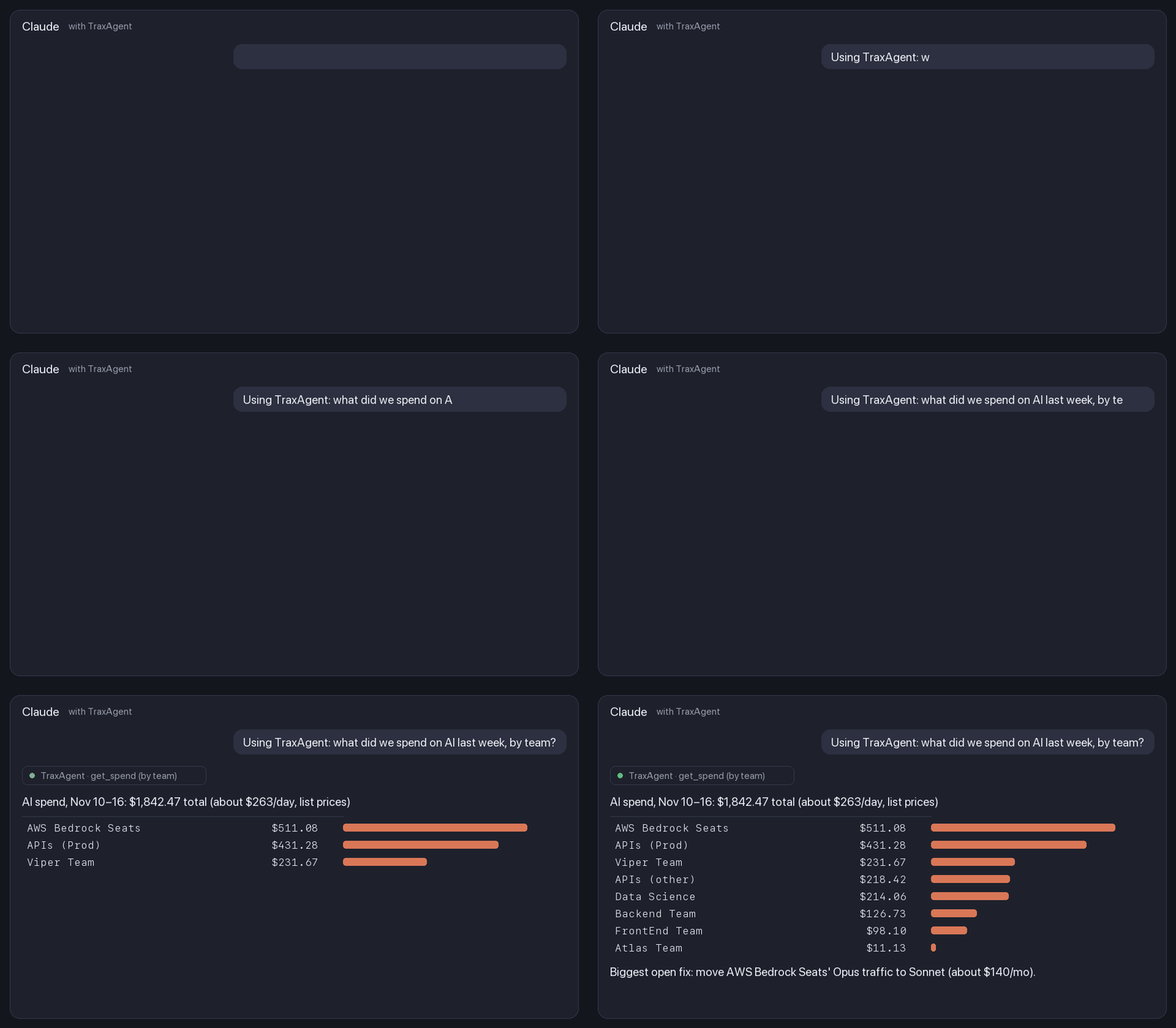
Two questions, answered from the sample company: what each team spent last week, then which cost cuts to make first. The second answer ranks the fixes by effort, not just by size, so the safe config changes come before the ones that need a quality test.
Your teams may pay for AI in 5 places or more: the Anthropic, OpenAI and Gemini APIs, Claude Code or Codex, Cursor, and Claude or ChatGPT seats. Each vendor's console is correct about its own slice and blind to the rest.
TraxAgent pulls them into one place every night, by team and by person. Then an AI review goes through your usage and tells you where you're overpaying. Each fix comes with what it costs you per month and the exact change to make. You walk into the budget meeting with the full number, where it went, and what you've already done to bring it down.
This repo is the Claude Code plugin. The same read-only server, https://www.traxagent.io/mcp, also works in Claude, ChatGPT, Cursor, VS Code and any MCP client: see Use it in other AI tools.
Try it in 30 seconds, no account
After installing (below):
/traxagent:spend-auditshows what your own Claude Code use costs at API prices, by model, project, day and session, plus your cache hit rate and what one model tier down would save. Claude reads Claude Code's local logs with its own tools and sends nothing anywhere.- Ask about a sample company: "Using TraxAgent demo, what did we spend on AI last week by team?" The
ai-spend-demoserver answers from sample data with no sign-in, so you can see every tool before connecting your own.
What you can do
- Get a ranked savings plan. "What cost cuts do you recommend across our AI spend?" TraxAgent groups every fix it found by kind, puts the no-risk changes first (Batch API for scheduled jobs, newer model versions at a lower price), then the bigger ones that need a check (prompt caching, a cheaper model where your own outcomes show it does as well), each with its monthly range.
- Ask about spend in plain English. "What did we spend on AI last week, by team?" "Which API key is using the most Opus?" "Why did spend jump on Tuesday?"
- Ship the fixes. "What's the biggest cost fix, and can you ship it here?" Claude pulls the fix's steps from TraxAgent, makes the change in your repo and opens a pull request that states the monthly saving.
- Check if the pricier model is worth it. "Does Sonnet do our code reviews as well as Opus?" Tag tasks with an outcome, and TraxAgent compares each model's success rate and cost per success by task type.
- See spend while you work. The spend status line shows this session's cost, your 5-hour and weekly Claude Code limit use, and, with an account, your spend cap and the day you'll reach it at your current pace.
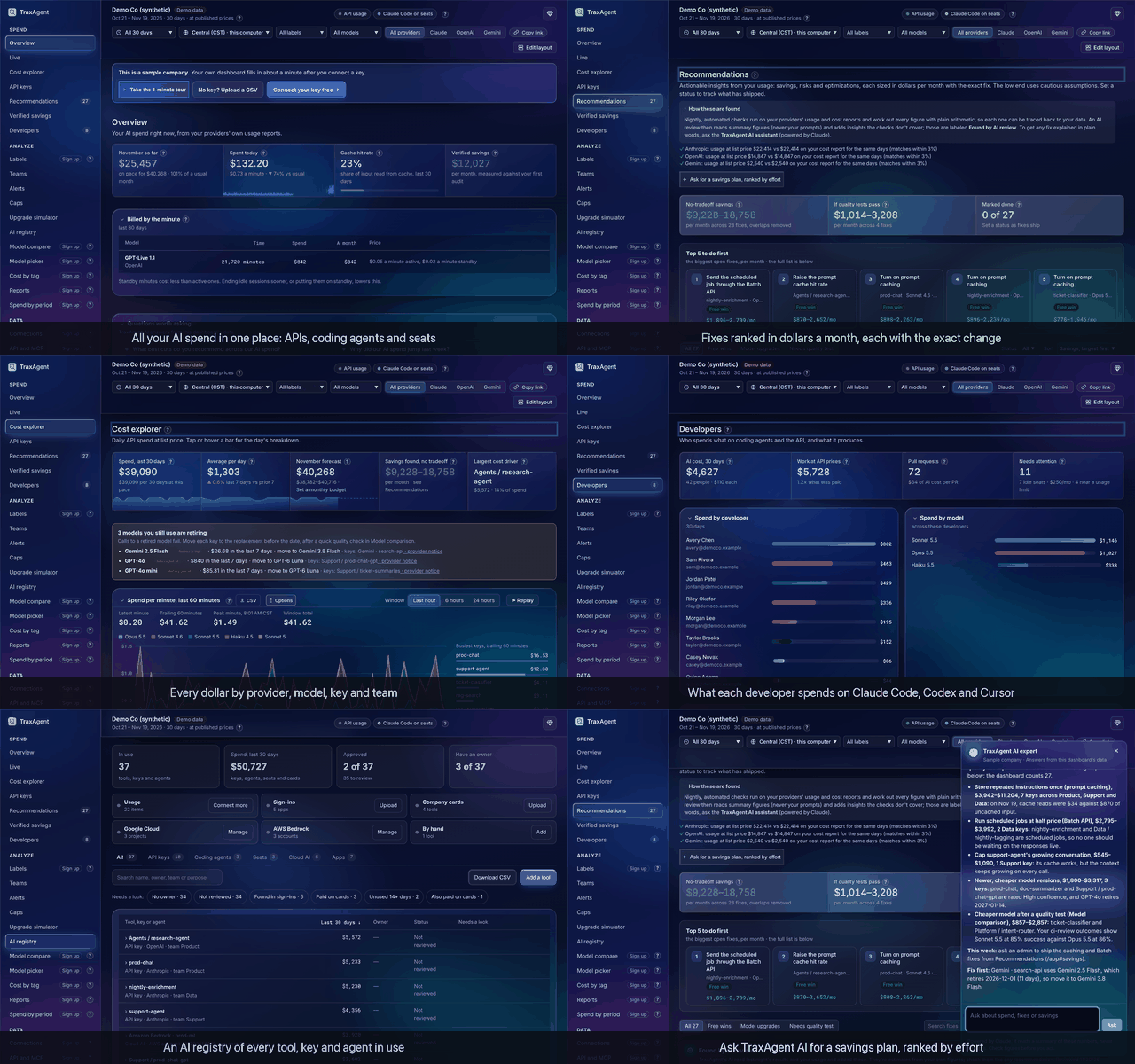
Behind the plugin is a full dashboard. The answers come from TraxAgent, which also has a dashboard for your team: spend by team and person, fixes ranked in dollars, budgets and caps, an AI registry, and finance reports. Click around the demo, no sign-up.
Example answer:
AI spend, Nov 10–16: $1,842.47 total (about $263.21/day, list prices)

| Team                 | Spend   |
|----------------------|---------|
| Backend Team         | $126.73 |
| FrontEnd Team        |  $98.10 |
| Data Science         | $214.06 |
| Viper Team           | $231.67 |
| Atlas Team           |  $11.13 |
| APIs (Prod)          | $431.28 |
| APIs (other)         | $218.42 |
| AWS Bedrock Seats    | $511.08 |

Biggest open cost fix: none right now.
And the savings question, on the sample company:
You: Using TraxAgent: what cost cuts do you recommend across our AI spend?

$9.2k–18.7k a month of $39.0k is avoidable. Ranked by effort, not size:

1. Batch API for 2 nightly Data jobs   $2.8k–4.0k   runs at 01:00 UTC, no one waits
2. Newer versions: Sonnet 4.6 → 5.5     $1.9k–3.4k   cheaper per token, same family
3. Opus → Sonnet for CI code review     $772         85% vs 86% success, half the cost
4. Prompt caching on 16 keys            $5.1k–14.1k  hit rate under 30% on most

Do the first two this week: config changes with no quality risk.
Caching is the big prize, and one key's cache broke on Nov 6.
More questions worth asking
| Ask | What you get |
|---|---|
| "What cost cuts do you recommend across our AI spend?" | Every fix grouped by kind and ranked by effort, with the monthly range and the safe ones first |
| "Which fix should we ship first, and can you do it here?" | The steps for the top fix; Claude makes the change in this repo and opens a pull request with the saving |
| "Is Opus worth it for our code reviews, or would Sonnet do?" | Success rate and cost per success for each model on that task, from your own outcomes |
| "Why did AI spend jump on Tuesday?" | The key, model and team behind the jump, and whether a cache broke or a loop ran away |
| "Who are our top 10 AI spenders this month, across Claude Code, Codex and Cursor?" | Spend per person with their team and a split by tool |
| "Which AI tools have no owner or aren't approved?" | The AI registry: every key, coding agent, seat plan and app in use, with what needs a look |
| "Which API keys haven't been used in 30 days?" | Keys to revoke, from the registry's last-used dates |
| "If we moved this traffic to Sonnet 5.5, what would it cost?" | Last month's real usage replayed at the other model's list prices |
Install in Claude Code
In Claude Code:
/plugin marketplace add ccarter01011/traxagent-claude-plugin
/plugin install traxagent@traxagent
Then run /mcp, pick plugin:traxagent:ai-spend, choose Authenticate and sign in to TraxAgent in your browser. There's no token to copy. The MCP server is on TraxAgent's paid plans.
If this saved you a budget meeting, a ⭐ on this repo helps other teams find it.
No account yet? Set one up in about 5 minutes by pasting a read-only admin key. TraxAgent is free up to $100 a month of AI spend.
Use it in other AI tools
Every option below signs in with your TraxAgent account (OAuth). Access is read-only and there's no token to copy.
| Tool | How to add TraxAgent |
|---|---|
| Claude (web, desktop) | Open TraxAgent in Claude's connector directory, choose Connect, then sign in. |
| ChatGPT | Plugins → Add → Add custom MCP server. URL: https://www.traxagent.io/mcp, Authentication: OAuth. Create it, sign in, then mention @TraxAgent in a chat. |
| Cursor | Add to Cursor, then sign in when Cursor asks. Also on Cursor Directory. |
| VS Code / GitHub Copilot | Add to VS Code, sign in, then use it from Copilot chat in agent mode. |
| Any MCP client (Codex, Gemini CLI, Windsurf…) | Add https://www.traxagent.io/mcp as a remote (streamable HTTP) MCP server. Clients that support OAuth sign in. Others can send a read-only API token from API and MCP. |
It's also listed in the official MCP Registry as io.traxagent/traxagent.
Look first, no sign-up (about 2 minutes each)
- Free audit: upload a usage CSV, no admin key needed. You get the findings on the spot, each with its monthly cost and the exact fix.
- Speed Index: race your own prompt across 10 Claude and OpenAI models.
- Demo: see the whole product on sample data.
Spend caps
Some companies now cap each engineer's AI spend by day, week or month. If leadership asks whether your teams need one, test a cap against your own numbers before you set it. TraxAgent shows who would hit it and how often, then warns people early, before they reach it, and again at 80% and 100%.
Trust and security
- Read-only. TraxAgent reads usage reports with read-only admin keys. Neither the keys nor this plugin can change anything at your providers.
- No prompts or outputs. TraxAgent never receives what you send to models, only usage and cost.
- OAuth sign-in. The plugin connects with OAuth 2.1 (PKCE), using short-lived tokens. You can disconnect any app under API and MCP → Connected apps.
- Open plugin. Everything this plugin does is in this repo: two MCP server addresses, two skills and one command, all plain Markdown and JSON you can read in
plugins/traxagent/.
More detail: Security · Privacy · How it works
What's in this plugin
| Part | What it does |
|---|---|
/spend-audit command |
Local Claude Code cost report from your session logs. No account, nothing sent |
ai-spend-demo MCP server |
The same tools on a sample company, no sign-in |
ai-spend MCP server |
Read-only tools: get_spend_summary, get_spend, get_people_spend, list_fixes, get_fix_prompt, get_task_quality, get_ai_registry, list_api_keys |
ai-spend skill |
Tells Claude how to answer spend questions and ship fixes as pull requests |
spend-statusline skill |
Installs the TraxAgent status line, with your OK |
License
MIT. Questions: traxagent.io
Security and privacy
Every tool is read-only, the plugin has no hooks, the plugin ships no scripts, and /spend-audit only reads local logs. TraxAgent never sees prompts or model outputs. CI checks these rules on every push. Details and how to report a problem: SECURITY.md.
Yorumlar (0)
Yorum birakmak icin giris yap.
Yorum birakSonuc bulunamadi