moto
Health Gecti
- License — License: MIT
- Description — Repository has a description
- Active repo — Last push 0 days ago
- Community trust — 26 GitHub stars
Code Basarisiz
- rm -rf — Recursive force deletion command in claude/hooks/block-destructive.sh
Permissions Gecti
- Permissions — No dangerous permissions requested
This tool acts as a comprehensive terminal IDE and operating environment for AI coding agents. It provides pre-configured context, safety hooks, memory templates, and skill integrations to automate and secure workflows using agents like Claude Code and Codex.
Security Assessment
The tool is built heavily in Shell and is designed specifically to execute commands and manage your local and remote development environments. While the automated scanner flagged a recursive force deletion command (`rm -rf`), this is actually used inside its safety hooks to intentionally block destructive AI actions—a strong security feature rather than a vulnerability. The repository requires no overtly dangerous permissions. Because the tool orchestrates Docker, browser automation, and CLI tools, it inherently handles sensitive data, local files, and network requests based on your configuration. You will need to supply your own API keys via a `.env` file, and there are no hardcoded secrets. Overall risk is rated as Medium because granting any AI agent direct access to execute terminal commands and manage system files requires careful oversight.
Quality Assessment
The project is actively maintained, with its most recent push happening today. It uses the permissive MIT license and has a clear, detailed description. Community trust is currently low, given it has only 26 GitHub stars.
Verdict
Use with caution. It is a well-structured and actively maintained developer tool, but always review the shell scripts before executing the installer to understand exactly how it modifies your system.
Floom's terminal IDE for AI agents: Claude control plane, Codex workers, Docker runtime, hooks, skills, memory, and browser/Gmail workflows.
moto 🛵
A terminal IDE for AI agents, extracted from 500+ real sessions


moto is Floom's terminal IDE for AI agents: Claude as the control plane, Codex for backend/infra/debugging, opencode as an optional worker, subagent workflows, Docker-first runtime, CLAUDE.md / AGENTS.md-style context, safety hooks, 60+ skills, Gmail/WhatsApp integrations, memory, browser automation, and cost tracking.
Formerly buildingopen/moto. Old GitHub URLs redirect.
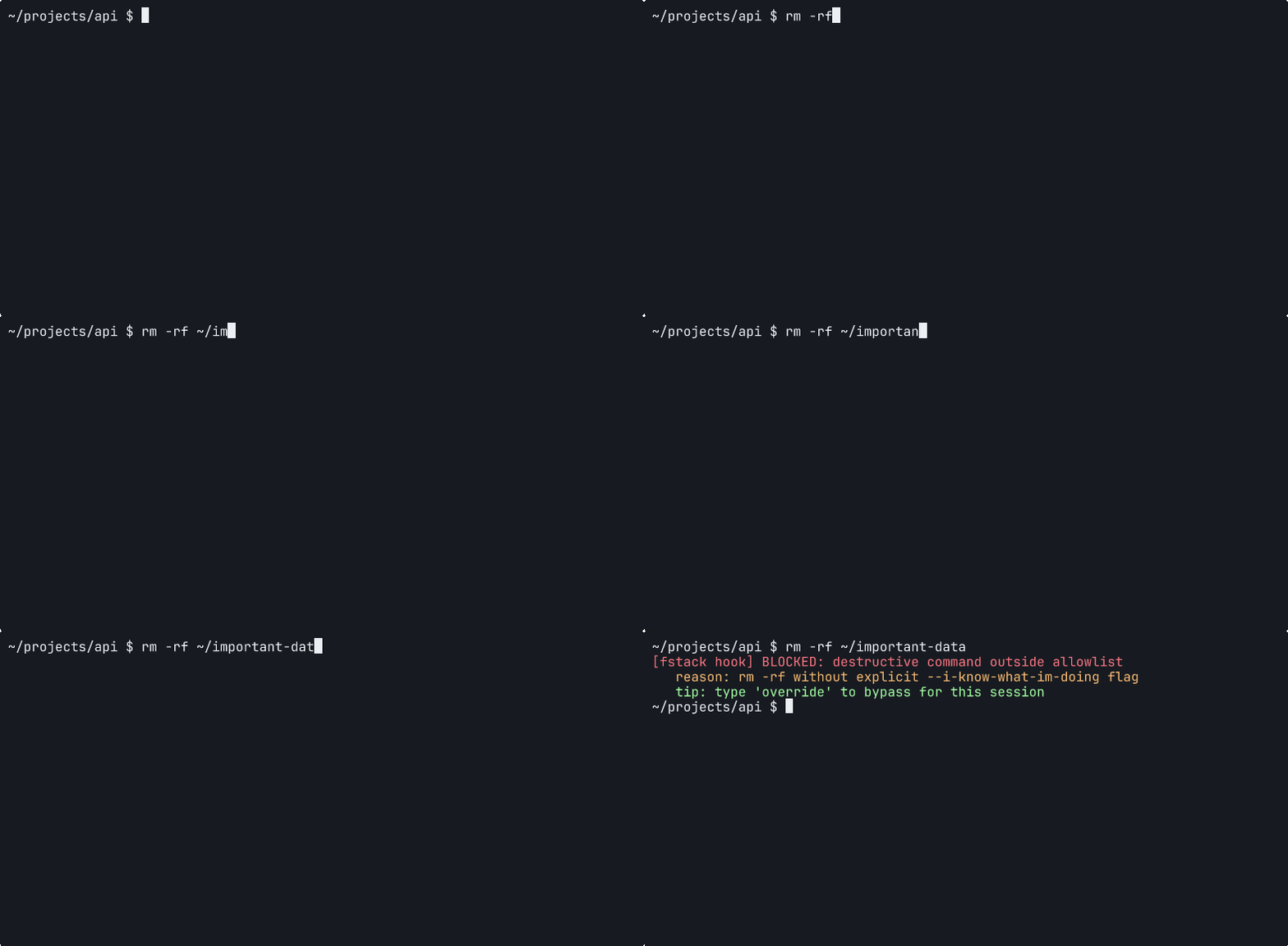
A safety hook firing on a destructive command.
Who is this for?
- Founders/operators turning repeated work into software with agents
- Claude Code / Codex users who want a real operating environment instead of one-off prompts
- Terminal-first builders running multiple agents on a Mac + remote Linux box
- Teams standardizing agent rules, hooks, skills, memory, and remote runtime
- Anyone burned by agents running destructive commands, leaking secrets, or claiming success without fresh evidence
What makes this different?
Most AI coding setups are a prompt file plus a pile of tools. moto is the full operating environment: context, hooks, skills, memory, terminal sessions, remote server runtime, browser automation, Docker sandboxes, and launcher commands for Claude, Codex, and opencode.
The philosophy is simple:
- context before prompting
- wireframes before UI code
- Docker before SaaS integrations
- subagents before monolithic chats
- cheap models for mechanical checks
- expensive models for judgment
- complexity only after real usage earns it
Quick Start
git clone https://github.com/floomhq/moto.git
cd moto
./install.sh          # Symlinks configs into ~/.claude/
That's it. The installer detects existing configs, backs them up, resolves $HOME paths in hook commands, and installs 17 hooks + 7 scripts + 60+ skills + memory template. Run ./install.sh --copy for standalone files instead of symlinks.
For the full remote workstation from the same repo:
cp .env.example .env
$EDITOR .env
./install.sh mac
./install.sh server-remote
After install:
- Edit
~/.claude/CLAUDE.mdto match your workflow (search for<!-- Customize -->comments) - Copy
claude/CLAUDE-project.mdinto your project roots - Optionally copy
.env.exampleto.envfor API keys used by some hooks/scripts
Comparison
| bare Claude Code | Claude Code + dotfiles | moto | |
|---|---|---|---|
| Context | manual per session | static files | CLAUDE.md + AGENTS.md + MEMORY.md |
| Safety | none | none | 17 hooks blocking destructive commands, secret leaks, config tampering |
| Remote workflow | DIY SSH | DIY SSH | moto up + SSHFS + systemd + tmux |
| Skills | none | none | 60+ slash commands (/cost, /qa, /ship, /debug, etc.) |
| Sidecars | none | none | Groq / Gemini / NVIDIA routing for cheap stateless work |
| Memory | none | none | MEMORY.md auto-updated across sessions |
| Cost tracking | none | none | Per-model, per-session token costs |
| Browser | none | none | Chrome CDP automation via skills |
| Messaging | none | none | WhatsApp + Gmail integrations |
Architecture
moto splits agent work between a Mac control plane and a remote Linux runtime. The Mac stays where the human works, while the server owns long-running sessions, containers, cheap sidecar calls, browser automation, and messaging integrations.
flowchart LR
  subgraph Mac["Mac control plane"]
    IDE["IDE + terminal"]
    Claude["Claude Code"]
    Codex["Codex backend/debug"]
    Browser["Local browser"]
  end

  subgraph Link["Connection layer"]
    SSHFS["SSHFS"]
    Systemd["systemd"]
    Tunnels["SSH tunnels"]
  end

  subgraph Linux["Remote Linux runtime"]
    Tmux["tmux sessions"]
    Docker["Docker containers"]
    CDP["Chrome CDP"]
    Messaging["WhatsApp + Gmail"]
  end

  subgraph Surfaces["Agent surfaces"]
    Skills["60+ skills"]
    Hooks["17 safety hooks"]
    Memory["MEMORY.md"]
    Slash["slash commands"]
  end

  subgraph Sidecars["Stateless sidecars"]
    Groq["Groq"]
    Nvidia["NVIDIA"]
    Gemini["Gemini"]
  end

  IDE --> Claude
  Claude --> Codex
  Browser --> Claude
  Claude --> SSHFS
  Claude --> Systemd
  Claude --> Tunnels
  SSHFS --> Tmux
  Systemd --> Tmux
  Tunnels --> Tmux
  Tmux --> Docker
  Tmux --> CDP
  Tmux --> Messaging
  Claude --> Skills
  Hooks --> Claude
  Memory --> Claude
  Slash --> Claude
  Skills --> Tmux
  Tmux --> Groq
  Tmux --> Nvidia
  Tmux --> Gemini
Read the deep dive: docs/architecture.md
What's included
| Directory | Contents | Learn more |
|---|---|---|
claude/ |
CLAUDE.md, hooks, scripts, skills, memory | claude/skills/README.md · claude/hooks/README.md · claude/memory/README.md |
mac/ |
moto CLI, iTerm automation, shell aliases, launchd + SSH templates |
mac/README.md |
server/ |
Systemd services, Docker stack, safety utils, browser automation, tmux | docs/bootstrap.md |
whatsapp/ |
OpenClaw gateway, verified send, SQLite contact lookup | whatsapp/README.md |
gmail/ |
IMAP checker, multi-account support | gmail/ |
cron/ |
Job templates, health checks, safe-pipeline patterns | cron/ |
FAQ
Do I need a remote server?
No. ./install.sh works locally. Add ./install.sh mac + ./install.sh server-remote only when you want the integrated remote workflow.
Does this replace Claude Code?
No. It's the operating environment around Claude Code (and Codex, and opencode). You still use Anthropic's CLI; moto just makes it reliable, safe, and reproducible.
Is this safe?
17 hooks run on every tool call blocking rm -rf /, secret leaks, wrong package managers, unverified WhatsApp sends, and more. See claude/hooks/README.md.
How much does it cost?
The repo is free. Hooks track your Claude/Codex token spend to costs.jsonl. Sidecars route bounded work to free/cheap models so you burn premium tokens on judgment, not mechanical tasks.
Can I use only the hooks? Or only the skills?
Yes. The installer is modular. Pick what you need.
Requirements
| Requirement | Required? | Used by |
|---|---|---|
| Claude Code CLI | Yes | Everything |
jq |
Yes | All hooks (JSON parsing) |
python3 |
Optional | Gemini audit hook, email checker |
gitleaks |
Optional | Secret scanning hook |
Configuration
After running install.sh:
- Edit CLAUDE.md — Search for
<!-- Customize -->comments and replace placeholders with your setup - Add project configs — Copy
claude/CLAUDE-project.mdto each project root - API keys (optional) — Copy
.env.exampleto.envfor hooks/scripts that need external APIs
The settings.json file has $HOME paths pre-resolved by the installer. Re-run ./install.sh to pick up changes.
Related Projects
Other open-source tools from BuildingOpen:
| Project | Description |
|---|---|
| bouncer | Independent Gemini quality gate that audits Claude Code's output before it can stop |
| claude-code-stats | Spotify Wrapped for Claude Code. Visualize your AI coding stats, token usage, and costs |
| claude-wrapped | Visualize your Claude Code stats with npx claude-entropy |
| hook-stats | Analyze your Claude Code bash command log |
| session-recall | Search and recover context after Claude's automatic compaction |
| browse | Browser automation CLI with autonomous agent mode via CDP |
| openbrowser | Give AI your browser. Check email, track orders, download receipts. MCP server + CLI |
| openqueen | Autonomous coding agent controlled by WhatsApp/Telegram. Gemini orchestrates Claude/Codex |
| blast-radius | Find all files affected by your changes. One bash script, zero dependencies |
| dep-check | Find dead imports in your project. One bash script |
Changelog
See CHANGELOG.md.
License
Yorumlar (0)
Yorum birakmak icin giris yap.
Yorum birakSonuc bulunamadi