LoopEngineering-CrashCourse
Health Warn
- License — License: MIT
- Description — Repository has a description
- Active repo — Last push 0 days ago
- Low visibility — Only 7 GitHub stars
Code Fail
- rm -rf — Recursive force deletion command in .agents/skills/deploy-to-vercel/resources/deploy-codex.sh
- rm -rf — Recursive force deletion command in .agents/skills/deploy-to-vercel/resources/deploy.sh
Permissions Pass
- Permissions — No dangerous permissions requested
No AI report is available for this listing yet.
A free, open-source curriculum for loop engineering — the discipline of designing control systems that keep AI coding agents working toward a goal over time. 14 steps across 4 learning tracks, 20 ready-to-run loop kits, graded labs, an operating handbook, and a Loop Ready certification.













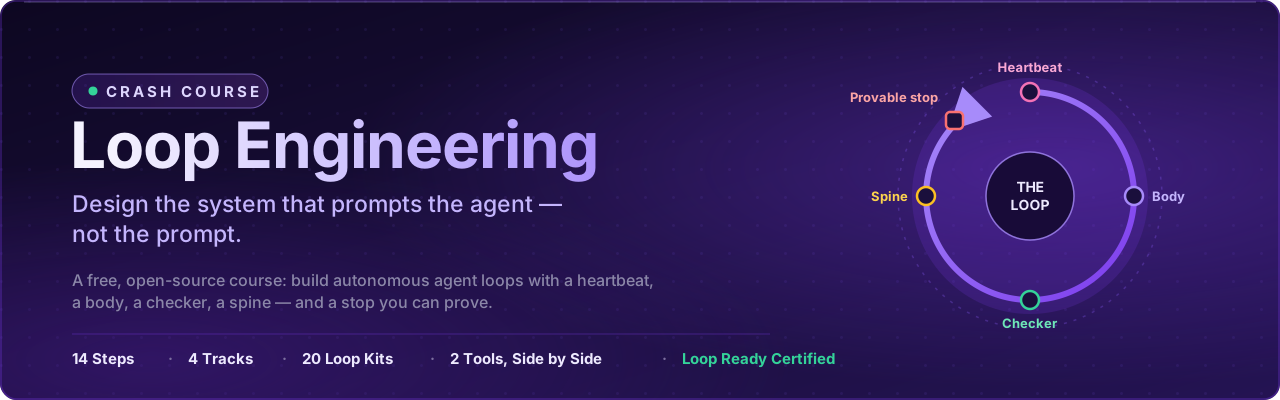
Loop Engineering Crash Course
Stop prompting one message at a time. Design the loop.
Learn to build AI agent loops — autonomous systems with a heartbeat, a body, a
checker, a spine, and a stop you can prove.
Loop engineering is the practice of designing the system that prompts an AI agent — its
trigger, instructions, guardrails, verification, state, and logging — rather than prompting
it by hand.
The leverage has moved: it no longer lives in the perfect prompt, but in the control
system that keeps an agent working toward a goal over time. This free, open-source
course teaches that discipline end to end — 14 steps, 20 ready-to-run loop kits, graded
labs, an operating handbook, and a certification. You don't read about loops here;
you build them, in two tools, from a first in-session loop to a certified fleet.
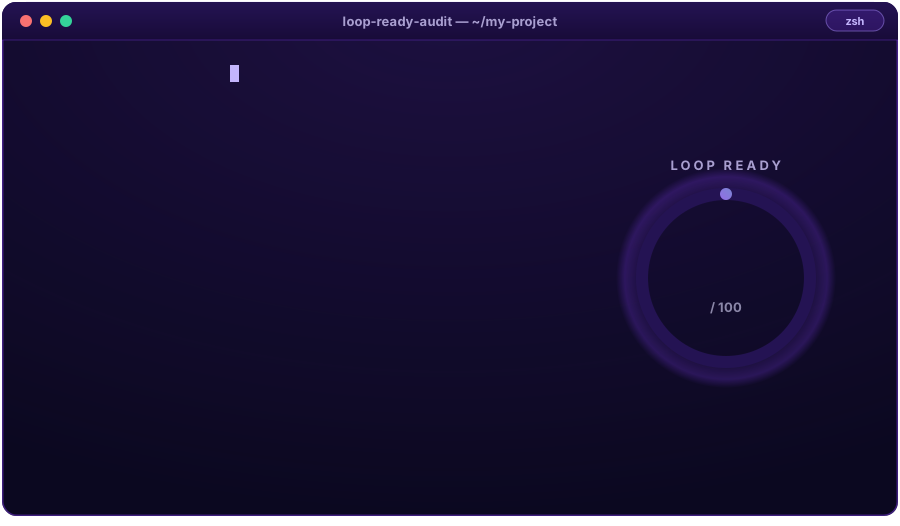
Real command, real score — this image is
rendered from an actual run of the
deterministic Loop Ready audit, and
CI re-renders it on every push. If a kit ever
fails, this terminal goes red.
Want a loop running in your own project before the first lesson? One command:
# see the 20 ready-made loop kits
npx @loop-engineering/loop-kit list

# install one into the project you want the loop to watch
npx @loop-engineering/loop-kit ci-sweeper
We eat our own cooking. This is a course about loops that is built by loops. The
rulebook lives inLOOP.md, the durable spine inSTATE.md,
and every single run is logged, one line at a time, inshared/loop-run-log.md.
📌 Quick links
| I want to… | |
|---|---|
| Enroll — find my starting point in 60 seconds | View → |
| See the full learning-track map with entry checks | View → |
| Set up my agent (Claude Code, OpenCode, Codex, Grok) | View → |
| Look up a term in the glossary | View → |
| Install a ready-made loop in my own project | View → |
| Browse the 20 loop patterns | View → |
| Operate loops safely (failure modes, recovery) | View → |
| Get certified | View → |

💬 Why this matters
The people building today's coding agents say it plainly:
"You shouldn't be prompting coding agents anymore. You should be designing loops
that prompt your agents."— Peter Steinberger (source S8)
"I don't prompt Claude anymore. I have loops running that prompt Claude and figuring
out what to do. My job is to write loops."— Boris Cherny, Head of Claude Code at Anthropic (source S8)
The job is no longer writing the perfect prompt — it is architecting the control system
that keeps agents working toward a goal over time. That is exactly the discipline this
course teaches, and every voice above is one of its
nine credited primary sources.
🧩 The six building blocks
A heartbeat is the trigger that starts one iteration of a loop — in-session, conditional,
scheduled, or event-driven. A spine is a loop's durable state between runs: with one an
interrupted loop resumes, without one it restarts.
Every loop in this course — and every kit in the
pattern library — is assembled from the same six parts:
| Building block | Job in the loop | Taught in |
|---|---|---|
| Heartbeat — schedules & automations | discovery + triage on a cadence | Part 2 |
| Worktrees | safe parallel execution | Part 3 |
| Skills | persistent project knowledge | Part 3 |
| Connectors / MCP | reach into your real tools | Part 3 |
| Sub-agents | the maker / checker split | Part 3 |
| + Spine — memory / state | durable state outside any conversation | Part 4 |

Deep dive: Primitives ·
Primitives Matrix — which block exists in
which tool, side by side.
🎓 Choose your track
New here? Open the 60-second router →
Like any good LMS, this course meets you where you are. Answer four honest questions and
the router drops you onto exactly one of four tracks — so a first-timer never drowns and
a veteran never yawns:
| Track | You are… | You'll learn to… |
|---|---|---|
| T1 · Foundations | using an AI agent by hand (or not yet) | explain the shift and run your first in-session loop |
| T2 · Practitioner | fluent in the six parts of a loop | choose a heartbeat, write a provable stop, split maker/checker |
| T3 · Engineer | able to assemble a loop | build the full six-part loop in two tools and operate it safely |
| T4 · Ultra-Pro | shipping loops already | hill-climbing loops, fleets, governance at team scale |
View the full track map with entry checks and exit assessments →
📚 Curriculum
Prerequisites & foundations (read first):
Environment Setup ·
Agentic-Coding Primer ·
Spec-Driven Primer ·
Mental Models ·
Concepts ·
The Four Layers ·
Primitives ·
Primitives Matrix ·
Glossary
The 14-step core roadmap — six parts, each ending in something you built:
| Part | Steps | What you learn | |
|---|---|---|---|
| 1 · The Shift | 01–03 | prompting → looping, the four layers, anatomy of a loop | Start → |
| 2 · The Heartbeat | 04–07 | in-session, run-until-done, schedules, event-driven | Start → |
| 3 · The Body | 08–11 | worktrees, skills, connectors/MCP, maker ≠ checker | Start → |
| 4 · The Spine | 12 | durable state between runs | Start → |
| 5 · A Complete Loop | 13 | build the same loop twice (Claude Code & OpenCode) | Start → |
| 6 · Human Control | 14 | staying the engineer: cost, verification, nested loops | Start → |
Then keep climbing:
| Stage | What it holds | |
|---|---|---|
| Methods | design your own loop: Decision Framework, Design Checklist, Pattern Picker, Worked Example | View → |
| Operating handbook | safety, failure modes, infinite loops, observability, recovery | View → |
| Graded labs | 11 hands-on projects, from a watch loop to a two-routine gate — with solutions | View → |
| Advanced | hill-climbing, multi-loop coordination, evals & traces, governance, enterprise scale | View → |
| Certification | the Loop Ready capstone: Final Exam · Capstone Rubric | View → |
Every lesson shows the same build in at least two tools, side by side
(Claude Code ↔ OpenCode), so you learn the discipline — not one vendor's syntax.
🔁 Anatomy of a loop
An agent loop is a system that repeatedly runs an AI agent toward a specified outcome
without a human driving each run. Every production loop declares six parts; a loop missing
one of them is the loop that surprises you at 3am.
Six parts, one discipline. A heartbeat decides when the agent runs, a body does
the work, a checker grades it (the maker never grades its own work), a spine
remembers across runs, a provable stop ends it, and you stay the engineer:
flowchart LR
H(["⏱ Heartbeat<br/>when it runs"]) --> B["🦾 Body<br/>does the work"]
B --> C{"✅ Checker<br/>grades it"}
C -- "not done" --> S[("🧠 Spine<br/>remembers")]
S --> H
C -- "success · run limit · no progress" --> X(["🛑 Provable stop"])
X --> U["🧑💻 You — the engineer"]
Start with Mental Models and
The Four Layers; keep the
Glossary open in a tab.
🧰 Loop pattern library
Twenty production-shaped loop kits, each with a definition, a spine, a budget, a
constitution, and a read-only checker. Install any of them into your own project with
one command — no clone required:
npx @loop-engineering/loop-kit <pattern-name>
| Pattern | What it does |
|---|---|
ci-sweeper |
fires the instant CI goes red on main and sweeps it back to green |
pr-babysitter |
keeps open PRs from rotting — conflicts, red CI, silent reviewers |
daily-triage |
clears the overnight noise before you open your laptop |
issue-triage |
daily-triage's narrower cousin, stripped down to issues alone |
dependency-sweeper |
keeps dependencies current without updating them blind |
dependency-cve-burndown |
reads the 3 a.m. CVE advisory so it never waits until Monday |
docs-sweep |
catches documentation the moment the code moves on without it |
changelog-drafter |
drafts the changelog your busy sprint was going to forget |
test-coverage-loop |
burns down the "we should really test that" backlog |
test-stabilizer-loop |
hunts flaky tests until a red run means something again |
prod-error-sweep |
sweeps the production errors that actually cost users something |
page-load-loop |
keeps pushing page-load performance downhill, beat after beat |
repo-cleanup-loop |
clears repository clutter — branches nobody deleted, and worse |
post-merge-cleanup |
finishes the story every merge leaves behind |
ticket-to-pr-ready |
one ticket, one run: reproduce, fix, arrive PR-ready |
spec-dev-review |
one story → a scoped spec packet: findings, progress, review |
clodex-adversarial-review |
a real maker–checker pair: Claude implements, Codex reviews |
codex-completion-contract |
stops "mostly done" from quietly passing as "done" |
loop-harness-verification |
a general-purpose harness for any scheduled repo task |
stale-safe-batch-release |
the bookend: batches what every other kit left safely releasable |
Prefer to design your own from a blank? npx @loop-engineering/loop-kit new <loop-name>
scaffolds one from the blank template.
View the full install guide →
🚀 Getting started (5 minutes)
- Enroll — run the 60-second router. It hands you
a track. - Set up your agent — follow the
Environment Setup guide
(Claude Code, OpenCode, Codex, or Grok; every lesson shows at least Claude Code ↔ OpenCode). - Speed-run the primers — the
Agentic-Coding Primer and the
Spec-Driven Primer. - Ground yourself in the foundations — start with
Mental Models. - Begin the 14 steps — Part 1 · The Shift, then follow
the curriculum through to the
Loop Ready certification.
🛡️ Operating & safety
A loop without a provable stop is an incident with a delay. The operating handbook is a
first-class part of the course, not an appendix:
- Operating loops — the day-to-day handbook
- Safety — L1 report-only first, human gates, budgets
- Failure modes ·
Infinite loops ·
Anti-patterns - Observability ·
Recovery playbook ·
Multi-loop operation
The house rules this repo itself runs under — one owner per file, a sacred spine, stop
conditions as specs, green ≠ done — live in LOOP.md.
"Build the loop. But build it like someone who intends to stay the engineer, not just
the person who presses go."— Addy Osmani, Loop Engineering
(source S5)
🏅 Certification: Loop Ready
Loop Ready is an auditable score, not a badge. It certifies that you can design a loop
declaring all six parts, and that the loop you built is verified by something other than
itself.
The course ends with a graded capstone, not a participation badge. You design, build,
and operate a loop of your own, then defend it against the
Capstone Rubric and pass the
Final Exam.
View the full certification path →
📂 Repository map
| Folder | What it holds |
|---|---|
docs/ |
the course — single source of truth for GitHub and the website |
loops/ |
the loops that build this course — real prompts, real spines |
patterns/ |
the 20 loop patterns (table above) |
starters/ |
install-and-fill loop kits — one npx command into any project, or start from _template/ |
packages/loop-kit/ |
the published CLI behind npx @loop-engineering/loop-kit |
skills/, templates/, examples/, stories/ |
reusable parts and case studies |
resources/ |
source attribution for all nine primary sources |
web/ |
the Next.js course website (in progress) |
✍️ About the author
Written and maintained by Ayesha Khalid —
@ayeshakhalid192007-dev.
I built this course the way it teaches you to work: every lesson, kit, and check in this
repository was produced by loops running against a written spec, logged one beat at a time
in shared/loop-run-log.md. The 20 kits ship with a
deterministic audit because I needed to know they still
worked after each change — not believe it. Where this course is opinionated (maker ≠
checker, a stop you can prove, a human gate that stays), those opinions came from watching
loops fail in the specific ways the labs now make you reproduce on purpose.
Corrections and disagreement are welcome — open an issue.
🤝 Contributing & credits
Pull requests are genuinely welcome — start with the
Contributing Guide. This course stands on the shoulders of nine
primary sources: it synthesizes and adapts MIT-licensed material and public writing,
and it credits every one of them, page by page, on the
Sources & Attribution page. Academic or written citation?
Use CITATION.cff.
Primary sources, linked directly:
- Addy Osmani — Loop Engineering
- LangChain — The Art of Loop Engineering
- Cobus Greyling — loop-engineering
- Panaversity Agent Factory — Loop Engineering Crash Course · Agentic Coding · Spec-Driven Development
- Anthropic — Claude Code documentation
- Model Context Protocol specification
- GitHub — scheduled workflow events
- Peter Steinberger (@steipete) · Andrej Karpathy (@karpathy) · Andrew Ng (@AndrewYNg)
Full page-by-page attribution: Sources & Attribution.
Licensed MIT — free to learn from, fork, and teach with.
⬆ Back to top · Built with its own loops, one
provable stop at a time.
Reviews (0)
Sign in to leave a review.
Leave a reviewNo results found