taurus
Health Uyari
- License — License: MIT
- Description — Repository has a description
- Active repo — Last push 0 days ago
- Low visibility — Only 5 GitHub stars
Code Basarisiz
- exec() — Shell command execution in src/vendor/addon-search.js
- exec() — Shell command execution in src/vendor/addon-web-links.js
Permissions Gecti
- Permissions — No dangerous permissions requested
Bu listing icin henuz AI raporu yok.
Taurus - a Windows desktop launcher that runs multiple Claude Code agents as embedded terminal tabs, each started in the right process folder. Built around the Interpreted Context Methodology (ICM).
Taurus — Agent Launcher
▶ Click the image to watch the special agents film on YouTube.
A small Tauri desktop app that runs and manages multiple Claude Code agents as
terminal tabs in one window — with voice, a file DROPZONE and an inline
HTML/Markdown viewer built in.
Since 0.5.0 a tab can also run its agent on another machine over SSH — your
folders stay where they are and the agent goes to them.
▶ Watch: remote agents ·
features tour ·
original explainer ·
15-second teaser.
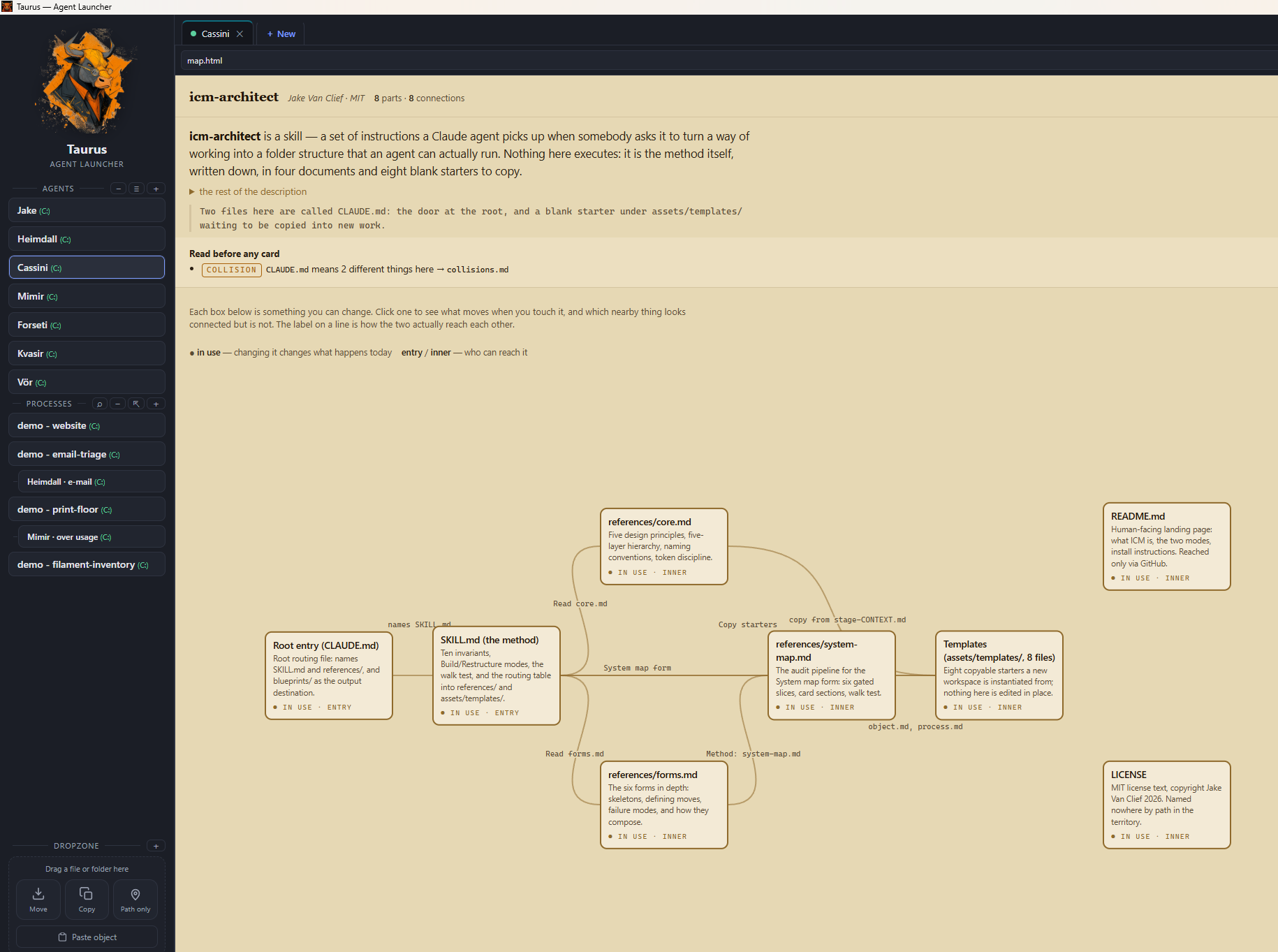
Pick or create an agent on the left, see the folder + a (C:) / (X:) drive tag,
give the session a title, choose a mode, and hit Start — the agent opens as an
embedded terminal tab. Open several, drag them into the order you want, and let a
tab flash in its own colour (or speak up) when an agent is done and waiting for you.
Windows-only for now (uses ConPTY + Windows Terminal-style embedding).
Why Taurus
Giving Claude the right context at the right moment is still one of the hardest
parts of working with coding agents day to day.
Elaborate memory systems help a single power user, but they don't scale to an
enterprise: they're hard to curate, easy to pollute, and brittle as the number of
people and projects grows. Honestly, the wheel hasn't been invented yet — nobody
has a clean, proven answer for how context should work at team scale.
Taurus is built around the Interpreted Context Methodology (ICM) — "folder structure as agent architecture." Instead of orchestration code or sprawling memory, context lives in the folders themselves: a CLAUDE.md, conventions, and reference material that load in layers the moment an agent starts there. Approaches built around one person's bespoke setup are expensive to onboard a whole team onto; a folder anyone can open is not.
Taurus' contribution is the entry point: let everyone start the agent in the process folder they actually need. From there ICM does the rest, so:
- the user immediately knows where they should be for a given task, and
- Claude starts with exactly the scoped context that folder carries — giving
repeatable results across people and runs.
It isn't the final answer to context-at-scale, but it removes the biggest piece of
day-to-day friction: people land in the right place, and the agent behaves
consistently. That's what Taurus is for.
Features
Agents in tabs
- Embedded terminals with tabs — each agent runs inside the window (xterm.js +
ConPTY viaportable-pty); click tabs to switch, drag to reorder them. - The AGENTS sidebar — one-line cards with a tinted (C:) / (X:) / (UNC)
drive tag so local vs network is obvious at a glance. Drag cards to reorder;
hover for edit/delete; + Add agent on the launch form saves a one-off
straight into the menu. - Attention flash + voice — a tab flashes in its own colour only when its agent
has really finished (busy detection with a confirmation window against false
"ready" alerts), and can announce it out loud ("Porter is ready"). - Live status — optionally shows Claude's current activity verb on the tab
(✶ Orbiting…). - Per-project agent, model & mode — launch
claude(Claude Code) oragy
(a Gemini-backed agent CLI), optionally pinned to a model, indefault,plan
orauto(--permission-mode); all set per project, overridable per session. - Restart / resume — right-click a tab to restart and resume the same
conversation; optionally remember sessions and resume them on startup.
(agyhas no session ids, so a restart resumes the folder's most recent
conversation.) - Works with a native
claude.exeor an npm install —.cmd/.batshims
(npm i -g @anthropic-ai/claude-code) are resolved and launched correctly.
Voice
- Talk to your agent (push-to-talk STT) — hold F9 or click the round
record button above the DROPZONE; a live level ring shows Listening…, release
(or click again) and the transcript lands at the active prompt (optionally sent
immediately). Speech-to-text runs fully offline via a local sherpa-onnx
sidecar (NVIDIA Parakeet TDT v3 by default, downloaded on demand from
Settings → Voice, hash-pinned). The model list can follow a registry URL so new
models appear without an app update. - Your agent talks back (TTS) — Windows voices, including the natural
(neural) ones when installed, grouped and labelled with their language
(e.g. Microsoft Frank — Dutch). Optional "agent is ready" announcement for
background tabs, speak-the-selection from a tab's context menu, and a
slow-to-fast rate slider.
DROPZONE
- Hand files to your agent, locally. Drag a file or folder onto the sidebar
DROPZONE and pick Move, Copy (into the agent'sinput/folder) or
Path only; the full path is inserted at the active prompt so you can
immediately ask the agent to work on it. Paste works too (clipboard text, an
image, or a file copied in Explorer), and + opens a file picker. Nothing is
ever uploaded anywhere — local files, local agent, local tools.
Inline viewer
- HTML preview — click an
.htmlpath in the terminal (or right-click a tab →
HTML preview); it renders in a sandboxed pane beside (or instead of) the
terminal. External links open in your default browser;mailto:opens your
mail client. - Markdown preview —
.mdfiles render inline too: GFM tables (with
alignment), task lists, strikethrough, code blocks, working in-document
anchors — with a</>raw/rendered toggle. Rendering is escape-first
(raw HTML in a document can never execute) andjavascript:/data:links are
stripped to plain text.
Comfort & polish
- Settings in tabs (General / Theme / HTML preview / Terminal / Voice) with
per-setting hover help. - Search the scrollback (Ctrl+Shift+F), copy-on-select, right-click paste,
Ctrl+Shift+C/V, clickable links, font zoom (Ctrl+= / − / 0), tab shortcuts
(Ctrl+Tab, Ctrl+1..9, Ctrl+T/W), agent-mouse toggle — all toggleable. - EN / NL — the default follows your OS language; your choice wins.
- White-label & skins — rebrand from a local
branding.jsonand pick from ten
visual skins. See Branding.
Install
Grab the latest release from the
releases page:*-setup.exe (installer), .msi, or the portable exe (no install).
Requirements:
- WebView2 runtime (preinstalled on Windows 11)
- The Claude Code CLI on your
PATH— native installer ornpm install -g @anthropic-ai/claude-code(both work) - For dictation: a microphone + the STT model (one-time download from
Settings → Voice, ~490 MB, stays on your machine)
Develop
Node.js and Rust (MSVC toolchain):
npm install
npm run tauri dev
Build (installer + standalone exe)
npm run tauri build
Output:
- standalone:
src-tauri/target/release/taurus.exe - installers:
src-tauri/target/release/bundle/(NSIS*-setup.exe, MSI)
Configuration
Projects live in %APPDATA%\Taurus\projects.json (per user, created on first run).
Edit them with the in-app Agents editor, or by hand. Format:
[
  {
    "id": "my-id",
    "label": "Button name",
    "path": "C:\\path\\to\\folder",
    "title": "Default session title",
    "task": "",
    "accent": "#7c9cff",
    "mode": "default",
    "agent": "claude",
    "model": "",
    "command": ""
  }
]
agent(optional) — which agent CLI to launch:claude(default, Claude Code)
oragy(a Gemini-backed agent CLI). Selectable per project in the editor and
overridable per session on the launch form. Resume limitation:agyhas no
session ids, so restarts resume the folder's most recent conversation.model(optional) — model the agent starts with (free text, e.g.opus,sonnet,gemini-2.5-pro). Empty means the agent's own default. Passed as--model.command(optional) — run a different program instead of the agent for this
project (no agent flags). Takes precedence overagent/model. Use double
quotes around a program path or argument that contains spaces.- A fresh install starts with an empty list (no baked-in paths). UI settings
(language, font, toggles) are kept in the WebView2 local storage.
Remote hosts
▶ Watch the explainer — 60 seconds: adding a
machine, working on it, and moving an agent's folder structure across.
A tab can run its agent on another machine over SSH instead of locally: the
work happens where the data and the access are, and the tab still shows the
agent's own TUI. Hosts live in %APPDATA%\Taurus\hosts.json and appear in the
launch form under Runs on.
Add a machine once from the 🖥 button beside the Agents heading: one connection
test reports which OS it runs, whether an agent CLI is installed, whether the
box can reach api.anthropic.com at all, and whether a session there survives a
dropped connection. A host with herdr installed gets that
last one on Windows and macOS as well, not just where tmux exists. An agent then carries its machine like it carries its
folder, and its tab shows a badge for where it runs.
A session on a host outlives the tab, the connection and the workstation, so ⇱
beside + asks a machine what is running on it — session, agent, its state and
its folder — and attaches to the one you pick.
Right-click a tab or an agent card to move an agent to another machine,
folder and all — with a survey of what is about to be copied, so a 512 MBnode_modules does not travel unless you say so.
Setup is two prompts — one for an agent on your workstation, one for an agent on
the target machine — in REMOTE-HOSTS.md, along with thehosts.json format, what session persistence you get per host, and the security
notes worth reading before pointing an agent at a machine you do not own.
Branding (white-label)
You can rebrand the launcher — app name, subtitle, logo, colours, skin, window
title — without forking or editing code. Copybranding.example.json to %APPDATA%\Taurus\branding.json
(next to projects.json) and edit it. Without the file the build is plain
Taurus; remove it to get Taurus back. Every field is optional:
{
  "appName": "Acme Agent Launcher",
  "subtitle": "Acme Corp",
  "logo": "C:\\ProgramData\\Acme\\logo.png",
  "windowTitle": "Acme Agent Launcher",
  "skin": "default",
  "skinName": "Acme",
  "theme": { "--accent": "#3b82f6", "--bg": "#0b1220", "--bg-panel": "#11182a" }
}
themeoverrides the CSS variables insrc/styles.css:root— the themeable
ones are--bg,--bg-panel,--bg-card,--bg-card-hover,--border,--text,--text-dim,--accent(and--term-bg/--term-fg/--term-sel
for the terminal).skinsets the default theme (see Skins below).skinNamelabels the branding-derived theme in the ⚙ Settings → Theme
dropdown (e.g."NEXUS"); falls back toappNameif omitted. Use it when yoursubtitleis a tagline that would read oddly as a theme name.fontsets the UI font family (e.g."'IBM Plex Mono', monospace"). IBM Plex
Mono ships bundled (offline); any installed/CSS font name also works.garble(true/false) toggles the hover letter-scramble effect on the
sidebar buttons, agent cards and tab titles. It's on by default for a branded
theme; setfalseto disable.logois an absolute path; it's read at startup and inlined as a data URI.- The in-app branding above is runtime/config-driven. To also change the
installer product name / identifier (baked into the bundle), build with a
Tauri config overlay:npm run tauri build -- --config <overlay>.json.
Skins
Built-in visual themes that restyle the sidebar, top bar, buttons and terminal.
Pick one live under ⚙ Settings → Theme, or set a default via "skin": "…"
in branding.json (an explicit Settings choice wins). Available skins:
| value | look |
|---|---|
default |
the standard dark theme |
retro-mac |
classic Mac System 7 / Platinum (grey, beveled, pinstripe) |
aqua |
early Mac OS X (pinstripes, glossy lozenge buttons) |
retro-win |
Windows 95/98 (teal desktop, raised 3D grey controls) |
winxp |
Windows XP Luna (blue bars, glossy buttons, green primary) |
terminal |
green-on-black CRT (monochrome, scanlines) |
nord |
modern — Nord arctic blue-grey (dark) |
dracula |
modern — Dracula (dark, vibrant) |
solarized |
modern — Solarized Light (warm, light) |
catppuccin |
modern — Catppuccin Mocha (soft pastel, dark) |
Skins are pure CSS (src/skins.css, scoped by html[data-skin="…"]) — adding
more is just another block. The retro skins adapt techniques from the MIT
projects 98.css / XP.css / system.css; the
modern skins are palette-only.
Keep brand assets out of this repo:
branding.jsonandsrc/*-logo.pngare
git-ignored. A real brand lives only in the local config, never committed.
Portable / pre-branded distribution
branding.json is read from %APPDATA%\Taurus\ **or**, as a fallback, from the
folder next to taurus.exe. A relative logo path resolves against the folder
the branding.json was found in. So a self-contained, pre-branded build is just
a folder you can zip and hand out:
MyBrand Agent Launcher/
  taurus.exe          (rename freely, e.g. "MyBrand Agent Launcher.exe")
  branding.json       ("logo": "logo.png", relative)
  logo.png
Unzip and run — no setup. A branding.json in %APPDATA%\Taurus\ takes
precedence over the one next to the exe. To also rebrand the installer's product
name, build with a Tauri config overlay (--config).
Demo mode
Want to show Taurus (or record a video) without exposing real projects?demo\demo-on.ps1 backs up your config and swaps in two demo agents backed by a
fake Claude (mock-claude.mjs) — no real data or MCP is ever touched.demo\demo-off.ps1 restores your own configuration.
How it works
- Frontend:
src/— vanilla HTML/CSS/JS (xterm.js vendored insrc/vendor/). - Backend:
src-tauri/src/lib.rs— Rust commands for project config, the native
folder picker, the ConPTY sessions (create/restart/write/resize/close), voice
(Windows TTS + the sherpa-onnx STT sidecar) and the DROPZONE file operations. - Previews render in a sandboxed iframe (no same-origin, scripts contained);
Markdown is rendered escape-first by a small built-in renderer, so documents
can't inject HTML/JS into the app.
Yorumlar (0)
Yorum birakmak icin giris yap.
Yorum birakSonuc bulunamadi