clipport
Health Uyari
- License — License: MIT
- Description — Repository has a description
- Active repo — Last push 0 days ago
- Low visibility — Only 5 GitHub stars
Code Basarisiz
- rm -rf — Recursive force deletion command in install.sh
Permissions Gecti
- Permissions — No dangerous permissions requested
Bu listing icin henuz AI raporu yok.
Copy screenshots from your Mac. Paste them into your VM.

clipport
Paste local text and images into remote iTerm sessions.




Clipport makes one iTerm paste shortcut work across local and SSH shells. It
detects the active iTerm session, reads the Mac clipboard, and chooses the
right paste behavior.
| Session | Clipboard | Terminal receives |
|---|---|---|
| local | text or image | native paste; clipctl paste prints nothing |
| remote | text | clipboard text |
| remote | image | remote image path under /tmp/clipport/... |
Demo
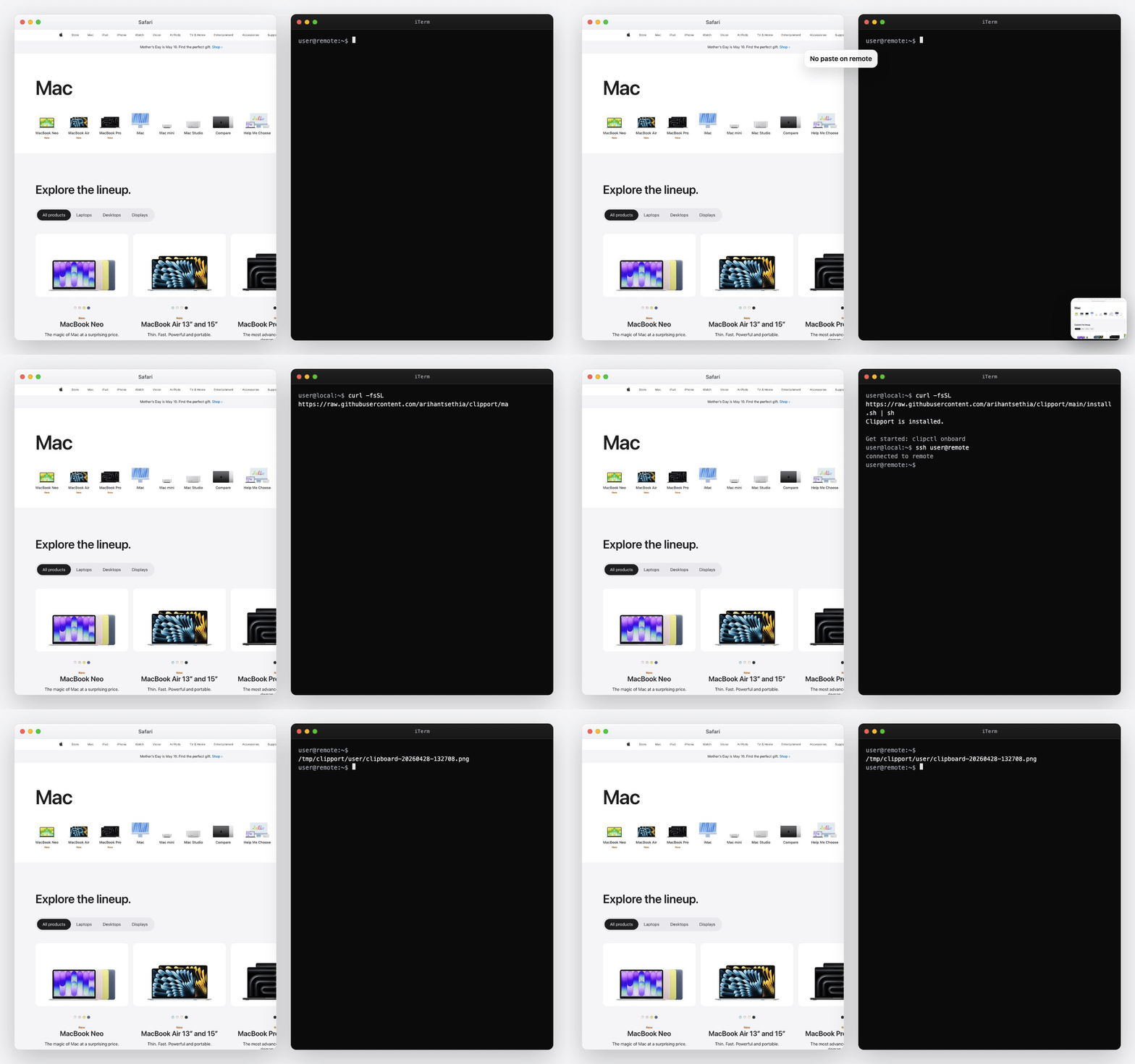
Remote image example:
/tmp/clipport/yourname/clipboard-20260428-132708.241851.png
Use Clipport when a remote process needs the thing on your Mac clipboard: a
screenshot, an image, or plain text pasted through the same terminal shortcut.
Use Cases
Clipport is useful when the remote shell needs local clipboard state:
- paste a screenshot path into a VM shell
- hand a local image to a remote command
- avoid one-off
scpfor clipboard images - keep one paste shortcut for local and SSH shells
Requirements
- macOS
- iTerm2
- Homebrew
- passwordless SSH to each remote machine
- writable
/tmpon each remote machine
Install
curl -fsSL https://raw.githubusercontent.com/arihantsethia/clipport/main/install.sh | sh
The installer builds clipctl, clipportd, and the Clipport menu bar app.
It records local install paths in ~/.config/clipport/config.toml. It does
not start Clipport. It reports installed for a new install and upgraded
when it finds an existing config, binary, app bundle, or launchd plist.
If ~/.local/bin is not on your PATH, the installer prints the export line
to add.
Setup
Build host config from ~/.ssh/config:
clipctl onboard
Onboarding lets you choose SSH hosts, configure the iTerm paste shortcut, and
install OpenSSH LocalCommand hooks for automatic session matching.
Start Clipport:
clipctl start
Check the install:
clipctl doctor
Then open an SSH session in iTerm, copy text on your Mac, and press the
Clipport paste shortcut. Text should appear at the remote prompt.
For images, copy an image or screenshot and press the same shortcut. The remote
prompt receives a path like:
/tmp/clipport/yourname/clipboard-20260428-132708.241851.png
Test remote image upload without changing your clipboard:
clipctl test-paste --host <machine>
Behavior
iTerm runs this command behind the paste shortcut:
clipctl paste
Stdout is strict because iTerm inserts stdout into the terminal:
- local paste prints nothing
- remote text prints the clipboard text
- remote image upload prints only the remote path
Remote uploads always use paths under:
/tmp/clipport/<local-user>/
Configuration
A machine is one remote filesystem. A route is one SSH path to that machine.
OpenSSH still owns aliases, keys, proxies, and connection behavior.
Rerun onboarding:
clipctl onboard
List SSH hosts seen by onboarding:
clipctl onboard --list
Local install settings and host routes live in:
~/.config/clipport/config.toml
The file contains no secrets.
Session Matching
Clipport maps the active iTerm session to a configured machine. OpenSSHLocalCommand hooks make that mapping explicit. If hooks are not installed or
do not fire, terminal title detection and manual registration remain available.
Register the current iTerm session manually:
clipctl session register --machine <machine>
Show configured hosts, registered sessions, and recent transfers:
clipctl status
Menu Bar
When started, the menu bar app supervises clipportd. It shows daemon health,
configured hosts, and shortcuts to restart Clipport, run clipctl doctor, and
open config or log files.
clipportd exits when the menu bar app exits. Choosing Quit stops the
daemon and exits Clipport. The menu bar app does not change theclipctl paste stdout contract.
Commands
# Paste entrypoint used by iTerm.
clipctl paste

# Start, stop, or restart the menu bar app and daemon.
clipctl start
clipctl stop
clipctl restart

# Health check.
clipctl doctor

# Status and recent transfers.
clipctl status

# Upload an embedded test PNG to a configured machine.
clipctl test-paste --host <machine>

# Update from the public installer source.
clipctl update
Debug paste failures:
clipctl --debug paste
Remote Clipboard Shims
Shims are only for remote programs that call wl-paste or xclip directly.
Install shims for a configured machine:
clipctl shims setup --host <machine>
Both local and remote tokens live at:
~/.config/clipport/token
Permissions are 0600. Tokens are not embedded in executable scripts. The
local HTTP endpoint binds only to loopback.
Remove shims:
clipctl shims uninstall --host <machine>
Remove the remote token too:
clipctl shims uninstall --host <machine> --remove-remote-token
Install Options
From a checkout:
./install.sh
Install binaries somewhere else:
CLIPPORT_BIN=/some/bin ./install.sh
Use a different iTerm key binding:
CLIPPORT_ITERM_KEY=<iterm-key-code> ./install.sh
Use a specific loopback HTTP address:
CLIPPORT_HTTP=127.0.0.1:18800 ./install.sh
Update
clipctl update
clipctl update downloads the latest installer and applies it using the current
install settings.
Set CLIPPORT_REF to update from another branch or ref:
CLIPPORT_REF=<ref> clipctl update
Uninstall
clipctl uninstall
Preview:
clipctl uninstall --dry-run
Remove local config, cache, token, and /tmp/clipport files:
clipctl uninstall --remove-data
By default, uninstall keeps local data and remote shim tokens.
Troubleshooting
Start with:
clipctl doctor
Common cases:
- LAN route fails: expected when off that network; Clipport tries the next
route. - SSH shell gets native paste: run
clipctl session register --machine <machine>in that iTerm session. - Hotkey does nothing: confirm iTerm runs
clipctl paste, then check/tmp/clipportd.err.log. - Image upload fails: check passwordless SSH and remote write access to
/tmp/clipport.
Development
gofmt -w <changed go files>
go test ./...
go vet ./...
go build ./cmd/clipctl ./cmd/clipportd
CGO_ENABLED=1 go build -o /tmp/clipport-check ./cmd/clipport
See ARCHITECTURE.md for the contributor architecture map.
Report security issues using SECURITY.md.
License
Clipport is released under the MIT License.
Yorumlar (0)
Yorum birakmak icin giris yap.
Yorum birakSonuc bulunamadi