mcp-audit
mcp
Fail
Health Pass
- License — License: MIT
- Description — Repository has a description
- Active repo — Last push 3 days ago
- Community trust — 145 GitHub stars
Code Fail
- fs module — File system access in .github/workflows/mcp-audit.yml
- process.env — Environment variable access in backend/api/report.ts
- network request — Outbound network request in backend/api/report.ts
- process.env — Environment variable access in backend/lib/email.ts
- rm -rf — Recursive force deletion command in deploy.sh
Permissions Pass
- Permissions — No dangerous permissions requested
No AI report is available for this listing yet.
See what your AI agents can access. Scan MCP configs for exposed secrets, shadow APIs, and AI models. Generate AI-BOMs for compliance.
README.md
MCP Audit


See what your AI agents can access - before they go live.
Web App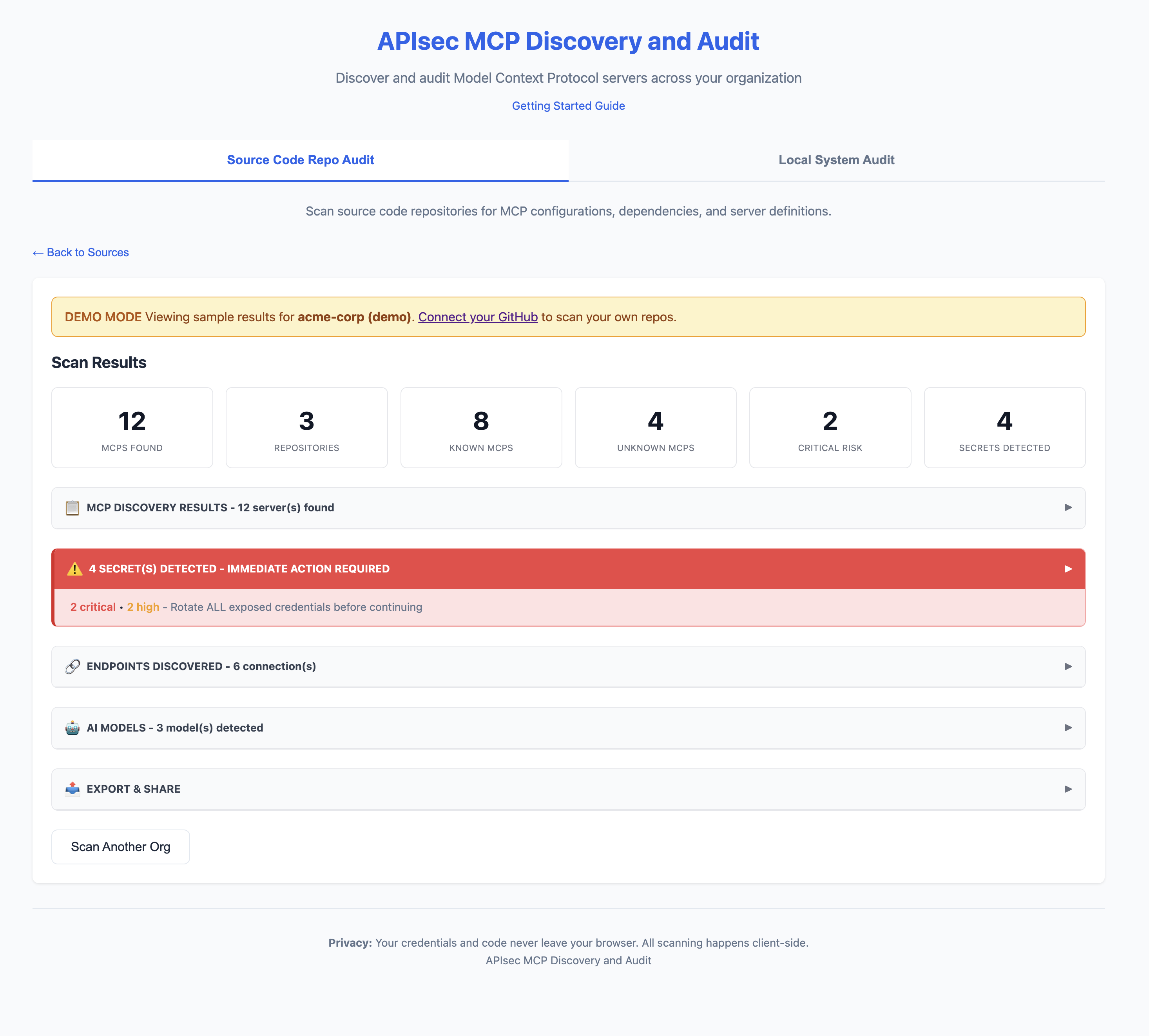
CLI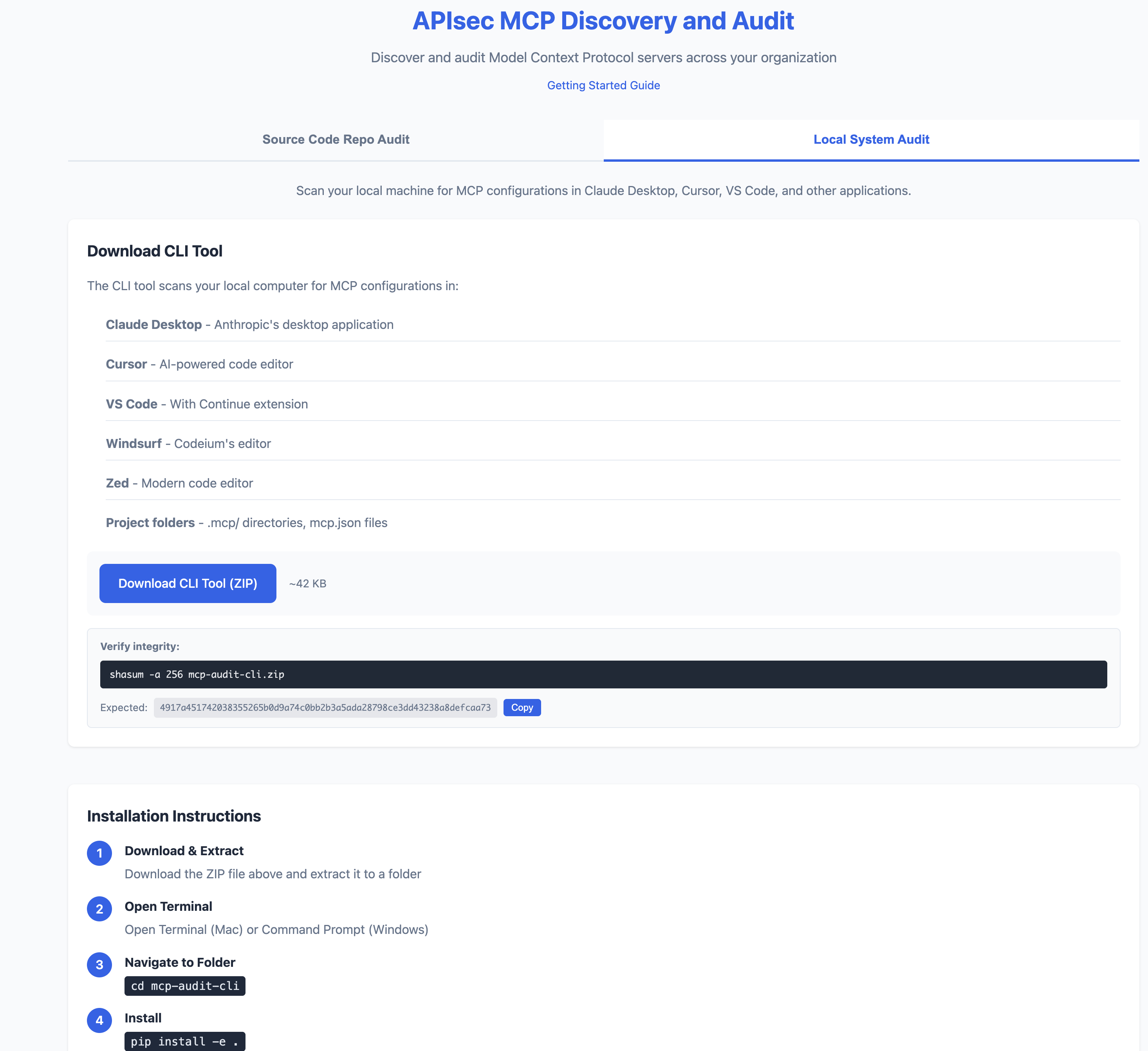
Quick Start
# Install
pip install -e .

# Scan your machine
mcp-audit scan

# Or try the web app (no install)
# https://apisec-inc.github.io/mcp-audit/?demo=true
What It Does
MCP Audit scans your AI development tools (Claude Desktop, Cursor, VS Code) and reveals:
- Secrets - Exposed API keys, tokens, database passwords
- APIs - Every endpoint your AI agents connect to
- AI Models - Which LLMs are configured (GPT-4, Claude, Llama)
- Risk Flags - Shell access, filesystem access, unverified sources
⚠️  2 SECRET(S) DETECTED - IMMEDIATE ACTION REQUIRED

[CRITICAL] GitHub Personal Access Token
  Location: github-tools → env.GITHUB_TOKEN
  Remediation: https://github.com/settings/tokens → Delete → Recreate

[HIGH] Database Connection String
  Location: postgres-mcp → env.DATABASE_URL
  Remediation: Rotate credentials, use secrets manager
What It Finds (and Doesn't Find)
What It Finds
| Scan Type | Finds |
|---|---|
| GitHub Scan | MCP configs committed to repositories (mcp.json, .mcp/, claude_desktop_config.json, etc.) |
| Local Scan | MCP configs on your machine (Claude Desktop, Cursor, VS Code, Windsurf, Zed) |
What It Won't Find
| Blind Spot | Why |
|---|---|
| Secrets in environment variables at runtime | We scan config files, not running processes |
| Configs pulled from secrets managers | Vault, AWS Secrets Manager, etc. are not scanned |
| Dynamically generated configs | Configs created at runtime aren't in files |
| MCPs installed but not configured | No config file = nothing to scan |
| Private repos you don't have access to | GitHub scan is limited by your PAT scope |
| Encrypted or obfuscated secrets | Pattern matching won't catch encoded values |
| Non-standard config locations | Custom paths outside known locations |
Important
A clean scan does not mean zero risk.
- Developers may have MCPs configured on machines you haven't scanned
- Configs may exist in repos outside your GitHub org
- Runtime behavior may differ from static configuration
MCP Audit provides visibility, not guarantees. Use alongside runtime monitoring and security reviews.
CI/CD Integration
Fail builds on critical risks:
# .github/workflows/mcp-audit.yml
name: MCP Security Audit
on: [push, pull_request]

jobs:
  audit:
    runs-on: ubuntu-latest
    steps:
      - uses: actions/checkout@v4

      - name: Install MCP Audit
        run: pip install mcp-audit

      - name: Run Security Scan
        run: mcp-audit scan --path . --format json -o mcp-report.json

      - name: Fail on Critical
        run: |
          CRITICAL=$(jq '[.mcps[] | select(.risk == "critical")] | length' mcp-report.json)
          if [ "$CRITICAL" -gt 0 ]; then
            echo "❌ Found $CRITICAL critical-risk MCPs"
            exit 1
          fi

      - name: Upload AI-BOM
        uses: actions/upload-artifact@v4
        with:
          name: ai-bom
          path: mcp-report.json
Export Formats
# JSON (for CI/CD)
mcp-audit scan --format json -o report.json

# AI-BOM (CycloneDX 1.6)
mcp-audit scan --format cyclonedx -o ai-bom.json

# SARIF (GitHub Security integration)
mcp-audit scan --format sarif -o results.sarif

# CSV / Markdown
mcp-audit scan --format csv -o report.csv
mcp-audit scan --format markdown -o report.md

# PDF Report via Email
mcp-audit scan --email [email protected]
Key Features
| Feature | Description |
|---|---|
| MCP Discovery | Find MCPs in Claude Desktop, Cursor, VS Code, Windsurf, Zed |
| Secrets Detection | 25+ secret patterns with provider-specific remediation |
| API Inventory | Database, REST, SSE, SaaS, Cloud endpoints |
| AI Model Detection | OpenAI, Anthropic, Google, Meta, Mistral, Ollama |
| OWASP LLM Top 10 | Maps findings to OWASP LLM Top 10 (2025) framework |
| AI-BOM Export | CycloneDX 1.6 for supply chain compliance |
| SARIF Output | GitHub Security integration with OWASP tags |
| Registry | 50+ known MCPs with risk classifications |
Two Ways to Use
| Web App | CLI Tool | |
|---|---|---|
| Scans | GitHub repositories | Local machine |
| Install | None (browser) | Python 3.9+ |
| Best for | Org-wide visibility | Deep local analysis |
| Privacy | Token stays in browser | 100% local |
Web App: https://apisec-inc.github.io/mcp-audit/
CLI Reference
Scan Commands
mcp-audit scan                    # Full scan
mcp-audit scan --secrets-only     # Only secrets
mcp-audit scan --apis-only        # Only API endpoints
mcp-audit scan --models-only      # Only AI models
mcp-audit scan --verbose          # Detailed output
mcp-audit scan --path ./project   # Specific directory
Export Options
mcp-audit scan --format json -o report.json       # JSON output
mcp-audit scan --format csv -o report.csv         # CSV output
mcp-audit scan --format markdown -o report.md     # Markdown output
mcp-audit scan --format cyclonedx -o ai-bom.json  # CycloneDX 1.6 AI-BOM
mcp-audit scan --format sarif -o results.sarif    # SARIF for GitHub Security
mcp-audit scan --email [email protected]       # PDF report via email
Registry Commands
mcp-audit registry                    # List all known MCPs
mcp-audit registry --risk critical    # Filter by risk
mcp-audit registry lookup "stripe"    # Search registry
Risk Levels
| Level | Meaning | Examples |
|---|---|---|
| 🔴 CRITICAL | Full system access | Database admin, shell access, cloud IAM |
| 🟠 HIGH | Write access | Filesystem write, API mutations |
| 🟡 MEDIUM | Read + limited write | SaaS integrations, read-only DB |
| 🟢 LOW | Read-only | Public APIs, memory storage |
Detected Secrets
| Severity | Types |
|---|---|
| 🔴 Critical | AWS Keys, GitHub PATs, Stripe Live Keys, DB Credentials |
| 🟠 High | Slack Tokens, OpenAI Keys, Anthropic Keys, SendGrid |
| 🟡 Medium | Webhooks, Generic API Keys |
Privacy
- Web App: GitHub token never leaves your browser
- CLI: Runs 100% locally, no telemetry
- PDF Reports: Only summary data sent (no secrets)
Installation
Option 1: Python (pip)
# Clone and install
git clone https://github.com/apisec-inc/mcp-audit.git
cd mcp-audit
pip install -e .

# Verify
mcp-audit --help
Requires Python 3.9+
Option 2: Docker
# Build image
docker build -t mcp-audit .

# Scan current directory
docker run -v $(pwd):/scan mcp-audit scan

# Scan with JSON output
docker run -v $(pwd):/scan mcp-audit scan --format json -o /scan/report.json
Verify Download Integrity
All MCP Audit releases include SHA256 checksums.
Verify CLI Download
# Download the checksum file
curl -O https://github.com/apisec-inc/mcp-audit/releases/latest/download/CHECKSUMS.txt

# Verify the zip file
shasum -a 256 -c CHECKSUMS.txt --ignore-missing
Expected output:
mcp-audit-cli.zip: OK
Current Release Checksum
| File | SHA256 |
|---|---|
mcp-audit-cli.zip |
4917a451742038355265b0d9a74c0bb2b3a5ada28798ce3dd43238a8defcaa73 |
Full checksums: CHECKSUMS.txt
Documentation
- Risk Scoring - How risk levels and flags are assigned
- Contributing - Guidelines for contributors
License
MIT - see LICENSE
Built by APIsec
Reviews (0)
Sign in to leave a review.
Leave a reviewNo results found