aval
Health Uyari
- License — License: MIT
- Description — Repository has a description
- Active repo — Last push 0 days ago
- Low visibility — Only 5 GitHub stars
Code Basarisiz
- rm -rf — Recursive force deletion command in config/claude/settings.json
Permissions Gecti
- Permissions — No dangerous permissions requested
Bu listing icin henuz AI raporu yok.
Engineering harness for AI coding agents (Claude Code, OpenCode): rules, memory, skills, hooks and quality gates, all verified by tests. One Go binary for macOS, Linux and Windows.


What it is ·
Plan decks ·
Guarantees ·
Stack and roadmap ·
Install ·
Commands ·
Inside ·
Principles ·
Full guide →
What aval is

aval is an engineering harness for AI coding agents: the rules, memory,
skills, hooks and quality gates that Claude Code and OpenCode work with, plus
the terminal environment they run in. It ships as a single Go binary that is
versioned, covered by tests and installs on macOS, Linux and Windows.
The name is the principle. In Spanish, an aval is a guarantee, a
co-signature that vouches for something. No rule in aval depends on the agent's
good will: each one is backed by a mechanism that checks it, whether a test, a
hook or a gate with measured results. That is why the v in the logo is a
check mark.
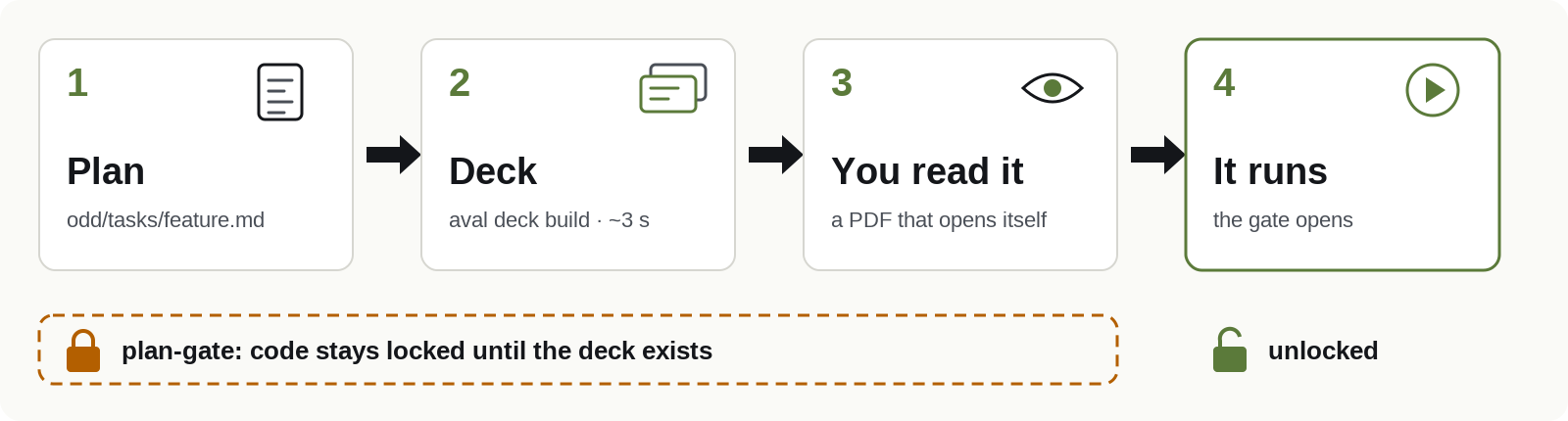
The same applies to understanding: no plan runs before you have seen it.
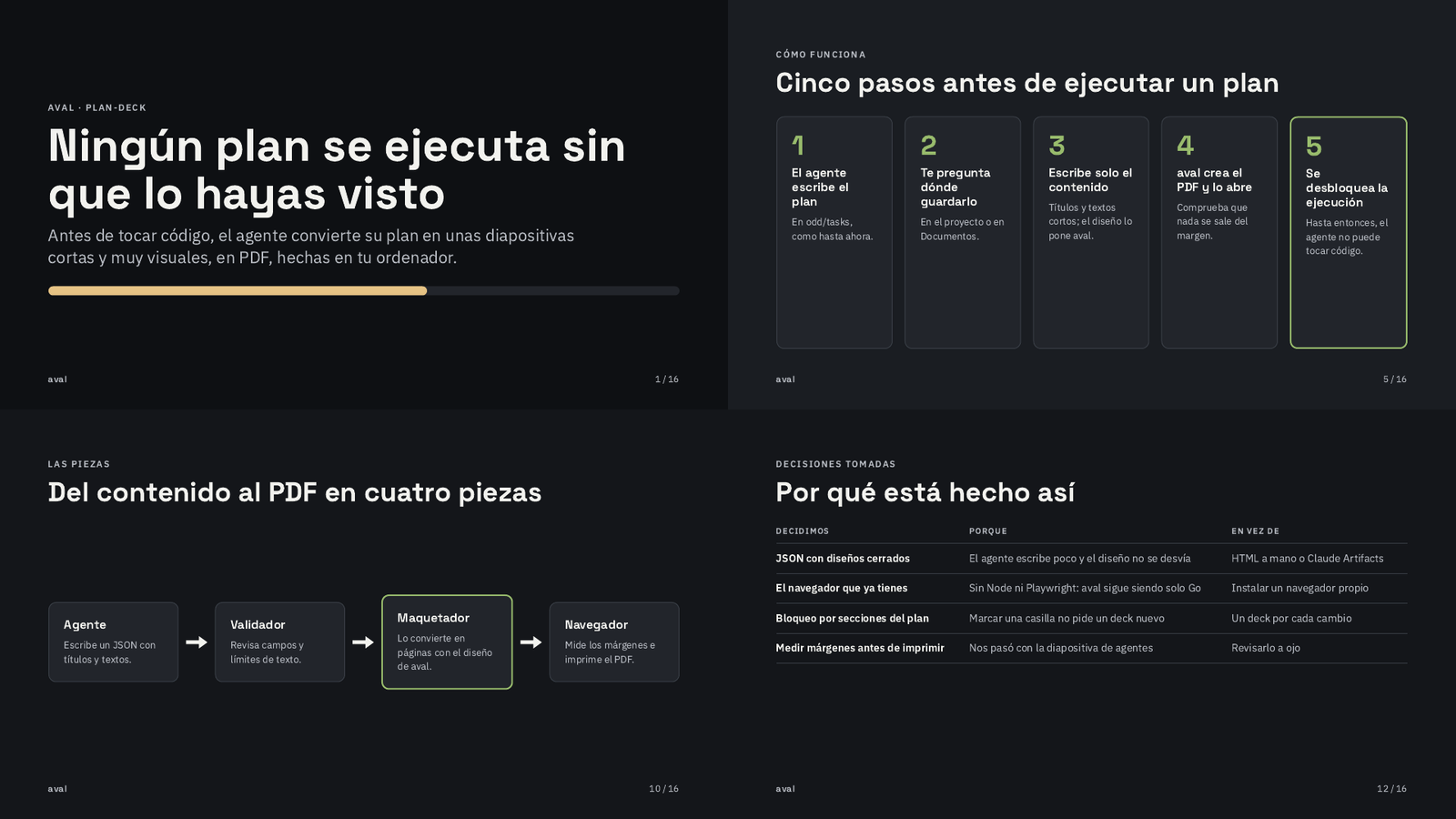
Before an agent executes a plan, aval turns it into a short PDF deck and blocks
code edits until the deck exists.
Plan decks
You see the plan before the agent runs it.
| Local | Fast | Enforced | Everywhere |
|---|---|---|---|
| Your own browser prints the PDF. No cloud, no Node. | 16 slides in about 3 s, the same dark look every time. | Code stays locked until the deck exists. | Every agent, every project. You choose where it is saved. |
aval deck build plan.deck.json -o docs/decks/plan.pdf --plan odd/tasks/plan.md --open
How it decides, the layouts and the bypass: guide → Plan decks.
Guarantees
| The promise | How it is checked |
|---|---|
| No secret reaches git | gitleaks scans the tree and the full history on every test run |
| Nothing ships without a test | Strict TDD: the agent writes a [tdd-gate] naming the failing test before any code |
| Nothing visual is approved by eye | A hook blocks UI edits until the design pipeline runs; the gates measure contrast |
| No plan runs unseen | Every plan becomes a short PDF deck (plan-deck skill, aval deck, rendered locally); a hook blocks edits until it exists |
| One source of truth | The TUI, --yes, update, doctor and uninstall all read install.manifest; nothing keeps its own list |
| Installing deletes nothing | Anything in the way moves to ~/.aval-backup/<date>/ before linking |
| The agent does not forget | Persistent memory with Engram across sessions and compactions |
Stack and roadmap
aval runs today on a set of proven tools. The roadmap moves every piece of the
workspace into aval itself, so that the only external dependency left is the
AI provider you choose. What stays is what the product is built with, ships
through or drives: Go, npm and Homebrew; Git, gitleaks and a headless browser.
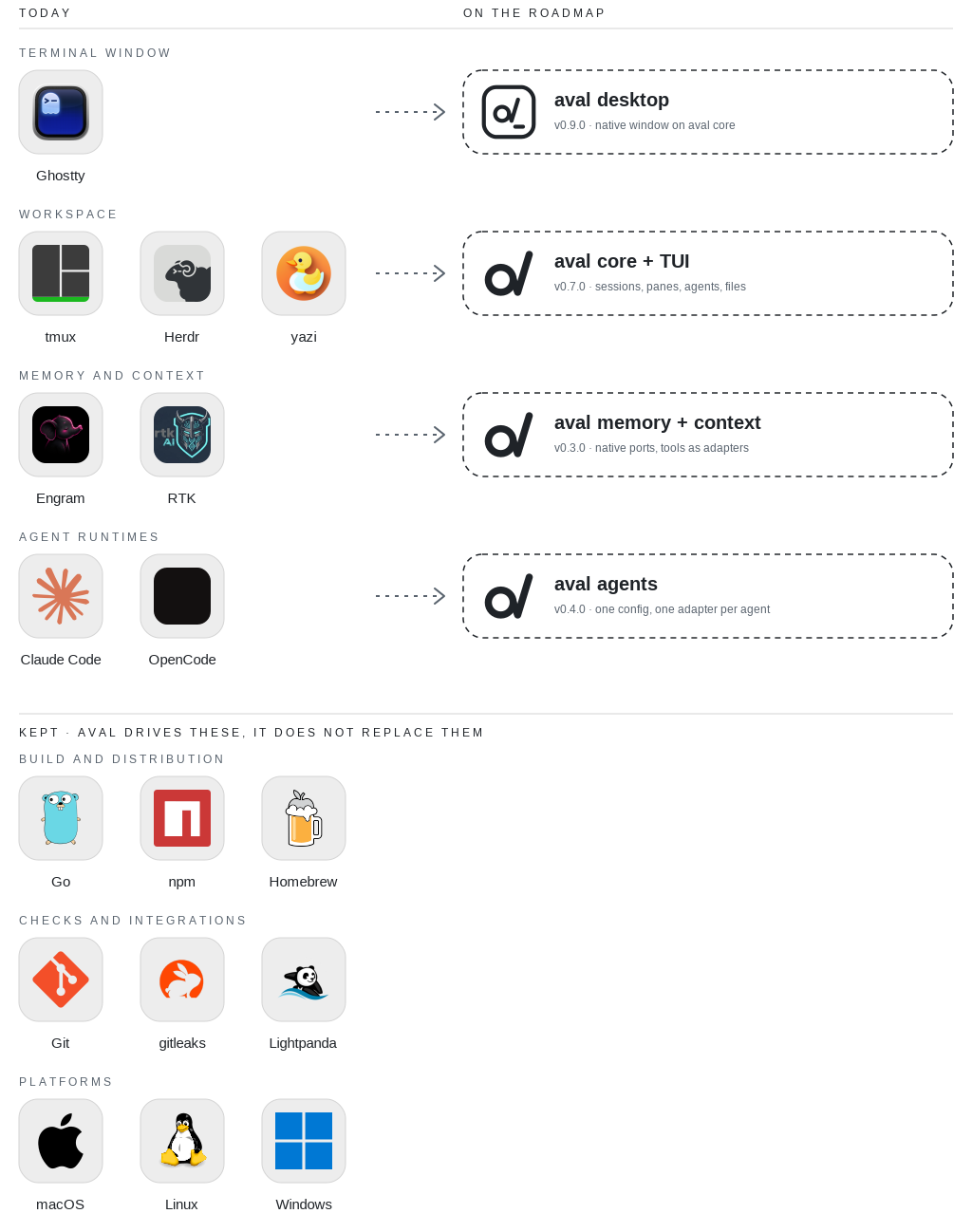
Official logos of each project (sources).
What is configured today and what replaces it
| Job | Today | Replaced by | Ships in |
|---|---|---|---|
| Terminal window | Ghostty | aval desktop: a native window over aval core with an embedded terminal |
v0.9.0 |
| Sessions, panes and agents | tmux, Herdr | aval core: persistent PTYs, spaces, tabs and panes, a socket API, worktree per task | v0.6.0 |
| Multiplexer UI, file panel, status bar | tmux, yazi | aval TUI: panes, agent list with status, diff review with line comments, file panel | v0.7.0 |
| Memory and context | Engram, RTK, code-review-graph | aval memory and aval context: native ports; today's tools become adapters | v0.3.0 |
| Harness glue | gentle-ai, agnix, Node screenshot script | native aval commands: aval lint, aval shot (CDP from Go), hook guard and done gate |
v0.3.0 |
| Agent configuration | One config file per agent | aval agents: one config model with an adapter each for Claude Code, OpenCode, Codex and Gemini | v0.4.0 |
| Agent runtime | Claude Code, OpenCode | Stays. An own runtime on the provider's SDK is only evaluated for v1.0 | v1.0.0 |
The desktop app
aval desktop is where the roadmap ends up: one lightweight app that is
shell, multiplexer and agent workspace at once, built on aval core and sharing
the TUI's features. Its mark is the aval mark inside an app frame, followed by a
terminal cursor.
Milestones
| Version | Goal |
|---|---|
| v0.1.0 | First release: signed binaries, npm packages, Windows support |
| v0.2.0 | Maintainability: one local check equal to CI, generated CLI reference, architecture map, dependency and size budgets |
| v0.3.0 | Native harness core: guard, secrets, formatter, done gate, lint, shot, memory and context ports |
| v0.4.0 | Agent runtime adapters |
| v0.5.0 | Local observability and distribution: insights, usage, history, bench, update channels, Homebrew tap |
| v0.6.0 | aval core |
| v0.7.0 | aval TUI, and the retirement of tmux, Herdr and yazi |
| v0.8.0 | Development workflow: aval init, commands, rule-compliance evals |
| v0.9.0 | Desktop app, remote machines and personalization |
| v1.0.0 | Stable contract, and an evaluation of an own agent runtime |
Each issue is written as a spec an AI agent can implement directly. The full
plan lives in the pinned roadmap issue.
Install
1. Get the binary. Any of these; the rest is the same.
npx @alvaroofernaandez/aval@next install   # no clone needed; prerelease from npm
go install github.com/alvaroofernaandez/aval/cmd/aval@latest
Or download an archive from Releases (checksums in SHA256SUMS).
2. Run aval. On a terminal, a bare aval opens the hub: the wordmark, a status panel (version from the update cache, repo, doctor, last backup, theme) and a menu. Opening it writes nothing and makes no network calls. Each entry has an icon, and some a badge (updates, doctor warnings, backups, sandboxes); a detail pane beside the menu says what the highlighted entry will do, and a letter opens an entry directly (? lists them).
                       ▗██              ██  Version  0.3.0 · ! 0.3.1 available
                      ▗██▘              ██  Repo     ~/.aval
     ▄▄▄▄▄▄▄▖  ▗▄▖    ▟█▘    ▗▄▄▄▄▄▄▄   ██  Doctor   ! 1 warn
   ▗██▀▀▀▜██▌  ▝██▖  ▟█▛    ▟█▛▀▀▀███   ██  Backup   today 12:54 · install
   ██▘    ▜█▌   ▝██▖▟█▛    ▐█▛    ▝██   ██  Theme    mono
   ▜█▙▖  ▄██▌    ▝███▛     ▝██▄  ▗▟██   ██
    ▀▜████▜█▌     ▝█▛       ▝▀████▛██   ██
  Nothing passes without evidence.                               macOS (arm64)
  ────────────────────────────────────────────────────────────────────────────

  Set up  › ⇣ Install        │ ⇣ Install                                     i
            ⟳ Update     ↑ 3 │ Link the repo configs into this home.
            ⇄ Sync           │
  Health    ⊞ Doctor     ! 1 │ Repo      ~/.aval
  Undo      ◷ Backups      4 │ Last run  today 12:54
            ⌫ Uninstall      │
  Tools     ⎈ Settings       │ enter  pick what to link
            ⧉ Dev sandbox  2 │
            ◉ About          │

  ────────────────────────────────────────────────────────────────────────────
  1 warning · open Doctor to see it
  ↑↓ move · enter open · i u s d b x , v a jump · ? help · q quit

Every write goes through preview, confirm, run and result. A destructive confirm opens on Cancel and names its safety net. Without a terminal, with aval help or --help, or with TERM=dumb, aval prints the usage byte for byte instead.
Views:
- Install: links the repo configs into this home. It previews first, and anything in the way moves to
~/.aval-backup. - Update: pulls the repo (fast-forward only), then re-applies. It fetches a preview first, stops on a dirty tree, and backs up files in the way.
- Sync: merges repo-managed settings into the live config. It previews the drift, backs up, verifies with doctor and rolls back on failure.
- Doctor: checks this machine against the repo. It is read-only until you press
f; the fixes it offers are safe ones (dangling links, settings drift), backed up first. - Backups: lists backup runs and restores one. A restore previews first, confirms on Cancel, and moves foreign content aside instead of deleting it.
- Uninstall: removes the links aval made and puts back what they displaced. It previews at once, confirms on Cancel, and names
aval restore latestas the undo. - Settings: theme, glyphs, motion and update checks. Enter saves, esc discards.
- Dev sandbox: a throwaway home for trying aval. Your real home is not touched; reset and remove confirm on Cancel.
- About: version, paths and links. Read-only.
Or run aval install to go straight to the installer. Without a terminal, aval on its own prints the usage and changes nothing.
- Welcome. If aval cannot find its repository, it offers to clone it to
~/.aval, or to use a folder you already have. Cloning is always your choice. - Select. Each group shows what will happen to its files before anything is written: new, linked, or replaces a file.
- Install. Failures appear inline, and
ctrl+cstops after the current step. - Done. Counts, the backup path, the undo command (
aval restore latest) and the next steps.
aval install                  # TUI: welcome, select, install, done
aval install --yes --dry-run  # no TUI: shows what it would do, touches nothing
aval install --yes            # no TUI: installs everything that applies (--copy copies instead of linking)
Nothing is deleted: anything in the way moves to ~/.aval-backup first. Without a terminal and without --yes, aval install stops with a clear error instead of opening a TUI.
The repository is found from, in order: --repo <path>, $AVAL_REPO, the location recorded in~/.config/aval/config after the first completed install, then the current directory. Subcommands that do
not depend on the repo (hook, design, tmux, pdf...) work with the binary alone.
Everything installed on purpose with Homebrew is in the Brewfile (brew bundle --file=Brewfile).
Private material (company names, client skills) lives outside the repo, in ~/.config/aval/private
(or $AVAL_PRIVATE_DIR): a settings.json that aval sync merges on top and a links.manifest that it links.
[!NOTE]
Until v0.1.0 is final, npm packages and binaries are prereleases: npm serves them under thenexttag.
Configuration
Settings live in ${XDG_CONFIG_HOME:-~/.config}/aval/config (%APPDATA%\aval\config on Windows), one key = value per line. Comments and unknown lines are preserved. aval config path prints the file.
| Key | Values | Default | Env | Flag |
|---|---|---|---|---|
repo |
path | none | AVAL_REPO |
--repo |
theme |
aval, terminal, mono, or a community theme |
aval |
AVAL_THEME |
--theme |
background |
auto, dark, light |
auto |
AVAL_BACKGROUND |
|
glyphs |
auto, unicode, ascii |
auto |
AVAL_GLYPHS |
|
motion |
auto, off |
auto |
AVAL_MOTION |
|
update_check |
on, off |
on |
AVAL_NO_UPDATE_CHECK |
|
language |
auto, en, es |
auto |
AVAL_LANG |
--lang |
Precedence: flag, then environment variable, then file, then default. NO_COLOR is honoured and wins over all of it. --plain means mono, ASCII glyphs and motion off, in one flag.
aval config                 # settings view on a terminal, list otherwise
aval config list            # every value and where it comes from
aval config get theme
aval config set theme catppuccin
aval config path
Language. The hub, the installer and the human output of the CLI come in English and Spanish. language = auto picks Spanish when the first of LC_ALL, LC_MESSAGES and LANG that is set starts with es, and English otherwise. The order is --lang, then AVAL_LANG, then the file, then the locale, then English. aval --lang es doctor is a one-off; aval config set language es sticks. A wrong --lang exits 1; a wrong AVAL_LANG is skipped, and a wrong language in the file warns on stderr and falls back to the locale.
Never translated, in any language: --json output, hook and statusline output, logs, and generated files. Scripts and agents read those.
Known English left in a Spanish session: text that comes from the core packages (doctor check messages, plan group labels and reasons, sync warnings, the reasons inside install errors), unknown command, and the update-available notice.
The settings view previews the theme live: enter saves, esc discards. Inside the installer, press s. An invalid value warns once on stderr and falls back to the default; aval config set refuses it with exit 1.
Themes. aval is the default: ink on your own terminal background, with colour only on the state glyphs (√ ! ×), never on text, and the same rule holds in every theme. terminal uses your terminal's 16 colours and mono uses none. Community themes are opt-in, and a variant can be pinned, for example theme = catppuccin-frappe.
| Theme | Variants |
|---|---|
catppuccin |
catppuccin-mocha, catppuccin-latte, catppuccin-frappe, catppuccin-macchiato |
tokyo-night |
tokyo-night-storm, tokyo-night-day |
gruvbox |
gruvbox-dark, gruvbox-light |
dracula |
dracula-alucard |
nord |
none |
kanagawa |
kanagawa-wave, kanagawa-dragon, kanagawa-lotus |
rose-pine |
rose-pine-moon, rose-pine-dawn |
solarized |
solarized-dark, solarized-light |
one-dark |
one-light |
everforest |
everforest-dark, everforest-light |
Palettes come from each theme's upstream repository; sources and licences are in internal/ui/themes/SOURCES.md.
Commands
| Command | What it does |
|---|---|
aval doctor |
Checks links, hooks, agents and settings (--fix, --json, --security) |
aval sync |
Writes what the repo manages into ~/.claude/settings.json and Codex/Gemini; transactional (--dry-run, --check) |
aval update |
git pull and links what is new (--dry-run) |
aval restore · aval uninstall |
Undo an install or sync from ~/.aval-backup (--list, latest, <id>, --pin) · remove only this repo's links |
aval budget |
Always-on context per agent and the latency of each hook; exits 1 when over budget |
aval review assess |
Risk level of the diff, from git alone, and which reviewers to run |
aval rules sync |
Mirrors the shared rules of CLAUDE.md and the lessons into OpenCode's AGENTS.md (--check) |
aval hook <name> |
lessons · design-gate · design-shot-stop · rtk-rewrite · repo-profile · pre-push |
aval statusline |
Claude Code status line |
aval deck build <spec> -o <pdf> --plan <plan> |
Plan deck as a PDF, rendered with the local browser; unlocks the plan gate |
aval design ack <surface> · aval design gate <…> |
Design pipeline ack · measured gates: contrast, tokens, pairs, hardcodes, theme-refs, component, emoji, native |
aval tmux <…> |
sidebar-toggle, sidebar-follow, sidebar-watch, open-file, close-file, paste-router, statusbar, launch |
aval macos <…> |
defaults, screenshot-clipboard install / copy |
aval kiri up · aval docker cleanup |
Gets Docker ready on Kiri · safe prunes (--dry-run) |
aval pdf init · aval pdf assets |
PDF report project · assets/brand.css |
aval reap-orphan-tests |
Ends orphaned test processes (--min-age, --dry-run) |
aval release <…> |
Cuts versions, release candidates and promotions: releasing |
aval dev |
Try aval in a sandbox that never touches your machine: dev mode |
Details for each one are in the guide.
Inside
| What | Details | |
|---|---|---|
config/claude · config/opencode |
Instructions, agents, hooks, commands | Agents |
skills/ |
Skills shared by every agent | Skills |
config/ghostty · config/yazi* · config/herdr-* · home/tmux.conf |
Terminal, status bar, yazi sidebar, Herdr | Status bar · Sidebar |
home/ |
zsh, p10k, git | Shell |
cmd/aval · internal/ · npm/ |
The binary, by domain, and its packaging | Map |
install.manifest |
What is installed and where: the single source | Installation |
.goreleaser.yaml · .github/workflows/release.yml |
SemVer versions, binaries with verifiable provenance and npm packages | Releasing · Changelog |
tests/ |
Go integration tests | Tests |
Principles
- One Go binary. All of aval's own logic is Go; no shell or Python of its own, except the zsh dotfiles (
home/) and the 3-line.githooks/pre-pushshim (git needs an executable). - Declarative manifest.
install.manifestsays what is installed and where; the code reads data, not paths. - No vendored upstream. Dependencies are modules, not copied trees.
- Nothing is deleted. Everything moved aside is kept in
~/.aval-backupandaval restorebrings it back. - Maintainability first. A feature that makes aval harder to maintain waits until it does not.
Contributing · MIT License · Security · Code of conduct
Images generated with go run ./tools/brand · every stack logo is a trademark of its project
Yorumlar (0)
Yorum birakmak icin giris yap.
Yorum birakSonuc bulunamadi