dsclaude
Health Warn
- No license — Repository has no license file
- Description — Repository has a description
- Active repo — Last push 0 days ago
- Community trust — 13 GitHub stars
Code Warn
- Code scan incomplete — No supported source files were scanned during light audit
Permissions Pass
- Permissions — No dangerous permissions requested
This is a collection of shell scripts designed to route CLI and desktop sessions for coding agents through alternative model backends, specifically configuring them to use the DeepSeek V4 API instead of the default Anthropic models.
Security Assessment
The tool operates by setting environment variables and launching agent processes. It inherently requires your DeepSeek API key to function and makes network requests to the DeepSeek API endpoint (`api.deepseek.com`). The automated audit found no hardcoded secrets within the codebase. However, because the light code scan was unable to parse the unsupported shell source files, a complete automated vulnerability check was not possible. The recommended installation method explicitly asks users to run `sudo` to move the script to a system directory, which always carries inherent risks if the script is later modified by a malicious actor. Overall risk is rated as Medium due to the incomplete code scan and the execution of an unaudited shell script.
Quality Assessment
The project is highly active, with its last update pushed today. It features a comprehensive and clear README detailing exactly what environment variables are set and how the system works. Community trust is currently minimal but present, represented by 13 GitHub stars. A notable drawback is the complete absence of a license file, meaning the legal terms of use and redistribution are technically undefined.
Verdict
Use with caution: the script is actively maintained and conceptually simple, but you should manually inspect the shell code before executing it due to the failed automated code scan and the lack of a formal license.
One script to run claude code with deepseek V4
xxclaude — Claude Code & Claude Desktop launchers for alternative backends
A small collection of shell scripts that point Claude Code and Claude Desktop at non-Anthropic model backends.
Scripts
| Script | Agent | Backend | Models |
|---|---|---|---|
| dsclaude | Claude Code (CLI) | DeepSeek API (Anthropic-compatible endpoint) | deepseek-v4-pro[1m] (default, unified reasoning) · deepseek-v4-flash[1m] (fast / haiku tier) |
| dsclaude-desktop | Claude Desktop (macOS GUI) | DeepSeek API (Anthropic-compatible endpoint) | deepseek-v4-pro · deepseek-v4-flash (1M context on both) |
dsclaude exposes the alternate model in Claude Code's /model picker so you can hot-swap mid-session, sets ANTHROPIC_DEFAULT_HAIKU_MODEL so background/cheap tasks route to the fast model, and honors optional env overrides for context window and output token limits.
dsclaude-desktop is a one-command configurator for Claude Desktop's built-in Configure Third-Party Inference feature (Developer menu). It writes the same config that the dialog would write — pre-filled for DeepSeek — and restarts the app. Claude Desktop's launch chooser handles switching back to Anthropic mode natively, so there's no --revert flag.
Compatibility
| Platform | Status |
|---|---|
| macOS | Native, fully supported |
| Linux (Ubuntu, etc.) | Compatible — requires bash and standard POSIX tools (pre-installed) |
| Windows | Not supported natively — works via WSL or Git Bash |
Quick start
git clone https://github.com/Agents365-ai/xxclaude.git
cd xxclaude
chmod +x dsclaude
Make it globally available (optional):
sudo mv dsclaude /usr/local/bin/
dsclaude
Follows the official DeepSeek guide: Integrate with Coding Agents / Anthropic API.
export DEEPSEEK_API_KEY=sk-xxxxxxxxxxxxxxxxxx   # add this line to ~/.zshrc or ~/.bashrc

dsclaude                 # start on deepseek-v4-pro (default, full reasoning)
dsclaude fast            # start on deepseek-v4-flash[1m] (cheaper / faster)
dsclaude long            # request a 1M context window (1,048,576 tokens)
dsclaude long fast       # 1M + flash
Sets the DeepSeek-recommended env vars under the hood: ANTHROPIC_BASE_URL=https://api.deepseek.com/anthropic, Opus/Sonnet/Haiku model mappings, CLAUDE_CODE_SUBAGENT_MODEL, and CLAUDE_CODE_EFFORT_LEVEL=max (override via DSCLAUDE_EFFORT).
In-session: /model deepseek-v4-flash[1m] ↔ /model deepseek-v4-pro[1m].
Note: Both
deepseek-v4-proanddeepseek-v4-flashnatively support a 1M-token context window. In Claude Code, the[1m]suffix is required on each model name to enable it (deepseek-v4-pro[1m],deepseek-v4-flash[1m]).dsclaudesets this for you.
dsclaude-desktop
A one-command configurator for Claude Desktop's built-in third-party inference feature, pre-filled for DeepSeek.
This is not a hack or workaround. Anthropic ships a "Configure Third-Party Inference" dialog inside Claude Desktop (Developer menu) where you can manually point the app at any Anthropic-compatible endpoint. The dialog has six required fields and a model list. dsclaude-desktop writes the same JSON config that the dialog would write, then restarts the app — saving you the menu navigation.
Prerequisites
- Claude Desktop installed (download from claude.ai/download)
- Developer Mode enabled in Claude Desktop
- Help → Troubleshooting → Enable Developer Mode
- Only needs to be done once. The script verifies this on each run.
- DeepSeek API Key in
$DEEPSEEK_API_KEY, your shell rc, or paste at the prompt
Usage
export DEEPSEEK_API_KEY=sk-xxxxxxxxxxxxxxxxxx   # or add to ~/.zshrc

./dsclaude-desktop      # configure and restart Claude Desktop
./dsclaude-desktop -h   # help
What it does:
- Generates an entry under
~/Library/Application Support/Claude-3p/configLibrary/with your DeepSeek key, base URLhttps://api.deepseek.com/anthropic, auth schemebearer, anddeepseek-v4-pro+deepseek-v4-flash(1M context) as the model list - Sets
appliedIdto your entry in_meta.json(existing entries are preserved) - Restarts Claude Desktop with
killall Claude && open -a Claude
Switching modes
Claude Desktop's launch chooser handles mode switching natively — no --revert flag needed:
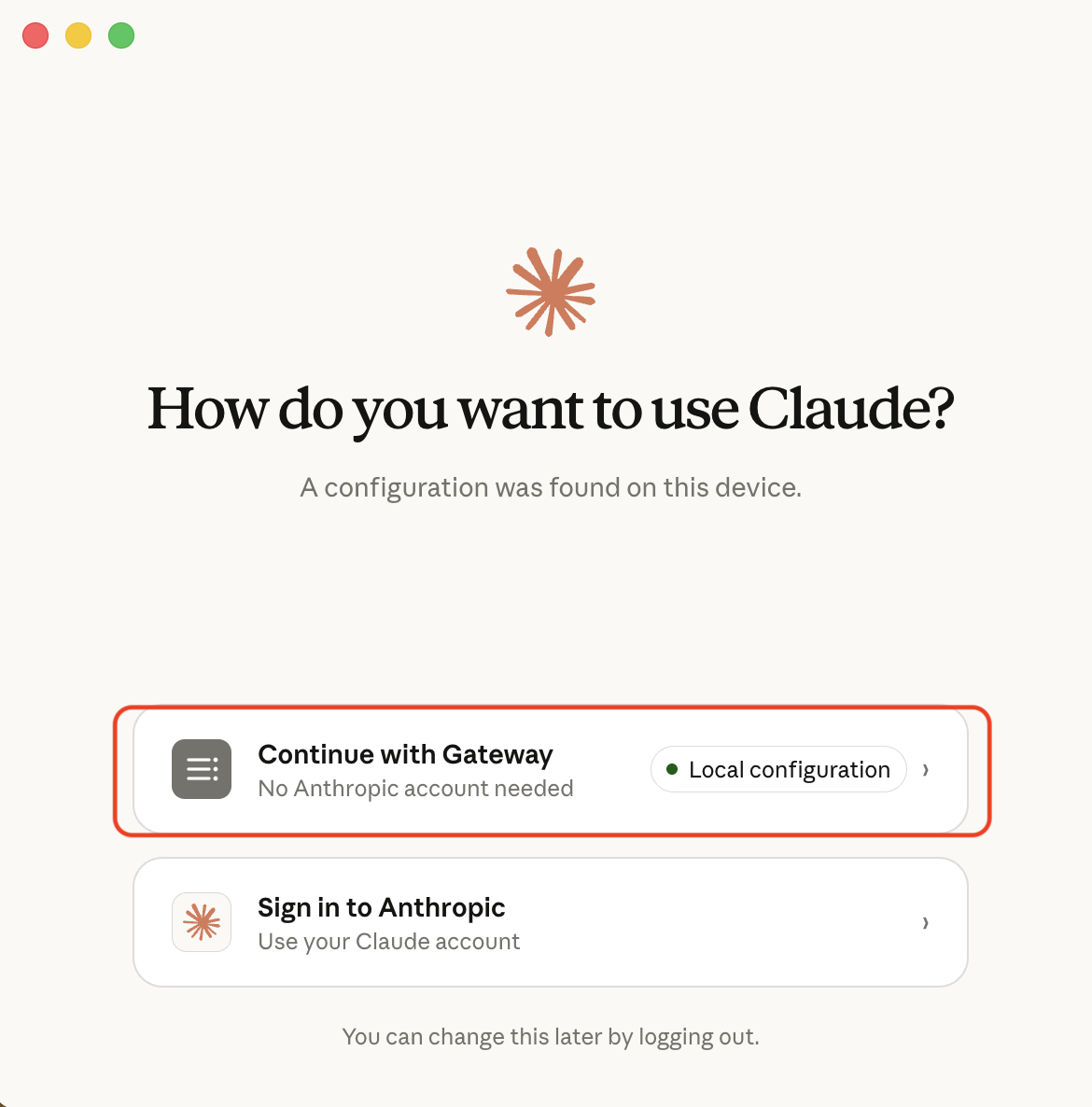
Even on the Anthropic sign-in page you can swap back to Gateway:
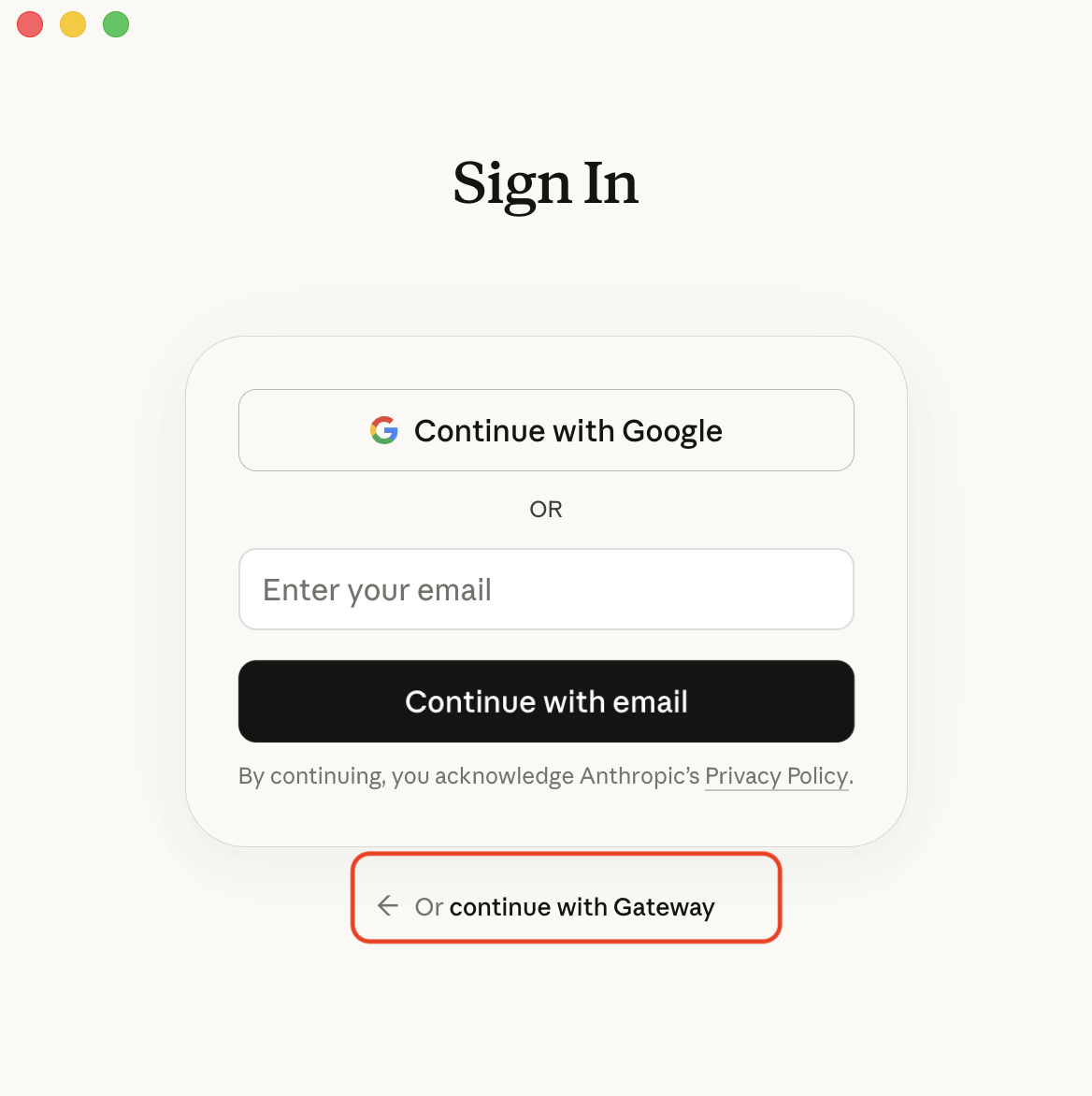
To switch: click your profile in Claude Desktop → Disconnect (or sign out) → at next launch, pick the other option.
What you get
In Gateway mode the Cowork and Code modes route to DeepSeek. The model picker shows your masked DeepSeek models:
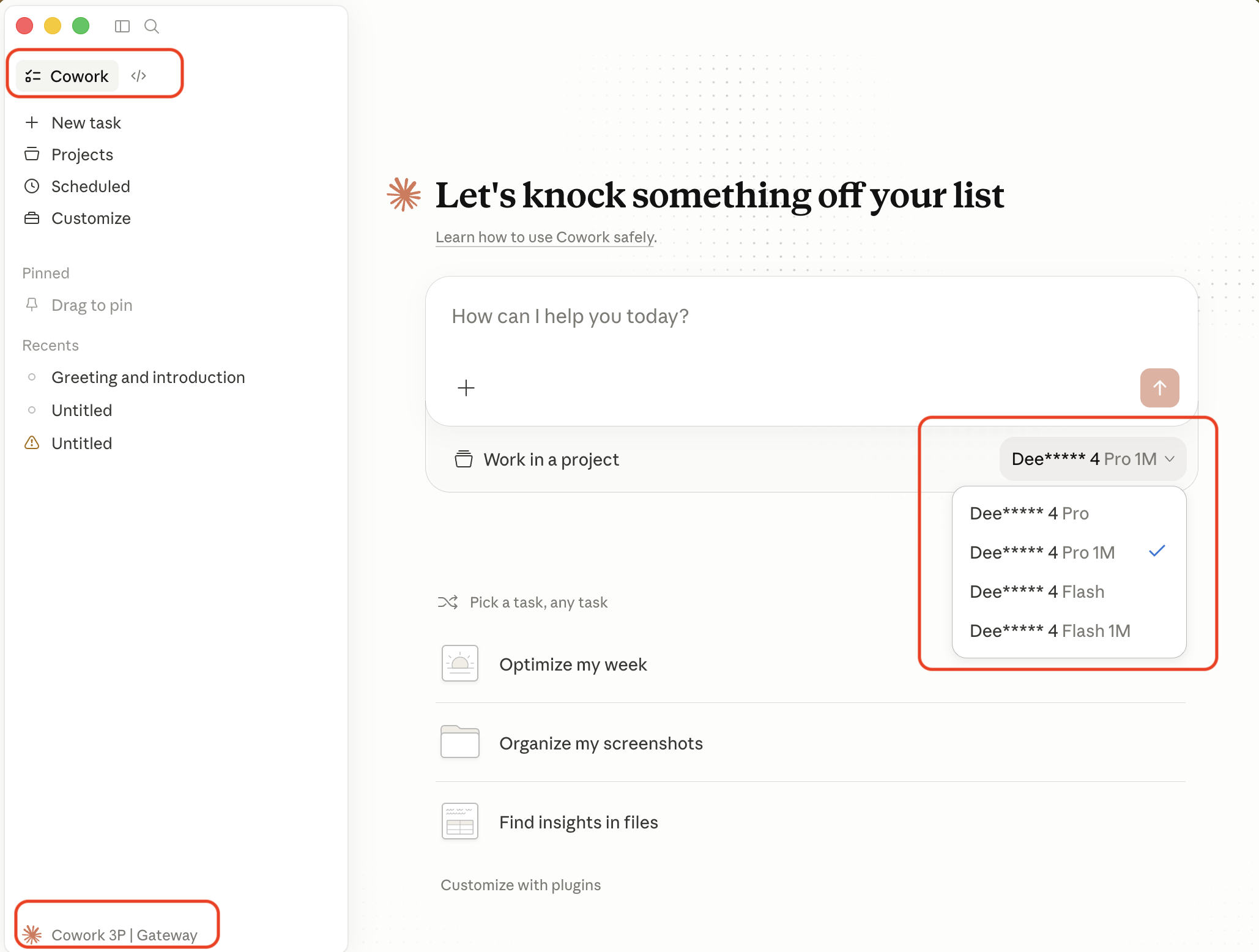
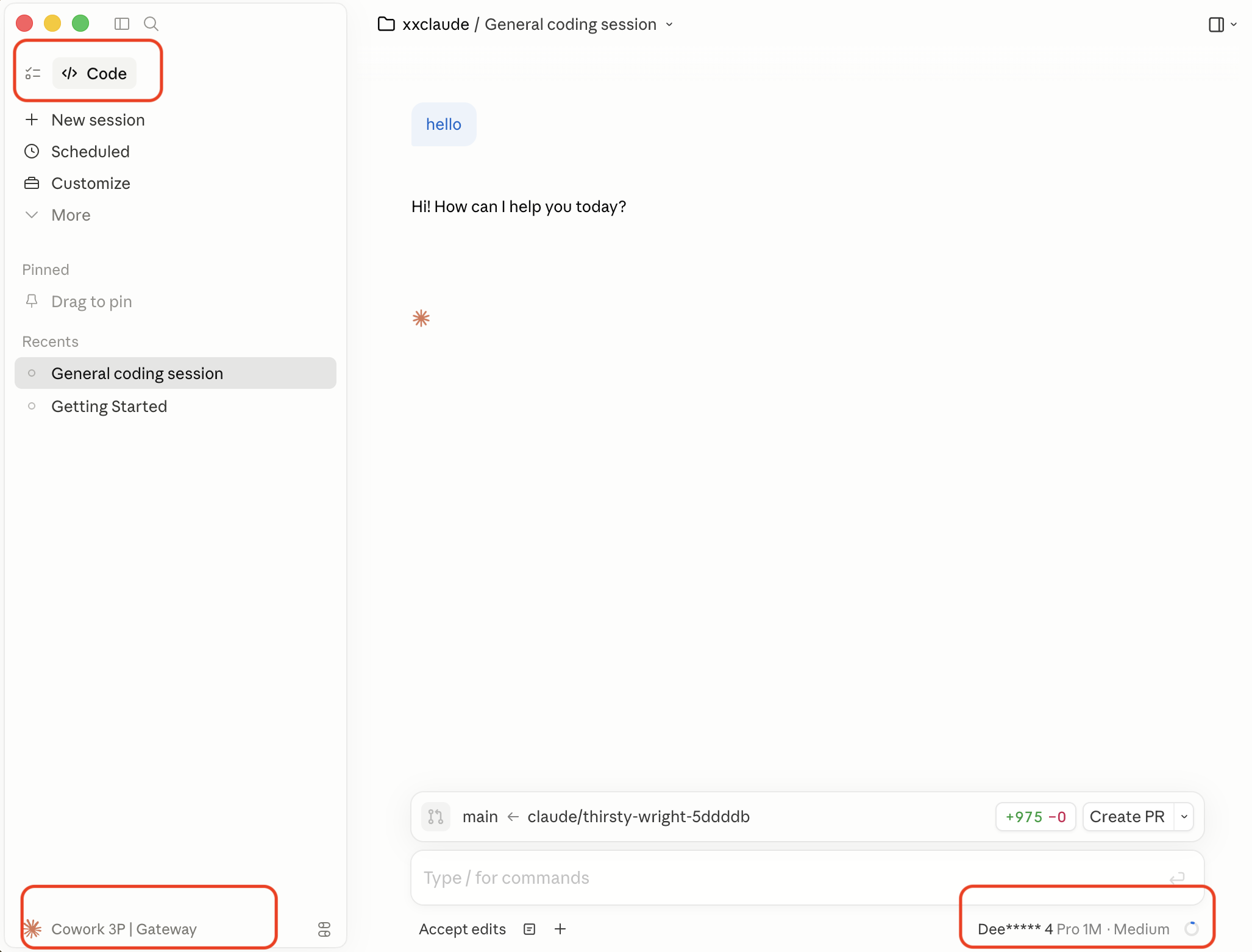
One feature is unavailable: classic Chat (claude.ai-style conversation). Chat depends on Anthropic-hosted features (memory, projects, artifacts, web search) that aren't part of the inference API surface. To use Chat, switch back to Anthropic mode via the launch chooser.
License
MIT
Support
If these scripts save you time, consider supporting the author:

WeChat Pay |

Alipay |

Buy Me a Coffee |

Give a Reward |
Author
Agents365-ai
- Bilibili: https://space.bilibili.com/441831884
- GitHub: https://github.com/Agents365-ai
Reviews (0)
Sign in to leave a review.
Leave a reviewNo results found