agentde
Health Warn
- License — License: MIT
- Description — Repository has a description
- Active repo — Last push 0 days ago
- Low visibility — Only 5 GitHub stars
Code Fail
- network request — Outbound network request in scripts/assemble.py
- rm -rf — Recursive force deletion command in scripts/build-app.sh
- rm -rf — Recursive force deletion command in scripts/install.sh
Permissions Pass
- Permissions — No dangerous permissions requested
No AI report is available for this listing yet.
A small, native macOS home for terminal agents (Claude Code, Codex): groups, tabs, live agent status, a viewer, native extensions and JSON plugins
AgentDE
A small, native macOS home for your terminal agents.
Run a dozen Claude Code and Codex sessions side by side, see at a glance which one needs you,
and pick up any of them after a quit, an update or a crash.




Install · Guide · Extending · Website · Issues
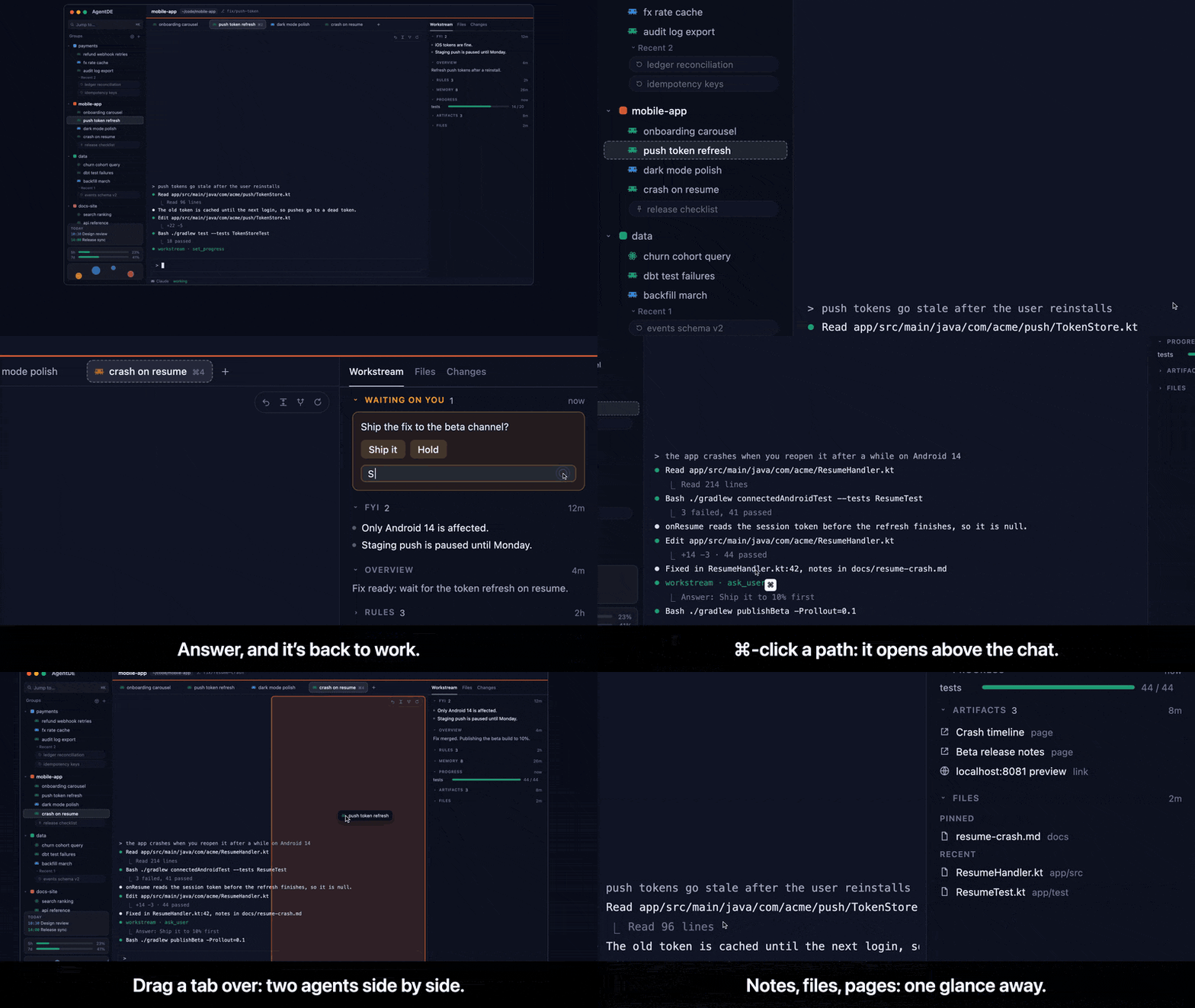
- Native and light. SwiftUI and AppKit, no Electron. Under 100 MB of memory (as Activity Monitor shows it) with a few groups loaded, under 1% CPU when idle.
- Knows what each agent is doing. Each tab's icon lights up: working, needs you, or done, with no setup. Notifications when an agent waits on you.
- Two at once. Drag a tab onto the chat to see two agents side by side.
- Tabs that don't die. Every tab's shell runs in its own small holder process, so agents keep working when you quit, update or crash.
- A viewer above the chat. ⌘-click any path or link an agent prints to see the file, page, diff, PDF or video right there.
- A side panel to see what's going on. The tab's files, its uncommitted changes and recent commits (click one for its diff), and the workstream: agents keep a shared record of each piece of work (overview, rules, memory, questions for you, progress, files) through an MCP server.
- Extensible. Native extensions in Swift, or JSON plugins for widgets, links and themes.
- Built for vibe coding. Yours to change however you want: point your agent at the source. It comes with notes for agents (
CLAUDE.md) and a map of the code (docs/ARCHITECTURE.md).
What AgentDE isn't
AgentDE assumes your agents do the low-level work (editing files, running git) and focuses on how you work with them. So it's just the basics, nothing fancy: no account, no cloud backend, no phone app, no elaborate workflows. Your code, sessions and keys stay on your Mac. It lets you talk to your agents efficiently, and what else does one need?
But what if I want…
| … | Use |
|---|---|
| To edit files or run git myself | Your editor or IDE. AgentDE shows files, changes and commits, read-only |
| To reach my sessions from my phone or another computer | Claude Code's and Codex's own remote features |
| VS Code's extensions | VS Code |
| Windows or Linux | Sorry: macOS only for now. Maybe in the future |
Install
Runs on macOS 14 or later, on Apple silicon and Intel. Tabs need claude or codex on your PATH.
brew install --cask agentde/tap/agentde
Or download AgentDE-<version>.zip from the latest release (signed and notarized), unzip it, and drag AgentDE to Applications. On first launch the Workstream panel offers to connect Claude Code and Codex to the workstream MCP server (it shows the changes first). Or do it from a terminal (without --yes it only shows what it would change):
/Applications/AgentDE.app/Contents/Resources/register-workstream.sh --yes
Build from source
Building needs macOS 15.6 or later with the Xcode Command Line Tools 26 or newer (xcode-select --install; full Xcode isn't needed).
git clone https://github.com/AgentDE/agentde && cd agentde
make signing                    # once: so macOS remembers your permission answers
make install                    # about 4 minutes the first time
make register-workstream YES=1  # once: the workstream MCP server and hooks (run without YES=1 to see the changes first)
The full steps, what each one changes, and uninstalling: Guide → Install.
The repos
| Repo | What |
|---|---|
| agentde | The app: groups, tabs, agent status, the viewer, search, the extension API |
| workstream-mcp | The MCP server behind workstreams. Works with plain Claude Code or Codex too, no app needed |
| agentde-workstreams | The workstream panel beside each chat, and the Usage widget |
| agentde-widgets | The sidebar widget spot, the Calendar widget, and widgets from JSON plugins |
| agentde-linear | Linear tickets in workstreams, and a widget with your open issues |
Learn more
- Guide: everything AgentDE does, every key and setting, troubleshooting.
- Extending: write a native extension or a JSON plugin.
- Architecture: how it works inside.
- Roadmap: what's planned, as issues labeled
planned. - CLAUDE.md: notes for agents working on this repo.
Credits
Built by Andrey Kurenkov and Claude, paid for by Astrocade. Consider joining him there!
License
MIT. See LICENSE.
Reviews (0)
Sign in to leave a review.
Leave a reviewNo results found