wenlan
Health Gecti
- License — License: Apache-2.0
- Description — Repository has a description
- Active repo — Last push 0 days ago
- Community trust — 45 GitHub stars
Code Basarisiz
- eval() — Dynamic code execution via eval() in .github/workflows/ci.yml
- rm -rf — Recursive force deletion command in .github/workflows/ci.yml
Permissions Gecti
- Permissions — No dangerous permissions requested
This local-first memory server gives AI agents persistent context, allowing past conversations to compound into long-term knowledge, project decisions, and insights.
Security Assessment
Overall Risk: Medium. The application is designed to process and store your AI conversations locally, meaning it inherently accesses potentially sensitive data. It runs a local daemon on `127.0.0.1:7878` and requires fetching external resources via `curl` and `npx`. The codebase contains file system access in its CI workflows and outbound network requests in evaluation fixtures, though no hardcoded secrets or dangerous explicit permissions were found. Notably, the macOS desktop application is currently unsigned, requiring users to manually bypass system quarantine protections (`sudo xattr -cr`) to run it.
Quality Assessment
The project is actively maintained, with its most recent code push happening today. It uses the standard AGPL-3.0 open-source license and provides clear, comprehensive documentation. However, community visibility and trust are currently very low. With only 5 GitHub stars and a status of "early preview," the tool is still in its infancy. The limited user base means potential bugs and security blind spots are less likely to have been externally vetted or discovered.
Verdict
Use with caution: The project is an active and promising local-first tool, but its early stage, unsigned builds, and low community adoption require careful oversight before integrating it into sensitive workflows.
Local-first AI work memory that compounds: capture decisions, lessons, gotchas in flow, distill into source-backed wiki pages, recall across sessions and any MCP client (Claude Code, Codex, etc...). Plain Markdown you own.
















Your next AI session should pick up the context you built, not lose it in chat history.
Wenlan is the single local home for your AI work artifacts: decisions, lessons, gotchas, project context. Captured in flow, distilled into source-backed wiki pages, recalled across chats, projects, and time.
A brief opens each session, a handoff closes it, so the thread carries forward instead of restarting.
One store, every tool: Claude Code, Cursor, Codex, Claude Desktop, VS Code, and Gemini CLI query the same local daemon. Read the Markdown under ~/.wenlan/, or symlink it into Obsidian for a graph view. Spaces keep work, personal, and client projects from bleeding together.
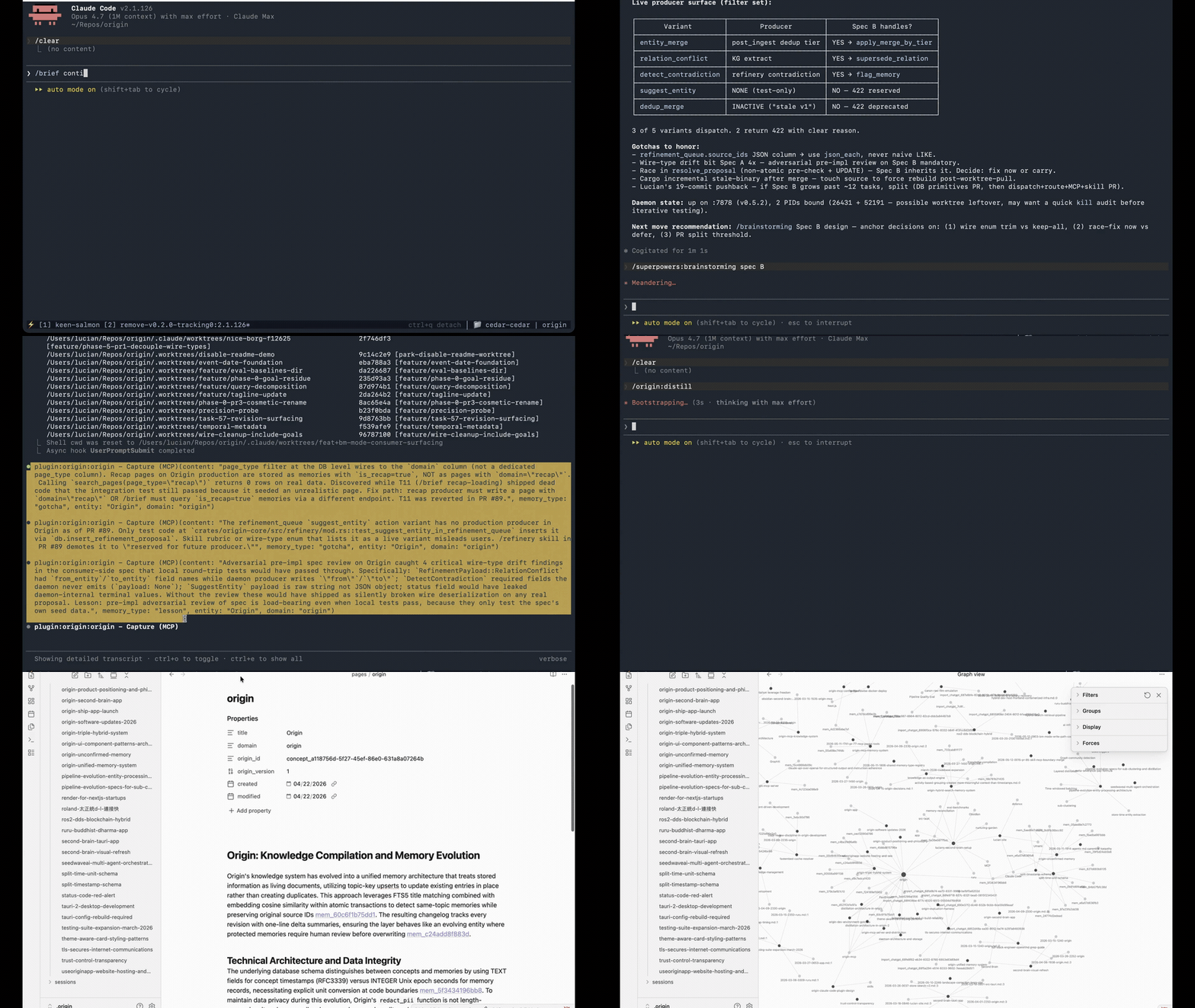
What makes Wenlan distinct
- Compounds, not just storage. Most memory tools hand back snippets. Wenlan clusters captures into source-backed wiki pages, and those pages feed retrieval alongside the atomic memories they came from.
- One home, locked to none. Every MCP client queries the same local daemon, so context built in one tool shows up in the next. Obsidian is one optional view you can symlink in, not where your work lives.
- Review before trust. Low-confidence captures and contradictions surface for review instead of silently entering context. Correct yourself once and Wenlan supersedes the old fact instead of serving both. Pages cite their source memory IDs, and the daemon refuses unsourced pages rather than letting hallucinated summaries in.
- Real git versioning. Memory, page, and session writes commit into
~/.wenlan/.git/, so you can inspect, diff, revert, or branch the Markdown artifacts.a1b2c3d page: embedding-retrieval refreshed (4 sources) 9f8e7d6 session: handoff embedding-work 5a4b3c2 capture: decision mem_abc123
Quickstart
Claude Code in 30 seconds
/plugin marketplace add 7xuanlu/claude-plugins
/plugin install origin@7xuanlu
/init
If Claude Code asks for a restart after installing, restart once, then run /init. The plugin handles daemon setup, MCP wiring, local memory setup, and the first round-trip check.
Then try /brief, /capture <decision>, or /handoff inside Claude Code.
Plugin details and daily commands: plugin/.
MCP-only setup
Use this if you want Wenlan tools in Claude Code without the plugin, or in Codex, Cursor, Claude Desktop, VS Code, or Gemini CLI.
npx -y @7xuanlu/wenlan setup
~/.wenlan/bin/origin mcp add claude-code      # or: codex, cursor, claude-desktop, vscode, gemini
MCP-only gives agents tools for capture, recall, context, doctor, and page distillation. It does not install Claude Code slash skills like /brief, /handoff, /distill, or /init.
Terminal runtime setup
Set up the local Wenlan runtime:
npx -y @7xuanlu/wenlan setup
Then start with ~/.wenlan/bin/wenlan status, ~/.wenlan/bin/wenlan recall <query>, or ~/.wenlan/bin/wenlan store <text>. CLI details: crates/wenlan-cli.
Service management:
wenlan install            # register + start the daemon (stops a running one first)
wenlan restart            # stop + start the daemon -- run this after upgrading
wenlan status
wenlan uninstall
After upgrading Wenlan (npx -y @7xuanlu/wenlan setup or install.sh), the new binary is on disk but the already-running daemon keeps serving the old code until you restart it. wenlan install now restarts automatically; if you upgraded another way, run wenlan restart.
How Wenlan works
The same loop runs every session: capture while you work, let the daemon refine between sessions, and return with the knowledge already in context.
      ┌──────── loops back · /handoff closes each pass ─────────┐
      ▼                                                         │
┌─────┴─────┐    ┌─────────────┐    ┌────────────────┐    ┌─────┴─────┐
│ CAPTURE   │    │ DAEMON      │    │ ONE STORE      │    │ RECALL +  │
│  in flow  │ ─▶ │  refines    │ ─▶ │  (local)       │ ─▶ │  BRIEF    │
│  /capture │    │  between    │    │  · memories    │    │  next     │
│           │    │  sessions   │    │  · wiki pages  │    │  session  │
│           │    │  dedup·link │    │  · graph       │    │  /recall  │
│           │    │  /distill   │    │                │    │  /brief   │
└───────────┘    └─────────────┘    └────────────────┘    └───────────┘
   one local daemon · one store · every MCP client reads it
   Claude Code · Cursor · Codex · Claude Desktop · VS Code · Gemini
Each pass leaves the store sharper. Captures that would sit as loose snippets elsewhere get deduped, linked to the people and projects they touch, and distilled into source-citing pages, so the next session brings back knowledge, not raw history. That is the compounding the loop is named for.
These five verbs drive it:
- Session starts.
/brief [topic]loads project status, identity, preferences, and topic-relevant memories so the agent walks in with context. - During work.
/capture <thing>saves a decision, lesson, gotcha, or project fact in flow./recall <query>looks anything up. - Session ends.
/handoffwrites what changed, what's still open, and where to continue, so the next run picks up cleanly. - Between sessions. The daemon deduplicates overlapping captures and links related ideas in the background.
/distillsynthesizes wiki pages from clusters of related memories when you want a deliberate pass. - Next session.
/briefbrings it back in the Claude Code plugin; MCP-only clients call thecontexttool for the same memory. Recall pulls the relevant slice, not your whole history, so the context window goes to the work.
Full skill reference: plugin/skills.
Works fully local with no API key, cloud account, or signup. Capture, recall, hybrid search, and graph context need nothing external; add a local model or API key only for automatic page distillation. No telemetry.
What you get
- Atomic memory layer: every capture is stored first as a typed memory with source agent, confidence, stability, and supersession metadata.
- Source-backed pages: pages keep source memory IDs, stale reasons, and revision state so distillation can refresh them without losing provenance.
- Hybrid retrieval on libSQL: memories, pages, FTS5 text, vector embeddings, and graph context in one local store your MCP clients can query, fused with reciprocal-rank fusion. An optional local cross-encoder reranker sharpens the top results.
- Connected recall: people, projects, tools, and decisions come back linked, so a memory arrives with the context around it instead of alone.
- Distill cycles: run
/distillmanually today, or add a local model/API key for background extraction, page refreshes, recaps, and richer graph links. - Stays fresh on its own: background passes link entities, grow matching pages, and update each memory's effective confidence from type, access, and age, so recent and load-bearing memories surface while stale ones fade.
- Review before trust: low-confidence captures, pending revisions, contradictions, and supersessions can surface instead of silently entering context.
- Explicit spaces: tag memories, pages, and recalls with
space=work | personal | client-Xso a day-job capture never bleeds into a side-project brief. Auto-detected from the current repo or workspace when no space is set; overridable always. - You own the data: everything is plain Markdown under
~/.wenlan/, versioned in git. Grep it, symlink it into Obsidian, or walk away with the files anytime. No lock-in.
Spaces
Memories belong to a space like origin, career, orideas. Set the active space per shell:
ORIGIN_SPACE=career claude
Or declaratively via ~/.wenlan/spaces.toml (seeplugin/examples/spaces.toml). To manage spaces from the CLI:
wenlan space list
wenlan space add ideas --default
wenlan space show ideas
wenlan space move scratch career
wenlan doctor prints the current resolver state so you can see exactly
which layer chose the active space.
Evaluation
Hybrid retrieval, transparent eval. BGE-Base-EN-v1.5-Q + FTS5 + Reciprocal Rank Fusion; local BGE-Reranker-Base cross-encoder rerank is the default path when enabled, with BGE-Reranker-V2-M3 available as a higher-quality option. The table below is retrieval-only, not end-to-end answer quality. ~168 tokens per recall query. Eval harness at crates/wenlan-core/src/eval/. Run it yourself.
Update workflow in docs/eval.
| Benchmark | Recall@5 | MRR | NDCG@10 |
|---|---|---|---|
| LongMemEval (oracle, 500 Q) | 93.6% | 0.857 | 0.883 |
| LoCoMo (locomo10) | 70.0% | 0.647 | 0.684 |
Repo Map
Wenlan is daemon-first. wenlan-server owns the local database, embeddings, distill cycles, knowledge graph, and HTTP API on 127.0.0.1:7878. The plugin, MCP server, CLI, and local tools are thin clients over that daemon.
| Path | What lives there |
|---|---|
| crates/wenlan-core | Storage, search, embeddings, distill cycles, graph, pages, export, eval. |
| crates/wenlan-server | Local daemon and HTTP API. |
| crates/wenlan-mcp | MCP server, tools, npm package. |
| crates/wenlan-cli | User CLI for setup, service management, search, recall, store, list, agents, model/key setup, and doctor. |
| plugin/ | Claude Code plugin (plugin.json, skills, hooks, .mcp.json). |
| docs/eval | Benchmark workflow and methodology. |
Full contributor map: CLAUDE.md.
Build from source
Wenlan builds natively on macOS (Apple Silicon + Intel), Linux (x86_64 + ARM64; glibc), and Windows (x86_64). The npm wrapper (@7xuanlu/origin, wenlan-mcp) and install.sh auto-detect your platform and pull the matching prebuilt release. Most users should install through the Claude Code plugin or npx. For local development:
git clone https://github.com/7xuanlu/origin.git
cd origin
cargo build --workspace
cargo run -p wenlan-server
Build details for the daemon, MCP server, CLI, and core crates live in the crate READMEs linked above. Cross-platform specifics (service registration, paths, Windows install limitation) live in AGENTS.md.
Learn more
Longer-form writing on AI work memory and how Wenlan compares lives at useorigin.app/learn:
Concepts
- What is AI work memory?: the shape of the problem Wenlan solves
- MCP memory server: how Wenlan exposes memory through the Model Context Protocol
- Local-first AI memory: data, privacy, and control
- Markdown + local index: the storage model
- AI agent handoff loop: session-end discipline that prevents context loss
Comparisons
- Wenlan vs Basic Memory: Markdown knowledge base vs AI work-session memory
- Wenlan vs claude-mem: observer-style Claude Code memory vs MCP-first cross-tool memory
- Wenlan vs Superlocal Memory: includes the honest LoCoMo benchmark concession
Docs
- Get started: install + verify the first local memory loop
- Daily workflow: capture, handoff, distill
- MCP clients: connect Claude Code, Cursor, Codex, Claude Desktop, Gemini CLI
What Wenlan is NOT
- Not a Life OS. No habits, calendar, journal, or life-management modules. Wenlan scopes to AI work artifacts only. If you want a full personal OS, look at PAI.
- Not a workflow suite. ~30 MCP tools across one daemon. If you want 30+ skills, 8+ agents, and an auto-research loop bundled, look at pro-workflow. Wenlan trades breadth for focus.
- Not a memory infrastructure SDK. For people using AI daily, not as a backend for other apps building memory features.
- Not for one-off chats. Best when work spans sessions, projects, and weeks.
Contributing
Bug fixes, eval cases, docs, and features are welcome. Start with CONTRIBUTING.md. Architecture and development rules are in CLAUDE.md. Security reports: SECURITY.md. Please also read the Code of Conduct.
License
Wenlan is licensed under Apache-2.0. This includes the local runtime, CLI, MCP server, shared types, and Claude Code plugin files in this repo.
The permissive license keeps the daemon boundary usable for MCP clients and downstream local tools.
Acknowledgments
Predecessors:
- Karpathy's LLM-wiki note. Raw-to-wiki distillation pattern.
- Claude Code's
MEMORY.md. The simplest version of the idea.
Peers:
- agentmemory. Agent-side memory framework.
- basic-memory. Local-first knowledge management for Claude.
- obsidian-mind. Obsidian-native memory and review loop for coding agents.
- pro-workflow. Claude Code productivity suite.
- mcp-memory-service. Memory service for MCP.
- Memoria. "Git for AI Agent Memory" via Copy-on-Write.
- OpenMemory, claude-memory-compiler, PAI, Palinode. Adjacent shapes.
Different shapes of the same problem. Try the one that fits.
Yorumlar (0)
Yorum birakmak icin giris yap.
Yorum birakSonuc bulunamadi